<!DOCTYPE html>
    <html lang="vi" xmlns="http://www.w3.org/1999/xhtml" prefix="og: http://ogp.me/ns#">
    <head>
<title>Bài 22&#x3A; Carousel trong Bootstrap 5</title>
<meta name="description" content="Bài 22&#x3A; Carousel trong Bootstrap 5 - Savefile - Tin Tức - https&#x3A;&#x002F;&#x002F;www.nguoicodonvn2008.info&#x002F;vi&#x002F;news&#x002F;savefile&#x002F;tam-su-tinh-yeu&#x002F;bai-22-carousel-trong-bootstrap-5-6415.html">
<meta name="author" content=".: Nguoicodonvn2008.info - Cõi lòng người cô đơn :.">
<meta name="copyright" content=".: Nguoicodonvn2008.info - Cõi lòng người cô đơn :. [admin@nguoicodonvn2008.info]">
<meta name="robots" content="index, archive, follow, noodp">
<meta name="googlebot" content="index,archive,follow,noodp">
<meta name="msnbot" content="all,index,follow">
<meta name="generator" content="NukeViet v4.5">
<meta http-equiv="Content-Type" content="text/html; charset=utf-8">
<meta property="og:title" content="Bài 22&#x3A; Carousel trong Bootstrap 5">
<meta property="og:type" content="website">
<meta property="og:description" content="Savefile - Tin Tức - https&#x3A;&#x002F;&#x002F;www.nguoicodonvn2008.info&#x002F;vi&#x002F;news&#x002F;savefile&#x002F;tam-su-tinh-yeu&#x002F;bai-22-carousel-trong-bootstrap-5-6415.html">
<meta property="og:site_name" content=".&#x3A; Nguoicodonvn2008.info - Cõi lòng người cô đơn &#x3A;.">
<meta property="og:url" content="https://www.nguoicodonvn2008.info/vi/news/savefile/tam-su-tinh-yeu/bai-22-carousel-trong-bootstrap-5-6415.html">
<link rel="shortcut icon" href="https://nguoicodonvn2008.info/favicon.ico">
<link rel="canonical" href="https://www.nguoicodonvn2008.info/vi/news/savefile/tam-su-tinh-yeu/bai-22-carousel-trong-bootstrap-5-6415.html">
<link rel="alternate" href="https://nguoicodonvn2008.info/vi/news/rss/" title="Tin Tức" type="application/rss+xml">
<link rel="alternate" href="https://nguoicodonvn2008.info/vi/news/rss/karaoke-dual/" title="Tin Tức - Karaoke Dual" type="application/rss+xml">
<link rel="alternate" href="https://nguoicodonvn2008.info/vi/news/rss/nhac-tre/" title="Tin Tức - Nhạc trẻ" type="application/rss+xml">
<link rel="alternate" href="https://nguoicodonvn2008.info/vi/news/rss/tru-tinh/" title="Tin Tức - Trữ tình" type="application/rss+xml">
<link rel="alternate" href="https://nguoicodonvn2008.info/vi/news/rss/nuoc-ngoai/" title="Tin Tức - Nước ngoài" type="application/rss+xml">
<link rel="alternate" href="https://nguoicodonvn2008.info/vi/news/rss/remix/" title="Tin Tức - Remix" type="application/rss+xml">
<link rel="alternate" href="https://nguoicodonvn2008.info/vi/news/rss/tam-su-tinh-yeu/" title="Tin Tức - Tâm sự tình yêu" type="application/rss+xml">
<link rel="alternate" href="https://nguoicodonvn2008.info/vi/news/rss/tho-suu-tam/" title="Tin Tức - Thơ sưu tầm" type="application/rss+xml">
<link rel="alternate" href="https://nguoicodonvn2008.info/vi/news/rss/cuoc-song/" title="Tin Tức - Cuộc sống" type="application/rss+xml">
<link rel="alternate" href="https://nguoicodonvn2008.info/vi/news/rss/phan-mem/" title="Tin Tức - Phần mềm" type="application/rss+xml">
<link rel="alternate" href="https://nguoicodonvn2008.info/vi/news/rss/kien-thuc-may-tinh/" title="Tin Tức - Kiến thức máy tính" type="application/rss+xml">
<link rel="alternate" href="https://nguoicodonvn2008.info/vi/news/rss/hoc-tap/" title="Tin Tức - Học tập" type="application/rss+xml">
<link rel="alternate" href="https://nguoicodonvn2008.info/vi/news/rss/tai-lieu/" title="Tin Tức - Tài liệu" type="application/rss+xml">
<link rel="alternate" href="https://nguoicodonvn2008.info/vi/news/rss/de-thi/" title="Tin Tức - Đề thi" type="application/rss+xml">
<link rel="preload" as="style" href="https://nguoicodonvn2008.info/assets/css/font-awesome.min.css" type="text/css">
<link rel="preload" as="style" href="https://nguoicodonvn2008.info/themes/default/css/bootstrap.non-responsive.css" type="text/css">
<link rel="preload" as="style" href="https://nguoicodonvn2008.info/themes/default/css/style.css" type="text/css">
<link rel="preload" as="style" href="https://nguoicodonvn2008.info/themes/default/css/style.non-responsive.css" type="text/css">
<link rel="preload" as="style" href="https://nguoicodonvn2008.info/themes/default/css/news.css" type="text/css">
<link rel="preload" as="style" href="https://nguoicodonvn2008.info/themes/default/css/custom.css" type="text/css">
<link rel="preload" as="script" href="https://nguoicodonvn2008.info/assets/js/jquery/jquery.min.js" type="text/javascript">
<link rel="preload" as="script" href="https://nguoicodonvn2008.info/assets/js/language/vi.js" type="text/javascript">
<link rel="preload" as="script" href="https://nguoicodonvn2008.info/assets/js/DOMPurify/purify3.js" type="text/javascript">
<link rel="preload" as="script" href="https://nguoicodonvn2008.info/assets/js/global.js" type="text/javascript">
<link rel="preload" as="script" href="https://nguoicodonvn2008.info/assets/js/site.js" type="text/javascript">
<link rel="preload" as="script" href="https://nguoicodonvn2008.info/themes/default/js/news.js" type="text/javascript">
<link rel="preload" as="script" href="https://nguoicodonvn2008.info/themes/default/js/main.js" type="text/javascript">
<link rel="preload" as="script" href="https://nguoicodonvn2008.info/themes/default/js/custom.js" type="text/javascript">
<link rel="preload" as="script" href="https://nguoicodonvn2008.info/themes/default/js/bootstrap.min.js" type="text/javascript">
<link rel="stylesheet" href="https://nguoicodonvn2008.info/assets/css/font-awesome.min.css">
<link rel="stylesheet" href="https://nguoicodonvn2008.info/themes/default/css/bootstrap.non-responsive.css">
<link rel="stylesheet" href="https://nguoicodonvn2008.info/themes/default/css/style.css">
<link rel="stylesheet" href="https://nguoicodonvn2008.info/themes/default/css/style.non-responsive.css">
<link rel="StyleSheet" href="https://nguoicodonvn2008.info/themes/default/css/news.css">
<link rel="stylesheet" href="https://nguoicodonvn2008.info/themes/default/css/custom.css">
<style type="text/css">
	body{background: #fff;}
</style>
    </head>
    <body>
<div id="print">
	<div id="hd_print">
		<h2 class="pull-left">.&#x3A; Nguoicodonvn2008.info - Cõi lòng người cô đơn &#x3A;.</h2>
		<p class="pull-right"><a title=".&#x3A; Nguoicodonvn2008.info - Cõi lòng người cô đơn &#x3A;." href="https://nguoicodonvn2008.info/">https://nguoicodonvn2008.info</a></p>
	</div>
	<div class="clear"></div>
	<hr />
	<div id="content">
		<h1>Bài 22&#x3A; Carousel trong Bootstrap 5</h1>
		<ul class="list-inline">
			<li>Thứ hai - 05/12/2022 23:43</li>
			<li class="hidden-print txtrequired"><em class="fa fa-print">&nbsp;</em><a title="In ra" href="javascript:;" onclick="window.print()">In ra</a></li>
			<li class="hidden-print txtrequired"><em class="fa fa-power-off">&nbsp;</em><a title="Đóng cửa sổ này" href="javascript:;" onclick="window.close()">Đóng cửa sổ này</a></li>
		</ul>
		<div class="clear"></div>
		<div id="hometext">
		</div>
				<div class="imghome">
			<img alt="Bài 22&#x3A; Carousel trong Bootstrap 5" src="https://st.quantrimang.com/photos/image/2022/12/05/bootstrap-slideshow.gif" width="460" class="img-thumbnail" />
		</div>
		<div class="clear"></div>
		<div id="bodytext" class="clearfix">
			<h1 style="text-align: justify;"><strong style="font-size: 13px;">Carousel trong Bootstrap 5&nbsp;</strong><span style="font-size: 13px;">là một plugin được dùng để duyệt các phần tử như slide, ảnh… Dưới đây là&nbsp;</span><strong style="font-size: 13px;">cách dùng Carousel trong Bootstrap 5</strong><span style="font-size: 13px;">.</span></h1>

<h2 style="text-align: justify;">Carousel / Slideshow trong Bootstrap 5</h2>

<p style="text-align: justify;"><strong>Carousel trong Bootstrap 5</strong>&nbsp;là một slideshow chạy qua một loạt ảnh hoặc nhân tố khác.</p>

<h2 style="text-align: justify;">Cách tạo carousel trong Bootstrap 5</h2>

<p style="text-align: justify;">Code mẫu sau hiện cách tạo một slideshow cơ bản với các chỉ báo và điều khiển:</p>

<pre id="pre0" style="text-align: justify;">
&lt;!-- Carousel --&gt;
&lt;div id=&quot;demo&quot; class=&quot;carousel slide&quot; data-bs-ride=&quot;carousel&quot;&gt;

&lt;!-- Indicators/dots --&gt;
&lt;div class=&quot;carousel-indicators&quot;&gt;
&lt;button type=&quot;button&quot; data-bs-target=&quot;#demo&quot; data-bs-slide-to=&quot;0&quot; class=&quot;active&quot;&gt;&lt;/button&gt;
&lt;button type=&quot;button&quot; data-bs-target=&quot;#demo&quot; data-bs-slide-to=&quot;1&quot;&gt;&lt;/button&gt;
&lt;button type=&quot;button&quot; data-bs-target=&quot;#demo&quot; data-bs-slide-to=&quot;2&quot;&gt;&lt;/button&gt;
&lt;/div&gt;

&lt;!-- The slideshow/carousel --&gt;
&lt;div class=&quot;carousel-inner&quot;&gt;
&lt;div class=&quot;carousel-item active&quot;&gt;
&lt;img src=&quot;la.jpg&quot; alt=&quot;Los Angeles&quot; class=&quot;d-block w-100&quot;&gt;
&lt;/div&gt;
&lt;div class=&quot;carousel-item&quot;&gt;
&lt;img src=&quot;chicago.jpg&quot; alt=&quot;Chicago&quot; class=&quot;d-block w-100&quot;&gt;
&lt;/div&gt;
&lt;div class=&quot;carousel-item&quot;&gt;
&lt;img src=&quot;ny.jpg&quot; alt=&quot;New York&quot; class=&quot;d-block w-100&quot;&gt;
&lt;/div&gt;
&lt;/div&gt;

&lt;!-- Left and right controls/icons --&gt;
&lt;button class=&quot;carousel-control-prev&quot; type=&quot;button&quot; data-bs-target=&quot;#demo&quot; data-bs-slide=&quot;prev&quot;&gt;
&lt;span class=&quot;carousel-control-prev-icon&quot;&gt;&lt;/span&gt;
&lt;/button&gt;
&lt;button class=&quot;carousel-control-next&quot; type=&quot;button&quot; data-bs-target=&quot;#demo&quot; data-bs-slide=&quot;next&quot;&gt;
&lt;span class=&quot;carousel-control-next-icon&quot;&gt;&lt;/span&gt;
&lt;/button&gt;
&lt;/div&gt;</pre>

<p style="text-align: justify;">Giải thích chi tiết:</p>

<table cellpadding="2" cellspacing="2">
	<tbody>
		<tr>
			<th style="text-align: justify;">Class</th>
			<th style="text-align: justify;">Mô tả</th>
		</tr>
		<tr>
			<td style="text-align: justify;"><code>.carousel</code></td>
			<td style="text-align: justify;">Tạo một carousel</td>
		</tr>
		<tr>
			<td style="text-align: justify;"><code>.carousel-indicators</code></td>
			<td style="text-align: justify;">Thêm chỉ báo cho carousel. Chúng là những chấm nhỏ nằm ở phía dưới của slide (cho bạn biết số lượng slide có trong carousel và hiện đang xem slide nào.)</td>
		</tr>
		<tr>
			<td style="text-align: justify;"><code>.carousel-inner</code></td>
			<td style="text-align: justify;">Thêm slide vào carousel</td>
		</tr>
		<tr>
			<td style="text-align: justify;"><code>.carousel-item</code></td>
			<td style="text-align: justify;">Nội dung của từng slide</td>
		</tr>
		<tr>
			<td style="text-align: justify;"><code>.carousel-control-prev</code></td>
			<td style="text-align: justify;">Thêm nút xem lại slide trước đó vào carousel, cho phép người dùng quay lại slide vừa xem</td>
		</tr>
		<tr>
			<td style="text-align: justify;"><code>.carousel-control-next</code></td>
			<td style="text-align: justify;">Thêm nút bên phải hay tiếp theo vào carousel, cho phép người dùng chuyển tiếp giữa các slide</td>
		</tr>
		<tr>
			<td style="text-align: justify;"><code>.carousel-control-prev-icon</code></td>
			<td style="text-align: justify;">Được dùng cùng với&nbsp;<code>.carousel-control-prev</code>&nbsp;để tạo một nút bấm trước đó.</td>
		</tr>
		<tr>
			<td style="text-align: justify;"><code>.carousel-control-next-icon</code></td>
			<td style="text-align: justify;">Được dùng với&nbsp;<code>.carousel-control-next</code>&nbsp;để tạo nút bấm tiếp theo.</td>
		</tr>
		<tr>
			<td style="text-align: justify;"><code>.slide</code></td>
			<td style="text-align: justify;">Thêm chuyển tiếp CSS và hiệu ứng động khi chuyển tiếp giữa các mục. Loại bỏ class này nếu bạn không muốn hiệu ứng đó.</td>
		</tr>
	</tbody>
</table>

<h2 style="text-align: justify;">Thêm chú thích vào slide</h2>

<p style="text-align: justify;">Thêm thành phần vào bên trong&nbsp;<code>&lt;div class=&quot;carousel-caption&quot;&gt;</code>&nbsp;với từng&nbsp;<code>&lt;div class=&quot;carousel-item&quot;&gt;</code>&nbsp;để tạo một chú thích cho từng slide:</p>

<p style="text-align: justify;">Code mẫu:</p>

<pre id="pre1" style="text-align: justify;">
&lt;div class=&quot;carousel-item&quot;&gt;
&lt;img src=&quot;la.jpg&quot; alt=&quot;Los Angeles&quot;&gt;
&lt;div class=&quot;carousel-caption&quot;&gt;
&lt;h3&gt;Los Angeles&lt;/h3&gt;
&lt;p&gt;We had such a great time in LA!&lt;/p&gt;
&lt;/div&gt;
&lt;/div&gt;</pre>

<p style="text-align: justify;">Ví dụ:</p>

<pre id="pre2" style="text-align: justify;">
&lt;!DOCTYPE html&gt;
&lt;html lang=&quot;en&quot;&gt;
&lt;head&gt;
  &lt;title&gt;Bootstrap Example&lt;/title&gt;
  &lt;meta charset=&quot;utf-8&quot;&gt;
  &lt;meta name=&quot;viewport&quot; content=&quot;width=device-width, initial-scale=1&quot;&gt;
  &lt;link href=&quot;https://cdn.jsdelivr.net/npm/bootstrap@5.2.3/dist/css/bootstrap.min.css&quot; rel=&quot;stylesheet&quot;&gt;
  &lt;script src=&quot;https://cdn.jsdelivr.net/npm/bootstrap@5.2.3/dist/js/bootstrap.bundle.min.js&quot;&gt;&lt;/script&gt;
&lt;/head&gt;
&lt;body&gt;

&lt;!-- Carousel --&gt;
&lt;div id=&quot;demo&quot; class=&quot;carousel slide&quot; data-bs-ride=&quot;carousel&quot;&gt;

  &lt;!-- Indicators/dots --&gt;
  &lt;div class=&quot;carousel-indicators&quot;&gt;
    &lt;button type=&quot;button&quot; data-bs-target=&quot;#demo&quot; data-bs-slide-to=&quot;0&quot; class=&quot;active&quot;&gt;&lt;/button&gt;
    &lt;button type=&quot;button&quot; data-bs-target=&quot;#demo&quot; data-bs-slide-to=&quot;1&quot;&gt;&lt;/button&gt;
    &lt;button type=&quot;button&quot; data-bs-target=&quot;#demo&quot; data-bs-slide-to=&quot;2&quot;&gt;&lt;/button&gt;
  &lt;/div&gt;
  &lt;!-- The slideshow/carousel --&gt;
  &lt;div class=&quot;carousel-inner&quot;&gt;
    &lt;div class=&quot;carousel-item active&quot;&gt;
      &lt;img src=&quot;la.jpg&quot; alt=&quot;Los Angeles&quot; class=&quot;d-block&quot; style=&quot;width:100%&quot;&gt;
      &lt;div class=&quot;carousel-caption&quot;&gt;
        &lt;h3&gt;Los Angeles&lt;/h3&gt;
        &lt;p&gt;We had such a great time in LA!&lt;/p&gt;
      &lt;/div&gt;
    &lt;/div&gt;
    &lt;div class=&quot;carousel-item&quot;&gt;
      &lt;img src=&quot;chicago.jpg&quot; alt=&quot;Chicago&quot; class=&quot;d-block&quot; style=&quot;width:100%&quot;&gt;
      &lt;div class=&quot;carousel-caption&quot;&gt;
        &lt;h3&gt;Chicago&lt;/h3&gt;
        &lt;p&gt;Thank you, Chicago!&lt;/p&gt;
      &lt;/div&gt; 
    &lt;/div&gt;
    &lt;div class=&quot;carousel-item&quot;&gt;
      &lt;img src=&quot;ny.jpg&quot; alt=&quot;New York&quot; class=&quot;d-block&quot; style=&quot;width:100%&quot;&gt;
      &lt;div class=&quot;carousel-caption&quot;&gt;
        &lt;h3&gt;New York&lt;/h3&gt;
        &lt;p&gt;We love the Big Apple!&lt;/p&gt;
      &lt;/div&gt;  
    &lt;/div&gt;
  &lt;/div&gt;
  &lt;!-- Left and right controls/icons --&gt;
  &lt;button class=&quot;carousel-control-prev&quot; type=&quot;button&quot; data-bs-target=&quot;#demo&quot; data-bs-slide=&quot;prev&quot;&gt;
    &lt;span class=&quot;carousel-control-prev-icon&quot;&gt;&lt;/span&gt;
  &lt;/button&gt;
  &lt;button class=&quot;carousel-control-next&quot; type=&quot;button&quot; data-bs-target=&quot;#demo&quot; data-bs-slide=&quot;next&quot;&gt;
    &lt;span class=&quot;carousel-control-next-icon&quot;&gt;&lt;/span&gt;
  &lt;/button&gt;
&lt;/div&gt;

&lt;div class=&quot;container-fluid mt-3&quot;&gt;
  &lt;h3&gt;Ví dụ về tạo slide trong Bootstrap 5&lt;/h3&gt;
&lt;/div&gt;

&lt;/body&gt;
&lt;/html&gt;
</pre>

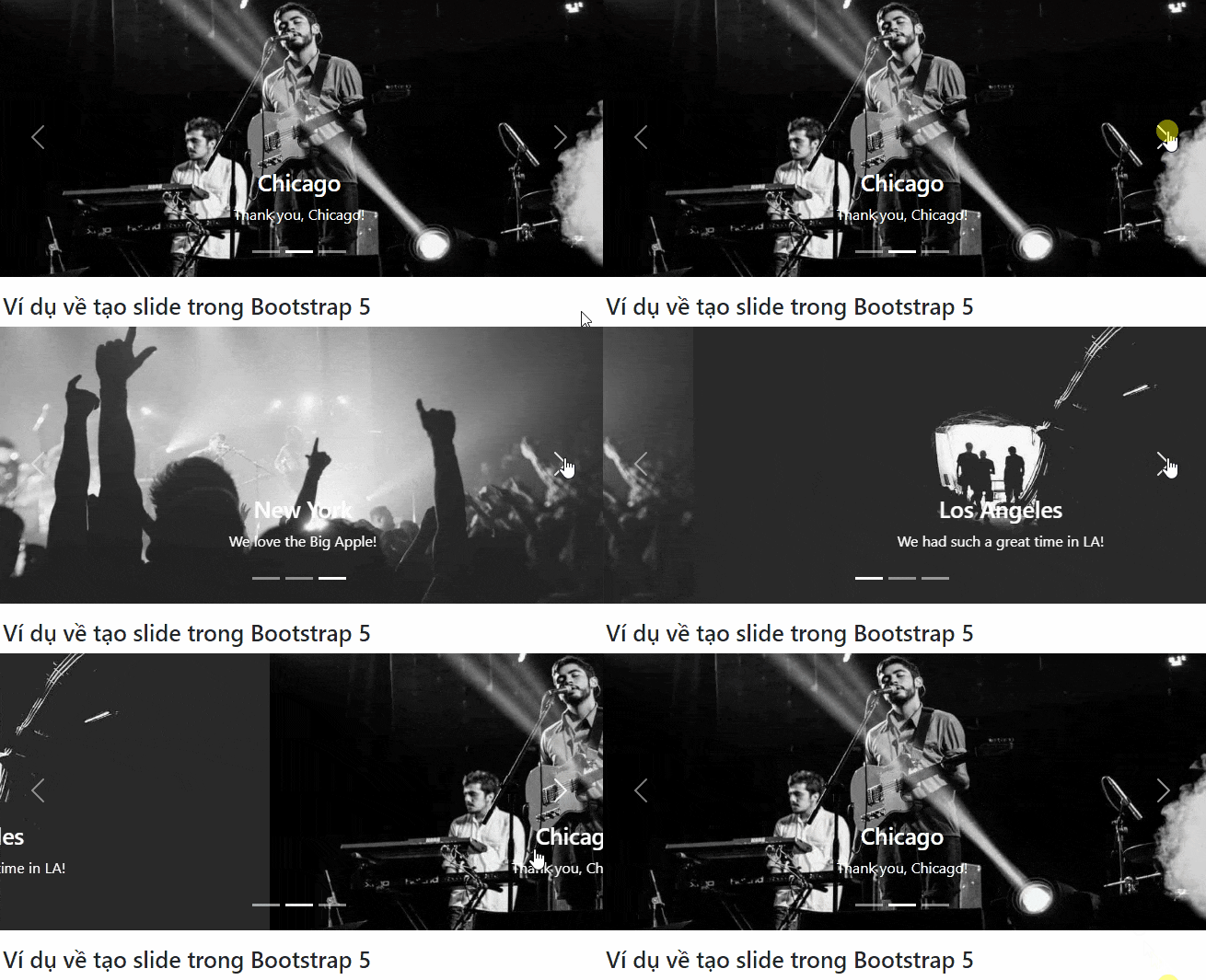
<p style="text-align: justify;"><img alt="Tạo slideshow bằng Bootstrap 5" data-i="0" data-src="https://st.quantrimang.com/photos/image/2022/12/05/bootstrap-slideshow.gif" data-was-processed="true" height="352" src="https://st.quantrimang.com/photos/image/2022/12/05/bootstrap-slideshow.gif" width="650" /></p>

<p style="text-align: justify;">Như bạn thấy, cách tạo slide hay dùng carousel để tạo slide trình chiếu rất dễ. Bạn chỉ cần áp dụng code kể trên và thay nội dung cùng hình mong muốn cho web. Hi vọng bài viết hữu ích với các bạn.</p>
		</div>
				<div id="author">
						<p>
				<strong>Nguồn tin:</strong>
				Quantrimang.com
			</p>
		</div>
	</div>
	<div id="footer" class="clearfix">
		<div id="url">
			<strong>URL của bản tin này: </strong><a href="https://www.nguoicodonvn2008.info/vi/news/savefile/tam-su-tinh-yeu/bai-22-carousel-trong-bootstrap-5-6415.html" title="Bài 22&#x3A; Carousel trong Bootstrap 5">https://www.nguoicodonvn2008.info/vi/news/savefile/tam-su-tinh-yeu/bai-22-carousel-trong-bootstrap-5-6415.html</a>

		</div>
		<div class="clear"></div>
		<div class="copyright">
			&copy; .&#x3A; Nguoicodonvn2008.info - Cõi lòng người cô đơn &#x3A;.
		</div>
		<div id="contact">
			<a href="mailto:admin@nguoicodonvn2008.info">admin@nguoicodonvn2008.info</a>
		</div>
	</div>
</div>
        <div id="timeoutsess" class="chromeframe">
            Bạn đã không sử dụng Site, <a onclick="timeoutsesscancel();" href="https://nguoicodonvn2008.info/#">Bấm vào đây để duy trì trạng thái đăng nhập</a>. Thời gian chờ: <span id="secField"> 60 </span> giây
        </div>
        <div id="openidResult" class="nv-alert" style="display:none"></div>
        <div id="openidBt" data-result="" data-redirect=""></div>
		</script>
		<div class="car-top">
  <span><img src="https://nguoicodonvn2008.info/themes/default/images/car.png" alt=""></span>
</div>
<script src="https://nguoicodonvn2008.info/assets/js/jquery/jquery.min.js"></script>
<script>var nv_base_siteurl="/",nv_lang_data="vi",nv_lang_interface="vi",nv_name_variable="nv",nv_fc_variable="op",nv_lang_variable="language",nv_module_name="news",nv_func_name="savefile",nv_is_user=0, nv_my_ofs=-4,nv_my_abbr="EDT",nv_cookie_prefix="nv4c_e856T",nv_check_pass_mstime=1738000,nv_area_admin=0,nv_safemode=0,theme_responsive=0,nv_recaptcha_ver=2,nv_recaptcha_sitekey="",nv_recaptcha_type="image",XSSsanitize=1;</script>
<script src="https://nguoicodonvn2008.info/assets/js/language/vi.js"></script>
<script src="https://nguoicodonvn2008.info/assets/js/DOMPurify/purify3.js"></script>
<script src="https://nguoicodonvn2008.info/assets/js/global.js"></script>
<script src="https://nguoicodonvn2008.info/assets/js/site.js"></script>
<script src="https://nguoicodonvn2008.info/themes/default/js/news.js"></script>
<script src="https://nguoicodonvn2008.info/themes/default/js/main.js"></script>
<script src="https://nguoicodonvn2008.info/themes/default/js/custom.js"></script>
<script type="application/ld+json">
        {
            "@context": "https://schema.org",
            "@type": "Organization",
            "url": "https://nguoicodonvn2008.info",
            "logo": "https://nguoicodonvn2008.info/uploads/angel.gif"
        }
        </script>
<script src="https://nguoicodonvn2008.info/themes/default/js/bootstrap.min.js"></script>
<script type="text/javascript">
var $scrolltop = $('.car-top');
$scrolltop.on('click', function () {
    $('html,body').animate({
        scrollTop: 0
    }, 800);
    $(this).addClass("car-run");
    setTimeout(function(){ $scrolltop.removeClass('car-run');}, 1000);
    return false;
});
$(window).on('scroll', function ()
{ 
    if($(window).scrollTop() >= 200)
    {
        $scrolltop.addClass("show");
        $scrolltop.addClass("car-down");
    }
    else
    {
       $scrolltop.removeClass("show");
       setTimeout(function(){ $scrolltop.removeClass('car-down');}, 300);
    }
});
</script>
</body>
</html>