<!DOCTYPE html>
    <html lang="vi" xmlns="http://www.w3.org/1999/xhtml" prefix="og: http://ogp.me/ns#">
    <head>
<title>Top phần mềm tăng tốc download cho Mac</title>
<meta name="description" content="Top phần mềm tăng tốc download cho Mac - Savefile - Tin Tức - https&#x3A;&#x002F;&#x002F;www.nguoicodonvn2008.info&#x002F;vi&#x002F;news&#x002F;savefile&#x002F;phan-mem&#x002F;top-phan-mem-tang-toc-download-cho-mac-8045.html">
<meta name="author" content=".: Nguoicodonvn2008.info - Cõi lòng người cô đơn :.">
<meta name="copyright" content=".: Nguoicodonvn2008.info - Cõi lòng người cô đơn :. [admin@nguoicodonvn2008.info]">
<meta name="robots" content="index, archive, follow, noodp">
<meta name="googlebot" content="index,archive,follow,noodp">
<meta name="msnbot" content="all,index,follow">
<meta name="generator" content="NukeViet v4.5">
<meta http-equiv="Content-Type" content="text/html; charset=utf-8">
<meta property="og:title" content="Top phần mềm tăng tốc download cho Mac">
<meta property="og:type" content="website">
<meta property="og:description" content="Savefile - Tin Tức - https&#x3A;&#x002F;&#x002F;www.nguoicodonvn2008.info&#x002F;vi&#x002F;news&#x002F;savefile&#x002F;phan-mem&#x002F;top-phan-mem-tang-toc-download-cho-mac-8045.html">
<meta property="og:site_name" content=".&#x3A; Nguoicodonvn2008.info - Cõi lòng người cô đơn &#x3A;.">
<meta property="og:url" content="https://www.nguoicodonvn2008.info/vi/news/savefile/phan-mem/top-phan-mem-tang-toc-download-cho-mac-8045.html">
<link rel="shortcut icon" href="https://nguoicodonvn2008.info/favicon.ico">
<link rel="canonical" href="https://www.nguoicodonvn2008.info/vi/news/savefile/phan-mem/top-phan-mem-tang-toc-download-cho-mac-8045.html">
<link rel="alternate" href="https://nguoicodonvn2008.info/vi/news/rss/" title="Tin Tức" type="application/rss+xml">
<link rel="alternate" href="https://nguoicodonvn2008.info/vi/news/rss/karaoke-dual/" title="Tin Tức - Karaoke Dual" type="application/rss+xml">
<link rel="alternate" href="https://nguoicodonvn2008.info/vi/news/rss/nhac-tre/" title="Tin Tức - Nhạc trẻ" type="application/rss+xml">
<link rel="alternate" href="https://nguoicodonvn2008.info/vi/news/rss/tru-tinh/" title="Tin Tức - Trữ tình" type="application/rss+xml">
<link rel="alternate" href="https://nguoicodonvn2008.info/vi/news/rss/nuoc-ngoai/" title="Tin Tức - Nước ngoài" type="application/rss+xml">
<link rel="alternate" href="https://nguoicodonvn2008.info/vi/news/rss/remix/" title="Tin Tức - Remix" type="application/rss+xml">
<link rel="alternate" href="https://nguoicodonvn2008.info/vi/news/rss/tam-su-tinh-yeu/" title="Tin Tức - Tâm sự tình yêu" type="application/rss+xml">
<link rel="alternate" href="https://nguoicodonvn2008.info/vi/news/rss/tho-suu-tam/" title="Tin Tức - Thơ sưu tầm" type="application/rss+xml">
<link rel="alternate" href="https://nguoicodonvn2008.info/vi/news/rss/cuoc-song/" title="Tin Tức - Cuộc sống" type="application/rss+xml">
<link rel="alternate" href="https://nguoicodonvn2008.info/vi/news/rss/phan-mem/" title="Tin Tức - Phần mềm" type="application/rss+xml">
<link rel="alternate" href="https://nguoicodonvn2008.info/vi/news/rss/kien-thuc-may-tinh/" title="Tin Tức - Kiến thức máy tính" type="application/rss+xml">
<link rel="alternate" href="https://nguoicodonvn2008.info/vi/news/rss/hoc-tap/" title="Tin Tức - Học tập" type="application/rss+xml">
<link rel="alternate" href="https://nguoicodonvn2008.info/vi/news/rss/tai-lieu/" title="Tin Tức - Tài liệu" type="application/rss+xml">
<link rel="alternate" href="https://nguoicodonvn2008.info/vi/news/rss/de-thi/" title="Tin Tức - Đề thi" type="application/rss+xml">
<link rel="preload" as="style" href="https://nguoicodonvn2008.info/assets/css/font-awesome.min.css" type="text/css">
<link rel="preload" as="style" href="https://nguoicodonvn2008.info/themes/default/css/bootstrap.non-responsive.css" type="text/css">
<link rel="preload" as="style" href="https://nguoicodonvn2008.info/themes/default/css/style.css" type="text/css">
<link rel="preload" as="style" href="https://nguoicodonvn2008.info/themes/default/css/style.non-responsive.css" type="text/css">
<link rel="preload" as="style" href="https://nguoicodonvn2008.info/themes/default/css/news.css" type="text/css">
<link rel="preload" as="style" href="https://nguoicodonvn2008.info/themes/default/css/custom.css" type="text/css">
<link rel="preload" as="script" href="https://nguoicodonvn2008.info/assets/js/jquery/jquery.min.js" type="text/javascript">
<link rel="preload" as="script" href="https://nguoicodonvn2008.info/assets/js/language/vi.js" type="text/javascript">
<link rel="preload" as="script" href="https://nguoicodonvn2008.info/assets/js/DOMPurify/purify3.js" type="text/javascript">
<link rel="preload" as="script" href="https://nguoicodonvn2008.info/assets/js/global.js" type="text/javascript">
<link rel="preload" as="script" href="https://nguoicodonvn2008.info/assets/js/site.js" type="text/javascript">
<link rel="preload" as="script" href="https://nguoicodonvn2008.info/themes/default/js/news.js" type="text/javascript">
<link rel="preload" as="script" href="https://nguoicodonvn2008.info/themes/default/js/main.js" type="text/javascript">
<link rel="preload" as="script" href="https://nguoicodonvn2008.info/themes/default/js/custom.js" type="text/javascript">
<link rel="preload" as="script" href="https://nguoicodonvn2008.info/themes/default/js/bootstrap.min.js" type="text/javascript">
<link rel="stylesheet" href="https://nguoicodonvn2008.info/assets/css/font-awesome.min.css">
<link rel="stylesheet" href="https://nguoicodonvn2008.info/themes/default/css/bootstrap.non-responsive.css">
<link rel="stylesheet" href="https://nguoicodonvn2008.info/themes/default/css/style.css">
<link rel="stylesheet" href="https://nguoicodonvn2008.info/themes/default/css/style.non-responsive.css">
<link rel="StyleSheet" href="https://nguoicodonvn2008.info/themes/default/css/news.css">
<link rel="stylesheet" href="https://nguoicodonvn2008.info/themes/default/css/custom.css">
<style type="text/css">
	body{background: #fff;}
</style>
    </head>
    <body>
<div id="print">
	<div id="hd_print">
		<h2 class="pull-left">.&#x3A; Nguoicodonvn2008.info - Cõi lòng người cô đơn &#x3A;.</h2>
		<p class="pull-right"><a title=".&#x3A; Nguoicodonvn2008.info - Cõi lòng người cô đơn &#x3A;." href="https://nguoicodonvn2008.info/">https://nguoicodonvn2008.info</a></p>
	</div>
	<div class="clear"></div>
	<hr />
	<div id="content">
		<h1>Top phần mềm tăng tốc download cho Mac</h1>
		<ul class="list-inline">
			<li>Thứ hai - 05/02/2024 22:10</li>
			<li class="hidden-print txtrequired"><em class="fa fa-print">&nbsp;</em><a title="In ra" href="javascript:;" onclick="window.print()">In ra</a></li>
			<li class="hidden-print txtrequired"><em class="fa fa-power-off">&nbsp;</em><a title="Đóng cửa sổ này" href="javascript:;" onclick="window.close()">Đóng cửa sổ này</a></li>
		</ul>
		<div class="clear"></div>
		<div id="hometext">
		</div>
				<div class="imghome">
			<img alt="Top phần mềm tăng tốc download cho Mac" src="https://st.quantrimang.com/photos/image/2018/06/14/phan-mem-tang-toc-dowload-cho-mac-1.jpg" width="460" class="img-thumbnail" />
		</div>
		<div class="clear"></div>
		<div id="bodytext" class="clearfix">
			<p style="text-align: justify;">Download Accelerator Plus còn được gọi là DAP, đây là phần mềm quản lý download phổ biến nhất mọi thời đại. Tuy nhiên nó đã ngừng hỗ trợ cho macOS X 10.4 trở lên. Nếu bạn cần tải những file lớn, hãy xem top những phần mềm quản lý, tăng tốc download cho Mac sau đây nhé.</p>

<h2 style="text-align: justify;">1. Phần mềm quản lý, tăng tốc download Folx Free</h2>

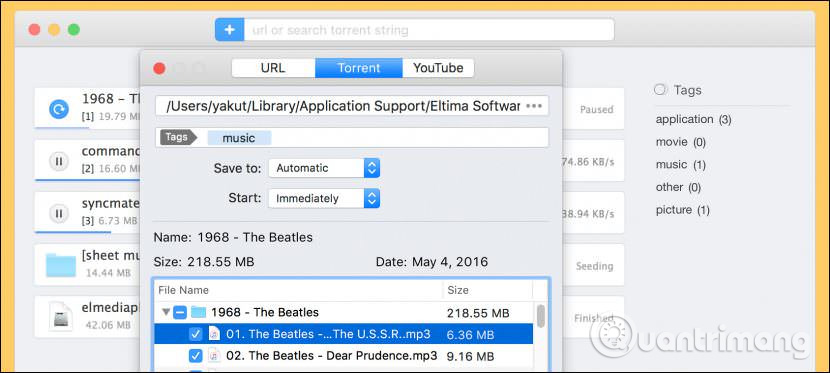
<p style="text-align: justify;">Folx là một trình quản lý tải xuống miễn phí dành cho Mac OS X với giao diện kiểu Mac đích thực. Nó quản lý tải xuống thuận tiện, cung cấp các cài đặt linh hoạt, v.v… Folx có hệ thống phân loại và giữ nội dung tải về độc đáo. Nếu bạn muốn tải từ trang web xuống, Folx có thể tự động download các bản tải xuống hoặc một loại file cụ thể. Ngoài ra, nó cũng có một extension trình duyệt, cung cấp tùy chọn tải toàn bộ, tải file đã chọn và tải cùng Folx. Nó hỗ trợ các trình duyệt: Safari, Firefox, Opera, Chrome.</p>

<p style="text-align: justify;"><img alt="Phần mềm Folx Free" data-i="0" data-src="https://st.quantrimang.com/photos/image/2018/06/14/phan-mem-tang-toc-dowload-cho-mac-1.jpg" data-was-processed="true" height="288" src="https://st.quantrimang.com/photos/image/2018/06/14/phan-mem-tang-toc-dowload-cho-mac-1.jpg" width="640" /></p>

<p style="text-align: justify;">Với phiên bản miễn phí bạn chỉ có thể sử dụng tính năng liên kết dạng magnet. Ngoài việc tải các file từ trình theo dõi torrent, Folx cho phép bạn tải bằng các liên kết dạng magnet, do đó bạn sẽ không phải lưu file riêng biệt trước khi bắt đầu tải thực sự, tính năng này rất thuận tiện. Còn các tính năng khác như tìm kiếm torrent, kiểm soát tốc độ, tích hợp iTunes, tải từ YouTube chỉ có trong phiên bản trả phí.</p>

<div style="text-align: justify;">&nbsp;</div>

<p style="text-align: justify;"><strong>Download</strong>:&nbsp;Folx Free&nbsp;(Miễn phí/19,95 USD)<br />
<span style="color:rgb(192, 57, 43);"><strong>https://mac.eltima.com/download-manager.html</strong></span></p>

<h2 style="text-align: justify;">2. Phần mềm quản lý, tăng tốc download iGetter</h2>

<p style="text-align: justify;"><img alt="Phần mềm iGetter" data-i="1" data-src="https://st.quantrimang.com/photos/image/2018/06/14/phan-mem-tang-toc-dowload-cho-mac-2.jpg" data-was-processed="true" height="404" src="https://st.quantrimang.com/photos/image/2018/06/14/phan-mem-tang-toc-dowload-cho-mac-2.jpg" width="640" /></p>

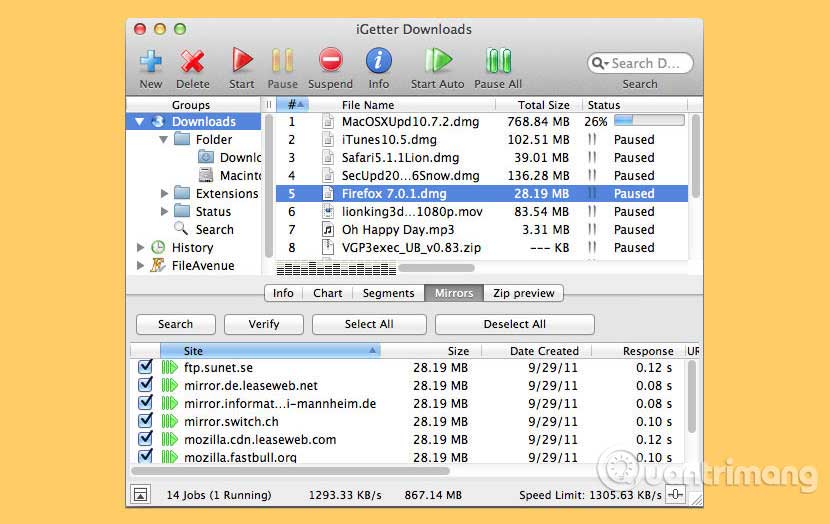
<p style="text-align: justify;">iGetter là phần mềm quản lý tải xuống và tăng tốc download mạnh mẽ, đầy đủ tính năng. iGetter có thể cải thiện đáng kể tốc độ download bằng cách sử dụng tính năng&nbsp;<strong>Segmented downloading</strong>. Ngoài ra, nó còn cho phép tự động tiếp tục tải sau khi tải xuống bị dừng, hỏng, lọc file tải theo trình tự với nhiều tiêu chí khác nhau, Site explorer, danh sách lịch sử, lên lịch tải khi traffic thấp, tự động dừng và tắt khi hoàn tất, và nhiều tính năng khác nữa. Dưới đây là một số tính năng chính của iGetter:</p>

<ul>
	<li style="text-align: justify;"><strong>Managing Downloads</strong>&nbsp;- iGetter cho phép bạn dừng và tiếp tục tải xuống. Nếu bạn còn một phần file đang tải dở, iGetter sẽ khởi động lại tại điểm bị hỏng, do đó iGetter chỉ nhận phần còn lại của file mà không khởi động lại từ điểm bắt đầu, điều này khiến việc tải file dễ dàng và nhanh hơn. Lưu ý, có một số trường hợp, nhưng ít gặp, server ngăn không cho tiếp tục tải file. Trong trường hợp này, iGetter sẽ thông báo khi bạn dừng tải trên file không thể tiếp tục. iGetter cho phép người dùng tổ chức file tải xuống và tự động tải chúng. Bạn có thể thiết lập vị trí của các file tải theo thứ tự bằng cách di chuyển nó lên hoặc xuống để chọn vị trí tốt. Ngoài ra bạn có thể sử dụng bộ lọc thứ tự này để sắp xếp tải theo thư mục, kiểu file và tình trạng.</li>
	<li style="text-align: justify;"><strong>Segmented Downloading</strong>&nbsp;- Một trong những tính năng cơ bản của iGetter là&nbsp;<strong>Segmented Downloading</strong>. Tính năng này rất hữu ích khi các server giới hạn tốc độ tải cho mọi kết nối. Segmented Downloading có thể tăng tốc download bằng cách tạo nhiều kết nối với server và tải nhiều đoạn cùng một lúc. Tăng tốc độ tải theo phân đoạn phụ thuộc vào tốc độ kết nối Internet và băng thông có sẵn cho tải của server.</li>
	<li style="text-align: justify;"><strong>Mirror</strong>&nbsp;- Nếu chọn bảng điều khiển mirror, bạn có thể tìm kiếm và thêm server mirror được tìm thấy trong thư viện FileAvenue.net. Để tìm kiếm mirror, click vào nút&nbsp;<strong>Search</strong>&nbsp;và iGetter sẽ hiển thị tất cả các server mirror có thể tải xuống. Bạn có thể chọn địa điểm thích hợp cho các file theo cách thủ công. Trong bảng mirror, người dùng sẽ thấy vị trí server, kích thước file, v.v… Bạn cũng có thể kiểm tra những URL muốn đưa vào quá trình tải. Nếu chọn tất cả các vị trí server, iGetter sẽ tự động liên kết mirror URL với phân đoạn bắt đầu từ mirror đầu tiên trong bảng. Ngoài ra, bạn có thể thêm mirror server cho bất cứ file tải nào theo cách thủ công sử dụng lệnh<strong>&nbsp;Item Settings</strong>.</li>
	<li style="text-align: justify;"><strong>Schedule Downloads</strong>&nbsp;- Với chức năng hữu ích này, bạn có thể lên lịch tải file khi traffic thấp bằng cách thiết lập thời gian, ngày giờ chính xác khi muốn iGetter bắt đầu tải theo trình tự. Bạn có thể sử dụng đồng hồ đếm ngược hoặc thiết lập thời gian chính xác iGetter dừng tải tự động. iGetter có thể tự động thoát quá trình này, tắt hoặc để máy ở chế độ ngủ khi hoàn tất tải hoặc đến thời gian được lên lịch.</li>
	<li style="text-align: justify;"><strong>Site Explorer</strong>&nbsp;- Site Explorer cho phép khám phá toàn bộ trang web hoặc các trang FTP, vì vậy bạn có thể dễ dàng tìm và tải các file mong muốn. Để khám phá trang web HTTP,&nbsp;HTTPS&nbsp;hoặc FTP, hãy chọn nhóm&nbsp;<strong>Site Explorer</strong>&nbsp;và chọn&nbsp;<strong>Enter Site URL</strong>&nbsp;trong menu ngữ cảnh để thiết lập URL trang web. Khi phát hiện file, bạn có thể click đúp vào nó hoặc chọn&nbsp;<strong>Add to queue</strong>&nbsp;từ menu ngữ cảnh và nó sẽ xuất hiện thứ tự download. Nếu muốn hủy quá trình tải này, chỉ cần nhấn nút&nbsp;<strong>Pause</strong>&nbsp;trên Toolbar. Site Explorer phân tích trang HTML để tìm kiếm các link có sẵn, thậm chí nó còn tìm kiếm trong các hàm&nbsp;JavaScript, vì vậy nó sẽ hiển thị danh sách nội dung trang web hoàn chỉnh.</li>
</ul>

<div style="text-align: justify;">&nbsp;</div>

<p style="text-align: justify;"><strong>Download</strong>:&nbsp;iGetter&nbsp;(Miễn phí)<br />
<span style="color:rgb(192, 57, 43);"><strong>https://download.com.vn/igetter-2-8-for-mac-14726</strong></span></p>

<h2 style="text-align: justify;">3. Phần mềm quản lý, tăng tốc download JDownloader</h2>

<p style="text-align: justify;">&nbsp;</p>

<div style="text-align: justify;"><img alt="Phần mềm JDownloader" data-adbro-processed="true" data-i="2" data-src="https://st.quantrimang.com/photos/image/2018/06/14/phan-mem-tang-toc-dowload-cho-mac-3.jpg" data-was-processed="true" height="404" src="https://st.quantrimang.com/photos/image/2018/06/14/phan-mem-tang-toc-dowload-cho-mac-3.jpg" width="640" /></div>

<p style="text-align: justify;">JDownloader chắc chắn là phần mềm quản lý, tăng tốc download miễn phí tốt nhất cho Mac. JDownloader được viết bằng Java, cho phép tự động tải xuống các file và tách file từ các trang web lưu trữ bằng một lần click. JDownloader hỗ trợ việc sử dụng các tài khoản cao cấp. Một số phần, nhưng không phải tất cả, của JDownloader là mã nguồn mở. Dưới đây là một số tính năng của Jdownloader cho Mac:</p>

<ul>
	<li style="text-align: justify;">Tải file từ các dịch vụ lưu trữ file như Mediafire, 4Shared và các file khác.</li>
	<li style="text-align: justify;">Có thể tự động giải quyết một số CAPTCHA bằng module OCR của riêng nó (JAntiCaptcha)</li>
	<li style="text-align: justify;">Giới hạn tải xuống mỗi ngày trước khi làm mới&nbsp;địa chỉ IP</li>
	<li style="text-align: justify;">Tiếp tục/tạm dừng tải xuống theo ý muốn của bạn</li>
	<li style="text-align: justify;">Dễ sử dụng ngay cả với những người mới</li>
	<li style="text-align: justify;">Bạn chỉ cần sao chép URL của file muốn tải xuống và dán vào phần mềm tải xuống</li>
	<li style="text-align: justify;">Phần mềm nén các file lớn thành các file RAR để làm cho kích thước tải xuống nhỏ hơn.</li>
</ul>

<p style="text-align: justify;">&nbsp;</p>

<p style="text-align: justify;"><strong>Download</strong>:&nbsp;JDownloader&nbsp;(Miễn phí)<br />
<span style="color:rgb(192, 57, 43);"><strong>https://download.com.vn/jdownloader-for-mac-20953</strong></span></p>

<h2 style="text-align: justify;">4. Phần mềm quản lý, tăng tốc download Progressive Downloader</h2>

<p style="text-align: justify;"><img alt="Phần mềm Progressive Downloader" data-i="3" data-src="https://st.quantrimang.com/photos/image/2018/06/14/phan-mem-tang-toc-dowload-cho-mac-5.jpg" data-was-processed="true" height="400" src="https://st.quantrimang.com/photos/image/2018/06/14/phan-mem-tang-toc-dowload-cho-mac-5.jpg" width="640" /></p>

<p style="text-align: justify;">Phần mềm quản lý tải xuống giúp bạn đẩy nhanh tốc độ download sử dụng toàn bộ băng thông kết nối Internet.</p>

<ul>
	<li style="text-align: justify;">Tích hợp với tất cả các trình duyệt chính</li>
	<li style="text-align: justify;">Tự động tìm kiếm các máy chủ nhanh nhất có sẵn để tải xuống</li>
	<li style="text-align: justify;">Trình duyệt FTP/SFTP tích hợp sẵn điều khiển các tài nguyên từ xa</li>
	<li style="text-align: justify;">Sử dụng sức mạnh của ứng dụng từ AppScript hoặc Automator.</li>
	<li style="text-align: justify;">Sử dụng tài khoản Zevera để tải xuống từ hơn một trăm dịch vụ lưu trữ file</li>
	<li style="text-align: justify;">File tải xuống chỉ chạy trong cửa sổ thời gian được chỉ định.</li>
</ul>

<div style="text-align: justify;"><iframe allowtransparency="true" data-google-container-id="a!4" data-google-query-id="CP6Rw-PelYQDFeqR6QUdBPANWA" data-load-complete="true" frameborder="0" height="0" hspace="0" id="aswift_3" marginheight="0" marginwidth="0" name="aswift_3" sandbox="" scrolling="no" vspace="0" width="694"></iframe></div>

<p style="text-align: justify;"><strong>Download</strong>:&nbsp;Progressive Downloader&nbsp;(Miễn phí)<br />
<span style="color:rgb(192, 57, 43);"><strong>https://www.macpsd.net/</strong></span></p>

<h2 style="text-align: justify;">5. Phần mềm quản lý, tăng tốc download Xtreme Download Manager</h2>

<p style="text-align: justify;"><img alt="Phần mềm Xtreme Download Manager " data-i="4" data-src="https://st.quantrimang.com/photos/image/2018/06/14/phan-mem-tang-toc-dowload-cho-mac-6.jpg" data-was-processed="true" height="244" src="https://st.quantrimang.com/photos/image/2018/06/14/phan-mem-tang-toc-dowload-cho-mac-6.jpg" width="640" /></p>

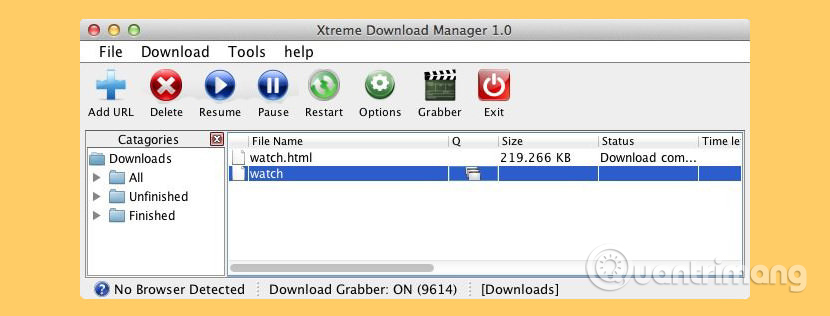
<p style="text-align: justify;">Xtreme Download Manager là một công cụ mạnh mẽ để tăng tốc độ download lên đến 500%,&nbsp;<a href="https://quantrimang.com/cong-nghe/8-cach-download-video-tren-youtube-nhanh-nhat-175841" title="11 cách download video trên Youtube nhanh chóng, đơn giản">lưu video trực tuyến từ YouTube</a>, Metacafe, DailyMotion, Google Video hoặc bất kỳ trang web nào khác; tiếp tục tải xuống khi tải bị hỏng/chết và tải xuống theo lịch trình. XDM tích hợp với Microsoft Edge, Firefox, Chrome, IE, Opera, Safari và tất cả các trình duyệt phổ biến để tải và lưu video trực tuyến từ web. XDM sử dụng thuật toán phân đoạn động, nén dữ liệu và tái sử dụng kết nối để tăng tốc quá trình tải xuống. Xtreme Download Manager hỗ trợ giao thức HTTP, HTTPS và FTP,&nbsp;<a href="https://quantrimang.com/cong-nghe/tong-quan-ve-firewall-84474" title="Tường lửa (Firewall) là gì? Những kiến thức tổng quan về Firewall">tường lửa</a>,&nbsp;<a href="https://quantrimang.com/cong-nghe/nhung-may-chu-proxy-an-danh-mien-phi-tot-nhat-145100" title="Những máy chủ proxy ẩn danh miễn phí tốt nhất">máy chủ proxy</a>, script lệnh proxy tự động, chuyển hướng file, cookie, ủy quyền, v.v.</p>

<p style="text-align: justify;">Các tính năng chính của nó:</p>

<ul>
	<li style="text-align: justify;">Tải file ở tốc độ tối đa nhất có thể (nhanh hơn 5-6 lần)</li>
	<li style="text-align: justify;">Làm việc với tất cả phiên bản trình duyệt. XDM có thể tích hợp với bất kỳ trình duyệt nào (Microsoft Edge, Firefox, Chrome, Internet Explorer, Opera, Safari hoặc bất kỳ chương trình nào khác đang cố tải file từ Internet)</li>
	<li style="text-align: justify;">XDM có thể lưu video từ YouTube, Daily Motion, Metacafe hay trang web chia sẻ video phổ biến khác</li>
	<li style="text-align: justify;">Làm việc với Windows ISA, hỗ trợ tự động proxy, NTLM, xác thực Kerberos</li>
	<li style="text-align: justify;">Hỗ trợ giao thức HTTP, HTTPS, FTP với xác thực, Máy chủ proxy, Cookie, chuyển hướng, v.v…</li>
	<li style="text-align: justify;">Tiếp tục tải xuống do sự cố kết nối, mất điện hoặc hết hạn phiên</li>
	<li style="text-align: justify;">Tải xuống hàng loạt, theo dõi clipboard, kiểm tra chống virus tự động, lên lịch, tắt hệ thống khi hoàn tất tải xuống</li>
</ul>

<p style="text-align: justify;"><strong>Download</strong>:&nbsp;Xtreme Download Manager<br />
<span style="color:rgb(192, 57, 43);"><strong>https://sourceforge.net/projects/xdman/</strong></span></p>

<h2 style="text-align: justify;">6. Phần mềm quản lý, tăng tốc download Download Shuttle</h2>

<p style="text-align: justify;"><img alt="Phần mềm Download Shuttle" data-i="5" data-src="https://st.quantrimang.com/photos/image/2018/06/14/phan-mem-tang-toc-dowload-cho-mac-7.jpg" data-was-processed="true" height="400" src="https://st.quantrimang.com/photos/image/2018/06/14/phan-mem-tang-toc-dowload-cho-mac-7.jpg" width="640" /></p>

<p style="text-align: justify;">Download Shuttle là phần mềm tăng tốc và quản lý download nhanh chóng, hoàn toàn miễn phí. Tất cả các bản tải xuống được thực hiện thông qua Download Shuttle đều có nhiều phân đoạn, tức là mỗi file sẽ được chia thành các phần nhỏ hơn, được tải cùng một lúc, giúp đẩy nhanh tốc độ tải khi băng thông được tối đa hóa.</p>

<p style="text-align: justify;">Những tính năng chính:</p>

<ul>
	<li style="text-align: justify;">Tốc độ nhanh hơn với tải nhiều phân đoạn</li>
	<li style="text-align: justify;">Công cụ quản lý download cho phép tải đồng thời nhiều file cùng một lúc, không giới hạn</li>
	<li style="text-align: justify;">Hỗ trợ các URL yêu cầu xác thực</li>
	<li style="text-align: justify;">Tạm dừng và tiếp tục tải hỗ trợ cho một số các URL</li>
	<li style="text-align: justify;">Tính năng kéo và thả hỗ trợ cho các liên kết tải xuống</li>
	<li style="text-align: justify;">Hỗ trợ HTTP/HTTPS</li>
	<li style="text-align: justify;">Dịch vụ OS X gửi URL được tải xuống trực tiếp bằng Download Shuttle</li>
</ul>

<p style="text-align: justify;"><strong>Download</strong>:&nbsp;Download Shuttle<br />
<span style="color:rgb(192, 57, 43);"><strong>https://download.com.vn/download-shuttle-cho-mac-118387</strong></span></p>

<h2 style="text-align: justify;">7. Phần mềm tăng tốc download Free Download Manager</h2>

<div style="text-align: justify;"><iframe allowtransparency="true" data-google-container-id="a!5" data-google-query-id="CI642ePelYQDFe6a6QUdY8gGRg" data-load-complete="true" frameborder="0" height="0" hspace="0" id="aswift_4" marginheight="0" marginwidth="0" name="aswift_4" sandbox="" scrolling="no" vspace="0" width="694"></iframe></div>

<figure>
<div style="text-align: justify;"><img alt="Free Download Manager" data-i="6" data-src="https://st.quantrimang.com/photos/image/2024/02/05/top-phan-mem-tang-toc-download-cho-mac-1.jpg" data-was-processed="true" height="590" src="https://st.quantrimang.com/photos/image/2024/02/05/top-phan-mem-tang-toc-download-cho-mac-1.jpg" width="830" /></div>

<figcaption>
<div style="text-align: justify;">Free Download Manager</div>
</figcaption>
</figure>

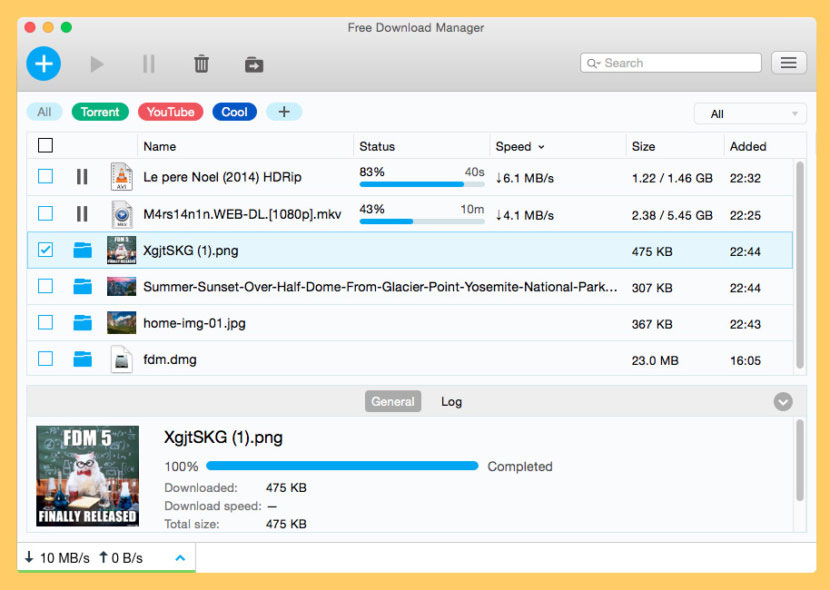
<p style="text-align: justify;">Free Download Manager tăng tốc tải xuống bằng cách chia file thành nhiều phần và sau đó tải xuống đồng thời. Ngoài ra, Free Download Manager cho phép bạn điều chỉnh mức sử dụng lưu lượng, sắp xếp tải xuống, kiểm soát mức độ ưu tiên file cho torrent, tải xuống các file lớn một cách hiệu quả và tiếp tục bản tải xuống bị hỏng.</p>

<p style="text-align: justify;">Free Download Manager có thể tăng tốc tất cả các lượt tải xuống của bạn lên tới 10 lần, xử lý các file media ở nhiều định dạng phổ biến khác nhau, kéo và thả URL ngay từ trình duyệt web cũng như tải xuống đồng thời nhiều file! Nó là một trình tổ chức và tăng tốc tải xuống hiện đại mạnh mẽ dành cho Windows và Mac. Free Download Manager cho phép bạn điều chỉnh mức sử dụng lưu lượng, sắp xếp các bản tải xuống, kiểm soát mức độ ưu tiên của file cho torrent, tải xuống các file lớn một cách hiệu quả và tiếp tục tải xuống bị hỏng.</p>

<ul>
	<li style="text-align: justify;">Hỗ trợ BitTorrent – Tải xuống file bằng giao thức BitTorrent.</li>
	<li style="text-align: justify;">Tiếp tục tải xuống bị hỏng</li>
	<li style="text-align: justify;">Điều chỉnh mức sử dụng lưu lượng</li>
	<li style="text-align: justify;">Tải video từ các trang web phổ biến</li>
</ul>
		</div>
				<div id="author">
						<p>
				<strong>Nguồn tin:</strong>
				Quantrimang.com
			</p>
		</div>
	</div>
	<div id="footer" class="clearfix">
		<div id="url">
			<strong>URL của bản tin này: </strong><a href="https://www.nguoicodonvn2008.info/vi/news/savefile/phan-mem/top-phan-mem-tang-toc-download-cho-mac-8045.html" title="Top phần mềm tăng tốc download cho Mac">https://www.nguoicodonvn2008.info/vi/news/savefile/phan-mem/top-phan-mem-tang-toc-download-cho-mac-8045.html</a>

		</div>
		<div class="clear"></div>
		<div class="copyright">
			&copy; .&#x3A; Nguoicodonvn2008.info - Cõi lòng người cô đơn &#x3A;.
		</div>
		<div id="contact">
			<a href="mailto:admin@nguoicodonvn2008.info">admin@nguoicodonvn2008.info</a>
		</div>
	</div>
</div>
        <div id="timeoutsess" class="chromeframe">
            Bạn đã không sử dụng Site, <a onclick="timeoutsesscancel();" href="https://nguoicodonvn2008.info/#">Bấm vào đây để duy trì trạng thái đăng nhập</a>. Thời gian chờ: <span id="secField"> 60 </span> giây
        </div>
        <div id="openidResult" class="nv-alert" style="display:none"></div>
        <div id="openidBt" data-result="" data-redirect=""></div>
		</script>
		<div class="car-top">
  <span><img src="https://nguoicodonvn2008.info/themes/default/images/car.png" alt=""></span>
</div>
<script src="https://nguoicodonvn2008.info/assets/js/jquery/jquery.min.js"></script>
<script>var nv_base_siteurl="/",nv_lang_data="vi",nv_lang_interface="vi",nv_name_variable="nv",nv_fc_variable="op",nv_lang_variable="language",nv_module_name="news",nv_func_name="savefile",nv_is_user=0, nv_my_ofs=-4,nv_my_abbr="EDT",nv_cookie_prefix="nv4c_e856T",nv_check_pass_mstime=1738000,nv_area_admin=0,nv_safemode=0,theme_responsive=0,nv_recaptcha_ver=2,nv_recaptcha_sitekey="",nv_recaptcha_type="image",XSSsanitize=1;</script>
<script src="https://nguoicodonvn2008.info/assets/js/language/vi.js"></script>
<script src="https://nguoicodonvn2008.info/assets/js/DOMPurify/purify3.js"></script>
<script src="https://nguoicodonvn2008.info/assets/js/global.js"></script>
<script src="https://nguoicodonvn2008.info/assets/js/site.js"></script>
<script src="https://nguoicodonvn2008.info/themes/default/js/news.js"></script>
<script src="https://nguoicodonvn2008.info/themes/default/js/main.js"></script>
<script src="https://nguoicodonvn2008.info/themes/default/js/custom.js"></script>
<script type="application/ld+json">
        {
            "@context": "https://schema.org",
            "@type": "Organization",
            "url": "https://nguoicodonvn2008.info",
            "logo": "https://nguoicodonvn2008.info/uploads/angel.gif"
        }
        </script>
<script src="https://nguoicodonvn2008.info/themes/default/js/bootstrap.min.js"></script>
<script type="text/javascript">
var $scrolltop = $('.car-top');
$scrolltop.on('click', function () {
    $('html,body').animate({
        scrollTop: 0
    }, 800);
    $(this).addClass("car-run");
    setTimeout(function(){ $scrolltop.removeClass('car-run');}, 1000);
    return false;
});
$(window).on('scroll', function ()
{ 
    if($(window).scrollTop() >= 200)
    {
        $scrolltop.addClass("show");
        $scrolltop.addClass("car-down");
    }
    else
    {
       $scrolltop.removeClass("show");
       setTimeout(function(){ $scrolltop.removeClass('car-down');}, 300);
    }
});
</script>
</body>
</html>