<!DOCTYPE html>
    <html lang="vi" xmlns="http://www.w3.org/1999/xhtml" prefix="og: http://ogp.me/ns#">
    <head>
<title>Hướng dẫn tạo giao diện Windows 10 tuyệt đẹp với bộ theme Amatical và phần mềm Rainmeter</title>
<meta name="description" content="Hướng dẫn tạo giao diện Windows 10 tuyệt đẹp với bộ theme Amatical và phần mềm Rainmeter - Savefile - Tin Tức -...">
<meta name="author" content=".: Nguoicodonvn2008.info - Cõi lòng người cô đơn :.">
<meta name="copyright" content=".: Nguoicodonvn2008.info - Cõi lòng người cô đơn :. [admin@nguoicodonvn2008.info]">
<meta name="robots" content="index, archive, follow, noodp">
<meta name="googlebot" content="index,archive,follow,noodp">
<meta name="msnbot" content="all,index,follow">
<meta name="generator" content="NukeViet v4.5">
<meta http-equiv="Content-Type" content="text/html; charset=utf-8">
<meta property="og:title" content="Hướng dẫn tạo giao diện Windows 10 tuyệt đẹp với bộ theme Amatical và phần mềm Rainmeter">
<meta property="og:type" content="website">
<meta property="og:description" content="Savefile - Tin Tức -...">
<meta property="og:site_name" content=".&#x3A; Nguoicodonvn2008.info - Cõi lòng người cô đơn &#x3A;.">
<meta property="og:url" content="https://www.nguoicodonvn2008.info/vi/news/savefile/phan-mem/huong-dan-tao-giao-dien-windows-10-tuyet-dep-voi-bo-theme-amatical-va-phan-mem-rainmeter-3374.html">
<link rel="shortcut icon" href="https://nguoicodonvn2008.info/favicon.ico">
<link rel="canonical" href="https://www.nguoicodonvn2008.info/vi/news/savefile/phan-mem/huong-dan-tao-giao-dien-windows-10-tuyet-dep-voi-bo-theme-amatical-va-phan-mem-rainmeter-3374.html">
<link rel="alternate" href="https://nguoicodonvn2008.info/vi/news/rss/" title="Tin Tức" type="application/rss+xml">
<link rel="alternate" href="https://nguoicodonvn2008.info/vi/news/rss/karaoke-dual/" title="Tin Tức - Karaoke Dual" type="application/rss+xml">
<link rel="alternate" href="https://nguoicodonvn2008.info/vi/news/rss/nhac-tre/" title="Tin Tức - Nhạc trẻ" type="application/rss+xml">
<link rel="alternate" href="https://nguoicodonvn2008.info/vi/news/rss/tru-tinh/" title="Tin Tức - Trữ tình" type="application/rss+xml">
<link rel="alternate" href="https://nguoicodonvn2008.info/vi/news/rss/nuoc-ngoai/" title="Tin Tức - Nước ngoài" type="application/rss+xml">
<link rel="alternate" href="https://nguoicodonvn2008.info/vi/news/rss/remix/" title="Tin Tức - Remix" type="application/rss+xml">
<link rel="alternate" href="https://nguoicodonvn2008.info/vi/news/rss/tam-su-tinh-yeu/" title="Tin Tức - Tâm sự tình yêu" type="application/rss+xml">
<link rel="alternate" href="https://nguoicodonvn2008.info/vi/news/rss/tho-suu-tam/" title="Tin Tức - Thơ sưu tầm" type="application/rss+xml">
<link rel="alternate" href="https://nguoicodonvn2008.info/vi/news/rss/cuoc-song/" title="Tin Tức - Cuộc sống" type="application/rss+xml">
<link rel="alternate" href="https://nguoicodonvn2008.info/vi/news/rss/phan-mem/" title="Tin Tức - Phần mềm" type="application/rss+xml">
<link rel="alternate" href="https://nguoicodonvn2008.info/vi/news/rss/kien-thuc-may-tinh/" title="Tin Tức - Kiến thức máy tính" type="application/rss+xml">
<link rel="alternate" href="https://nguoicodonvn2008.info/vi/news/rss/hoc-tap/" title="Tin Tức - Học tập" type="application/rss+xml">
<link rel="alternate" href="https://nguoicodonvn2008.info/vi/news/rss/tai-lieu/" title="Tin Tức - Tài liệu" type="application/rss+xml">
<link rel="alternate" href="https://nguoicodonvn2008.info/vi/news/rss/de-thi/" title="Tin Tức - Đề thi" type="application/rss+xml">
<link rel="preload" as="style" href="https://nguoicodonvn2008.info/assets/css/font-awesome.min.css" type="text/css">
<link rel="preload" as="style" href="https://nguoicodonvn2008.info/themes/default/css/bootstrap.non-responsive.css" type="text/css">
<link rel="preload" as="style" href="https://nguoicodonvn2008.info/themes/default/css/style.css" type="text/css">
<link rel="preload" as="style" href="https://nguoicodonvn2008.info/themes/default/css/style.non-responsive.css" type="text/css">
<link rel="preload" as="style" href="https://nguoicodonvn2008.info/themes/default/css/news.css" type="text/css">
<link rel="preload" as="style" href="https://nguoicodonvn2008.info/themes/default/css/custom.css" type="text/css">
<link rel="preload" as="script" href="https://nguoicodonvn2008.info/assets/js/jquery/jquery.min.js" type="text/javascript">
<link rel="preload" as="script" href="https://nguoicodonvn2008.info/assets/js/language/vi.js" type="text/javascript">
<link rel="preload" as="script" href="https://nguoicodonvn2008.info/assets/js/DOMPurify/purify3.js" type="text/javascript">
<link rel="preload" as="script" href="https://nguoicodonvn2008.info/assets/js/global.js" type="text/javascript">
<link rel="preload" as="script" href="https://nguoicodonvn2008.info/assets/js/site.js" type="text/javascript">
<link rel="preload" as="script" href="https://nguoicodonvn2008.info/themes/default/js/news.js" type="text/javascript">
<link rel="preload" as="script" href="https://nguoicodonvn2008.info/themes/default/js/main.js" type="text/javascript">
<link rel="preload" as="script" href="https://nguoicodonvn2008.info/themes/default/js/custom.js" type="text/javascript">
<link rel="preload" as="script" href="https://nguoicodonvn2008.info/themes/default/js/bootstrap.min.js" type="text/javascript">
<link rel="stylesheet" href="https://nguoicodonvn2008.info/assets/css/font-awesome.min.css">
<link rel="stylesheet" href="https://nguoicodonvn2008.info/themes/default/css/bootstrap.non-responsive.css">
<link rel="stylesheet" href="https://nguoicodonvn2008.info/themes/default/css/style.css">
<link rel="stylesheet" href="https://nguoicodonvn2008.info/themes/default/css/style.non-responsive.css">
<link rel="StyleSheet" href="https://nguoicodonvn2008.info/themes/default/css/news.css">
<link rel="stylesheet" href="https://nguoicodonvn2008.info/themes/default/css/custom.css">
<style type="text/css">
	body{background: #fff;}
</style>
    </head>
    <body>
<div id="print">
	<div id="hd_print">
		<h2 class="pull-left">.&#x3A; Nguoicodonvn2008.info - Cõi lòng người cô đơn &#x3A;.</h2>
		<p class="pull-right"><a title=".&#x3A; Nguoicodonvn2008.info - Cõi lòng người cô đơn &#x3A;." href="https://nguoicodonvn2008.info/">https://nguoicodonvn2008.info</a></p>
	</div>
	<div class="clear"></div>
	<hr />
	<div id="content">
		<h1>Hướng dẫn tạo giao diện Windows 10 tuyệt đẹp với bộ theme Amatical và phần mềm Rainmeter</h1>
		<ul class="list-inline">
			<li>Chủ nhật - 03/01/2021 23:50</li>
			<li class="hidden-print txtrequired"><em class="fa fa-print">&nbsp;</em><a title="In ra" href="javascript:;" onclick="window.print()">In ra</a></li>
			<li class="hidden-print txtrequired"><em class="fa fa-power-off">&nbsp;</em><a title="Đóng cửa sổ này" href="javascript:;" onclick="window.close()">Đóng cửa sổ này</a></li>
		</ul>
		<div class="clear"></div>
		<div id="hometext">
		</div>
				<div class="imghome">
			<img alt="Hướng dẫn tạo giao diện Windows 10 tuyệt đẹp với bộ theme Amatical và phần mềm Rainmeter" src="https://st.quantrimang.com/photos/image/2021/01/04/huong-dan-tao-giao-dien-windows-10-tuyet-dep-voi-bo-theme-amatical-va-phan-mem-rainmeter-2.jpg" width="460" class="img-thumbnail" />
		</div>
		<div class="clear"></div>
		<div id="bodytext" class="clearfix">
			<p style="text-align: justify;">Rainmeter&nbsp;là phần mềm cho phép các bạn thỏa sức sáng tạo, tùy biến giao diện máy tính Windows 10 của mình. Trong bài viết này, Quantrimang sẽ hướng dẫn các bạn cách tạo giao diện tuyệt đẹp trên Rainmeter với bộ theme mang tên Amatical của tác giả ApexXx-Sensei trên Deviantart.</p>

<h2 style="text-align: justify;">Bước 1: Sao lưu hệ thống</h2>

<p style="text-align: justify;">Đây là bước dự phòng mà bạn nên thực hiện để đảm bảo không bị mất dữ liệu nếu như quá trình cài đặt giao diện mới xảy ra vấn đề. Để sao lưu hệ thống Windows 10 bạn có thể làm theo hướng dẫn dưới đây:</p>

<div style="text-align: justify;">&nbsp;</div>

<h2 style="text-align: justify;">Bước 2: Tải và cài đặt Rainmeter</h2>

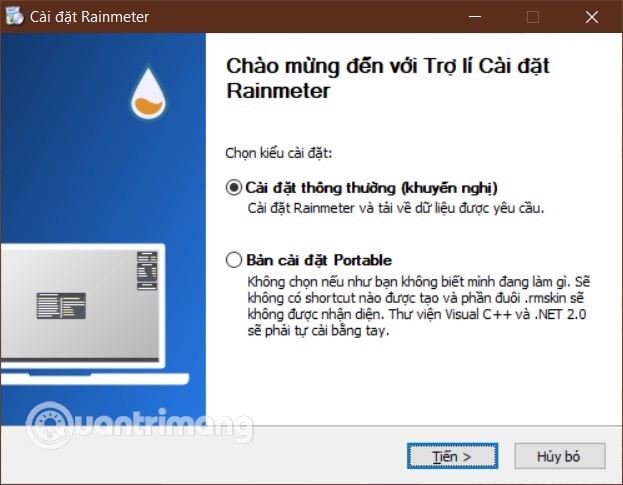
<p style="text-align: justify;">Để tải Rainmeter bạn cần truy cập vào link bên dưới. Sau khi tải về, bạn chạy tập tin&nbsp;<strong>Rainmeter.exe</strong>&nbsp;để tiến hành cài đặt ứng dụng. Trong quá trình cài đặt, bạn chỉ cần nhấn&nbsp;<strong>Next</strong>&nbsp;và&nbsp;<strong>Install</strong>&nbsp;để hoàn tất cài đặt.&nbsp;</p>

<ul>
	<li style="text-align: justify;">Tải Rainmeter:&nbsp;<span style="color:rgb(192, 57, 43);"><strong>https://www.rainmeter.net/</strong></span></li>
</ul>

<p style="text-align: justify;">Lưu ý, ứng dụng Rainmeter cũng có tùy chọn Tiếng Việt để các bạn dễ dàng sử dụng. Bạn có thể chọn ngôn ngữ ngay ở phần đầu quá trình cài đặt.</p>

<figure>
<div style="text-align: justify;"><img alt="Cài đặt Rainmeter" data-i="0" data-src="https://st.quantrimang.com/photos/image/2021/01/04/huong-dan-tao-giao-dien-windows-10-tuyet-dep-voi-bo-theme-amatical-va-phan-mem-rainmeter.jpg" data-was-processed="true" height="485" src="https://st.quantrimang.com/photos/image/2021/01/04/huong-dan-tao-giao-dien-windows-10-tuyet-dep-voi-bo-theme-amatical-va-phan-mem-rainmeter.jpg" width="623" /></div>

<figcaption>
<div style="text-align: justify;">Cài đặt Rainmeter</div>
</figcaption>
</figure>

<p style="text-align: justify;">Sau khi cài xong, bạn chạy Rainmeter và tắt các skin hiển thị ở góc trên bên phải màn hình đi cho đỡ rối mắt. Bạn tắt skin bằng cách nhấp chuột phải vào skin sau đó chọn &quot;<strong>Tắt skin</strong>&quot;.</p>

<h2 style="text-align: justify;"><strong>Bước&nbsp;3: Tải về và thiết lập giao diện Amatical trên Windows 10</strong></h2>

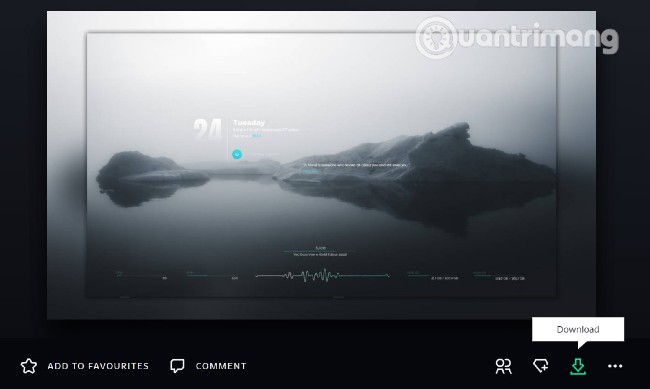
<p style="text-align: justify;">Tiếp theo, mời bạn truy cập vào Deviantart để tải về bộ theme Amatical. Lưu ý là để tải được theme này bạn cần đăng ký tài khoản Deviantart, quá trình đăng ký chỉ mất vài phút.</p>

<figure>
<div style="text-align: justify;"><img alt="Tải về giao diện Amatical" data-i="1" data-src="https://st.quantrimang.com/photos/image/2021/01/04/huong-dan-tao-giao-dien-windows-10-tuyet-dep-voi-bo-theme-amatical-va-phan-mem-rainmeter-1.jpg" data-was-processed="true" height="389" src="https://st.quantrimang.com/photos/image/2021/01/04/huong-dan-tao-giao-dien-windows-10-tuyet-dep-voi-bo-theme-amatical-va-phan-mem-rainmeter-1.jpg" width="650" /></div>

<figcaption>
<div style="text-align: justify;">Tải về giao diện Amatical</div>
</figcaption>
</figure>

<p style="text-align: justify;">Trong giao diện web của Deviantart, bạn nhấn nút &quot;<strong>Download</strong>&quot; để tải theme. File theme tải về sẽ có định dạng &quot;<strong>.rmskin</strong>&quot;. Để cài theme, bạn nhấn đúp chuột trái vào file vừa tải và sau đó chọn&nbsp;<strong>Install</strong>&nbsp;ở cửa sổ xác nhận.</p>

<ul>
	<li style="text-align: justify;">Tải về theme Amatical:</li>
</ul>

<div style="text-align: justify;"><span style="color:rgb(192, 57, 43);"><strong>https://www.deviantart.com/apexxx-sensei/art/Amatical-742039669</strong></span></div>

<p style="text-align: justify;">Khi chạy xong, theme Amatical sẽ tự động được kích hoạt. Lúc này, bạn chỉ cần sắp xếp lại các vị trí của biểu tượng ứng dụng và thành phần giao diện sao cho phù hợp với sở thích. Bạn cũng có thể chọn màu cho các thành phần giao diện sao cho phù hợp với hình nền hoặc chọn hình nền phù hợp với màu sẵn có của giao diện.</p>

<p style="text-align: justify;">Để theme Amatical thể hiện tốt nhất, bạn nên chọn các hình nền tối màu. Ngoài ra, bạn cũng nên lược bỏ các biểu tượng ứng dụng trên màn hình và ẩn thanh Taskbar để tối ưu hóa giao diện.</p>

<div style="text-align: justify;">&nbsp;</div>

<p style="text-align: justify;">Để mở cửa sổ thiết lập của Amatical bạn chỉ cần nhấn đúp chuột trái vào skin hiển thị thứ và ngày giờ. Tương tự như vậy, bạn có thể chỉnh sửa hoặc thêm các quotes yêu thích vào danh sách quotes hiển thị trên theme Amatical bằng cách nhấn đúp vào skin quotes.</p>

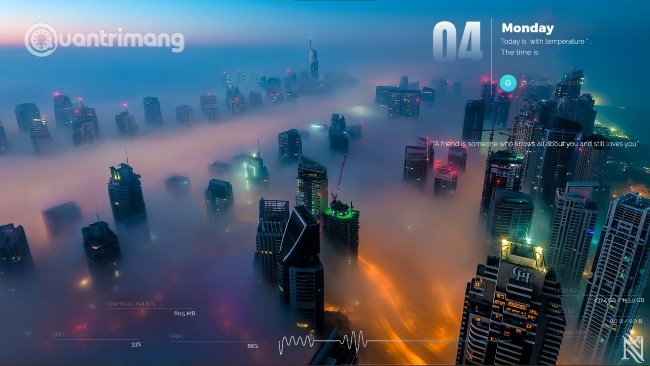
<p style="text-align: justify;">Đây là thành quả của mình sau một lúc mày mò:</p>

<figure>
<div style="text-align: justify;"><img alt="Giao diện Windows 10 sau khi cài đặt theme Amatical" data-i="2" data-src="https://st.quantrimang.com/photos/image/2021/01/04/huong-dan-tao-giao-dien-windows-10-tuyet-dep-voi-bo-theme-amatical-va-phan-mem-rainmeter-2.jpg" data-was-processed="true" height="366" src="https://st.quantrimang.com/photos/image/2021/01/04/huong-dan-tao-giao-dien-windows-10-tuyet-dep-voi-bo-theme-amatical-va-phan-mem-rainmeter-2.jpg" width="650" /></div>

<figcaption>
<div style="text-align: justify;">Giao diện Windows 10 sau khi cài đặt theme Amatical</div>
</figcaption>
</figure>

<p style="text-align: justify;">&nbsp;</p>

<p style="text-align: justify;">Link tải hình nền trong ảnh nếu các bạn thích:</p>

<ul>
	<li style="text-align: justify;">Hình nền Dubai mù sương:</li>
</ul>

<div style="text-align: justify;"><span style="color:rgb(192, 57, 43);"><strong>https://wall.alphacoders.com/big.php?i=745824</strong></span></div>

<p style="text-align: justify;">Chúc các bạn thành công!</p>
		</div>
				<div id="author">
						<p>
				<strong>Nguồn tin:</strong>
				Quantrimang.com
			</p>
		</div>
	</div>
	<div id="footer" class="clearfix">
		<div id="url">
			<strong>URL của bản tin này: </strong><a href="https://www.nguoicodonvn2008.info/vi/news/savefile/phan-mem/huong-dan-tao-giao-dien-windows-10-tuyet-dep-voi-bo-theme-amatical-va-phan-mem-rainmeter-3374.html" title="Hướng dẫn tạo giao diện Windows 10 tuyệt đẹp với bộ theme Amatical và phần mềm Rainmeter">https://www.nguoicodonvn2008.info/vi/news/savefile/phan-mem/huong-dan-tao-giao-dien-windows-10-tuyet-dep-voi-bo-theme-amatical-va-phan-mem-rainmeter-3374.html</a>

		</div>
		<div class="clear"></div>
		<div class="copyright">
			&copy; .&#x3A; Nguoicodonvn2008.info - Cõi lòng người cô đơn &#x3A;.
		</div>
		<div id="contact">
			<a href="mailto:admin@nguoicodonvn2008.info">admin@nguoicodonvn2008.info</a>
		</div>
	</div>
</div>
        <div id="timeoutsess" class="chromeframe">
            Bạn đã không sử dụng Site, <a onclick="timeoutsesscancel();" href="https://nguoicodonvn2008.info/#">Bấm vào đây để duy trì trạng thái đăng nhập</a>. Thời gian chờ: <span id="secField"> 60 </span> giây
        </div>
        <div id="openidResult" class="nv-alert" style="display:none"></div>
        <div id="openidBt" data-result="" data-redirect=""></div>
		</script>
		<div class="car-top">
  <span><img src="https://nguoicodonvn2008.info/themes/default/images/car.png" alt=""></span>
</div>
<script src="https://nguoicodonvn2008.info/assets/js/jquery/jquery.min.js"></script>
<script>var nv_base_siteurl="/",nv_lang_data="vi",nv_lang_interface="vi",nv_name_variable="nv",nv_fc_variable="op",nv_lang_variable="language",nv_module_name="news",nv_func_name="savefile",nv_is_user=0, nv_my_ofs=-4,nv_my_abbr="EDT",nv_cookie_prefix="nv4c_e856T",nv_check_pass_mstime=1738000,nv_area_admin=0,nv_safemode=0,theme_responsive=0,nv_recaptcha_ver=2,nv_recaptcha_sitekey="",nv_recaptcha_type="image",XSSsanitize=1;</script>
<script src="https://nguoicodonvn2008.info/assets/js/language/vi.js"></script>
<script src="https://nguoicodonvn2008.info/assets/js/DOMPurify/purify3.js"></script>
<script src="https://nguoicodonvn2008.info/assets/js/global.js"></script>
<script src="https://nguoicodonvn2008.info/assets/js/site.js"></script>
<script src="https://nguoicodonvn2008.info/themes/default/js/news.js"></script>
<script src="https://nguoicodonvn2008.info/themes/default/js/main.js"></script>
<script src="https://nguoicodonvn2008.info/themes/default/js/custom.js"></script>
<script type="application/ld+json">
        {
            "@context": "https://schema.org",
            "@type": "Organization",
            "url": "https://nguoicodonvn2008.info",
            "logo": "https://nguoicodonvn2008.info/uploads/angel.gif"
        }
        </script>
<script src="https://nguoicodonvn2008.info/themes/default/js/bootstrap.min.js"></script>
<script type="text/javascript">
var $scrolltop = $('.car-top');
$scrolltop.on('click', function () {
    $('html,body').animate({
        scrollTop: 0
    }, 800);
    $(this).addClass("car-run");
    setTimeout(function(){ $scrolltop.removeClass('car-run');}, 1000);
    return false;
});
$(window).on('scroll', function ()
{ 
    if($(window).scrollTop() >= 200)
    {
        $scrolltop.addClass("show");
        $scrolltop.addClass("car-down");
    }
    else
    {
       $scrolltop.removeClass("show");
       setTimeout(function(){ $scrolltop.removeClass('car-down');}, 300);
    }
});
</script>
</body>
</html>