<!DOCTYPE html>
    <html lang="vi" xmlns="http://www.w3.org/1999/xhtml" prefix="og: http://ogp.me/ns#">
    <head>
<title>Đừng tin vào chế độ ẩn danh của Chrome&#33; Hãy sử dụng trình duyệt DuckDuckGo&#33;</title>
<meta name="description" content="Đừng tin vào chế độ ẩn danh của Chrome&#33; Hãy sử dụng trình duyệt DuckDuckGo&#33; - Savefile - Tin Tức -...">
<meta name="author" content=".: Nguoicodonvn2008.info - Cõi lòng người cô đơn :.">
<meta name="copyright" content=".: Nguoicodonvn2008.info - Cõi lòng người cô đơn :. [admin@nguoicodonvn2008.info]">
<meta name="robots" content="index, archive, follow, noodp">
<meta name="googlebot" content="index,archive,follow,noodp">
<meta name="msnbot" content="all,index,follow">
<meta name="generator" content="NukeViet v4.5">
<meta http-equiv="Content-Type" content="text/html; charset=utf-8">
<meta property="og:title" content="Đừng tin vào chế độ ẩn danh của Chrome&#33; Hãy sử dụng trình duyệt DuckDuckGo&#33;">
<meta property="og:type" content="website">
<meta property="og:description" content="Savefile - Tin Tức - https&#x3A;&#x002F;&#x002F;www.nguoicodonvn2008.info&#x002F;vi&#x002F;news&#x002F;savefile&#x002F;phan-mem&#x002F;dung-tin-vao-che-do-an-danh-cua-chrome-hay-su-dung-trinh-duyet-duckduckgo-10612.html">
<meta property="og:site_name" content=".&#x3A; Nguoicodonvn2008.info - Cõi lòng người cô đơn &#x3A;.">
<meta property="og:url" content="https://www.nguoicodonvn2008.info/vi/news/savefile/phan-mem/dung-tin-vao-che-do-an-danh-cua-chrome-hay-su-dung-trinh-duyet-duckduckgo-10612.html">
<link rel="shortcut icon" href="https://nguoicodonvn2008.info/favicon.ico">
<link rel="canonical" href="https://www.nguoicodonvn2008.info/vi/news/savefile/phan-mem/dung-tin-vao-che-do-an-danh-cua-chrome-hay-su-dung-trinh-duyet-duckduckgo-10612.html">
<link rel="alternate" href="https://nguoicodonvn2008.info/vi/news/rss/" title="Tin Tức" type="application/rss+xml">
<link rel="alternate" href="https://nguoicodonvn2008.info/vi/news/rss/karaoke-dual/" title="Tin Tức - Karaoke Dual" type="application/rss+xml">
<link rel="alternate" href="https://nguoicodonvn2008.info/vi/news/rss/nhac-tre/" title="Tin Tức - Nhạc trẻ" type="application/rss+xml">
<link rel="alternate" href="https://nguoicodonvn2008.info/vi/news/rss/tru-tinh/" title="Tin Tức - Trữ tình" type="application/rss+xml">
<link rel="alternate" href="https://nguoicodonvn2008.info/vi/news/rss/nuoc-ngoai/" title="Tin Tức - Nước ngoài" type="application/rss+xml">
<link rel="alternate" href="https://nguoicodonvn2008.info/vi/news/rss/remix/" title="Tin Tức - Remix" type="application/rss+xml">
<link rel="alternate" href="https://nguoicodonvn2008.info/vi/news/rss/tam-su-tinh-yeu/" title="Tin Tức - Tâm sự tình yêu" type="application/rss+xml">
<link rel="alternate" href="https://nguoicodonvn2008.info/vi/news/rss/tho-suu-tam/" title="Tin Tức - Thơ sưu tầm" type="application/rss+xml">
<link rel="alternate" href="https://nguoicodonvn2008.info/vi/news/rss/cuoc-song/" title="Tin Tức - Cuộc sống" type="application/rss+xml">
<link rel="alternate" href="https://nguoicodonvn2008.info/vi/news/rss/phan-mem/" title="Tin Tức - Phần mềm" type="application/rss+xml">
<link rel="alternate" href="https://nguoicodonvn2008.info/vi/news/rss/kien-thuc-may-tinh/" title="Tin Tức - Kiến thức máy tính" type="application/rss+xml">
<link rel="alternate" href="https://nguoicodonvn2008.info/vi/news/rss/hoc-tap/" title="Tin Tức - Học tập" type="application/rss+xml">
<link rel="alternate" href="https://nguoicodonvn2008.info/vi/news/rss/tai-lieu/" title="Tin Tức - Tài liệu" type="application/rss+xml">
<link rel="alternate" href="https://nguoicodonvn2008.info/vi/news/rss/de-thi/" title="Tin Tức - Đề thi" type="application/rss+xml">
<link rel="preload" as="style" href="https://nguoicodonvn2008.info/assets/css/font-awesome.min.css" type="text/css">
<link rel="preload" as="style" href="https://nguoicodonvn2008.info/themes/default/css/bootstrap.non-responsive.css" type="text/css">
<link rel="preload" as="style" href="https://nguoicodonvn2008.info/themes/default/css/style.css" type="text/css">
<link rel="preload" as="style" href="https://nguoicodonvn2008.info/themes/default/css/style.non-responsive.css" type="text/css">
<link rel="preload" as="style" href="https://nguoicodonvn2008.info/themes/default/css/news.css" type="text/css">
<link rel="preload" as="style" href="https://nguoicodonvn2008.info/themes/default/css/custom.css" type="text/css">
<link rel="preload" as="script" href="https://nguoicodonvn2008.info/assets/js/jquery/jquery.min.js" type="text/javascript">
<link rel="preload" as="script" href="https://nguoicodonvn2008.info/assets/js/language/vi.js" type="text/javascript">
<link rel="preload" as="script" href="https://nguoicodonvn2008.info/assets/js/DOMPurify/purify3.js" type="text/javascript">
<link rel="preload" as="script" href="https://nguoicodonvn2008.info/assets/js/global.js" type="text/javascript">
<link rel="preload" as="script" href="https://nguoicodonvn2008.info/assets/js/site.js" type="text/javascript">
<link rel="preload" as="script" href="https://nguoicodonvn2008.info/themes/default/js/news.js" type="text/javascript">
<link rel="preload" as="script" href="https://nguoicodonvn2008.info/themes/default/js/main.js" type="text/javascript">
<link rel="preload" as="script" href="https://nguoicodonvn2008.info/themes/default/js/custom.js" type="text/javascript">
<link rel="preload" as="script" href="https://nguoicodonvn2008.info/themes/default/js/bootstrap.min.js" type="text/javascript">
<link rel="stylesheet" href="https://nguoicodonvn2008.info/assets/css/font-awesome.min.css">
<link rel="stylesheet" href="https://nguoicodonvn2008.info/themes/default/css/bootstrap.non-responsive.css">
<link rel="stylesheet" href="https://nguoicodonvn2008.info/themes/default/css/style.css">
<link rel="stylesheet" href="https://nguoicodonvn2008.info/themes/default/css/style.non-responsive.css">
<link rel="StyleSheet" href="https://nguoicodonvn2008.info/themes/default/css/news.css">
<link rel="stylesheet" href="https://nguoicodonvn2008.info/themes/default/css/custom.css">
<style type="text/css">
	body{background: #fff;}
</style>
    </head>
    <body>
<div id="print">
	<div id="hd_print">
		<h2 class="pull-left">.&#x3A; Nguoicodonvn2008.info - Cõi lòng người cô đơn &#x3A;.</h2>
		<p class="pull-right"><a title=".&#x3A; Nguoicodonvn2008.info - Cõi lòng người cô đơn &#x3A;." href="https://nguoicodonvn2008.info/">https://nguoicodonvn2008.info</a></p>
	</div>
	<div class="clear"></div>
	<hr />
	<div id="content">
		<h1>Đừng tin vào chế độ ẩn danh của Chrome&#33; Hãy sử dụng trình duyệt DuckDuckGo&#33;</h1>
		<ul class="list-inline">
			<li>Thứ sáu - 20/06/2025 23:41</li>
			<li class="hidden-print txtrequired"><em class="fa fa-print">&nbsp;</em><a title="In ra" href="javascript:;" onclick="window.print()">In ra</a></li>
			<li class="hidden-print txtrequired"><em class="fa fa-power-off">&nbsp;</em><a title="Đóng cửa sổ này" href="javascript:;" onclick="window.close()">Đóng cửa sổ này</a></li>
		</ul>
		<div class="clear"></div>
		<div id="hometext">
		</div>
				<div class="imghome">
			<img alt="Đừng tin vào chế độ ẩn danh của Chrome&#33; Hãy sử dụng trình duyệt DuckDuckGo&#33;" src="https://st.quantrimang.com/photos/image/2025/06/20/dung-duckduckgo-thay-che-do-an-danh-chrome-1.jpg" width="460" class="img-thumbnail" />
		</div>
		<div class="clear"></div>
		<div id="bodytext" class="clearfix">
			<p style="text-align: justify;">Hầu như mọi hành động bạn thực hiện trên&nbsp;Internet&nbsp;đều được theo dõi. Chế độ ẩn danh của&nbsp;Google Chrome&nbsp;giúp bạn duyệt Internet ẩn danh, nhưng đừng tin tưởng vào nó vì trình duyệt DuckDuckGo sẽ giúp duyệt ẩn danh tốt hơn nhiều.</p>

<h2 style="text-align: justify;">Tại sao nên sử dụng trình duyệt DuckDuckGo?</h2>

<p style="text-align: justify;">Thay vì Chrome, hãy sử dụng trình duyệt&nbsp;DuckDuckGo&nbsp;bất cứ khi nào bạn không muốn bị theo dõi trực tuyến (mà thực tế là hầu hết thời gian đều như vậy!). DuckDuckGo vốn đã là một công cụ tìm kiếm tập trung vào quyền riêng tư phổ biến và là một giải pháp thay thế khả thi cho&nbsp;Google. Tuy nhiên, trình duyệt DuckDuckGo còn đưa điều này lên một tầm cao mới.<br />
<span style="color:rgb(192, 57, 43);"><strong>quantrimang.com/download/duckduckgo-183159</strong></span></p>

<h3 style="text-align: justify;">Thiết lập quyền riêng tư theo mặc định</h3>

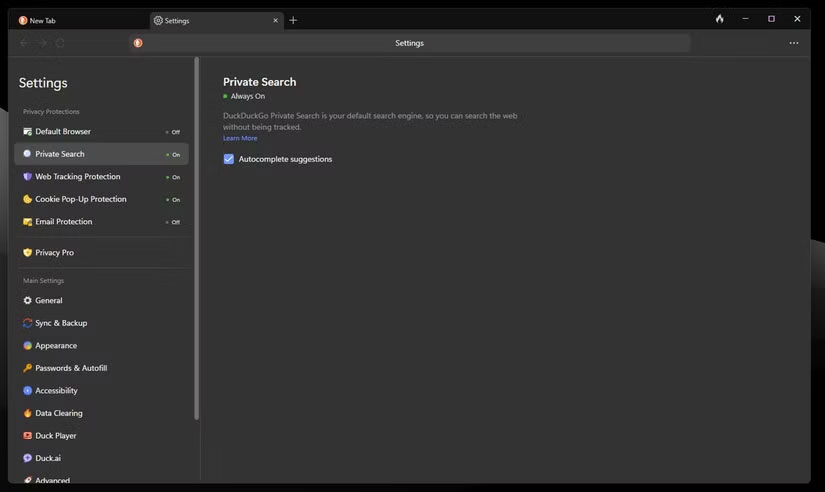
<p style="text-align: justify;">Một trong những điểm mạnh lớn nhất của DuckDuckGo là nó được thiết lập để bảo vệ quyền riêng tư ngay từ đầu. Điều này có nghĩa là bạn không phải đi khắp nơi can thiệp vào các cài đặt. Thật vậy, bạn có thể làm cho Chrome an toàn hơn nhiều bằng cách điều chỉnh các cài đặt phù hợp và cài đặt một vài tiện ích mở rộng, nhưng DuckDuckGo cung cấp tất cả những tính năng này được tích hợp sẵn và bật theo mặc định.</p>

<figure>
<div style="text-align: justify;"><img alt="Cài đặt quyền riêng tư trong trình duyệt DuckDuckGo" data-i="0" data-src="https://st.quantrimang.com/photos/image/2025/06/20/dung-duckduckgo-thay-che-do-an-danh-chrome-1.jpg" data-was-processed="true" height="492" src="https://st.quantrimang.com/photos/image/2025/06/20/dung-duckduckgo-thay-che-do-an-danh-chrome-1.jpg" width="825" /></div>

<figcaption>
<div style="text-align: justify;">Cài đặt quyền riêng tư trong trình duyệt DuckDuckGo</div>
</figcaption>
</figure>

<p style="text-align: justify;">Bạn cũng được bảo vệ khỏi việc theo dõi quảng cáo được cá nhân hóa, ít nhất là khi bạn sử dụng công cụ tìm kiếm DuckDuckGo. Bảo vệ quyền riêng tư cũng dễ thiết lập, với tất cả các cài đặt chính được đánh dấu ở đầu menu cài đặt với những giải thích rõ ràng. Nó thậm chí còn có các bản tóm tắt AI không phô trương ưu tiên quyền riêng tư của người dùng.</p>

<h3 style="text-align: justify;">Xóa lịch sử chỉ bằng một cú nhấp chuột</h3>

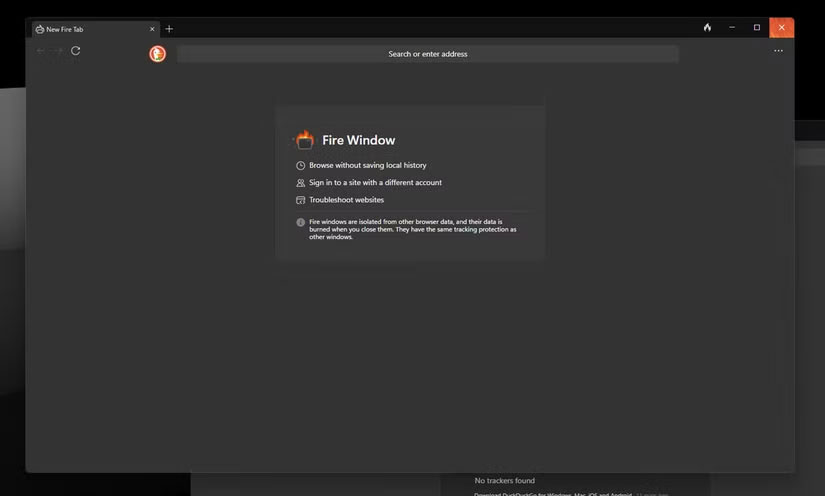
<p style="text-align: justify;">Có lẽ tính năng nổi bật nhất của trình duyệt DuckDuckGo là nút Fire. Không giống như Chrome, nơi bạn thường phải điều hướng qua một số menu để xóa dữ liệu duyệt web của mình, DuckDuckGo đặt tính năng này ngay bên cạnh thanh&nbsp;<a data-type="internal" href="https://quantrimang.com/cong-nghe/url-la-gi-158090" title="URL là gì? Cấu trúc của URL">URL</a>&nbsp;của bạn. Chỉ cần nhấp vào nút và tất cả dữ liệu duyệt web, bao gồm lịch sử,&nbsp;<a data-type="internal" href="https://quantrimang.com/cong-nghe/internet-cookies-lam-viec-nhu-the-nao-70733" title="Cookie là gì? Cookie làm việc như thế nào?">cookie</a>, dữ liệu được lưu trong cache và quyền của trang web, sẽ bị xóa.</p>

<p style="text-align: justify;">Tính năng này cho phép bạn xóa mọi dấu vết hoạt động Internet trên thiết bị chỉ bằng một cú nhấp chuột. Tính năng này cũng hữu ích nếu bạn thường xuyên chuyển đổi giữa nhiều tài khoản trên cùng một trang web và không muốn gặp rắc rối khi thiết lập từng profile trình duyệt. Tính năng này cũng khác với chế độ ẩn danh của Chrome vì về cơ bản, nó sẽ reset toàn bộ trình duyệt thay vì ngăn dữ liệu được lưu cục bộ.</p>

<figure>
<div style="text-align: justify;"><img alt="Cửa sổ Fire trong trình duyệt DuckDuckGo" data-i="1" data-src="https://st.quantrimang.com/photos/image/2025/06/20/dung-duckduckgo-thay-che-do-an-danh-chrome-2.jpg" data-was-processed="true" height="496" src="https://st.quantrimang.com/photos/image/2025/06/20/dung-duckduckgo-thay-che-do-an-danh-chrome-2.jpg" width="825" /></div>

<figcaption>
<div style="text-align: justify;">Cửa sổ Fire trong trình duyệt DuckDuckGo</div>
</figcaption>
</figure>

<p style="text-align: justify;">Có một tùy chọn &quot;fireproof&quot; các trang web cụ thể để chúng không bị ảnh hưởng bởi nút Fire. Ngoài ra, DuckDuckGo còn có tùy chọn Fire Window riêng biệt cho phép bạn duyệt mà không lưu bất kỳ lịch sử cục bộ nào. Các cửa sổ này cũng được tách biệt khỏi phần còn lại của trình duyệt và mọi dữ liệu được thu thập trong phiên duyệt sẽ được xóa chủ động sau khi bạn đóng tất cả các cửa sổ Fire.</p>

<h3 style="text-align: justify;">Nhẹ và hoạt động tốt với VPN</h3>

<p style="text-align: justify;">Cuối cùng nhưng không kém phần quan trọng, trình duyệt DuckDuckGo cực kỳ nhẹ so với các tính năng mà nó cung cấp. Chrome có thể trở thành một trình duyệt ngốn bộ nhớ rất nhanh, nhưng khi sử dụng DuckDuckGo, bạn thực sự phải mở một số lượng tab không hợp lý để trình duyệt tiêu thụ nhiều tài nguyên hệ thống.</p>

<p style="text-align: justify;">Ngoài việc không đẩy hệ thống của bạn đến giới hạn như một game AAA, sự ảnh hưởng không đáng kể của DuckDuckGo cũng chuyển thành hiệu suất duyệt rất nhanh. Tuy nhiên, nếu bạn xử lý nhiều khối lượng công việc đòi hỏi nhiều đồ họa hoặc sử dụng các ứng dụng web phức tạp, thì bản chất khá đơn giản của trình duyệt có thể hạn chế hiệu suất. Bất kể thế nào, nó rất tuyệt vời cho việc sử dụng hàng ngày và bạn sẽ không nhận thấy bất kỳ sự cố nào với các công cụ thông thường.</p>

<p style="text-align: justify;">Trình duyệt DuckDuckGo cũng được xây dựng từ đầu để tương thích với nhiều&nbsp;VPN&nbsp;khác nhau. Bạn có thể chọn đăng ký DuckDuckGo Privacy Pro, bao gồm VPN, bảo vệ chống trộm danh tính và công cụ thông tin cá nhân. Tuy nhiên, trình duyệt này hoạt động khá tốt với các VPN, ứng dụng và tiện ích mở rộng của bên thứ ba. Chrome thường gặp sự cố khi bạn ngẫu nhiên khởi động VPN giữa phiên duyệt web vì cần truy cập một trang web từ một địa chỉ IP khác hoặc không muốn bị theo dõi.</p>

<p style="text-align: justify;">Chrome hầu như luôn mất một thời gian trước khi có thể bắt đầu hiển thị đúng các trang web đã thay đổi. Trong một số trường hợp, trình duyệt thậm chí không hiển thị các trang web khi được kết nối với VPN- một vấn đề mà bạn sẽ không gặp phải với DuckDuckGo.</p>

<p style="text-align: justify;">Nhìn chung, trình duyệt an toàn hơn nhiều khi nói đến việc ẩn danh dấu vết kỹ thuật số của mình. Bạn không cần phải can thiệp vào cài đặt, cài đặt tiện ích mở rộng hoặc thậm chí lo lắng về việc phải chuyển qua các menu để tìm cài đặt quan trọng. Nếu bạn từng dựa vào chế độ ẩn danh của Chrome để bảo vệ mình trực tuyến, thì đã đến lúc thử DuckDuckGo.</p>
		</div>
				<div id="author">
						<p>
				<strong>Nguồn tin:</strong>
				Quantrimang.com:
			</p>
		</div>
	</div>
	<div id="footer" class="clearfix">
		<div id="url">
			<strong>URL của bản tin này: </strong><a href="https://www.nguoicodonvn2008.info/vi/news/savefile/phan-mem/dung-tin-vao-che-do-an-danh-cua-chrome-hay-su-dung-trinh-duyet-duckduckgo-10612.html" title="Đừng tin vào chế độ ẩn danh của Chrome&#33; Hãy sử dụng trình duyệt DuckDuckGo&#33;">https://www.nguoicodonvn2008.info/vi/news/savefile/phan-mem/dung-tin-vao-che-do-an-danh-cua-chrome-hay-su-dung-trinh-duyet-duckduckgo-10612.html</a>

		</div>
		<div class="clear"></div>
		<div class="copyright">
			&copy; .&#x3A; Nguoicodonvn2008.info - Cõi lòng người cô đơn &#x3A;.
		</div>
		<div id="contact">
			<a href="mailto:admin@nguoicodonvn2008.info">admin@nguoicodonvn2008.info</a>
		</div>
	</div>
</div>
        <div id="timeoutsess" class="chromeframe">
            Bạn đã không sử dụng Site, <a onclick="timeoutsesscancel();" href="https://nguoicodonvn2008.info/#">Bấm vào đây để duy trì trạng thái đăng nhập</a>. Thời gian chờ: <span id="secField"> 60 </span> giây
        </div>
        <div id="openidResult" class="nv-alert" style="display:none"></div>
        <div id="openidBt" data-result="" data-redirect=""></div>
		</script>
		<div class="car-top">
  <span><img src="https://nguoicodonvn2008.info/themes/default/images/car.png" alt=""></span>
</div>
<script src="https://nguoicodonvn2008.info/assets/js/jquery/jquery.min.js"></script>
<script>var nv_base_siteurl="/",nv_lang_data="vi",nv_lang_interface="vi",nv_name_variable="nv",nv_fc_variable="op",nv_lang_variable="language",nv_module_name="news",nv_func_name="savefile",nv_is_user=0, nv_my_ofs=-4,nv_my_abbr="EDT",nv_cookie_prefix="nv4c_e856T",nv_check_pass_mstime=1738000,nv_area_admin=0,nv_safemode=0,theme_responsive=0,nv_recaptcha_ver=2,nv_recaptcha_sitekey="",nv_recaptcha_type="image",XSSsanitize=1;</script>
<script src="https://nguoicodonvn2008.info/assets/js/language/vi.js"></script>
<script src="https://nguoicodonvn2008.info/assets/js/DOMPurify/purify3.js"></script>
<script src="https://nguoicodonvn2008.info/assets/js/global.js"></script>
<script src="https://nguoicodonvn2008.info/assets/js/site.js"></script>
<script src="https://nguoicodonvn2008.info/themes/default/js/news.js"></script>
<script src="https://nguoicodonvn2008.info/themes/default/js/main.js"></script>
<script src="https://nguoicodonvn2008.info/themes/default/js/custom.js"></script>
<script type="application/ld+json">
        {
            "@context": "https://schema.org",
            "@type": "Organization",
            "url": "https://nguoicodonvn2008.info",
            "logo": "https://nguoicodonvn2008.info/uploads/angel.gif"
        }
        </script>
<script src="https://nguoicodonvn2008.info/themes/default/js/bootstrap.min.js"></script>
<script type="text/javascript">
var $scrolltop = $('.car-top');
$scrolltop.on('click', function () {
    $('html,body').animate({
        scrollTop: 0
    }, 800);
    $(this).addClass("car-run");
    setTimeout(function(){ $scrolltop.removeClass('car-run');}, 1000);
    return false;
});
$(window).on('scroll', function ()
{ 
    if($(window).scrollTop() >= 200)
    {
        $scrolltop.addClass("show");
        $scrolltop.addClass("car-down");
    }
    else
    {
       $scrolltop.removeClass("show");
       setTimeout(function(){ $scrolltop.removeClass('car-down');}, 300);
    }
});
</script>
</body>
</html>