<!DOCTYPE html>
    <html lang="vi" xmlns="http://www.w3.org/1999/xhtml" prefix="og: http://ogp.me/ns#">
    <head>
<title>Cách sử dụng AppLocker để cho phép hoặc chặn các file thực thi chạy trong Windows 10</title>
<meta name="description" content="Cách sử dụng AppLocker để cho phép hoặc chặn các file thực thi chạy trong Windows 10 - Savefile - Tin Tức -...">
<meta name="author" content=".: Nguoicodonvn2008.info - Cõi lòng người cô đơn :.">
<meta name="copyright" content=".: Nguoicodonvn2008.info - Cõi lòng người cô đơn :. [admin@nguoicodonvn2008.info]">
<meta name="robots" content="index, archive, follow, noodp">
<meta name="googlebot" content="index,archive,follow,noodp">
<meta name="msnbot" content="all,index,follow">
<meta name="generator" content="NukeViet v4.5">
<meta http-equiv="Content-Type" content="text/html; charset=utf-8">
<meta property="og:title" content="Cách sử dụng AppLocker để cho phép hoặc chặn các file thực thi chạy trong Windows 10">
<meta property="og:type" content="website">
<meta property="og:description" content="Savefile - Tin Tức -...">
<meta property="og:site_name" content=".&#x3A; Nguoicodonvn2008.info - Cõi lòng người cô đơn &#x3A;.">
<meta property="og:url" content="https://www.nguoicodonvn2008.info/vi/news/savefile/phan-mem/cach-su-dung-applocker-de-cho-phep-hoac-chan-cac-file-thuc-thi-chay-trong-windows-10-3797.html">
<link rel="shortcut icon" href="https://nguoicodonvn2008.info/favicon.ico">
<link rel="canonical" href="https://www.nguoicodonvn2008.info/vi/news/savefile/phan-mem/cach-su-dung-applocker-de-cho-phep-hoac-chan-cac-file-thuc-thi-chay-trong-windows-10-3797.html">
<link rel="alternate" href="https://nguoicodonvn2008.info/vi/news/rss/" title="Tin Tức" type="application/rss+xml">
<link rel="alternate" href="https://nguoicodonvn2008.info/vi/news/rss/karaoke-dual/" title="Tin Tức - Karaoke Dual" type="application/rss+xml">
<link rel="alternate" href="https://nguoicodonvn2008.info/vi/news/rss/nhac-tre/" title="Tin Tức - Nhạc trẻ" type="application/rss+xml">
<link rel="alternate" href="https://nguoicodonvn2008.info/vi/news/rss/tru-tinh/" title="Tin Tức - Trữ tình" type="application/rss+xml">
<link rel="alternate" href="https://nguoicodonvn2008.info/vi/news/rss/nuoc-ngoai/" title="Tin Tức - Nước ngoài" type="application/rss+xml">
<link rel="alternate" href="https://nguoicodonvn2008.info/vi/news/rss/remix/" title="Tin Tức - Remix" type="application/rss+xml">
<link rel="alternate" href="https://nguoicodonvn2008.info/vi/news/rss/tam-su-tinh-yeu/" title="Tin Tức - Tâm sự tình yêu" type="application/rss+xml">
<link rel="alternate" href="https://nguoicodonvn2008.info/vi/news/rss/tho-suu-tam/" title="Tin Tức - Thơ sưu tầm" type="application/rss+xml">
<link rel="alternate" href="https://nguoicodonvn2008.info/vi/news/rss/cuoc-song/" title="Tin Tức - Cuộc sống" type="application/rss+xml">
<link rel="alternate" href="https://nguoicodonvn2008.info/vi/news/rss/phan-mem/" title="Tin Tức - Phần mềm" type="application/rss+xml">
<link rel="alternate" href="https://nguoicodonvn2008.info/vi/news/rss/kien-thuc-may-tinh/" title="Tin Tức - Kiến thức máy tính" type="application/rss+xml">
<link rel="alternate" href="https://nguoicodonvn2008.info/vi/news/rss/hoc-tap/" title="Tin Tức - Học tập" type="application/rss+xml">
<link rel="alternate" href="https://nguoicodonvn2008.info/vi/news/rss/tai-lieu/" title="Tin Tức - Tài liệu" type="application/rss+xml">
<link rel="alternate" href="https://nguoicodonvn2008.info/vi/news/rss/de-thi/" title="Tin Tức - Đề thi" type="application/rss+xml">
<link rel="preload" as="style" href="https://nguoicodonvn2008.info/assets/css/font-awesome.min.css" type="text/css">
<link rel="preload" as="style" href="https://nguoicodonvn2008.info/themes/default/css/bootstrap.non-responsive.css" type="text/css">
<link rel="preload" as="style" href="https://nguoicodonvn2008.info/themes/default/css/style.css" type="text/css">
<link rel="preload" as="style" href="https://nguoicodonvn2008.info/themes/default/css/style.non-responsive.css" type="text/css">
<link rel="preload" as="style" href="https://nguoicodonvn2008.info/themes/default/css/news.css" type="text/css">
<link rel="preload" as="style" href="https://nguoicodonvn2008.info/themes/default/css/custom.css" type="text/css">
<link rel="preload" as="script" href="https://nguoicodonvn2008.info/assets/js/jquery/jquery.min.js" type="text/javascript">
<link rel="preload" as="script" href="https://nguoicodonvn2008.info/assets/js/language/vi.js" type="text/javascript">
<link rel="preload" as="script" href="https://nguoicodonvn2008.info/assets/js/DOMPurify/purify3.js" type="text/javascript">
<link rel="preload" as="script" href="https://nguoicodonvn2008.info/assets/js/global.js" type="text/javascript">
<link rel="preload" as="script" href="https://nguoicodonvn2008.info/assets/js/site.js" type="text/javascript">
<link rel="preload" as="script" href="https://nguoicodonvn2008.info/themes/default/js/news.js" type="text/javascript">
<link rel="preload" as="script" href="https://nguoicodonvn2008.info/themes/default/js/main.js" type="text/javascript">
<link rel="preload" as="script" href="https://nguoicodonvn2008.info/themes/default/js/custom.js" type="text/javascript">
<link rel="preload" as="script" href="https://nguoicodonvn2008.info/themes/default/js/bootstrap.min.js" type="text/javascript">
<link rel="stylesheet" href="https://nguoicodonvn2008.info/assets/css/font-awesome.min.css">
<link rel="stylesheet" href="https://nguoicodonvn2008.info/themes/default/css/bootstrap.non-responsive.css">
<link rel="stylesheet" href="https://nguoicodonvn2008.info/themes/default/css/style.css">
<link rel="stylesheet" href="https://nguoicodonvn2008.info/themes/default/css/style.non-responsive.css">
<link rel="StyleSheet" href="https://nguoicodonvn2008.info/themes/default/css/news.css">
<link rel="stylesheet" href="https://nguoicodonvn2008.info/themes/default/css/custom.css">
<style type="text/css">
	body{background: #fff;}
</style>
    </head>
    <body>
<div id="print">
	<div id="hd_print">
		<h2 class="pull-left">.&#x3A; Nguoicodonvn2008.info - Cõi lòng người cô đơn &#x3A;.</h2>
		<p class="pull-right"><a title=".&#x3A; Nguoicodonvn2008.info - Cõi lòng người cô đơn &#x3A;." href="https://nguoicodonvn2008.info/">https://nguoicodonvn2008.info</a></p>
	</div>
	<div class="clear"></div>
	<hr />
	<div id="content">
		<h1>Cách sử dụng AppLocker để cho phép hoặc chặn các file thực thi chạy trong Windows 10</h1>
		<ul class="list-inline">
			<li>Thứ hai - 22/03/2021 00:54</li>
			<li class="hidden-print txtrequired"><em class="fa fa-print">&nbsp;</em><a title="In ra" href="javascript:;" onclick="window.print()">In ra</a></li>
			<li class="hidden-print txtrequired"><em class="fa fa-power-off">&nbsp;</em><a title="Đóng cửa sổ này" href="javascript:;" onclick="window.close()">Đóng cửa sổ này</a></li>
		</ul>
		<div class="clear"></div>
		<div id="hometext">
		</div>
				<div class="imghome">
			<img alt="Cách sử dụng AppLocker để cho phép hoặc chặn các file thực thi chạy trong Windows 10" src="https://st.quantrimang.com/photos/image/2021/03/18/dung-applocker-cho-phep-chan-file-thuc-thi-26.jpg" width="460" class="img-thumbnail" />
		</div>
		<div class="clear"></div>
		<div id="bodytext" class="clearfix">
			<p style="text-align: justify;">AppLocker giúp bạn kiểm soát ứng dụng và file nào người dùng có thể chạy. Chúng bao gồm các file thực thi, script, file Windows Installer, thư viện liên kết động (DLL), ứng dụng Microsoft Store và trình cài đặt những ứng dụng này.</p>

<p style="text-align: justify;">AppLocker xác định các quy tắc thực thi dưới dạng bất kỳ file nào có phần mở rộng .exe và .com được liên kết với một ứng dụng. Bởi vì tất cả các quy tắc mặc định cho bộ sưu tập quy tắc thực thi đều dựa trên những đường dẫn thư mục, nên tất cả các file trong những đường dẫn đó sẽ được cho phép. Bảng sau liệt kê các quy tắc mặc định có sẵn cho bộ sưu tập quy tắc thực thi.</p>

<div style="text-align: justify;">&nbsp;</div>

<p style="text-align: justify;">Bất kỳ file thực thi nào không được phép theo quy tắc mặc định bên dưới sẽ tự động bị chặn theo mặc định trừ khi bạn tạo quy tắc mới để cho phép file đó đối với một người dùng hoặc nhóm.</p>

<p style="text-align: justify;">Nếu bạn muốn chặn một file thực thi được cho phép bởi các quy tắc mặc định bên dưới, bạn sẽ cần tạo một quy tắc mới để chặn (từ chối) file đó đối với một người dùng hoặc nhóm.</p>

<p style="text-align: justify;">Hướng dẫn này sẽ chỉ cho bạn cách sử dụng AppLocker để cho phép hoặc chặn các file thực thi được chỉ định (.exe và .com) chạy cho tất cả hoặc người dùng và nhóm cụ thể trong Windows 10 Enterprise và Windows 10 Education.</p>

<h2 style="text-align: justify;">Cách sử dụng AppLocker để cho phép hoặc chặn các file thực thi chạy trong Windows 10</h2>

<p style="text-align: justify;">Đây là cách thực hiện:</p>

<p style="text-align: justify;">1.&nbsp;<a href="https://quantrimang.com/huong-dan-mo-command-prompt-duoi-quyen-admin-tren-windows-8-va-10-119884" title="Cách mở và chạy cmd với quyền Admin trên Windows">Mở Command Prompt với quyền admin</a>.</p>

<p style="text-align: justify;">2. Sao chép và dán lệnh bên dưới vào&nbsp;<a href="https://quantrimang.com/huong-dan-su-dung-command-prompt-85301" title="Hướng dẫn sử dụng Command Prompt">Command Prompt</a>, nhấn&nbsp;<strong>Enter</strong>&nbsp;và đóng&nbsp;<strong>Command Prompt</strong>&nbsp;khi nó kết thúc.</p>

<p style="text-align: justify;">Lệnh này để đảm bảo service&nbsp;<strong>Application Identity</strong>&nbsp;được kích hoạt, đặt thành&nbsp;<strong>Automatic</strong>&nbsp;và đang chạy. AppLocker không thể thực thi các quy tắc nếu service này không chạy.</p>

<pre id="pre0">
<code>sc config &quot;AppIDSvc&quot; start=auto &amp; net start &quot;AppIDSvc&quot;</code></pre>

<p style="text-align: justify;">3. Mở&nbsp;<strong>Local Security Policy</strong>&nbsp;(<strong>secpol.msc</strong>).</p>

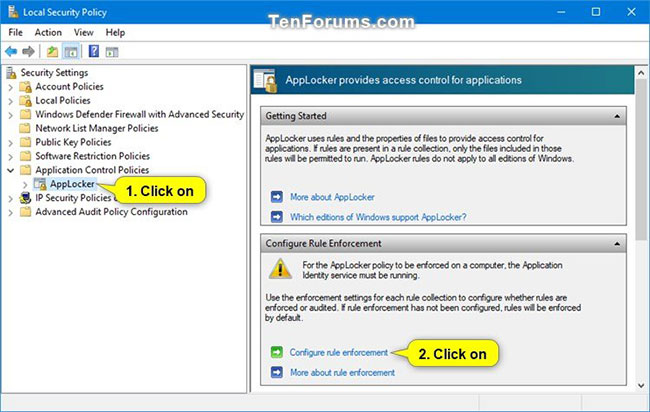
<p style="text-align: justify;">4. Mở rộng&nbsp;<strong>Application Control Policies</strong>&nbsp;trong ngăn bên trái của cửa sổ&nbsp;<strong>Local Security Policy</strong>, nhấp vào&nbsp;<strong>AppLocker</strong>&nbsp;và nhấn vào liên kết&nbsp;<strong>Configure rule enforcement</strong>&nbsp;ở phía bên phải.</p>

<figure>
<div style="text-align: justify;"><img alt="Nhấn vào liên kết Configure rule enforcement" data-i="0" data-src="https://st.quantrimang.com/photos/image/2021/03/18/dung-applocker-cho-phep-chan-file-thuc-thi-1.jpg" data-was-processed="true" height="412" src="https://st.quantrimang.com/photos/image/2021/03/18/dung-applocker-cho-phep-chan-file-thuc-thi-1.jpg" width="650" /></div>

<figcaption>
<div style="text-align: justify;">Nhấn vào liên kết Configure rule enforcement</div>
</figcaption>
</figure>

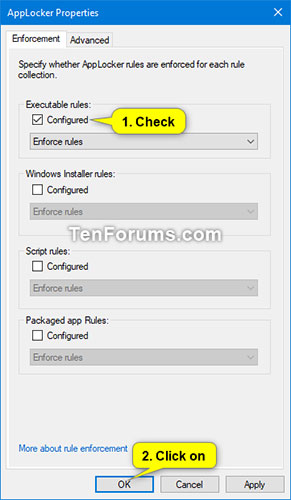
<p style="text-align: justify;">5. Chọn hộp&nbsp;<strong>Configured</strong>&nbsp;trong&nbsp;<strong>Executable rules</strong>&nbsp;và nhấn&nbsp;<strong>OK.</strong></p>

<figure>
<div style="text-align: justify;"><img alt="Chọn hộp Configured trong Executable rules" data-i="1" data-src="https://st.quantrimang.com/photos/image/2021/03/18/dung-applocker-cho-phep-chan-file-thuc-thi-2.jpg" data-was-processed="true" height="500" src="https://st.quantrimang.com/photos/image/2021/03/18/dung-applocker-cho-phep-chan-file-thuc-thi-2.jpg" width="291" /></div>

<figcaption>
<div style="text-align: justify;">Chọn hộp Configured trong Executable rules</div>
</figcaption>
</figure>

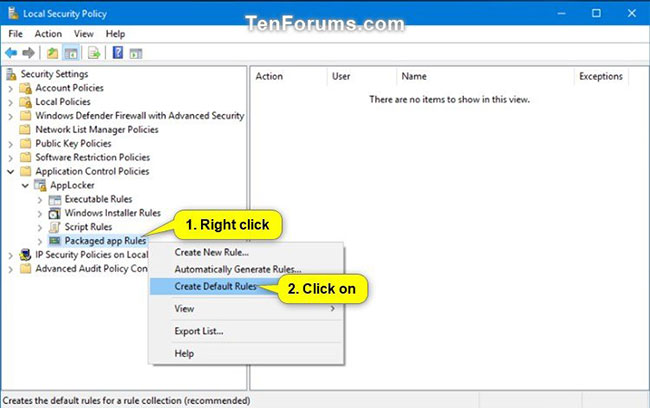
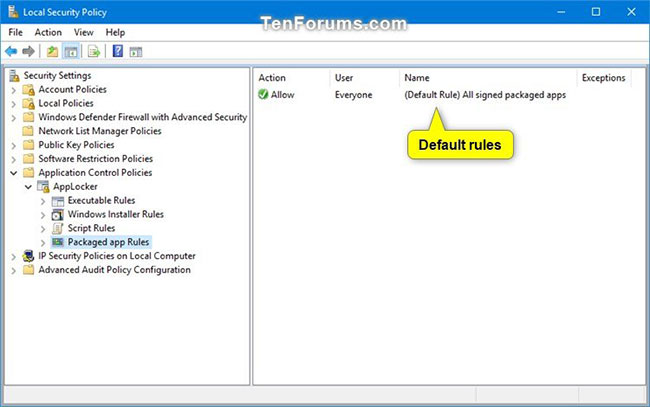
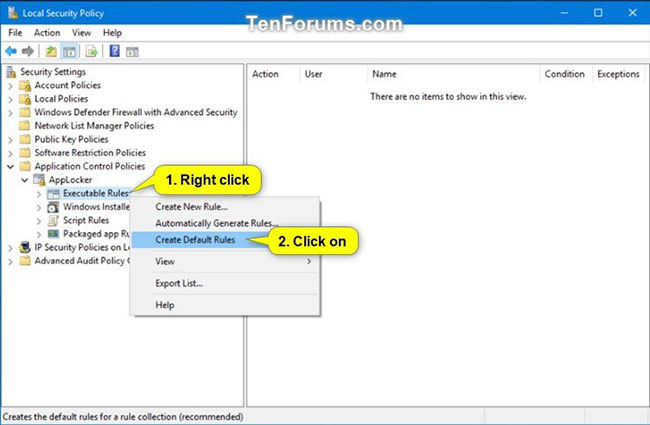
<p style="text-align: justify;">6. Mở rộng AppLocker đang mở trong ngăn bên trái của cửa sổ&nbsp;<strong>Local Security Policy</strong>, nhấp vào&nbsp;<strong>Packaged app Rules</strong>, nhấp chuột phải hoặc nhấn và giữ vào&nbsp;<strong>Packaged app Rules</strong>, rồi chọn&nbsp;<strong>Create Default Rules</strong>.</p>

<p style="text-align: justify;">Nếu bước này không được thực hiện, AppLocker sẽ chặn tất cả các ứng dụng Microsoft Store chạy.</p>

<figure>
<div style="text-align: justify;"><img alt="Nhấp vào Packaged app Rules" data-i="2" data-src="https://st.quantrimang.com/photos/image/2021/03/18/dung-applocker-cho-phep-chan-file-thuc-thi-3.jpg" data-was-processed="true" height="408" src="https://st.quantrimang.com/photos/image/2021/03/18/dung-applocker-cho-phep-chan-file-thuc-thi-3.jpg" width="650" /></div>
</figure>

<figure>
<div style="text-align: justify;"><img alt="Quy tắc mặc định" data-i="3" data-src="https://st.quantrimang.com/photos/image/2021/03/18/dung-applocker-cho-phep-chan-file-thuc-thi-4.jpg" data-was-processed="true" height="407" src="https://st.quantrimang.com/photos/image/2021/03/18/dung-applocker-cho-phep-chan-file-thuc-thi-4.jpg" width="650" /></div>
</figure>

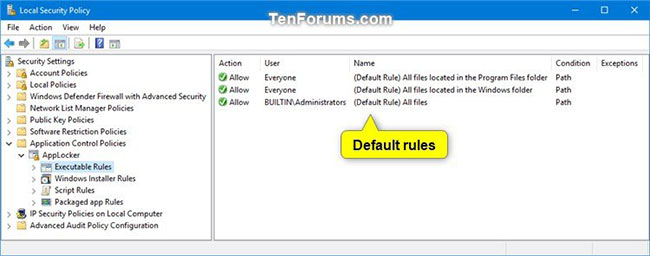
<p style="text-align: justify;">7. Nhấp vào&nbsp;<strong>Executable Rules</strong>, nhấp chuột phải hoặc nhấn và giữ vào&nbsp;<strong>Executable Rules</strong>, rồi chọn&nbsp;<strong>Create Default Rules</strong>.</p>

<p style="text-align: justify;">Nếu bước này không được thực hiện, AppLocker sẽ chặn tất cả các file thực thi chạy theo mặc định trừ khi được cho phép bởi một quy tắc đã tạo.</p>

<figure>
<div style="text-align: justify;"><img alt="Chọn Create Default Rules" data-i="4" data-src="https://st.quantrimang.com/photos/image/2021/03/18/dung-applocker-cho-phep-chan-file-thuc-thi-5.jpg" data-was-processed="true" height="425" src="https://st.quantrimang.com/photos/image/2021/03/18/dung-applocker-cho-phep-chan-file-thuc-thi-5.jpg" width="650" /></div>
</figure>

<figure>
<div style="text-align: justify;"><img alt="Quy tắc mặc định" data-i="5" data-src="https://st.quantrimang.com/photos/image/2021/03/18/dung-applocker-cho-phep-chan-file-thuc-thi-6.jpg" data-was-processed="true" height="256" src="https://st.quantrimang.com/photos/image/2021/03/18/dung-applocker-cho-phep-chan-file-thuc-thi-6.jpg" width="650" /></div>
</figure>

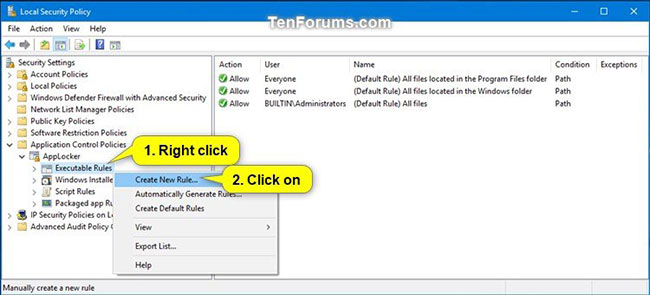
<p style="text-align: justify;">8. Nhấp chuột phải hoặc nhấn và giữ vào&nbsp;<strong>Executable Rules</strong>, nhấp vào&nbsp;<strong>Create New Rule</strong>.</p>

<figure>
<div style="text-align: justify;"><img alt="Nhấp vào Create New Rule" data-i="6" data-src="https://st.quantrimang.com/photos/image/2021/03/18/dung-applocker-cho-phep-chan-file-thuc-thi-7.jpg" data-was-processed="true" height="295" src="https://st.quantrimang.com/photos/image/2021/03/18/dung-applocker-cho-phep-chan-file-thuc-thi-7.jpg" width="650" /></div>

<figcaption>
<div style="text-align: justify;">Nhấp vào Create New Rule</div>
</figcaption>
</figure>

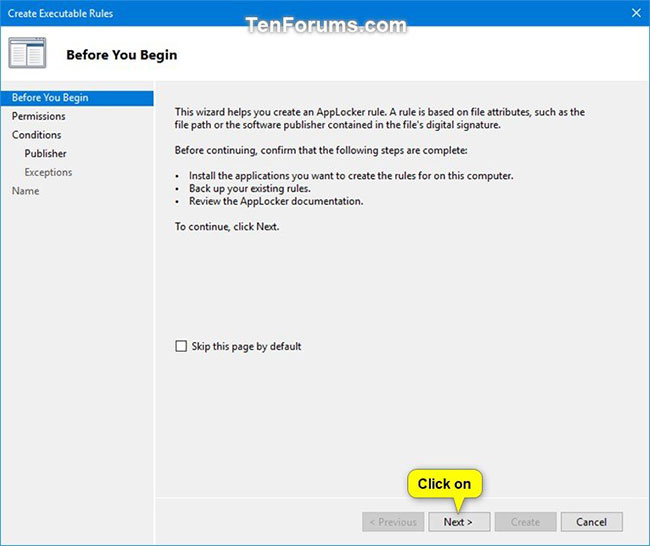
<p style="text-align: justify;">9. Nhấp vào&nbsp;<strong>Next</strong>.</p>

<figure>
<div style="text-align: justify;"><img alt="Nhấp vào Next" data-i="7" data-src="https://st.quantrimang.com/photos/image/2021/03/18/dung-applocker-cho-phep-chan-file-thuc-thi-8.jpg" data-was-processed="true" height="546" src="https://st.quantrimang.com/photos/image/2021/03/18/dung-applocker-cho-phep-chan-file-thuc-thi-8.jpg" width="650" /></div>

<figcaption>
<div style="text-align: justify;">Nhấp vào Next</div>
</figcaption>
</figure>

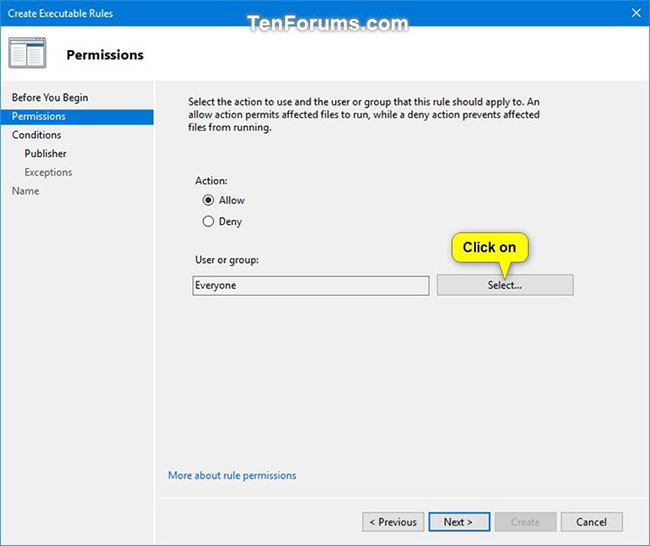
<p style="text-align: justify;">10. Nếu bạn muốn chỉ định người dùng hoặc nhóm để thực thi quy tắc này, hãy nhấp vào&nbsp;<strong>Select.</strong></p>

<p style="text-align: justify;">Cài đặt mặc định là&nbsp;<strong>Everyone</strong>&nbsp;cho tất cả người dùng và nhóm.</p>

<figure>
<div style="text-align: justify;"><img alt="Cài đặt mặc định là Everyone" data-i="8" data-src="https://st.quantrimang.com/photos/image/2021/03/18/dung-applocker-cho-phep-chan-file-thuc-thi-9.jpg" data-was-processed="true" height="546" src="https://st.quantrimang.com/photos/image/2021/03/18/dung-applocker-cho-phep-chan-file-thuc-thi-9.jpg" width="650" /></div>

<figcaption>
<div style="text-align: justify;">Cài đặt mặc định là Everyone</div>
</figcaption>
</figure>

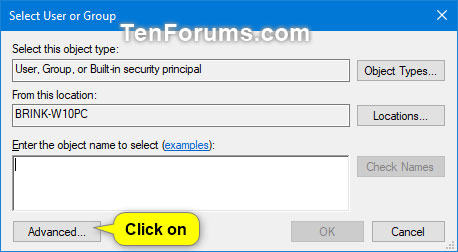
<p style="text-align: justify;">A) Nhấp vào nút&nbsp;<strong>Advanced.</strong></p>

<figure>
<div style="text-align: justify;"><img alt="Nhấp vào nút Advanced" data-i="9" data-src="https://st.quantrimang.com/photos/image/2021/03/18/dung-applocker-cho-phep-chan-file-thuc-thi-10.jpg" data-was-processed="true" height="252" src="https://st.quantrimang.com/photos/image/2021/03/18/dung-applocker-cho-phep-chan-file-thuc-thi-10.jpg" width="458" /></div>

<figcaption>
<div style="text-align: justify;">Nhấp vào nút Advanced</div>
</figcaption>
</figure>

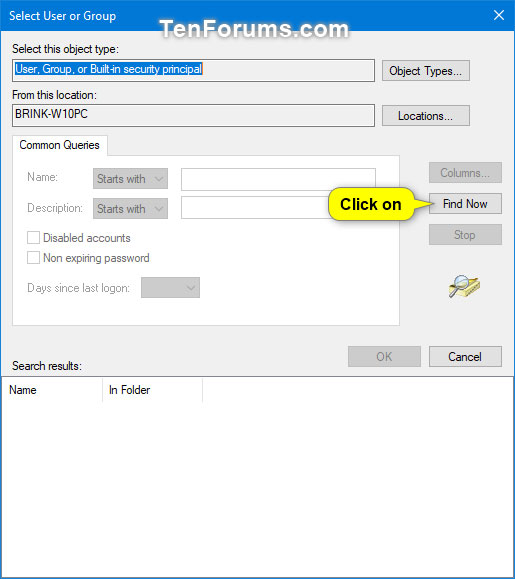
<p style="text-align: justify;">B) Nhấp vào nút&nbsp;<strong>Find Now.</strong></p>

<figure>
<div style="text-align: justify;"><img alt="Nhấp vào nút Find Now" data-i="10" data-src="https://st.quantrimang.com/photos/image/2021/03/18/dung-applocker-cho-phep-chan-file-thuc-thi-11.jpg" data-was-processed="true" height="579" src="https://st.quantrimang.com/photos/image/2021/03/18/dung-applocker-cho-phep-chan-file-thuc-thi-11.jpg" width="515" /></div>

<figcaption>
<div style="text-align: justify;">Nhấp vào nút Find Now</div>
</figcaption>
</figure>

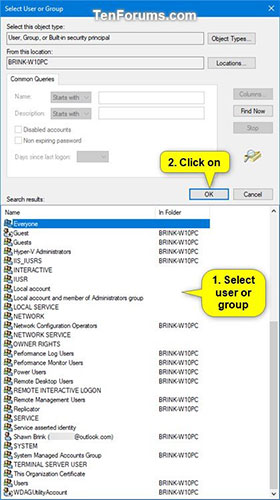
<p style="text-align: justify;">C) Chọn người dùng hoặc nhóm bạn muốn và nhấn vào&nbsp;<strong>OK.</strong></p>

<figure>
<div style="text-align: justify;"><img alt="Chọn người dùng hoặc nhóm bạn muốn" data-i="11" data-src="https://st.quantrimang.com/photos/image/2021/03/18/dung-applocker-cho-phep-chan-file-thuc-thi-12.jpg" data-was-processed="true" height="500" src="https://st.quantrimang.com/photos/image/2021/03/18/dung-applocker-cho-phep-chan-file-thuc-thi-12.jpg" width="280" /></div>

<figcaption>
<div style="text-align: justify;">Chọn người dùng hoặc nhóm bạn muốn</div>
</figcaption>
</figure>

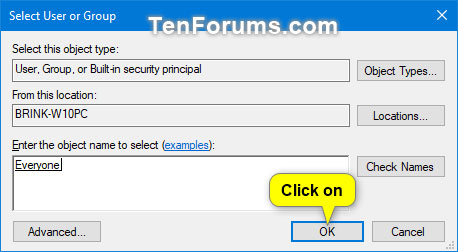
<p style="text-align: justify;">D) Nhấp vào&nbsp;<strong>OK.</strong></p>

<figure>
<div style="text-align: justify;"><img alt="Nhấp vào OK" data-i="12" data-src="https://st.quantrimang.com/photos/image/2021/03/18/dung-applocker-cho-phep-chan-file-thuc-thi-13.jpg" data-was-processed="true" height="252" src="https://st.quantrimang.com/photos/image/2021/03/18/dung-applocker-cho-phep-chan-file-thuc-thi-13.jpg" width="458" /></div>

<figcaption>
<div style="text-align: justify;">Nhấp vào OK</div>
</figcaption>
</figure>

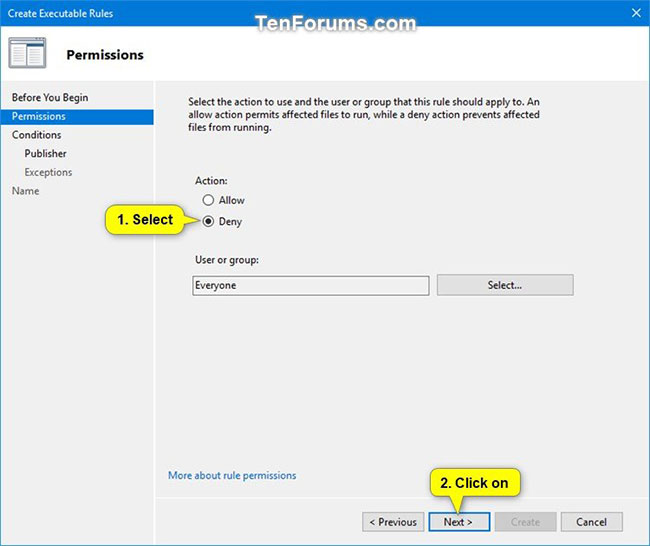
<p style="text-align: justify;">11. Chọn&nbsp;<strong>Allow</strong>&nbsp;hoặc&nbsp;<strong>Deny</strong>&nbsp;tùy theo những gì bạn muốn và nhấp vào&nbsp;<strong>Next.</strong></p>

<figure>
<div style="text-align: justify;"><img alt="Chọn Allow hoặc Deny" data-i="13" data-src="https://st.quantrimang.com/photos/image/2021/03/18/dung-applocker-cho-phep-chan-file-thuc-thi-14.jpg" data-was-processed="true" height="546" src="https://st.quantrimang.com/photos/image/2021/03/18/dung-applocker-cho-phep-chan-file-thuc-thi-14.jpg" width="650" /></div>

<figcaption>
<div style="text-align: justify;">Chọn Allow hoặc Deny</div>
</figcaption>
</figure>

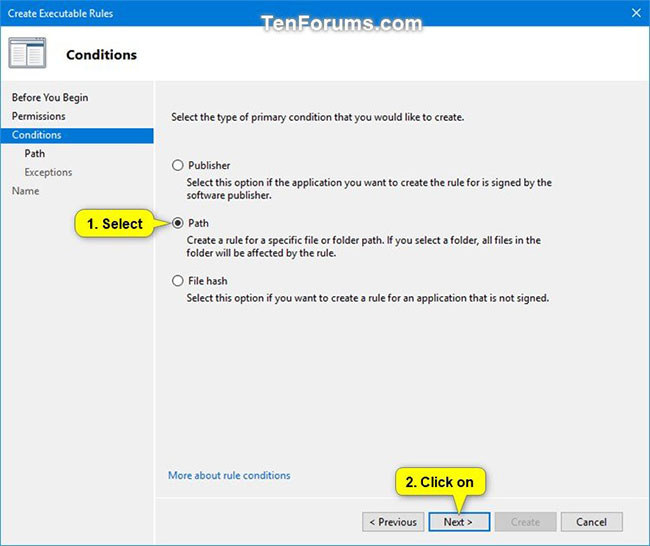
<p style="text-align: justify;">12. Chọn&nbsp;<strong>Path</strong>&nbsp;và nhấp vào&nbsp;<strong>Next.</strong></p>

<figure>
<div style="text-align: justify;"><img alt="Chọn Path" data-i="14" data-src="https://st.quantrimang.com/photos/image/2021/03/18/dung-applocker-cho-phep-chan-file-thuc-thi-15.jpg" data-was-processed="true" height="546" src="https://st.quantrimang.com/photos/image/2021/03/18/dung-applocker-cho-phep-chan-file-thuc-thi-15.jpg" width="650" /></div>

<figcaption>
<div style="text-align: justify;">Chọn Path</div>
</figcaption>
</figure>

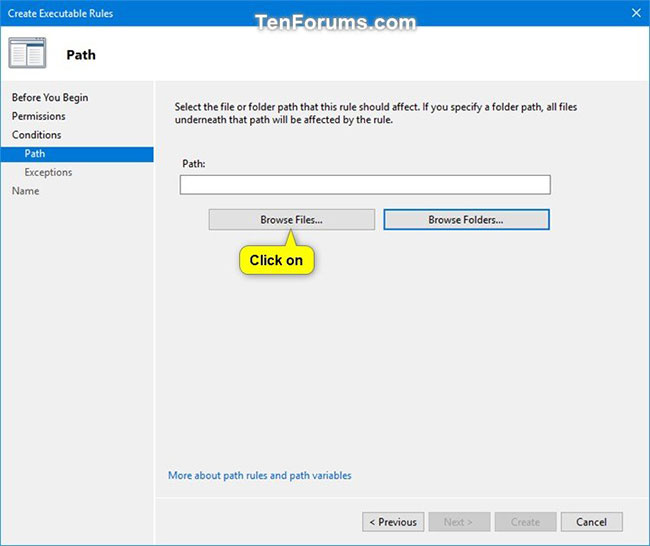
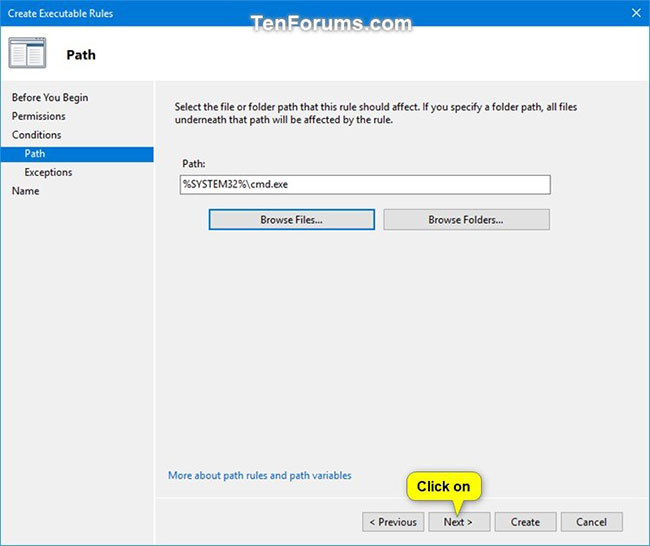
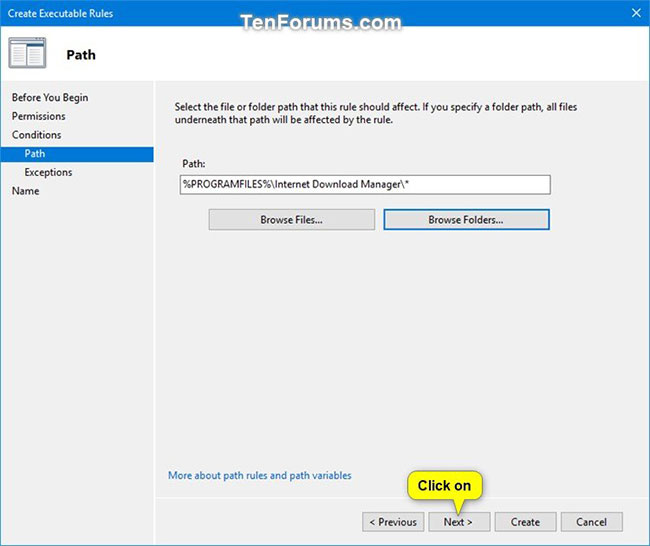
<p style="text-align: justify;">13. Thực hiện bước 14 (cho file) hoặc bước 15 (cho thư mục/ổ) bên dưới cho đường dẫn file hoặc thư mục bạn muốn chỉ định để cho phép hoặc chặn.</p>

<p style="text-align: justify;">14. Để chỉ định một đường dẫn file thực thi để cho phép hoặc chặn</p>

<p style="text-align: justify;">A) Nhấp vào nút&nbsp;<strong>Browse Files</strong>.</p>

<figure>
<div style="text-align: justify;"><img alt="Nhấp vào nút Browse Files" data-i="15" data-src="https://st.quantrimang.com/photos/image/2021/03/18/dung-applocker-cho-phep-chan-file-thuc-thi-16.jpg" data-was-processed="true" height="546" src="https://st.quantrimang.com/photos/image/2021/03/18/dung-applocker-cho-phep-chan-file-thuc-thi-16.jpg" width="650" /></div>

<figcaption>
<div style="text-align: justify;">Nhấp vào nút Browse Files</div>
</figcaption>
</figure>

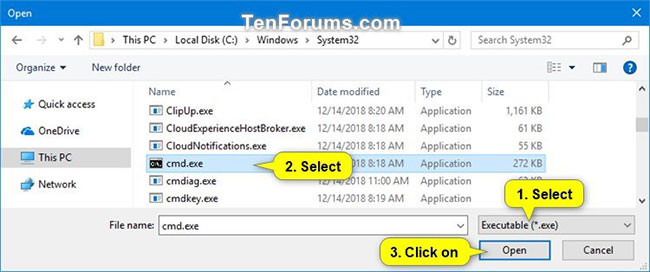
<p style="text-align: justify;">B) Chọn xem bạn muốn cho phép hoặc chặn file .exe hoặc .com trong menu drop-down ở góc dưới cùng bên phải.</p>

<p style="text-align: justify;">C) Điều hướng đến và chọn file .exe hoặc .com mà bạn muốn cho phép hoặc chặn.</p>

<p style="text-align: justify;">D) Nhấp vào&nbsp;<strong>Open</strong>&nbsp;và chuyển đến bước 16 bên dưới.</p>

<figure>
<div style="text-align: justify;"><img alt="Nhấp vào Open" data-i="16" data-src="https://st.quantrimang.com/photos/image/2021/03/18/dung-applocker-cho-phep-chan-file-thuc-thi-17.jpg" data-was-processed="true" height="272" src="https://st.quantrimang.com/photos/image/2021/03/18/dung-applocker-cho-phep-chan-file-thuc-thi-17.jpg" width="650" /></div>

<figcaption>
<div style="text-align: justify;">Nhấp vào Open</div>
</figcaption>
</figure>

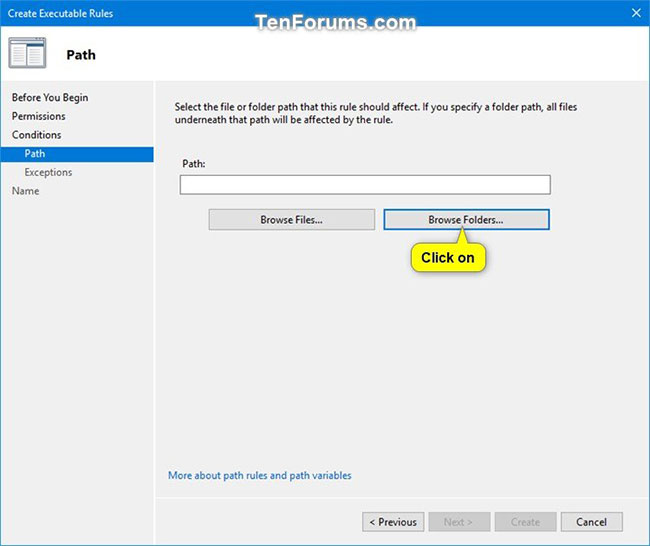
<p style="text-align: justify;">15. Để chỉ định một thư mục hoặc đường dẫn ổ nhằm cho phép hoặc chặn tất cả các file thực thi trong thư mục hoặc ổ.</p>

<p style="text-align: justify;">A) Nhấp vào nút&nbsp;<strong>Browse Folders</strong>.</p>

<figure>
<div style="text-align: justify;"><img alt="Nhấp vào nút Browse Folders" data-i="17" data-src="https://st.quantrimang.com/photos/image/2021/03/18/dung-applocker-cho-phep-chan-file-thuc-thi-18.jpg" data-was-processed="true" height="546" src="https://st.quantrimang.com/photos/image/2021/03/18/dung-applocker-cho-phep-chan-file-thuc-thi-18.jpg" width="650" /></div>

<figcaption>
<div style="text-align: justify;">Nhấp vào nút Browse Folders</div>
</figcaption>
</figure>

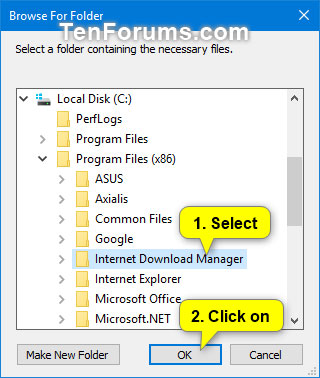
<p style="text-align: justify;">B) Điều hướng đến và chọn một thư mục hoặc ổ bạn muốn cho phép hoặc chặn tất cả các file thực thi (.exe và .com) trong đó.</p>

<p style="text-align: justify;">C) Nhấp vào&nbsp;<strong>OK</strong>&nbsp;và chuyển sang bước 16 bên dưới.</p>

<figure>
<div style="text-align: justify;"><img alt="Nhấp vào OK" data-i="18" data-src="https://st.quantrimang.com/photos/image/2021/03/18/dung-applocker-cho-phep-chan-file-thuc-thi-19.jpg" data-was-processed="true" height="378" src="https://st.quantrimang.com/photos/image/2021/03/18/dung-applocker-cho-phep-chan-file-thuc-thi-19.jpg" width="320" /></div>

<figcaption>
<div style="text-align: justify;">Nhấp vào OK</div>
</figcaption>
</figure>

<p style="text-align: justify;">16. Nhấp vào&nbsp;<strong>Next.</strong></p>

<figure>
<div style="text-align: justify;"><img alt="Nhấp vào Next" data-i="19" data-src="https://st.quantrimang.com/photos/image/2021/03/18/dung-applocker-cho-phep-chan-file-thuc-thi-20.jpg" data-was-processed="true" height="546" src="https://st.quantrimang.com/photos/image/2021/03/18/dung-applocker-cho-phep-chan-file-thuc-thi-20.jpg" width="650" /></div>
</figure>

<figure>
<div style="text-align: justify;"><img alt="Chọn Next" data-i="20" data-src="https://st.quantrimang.com/photos/image/2021/03/18/dung-applocker-cho-phep-chan-file-thuc-thi-21.jpg" data-was-processed="true" height="546" src="https://st.quantrimang.com/photos/image/2021/03/18/dung-applocker-cho-phep-chan-file-thuc-thi-21.jpg" width="650" /></div>
</figure>

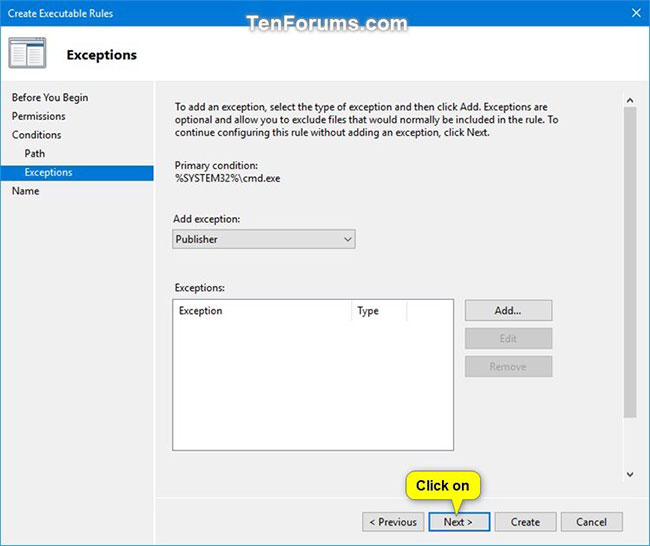
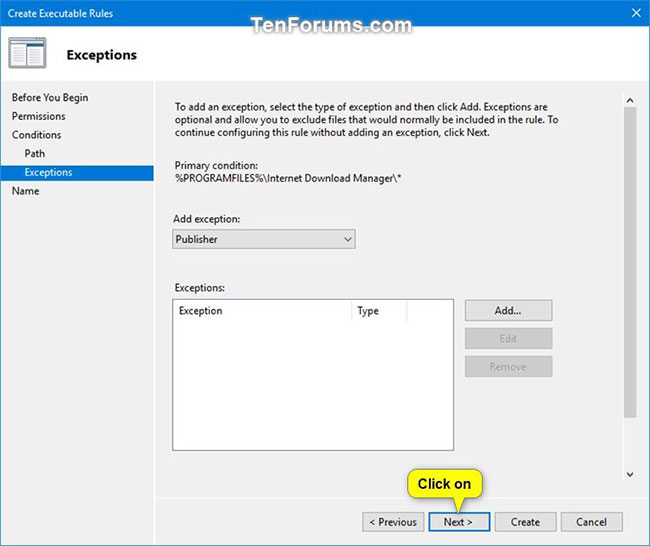
<p style="text-align: justify;">17. Nhấp tiếp vào&nbsp;<strong>Next</strong>&nbsp;một lần nữa.</p>

<figure>
<div style="text-align: justify;"><img alt="Nhấp tiếp vào Next một lần nữa" data-i="21" data-src="https://st.quantrimang.com/photos/image/2021/03/18/dung-applocker-cho-phep-chan-file-thuc-thi-22.jpg" data-was-processed="true" height="546" src="https://st.quantrimang.com/photos/image/2021/03/18/dung-applocker-cho-phep-chan-file-thuc-thi-22.jpg" width="650" /></div>
</figure>

<figure>
<div style="text-align: justify;"><img alt="Nhấn Next tiếp" data-i="22" data-src="https://st.quantrimang.com/photos/image/2021/03/18/dung-applocker-cho-phep-chan-file-thuc-thi-23.jpg" data-was-processed="true" height="546" src="https://st.quantrimang.com/photos/image/2021/03/18/dung-applocker-cho-phep-chan-file-thuc-thi-23.jpg" width="650" /></div>
</figure>

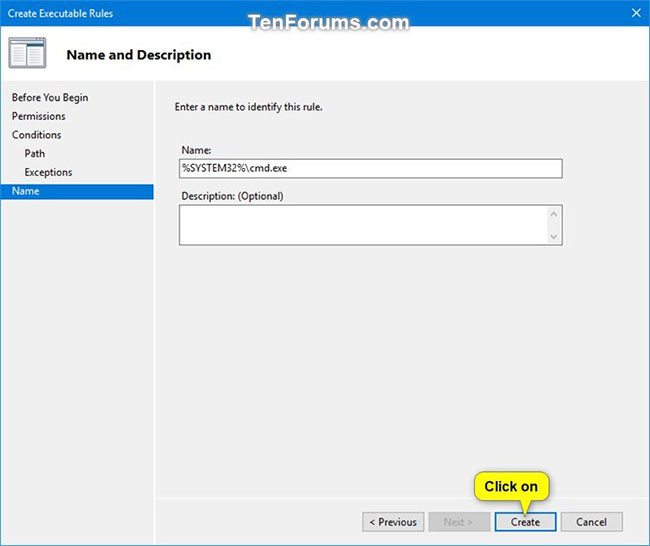
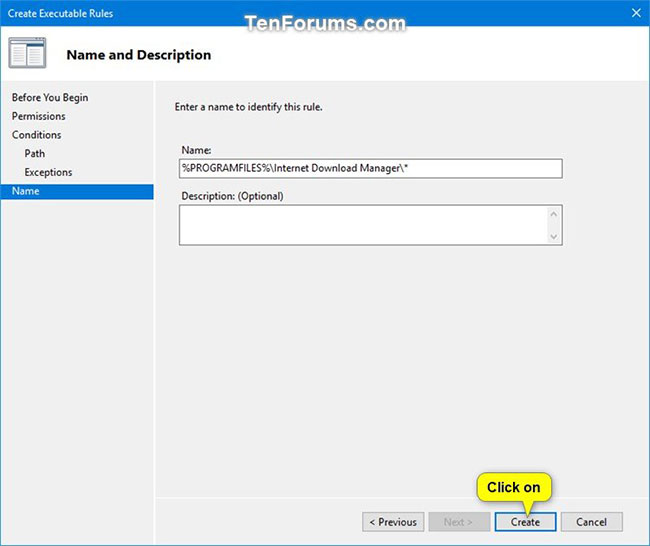
<p style="text-align: justify;">18. Nhấp vào&nbsp;<strong>Create.</strong></p>

<figure>
<div style="text-align: justify;"><img alt="Nhấp vào Create" data-i="23" data-src="https://st.quantrimang.com/photos/image/2021/03/18/dung-applocker-cho-phep-chan-file-thuc-thi-24.jpg" data-was-processed="true" height="546" src="https://st.quantrimang.com/photos/image/2021/03/18/dung-applocker-cho-phep-chan-file-thuc-thi-24.jpg" width="650" /></div>
</figure>

<figure>
<div style="text-align: justify;"><img alt="Nhấn tiếp vào Create" data-i="24" data-src="https://st.quantrimang.com/photos/image/2021/03/18/dung-applocker-cho-phep-chan-file-thuc-thi-25.jpg" data-was-processed="true" height="546" src="https://st.quantrimang.com/photos/image/2021/03/18/dung-applocker-cho-phep-chan-file-thuc-thi-25.jpg" width="650" /></div>
</figure>

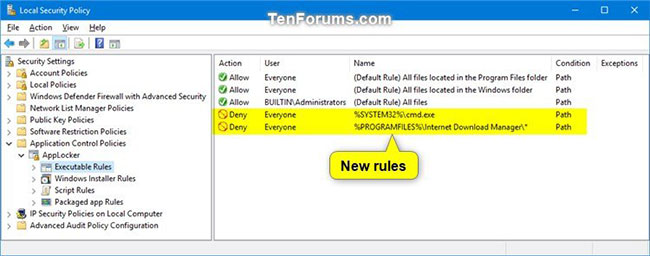
<p style="text-align: justify;">19. Quy tắc mới của bạn cho&nbsp;<strong>&quot;Executable Rules&quot;</strong>&nbsp;bây giờ sẽ được tạo.</p>

<figure>
<div style="text-align: justify;"><img alt="Quy tắc mới được tạo" data-i="25" data-src="https://st.quantrimang.com/photos/image/2021/03/18/dung-applocker-cho-phep-chan-file-thuc-thi-26.jpg" data-was-processed="true" height="256" src="https://st.quantrimang.com/photos/image/2021/03/18/dung-applocker-cho-phep-chan-file-thuc-thi-26.jpg" width="650" /></div>

<figcaption>
<div style="text-align: justify;">Quy tắc mới được tạo</div>
</figcaption>
</figure>

<p style="text-align: justify;">20. Lặp lại các bước từ 8 đến 19 nếu bạn muốn tạo một quy tắc mới khác để cho phép hoặc chặn một file thực thi khác cho người dùng hoặc nhóm.</p>

<p style="text-align: justify;">21. Khi hoàn tất, bạn có thể đóng cửa sổ&nbsp;<strong>Local Security Policy</strong>.</p>
		</div>
				<div id="author">
						<p>
				<strong>Nguồn tin:</strong>
				Quantrimang.com
			</p>
		</div>
	</div>
	<div id="footer" class="clearfix">
		<div id="url">
			<strong>URL của bản tin này: </strong><a href="https://www.nguoicodonvn2008.info/vi/news/savefile/phan-mem/cach-su-dung-applocker-de-cho-phep-hoac-chan-cac-file-thuc-thi-chay-trong-windows-10-3797.html" title="Cách sử dụng AppLocker để cho phép hoặc chặn các file thực thi chạy trong Windows 10">https://www.nguoicodonvn2008.info/vi/news/savefile/phan-mem/cach-su-dung-applocker-de-cho-phep-hoac-chan-cac-file-thuc-thi-chay-trong-windows-10-3797.html</a>

		</div>
		<div class="clear"></div>
		<div class="copyright">
			&copy; .&#x3A; Nguoicodonvn2008.info - Cõi lòng người cô đơn &#x3A;.
		</div>
		<div id="contact">
			<a href="mailto:admin@nguoicodonvn2008.info">admin@nguoicodonvn2008.info</a>
		</div>
	</div>
</div>
        <div id="timeoutsess" class="chromeframe">
            Bạn đã không sử dụng Site, <a onclick="timeoutsesscancel();" href="https://nguoicodonvn2008.info/#">Bấm vào đây để duy trì trạng thái đăng nhập</a>. Thời gian chờ: <span id="secField"> 60 </span> giây
        </div>
        <div id="openidResult" class="nv-alert" style="display:none"></div>
        <div id="openidBt" data-result="" data-redirect=""></div>
		</script>
		<div class="car-top">
  <span><img src="https://nguoicodonvn2008.info/themes/default/images/car.png" alt=""></span>
</div>
<script src="https://nguoicodonvn2008.info/assets/js/jquery/jquery.min.js"></script>
<script>var nv_base_siteurl="/",nv_lang_data="vi",nv_lang_interface="vi",nv_name_variable="nv",nv_fc_variable="op",nv_lang_variable="language",nv_module_name="news",nv_func_name="savefile",nv_is_user=0, nv_my_ofs=-4,nv_my_abbr="EDT",nv_cookie_prefix="nv4c_e856T",nv_check_pass_mstime=1738000,nv_area_admin=0,nv_safemode=0,theme_responsive=0,nv_recaptcha_ver=2,nv_recaptcha_sitekey="",nv_recaptcha_type="image",XSSsanitize=1;</script>
<script src="https://nguoicodonvn2008.info/assets/js/language/vi.js"></script>
<script src="https://nguoicodonvn2008.info/assets/js/DOMPurify/purify3.js"></script>
<script src="https://nguoicodonvn2008.info/assets/js/global.js"></script>
<script src="https://nguoicodonvn2008.info/assets/js/site.js"></script>
<script src="https://nguoicodonvn2008.info/themes/default/js/news.js"></script>
<script src="https://nguoicodonvn2008.info/themes/default/js/main.js"></script>
<script src="https://nguoicodonvn2008.info/themes/default/js/custom.js"></script>
<script type="application/ld+json">
        {
            "@context": "https://schema.org",
            "@type": "Organization",
            "url": "https://nguoicodonvn2008.info",
            "logo": "https://nguoicodonvn2008.info/uploads/angel.gif"
        }
        </script>
<script src="https://nguoicodonvn2008.info/themes/default/js/bootstrap.min.js"></script>
<script type="text/javascript">
var $scrolltop = $('.car-top');
$scrolltop.on('click', function () {
    $('html,body').animate({
        scrollTop: 0
    }, 800);
    $(this).addClass("car-run");
    setTimeout(function(){ $scrolltop.removeClass('car-run');}, 1000);
    return false;
});
$(window).on('scroll', function ()
{ 
    if($(window).scrollTop() >= 200)
    {
        $scrolltop.addClass("show");
        $scrolltop.addClass("car-down");
    }
    else
    {
       $scrolltop.removeClass("show");
       setTimeout(function(){ $scrolltop.removeClass('car-down');}, 300);
    }
});
</script>
</body>
</html>