<!DOCTYPE html>
    <html lang="vi" xmlns="http://www.w3.org/1999/xhtml" prefix="og: http://ogp.me/ns#">
    <head>
<title>Cách dùng ABBYY chuyển PDF sang Word</title>
<meta name="description" content="Cách dùng ABBYY chuyển PDF sang Word - Savefile - Tin Tức - https&#x3A;&#x002F;&#x002F;www.nguoicodonvn2008.info&#x002F;vi&#x002F;news&#x002F;savefile&#x002F;phan-mem&#x002F;cach-dung-abbyy-chuyen-pdf-sang-word-668.html">
<meta name="author" content=".: Nguoicodonvn2008.info - Cõi lòng người cô đơn :.">
<meta name="copyright" content=".: Nguoicodonvn2008.info - Cõi lòng người cô đơn :. [admin@nguoicodonvn2008.info]">
<meta name="robots" content="index, archive, follow, noodp">
<meta name="googlebot" content="index,archive,follow,noodp">
<meta name="msnbot" content="all,index,follow">
<meta name="generator" content="NukeViet v4.5">
<meta http-equiv="Content-Type" content="text/html; charset=utf-8">
<meta property="og:title" content="Cách dùng ABBYY chuyển PDF sang Word">
<meta property="og:type" content="website">
<meta property="og:description" content="Savefile - Tin Tức - https&#x3A;&#x002F;&#x002F;www.nguoicodonvn2008.info&#x002F;vi&#x002F;news&#x002F;savefile&#x002F;phan-mem&#x002F;cach-dung-abbyy-chuyen-pdf-sang-word-668.html">
<meta property="og:site_name" content=".&#x3A; Nguoicodonvn2008.info - Cõi lòng người cô đơn &#x3A;.">
<meta property="og:url" content="https://www.nguoicodonvn2008.info/vi/news/savefile/phan-mem/cach-dung-abbyy-chuyen-pdf-sang-word-668.html">
<link rel="shortcut icon" href="https://nguoicodonvn2008.info/favicon.ico">
<link rel="canonical" href="https://www.nguoicodonvn2008.info/vi/news/savefile/phan-mem/cach-dung-abbyy-chuyen-pdf-sang-word-668.html">
<link rel="alternate" href="https://nguoicodonvn2008.info/vi/news/rss/" title="Tin Tức" type="application/rss+xml">
<link rel="alternate" href="https://nguoicodonvn2008.info/vi/news/rss/karaoke-dual/" title="Tin Tức - Karaoke Dual" type="application/rss+xml">
<link rel="alternate" href="https://nguoicodonvn2008.info/vi/news/rss/nhac-tre/" title="Tin Tức - Nhạc trẻ" type="application/rss+xml">
<link rel="alternate" href="https://nguoicodonvn2008.info/vi/news/rss/tru-tinh/" title="Tin Tức - Trữ tình" type="application/rss+xml">
<link rel="alternate" href="https://nguoicodonvn2008.info/vi/news/rss/nuoc-ngoai/" title="Tin Tức - Nước ngoài" type="application/rss+xml">
<link rel="alternate" href="https://nguoicodonvn2008.info/vi/news/rss/remix/" title="Tin Tức - Remix" type="application/rss+xml">
<link rel="alternate" href="https://nguoicodonvn2008.info/vi/news/rss/tam-su-tinh-yeu/" title="Tin Tức - Tâm sự tình yêu" type="application/rss+xml">
<link rel="alternate" href="https://nguoicodonvn2008.info/vi/news/rss/tho-suu-tam/" title="Tin Tức - Thơ sưu tầm" type="application/rss+xml">
<link rel="alternate" href="https://nguoicodonvn2008.info/vi/news/rss/cuoc-song/" title="Tin Tức - Cuộc sống" type="application/rss+xml">
<link rel="alternate" href="https://nguoicodonvn2008.info/vi/news/rss/phan-mem/" title="Tin Tức - Phần mềm" type="application/rss+xml">
<link rel="alternate" href="https://nguoicodonvn2008.info/vi/news/rss/kien-thuc-may-tinh/" title="Tin Tức - Kiến thức máy tính" type="application/rss+xml">
<link rel="alternate" href="https://nguoicodonvn2008.info/vi/news/rss/hoc-tap/" title="Tin Tức - Học tập" type="application/rss+xml">
<link rel="alternate" href="https://nguoicodonvn2008.info/vi/news/rss/tai-lieu/" title="Tin Tức - Tài liệu" type="application/rss+xml">
<link rel="alternate" href="https://nguoicodonvn2008.info/vi/news/rss/de-thi/" title="Tin Tức - Đề thi" type="application/rss+xml">
<link rel="preload" as="style" href="https://nguoicodonvn2008.info/assets/css/font-awesome.min.css" type="text/css">
<link rel="preload" as="style" href="https://nguoicodonvn2008.info/themes/default/css/bootstrap.non-responsive.css" type="text/css">
<link rel="preload" as="style" href="https://nguoicodonvn2008.info/themes/default/css/style.css" type="text/css">
<link rel="preload" as="style" href="https://nguoicodonvn2008.info/themes/default/css/style.non-responsive.css" type="text/css">
<link rel="preload" as="style" href="https://nguoicodonvn2008.info/themes/default/css/news.css" type="text/css">
<link rel="preload" as="style" href="https://nguoicodonvn2008.info/themes/default/css/custom.css" type="text/css">
<link rel="preload" as="script" href="https://nguoicodonvn2008.info/assets/js/jquery/jquery.min.js" type="text/javascript">
<link rel="preload" as="script" href="https://nguoicodonvn2008.info/assets/js/language/vi.js" type="text/javascript">
<link rel="preload" as="script" href="https://nguoicodonvn2008.info/assets/js/DOMPurify/purify3.js" type="text/javascript">
<link rel="preload" as="script" href="https://nguoicodonvn2008.info/assets/js/global.js" type="text/javascript">
<link rel="preload" as="script" href="https://nguoicodonvn2008.info/assets/js/site.js" type="text/javascript">
<link rel="preload" as="script" href="https://nguoicodonvn2008.info/themes/default/js/news.js" type="text/javascript">
<link rel="preload" as="script" href="https://nguoicodonvn2008.info/themes/default/js/main.js" type="text/javascript">
<link rel="preload" as="script" href="https://nguoicodonvn2008.info/themes/default/js/custom.js" type="text/javascript">
<link rel="preload" as="script" href="https://nguoicodonvn2008.info/themes/default/js/bootstrap.min.js" type="text/javascript">
<link rel="stylesheet" href="https://nguoicodonvn2008.info/assets/css/font-awesome.min.css">
<link rel="stylesheet" href="https://nguoicodonvn2008.info/themes/default/css/bootstrap.non-responsive.css">
<link rel="stylesheet" href="https://nguoicodonvn2008.info/themes/default/css/style.css">
<link rel="stylesheet" href="https://nguoicodonvn2008.info/themes/default/css/style.non-responsive.css">
<link rel="StyleSheet" href="https://nguoicodonvn2008.info/themes/default/css/news.css">
<link rel="stylesheet" href="https://nguoicodonvn2008.info/themes/default/css/custom.css">
<style type="text/css">
	body{background: #fff;}
</style>
    </head>
    <body>
<div id="print">
	<div id="hd_print">
		<h2 class="pull-left">.&#x3A; Nguoicodonvn2008.info - Cõi lòng người cô đơn &#x3A;.</h2>
		<p class="pull-right"><a title=".&#x3A; Nguoicodonvn2008.info - Cõi lòng người cô đơn &#x3A;." href="https://nguoicodonvn2008.info/">https://nguoicodonvn2008.info</a></p>
	</div>
	<div class="clear"></div>
	<hr />
	<div id="content">
		<h1>Cách dùng ABBYY chuyển PDF sang Word</h1>
		<ul class="list-inline">
			<li>Chủ nhật - 04/08/2019 07:00</li>
			<li class="hidden-print txtrequired"><em class="fa fa-print">&nbsp;</em><a title="In ra" href="javascript:;" onclick="window.print()">In ra</a></li>
			<li class="hidden-print txtrequired"><em class="fa fa-power-off">&nbsp;</em><a title="Đóng cửa sổ này" href="javascript:;" onclick="window.close()">Đóng cửa sổ này</a></li>
		</ul>
		<div class="clear"></div>
		<div id="hometext">
		</div>
				<div class="imghome">
			<img alt="Cách dùng ABBYY chuyển PDF sang Word" src="https://st.quantrimang.com/photos/image/2019/07/22/ABBYY-convert-file-PDF-2.jpg" width="460" class="img-thumbnail" />
		</div>
		<div class="clear"></div>
		<div id="bodytext" class="clearfix">
			<p style="text-align: justify;">Khi chuyển đổi giữa các dạng tập tin với nhau, đặc biệt tài liệu thì việc giữ nguyên font chữ và định dạng nội dung là điều quan trọng. Có rất nhiều phần mềm hay công cụ trực tuyến hỗ trợ chúng ta&nbsp;chuyển đổi PDF sang Word,&nbsp;PDF sang file Excel&nbsp;như ABBYY FineReader chẳng hạn.</p>

<p style="text-align: justify;">ABBYY FineReader là phần mềm xử lý tập tin PDF, hỗ trợ nhiều công cụ để chỉnh sửa nội dung PDF, chuyển đổi PDF sang nhiều định dạng, scan hình ảnh hoặc các file PDF đã bị mã hóa, chống copy sang các định dạng bất kỳ để có thể chỉnh sửa được. Đặc biệt phần mềm sử dụng công nghệ OCR để xử lý toàn diện văn bản PDF dạng bản cứng. Bài viết dưới đây sẽ hướng dẫn bạn đọc cách dùng ABBYY chuyển PDF hay file ảnh sang Word.</p>

<div style="text-align: justify;">&nbsp;</div>

<h2 style="text-align: justify;">Hướng dẫn sử dụng ABBYY FineReader</h2>

<p style="text-align: justify;"><strong>Bước 1:</strong></p>

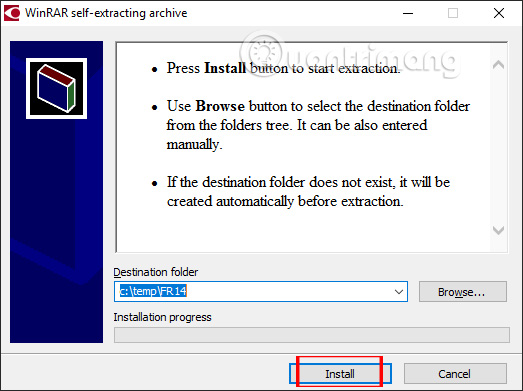
<p style="text-align: justify;">Chúng ta tải phần mềm ABBYY FineReader theo link dưới đây và tiến hành cài đặt như thông thường.</p>

<ul>
	<li style="text-align: justify;">Tải phần mềm&nbsp;ABBYY FineReader:</li>
</ul>

<div style="text-align: justify;"><span style="color:rgb(192, 57, 43);"><strong>https://download.com.vn/abbyy-finereader-professional-edition/download</strong></span></div>

<p style="text-align: justify;"><img alt="Giải nén file" data-i="0" data-src="https://st.quantrimang.com/photos/image/2019/07/22/ABBYY-convert-file-PDF-1.jpg" data-was-processed="true" height="391" src="https://st.quantrimang.com/photos/image/2019/07/22/ABBYY-convert-file-PDF-1.jpg" width="523" /></p>

<p style="text-align: justify;"><strong>Bước 2:</strong></p>

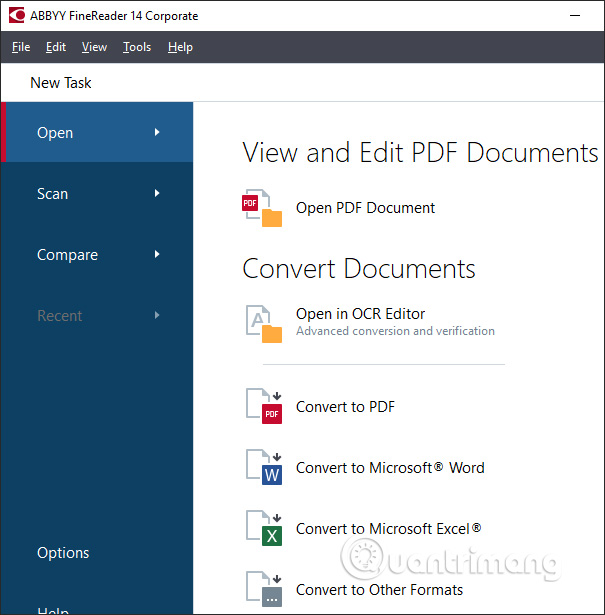
<p style="text-align: justify;">Khởi động phần mềm và bạn sẽ nhìn thấy giao diện chính của ABBYY FineReader. Tại đây chúng ta nhấn chọn vào&nbsp;<strong>công cụ Convert to Microsoft Word</strong>.</p>

<p style="text-align: justify;"><img alt="Chuyển PDF sang Word" data-i="1" data-src="https://st.quantrimang.com/photos/image/2019/07/22/ABBYY-convert-file-PDF-2.jpg" data-was-processed="true" height="615" src="https://st.quantrimang.com/photos/image/2019/07/22/ABBYY-convert-file-PDF-2.jpg" width="605" /></p>

<p style="text-align: justify;"><strong>Bước 3:</strong></p>

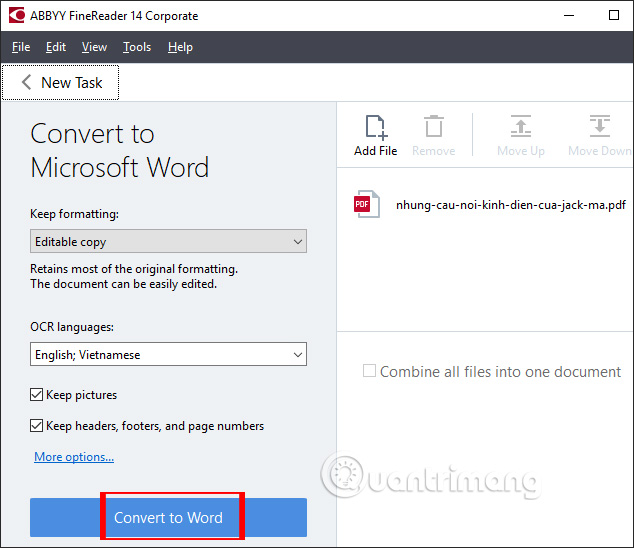
<p style="text-align: justify;">Hiển thị thư mục để chọn file muốn convert sang file Word. Chúng ta&nbsp;<strong>lựa chọn file PDF</strong>muốn chuyển đổi sang file Word.</p>

<p style="text-align: justify;">Chuyển sang giao diện mới, nhấn vào&nbsp;<strong>Add File</strong>&nbsp;để thêm file khác nếu người dùng cần chuyển đổi nhiều file cùng lúc. Nhấn vào&nbsp;<strong>Convert to Word</strong>&nbsp;để tiến hành chuyển đổi.</p>

<p style="text-align: justify;"><img alt="Chọn file PDF" data-i="2" data-src="https://st.quantrimang.com/photos/image/2019/07/22/ABBYY-convert-file-PDF-3.jpg" data-was-processed="true" height="548" src="https://st.quantrimang.com/photos/image/2019/07/22/ABBYY-convert-file-PDF-3.jpg" width="634" /></p>

<p style="text-align: justify;"><strong>Bước 4:</strong></p>

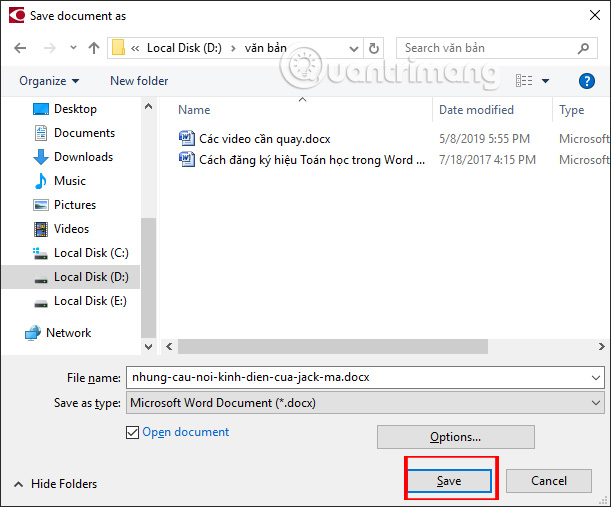
<p style="text-align: justify;">Hiển thị thư mục trên máy tính để chúng ta&nbsp;<strong>lưu tập tin Word</strong>&nbsp;xuống máy tính rồi nhấn&nbsp;<strong>nút Save</strong>&nbsp;để lưu lại.</p>

<p style="text-align: justify;"><img alt="Chọn nơi lưu file Word" data-i="3" data-src="https://st.quantrimang.com/photos/image/2019/07/22/ABBYY-convert-file-PDF-4.jpg" data-was-processed="true" height="507" src="https://st.quantrimang.com/photos/image/2019/07/22/ABBYY-convert-file-PDF-4.jpg" width="611" /></p>

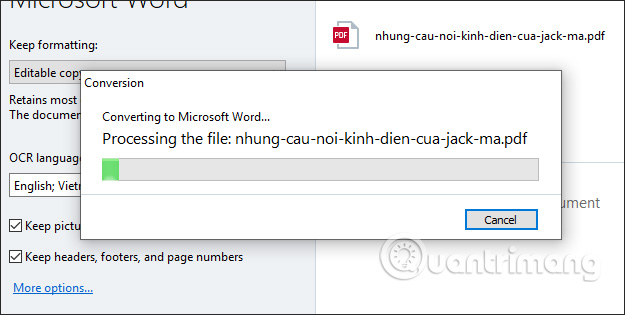
<p style="text-align: justify;">Quá trình chuyển đổi tập tin diễn ra ngay sau đó.</p>

<p style="text-align: justify;"><img alt="Tiến hành chuyển đổi" data-i="4" data-src="https://st.quantrimang.com/photos/image/2019/07/22/ABBYY-convert-file-PDF-5.jpg" data-was-processed="true" height="315" src="https://st.quantrimang.com/photos/image/2019/07/22/ABBYY-convert-file-PDF-5.jpg" width="625" /></p>

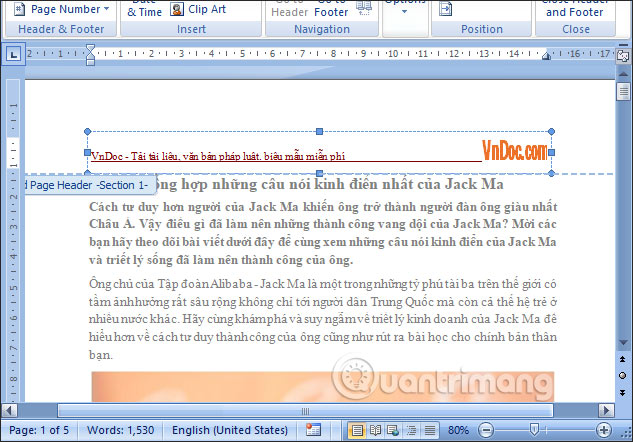
<p style="text-align: justify;">Kết quả chúng ta sẽ nhìn thấy file Word được chuyển từ tập tin PDF. Hình ảnh trong nội dung vẫn được giữ nguyên, bố cục nội dung, định dạng chữ không hề bị thay đổi. Chúng ta có thể chỉnh sửa lại bất cứ nội dung nào mà mình muốn.</p>

<p style="text-align: justify;"><img alt="Chỉnh sửa lại nội dung" data-i="5" data-src="https://st.quantrimang.com/photos/image/2019/07/22/ABBYY-convert-file-PDF-6.jpg" data-was-processed="true" height="442" src="https://st.quantrimang.com/photos/image/2019/07/22/ABBYY-convert-file-PDF-6.jpg" width="633" /></p>

<p style="text-align: justify;"><strong>Bước 5:</strong></p>

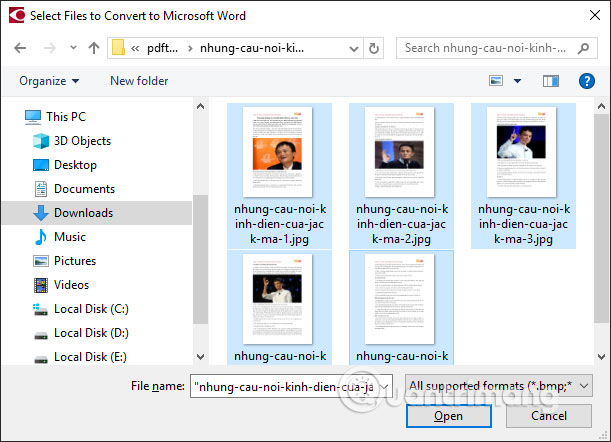
<p style="text-align: justify;">Để&nbsp;<strong>chuyển hình ảnh sang Word</strong>, bạn cũng nhấn chọn vào tùy chọn Convert to Microsoft Word. Lựa chọn các hình ảnh muốn chuyển đổi sang tập tin văn bản.</p>

<p style="text-align: justify;"><img alt="Chọn nhiều hình ảnh" data-i="6" data-src="https://st.quantrimang.com/photos/image/2019/07/22/ABBYY-convert-file-PDF-7.jpg" data-was-processed="true" height="442" src="https://st.quantrimang.com/photos/image/2019/07/22/ABBYY-convert-file-PDF-7.jpg" width="611" /></p>

<p style="text-align: justify;"><strong>Bước 6:</strong></p>

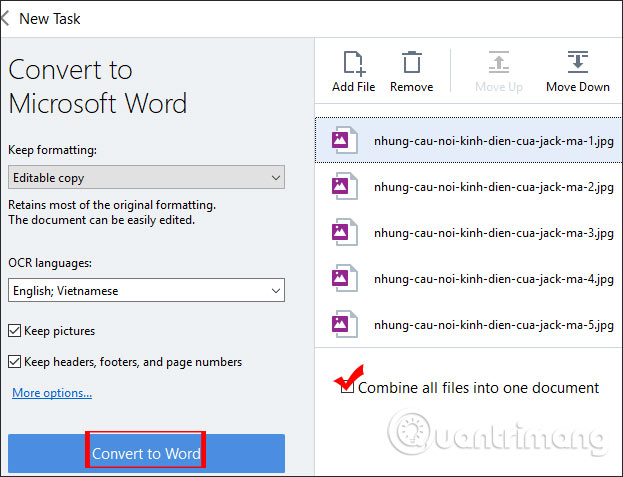
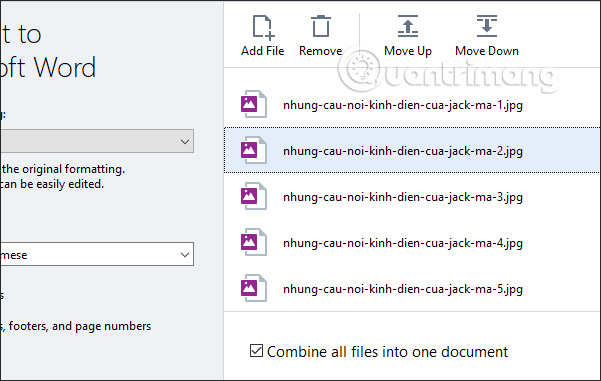
<p style="text-align: justify;">Mặc định ABBYY FineReader sẽ chuyển từng hình ảnh thành từng file Word riêng biệt. Nếu người dùng muốn&nbsp;<strong>ghép chúng lại thành 1 file Word</strong>&nbsp;thì&nbsp;<strong>tích chọn vào Combine all files into one document</strong>. Sau đó cũng nhấn vào Convert to Word để chuyển đổi.</p>

<p style="text-align: justify;"><img alt="Ghép file Word" data-i="7" data-src="https://st.quantrimang.com/photos/image/2019/07/22/ABBYY-convert-file-PDF-8.jpg" data-was-processed="true" height="477" src="https://st.quantrimang.com/photos/image/2019/07/22/ABBYY-convert-file-PDF-8.jpg" width="623" /></p>

<p style="text-align: justify;">Nếu muốn xóa file nào khỏi quá trình chuyển đổi thì bạn nhấn chọn rồi nhấn tiếp vào&nbsp;<strong>Remove</strong>. Khi ghép thành 1 file thì ABBYY FineReader sẽ ghép theo thứ tự sắp xếp từ trên xuống. Bạn có thể nhấn Move Up hoặc Move Down để&nbsp;<strong>thay đổi lại vị trí</strong>, hoặc<strong>&nbsp;tự di chuyển vị trí hình ảnh</strong>&nbsp;theo cách thủ công bằng chuột.</p>

<p style="text-align: justify;"><img alt="Thay đổi vị trí hình ảnh" data-i="8" data-src="https://st.quantrimang.com/photos/image/2019/07/22/ABBYY-convert-file-PDF-9.jpg" data-was-processed="true" height="381" src="https://st.quantrimang.com/photos/image/2019/07/22/ABBYY-convert-file-PDF-9.jpg" width="601" /></p>

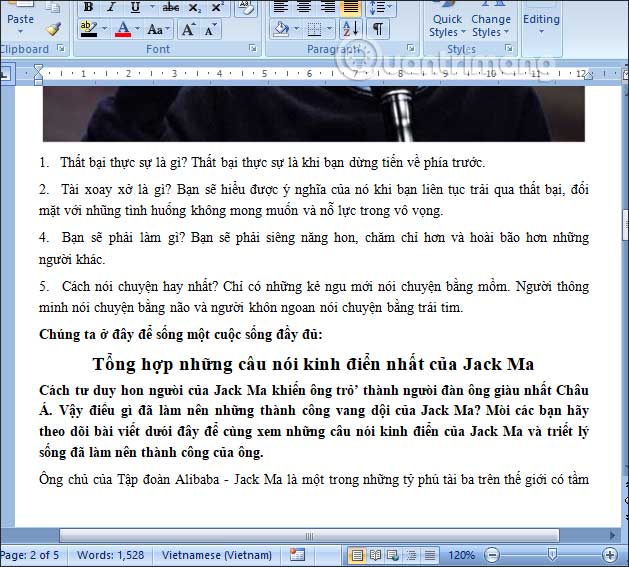
<p style="text-align: justify;">Kết quả bạn được file Word như hình dưới đây. Các trang sẽ được sắp xếp theo thứ tự mà người dùng đã thiết lập trước khi convert. Chẳng hạn với bản Word dưới đây đã thay đổi thứ tự các trang.</p>

<p style="text-align: justify;"><img alt="File Word từ hình ảnh" data-i="9" data-src="https://st.quantrimang.com/photos/image/2019/07/22/ABBYY-convert-file-PDF-10.jpg" data-was-processed="true" height="541" src="https://st.quantrimang.com/photos/image/2019/07/22/ABBYY-convert-file-PDF-10.jpg" width="600" /></p>

<p style="text-align: justify;">Phần mềm ABBYY FineReader có giao diện rất đơn giản, các mục được sắp xếp tách biệt theo nhu cầu của người dùng như chỉnh sửa file PDF hay convert sang tập tin Excel, Word. Nhìn chung ABBYY FineReader convert file không bị lỗi font chữ, và vẫn giữ nguyên định dạng hay bố cục nội dung.</p>

<p style="text-align: justify;">Chúc các bạn thực hiện thành công!</p>
		</div>
				<div id="author">
						<p>
				<strong>Nguồn tin:</strong>
				Quantrimang.com
			</p>
		</div>
	</div>
	<div id="footer" class="clearfix">
		<div id="url">
			<strong>URL của bản tin này: </strong><a href="https://www.nguoicodonvn2008.info/vi/news/savefile/phan-mem/cach-dung-abbyy-chuyen-pdf-sang-word-668.html" title="Cách dùng ABBYY chuyển PDF sang Word">https://www.nguoicodonvn2008.info/vi/news/savefile/phan-mem/cach-dung-abbyy-chuyen-pdf-sang-word-668.html</a>

		</div>
		<div class="clear"></div>
		<div class="copyright">
			&copy; .&#x3A; Nguoicodonvn2008.info - Cõi lòng người cô đơn &#x3A;.
		</div>
		<div id="contact">
			<a href="mailto:admin@nguoicodonvn2008.info">admin@nguoicodonvn2008.info</a>
		</div>
	</div>
</div>
        <div id="timeoutsess" class="chromeframe">
            Bạn đã không sử dụng Site, <a onclick="timeoutsesscancel();" href="https://nguoicodonvn2008.info/#">Bấm vào đây để duy trì trạng thái đăng nhập</a>. Thời gian chờ: <span id="secField"> 60 </span> giây
        </div>
        <div id="openidResult" class="nv-alert" style="display:none"></div>
        <div id="openidBt" data-result="" data-redirect=""></div>
		</script>
		<div class="car-top">
  <span><img src="https://nguoicodonvn2008.info/themes/default/images/car.png" alt=""></span>
</div>
<div id="run_cronjobs" style="visibility:hidden;display:none;"><img alt="cron" src="/index.php?second=cronjobs&amp;p=s4iH7c1f" width="1" height="1" /></div>
<script src="https://nguoicodonvn2008.info/assets/js/jquery/jquery.min.js"></script>
<script>var nv_base_siteurl="/",nv_lang_data="vi",nv_lang_interface="vi",nv_name_variable="nv",nv_fc_variable="op",nv_lang_variable="language",nv_module_name="news",nv_func_name="savefile",nv_is_user=0, nv_my_ofs=-4,nv_my_abbr="EDT",nv_cookie_prefix="nv4c_e856T",nv_check_pass_mstime=1738000,nv_area_admin=0,nv_safemode=0,theme_responsive=0,nv_recaptcha_ver=2,nv_recaptcha_sitekey="",nv_recaptcha_type="image",XSSsanitize=1;</script>
<script src="https://nguoicodonvn2008.info/assets/js/language/vi.js"></script>
<script src="https://nguoicodonvn2008.info/assets/js/DOMPurify/purify3.js"></script>
<script src="https://nguoicodonvn2008.info/assets/js/global.js"></script>
<script src="https://nguoicodonvn2008.info/assets/js/site.js"></script>
<script src="https://nguoicodonvn2008.info/themes/default/js/news.js"></script>
<script src="https://nguoicodonvn2008.info/themes/default/js/main.js"></script>
<script src="https://nguoicodonvn2008.info/themes/default/js/custom.js"></script>
<script type="application/ld+json">
        {
            "@context": "https://schema.org",
            "@type": "Organization",
            "url": "https://nguoicodonvn2008.info",
            "logo": "https://nguoicodonvn2008.info/uploads/angel.gif"
        }
        </script>
<script src="https://nguoicodonvn2008.info/themes/default/js/bootstrap.min.js"></script>
<script type="text/javascript">
var $scrolltop = $('.car-top');
$scrolltop.on('click', function () {
    $('html,body').animate({
        scrollTop: 0
    }, 800);
    $(this).addClass("car-run");
    setTimeout(function(){ $scrolltop.removeClass('car-run');}, 1000);
    return false;
});
$(window).on('scroll', function ()
{ 
    if($(window).scrollTop() >= 200)
    {
        $scrolltop.addClass("show");
        $scrolltop.addClass("car-down");
    }
    else
    {
       $scrolltop.removeClass("show");
       setTimeout(function(){ $scrolltop.removeClass('car-down');}, 300);
    }
});
</script>
</body>
</html>