<!DOCTYPE html>
    <html lang="vi" xmlns="http://www.w3.org/1999/xhtml" prefix="og: http://ogp.me/ns#">
    <head>
<title>9 ứng dụng biến file PDF thành biểu mẫu có thể điền</title>
<meta name="description" content="9 ứng dụng biến file PDF thành biểu mẫu có thể điền - Savefile - Tin Tức -...">
<meta name="author" content=".: Nguoicodonvn2008.info - Cõi lòng người cô đơn :.">
<meta name="copyright" content=".: Nguoicodonvn2008.info - Cõi lòng người cô đơn :. [admin@nguoicodonvn2008.info]">
<meta name="robots" content="index, archive, follow, noodp">
<meta name="googlebot" content="index,archive,follow,noodp">
<meta name="msnbot" content="all,index,follow">
<meta name="generator" content="NukeViet v4.5">
<meta http-equiv="Content-Type" content="text/html; charset=utf-8">
<meta property="og:title" content="9 ứng dụng biến file PDF thành biểu mẫu có thể điền">
<meta property="og:type" content="website">
<meta property="og:description" content="Savefile - Tin Tức - https&#x3A;&#x002F;&#x002F;www.nguoicodonvn2008.info&#x002F;vi&#x002F;news&#x002F;savefile&#x002F;phan-mem&#x002F;9-ung-dung-bien-file-pdf-thanh-bieu-mau-co-the-dien-9490.html">
<meta property="og:site_name" content=".&#x3A; Nguoicodonvn2008.info - Cõi lòng người cô đơn &#x3A;.">
<meta property="og:url" content="https://www.nguoicodonvn2008.info/vi/news/savefile/phan-mem/9-ung-dung-bien-file-pdf-thanh-bieu-mau-co-the-dien-9490.html">
<link rel="shortcut icon" href="https://nguoicodonvn2008.info/favicon.ico">
<link rel="canonical" href="https://www.nguoicodonvn2008.info/vi/news/savefile/phan-mem/9-ung-dung-bien-file-pdf-thanh-bieu-mau-co-the-dien-9490.html">
<link rel="alternate" href="https://nguoicodonvn2008.info/vi/news/rss/" title="Tin Tức" type="application/rss+xml">
<link rel="alternate" href="https://nguoicodonvn2008.info/vi/news/rss/karaoke-dual/" title="Tin Tức - Karaoke Dual" type="application/rss+xml">
<link rel="alternate" href="https://nguoicodonvn2008.info/vi/news/rss/nhac-tre/" title="Tin Tức - Nhạc trẻ" type="application/rss+xml">
<link rel="alternate" href="https://nguoicodonvn2008.info/vi/news/rss/tru-tinh/" title="Tin Tức - Trữ tình" type="application/rss+xml">
<link rel="alternate" href="https://nguoicodonvn2008.info/vi/news/rss/nuoc-ngoai/" title="Tin Tức - Nước ngoài" type="application/rss+xml">
<link rel="alternate" href="https://nguoicodonvn2008.info/vi/news/rss/remix/" title="Tin Tức - Remix" type="application/rss+xml">
<link rel="alternate" href="https://nguoicodonvn2008.info/vi/news/rss/tam-su-tinh-yeu/" title="Tin Tức - Tâm sự tình yêu" type="application/rss+xml">
<link rel="alternate" href="https://nguoicodonvn2008.info/vi/news/rss/tho-suu-tam/" title="Tin Tức - Thơ sưu tầm" type="application/rss+xml">
<link rel="alternate" href="https://nguoicodonvn2008.info/vi/news/rss/cuoc-song/" title="Tin Tức - Cuộc sống" type="application/rss+xml">
<link rel="alternate" href="https://nguoicodonvn2008.info/vi/news/rss/phan-mem/" title="Tin Tức - Phần mềm" type="application/rss+xml">
<link rel="alternate" href="https://nguoicodonvn2008.info/vi/news/rss/kien-thuc-may-tinh/" title="Tin Tức - Kiến thức máy tính" type="application/rss+xml">
<link rel="alternate" href="https://nguoicodonvn2008.info/vi/news/rss/hoc-tap/" title="Tin Tức - Học tập" type="application/rss+xml">
<link rel="alternate" href="https://nguoicodonvn2008.info/vi/news/rss/tai-lieu/" title="Tin Tức - Tài liệu" type="application/rss+xml">
<link rel="alternate" href="https://nguoicodonvn2008.info/vi/news/rss/de-thi/" title="Tin Tức - Đề thi" type="application/rss+xml">
<link rel="preload" as="style" href="https://nguoicodonvn2008.info/assets/css/font-awesome.min.css" type="text/css">
<link rel="preload" as="style" href="https://nguoicodonvn2008.info/themes/default/css/bootstrap.non-responsive.css" type="text/css">
<link rel="preload" as="style" href="https://nguoicodonvn2008.info/themes/default/css/style.css" type="text/css">
<link rel="preload" as="style" href="https://nguoicodonvn2008.info/themes/default/css/style.non-responsive.css" type="text/css">
<link rel="preload" as="style" href="https://nguoicodonvn2008.info/themes/default/css/news.css" type="text/css">
<link rel="preload" as="style" href="https://nguoicodonvn2008.info/themes/default/css/custom.css" type="text/css">
<link rel="preload" as="script" href="https://nguoicodonvn2008.info/assets/js/jquery/jquery.min.js" type="text/javascript">
<link rel="preload" as="script" href="https://nguoicodonvn2008.info/assets/js/language/vi.js" type="text/javascript">
<link rel="preload" as="script" href="https://nguoicodonvn2008.info/assets/js/DOMPurify/purify3.js" type="text/javascript">
<link rel="preload" as="script" href="https://nguoicodonvn2008.info/assets/js/global.js" type="text/javascript">
<link rel="preload" as="script" href="https://nguoicodonvn2008.info/assets/js/site.js" type="text/javascript">
<link rel="preload" as="script" href="https://nguoicodonvn2008.info/themes/default/js/news.js" type="text/javascript">
<link rel="preload" as="script" href="https://nguoicodonvn2008.info/themes/default/js/main.js" type="text/javascript">
<link rel="preload" as="script" href="https://nguoicodonvn2008.info/themes/default/js/custom.js" type="text/javascript">
<link rel="preload" as="script" href="https://nguoicodonvn2008.info/themes/default/js/bootstrap.min.js" type="text/javascript">
<link rel="stylesheet" href="https://nguoicodonvn2008.info/assets/css/font-awesome.min.css">
<link rel="stylesheet" href="https://nguoicodonvn2008.info/themes/default/css/bootstrap.non-responsive.css">
<link rel="stylesheet" href="https://nguoicodonvn2008.info/themes/default/css/style.css">
<link rel="stylesheet" href="https://nguoicodonvn2008.info/themes/default/css/style.non-responsive.css">
<link rel="StyleSheet" href="https://nguoicodonvn2008.info/themes/default/css/news.css">
<link rel="stylesheet" href="https://nguoicodonvn2008.info/themes/default/css/custom.css">
<style type="text/css">
	body{background: #fff;}
</style>
    </head>
    <body>
<div id="print">
	<div id="hd_print">
		<h2 class="pull-left">.&#x3A; Nguoicodonvn2008.info - Cõi lòng người cô đơn &#x3A;.</h2>
		<p class="pull-right"><a title=".&#x3A; Nguoicodonvn2008.info - Cõi lòng người cô đơn &#x3A;." href="https://nguoicodonvn2008.info/">https://nguoicodonvn2008.info</a></p>
	</div>
	<div class="clear"></div>
	<hr />
	<div id="content">
		<h1>9 ứng dụng biến file PDF thành biểu mẫu có thể điền</h1>
		<ul class="list-inline">
			<li>Thứ sáu - 06/12/2024 22:23</li>
			<li class="hidden-print txtrequired"><em class="fa fa-print">&nbsp;</em><a title="In ra" href="javascript:;" onclick="window.print()">In ra</a></li>
			<li class="hidden-print txtrequired"><em class="fa fa-power-off">&nbsp;</em><a title="Đóng cửa sổ này" href="javascript:;" onclick="window.close()">Đóng cửa sổ này</a></li>
		</ul>
		<div class="clear"></div>
		<div id="hometext">
		</div>
				<div class="imghome">
			<img alt="9 ứng dụng biến file PDF thành biểu mẫu có thể điền" src="https://st.quantrimang.com/photos/image/2024/12/06/ung-dung-bien-pdf-thanh-bieu-mau-co-the-dien-1.jpg" width="460" class="img-thumbnail" />
		</div>
		<div class="clear"></div>
		<div id="bodytext" class="clearfix">
			<p>Tạo và chia sẻ biểu mẫu PDF có thể điền có thể tiết kiệm thời gian và sự bực bội khi thu thập phản hồi. Với nhiều tùy chọn cho trình chỉnh sửa PDF, sau đây là danh sách các ứng dụng tốt nhất biến PDF tiêu chuẩn thành biểu mẫu PDF có thể tương tác, điền và chia sẻ.</p>

<h2 id="mcetoc_1iedjrouc16p">1.&nbsp;Adobe Acrobat</h2>
<span style="color:rgb(192, 57, 43);"><strong>https://www.adobe.com/acrobat.html</strong></span>

<figure><img alt="Biểu mẫu có thể điền của Adobe Acrobat" data-i="0" data-src="https://st.quantrimang.com/photos/image/2024/12/06/ung-dung-bien-pdf-thanh-bieu-mau-co-the-dien-1.jpg" data-was-processed="true" height="928" src="https://st.quantrimang.com/photos/image/2024/12/06/ung-dung-bien-pdf-thanh-bieu-mau-co-the-dien-1.jpg" width="1650" />
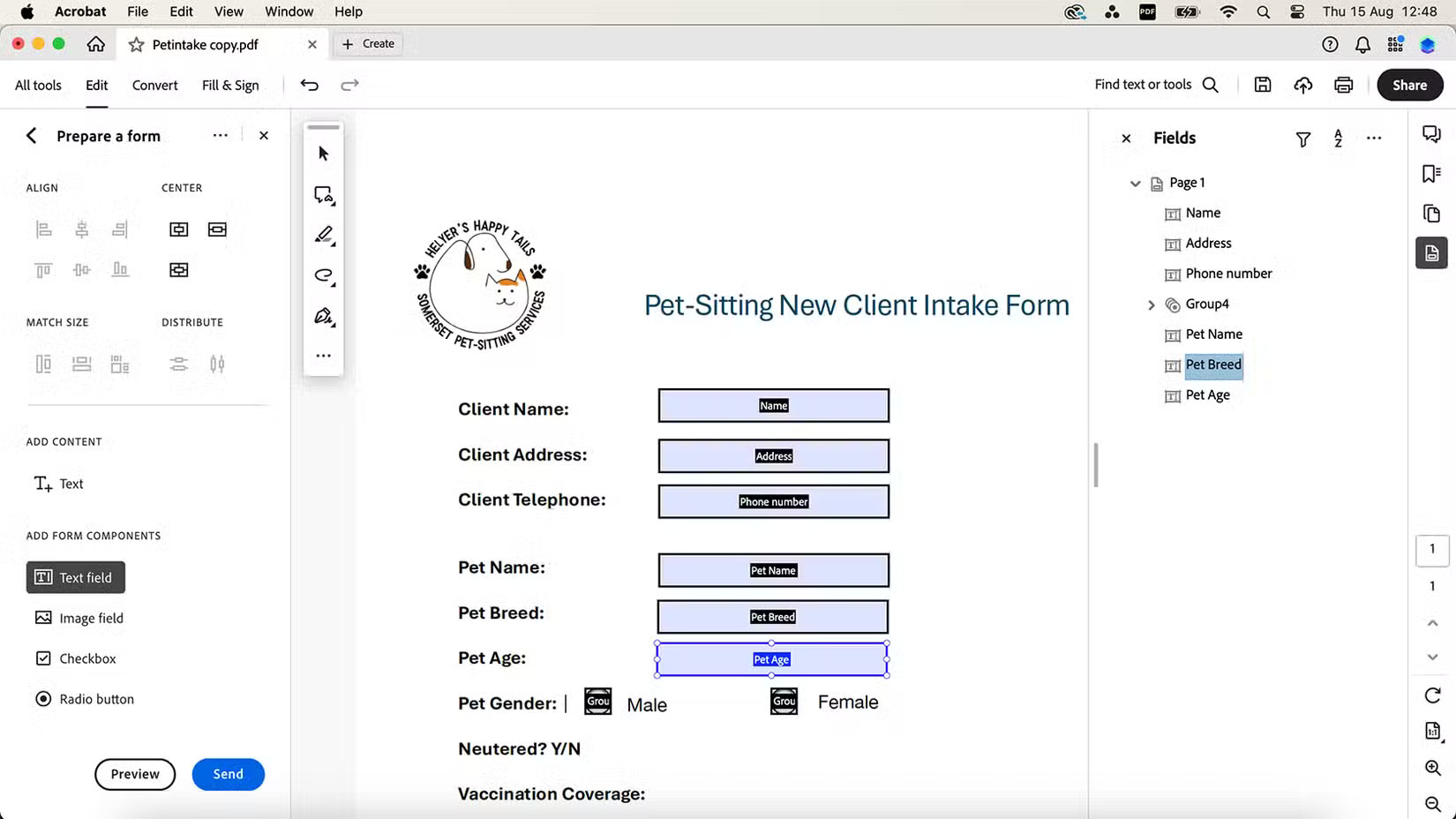
<figcaption>Biểu mẫu có thể điền của Adobe Acrobat</figcaption>
</figure>
&nbsp;

<p>Adobe Acrobat là sản phẩm phần mềm Adobe cao cấp. Bạn có thể đăng ký gói cá nhân với giá 12,99 USD/tháng. Acrobat cũng được bao gồm trong đăng ký Adobe Creative Cloud cùng với các phần mềm Adobe khác, thường có giá từ 50,00 USD/tháng.</p>

<p>Sau khi mở file PDF tiêu chuẩn, hãy chọn&nbsp;<strong>Prepare a form</strong>&nbsp;trên thanh công cụ bên trái. Tại đây, bạn sẽ tìm thấy tất cả các công cụ cần thiết để thêm trường biểu mẫu tương tác, hộp kiểm hoặc phần có thể điền. Bạn cũng có thể thêm văn bản, hình ảnh và liên kết trực tiếp tiêu chuẩn khi cần. Lưu và chia sẻ bằng các phương pháp như email, Microsoft Teams hoặc liên kết được tạo.</p>

<h2 id="mcetoc_1iedjrouc16q">2.&nbsp;pdfFiller</h2>
<span style="color:rgb(192, 57, 43);"><strong>https://www.pdffiller.com/</strong></span>

<figure><img alt="" data-adbro-processed="true" data-i="1" data-src="https://st.quantrimang.com/photos/image/2024/12/06/ung-dung-bien-pdf-thanh-bieu-mau-co-the-dien-2.jpg" data-was-processed="true" height="825" src="https://st.quantrimang.com/photos/image/2024/12/06/ung-dung-bien-pdf-thanh-bieu-mau-co-the-dien-2.jpg" width="1650" /></figure>

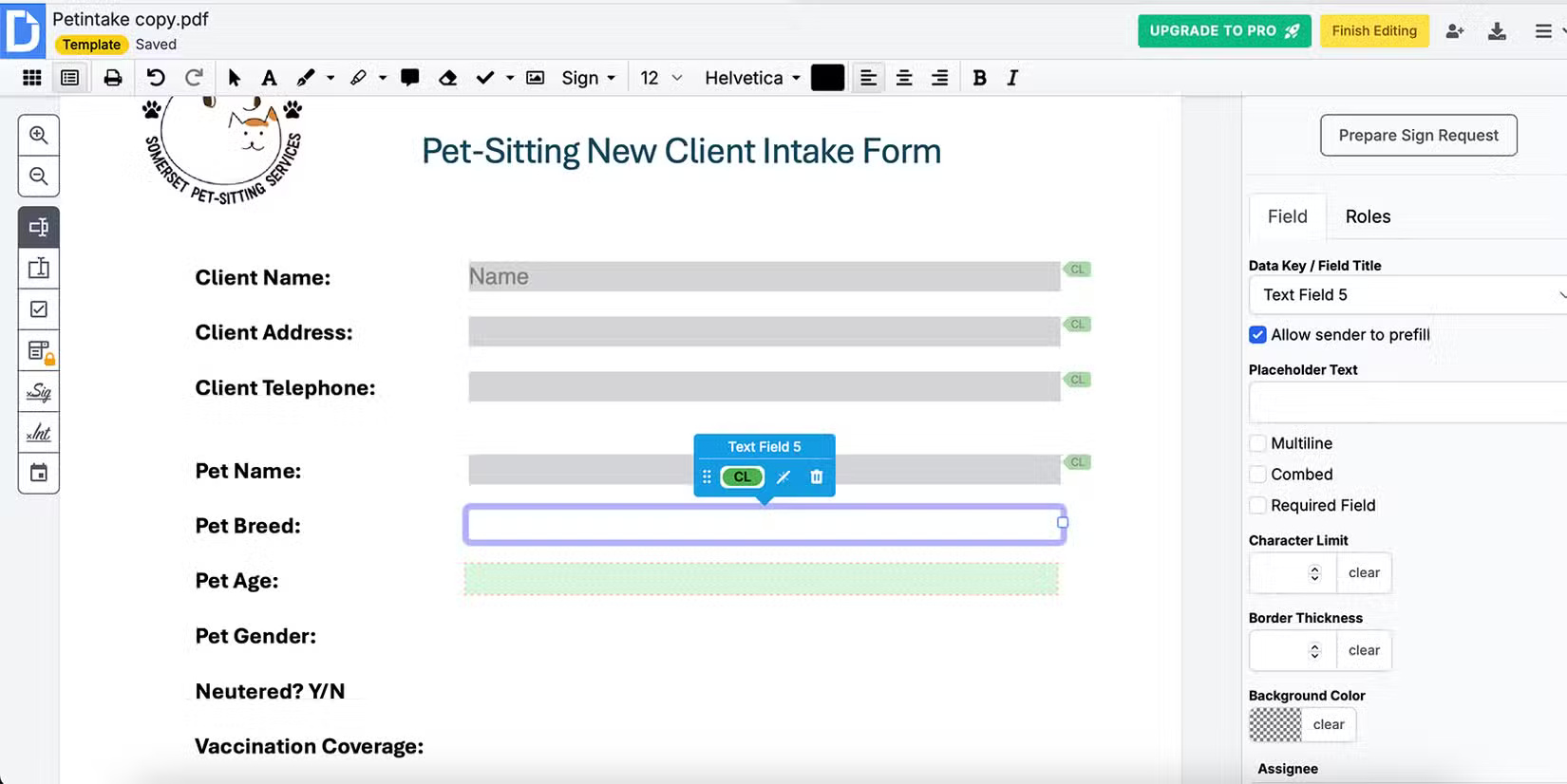
<p>pdfFiller là công cụ dựa trên trình duyệt giúp bạn có thể điền vào&nbsp;<a data-type="internal" href="https://quantrimang.com/cong-nghe/tim-hieu-ve-dinh-dang-pdf-118417" title="File PDF là gì? Đọc file PDF như thế nào?">file PDF</a>. Công cụ này cung cấp các hộp văn bản và vùng văn bản cũng như hộp kiểm, chữ ký và chữ viết tắt, hình ảnh và liên kết. Không giống như hầu hết các trình chuyển đổi biểu mẫu có thể điền khác, pdfFiller cũng cung cấp những trường mẫu cho các mục đích sử dụng phổ biến như số điện thoại, danh sách drop-down giới tính, mã bưu chính, độ tuổi, v.v...</p>
&nbsp;

<h2 id="mcetoc_1iedjrouc16r">3.&nbsp;UPDF</h2>
<span style="color:rgb(192, 57, 43);"><strong>https://updf.com/</strong></span>

<figure><img alt="" data-i="2" data-src="https://st.quantrimang.com/photos/image/2024/12/06/ung-dung-bien-pdf-thanh-bieu-mau-co-the-dien-3.jpg" data-was-processed="true" height="928" src="https://st.quantrimang.com/photos/image/2024/12/06/ung-dung-bien-pdf-thanh-bieu-mau-co-the-dien-3.jpg" width="1650" /></figure>

<p>UPDF cung cấp các ứng dụng Windows, macOS, iOS và Android với các tính năng miễn phí. Với gói miễn phí của UPDF, bạn có thể chuyển đổi tối đa 2 tài liệu mỗi ngày, với 1GB dung lượng lưu trữ đám mây miễn phí và quyền truy cập dùng thử miễn phí các tính năng cao cấp - nhưng bạn phải tạo một tài khoản.</p>

<p>Gói miễn phí cung cấp các công cụ cần thiết để biến PDF của bạn thành biểu mẫu có thể điền, nhưng PDF của bạn sẽ có watermark UPDF trừ khi bạn nâng cấp. Nếu thực sự không thích những điều này, bạn có thể thử một số phương pháp để&nbsp;xóa watermark khỏi PDF.</p>

<h2 id="mcetoc_1iedjrouc16s">4.&nbsp;Wondershare PDFelement</h2>
<span style="color:rgb(192, 57, 43);"><strong>https://pdf.wondershare.com/</strong></span>

<figure><img alt="" data-i="3" data-src="https://st.quantrimang.com/photos/image/2024/12/06/ung-dung-bien-pdf-thanh-bieu-mau-co-the-dien-4.jpg" data-was-processed="true" height="925" src="https://st.quantrimang.com/photos/image/2024/12/06/ung-dung-bien-pdf-thanh-bieu-mau-co-the-dien-4.jpg" width="1650" /></figure>
&nbsp;

<p>PDFelement dễ sử dụng, nhưng người dùng miễn phí sẽ thấy các cửa sổ pop-up thường xuyên yêu cầu nâng cấp trả phí, khiến công cụ này hơi không thân thiện với người dùng. Tạo biểu mẫu có thể điền bằng cách kéo và thả từng phần tử và chia sẻ qua liên kết email hoặc mã QR cho thiết bị di động.</p>

<h2 id="mcetoc_1iedjrouc16t">5.&nbsp;Fillout&nbsp;</h2>
<span style="color:rgb(192, 57, 43);"><strong>https://www.fillout.com/</strong></span>

<figure><img alt="" data-i="4" data-src="https://st.quantrimang.com/photos/image/2024/12/06/ung-dung-bien-pdf-thanh-bieu-mau-co-the-dien-5.jpg" data-was-processed="true" height="825" src="https://st.quantrimang.com/photos/image/2024/12/06/ung-dung-bien-pdf-thanh-bieu-mau-co-the-dien-5.jpg" width="1650" /></figure>

<p>Fillout là trình tạo biểu mẫu miễn phí dựa trên trình duyệt. Công cụ này có một số tính năng AI giúp xây dựng biểu mẫu từ đầu, nhưng cũng cung cấp giải pháp đơn giản để chuyển đổi file PDF thành biểu mẫu có thể điền.</p>

<h2 id="mcetoc_1iedjrouc16u">6.&nbsp;Jotform</h2>
<span style="color:rgb(192, 57, 43);"><strong>https://www.jotform.com/</strong></span>

<figure><img alt="" data-i="5" data-src="https://st.quantrimang.com/photos/image/2024/12/06/ung-dung-bien-pdf-thanh-bieu-mau-co-the-dien-6.jpg" data-was-processed="true" height="825" src="https://st.quantrimang.com/photos/image/2024/12/06/ung-dung-bien-pdf-thanh-bieu-mau-co-the-dien-6.jpg" width="1650" /></figure>

<p>Jotform là một trong những trang web năng suất tốt nhất hiện có và nó hữu ích cho nhiều mục đích sử dụng, như lưu trữ đơn xin việc, bảng câu hỏi và thăm dò ý kiến. Nó cũng có thể giúp bạn tạo PDF có thể điền. Jotform miễn phí, bạn chỉ cần một tài khoản để chia sẻ biểu mẫu đã hoàn thành của mình.</p>
&nbsp;

<h2 id="mcetoc_1iedjrouc16v">7.&nbsp;DocHub</h2>
<strong><span style="color:rgb(192, 57, 43);">https://www.jotform.com/</span></strong>

<figure><img alt="Biểu mẫu có thể điền DocHub" data-i="6" data-src="https://st.quantrimang.com/photos/image/2024/12/06/ung-dung-bien-pdf-thanh-bieu-mau-co-the-dien-7.jpg" data-was-processed="true" height="826" src="https://st.quantrimang.com/photos/image/2024/12/06/ung-dung-bien-pdf-thanh-bieu-mau-co-the-dien-7.jpg" width="1650" />
<figcaption>Biểu mẫu có thể điền DocHub</figcaption>
</figure>

<p>DocHub dựa trên trình duyệt và dễ sử dụng. Upload file PDF của bạn lên và chọn sử dụng làm template. Từ đó, bạn có thể dễ dàng chỉnh sửa bằng cách thêm trường biểu mẫu. Có một số tùy chọn trường nhỏ, bao gồm một số tùy chọn chỉ dành cho người dùng cao cấp. Tuy nhiên, hầu hết các công cụ bạn cần đều là một phần của gói miễn phí.</p>

<p>Để chia sẻ biểu mẫu có thể điền của mình, bạn phải gửi biểu mẫu qua email. Cài đặt DocHub cho phép nhắc nhở tự động miễn phí cũng như các tùy chọn hết hạn nếu email bị bỏ qua.</p>

<h2 id="mcetoc_1iedjrouc170">8.&nbsp;Sejda</h2>
<span style="color:rgb(192, 57, 43);"><strong>https://quantrimang.com/download/tai-sejda-187964</strong></span>
<figure><img alt="Biểu mẫu có thể điền Sejda" data-i="7" data-src="https://st.quantrimang.com/photos/image/2024/12/06/ung-dung-bien-pdf-thanh-bieu-mau-co-the-dien-8.jpg" data-was-processed="true" height="878" src="https://st.quantrimang.com/photos/image/2024/12/06/ung-dung-bien-pdf-thanh-bieu-mau-co-the-dien-8.jpg" width="1650" />
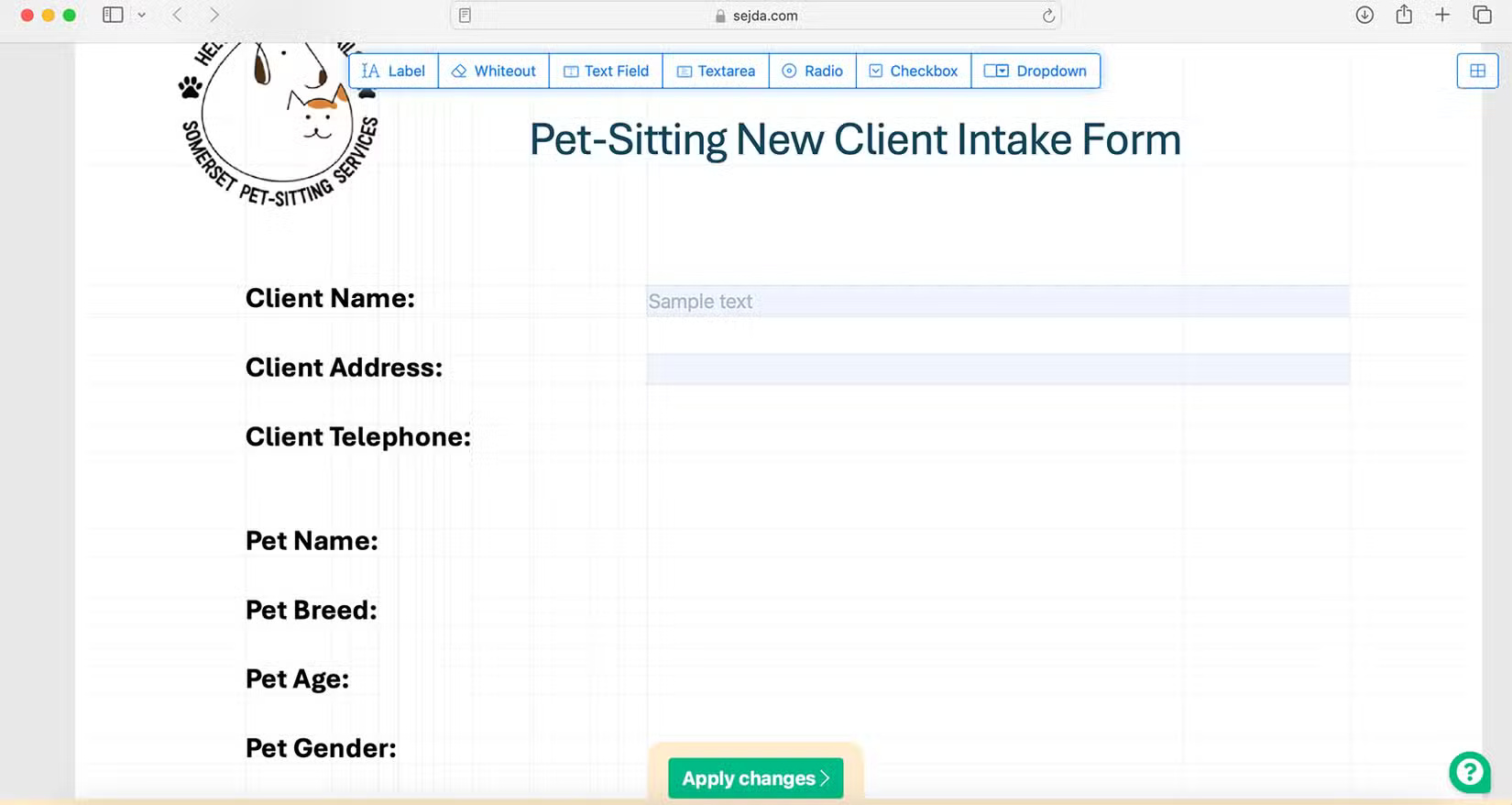
<figcaption>Biểu mẫu có thể điền Sejda</figcaption>
</figure>

<p>Sejda là một công cụ trình duyệt miễn phí mà bạn có thể sử dụng để tạo hoặc chỉnh sửa PDF và chuyển chúng thành biểu mẫu có thể điền.</p>

<p>Upload file PDF của bạn lên và thêm các tùy chọn tương tác như hộp trường văn bản, nút radio, menu drop-down, v.v... Bạn cũng có thể chỉnh sửa văn bản hiện có trong PDF của mình mà không có kết quả tiêu cực.</p>

<h2 id="mcetoc_1iedjrouc171">9.&nbsp;GoFormz</h2>
<span style="color:rgb(192, 57, 43);"><strong>https://accounts.goformz.com/login?ReturnUrl=https%3A%2F%2Faccounts.goformz.com%2Fconnect%2Fauthorize%2Fcallback%3Fclient_id%3Dfec39629-2cf9-4ed7-a1b5-aa44833c50dd%26redirect_uri%3Dhttps%253A%252F%252Fapp.goformz.com%26response_type%3Dcode%26scope%3Dopenid%2520profile%2520basic%26state%3Da46bfab439e84fed83c027ff8802b60b%26code_challenge%3Dg-cGGOfoJhudAEf-WAvUcezltqRc3pAErJY5_Ovwu6w%26code_challenge_method%3DS256%26response_mode%3Dquery</strong></span>
<figure><img alt="Biểu mẫu có thể điền GoFormz" data-i="8" data-src="https://st.quantrimang.com/photos/image/2024/12/06/ung-dung-bien-pdf-thanh-bieu-mau-co-the-dien-9.jpg" data-was-processed="true" height="825" src="https://st.quantrimang.com/photos/image/2024/12/06/ung-dung-bien-pdf-thanh-bieu-mau-co-the-dien-9.jpg" width="1650" />
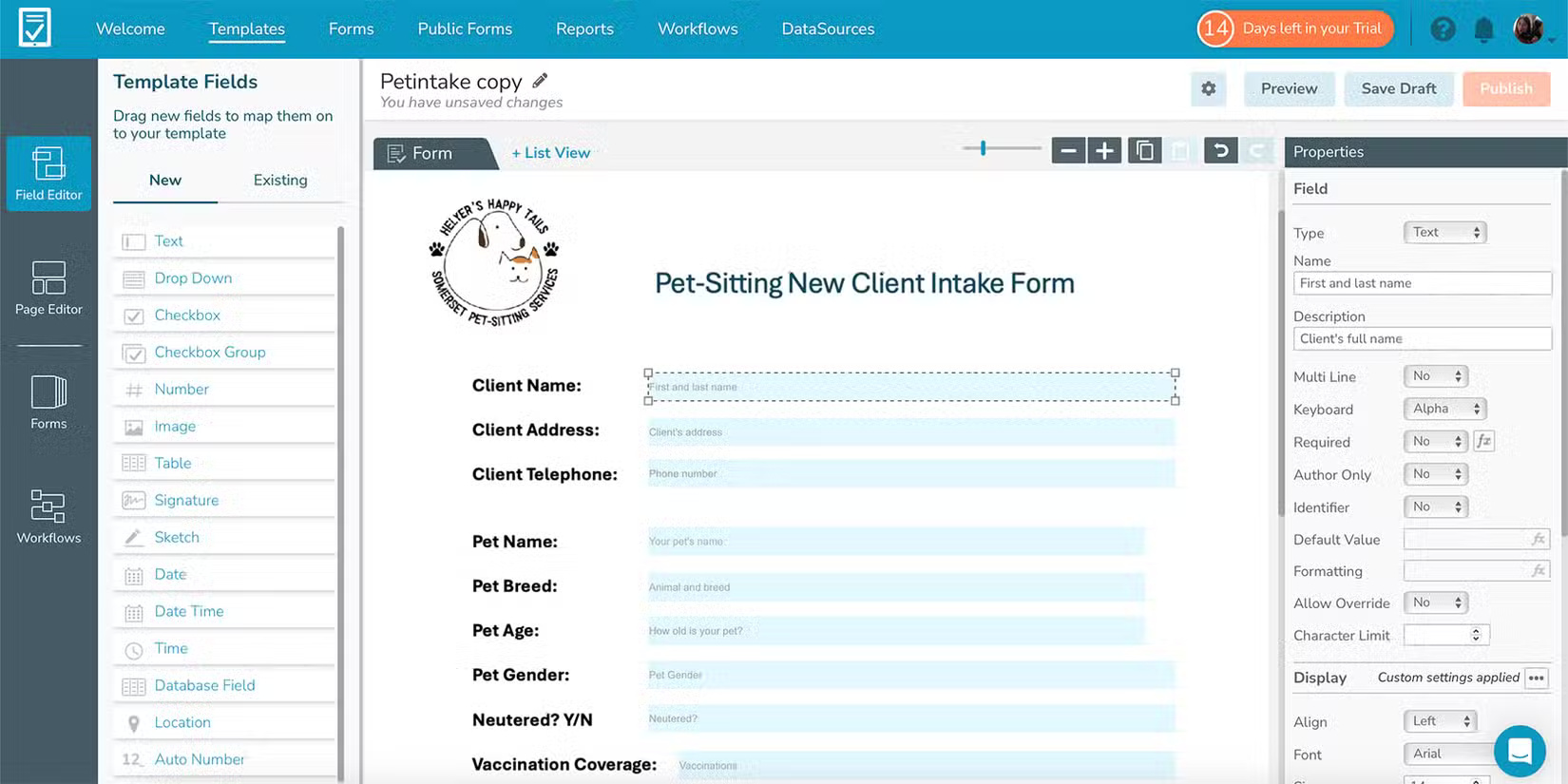
<figcaption>Biểu mẫu có thể điền GoFormz</figcaption>
</figure>

<p>GoForms cung cấp một cách miễn phí dễ sử dụng để chuyển đổi file PDF thành biểu mẫu có thể điền. Bạn có thể tạo file từ đầu hoặc upload lên PDF hiện có.</p>

<p>GoFormz dễ dàng như kéo và thả. Với danh sách các tùy chọn cho trường biểu mẫu tương tác, bạn có thể kéo hộp văn bản, menu drop-down, hộp kiểm và hộp chữ ký, cũng như trường nhập ngày, mã vạch và hình ảnh. Bạn có thể bao gồm văn bản mô tả hoặc văn bản thay thế, thay đổi màu sắc và chỉnh sửa nội bộ cho nhiều thuộc tính khác nhau như tùy chọn ghi đè và giới hạn ký tự.</p>
		</div>
				<div id="author">
						<p>
				<strong>Nguồn tin:</strong>
				Quantrimang.com:
			</p>
		</div>
	</div>
	<div id="footer" class="clearfix">
		<div id="url">
			<strong>URL của bản tin này: </strong><a href="https://www.nguoicodonvn2008.info/vi/news/savefile/phan-mem/9-ung-dung-bien-file-pdf-thanh-bieu-mau-co-the-dien-9490.html" title="9 ứng dụng biến file PDF thành biểu mẫu có thể điền">https://www.nguoicodonvn2008.info/vi/news/savefile/phan-mem/9-ung-dung-bien-file-pdf-thanh-bieu-mau-co-the-dien-9490.html</a>

		</div>
		<div class="clear"></div>
		<div class="copyright">
			&copy; .&#x3A; Nguoicodonvn2008.info - Cõi lòng người cô đơn &#x3A;.
		</div>
		<div id="contact">
			<a href="mailto:admin@nguoicodonvn2008.info">admin@nguoicodonvn2008.info</a>
		</div>
	</div>
</div>
        <div id="timeoutsess" class="chromeframe">
            Bạn đã không sử dụng Site, <a onclick="timeoutsesscancel();" href="https://nguoicodonvn2008.info/#">Bấm vào đây để duy trì trạng thái đăng nhập</a>. Thời gian chờ: <span id="secField"> 60 </span> giây
        </div>
        <div id="openidResult" class="nv-alert" style="display:none"></div>
        <div id="openidBt" data-result="" data-redirect=""></div>
		</script>
		<div class="car-top">
  <span><img src="https://nguoicodonvn2008.info/themes/default/images/car.png" alt=""></span>
</div>
<div id="run_cronjobs" style="visibility:hidden;display:none;"><img alt="cron" src="/index.php?second=cronjobs&amp;p=n9KRR1u2" width="1" height="1" /></div>
<script src="https://nguoicodonvn2008.info/assets/js/jquery/jquery.min.js"></script>
<script>var nv_base_siteurl="/",nv_lang_data="vi",nv_lang_interface="vi",nv_name_variable="nv",nv_fc_variable="op",nv_lang_variable="language",nv_module_name="news",nv_func_name="savefile",nv_is_user=0, nv_my_ofs=-4,nv_my_abbr="EDT",nv_cookie_prefix="nv4c_e856T",nv_check_pass_mstime=1738000,nv_area_admin=0,nv_safemode=0,theme_responsive=0,nv_recaptcha_ver=2,nv_recaptcha_sitekey="",nv_recaptcha_type="image",XSSsanitize=1;</script>
<script src="https://nguoicodonvn2008.info/assets/js/language/vi.js"></script>
<script src="https://nguoicodonvn2008.info/assets/js/DOMPurify/purify3.js"></script>
<script src="https://nguoicodonvn2008.info/assets/js/global.js"></script>
<script src="https://nguoicodonvn2008.info/assets/js/site.js"></script>
<script src="https://nguoicodonvn2008.info/themes/default/js/news.js"></script>
<script src="https://nguoicodonvn2008.info/themes/default/js/main.js"></script>
<script src="https://nguoicodonvn2008.info/themes/default/js/custom.js"></script>
<script type="application/ld+json">
        {
            "@context": "https://schema.org",
            "@type": "Organization",
            "url": "https://nguoicodonvn2008.info",
            "logo": "https://nguoicodonvn2008.info/uploads/angel.gif"
        }
        </script>
<script src="https://nguoicodonvn2008.info/themes/default/js/bootstrap.min.js"></script>
<script type="text/javascript">
var $scrolltop = $('.car-top');
$scrolltop.on('click', function () {
    $('html,body').animate({
        scrollTop: 0
    }, 800);
    $(this).addClass("car-run");
    setTimeout(function(){ $scrolltop.removeClass('car-run');}, 1000);
    return false;
});
$(window).on('scroll', function ()
{ 
    if($(window).scrollTop() >= 200)
    {
        $scrolltop.addClass("show");
        $scrolltop.addClass("car-down");
    }
    else
    {
       $scrolltop.removeClass("show");
       setTimeout(function(){ $scrolltop.removeClass('car-down');}, 300);
    }
});
</script>
</body>
</html>