<!DOCTYPE html>
    <html lang="vi" xmlns="http://www.w3.org/1999/xhtml" prefix="og: http://ogp.me/ns#">
    <head>
<title>8 công cụ miễn phí để tự động hóa PC Windows</title>
<meta name="description" content="8 công cụ miễn phí để tự động hóa PC Windows - Savefile - Tin Tức -...">
<meta name="author" content=".: Nguoicodonvn2008.info - Cõi lòng người cô đơn :.">
<meta name="copyright" content=".: Nguoicodonvn2008.info - Cõi lòng người cô đơn :. [admin@nguoicodonvn2008.info]">
<meta name="robots" content="index, archive, follow, noodp">
<meta name="googlebot" content="index,archive,follow,noodp">
<meta name="msnbot" content="all,index,follow">
<meta name="generator" content="NukeViet v4.5">
<meta http-equiv="Content-Type" content="text/html; charset=utf-8">
<meta property="og:title" content="8 công cụ miễn phí để tự động hóa PC Windows">
<meta property="og:type" content="website">
<meta property="og:description" content="Savefile - Tin Tức - https&#x3A;&#x002F;&#x002F;www.nguoicodonvn2008.info&#x002F;vi&#x002F;news&#x002F;savefile&#x002F;phan-mem&#x002F;8-cong-cu-mien-phi-de-tu-dong-hoa-pc-windows-9973.html">
<meta property="og:site_name" content=".&#x3A; Nguoicodonvn2008.info - Cõi lòng người cô đơn &#x3A;.">
<meta property="og:url" content="https://www.nguoicodonvn2008.info/vi/news/savefile/phan-mem/8-cong-cu-mien-phi-de-tu-dong-hoa-pc-windows-9973.html">
<link rel="shortcut icon" href="https://nguoicodonvn2008.info/favicon.ico">
<link rel="canonical" href="https://www.nguoicodonvn2008.info/vi/news/savefile/phan-mem/8-cong-cu-mien-phi-de-tu-dong-hoa-pc-windows-9973.html">
<link rel="alternate" href="https://nguoicodonvn2008.info/vi/news/rss/" title="Tin Tức" type="application/rss+xml">
<link rel="alternate" href="https://nguoicodonvn2008.info/vi/news/rss/karaoke-dual/" title="Tin Tức - Karaoke Dual" type="application/rss+xml">
<link rel="alternate" href="https://nguoicodonvn2008.info/vi/news/rss/nhac-tre/" title="Tin Tức - Nhạc trẻ" type="application/rss+xml">
<link rel="alternate" href="https://nguoicodonvn2008.info/vi/news/rss/tru-tinh/" title="Tin Tức - Trữ tình" type="application/rss+xml">
<link rel="alternate" href="https://nguoicodonvn2008.info/vi/news/rss/nuoc-ngoai/" title="Tin Tức - Nước ngoài" type="application/rss+xml">
<link rel="alternate" href="https://nguoicodonvn2008.info/vi/news/rss/remix/" title="Tin Tức - Remix" type="application/rss+xml">
<link rel="alternate" href="https://nguoicodonvn2008.info/vi/news/rss/tam-su-tinh-yeu/" title="Tin Tức - Tâm sự tình yêu" type="application/rss+xml">
<link rel="alternate" href="https://nguoicodonvn2008.info/vi/news/rss/tho-suu-tam/" title="Tin Tức - Thơ sưu tầm" type="application/rss+xml">
<link rel="alternate" href="https://nguoicodonvn2008.info/vi/news/rss/cuoc-song/" title="Tin Tức - Cuộc sống" type="application/rss+xml">
<link rel="alternate" href="https://nguoicodonvn2008.info/vi/news/rss/phan-mem/" title="Tin Tức - Phần mềm" type="application/rss+xml">
<link rel="alternate" href="https://nguoicodonvn2008.info/vi/news/rss/kien-thuc-may-tinh/" title="Tin Tức - Kiến thức máy tính" type="application/rss+xml">
<link rel="alternate" href="https://nguoicodonvn2008.info/vi/news/rss/hoc-tap/" title="Tin Tức - Học tập" type="application/rss+xml">
<link rel="alternate" href="https://nguoicodonvn2008.info/vi/news/rss/tai-lieu/" title="Tin Tức - Tài liệu" type="application/rss+xml">
<link rel="alternate" href="https://nguoicodonvn2008.info/vi/news/rss/de-thi/" title="Tin Tức - Đề thi" type="application/rss+xml">
<link rel="preload" as="style" href="https://nguoicodonvn2008.info/assets/css/font-awesome.min.css" type="text/css">
<link rel="preload" as="style" href="https://nguoicodonvn2008.info/themes/default/css/bootstrap.non-responsive.css" type="text/css">
<link rel="preload" as="style" href="https://nguoicodonvn2008.info/themes/default/css/style.css" type="text/css">
<link rel="preload" as="style" href="https://nguoicodonvn2008.info/themes/default/css/style.non-responsive.css" type="text/css">
<link rel="preload" as="style" href="https://nguoicodonvn2008.info/themes/default/css/news.css" type="text/css">
<link rel="preload" as="style" href="https://nguoicodonvn2008.info/themes/default/css/custom.css" type="text/css">
<link rel="preload" as="script" href="https://nguoicodonvn2008.info/assets/js/jquery/jquery.min.js" type="text/javascript">
<link rel="preload" as="script" href="https://nguoicodonvn2008.info/assets/js/language/vi.js" type="text/javascript">
<link rel="preload" as="script" href="https://nguoicodonvn2008.info/assets/js/DOMPurify/purify3.js" type="text/javascript">
<link rel="preload" as="script" href="https://nguoicodonvn2008.info/assets/js/global.js" type="text/javascript">
<link rel="preload" as="script" href="https://nguoicodonvn2008.info/assets/js/site.js" type="text/javascript">
<link rel="preload" as="script" href="https://nguoicodonvn2008.info/themes/default/js/news.js" type="text/javascript">
<link rel="preload" as="script" href="https://nguoicodonvn2008.info/themes/default/js/main.js" type="text/javascript">
<link rel="preload" as="script" href="https://nguoicodonvn2008.info/themes/default/js/custom.js" type="text/javascript">
<link rel="preload" as="script" href="https://nguoicodonvn2008.info/themes/default/js/bootstrap.min.js" type="text/javascript">
<link rel="stylesheet" href="https://nguoicodonvn2008.info/assets/css/font-awesome.min.css">
<link rel="stylesheet" href="https://nguoicodonvn2008.info/themes/default/css/bootstrap.non-responsive.css">
<link rel="stylesheet" href="https://nguoicodonvn2008.info/themes/default/css/style.css">
<link rel="stylesheet" href="https://nguoicodonvn2008.info/themes/default/css/style.non-responsive.css">
<link rel="StyleSheet" href="https://nguoicodonvn2008.info/themes/default/css/news.css">
<link rel="stylesheet" href="https://nguoicodonvn2008.info/themes/default/css/custom.css">
<style type="text/css">
	body{background: #fff;}
</style>
    </head>
    <body>
<div id="print">
	<div id="hd_print">
		<h2 class="pull-left">.&#x3A; Nguoicodonvn2008.info - Cõi lòng người cô đơn &#x3A;.</h2>
		<p class="pull-right"><a title=".&#x3A; Nguoicodonvn2008.info - Cõi lòng người cô đơn &#x3A;." href="https://nguoicodonvn2008.info/">https://nguoicodonvn2008.info</a></p>
	</div>
	<div class="clear"></div>
	<hr />
	<div id="content">
		<h1>8 công cụ miễn phí để tự động hóa PC Windows</h1>
		<ul class="list-inline">
			<li>Thứ tư - 12/03/2025 00:24</li>
			<li class="hidden-print txtrequired"><em class="fa fa-print">&nbsp;</em><a title="In ra" href="javascript:;" onclick="window.print()">In ra</a></li>
			<li class="hidden-print txtrequired"><em class="fa fa-power-off">&nbsp;</em><a title="Đóng cửa sổ này" href="javascript:;" onclick="window.close()">Đóng cửa sổ này</a></li>
		</ul>
		<div class="clear"></div>
		<div id="hometext">
		</div>
				<div class="imghome">
			<img alt="8 công cụ miễn phí để tự động hóa PC Windows" src="https://st.quantrimang.com/photos/image/2025/03/10/cong-cu-mien-phi-tu-dong-hoa-pc-windows-6.jpg" width="460" class="img-thumbnail" />
		</div>
		<div class="clear"></div>
		<div id="bodytext" class="clearfix">
			<p style="text-align: justify;">Tất cả chúng ta đều có những tác vụ lặp đi lặp lại muốn tự động hóa trên&nbsp;<a data-google-interstitial="false" data-google-vignette="false" href="https://quantrimang.com/cong-nghe/cong-cu-mien-phi-tu-dong-hoa-pc-windows-207904#">&nbsp;PC</a>&nbsp;của mình. May mắn thay, có rất nhiều ứng dụng&nbsp;<a data-google-interstitial="false" data-google-vignette="false" href="https://quantrimang.com/cong-nghe/cong-cu-mien-phi-tu-dong-hoa-pc-windows-207904#">&nbsp;Windows</a>&nbsp;của bên thứ ba có thể gánh vác trách nhiệm và giúp bạn sử dụng thời gian hiệu quả hơn.</p>

<h2 style="text-align: justify;">8.&nbsp;aText</h2>

<div style="text-align: justify;"><span style="color:rgb(39, 174, 96);"><strong>https://www.trankynam.com/atext/</strong></span></div>

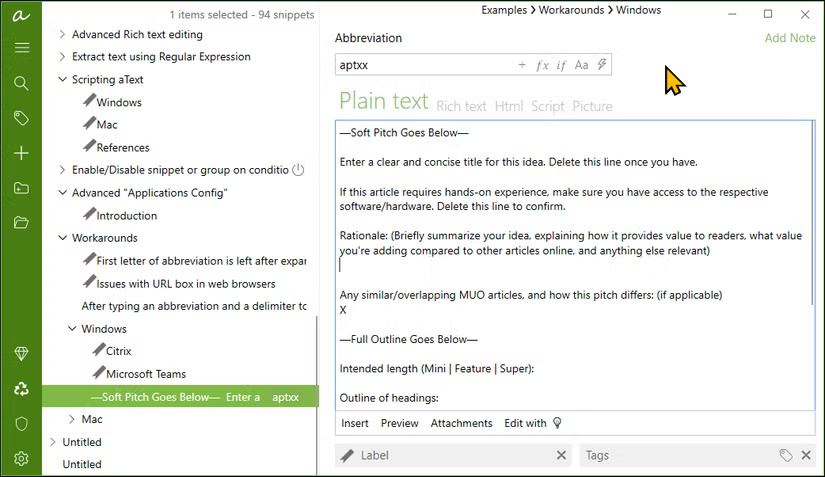
<p style="text-align: justify;">aText là một công cụ mở rộng văn bản tuyệt vời cho phép bạn tạo các shortcut cho những cụm từ thường dùng. Theo thời gian, công cụ này sẽ giúp bạn tiết kiệm được vài giờ mỗi tháng trong khi giảm thiểu lỗi đánh máy. Nhưng nó không chỉ mở rộng văn bản cơ bản.</p>

<p style="text-align: justify;">Bạn có thể tạo template được cá nhân hóa với các trường động như ngày, giờ, hình ảnh, v.v...</p>

<figure>
<div style="text-align: justify;"><img alt="Giao diện atext trên Windows 11" data-i="0" data-src="https://st.quantrimang.com/photos/image/2025/03/10/cong-cu-mien-phi-tu-dong-hoa-pc-windows-1.jpg" data-was-processed="true" height="477" src="https://st.quantrimang.com/photos/image/2025/03/10/cong-cu-mien-phi-tu-dong-hoa-pc-windows-1.jpg" width="825" /></div>

<figcaption>
<div style="text-align: justify;">Giao diện atext trên Windows 11</div>
</figcaption>
</figure>

<h2 style="text-align: justify;">7.&nbsp;AutoHot Key</h2>

<div style="text-align: justify;"><span style="color:rgb(192, 57, 43);"><strong>https://www.autohotkey.com/</strong></span></div>

<p style="text-align: justify;">AutoHot Key là ngôn ngữ tập lệnh tự động phổ biến dành cho Windows. Mặc dù bạn có thể sử dụng nó như một trình mở rộng văn bản như aText, nhưng nó có thể làm được nhiều hơn thế. Bạn có thể viết một script để gán hotkey mở chương trình và thực hiện tác vụ bên trong, tăng cường chức năng clipboard tích hợp, tạo GUI cơ bản để tương tác với các chương trình làm việc của bạn và thậm chí gán lại tổ hợp phím thành một phím duy nhất như&nbsp;<strong>Alt+Tab=Win</strong>&nbsp;để chuyển đổi giữa những ứng dụng.</p>

<h2 style="text-align: justify;">6.&nbsp;AutoDark Mode</h2>

<div style="text-align: justify;"><span style="color:rgb(192, 57, 43);"><strong>https://apps.microsoft.com/detail/xp8jk4hzbvf435?hl=vi-VN&amp;gl=VN</strong></span></div>

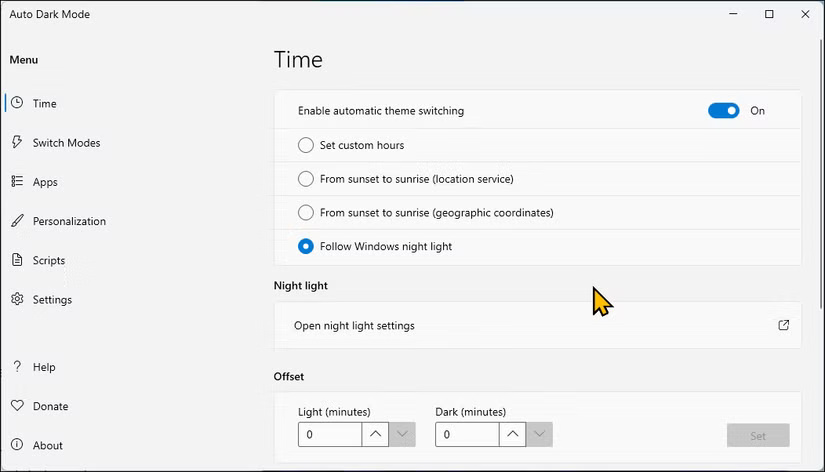
<p style="text-align: justify;">AutoDark Mode là một công cụ tự động hóa đơn giản nhưng cực kỳ hữu ích - và thành thật mà nói, Microsoft nên đưa tính năng này vào mặc định. Như tên gọi của nó, nó chuyển đổi giữa các theme tối và sáng của PC Windows tại một thời điểm cụ thể.</p>

<p style="text-align: justify;">Để bật tính năng chuyển đổi theme tự động, hãy vào tab&nbsp;<strong>Time</strong>&nbsp;và chọn lịch trình bạn muốn. Bạn có thể đặt thời gian tùy chỉnh, sử dụng lịch trình mặt trời mọc-lặn dựa trên vị trí hoặc đồng bộ với Windows Night Light để chuyển đổi liền mạch.</p>

<figure>
<div style="text-align: justify;"><img alt="Giao diện chế độ tối tự động trên Windows 11" data-adbro-processed="true" data-i="1" data-src="https://st.quantrimang.com/photos/image/2025/03/10/cong-cu-mien-phi-tu-dong-hoa-pc-windows-2.jpg" data-was-processed="true" height="472" src="https://st.quantrimang.com/photos/image/2025/03/10/cong-cu-mien-phi-tu-dong-hoa-pc-windows-2.jpg" width="825" /></div>

<figcaption>
<div style="text-align: justify;">Giao diện chế độ tối tự động trên Windows 11</div>
</figcaption>
</figure>

<h2 style="text-align: justify;">5.&nbsp;Power Automate</h2>

<div style="text-align: justify;"><span style="color:rgb(231, 76, 60);"><strong>https://apps.microsoft.com/detail/9nftch6j7fhv?hl=vi-VN&amp;gl=VN</strong></span></div>

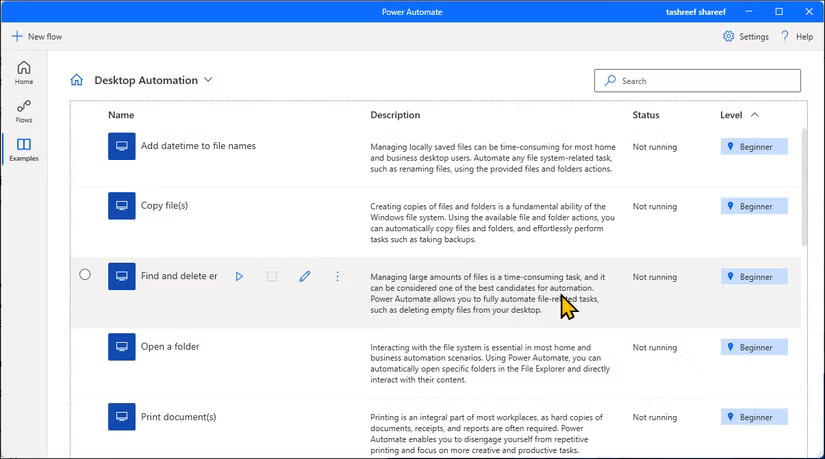
<p style="text-align: justify;">Microsoft Power Automate có thể giúp bạn tự động hóa các tác vụ hàng ngày lặp đi lặp lại trên Windows. Chúng được gọi là Flows và những gì bạn có thể làm với chúng phần lớn phụ thuộc vào quy trình làm việc của bạn. Ví dụ, hãy tạo các flow để tự động gửi email nhắc nhở thanh toán cho những thành viên câu lạc bộ thể thao của mình qua&nbsp;<a data-type="internal" href="https://quantrimang.com/cong-nghe/huong-dan-cach-su-dung-outlook-2013-cho-nguoi-moi-144897" title="Outlook là gì? Cách sử dụng Outlook cho người mới">Outlook</a>&nbsp;và một flow khác để tự động lưu file đính kèm email vào&nbsp;OneDrive&nbsp;và thậm chí sắp xếp ảnh theo ngày.</p>

<figure>
<div style="text-align: justify;"><img alt="Tab Examples mở trên Microsoft Power Automate trên Windows 11" data-i="2" data-src="https://st.quantrimang.com/photos/image/2025/03/10/cong-cu-mien-phi-tu-dong-hoa-pc-windows-3.jpg" data-was-processed="true" height="459" src="https://st.quantrimang.com/photos/image/2025/03/10/cong-cu-mien-phi-tu-dong-hoa-pc-windows-3.jpg" width="825" /></div>

<figcaption>
<div style="text-align: justify;">Tab Examples mở trên Microsoft Power Automate trên Windows 11</div>
</figcaption>
</figure>

<h2 style="text-align: justify;">4. Task Scheduler</h2>

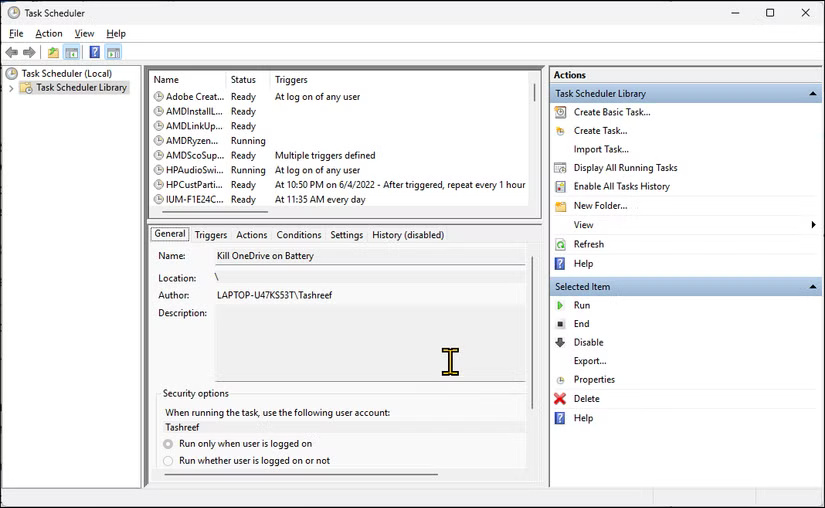
<p style="text-align: justify;">Task Scheduler&nbsp;là tiện ích tích hợp sẵn trong Windows, tự động hóa các tác vụ dựa trên những điều kiện được xác định trước. Bạn có thể sử dụng tiện ích này để tự động thực thi các file hàng loạt, khởi chạy ứng dụng và thực hiện những tác vụ bảo trì hệ thống như dọn dẹp ổ đĩa và cập nhật.</p>

<figure>
<div style="text-align: justify;"><img alt="Tạo tác vụ mới trên Task Scheduler trên Windows 11" data-i="3" data-src="https://st.quantrimang.com/photos/image/2025/03/10/cong-cu-mien-phi-tu-dong-hoa-pc-windows-4.jpg" data-was-processed="true" height="508" src="https://st.quantrimang.com/photos/image/2025/03/10/cong-cu-mien-phi-tu-dong-hoa-pc-windows-4.jpg" width="825" /></div>

<figcaption>
<div style="text-align: justify;">Tạo tác vụ mới trên Task Scheduler trên Windows 11</div>
</figcaption>
</figure>

<h2 style="text-align: justify;">3. PowerShell</h2>

<p style="text-align: justify;"><a data-type="internal" href="https://quantrimang.com/gioi-thieu-ve-powershell-37928" title="PowerShell và mọi điều bạn cần biết về tiện ích này">Microsoft</a> <a data-type="internal" href="https://quantrimang.com/gioi-thieu-ve-powershell-37928" title="PowerShell và mọi điều bạn cần biết về tiện ích này">PowerShell</a>&nbsp;là ngôn ngữ lập trình dựa trên dòng lệnh được thiết kế để tự động hóa các tác vụ hệ thống, thường thông qua việc sử dụng những ứng dụng khác. Ở cấp độ cơ bản, nó có thể được sử dụng để thay đổi chính sách thực thi, quản lý các ứng dụng Microsoft Store, thêm hoặc xóa người dùng và cấu hình các thiết bị mạng.</p>

<h2 style="text-align: justify;">2.&nbsp;Ditto</h2>

<div style="text-align: justify;"><span style="color:rgb(192, 57, 43);"><strong>https://apps.microsoft.com/detail/9nblggh3zbjq?hl=vi-VN&amp;gl=VN</strong></span></div>

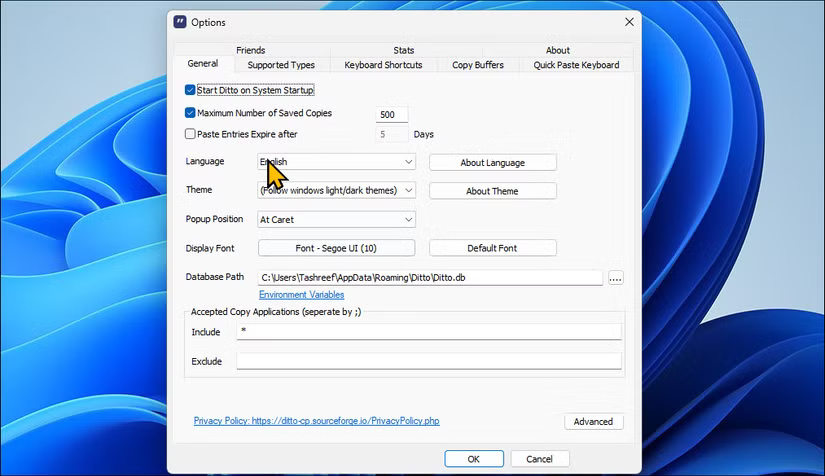
<p style="text-align: justify;">Microsoft đã cải thiện clipboard của&nbsp;&nbsp;Windows&nbsp;11 bằng cách giới thiệu lịch sử clipboard, nhưng vẫn còn hạn chế. Ditto là trình quản lý clipboard nâng cao cho phép bạn lưu số lượng bản sao không giới hạn và cấu hình bằng phím tắt&nbsp;<strong>Ctrl + #&nbsp;</strong>để dán 10 mục clipboard cuối cùng trực tiếp từ bàn phím.</p>

<p style="text-align: justify;">Bạn có thể chỉnh sửa các mục clipboard để sửa lỗi đánh máy hoặc lỗi, thêm mục clipboard mới, tạo nhóm và thậm chí tìm kiếm để tìm những mục đã sao chép. Đảm bảo sử dụng phím tắt&nbsp;<strong>Ctrl+ `</strong>(dấu ngoặc ngược) để khởi chạy và mở clipboard.</p>

<figure>
<div style="text-align: justify;"><img alt="Hộp thoại tùy chọn Ditto Clipboard Manager trên Windows 11" data-i="4" data-src="https://st.quantrimang.com/photos/image/2025/03/10/cong-cu-mien-phi-tu-dong-hoa-pc-windows-5.jpg" data-was-processed="true" height="476" src="https://st.quantrimang.com/photos/image/2025/03/10/cong-cu-mien-phi-tu-dong-hoa-pc-windows-5.jpg" width="825" /></div>

<figcaption>
<div style="text-align: justify;">Hộp thoại tùy chọn Ditto Clipboard Manager trên Windows 11</div>
</figcaption>
</figure>

<h2 style="text-align: justify;">1.&nbsp;DropIt</h2>

<div style="text-align: justify;"><span style="color:rgb(192, 57, 43);"><strong>http://www.dropitproject.com/</strong></span></div>

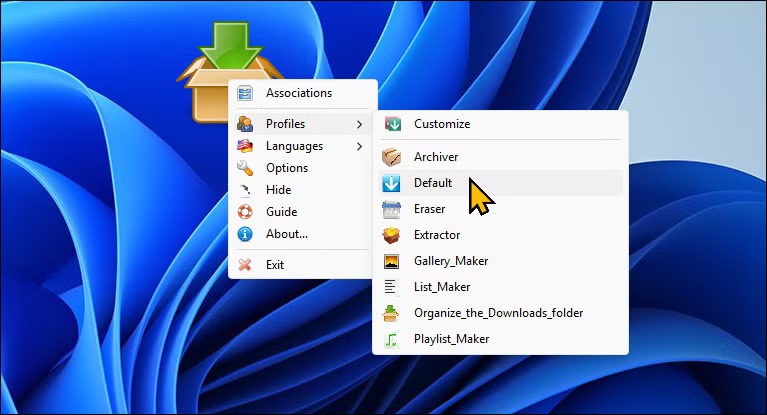
<p style="text-align: justify;">Nếu bạn không thích viết script, DropIt là tiện ích mã nguồn mở miễn phí giúp sắp xếp thư viện media lộn xộn của bạn. Nó có thể theo dõi các thay đổi thư mục và tự động hóa quản lý file mà không cần những script phức tạp.</p>

<figure>
<div style="text-align: justify;"><img alt="Tùy chọn DropIt trên desktop  Windows 11" data-i="5" data-src="https://st.quantrimang.com/photos/image/2025/03/10/cong-cu-mien-phi-tu-dong-hoa-pc-windows-6.jpg" data-was-processed="true" height="415" src="https://st.quantrimang.com/photos/image/2025/03/10/cong-cu-mien-phi-tu-dong-hoa-pc-windows-6.jpg" width="767" /></div>

<figcaption>
<div style="text-align: justify;">Tùy chọn DropIt trên desktop&nbsp; Windows 11</div>
</figcaption>
</figure>

<p style="text-align: justify;">Với DropIt, bạn có thể tạo các quy tắc dựa trên tiện ích mở rộng và ghép nối chúng với các hành động như Di chuyển, Sao chép, Tách, Xóa, Nén hoặc Bỏ qua. Ngoài ra, bạn có thể chỉ cần kéo và thả một thư mục vào biểu tượng nổi của DropIt trên desktop, sau đó chọn liên kết file, hành động và thư mục đích cho từng loại file.</p>

<div style="text-align: justify;">&nbsp;</div>
		</div>
				<div id="author">
						<p>
				<strong>Nguồn tin:</strong>
				Quantrimang.com:
			</p>
		</div>
	</div>
	<div id="footer" class="clearfix">
		<div id="url">
			<strong>URL của bản tin này: </strong><a href="https://www.nguoicodonvn2008.info/vi/news/savefile/phan-mem/8-cong-cu-mien-phi-de-tu-dong-hoa-pc-windows-9973.html" title="8 công cụ miễn phí để tự động hóa PC Windows">https://www.nguoicodonvn2008.info/vi/news/savefile/phan-mem/8-cong-cu-mien-phi-de-tu-dong-hoa-pc-windows-9973.html</a>

		</div>
		<div class="clear"></div>
		<div class="copyright">
			&copy; .&#x3A; Nguoicodonvn2008.info - Cõi lòng người cô đơn &#x3A;.
		</div>
		<div id="contact">
			<a href="mailto:admin@nguoicodonvn2008.info">admin@nguoicodonvn2008.info</a>
		</div>
	</div>
</div>
        <div id="timeoutsess" class="chromeframe">
            Bạn đã không sử dụng Site, <a onclick="timeoutsesscancel();" href="https://nguoicodonvn2008.info/#">Bấm vào đây để duy trì trạng thái đăng nhập</a>. Thời gian chờ: <span id="secField"> 60 </span> giây
        </div>
        <div id="openidResult" class="nv-alert" style="display:none"></div>
        <div id="openidBt" data-result="" data-redirect=""></div>
		</script>
		<div class="car-top">
  <span><img src="https://nguoicodonvn2008.info/themes/default/images/car.png" alt=""></span>
</div>
<script src="https://nguoicodonvn2008.info/assets/js/jquery/jquery.min.js"></script>
<script>var nv_base_siteurl="/",nv_lang_data="vi",nv_lang_interface="vi",nv_name_variable="nv",nv_fc_variable="op",nv_lang_variable="language",nv_module_name="news",nv_func_name="savefile",nv_is_user=0, nv_my_ofs=-4,nv_my_abbr="EDT",nv_cookie_prefix="nv4c_e856T",nv_check_pass_mstime=1738000,nv_area_admin=0,nv_safemode=0,theme_responsive=0,nv_recaptcha_ver=2,nv_recaptcha_sitekey="",nv_recaptcha_type="image",XSSsanitize=1;</script>
<script src="https://nguoicodonvn2008.info/assets/js/language/vi.js"></script>
<script src="https://nguoicodonvn2008.info/assets/js/DOMPurify/purify3.js"></script>
<script src="https://nguoicodonvn2008.info/assets/js/global.js"></script>
<script src="https://nguoicodonvn2008.info/assets/js/site.js"></script>
<script src="https://nguoicodonvn2008.info/themes/default/js/news.js"></script>
<script src="https://nguoicodonvn2008.info/themes/default/js/main.js"></script>
<script src="https://nguoicodonvn2008.info/themes/default/js/custom.js"></script>
<script type="application/ld+json">
        {
            "@context": "https://schema.org",
            "@type": "Organization",
            "url": "https://nguoicodonvn2008.info",
            "logo": "https://nguoicodonvn2008.info/uploads/angel.gif"
        }
        </script>
<script src="https://nguoicodonvn2008.info/themes/default/js/bootstrap.min.js"></script>
<script type="text/javascript">
var $scrolltop = $('.car-top');
$scrolltop.on('click', function () {
    $('html,body').animate({
        scrollTop: 0
    }, 800);
    $(this).addClass("car-run");
    setTimeout(function(){ $scrolltop.removeClass('car-run');}, 1000);
    return false;
});
$(window).on('scroll', function ()
{ 
    if($(window).scrollTop() >= 200)
    {
        $scrolltop.addClass("show");
        $scrolltop.addClass("car-down");
    }
    else
    {
       $scrolltop.removeClass("show");
       setTimeout(function(){ $scrolltop.removeClass('car-down');}, 300);
    }
});
</script>
</body>
</html>