<!DOCTYPE html>
    <html lang="vi" xmlns="http://www.w3.org/1999/xhtml" prefix="og: http://ogp.me/ns#">
    <head>
<title>5 chương trình tốt nhất nên cài đặt trên PC chơi game mới</title>
<meta name="description" content="5 chương trình tốt nhất nên cài đặt trên PC chơi game mới - Savefile - Tin Tức -...">
<meta name="author" content=".: Nguoicodonvn2008.info - Cõi lòng người cô đơn :.">
<meta name="copyright" content=".: Nguoicodonvn2008.info - Cõi lòng người cô đơn :. [admin@nguoicodonvn2008.info]">
<meta name="robots" content="index, archive, follow, noodp">
<meta name="googlebot" content="index,archive,follow,noodp">
<meta name="msnbot" content="all,index,follow">
<meta name="generator" content="NukeViet v4.5">
<meta http-equiv="Content-Type" content="text/html; charset=utf-8">
<meta property="og:title" content="5 chương trình tốt nhất nên cài đặt trên PC chơi game mới">
<meta property="og:type" content="website">
<meta property="og:description" content="Savefile - Tin Tức - https&#x3A;&#x002F;&#x002F;www.nguoicodonvn2008.info&#x002F;vi&#x002F;news&#x002F;savefile&#x002F;phan-mem&#x002F;5-chuong-trinh-tot-nhat-nen-cai-dat-tren-pc-choi-game-moi-8626.html">
<meta property="og:site_name" content=".&#x3A; Nguoicodonvn2008.info - Cõi lòng người cô đơn &#x3A;.">
<meta property="og:url" content="https://www.nguoicodonvn2008.info/vi/news/savefile/phan-mem/5-chuong-trinh-tot-nhat-nen-cai-dat-tren-pc-choi-game-moi-8626.html">
<link rel="shortcut icon" href="https://nguoicodonvn2008.info/favicon.ico">
<link rel="canonical" href="https://www.nguoicodonvn2008.info/vi/news/savefile/phan-mem/5-chuong-trinh-tot-nhat-nen-cai-dat-tren-pc-choi-game-moi-8626.html">
<link rel="alternate" href="https://nguoicodonvn2008.info/vi/news/rss/" title="Tin Tức" type="application/rss+xml">
<link rel="alternate" href="https://nguoicodonvn2008.info/vi/news/rss/karaoke-dual/" title="Tin Tức - Karaoke Dual" type="application/rss+xml">
<link rel="alternate" href="https://nguoicodonvn2008.info/vi/news/rss/nhac-tre/" title="Tin Tức - Nhạc trẻ" type="application/rss+xml">
<link rel="alternate" href="https://nguoicodonvn2008.info/vi/news/rss/tru-tinh/" title="Tin Tức - Trữ tình" type="application/rss+xml">
<link rel="alternate" href="https://nguoicodonvn2008.info/vi/news/rss/nuoc-ngoai/" title="Tin Tức - Nước ngoài" type="application/rss+xml">
<link rel="alternate" href="https://nguoicodonvn2008.info/vi/news/rss/remix/" title="Tin Tức - Remix" type="application/rss+xml">
<link rel="alternate" href="https://nguoicodonvn2008.info/vi/news/rss/tam-su-tinh-yeu/" title="Tin Tức - Tâm sự tình yêu" type="application/rss+xml">
<link rel="alternate" href="https://nguoicodonvn2008.info/vi/news/rss/tho-suu-tam/" title="Tin Tức - Thơ sưu tầm" type="application/rss+xml">
<link rel="alternate" href="https://nguoicodonvn2008.info/vi/news/rss/cuoc-song/" title="Tin Tức - Cuộc sống" type="application/rss+xml">
<link rel="alternate" href="https://nguoicodonvn2008.info/vi/news/rss/phan-mem/" title="Tin Tức - Phần mềm" type="application/rss+xml">
<link rel="alternate" href="https://nguoicodonvn2008.info/vi/news/rss/kien-thuc-may-tinh/" title="Tin Tức - Kiến thức máy tính" type="application/rss+xml">
<link rel="alternate" href="https://nguoicodonvn2008.info/vi/news/rss/hoc-tap/" title="Tin Tức - Học tập" type="application/rss+xml">
<link rel="alternate" href="https://nguoicodonvn2008.info/vi/news/rss/tai-lieu/" title="Tin Tức - Tài liệu" type="application/rss+xml">
<link rel="alternate" href="https://nguoicodonvn2008.info/vi/news/rss/de-thi/" title="Tin Tức - Đề thi" type="application/rss+xml">
<link rel="preload" as="style" href="https://nguoicodonvn2008.info/assets/css/font-awesome.min.css" type="text/css">
<link rel="preload" as="style" href="https://nguoicodonvn2008.info/themes/default/css/bootstrap.non-responsive.css" type="text/css">
<link rel="preload" as="style" href="https://nguoicodonvn2008.info/themes/default/css/style.css" type="text/css">
<link rel="preload" as="style" href="https://nguoicodonvn2008.info/themes/default/css/style.non-responsive.css" type="text/css">
<link rel="preload" as="style" href="https://nguoicodonvn2008.info/themes/default/css/news.css" type="text/css">
<link rel="preload" as="style" href="https://nguoicodonvn2008.info/themes/default/css/custom.css" type="text/css">
<link rel="preload" as="script" href="https://nguoicodonvn2008.info/assets/js/jquery/jquery.min.js" type="text/javascript">
<link rel="preload" as="script" href="https://nguoicodonvn2008.info/assets/js/language/vi.js" type="text/javascript">
<link rel="preload" as="script" href="https://nguoicodonvn2008.info/assets/js/DOMPurify/purify3.js" type="text/javascript">
<link rel="preload" as="script" href="https://nguoicodonvn2008.info/assets/js/global.js" type="text/javascript">
<link rel="preload" as="script" href="https://nguoicodonvn2008.info/assets/js/site.js" type="text/javascript">
<link rel="preload" as="script" href="https://nguoicodonvn2008.info/themes/default/js/news.js" type="text/javascript">
<link rel="preload" as="script" href="https://nguoicodonvn2008.info/themes/default/js/main.js" type="text/javascript">
<link rel="preload" as="script" href="https://nguoicodonvn2008.info/themes/default/js/custom.js" type="text/javascript">
<link rel="preload" as="script" href="https://nguoicodonvn2008.info/themes/default/js/bootstrap.min.js" type="text/javascript">
<link rel="stylesheet" href="https://nguoicodonvn2008.info/assets/css/font-awesome.min.css">
<link rel="stylesheet" href="https://nguoicodonvn2008.info/themes/default/css/bootstrap.non-responsive.css">
<link rel="stylesheet" href="https://nguoicodonvn2008.info/themes/default/css/style.css">
<link rel="stylesheet" href="https://nguoicodonvn2008.info/themes/default/css/style.non-responsive.css">
<link rel="StyleSheet" href="https://nguoicodonvn2008.info/themes/default/css/news.css">
<link rel="stylesheet" href="https://nguoicodonvn2008.info/themes/default/css/custom.css">
<style type="text/css">
	body{background: #fff;}
</style>
    </head>
    <body>
<div id="print">
	<div id="hd_print">
		<h2 class="pull-left">.&#x3A; Nguoicodonvn2008.info - Cõi lòng người cô đơn &#x3A;.</h2>
		<p class="pull-right"><a title=".&#x3A; Nguoicodonvn2008.info - Cõi lòng người cô đơn &#x3A;." href="https://nguoicodonvn2008.info/">https://nguoicodonvn2008.info</a></p>
	</div>
	<div class="clear"></div>
	<hr />
	<div id="content">
		<h1>5 chương trình tốt nhất nên cài đặt trên PC chơi game mới</h1>
		<ul class="list-inline">
			<li>Chủ nhật - 07/07/2024 23:43</li>
			<li class="hidden-print txtrequired"><em class="fa fa-print">&nbsp;</em><a title="In ra" href="javascript:;" onclick="window.print()">In ra</a></li>
			<li class="hidden-print txtrequired"><em class="fa fa-power-off">&nbsp;</em><a title="Đóng cửa sổ này" href="javascript:;" onclick="window.close()">Đóng cửa sổ này</a></li>
		</ul>
		<div class="clear"></div>
		<div id="hometext">
		</div>
				<div class="imghome">
			<img alt="5 chương trình tốt nhất nên cài đặt trên PC chơi game mới" src="https://st.quantrimang.com/photos/image/2024/07/08/chuong-trinh-nen-cai-dat-tren-pc-choi-game-moi-1.jpg" width="460" class="img-thumbnail" />
		</div>
		<div class="clear"></div>
		<div id="bodytext" class="clearfix">
			<p>Cùng với những game hay, mọi PC chơi game đều cần những chương trình và công cụ hữu ích. Từ game launcher, đến các công cụ giám sát, bộ chỉnh âm và công cụ tùy chỉnh RGB, hãy cùng xem các chương trình tốt nhất cho PC chơi game mà bạn nên cài đặt trên PC mới.</p>

<h2>1. Steam</h2>

<pre id="pre0">
<code>https://store.steampowered.com/</code></pre>

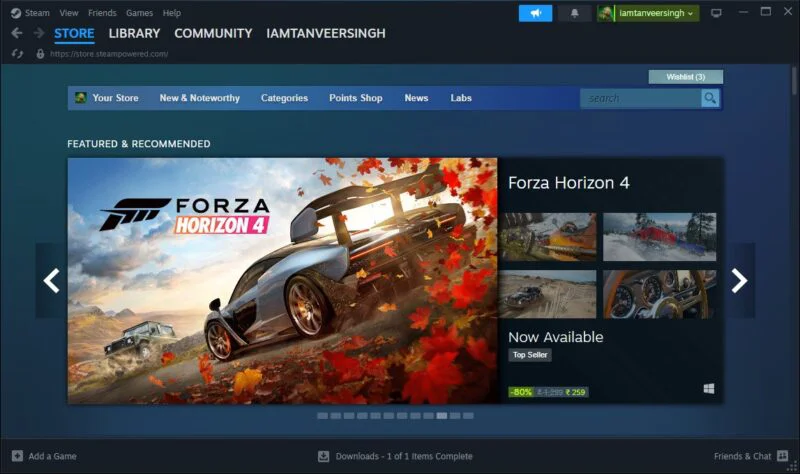
<p>Điều này có lẽ là điều hiển nhiên, trừ khi bạn có thái độ khó chịu với Valve và không muốn liên quan gì đến họ. Steam là cửa hàng lý tưởng để mua game trên PC, tương tác với cộng đồng chơi game trên PC, chơi cùng bạn bè và tận hưởng doanh số game được cho là tốt nhất quanh năm.</p>

<figure><img alt="Cửa hàng Steam" data-i="0" data-src="https://st.quantrimang.com/photos/image/2024/07/08/chuong-trinh-nen-cai-dat-tren-pc-choi-game-moi-1.jpg" data-was-processed="true" height="474" src="https://st.quantrimang.com/photos/image/2024/07/08/chuong-trinh-nen-cai-dat-tren-pc-choi-game-moi-1.jpg" width="800" />
<figcaption>Cửa hàng Steam</figcaption>
</figure>

<p>Là launcher chơi game phổ biến nhất hành tinh, Steam có thể được tìm thấy trên nhiều máy tính chơi game, thậm chí cả máy Mac. Chỉ cần tải xuống, tạo tài khoản, thêm phương thức thanh toán là bạn đã sẵn sàng bắt đầu xây dựng thư viện của mình.</p>
&nbsp;

<p>Nó cũng có chế độ hình ảnh lớn cho console, Steam Remote Play, để chơi co-op với bạn bè, chia sẻ game với gia đình và TV, thiết bị di động hoặc PC khác thông qua Steam Link. Ngoài ra còn có một ứng dụng di động dành cho cả Android và iOS.</p>

<h2>2. Epic Games Store</h2>

<pre id="pre1">
<code>https://store.epicgames.com/en-US/</code></pre>

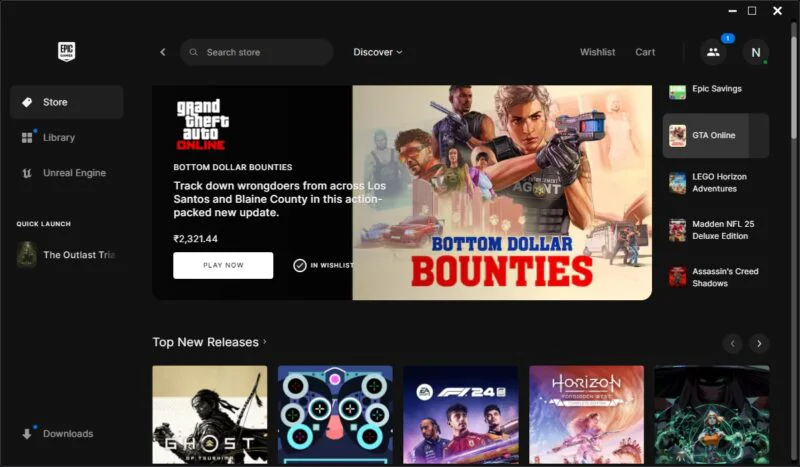
<p>Steam có thể là cửa hàng lớn nhất dành cho game trên PC, nhưng Epic Games Store cũng là một trong những game launcher tốt nhất. Được tạo ra và duy trì bởi công ty Fortnite và Unreal Engine, Epic Games Store mang đến cho game thủ mức giá cạnh tranh, một game miễn phí hàng tuần và doanh số bán hàng thường xuyên thường ngang bằng và thậm chí đánh bại những game từ Steam.</p>

<figure><img alt="Màn hình cửa sổ Epic Games Store" data-adbro-processed="true" data-i="1" data-src="https://st.quantrimang.com/photos/image/2024/07/08/chuong-trinh-nen-cai-dat-tren-pc-choi-game-moi-2.jpg" data-was-processed="true" height="467" src="https://st.quantrimang.com/photos/image/2024/07/08/chuong-trinh-nen-cai-dat-tren-pc-choi-game-moi-2.jpg" width="800" /><br />
&nbsp;&nbsp;&nbsp;
<figcaption>Màn hình cửa sổ Epic Games Store</figcaption>
</figure>

<p>Nó có thể thiếu một số tính năng xã hội và chia sẻ vốn là điểm thu hút lớn của Steam, nhưng đối với những người chỉ quan tâm đến việc nhận được mức giảm giá lớn và game miễn phí hàng tuần, Epic Games Store rất khó bị đánh bại. Có sẵn một danh mục game phong phú (không nhiều bằng Steam) có thể truy cập trên cả Windows và Mac.</p>

<h2>3.&nbsp;MSI Afterburner</h2>
<span style="color:rgb(192, 57, 43);"><strong>quantrimang.com/download/tai-msi-afterburner-190261</strong></span>

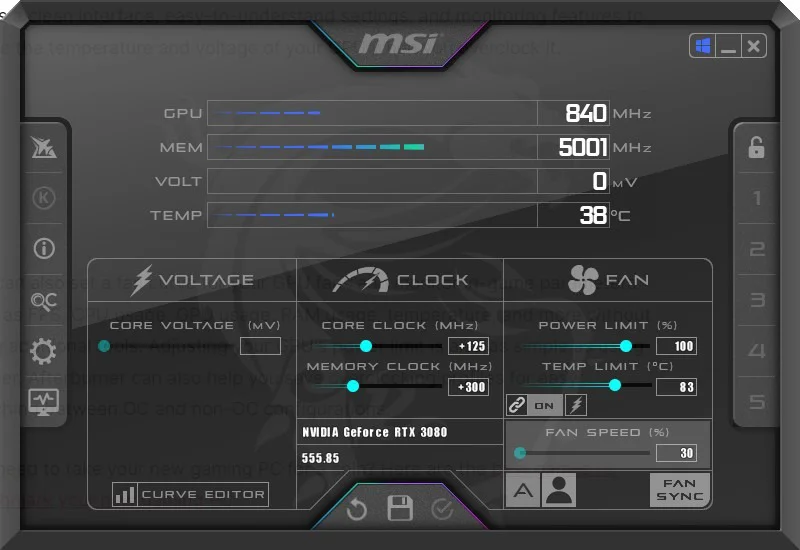
<p>Bất kỳ game thủ nào quan tâm đến việc&nbsp;ép xung GPU&nbsp;đều cần phải có MSI Afterburner trên PC chơi game của mình. Là công cụ ép xung card đồ họa ưa thích của người dùng Nvidia và AMD, MSI Afterburner đã đứng vững trước thử thách của thời gian. Nó cung cấp giao diện rõ ràng, cài đặt dễ hiểu và các tính năng giám sát để đo nhiệt độ và điện áp GPU khi được ép xung.</p>

<figure><img alt="Cửa sổ MSI Afterburner" data-i="2" data-src="https://st.quantrimang.com/photos/image/2024/07/08/chuong-trinh-nen-cai-dat-tren-pc-choi-game-moi-3.jpg" data-was-processed="true" height="550" src="https://st.quantrimang.com/photos/image/2024/07/08/chuong-trinh-nen-cai-dat-tren-pc-choi-game-moi-3.jpg" width="800" />
<figcaption>Cửa sổ MSI Afterburner</figcaption>
</figure>

<p>Bạn cũng có thể thiết lập fan curve cho quạt GPU của mình và theo dõi các thông số trong game, chẳng hạn như FPS, mức sử dụng CPU, mức sử dụng GPU, mức sử dụng RAM và nhiệt độ mà không cần sử dụng các công cụ bổ sung. Việc điều chỉnh giới hạn sức mạnh của GPU cũng đơn giản như sử dụng thanh trượt. Afterburner có thể giúp lưu lại các cấu hình ép xung để dễ dàng chuyển đổi giữa cấu hình OC và không OC.</p>

<h2>4.&nbsp;HWiNFO</h2>
<span style="color:rgb(192, 57, 43);"><strong>quantrimang.com/download/hwinfo-186135</strong></span>

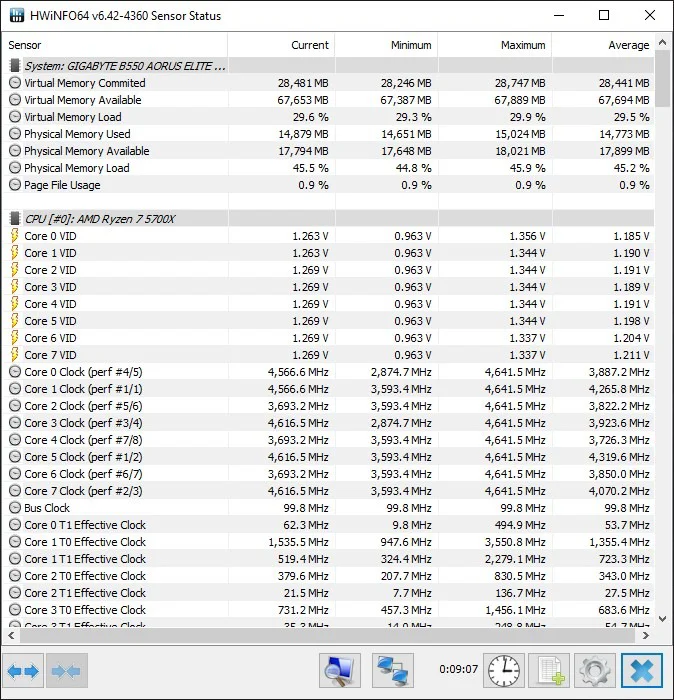
<p>Cho dù đang ép xung CPU và GPU hay chỉ đơn giản là đo benchmark cho PC Windows của mình, bạn có thể thấy công cụ của bên thứ ba hữu ích khi theo dõi nhiệt độ và chỉ số công suất. HWiNFO là một trong những công cụ giám sát hệ thống hữu ích nhất. Nó nhẹ và không cần cài đặt; Ngoài ra, bạn có thể cấu hình nó để chỉ hiển thị các cảm biến hệ thống hiển thị thông tin theo thời gian thực về&nbsp;<a data-type="internal" href="https://quantrimang.com/cong-nghe/cpu-la-gi-142876" title="CPU là gì?">CPU</a>,&nbsp;<a data-type="internal" href="https://quantrimang.com/cong-nghe/gpu-la-gi-176254" title="GPU là gì?">GPU</a>,&nbsp;<a data-type="internal" href="https://quantrimang.com/cong-nghe/nhung-dieu-can-biet-khi-chon-mua-mainboard-78770" title="Những điều cần biết khi chọn mua mainboard">bo mạch chủ</a>, RAM, bộ lưu trữ và quạt tản nhiệt.</p>

<figure><img alt="Cửa sổ HWiNFO" data-i="3" data-src="https://st.quantrimang.com/photos/image/2024/07/08/chuong-trinh-nen-cai-dat-tren-pc-choi-game-moi-4.jpg" data-was-processed="true" height="700" src="https://st.quantrimang.com/photos/image/2024/07/08/chuong-trinh-nen-cai-dat-tren-pc-choi-game-moi-4.jpg" width="674" />
<figcaption>Cửa sổ HWiNFO</figcaption>
</figure>
&nbsp;

<p>HWiNFO cho phép xem các giá trị hiện tại, trung bình, tối thiểu và tối đa cho tất cả các tham số hệ thống mà bạn có thể tưởng tượng. Nó cũng cung cấp màn hình hiển thị trên màn hình (OSD) tương tự như MSI Afterburner để xem các chỉ số trong game hoặc trong ứng dụng.</p>

<h2>5.&nbsp;Fan Control</h2>
<span style="color:rgb(192, 57, 43);"><strong>https://getfancontrol.com/</strong></span>

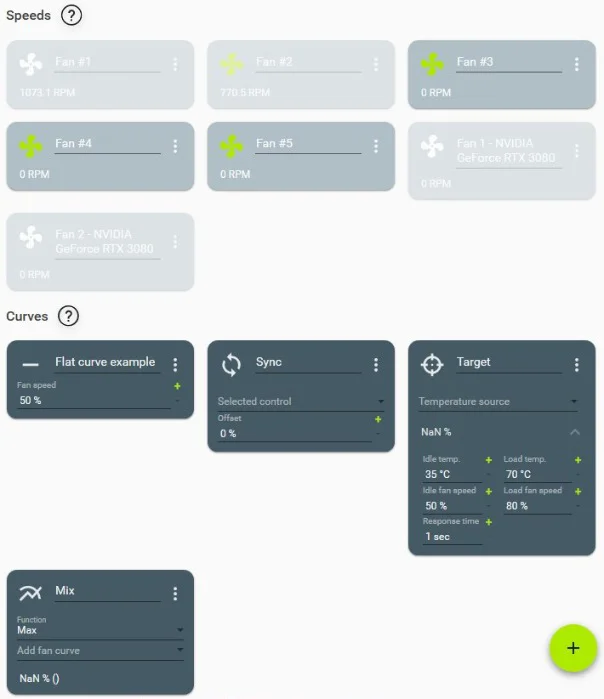
<p>Mặc dù có thể sử dụng nhiều công cụ để thiết lập fan curve của mình, nhưng Fan Control cho phép kiểm soát tối đa quạt hệ thống, quạt CPU và quạt GPU. Đây là một công cụ miễn phí cho phép thiết lập fan curve tùy chỉnh cho mọi quạt trong PC. Nếu bạn có một số quạt hút, quạt xả, quạt AIO và quạt GPU thì Fan Control là một công cụ tuyệt vời có thể giúp tối ưu hóa khả năng làm mát PC và giảm độ ồn của nó.</p>

<figure><img alt="Fan Control trên Windows" data-i="4" data-src="https://st.quantrimang.com/photos/image/2024/07/08/chuong-trinh-nen-cai-dat-tren-pc-choi-game-moi-5.jpg" data-was-processed="true" height="699" src="https://st.quantrimang.com/photos/image/2024/07/08/chuong-trinh-nen-cai-dat-tren-pc-choi-game-moi-5.jpg" width="604" />
<figcaption>Fan Control trên Windows</figcaption>
</figure>

<p>Bạn không chỉ có thể ra lệnh liên kết cảm biến nhiệt độ nào với fan curve nào mà còn liên kết nhiều fan curve với nhau để chúng hoạt động song song. Điều này mang lại cho bạn sự tự do để thử nghiệm các fan curve đến mức chi tiết nhất. Giao diện và điều khiển cực kỳ đơn giản. Thật khó để tin rằng đây là một công cụ miễn phí.</p>
&nbsp;
		</div>
				<div id="author">
						<p>
				<strong>Nguồn tin:</strong>
				Quantrimang.com:
			</p>
		</div>
	</div>
	<div id="footer" class="clearfix">
		<div id="url">
			<strong>URL của bản tin này: </strong><a href="https://www.nguoicodonvn2008.info/vi/news/savefile/phan-mem/5-chuong-trinh-tot-nhat-nen-cai-dat-tren-pc-choi-game-moi-8626.html" title="5 chương trình tốt nhất nên cài đặt trên PC chơi game mới">https://www.nguoicodonvn2008.info/vi/news/savefile/phan-mem/5-chuong-trinh-tot-nhat-nen-cai-dat-tren-pc-choi-game-moi-8626.html</a>

		</div>
		<div class="clear"></div>
		<div class="copyright">
			&copy; .&#x3A; Nguoicodonvn2008.info - Cõi lòng người cô đơn &#x3A;.
		</div>
		<div id="contact">
			<a href="mailto:admin@nguoicodonvn2008.info">admin@nguoicodonvn2008.info</a>
		</div>
	</div>
</div>
        <div id="timeoutsess" class="chromeframe">
            Bạn đã không sử dụng Site, <a onclick="timeoutsesscancel();" href="https://nguoicodonvn2008.info/#">Bấm vào đây để duy trì trạng thái đăng nhập</a>. Thời gian chờ: <span id="secField"> 60 </span> giây
        </div>
        <div id="openidResult" class="nv-alert" style="display:none"></div>
        <div id="openidBt" data-result="" data-redirect=""></div>
		</script>
		<div class="car-top">
  <span><img src="https://nguoicodonvn2008.info/themes/default/images/car.png" alt=""></span>
</div>
<script src="https://nguoicodonvn2008.info/assets/js/jquery/jquery.min.js"></script>
<script>var nv_base_siteurl="/",nv_lang_data="vi",nv_lang_interface="vi",nv_name_variable="nv",nv_fc_variable="op",nv_lang_variable="language",nv_module_name="news",nv_func_name="savefile",nv_is_user=0, nv_my_ofs=-4,nv_my_abbr="EDT",nv_cookie_prefix="nv4c_e856T",nv_check_pass_mstime=1738000,nv_area_admin=0,nv_safemode=0,theme_responsive=0,nv_recaptcha_ver=2,nv_recaptcha_sitekey="",nv_recaptcha_type="image",XSSsanitize=1;</script>
<script src="https://nguoicodonvn2008.info/assets/js/language/vi.js"></script>
<script src="https://nguoicodonvn2008.info/assets/js/DOMPurify/purify3.js"></script>
<script src="https://nguoicodonvn2008.info/assets/js/global.js"></script>
<script src="https://nguoicodonvn2008.info/assets/js/site.js"></script>
<script src="https://nguoicodonvn2008.info/themes/default/js/news.js"></script>
<script src="https://nguoicodonvn2008.info/themes/default/js/main.js"></script>
<script src="https://nguoicodonvn2008.info/themes/default/js/custom.js"></script>
<script type="application/ld+json">
        {
            "@context": "https://schema.org",
            "@type": "Organization",
            "url": "https://nguoicodonvn2008.info",
            "logo": "https://nguoicodonvn2008.info/uploads/angel.gif"
        }
        </script>
<script src="https://nguoicodonvn2008.info/themes/default/js/bootstrap.min.js"></script>
<script type="text/javascript">
var $scrolltop = $('.car-top');
$scrolltop.on('click', function () {
    $('html,body').animate({
        scrollTop: 0
    }, 800);
    $(this).addClass("car-run");
    setTimeout(function(){ $scrolltop.removeClass('car-run');}, 1000);
    return false;
});
$(window).on('scroll', function ()
{ 
    if($(window).scrollTop() >= 200)
    {
        $scrolltop.addClass("show");
        $scrolltop.addClass("car-down");
    }
    else
    {
       $scrolltop.removeClass("show");
       setTimeout(function(){ $scrolltop.removeClass('car-down');}, 300);
    }
});
</script>
</body>
</html>