<!DOCTYPE html>
    <html lang="vi" xmlns="http://www.w3.org/1999/xhtml" prefix="og: http://ogp.me/ns#">
    <head>
<title>4 ứng dụng soạn thảo mã nguồn mở có thể thay thế Microsoft Word</title>
<meta name="description" content="4 ứng dụng soạn thảo mã nguồn mở có thể thay thế Microsoft Word - Savefile - Tin Tức -...">
<meta name="author" content=".: Nguoicodonvn2008.info - Cõi lòng người cô đơn :.">
<meta name="copyright" content=".: Nguoicodonvn2008.info - Cõi lòng người cô đơn :. [admin@nguoicodonvn2008.info]">
<meta name="robots" content="index, archive, follow, noodp">
<meta name="googlebot" content="index,archive,follow,noodp">
<meta name="msnbot" content="all,index,follow">
<meta name="generator" content="NukeViet v4.5">
<meta http-equiv="Content-Type" content="text/html; charset=utf-8">
<meta property="og:title" content="4 ứng dụng soạn thảo mã nguồn mở có thể thay thế Microsoft Word">
<meta property="og:type" content="website">
<meta property="og:description" content="Savefile - Tin Tức - https&#x3A;&#x002F;&#x002F;www.nguoicodonvn2008.info&#x002F;vi&#x002F;news&#x002F;savefile&#x002F;phan-mem&#x002F;4-ung-dung-soan-thao-ma-nguon-mo-co-the-thay-the-microsoft-word-10682.html">
<meta property="og:site_name" content=".&#x3A; Nguoicodonvn2008.info - Cõi lòng người cô đơn &#x3A;.">
<meta property="og:url" content="https://www.nguoicodonvn2008.info/vi/news/savefile/phan-mem/4-ung-dung-soan-thao-ma-nguon-mo-co-the-thay-the-microsoft-word-10682.html">
<link rel="shortcut icon" href="https://nguoicodonvn2008.info/favicon.ico">
<link rel="canonical" href="https://www.nguoicodonvn2008.info/vi/news/savefile/phan-mem/4-ung-dung-soan-thao-ma-nguon-mo-co-the-thay-the-microsoft-word-10682.html">
<link rel="alternate" href="https://nguoicodonvn2008.info/vi/news/rss/" title="Tin Tức" type="application/rss+xml">
<link rel="alternate" href="https://nguoicodonvn2008.info/vi/news/rss/karaoke-dual/" title="Tin Tức - Karaoke Dual" type="application/rss+xml">
<link rel="alternate" href="https://nguoicodonvn2008.info/vi/news/rss/nhac-tre/" title="Tin Tức - Nhạc trẻ" type="application/rss+xml">
<link rel="alternate" href="https://nguoicodonvn2008.info/vi/news/rss/tru-tinh/" title="Tin Tức - Trữ tình" type="application/rss+xml">
<link rel="alternate" href="https://nguoicodonvn2008.info/vi/news/rss/nuoc-ngoai/" title="Tin Tức - Nước ngoài" type="application/rss+xml">
<link rel="alternate" href="https://nguoicodonvn2008.info/vi/news/rss/remix/" title="Tin Tức - Remix" type="application/rss+xml">
<link rel="alternate" href="https://nguoicodonvn2008.info/vi/news/rss/tam-su-tinh-yeu/" title="Tin Tức - Tâm sự tình yêu" type="application/rss+xml">
<link rel="alternate" href="https://nguoicodonvn2008.info/vi/news/rss/tho-suu-tam/" title="Tin Tức - Thơ sưu tầm" type="application/rss+xml">
<link rel="alternate" href="https://nguoicodonvn2008.info/vi/news/rss/cuoc-song/" title="Tin Tức - Cuộc sống" type="application/rss+xml">
<link rel="alternate" href="https://nguoicodonvn2008.info/vi/news/rss/phan-mem/" title="Tin Tức - Phần mềm" type="application/rss+xml">
<link rel="alternate" href="https://nguoicodonvn2008.info/vi/news/rss/kien-thuc-may-tinh/" title="Tin Tức - Kiến thức máy tính" type="application/rss+xml">
<link rel="alternate" href="https://nguoicodonvn2008.info/vi/news/rss/hoc-tap/" title="Tin Tức - Học tập" type="application/rss+xml">
<link rel="alternate" href="https://nguoicodonvn2008.info/vi/news/rss/tai-lieu/" title="Tin Tức - Tài liệu" type="application/rss+xml">
<link rel="alternate" href="https://nguoicodonvn2008.info/vi/news/rss/de-thi/" title="Tin Tức - Đề thi" type="application/rss+xml">
<link rel="preload" as="style" href="https://nguoicodonvn2008.info/assets/css/font-awesome.min.css" type="text/css">
<link rel="preload" as="style" href="https://nguoicodonvn2008.info/themes/default/css/bootstrap.non-responsive.css" type="text/css">
<link rel="preload" as="style" href="https://nguoicodonvn2008.info/themes/default/css/style.css" type="text/css">
<link rel="preload" as="style" href="https://nguoicodonvn2008.info/themes/default/css/style.non-responsive.css" type="text/css">
<link rel="preload" as="style" href="https://nguoicodonvn2008.info/themes/default/css/news.css" type="text/css">
<link rel="preload" as="style" href="https://nguoicodonvn2008.info/themes/default/css/custom.css" type="text/css">
<link rel="preload" as="script" href="https://nguoicodonvn2008.info/assets/js/jquery/jquery.min.js" type="text/javascript">
<link rel="preload" as="script" href="https://nguoicodonvn2008.info/assets/js/language/vi.js" type="text/javascript">
<link rel="preload" as="script" href="https://nguoicodonvn2008.info/assets/js/DOMPurify/purify3.js" type="text/javascript">
<link rel="preload" as="script" href="https://nguoicodonvn2008.info/assets/js/global.js" type="text/javascript">
<link rel="preload" as="script" href="https://nguoicodonvn2008.info/assets/js/site.js" type="text/javascript">
<link rel="preload" as="script" href="https://nguoicodonvn2008.info/themes/default/js/news.js" type="text/javascript">
<link rel="preload" as="script" href="https://nguoicodonvn2008.info/themes/default/js/main.js" type="text/javascript">
<link rel="preload" as="script" href="https://nguoicodonvn2008.info/themes/default/js/custom.js" type="text/javascript">
<link rel="preload" as="script" href="https://nguoicodonvn2008.info/themes/default/js/bootstrap.min.js" type="text/javascript">
<link rel="stylesheet" href="https://nguoicodonvn2008.info/assets/css/font-awesome.min.css">
<link rel="stylesheet" href="https://nguoicodonvn2008.info/themes/default/css/bootstrap.non-responsive.css">
<link rel="stylesheet" href="https://nguoicodonvn2008.info/themes/default/css/style.css">
<link rel="stylesheet" href="https://nguoicodonvn2008.info/themes/default/css/style.non-responsive.css">
<link rel="StyleSheet" href="https://nguoicodonvn2008.info/themes/default/css/news.css">
<link rel="stylesheet" href="https://nguoicodonvn2008.info/themes/default/css/custom.css">
<style type="text/css">
	body{background: #fff;}
</style>
    </head>
    <body>
<div id="print">
	<div id="hd_print">
		<h2 class="pull-left">.&#x3A; Nguoicodonvn2008.info - Cõi lòng người cô đơn &#x3A;.</h2>
		<p class="pull-right"><a title=".&#x3A; Nguoicodonvn2008.info - Cõi lòng người cô đơn &#x3A;." href="https://nguoicodonvn2008.info/">https://nguoicodonvn2008.info</a></p>
	</div>
	<div class="clear"></div>
	<hr />
	<div id="content">
		<h1>4 ứng dụng soạn thảo mã nguồn mở có thể thay thế Microsoft Word</h1>
		<ul class="list-inline">
			<li>Thứ sáu - 27/06/2025 23:56</li>
			<li class="hidden-print txtrequired"><em class="fa fa-print">&nbsp;</em><a title="In ra" href="javascript:;" onclick="window.print()">In ra</a></li>
			<li class="hidden-print txtrequired"><em class="fa fa-power-off">&nbsp;</em><a title="Đóng cửa sổ này" href="javascript:;" onclick="window.close()">Đóng cửa sổ này</a></li>
		</ul>
		<div class="clear"></div>
		<div id="hometext">
		</div>
				<div class="imghome">
			<img alt="4 ứng dụng soạn thảo mã nguồn mở có thể thay thế Microsoft Word" src="https://st.quantrimang.com/photos/image/2025/06/27/ung-dung-soan-thao-ma-nguon-mo-thay-the-microsoft-word4.jpg" width="460" class="img-thumbnail" />
		</div>
		<div class="clear"></div>
		<div id="bodytext" class="clearfix">
			<p style="text-align: justify;">Nếu bạn đang tìm phương án thay thế Microsoft Word và Microsoft, hoặc đơn giản muốn trải nghiệm các dự án miễn phí mã nguồn mở, có rất nhiều lựa chọn chất lượng. Dưới đây là 4 ứng dụng soạn thảo toàn diện có thể chạy trên hầu hết PC hoặc laptop mà bạn có thể dùng thử.</p>

<h2 style="text-align: justify;">Calligra Words</h2>

<div style="text-align: justify;"><span style="color:rgb(231, 76, 60);"><strong>https://apps.kde.org/calligra/</strong></span></div>

<p style="text-align: justify;">Calligra Words&nbsp;là trình xử lý văn bản từ KDE, cùng nhóm phát triển Plasma - giao diện người dùng Linux phổ biến - và các ứng dụng như KDE Connect, Krita và Kdenlive, tất cả đều xuất sắc.</p>

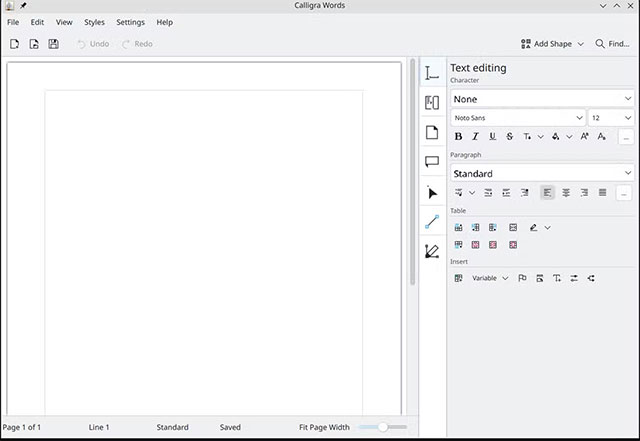
<p style="text-align: justify;">Calligra Words có giao diện khác biệt rõ rệt so với Microsoft Word. Khác với các trình xử lý văn bản thông thường, các thiết lập định dạng và kiểu thường dùng được bố trí trong menu lớn ở bên phải màn hình thay vì hiển thị dọc phía trên. Nhiều khía cạnh khiến tôi liên tưởng đến cách thiết lập giao diện người dùng của các ứng dụng chỉnh sửa ảnh như Photoshop hoặc GIMP.</p>

<p style="text-align: justify;">Calligra Words chắc chắn không có nhiều tùy chọn bằng Microsoft Word, nhưng đủ dùng cho hầu hết nhu cầu cơ bản.</p>

<p style="text-align: justify;">Về tính năng, Calligra Words nằm đâu đó giữa WordPad (đã bị Microsoft ngừng phát triển) và Microsoft Word. Khi xem qua các tùy chọn, bạn sẽ không gặp khó khăn khi tìm những tính năng cơ bản như định dạng bố cục trang, áp dụng đánh số, quản lý trích dẫn hoặc thêm header và footer. Bạn thậm chí có thể thêm drop cap nếu muốn.</p>

<p style="text-align: justify;"><img alt="Calligra Words" data-i="0" data-src="https://st.quantrimang.com/photos/image/2025/06/27/ung-dung-soan-thao-ma-nguon-mo-thay-the-microsoft-word1.jpg" data-was-processed="true" height="441" src="https://st.quantrimang.com/photos/image/2025/06/27/ung-dung-soan-thao-ma-nguon-mo-thay-the-microsoft-word1.jpg" width="640" /></p>

<p style="text-align: justify;">Một điều bất ngờ nữa là Calligra xử lý bảng ổn định hơn nhiều so với Word - vốn là điểm yếu tồn tại nhiều năm của Word.</p>

<p style="text-align: justify;">Các công cụ vẽ cũng được làm nổi bật - một điều khá khác biệt.</p>

<p style="text-align: justify;">Giống như các lựa chọn khác ở đây, Calligra Words có một số ứng dụng đi kèm cho phép bạn tạo bảng tính và trình chiếu.</p>

<p style="text-align: justify;">Nhược điểm lớn duy nhất là Calligra Writer hiện không có phiên bản cho Windows.</p>

<h2 style="text-align: justify;">OpenOffice</h2>

<div style="text-align: justify;"><span style="color:rgb(231, 76, 60);"><strong>https://www.openoffice.org/download/</strong></span></div>

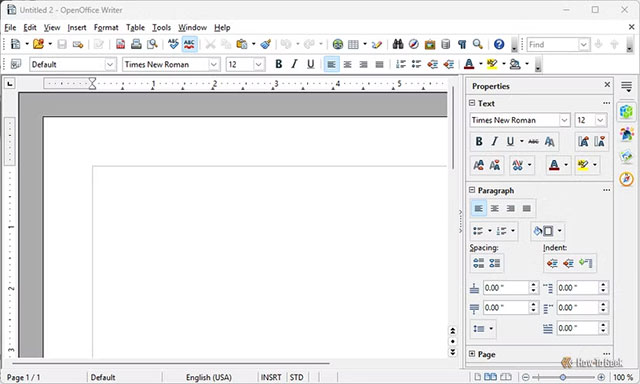
<p style="text-align: justify;">Apache OpenOffice&nbsp;mang đến cảm giác giống như sự kết hợp giữa Microsoft Word và Calligra Writer. Có một ribbon công cụ tiêu chuẩn chạy dọc phía trên cùng, và bạn có một menu lớn ở bên phải cho phép điều chỉnh thuộc tính của công cụ hiện tại.</p>

<p style="text-align: justify;">Bên cạnh sự khác biệt rõ ràng về giao diện người dùng, tất cả các thiết lập và tùy chọn cấu hình đều rất quen thuộc. Bạn sẽ không phải mò mẫm qua các cửa sổ hoặc menu phụ để tìm một thiết lập hoặc tính năng như thường xảy ra với Word!</p>

<p style="text-align: justify;">Cũng có một số chương trình OpenOffice khác mà bạn có thể sử dụng, hầu hết được thiết kế để thay thế các ứng dụng Microsoft Office tiêu chuẩn.</p>

<p style="text-align: justify;"><img alt="OpenOffice" data-i="1" data-src="https://st.quantrimang.com/photos/image/2025/06/27/ung-dung-soan-thao-ma-nguon-mo-thay-the-microsoft-word2.jpg" data-was-processed="true" height="384" src="https://st.quantrimang.com/photos/image/2025/06/27/ung-dung-soan-thao-ma-nguon-mo-thay-the-microsoft-word2.jpg" width="640" /></p>

<p style="text-align: justify;">OpenOffice dường như có chu kỳ phát hành chậm hơn LibreOffice, nghĩa là bạn sẽ có có thể nhận được các tính năng mới nhất nhanh chóng.</p>

<h2 style="text-align: justify;">ONLYOFFICE</h2>

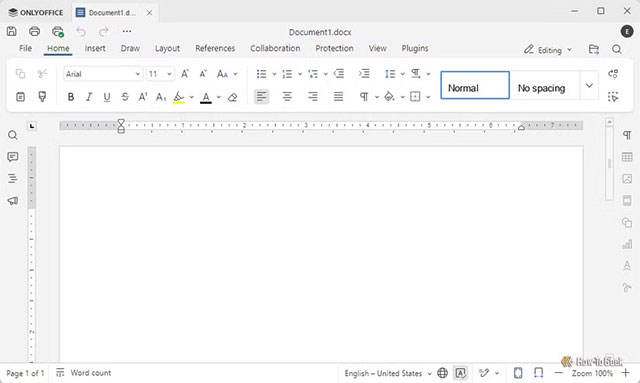
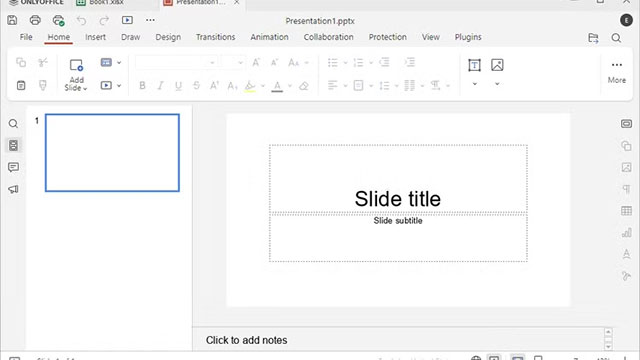
<p style="text-align: justify;">Nếu bạn đang tìm kiếm thứ gì đó giống Microsoft Word nhất, ONLYOFFICE là lựa chọn tốt nhất.</p>

<p style="text-align: justify;">Giao diện người dùng cơ bản mà bạn tương tác chủ yếu lấy cảm hứng rất lớn từ Microsoft Word, và khi bạn tìm hiểu sâu các tùy chọn, hầu hết chúng cũng rất giống với phiên bản Microsoft Word hiện đại.</p>

<p style="text-align: justify;"><img alt="ONLYOFFICE" data-i="2" data-src="https://st.quantrimang.com/photos/image/2025/06/27/ung-dung-soan-thao-ma-nguon-mo-thay-the-microsoft-word3.jpg" data-was-processed="true" height="383" src="https://st.quantrimang.com/photos/image/2025/06/27/ung-dung-soan-thao-ma-nguon-mo-thay-the-microsoft-word3.jpg" width="640" /></p>

<p style="text-align: justify;">chính giao diện quen thuộc là yếu tố khiến ONLYOFFICE trở thành sự lựa chọn hàng đầu thay vì các giải pháp mã nguồn mở khác, chứ không phải vì bất kỳ tính năng cụ thể nào.</p>

<p style="text-align: justify;">ONLYOFFICE không có nhiều tính năng bóng bẩy như Word, đặc biệt về định dạng, nhưng nó đáp ứng mọi nhu cầu của tôi kể từ khi bắt đầu sử dụng.</p>

<p style="text-align: justify;">Nếu muốn, bạn thậm chí có thể kết nối ONLYOFFICE với dịch vụ đám mây, giống như cách Word kết nối với OneDrive. Nó cũng cho phép bạn cộng tác trong thời gian thực với người dùng khác, giống như Google Sheets hoặc Word.</p>

<p style="text-align: justify;">Một điểm cộng thêm là ONLYOFFICE cho phép bạn sử dụng tính năng tự động lưu mà không cần bật đồng bộ đám mây - điều mà Microsoft đã loại bỏ khỏi Microsoft Word.</p>

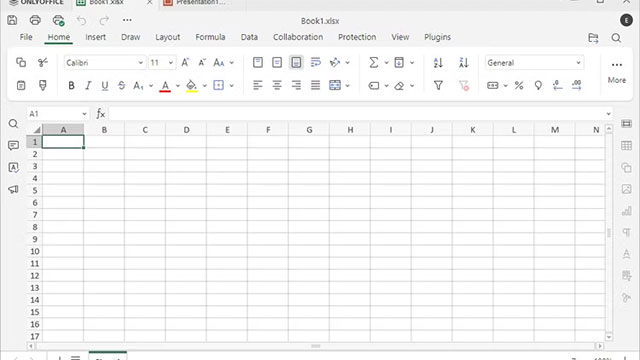
<p style="text-align: justify;">ONLYOFFICE được đóng gói kèm các ứng dụng tương đương Microsoft Excel và PowerPoint tích hợp trong cùng một ứng dụng, vì vậy bạn không cần phải chuyển đổi khi mở hoặc bắt đầu một loại tài liệu khác.</p>

<figure>
<div style="text-align: justify;"><img alt="ung dung soan thao ma nguon mo thay the microsoft word4*383546" data-i="3" data-src="https://st.quantrimang.com/photos/image/2025/06/27/ung-dung-soan-thao-ma-nguon-mo-thay-the-microsoft-word4.jpg" data-was-processed="true" height="360" src="https://st.quantrimang.com/photos/image/2025/06/27/ung-dung-soan-thao-ma-nguon-mo-thay-the-microsoft-word4.jpg" width="640" /></div>
</figure>

<figure>
<div style="text-align: justify;"><img alt="ung dung soan thao ma nguon mo thay the microsoft word5*383549" data-i="4" data-src="https://st.quantrimang.com/photos/image/2025/06/27/ung-dung-soan-thao-ma-nguon-mo-thay-the-microsoft-word5.jpg" data-was-processed="true" height="360" src="https://st.quantrimang.com/photos/image/2025/06/27/ung-dung-soan-thao-ma-nguon-mo-thay-the-microsoft-word5.jpg" width="640" /></div>
</figure>

<h2 style="text-align: justify;">LibreOffice Writer</h2>

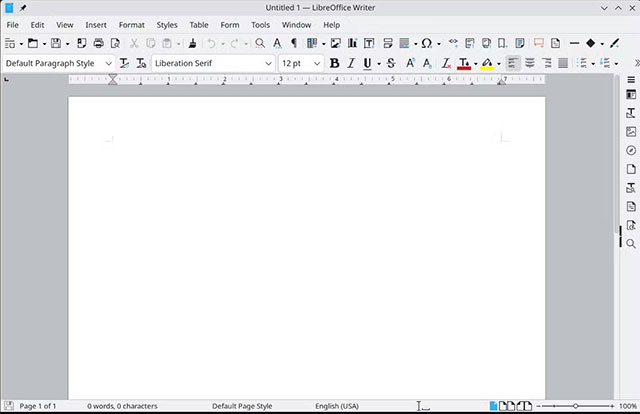
<p style="text-align: justify;">LibreOffice Writer là sự thay thế Word phổ biến nhất bạn sẽ tìm thấy trên các bản phân phối Linux. Bộ công cụ này cung cấp&nbsp;gần như đầy đủ tính năng tương đương với Microsoft Word.</p>

<p style="text-align: justify;">Hầu hết các tính năng Word có mà LibreOffice Writer thiếu đều liên quan đến tích hợp đám mây của Word, thứ mà LibreOffice Writer không có trừ khi bạn tự thiết lập.</p>

<p style="text-align: justify;">Khác biệt lớn nhất và dễ nhận thấy nhất là giao diện người dùng (UI). LibreOffice Writer trông giống phiên bản Word khoảng năm 2008 hơn. Điều này không ảnh hưởng đến tính hữu dụng, nhưng có thể gây khó chịu nếu bạn quen với giao diện tối giản hơn trong các ứng dụng Office hiện đại.</p>

<p style="text-align: justify;"><img alt="LibreOffice " data-i="5" data-src="https://st.quantrimang.com/photos/image/2025/06/27/ung-dung-soan-thao-ma-nguon-mo-thay-the-microsoft-word7.jpg" data-was-processed="true" height="414" src="https://st.quantrimang.com/photos/image/2025/06/27/ung-dung-soan-thao-ma-nguon-mo-thay-the-microsoft-word7.jpg" width="640" /></p>

<p style="text-align: justify;">Cách tiếp cận không cầu kỳ này có một vài ưu điểm. Chẳng hạn, bạn sẽ ít phải tìm kiếm tùy chọn hoặc tính năng trong LibreOffice Writer hơn so với Microsoft Word, và các menu - dù có vẻ bận rộn - cho cảm giác trực quan hơn một chút khi điều hướng. Nếu cần thứ gì đó gần nhất với tất cả tính năng của Microsoft Word, LibreOffice Writer sẽ là lựa chọn đầu tiên bạn nên nghĩ tới.</p>

<p style="text-align: justify;">Libre Writer cũng không được xây dựng một cách biệt lập. Nó được đóng gói như một phần của LibreOffice, bao gồm LibreOffice Calc (tương đương Excel) và LibreOffice Impress (tương đương PowerPoint), cộng thêm một số chương trình khác mà bạn có thể thấy hữu ích.</p>
		</div>
				<div id="author">
						<p>
				<strong>Nguồn tin:</strong>
				Quantrimang.com:
			</p>
		</div>
	</div>
	<div id="footer" class="clearfix">
		<div id="url">
			<strong>URL của bản tin này: </strong><a href="https://www.nguoicodonvn2008.info/vi/news/savefile/phan-mem/4-ung-dung-soan-thao-ma-nguon-mo-co-the-thay-the-microsoft-word-10682.html" title="4 ứng dụng soạn thảo mã nguồn mở có thể thay thế Microsoft Word">https://www.nguoicodonvn2008.info/vi/news/savefile/phan-mem/4-ung-dung-soan-thao-ma-nguon-mo-co-the-thay-the-microsoft-word-10682.html</a>

		</div>
		<div class="clear"></div>
		<div class="copyright">
			&copy; .&#x3A; Nguoicodonvn2008.info - Cõi lòng người cô đơn &#x3A;.
		</div>
		<div id="contact">
			<a href="mailto:admin@nguoicodonvn2008.info">admin@nguoicodonvn2008.info</a>
		</div>
	</div>
</div>
        <div id="timeoutsess" class="chromeframe">
            Bạn đã không sử dụng Site, <a onclick="timeoutsesscancel();" href="https://nguoicodonvn2008.info/#">Bấm vào đây để duy trì trạng thái đăng nhập</a>. Thời gian chờ: <span id="secField"> 60 </span> giây
        </div>
        <div id="openidResult" class="nv-alert" style="display:none"></div>
        <div id="openidBt" data-result="" data-redirect=""></div>
		</script>
		<div class="car-top">
  <span><img src="https://nguoicodonvn2008.info/themes/default/images/car.png" alt=""></span>
</div>
<script src="https://nguoicodonvn2008.info/assets/js/jquery/jquery.min.js"></script>
<script>var nv_base_siteurl="/",nv_lang_data="vi",nv_lang_interface="vi",nv_name_variable="nv",nv_fc_variable="op",nv_lang_variable="language",nv_module_name="news",nv_func_name="savefile",nv_is_user=0, nv_my_ofs=-4,nv_my_abbr="EDT",nv_cookie_prefix="nv4c_e856T",nv_check_pass_mstime=1738000,nv_area_admin=0,nv_safemode=0,theme_responsive=0,nv_recaptcha_ver=2,nv_recaptcha_sitekey="",nv_recaptcha_type="image",XSSsanitize=1;</script>
<script src="https://nguoicodonvn2008.info/assets/js/language/vi.js"></script>
<script src="https://nguoicodonvn2008.info/assets/js/DOMPurify/purify3.js"></script>
<script src="https://nguoicodonvn2008.info/assets/js/global.js"></script>
<script src="https://nguoicodonvn2008.info/assets/js/site.js"></script>
<script src="https://nguoicodonvn2008.info/themes/default/js/news.js"></script>
<script src="https://nguoicodonvn2008.info/themes/default/js/main.js"></script>
<script src="https://nguoicodonvn2008.info/themes/default/js/custom.js"></script>
<script type="application/ld+json">
        {
            "@context": "https://schema.org",
            "@type": "Organization",
            "url": "https://nguoicodonvn2008.info",
            "logo": "https://nguoicodonvn2008.info/uploads/angel.gif"
        }
        </script>
<script src="https://nguoicodonvn2008.info/themes/default/js/bootstrap.min.js"></script>
<script type="text/javascript">
var $scrolltop = $('.car-top');
$scrolltop.on('click', function () {
    $('html,body').animate({
        scrollTop: 0
    }, 800);
    $(this).addClass("car-run");
    setTimeout(function(){ $scrolltop.removeClass('car-run');}, 1000);
    return false;
});
$(window).on('scroll', function ()
{ 
    if($(window).scrollTop() >= 200)
    {
        $scrolltop.addClass("show");
        $scrolltop.addClass("car-down");
    }
    else
    {
       $scrolltop.removeClass("show");
       setTimeout(function(){ $scrolltop.removeClass('car-down');}, 300);
    }
});
</script>
</body>
</html>