<!DOCTYPE html>
    <html lang="vi" xmlns="http://www.w3.org/1999/xhtml" prefix="og: http://ogp.me/ns#">
    <head>
<title>4 trình quản lý download tốt nhất cho người dùng Linux</title>
<meta name="description" content="4 trình quản lý download tốt nhất cho người dùng Linux - Savefile - Tin Tức -...">
<meta name="author" content=".: Nguoicodonvn2008.info - Cõi lòng người cô đơn :.">
<meta name="copyright" content=".: Nguoicodonvn2008.info - Cõi lòng người cô đơn :. [admin@nguoicodonvn2008.info]">
<meta name="robots" content="index, archive, follow, noodp">
<meta name="googlebot" content="index,archive,follow,noodp">
<meta name="msnbot" content="all,index,follow">
<meta name="generator" content="NukeViet v4.5">
<meta http-equiv="Content-Type" content="text/html; charset=utf-8">
<meta property="og:title" content="4 trình quản lý download tốt nhất cho người dùng Linux">
<meta property="og:type" content="website">
<meta property="og:description" content="Savefile - Tin Tức - https&#x3A;&#x002F;&#x002F;www.nguoicodonvn2008.info&#x002F;vi&#x002F;news&#x002F;savefile&#x002F;phan-mem&#x002F;4-trinh-quan-ly-download-tot-nhat-cho-nguoi-dung-linux-677.html">
<meta property="og:site_name" content=".&#x3A; Nguoicodonvn2008.info - Cõi lòng người cô đơn &#x3A;.">
<meta property="og:url" content="https://www.nguoicodonvn2008.info/vi/news/savefile/phan-mem/4-trinh-quan-ly-download-tot-nhat-cho-nguoi-dung-linux-677.html">
<link rel="shortcut icon" href="https://nguoicodonvn2008.info/favicon.ico">
<link rel="canonical" href="https://www.nguoicodonvn2008.info/vi/news/savefile/phan-mem/4-trinh-quan-ly-download-tot-nhat-cho-nguoi-dung-linux-677.html">
<link rel="alternate" href="https://nguoicodonvn2008.info/vi/news/rss/" title="Tin Tức" type="application/rss+xml">
<link rel="alternate" href="https://nguoicodonvn2008.info/vi/news/rss/karaoke-dual/" title="Tin Tức - Karaoke Dual" type="application/rss+xml">
<link rel="alternate" href="https://nguoicodonvn2008.info/vi/news/rss/nhac-tre/" title="Tin Tức - Nhạc trẻ" type="application/rss+xml">
<link rel="alternate" href="https://nguoicodonvn2008.info/vi/news/rss/tru-tinh/" title="Tin Tức - Trữ tình" type="application/rss+xml">
<link rel="alternate" href="https://nguoicodonvn2008.info/vi/news/rss/nuoc-ngoai/" title="Tin Tức - Nước ngoài" type="application/rss+xml">
<link rel="alternate" href="https://nguoicodonvn2008.info/vi/news/rss/remix/" title="Tin Tức - Remix" type="application/rss+xml">
<link rel="alternate" href="https://nguoicodonvn2008.info/vi/news/rss/tam-su-tinh-yeu/" title="Tin Tức - Tâm sự tình yêu" type="application/rss+xml">
<link rel="alternate" href="https://nguoicodonvn2008.info/vi/news/rss/tho-suu-tam/" title="Tin Tức - Thơ sưu tầm" type="application/rss+xml">
<link rel="alternate" href="https://nguoicodonvn2008.info/vi/news/rss/cuoc-song/" title="Tin Tức - Cuộc sống" type="application/rss+xml">
<link rel="alternate" href="https://nguoicodonvn2008.info/vi/news/rss/phan-mem/" title="Tin Tức - Phần mềm" type="application/rss+xml">
<link rel="alternate" href="https://nguoicodonvn2008.info/vi/news/rss/kien-thuc-may-tinh/" title="Tin Tức - Kiến thức máy tính" type="application/rss+xml">
<link rel="alternate" href="https://nguoicodonvn2008.info/vi/news/rss/hoc-tap/" title="Tin Tức - Học tập" type="application/rss+xml">
<link rel="alternate" href="https://nguoicodonvn2008.info/vi/news/rss/tai-lieu/" title="Tin Tức - Tài liệu" type="application/rss+xml">
<link rel="alternate" href="https://nguoicodonvn2008.info/vi/news/rss/de-thi/" title="Tin Tức - Đề thi" type="application/rss+xml">
<link rel="preload" as="style" href="https://nguoicodonvn2008.info/assets/css/font-awesome.min.css" type="text/css">
<link rel="preload" as="style" href="https://nguoicodonvn2008.info/themes/default/css/bootstrap.non-responsive.css" type="text/css">
<link rel="preload" as="style" href="https://nguoicodonvn2008.info/themes/default/css/style.css" type="text/css">
<link rel="preload" as="style" href="https://nguoicodonvn2008.info/themes/default/css/style.non-responsive.css" type="text/css">
<link rel="preload" as="style" href="https://nguoicodonvn2008.info/themes/default/css/news.css" type="text/css">
<link rel="preload" as="style" href="https://nguoicodonvn2008.info/themes/default/css/custom.css" type="text/css">
<link rel="preload" as="script" href="https://nguoicodonvn2008.info/assets/js/jquery/jquery.min.js" type="text/javascript">
<link rel="preload" as="script" href="https://nguoicodonvn2008.info/assets/js/language/vi.js" type="text/javascript">
<link rel="preload" as="script" href="https://nguoicodonvn2008.info/assets/js/DOMPurify/purify3.js" type="text/javascript">
<link rel="preload" as="script" href="https://nguoicodonvn2008.info/assets/js/global.js" type="text/javascript">
<link rel="preload" as="script" href="https://nguoicodonvn2008.info/assets/js/site.js" type="text/javascript">
<link rel="preload" as="script" href="https://nguoicodonvn2008.info/themes/default/js/news.js" type="text/javascript">
<link rel="preload" as="script" href="https://nguoicodonvn2008.info/themes/default/js/main.js" type="text/javascript">
<link rel="preload" as="script" href="https://nguoicodonvn2008.info/themes/default/js/custom.js" type="text/javascript">
<link rel="preload" as="script" href="https://nguoicodonvn2008.info/themes/default/js/bootstrap.min.js" type="text/javascript">
<link rel="stylesheet" href="https://nguoicodonvn2008.info/assets/css/font-awesome.min.css">
<link rel="stylesheet" href="https://nguoicodonvn2008.info/themes/default/css/bootstrap.non-responsive.css">
<link rel="stylesheet" href="https://nguoicodonvn2008.info/themes/default/css/style.css">
<link rel="stylesheet" href="https://nguoicodonvn2008.info/themes/default/css/style.non-responsive.css">
<link rel="StyleSheet" href="https://nguoicodonvn2008.info/themes/default/css/news.css">
<link rel="stylesheet" href="https://nguoicodonvn2008.info/themes/default/css/custom.css">
<style type="text/css">
	body{background: #fff;}
</style>
    </head>
    <body>
<div id="print">
	<div id="hd_print">
		<h2 class="pull-left">.&#x3A; Nguoicodonvn2008.info - Cõi lòng người cô đơn &#x3A;.</h2>
		<p class="pull-right"><a title=".&#x3A; Nguoicodonvn2008.info - Cõi lòng người cô đơn &#x3A;." href="https://nguoicodonvn2008.info/">https://nguoicodonvn2008.info</a></p>
	</div>
	<div class="clear"></div>
	<hr />
	<div id="content">
		<h1>4 trình quản lý download tốt nhất cho người dùng Linux</h1>
		<ul class="list-inline">
			<li>Thứ hai - 05/08/2019 01:48</li>
			<li class="hidden-print txtrequired"><em class="fa fa-print">&nbsp;</em><a title="In ra" href="javascript:;" onclick="window.print()">In ra</a></li>
			<li class="hidden-print txtrequired"><em class="fa fa-power-off">&nbsp;</em><a title="Đóng cửa sổ này" href="javascript:;" onclick="window.close()">Đóng cửa sổ này</a></li>
		</ul>
		<div class="clear"></div>
		<div id="hometext">
		</div>
				<div class="imghome">
			<img alt="4 trình quản lý download tốt nhất cho người dùng Linux" src="https://st.quantrimang.com/photos/image/2019/08/05/trinh-quan-ly-download-tot-nhat-cho-linux-1.jpg" width="460" class="img-thumbnail" />
		</div>
		<div class="clear"></div>
		<div id="bodytext" class="clearfix">
			<p style="text-align: justify;">Bạn đã bao giờ phải vật lộn để giữ cho các file tải xuống của mình được tổ chức hoặc đột nhiên bị mất kết nối khi quá trình tải xuống đã đạt đến mức 99% chưa? Nếu bạn chưa cài đặt trình quản lý download trên máy tính Linux của mình, thì đây chính là thời điểm thích hợp để xem xét nghiêm túc về vấn đề này.</p>

<p style="text-align: justify;">Rất may, có một số trình quản lý download tốt để người dùng&nbsp;Linux&nbsp;thử nghiệm. Dưới đây là 4 tùy chọn tuyệt vời nhất. Mặc dù bài viết sử dụng&nbsp;Linux Mint&nbsp;làm ví dụ, nhưng hầu hết các phần mềm được liệt kê trong bài viết cũng sẽ hoạt động trên&nbsp;những bản phân phối Linux&nbsp;khác.</p>

<h2 id="mcetoc_1dhfsc7o50" style="text-align: justify;">1.&nbsp;Persepolis</h2>

<div style="text-align: justify;"><span style="color:rgb(142, 68, 173);"><strong>https://persepolisdm.github.io/</strong></span></div>

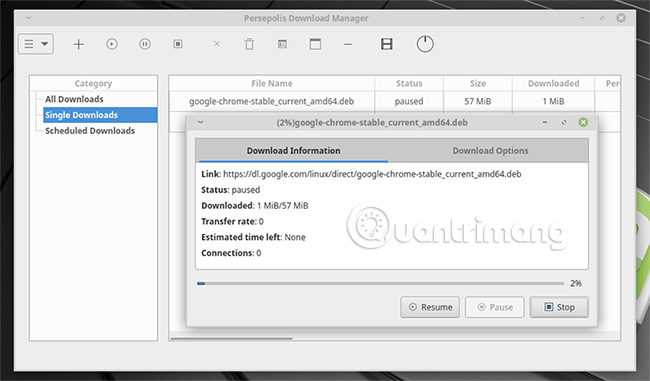
<p style="text-align: justify;">Nếu bạn đang tìm kiếm một trình quản lý download mã nguồn mở, nhanh chóng và giàu tính năng để cài đặt trên Linux Mint, thì không có gì khác ngoài Persepolis. Persepolis thực sự là một GUI wrapper cho tiện ích tải xuống terminal được gọi là&nbsp;aria2.</p>

<p style="text-align: justify;"><img alt="Persepolis" data-i="0" data-src="https://st.quantrimang.com/photos/image/2019/08/05/trinh-quan-ly-download-tot-nhat-cho-linux-1.jpg" data-was-processed="true" height="381" src="https://st.quantrimang.com/photos/image/2019/08/05/trinh-quan-ly-download-tot-nhat-cho-linux-1.jpg" width="650" /></p>

<p style="text-align: justify;">Persepolis hoạt động như một trình lên lịch download, tải xuống từng file một và lựa chọn hoàn hảo nếu bạn muốn bắt đầu việc tải xuống hàng loạt qua đêm. Persepolis cho phép bạn tiếp tục mọi bản tải xuống bị tạm dừng hoặc bị lỗi và với những tiện ích mở rộng cho Chrome và Firefox, nó sẽ tích hợp trực tiếp với các trình duyệt web hiện tại của bạn.</p>

<p style="text-align: justify;">Người dùng Linux Mint có thể tải xuống Persepolis bằng cách mở một cửa sổ terminal và gõ lệnh sau:</p>

<pre id="pre0">
<code>sudo add-apt-repository ppa:persepolis/ppa
 sudo apt update
 sudo apt install persepolis</code></pre>

<h2 id="mcetoc_1dhfsc7o51" style="text-align: justify;">2.&nbsp;Xtreme Download Manager&nbsp;</h2>

<div style="text-align: justify;"><span style="color:rgb(192, 57, 43);"><strong>https://subhra74.github.io/xdm/#downloads</strong></span></div>

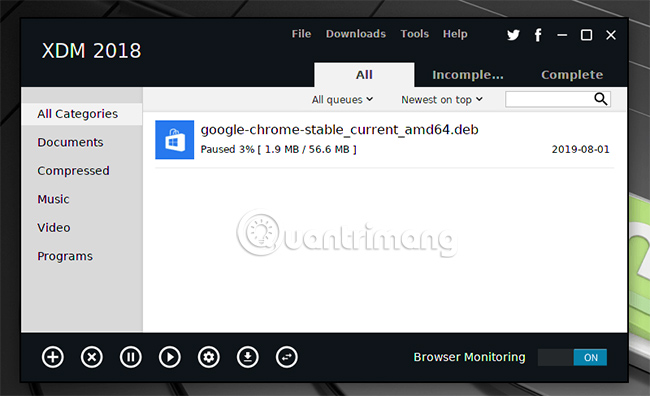
<p style="text-align: justify;">Xtreme Download Manager (hoặc XDM) tự quảng cáo mình là một công cụ giúp tăng tốc nhanh chóng việc tải xuống và đi kèm các tiện ích mở rộng trình duyệt để mở rộng khả năng của nó.</p>

<p style="text-align: justify;"><img alt="XDM" data-i="1" data-src="https://st.quantrimang.com/photos/image/2019/08/05/trinh-quan-ly-download-tot-nhat-cho-linux-2.jpg" data-was-processed="true" height="396" src="https://st.quantrimang.com/photos/image/2019/08/05/trinh-quan-ly-download-tot-nhat-cho-linux-2.jpg" width="650" /></p>

<p style="text-align: justify;">Nếu bạn&nbsp;phát trực tuyến video, nó sẽ nhắc bạn tải xuống nội dung trực tiếp, cho phép bạn truy cập ngoại tuyến vào các video&nbsp;YouTube&nbsp;yêu thích của mình. Xtreme Download Manager sẽ chuyển đổi mọi video tải xuống trong ứng dụng sang định dạng file bạn chọn. Theo tiêu chuẩn, XDM đi kèm với trình lên lịch tải xuống được tích hợp, cũng như cho phép các bản tải xuống được tạm dừng và tiếp tục lại theo ý muốn.</p>

<p style="text-align: justify;">Giống như Persepolis, XDM là công cụ đa nền tảng, có thể chạy trên cả Windows và macOS, cũng như các bản phân phối Linux khác. Người dùng Linux Mint sẽ cần tải xuống file&nbsp;<strong>tar.xz</strong>&nbsp;có liên quan từ trang web XDM, sau đó chạy các lệnh sau trong terminal:</p>

<pre id="pre1">
<code>tar xf your-xdm-file.tar.xz
 ./install.sh</code></pre>

<div style="text-align: justify;">&nbsp;</div>

<h2 id="mcetoc_1dhfsc7o52" style="text-align: justify;">3.&nbsp;uGet&nbsp;</h2>

<div style="text-align: justify;"><span style="color:rgb(192, 57, 43);"><strong>https://ugetdm.com/</strong></span></div>

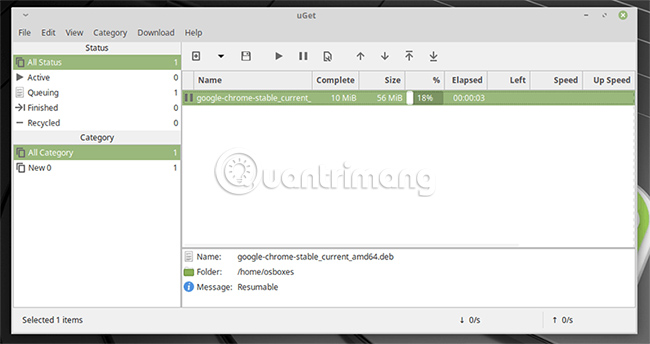
<p style="text-align: justify;">Một trong những trình quản lý download tốt, nổi tiếng và dễ sử dụng nhất hiện có là uGet. uGet có phiên bản trên mọi nền tảng mà bạn có thể nghĩ ra, từ Android đến BSD, và cũng có một gói có sẵn cho người dùng Linux.</p>

<p style="text-align: justify;"><img alt="uGet" data-i="2" data-src="https://st.quantrimang.com/photos/image/2019/08/05/trinh-quan-ly-download-tot-nhat-cho-linux-3.jpg" data-was-processed="true" height="344" src="https://st.quantrimang.com/photos/image/2019/08/05/trinh-quan-ly-download-tot-nhat-cho-linux-3.jpg" width="650" /></p>

<p style="text-align: justify;">Trình quản lý download được thiết kế rất tốt này sẽ cố gắng loại bỏ mọi sự phức tạp ra khỏi các bản tải xuống của bạn, chẳng hạn như bằng cách nhận dạng những URL file trong clipboard và hỏi bạn có muốn bắt đầu tải xuống tự động không. uGet cũng cho phép bạn tạm dừng và tiếp tục các bản tải xuống, tương tự như những trình quản lý khác trong danh sách này.</p>

<p style="text-align: justify;">Nếu bạn muốn tăng tốc độ tải xuống, uGet sẽ cho phép bạn thực hiện điều đó. uGet hỗ trợ 16 kết nối riêng biệt cùng một lúc cho mỗi lần tải xuống. Bạn cũng có thể tải xuống cùng một file từ nhiều nguồn khác nhau cùng một lúc, mà không cần động tới các tarball (một thuật ngữ được sử dụng chung nhằm ám chỉ một file có chứa các file khác). Để cài đặt, chỉ cần gõ lệnh sau trong terminal:</p>

<pre id="pre2">
<code>sudo apt install uget</code></pre>

<h2 id="mcetoc_1dhfsc7o53" style="text-align: justify;">4.&nbsp;KGet&nbsp;</h2>

<div style="text-align: justify;"><span style="color:rgb(41, 128, 185);"><strong>https://kde.org/applications/internet/org.kde.kget​​​​​​​</strong></span></div>

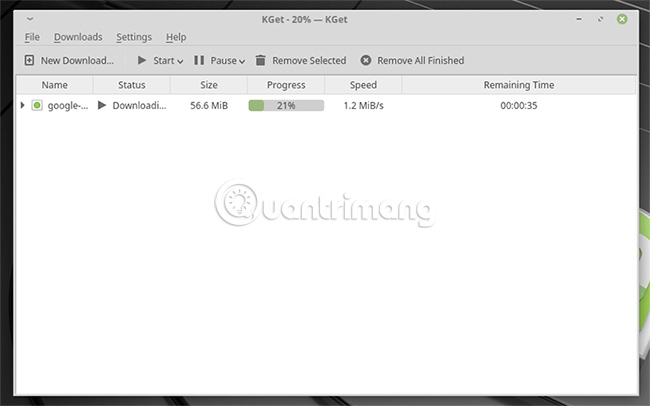
<p style="text-align: justify;">Người hâm mộ của cộng đồng KDE nên cân nhắc nghiêm túc việc sử dụng KGet. Trình quản lý download thân thiện với người mới bắt đầu và dự án KDE này sẽ sắp xếp các bản tải xuống của bạn gọn gàng, đồng thời không làm bạn choáng ngợp với các danh mục hoặc cài đặt.</p>

<p style="text-align: justify;"><img alt="KGet" data-i="3" data-src="https://st.quantrimang.com/photos/image/2019/08/05/trinh-quan-ly-download-tot-nhat-cho-linux-4.jpg" data-was-processed="true" height="406" src="https://st.quantrimang.com/photos/image/2019/08/05/trinh-quan-ly-download-tot-nhat-cho-linux-4.jpg" width="650" /></p>

<p style="text-align: justify;">Giống như các trình quản lý khác, KGet cũng có tính năng tạm dừng và tiếp tục tải xuống. KGet rất tối giản, vì vậy các tính năng có một chút hạn chế, nhưng điều quan trọng là nó rất nhẹ. KGet tích hợp tốt với Konqueror và trình duyệt KDE mặc định. KGet cũng đi kèm với sự hỗ trợ cho các bản tải xuống FTP và&nbsp;BitTorrent, vì vậy nó có thể là một sự thay thế tốt cho một BitTorrent client điển hình như Transmission hoặc Deluge.</p>

<p style="text-align: justify;">Nếu bạn đang tìm cách cài đặt KGet trên Linux Mint, chỉ cần mở terminal và gõ:</p>

<pre id="pre3">
<code>sudo apt install kget</code></pre>

<p style="text-align: justify;">Các trình quản lý download cho Linux này sẽ cung cấp cho bạn những công cụ tổ chức tuyệt vời, nếu bạn tải xuống các file thường xuyên. Nếu bạn không phải là người dùng Linux, hãy tận dụng&nbsp;các trình quản lý download Windows tốt nhất&nbsp;để thay thế.</p>

<p style="text-align: justify;">Bạn sử dụng trình quản lý download hay lựa chọn một phương pháp khác, chẳng hạn như wget trong terminal thay thế? Hãy chia sẻ suy nghĩ với mọi người trong phần bình luận bên dưới nhé!</p>

<p style="text-align: justify;">Chúc bạn tìm được lựa chọn phù hợp!</p>
		</div>
				<div id="author">
						<p>
				<strong>Nguồn tin:</strong>
				Quantrimang.com
			</p>
		</div>
	</div>
	<div id="footer" class="clearfix">
		<div id="url">
			<strong>URL của bản tin này: </strong><a href="https://www.nguoicodonvn2008.info/vi/news/savefile/phan-mem/4-trinh-quan-ly-download-tot-nhat-cho-nguoi-dung-linux-677.html" title="4 trình quản lý download tốt nhất cho người dùng Linux">https://www.nguoicodonvn2008.info/vi/news/savefile/phan-mem/4-trinh-quan-ly-download-tot-nhat-cho-nguoi-dung-linux-677.html</a>

		</div>
		<div class="clear"></div>
		<div class="copyright">
			&copy; .&#x3A; Nguoicodonvn2008.info - Cõi lòng người cô đơn &#x3A;.
		</div>
		<div id="contact">
			<a href="mailto:admin@nguoicodonvn2008.info">admin@nguoicodonvn2008.info</a>
		</div>
	</div>
</div>
        <div id="timeoutsess" class="chromeframe">
            Bạn đã không sử dụng Site, <a onclick="timeoutsesscancel();" href="https://nguoicodonvn2008.info/#">Bấm vào đây để duy trì trạng thái đăng nhập</a>. Thời gian chờ: <span id="secField"> 60 </span> giây
        </div>
        <div id="openidResult" class="nv-alert" style="display:none"></div>
        <div id="openidBt" data-result="" data-redirect=""></div>
		</script>
		<div class="car-top">
  <span><img src="https://nguoicodonvn2008.info/themes/default/images/car.png" alt=""></span>
</div>
<div id="run_cronjobs" style="visibility:hidden;display:none;"><img alt="cron" src="/index.php?second=cronjobs&amp;p=w9xc4YKE" width="1" height="1" /></div>
<script src="https://nguoicodonvn2008.info/assets/js/jquery/jquery.min.js"></script>
<script>var nv_base_siteurl="/",nv_lang_data="vi",nv_lang_interface="vi",nv_name_variable="nv",nv_fc_variable="op",nv_lang_variable="language",nv_module_name="news",nv_func_name="savefile",nv_is_user=0, nv_my_ofs=-4,nv_my_abbr="EDT",nv_cookie_prefix="nv4c_e856T",nv_check_pass_mstime=1738000,nv_area_admin=0,nv_safemode=0,theme_responsive=0,nv_recaptcha_ver=2,nv_recaptcha_sitekey="",nv_recaptcha_type="image",XSSsanitize=1;</script>
<script src="https://nguoicodonvn2008.info/assets/js/language/vi.js"></script>
<script src="https://nguoicodonvn2008.info/assets/js/DOMPurify/purify3.js"></script>
<script src="https://nguoicodonvn2008.info/assets/js/global.js"></script>
<script src="https://nguoicodonvn2008.info/assets/js/site.js"></script>
<script src="https://nguoicodonvn2008.info/themes/default/js/news.js"></script>
<script src="https://nguoicodonvn2008.info/themes/default/js/main.js"></script>
<script src="https://nguoicodonvn2008.info/themes/default/js/custom.js"></script>
<script type="application/ld+json">
        {
            "@context": "https://schema.org",
            "@type": "Organization",
            "url": "https://nguoicodonvn2008.info",
            "logo": "https://nguoicodonvn2008.info/uploads/angel.gif"
        }
        </script>
<script src="https://nguoicodonvn2008.info/themes/default/js/bootstrap.min.js"></script>
<script type="text/javascript">
var $scrolltop = $('.car-top');
$scrolltop.on('click', function () {
    $('html,body').animate({
        scrollTop: 0
    }, 800);
    $(this).addClass("car-run");
    setTimeout(function(){ $scrolltop.removeClass('car-run');}, 1000);
    return false;
});
$(window).on('scroll', function ()
{ 
    if($(window).scrollTop() >= 200)
    {
        $scrolltop.addClass("show");
        $scrolltop.addClass("car-down");
    }
    else
    {
       $scrolltop.removeClass("show");
       setTimeout(function(){ $scrolltop.removeClass('car-down');}, 300);
    }
});
</script>
</body>
</html>