<!DOCTYPE html>
    <html lang="vi" xmlns="http://www.w3.org/1999/xhtml" prefix="og: http://ogp.me/ns#">
    <head>
<title>12 công cụ nén file tốt nhất trên Linux</title>
<meta name="description" content="12 công cụ nén file tốt nhất trên Linux - Savefile - Tin Tức -...">
<meta name="author" content=".: Nguoicodonvn2008.info - Cõi lòng người cô đơn :.">
<meta name="copyright" content=".: Nguoicodonvn2008.info - Cõi lòng người cô đơn :. [admin@nguoicodonvn2008.info]">
<meta name="robots" content="index, archive, follow, noodp">
<meta name="googlebot" content="index,archive,follow,noodp">
<meta name="msnbot" content="all,index,follow">
<meta name="generator" content="NukeViet v4.5">
<meta http-equiv="Content-Type" content="text/html; charset=utf-8">
<meta property="og:title" content="12 công cụ nén file tốt nhất trên Linux">
<meta property="og:type" content="website">
<meta property="og:description" content="Savefile - Tin Tức - https&#x3A;&#x002F;&#x002F;www.nguoicodonvn2008.info&#x002F;vi&#x002F;news&#x002F;savefile&#x002F;phan-mem&#x002F;12-cong-cu-nen-file-tot-nhat-tren-linux-7740.html">
<meta property="og:site_name" content=".&#x3A; Nguoicodonvn2008.info - Cõi lòng người cô đơn &#x3A;.">
<meta property="og:url" content="https://www.nguoicodonvn2008.info/vi/news/savefile/phan-mem/12-cong-cu-nen-file-tot-nhat-tren-linux-7740.html">
<link rel="shortcut icon" href="https://nguoicodonvn2008.info/favicon.ico">
<link rel="canonical" href="https://www.nguoicodonvn2008.info/vi/news/savefile/phan-mem/12-cong-cu-nen-file-tot-nhat-tren-linux-7740.html">
<link rel="alternate" href="https://nguoicodonvn2008.info/vi/news/rss/" title="Tin Tức" type="application/rss+xml">
<link rel="alternate" href="https://nguoicodonvn2008.info/vi/news/rss/karaoke-dual/" title="Tin Tức - Karaoke Dual" type="application/rss+xml">
<link rel="alternate" href="https://nguoicodonvn2008.info/vi/news/rss/nhac-tre/" title="Tin Tức - Nhạc trẻ" type="application/rss+xml">
<link rel="alternate" href="https://nguoicodonvn2008.info/vi/news/rss/tru-tinh/" title="Tin Tức - Trữ tình" type="application/rss+xml">
<link rel="alternate" href="https://nguoicodonvn2008.info/vi/news/rss/nuoc-ngoai/" title="Tin Tức - Nước ngoài" type="application/rss+xml">
<link rel="alternate" href="https://nguoicodonvn2008.info/vi/news/rss/remix/" title="Tin Tức - Remix" type="application/rss+xml">
<link rel="alternate" href="https://nguoicodonvn2008.info/vi/news/rss/tam-su-tinh-yeu/" title="Tin Tức - Tâm sự tình yêu" type="application/rss+xml">
<link rel="alternate" href="https://nguoicodonvn2008.info/vi/news/rss/tho-suu-tam/" title="Tin Tức - Thơ sưu tầm" type="application/rss+xml">
<link rel="alternate" href="https://nguoicodonvn2008.info/vi/news/rss/cuoc-song/" title="Tin Tức - Cuộc sống" type="application/rss+xml">
<link rel="alternate" href="https://nguoicodonvn2008.info/vi/news/rss/phan-mem/" title="Tin Tức - Phần mềm" type="application/rss+xml">
<link rel="alternate" href="https://nguoicodonvn2008.info/vi/news/rss/kien-thuc-may-tinh/" title="Tin Tức - Kiến thức máy tính" type="application/rss+xml">
<link rel="alternate" href="https://nguoicodonvn2008.info/vi/news/rss/hoc-tap/" title="Tin Tức - Học tập" type="application/rss+xml">
<link rel="alternate" href="https://nguoicodonvn2008.info/vi/news/rss/tai-lieu/" title="Tin Tức - Tài liệu" type="application/rss+xml">
<link rel="alternate" href="https://nguoicodonvn2008.info/vi/news/rss/de-thi/" title="Tin Tức - Đề thi" type="application/rss+xml">
<link rel="preload" as="style" href="https://nguoicodonvn2008.info/assets/css/font-awesome.min.css" type="text/css">
<link rel="preload" as="style" href="https://nguoicodonvn2008.info/themes/default/css/bootstrap.non-responsive.css" type="text/css">
<link rel="preload" as="style" href="https://nguoicodonvn2008.info/themes/default/css/style.css" type="text/css">
<link rel="preload" as="style" href="https://nguoicodonvn2008.info/themes/default/css/style.non-responsive.css" type="text/css">
<link rel="preload" as="style" href="https://nguoicodonvn2008.info/themes/default/css/news.css" type="text/css">
<link rel="preload" as="style" href="https://nguoicodonvn2008.info/themes/default/css/custom.css" type="text/css">
<link rel="preload" as="script" href="https://nguoicodonvn2008.info/assets/js/jquery/jquery.min.js" type="text/javascript">
<link rel="preload" as="script" href="https://nguoicodonvn2008.info/assets/js/language/vi.js" type="text/javascript">
<link rel="preload" as="script" href="https://nguoicodonvn2008.info/assets/js/DOMPurify/purify3.js" type="text/javascript">
<link rel="preload" as="script" href="https://nguoicodonvn2008.info/assets/js/global.js" type="text/javascript">
<link rel="preload" as="script" href="https://nguoicodonvn2008.info/assets/js/site.js" type="text/javascript">
<link rel="preload" as="script" href="https://nguoicodonvn2008.info/themes/default/js/news.js" type="text/javascript">
<link rel="preload" as="script" href="https://nguoicodonvn2008.info/themes/default/js/main.js" type="text/javascript">
<link rel="preload" as="script" href="https://nguoicodonvn2008.info/themes/default/js/custom.js" type="text/javascript">
<link rel="preload" as="script" href="https://nguoicodonvn2008.info/themes/default/js/bootstrap.min.js" type="text/javascript">
<link rel="stylesheet" href="https://nguoicodonvn2008.info/assets/css/font-awesome.min.css">
<link rel="stylesheet" href="https://nguoicodonvn2008.info/themes/default/css/bootstrap.non-responsive.css">
<link rel="stylesheet" href="https://nguoicodonvn2008.info/themes/default/css/style.css">
<link rel="stylesheet" href="https://nguoicodonvn2008.info/themes/default/css/style.non-responsive.css">
<link rel="StyleSheet" href="https://nguoicodonvn2008.info/themes/default/css/news.css">
<link rel="stylesheet" href="https://nguoicodonvn2008.info/themes/default/css/custom.css">
<style type="text/css">
	body{background: #fff;}
</style>
    </head>
    <body>
<div id="print">
	<div id="hd_print">
		<h2 class="pull-left">.&#x3A; Nguoicodonvn2008.info - Cõi lòng người cô đơn &#x3A;.</h2>
		<p class="pull-right"><a title=".&#x3A; Nguoicodonvn2008.info - Cõi lòng người cô đơn &#x3A;." href="https://nguoicodonvn2008.info/">https://nguoicodonvn2008.info</a></p>
	</div>
	<div class="clear"></div>
	<hr />
	<div id="content">
		<h1>12 công cụ nén file tốt nhất trên Linux</h1>
		<ul class="list-inline">
			<li>Thứ ba - 07/11/2023 08:43</li>
			<li class="hidden-print txtrequired"><em class="fa fa-print">&nbsp;</em><a title="In ra" href="javascript:;" onclick="window.print()">In ra</a></li>
			<li class="hidden-print txtrequired"><em class="fa fa-power-off">&nbsp;</em><a title="Đóng cửa sổ này" href="javascript:;" onclick="window.close()">Đóng cửa sổ này</a></li>
		</ul>
		<div class="clear"></div>
		<div id="hometext">
		</div>
				<div class="imghome">
			<img alt="12 công cụ nén file tốt nhất trên Linux" src="https://st.quantrimang.com/photos/image/2023/11/07/cong-cu-nen-file-tot-nhat-tren-linux-12.jpg" width="460" class="img-thumbnail" />
		</div>
		<div class="clear"></div>
		<div id="bodytext" class="clearfix">
			<p style="text-align: justify;">Nén file là một phần không thể thiếu trong quản trị hệ thống. Việc tìm ra phương pháp nén tốt nhất đòi hỏi sự quyết tâm đáng kể. May mắn thay, có rất nhiều công cụ nén mạnh mẽ dành cho Linux giúp việc sao lưu dữ liệu hệ thống trở nên dễ dàng hơn. Sau đây là một số công cụ tốt nhất có thể được sử dụng để nén file trong&nbsp;<a data-type="internal" href="https://quantrimang.com/cong-nghe/linux-os" title="Linux">Linux</a>.</p>

<h2 style="text-align: justify;">1.&nbsp;LZ4</h2>

<div style="text-align: justify;"><span style="color:rgb(192, 57, 43);"><strong>https://github.com/lz4/lz4</strong></span></div>

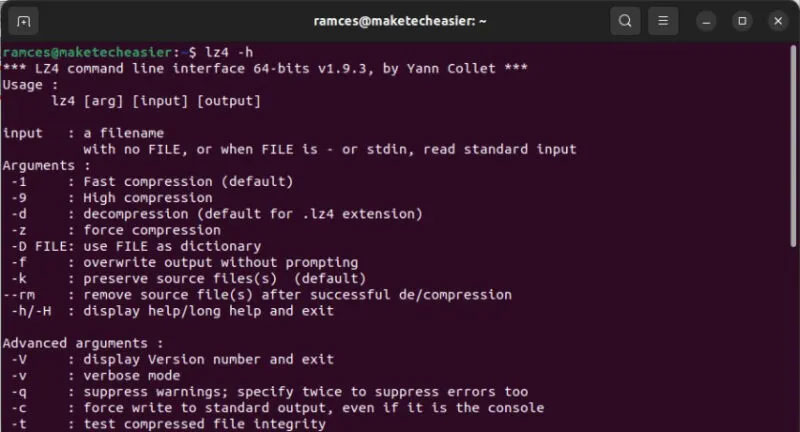
<p style="text-align: justify;">LZ4 là công cụ nén được lựa chọn dành cho quản trị viên cần tốc độ nén và giải nén nhanh như chớp. Nó sử dụng thuật toán nén không mất dữ liệu LZ4, thuộc họ thuật toán nén định hướng byte LZ77.</p>

<p style="text-align: justify;">Hơn nữa, LZ4 còn được kết hợp với bộ giải mã tốc độ cao có thể xử lý hơn 1 Gigabyte/giây trên mỗi lõi CPU. Điều này khiến nó trở nên lý tưởng cho những người dùng đang muốn nén lượng lớn dữ liệu với ít thời gian nhất có thể.</p>

<figure>
<div style="text-align: justify;"><img alt="LZ4" data-i="0" data-src="https://st.quantrimang.com/photos/image/2023/11/07/cong-cu-nen-file-tot-nhat-tren-linux-1.jpg" data-was-processed="true" height="432" src="https://st.quantrimang.com/photos/image/2023/11/07/cong-cu-nen-file-tot-nhat-tren-linux-1.jpg" width="800" /></div>

<figcaption>
<div style="text-align: justify;">LZ4</div>
</figcaption>
</figure>

<h2 style="text-align: justify;">2.&nbsp;Zstandard</h2>

<div style="text-align: justify;"><span style="color:rgb(192, 57, 43);"><strong>https://facebook.github.io/zstd/</strong></span></div>

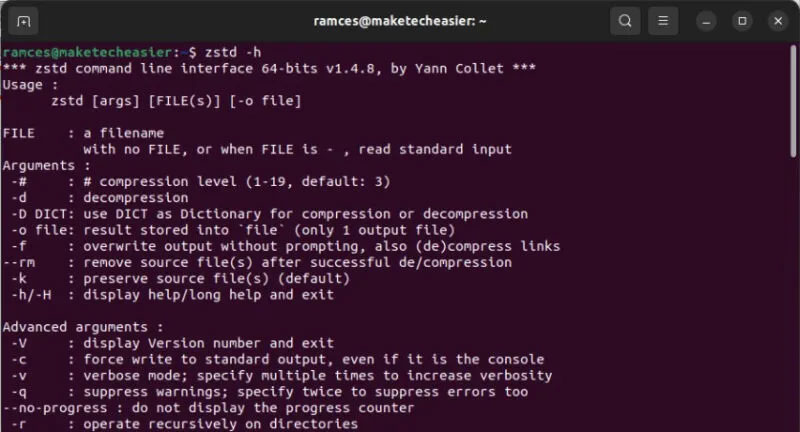
<p style="text-align: justify;">Zstandard là một công cụ nén nhanh khác dành cho Linux, có thể được sử dụng cho các dự án cá nhân và doanh nghiệp. Một số tính năng hấp dẫn nhất của Zstandard bao gồm chế độ thích ứng, có thể kiểm soát tỷ lệ nén dựa trên I/O.</p>

<div style="text-align: justify;">&nbsp;</div>

<p style="text-align: justify;">Zstandard cũng có API phong phú có sẵn cho tất cả các ngôn ngữ lập trình chính.</p>

<figure>
<div style="text-align: justify;"><br />
<img alt="Terminal hiển thị màn hình trợ giúp cho zstd." data-adbro-processed="true" data-i="1" data-src="https://st.quantrimang.com/photos/image/2023/11/07/cong-cu-nen-file-tot-nhat-tren-linux-2.jpg" data-was-processed="true" height="432" src="https://st.quantrimang.com/photos/image/2023/11/07/cong-cu-nen-file-tot-nhat-tren-linux-2.jpg" width="800" /></div>

<figcaption>
<div style="text-align: justify;">Terminal hiển thị màn hình trợ giúp cho zstd.</div>
</figcaption>
</figure>

<h2 style="text-align: justify;">3.&nbsp;lzop</h2>

<div style="text-align: justify;"><span style="color:rgb(192, 57, 43);"><strong>https://www.lzop.org/</strong></span></div>

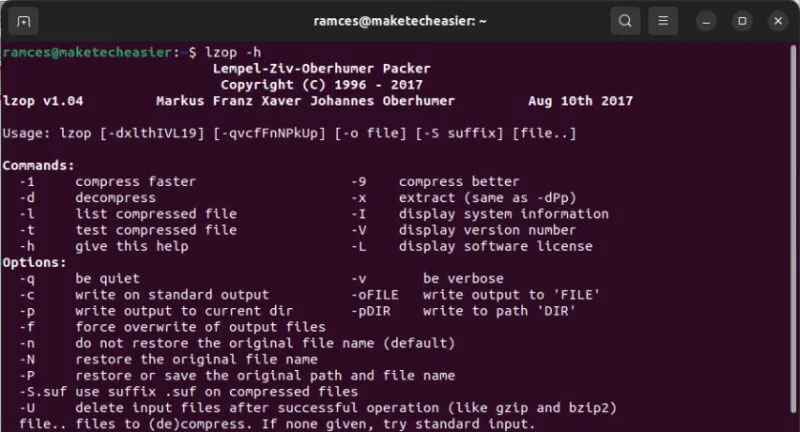
<p style="text-align: justify;">lzop là một công cụ nén mạnh mẽ sử dụng thuật toán nén Lempel-Ziv-Oberhumer (LZO). lzop cung cấp tốc độ nén chóng mặt. Ví dụ, lzop tạo ra các file lớn hơn một chút so với gzip nhưng chỉ yêu cầu thời gian chạy CPU chỉ bằng 10%.</p>

<p style="text-align: justify;">Hơn nữa, lzop có thể xử lý việc sao lưu hệ thống theo nhiều cách, bao gồm chế độ sao lưu, chế độ file đơn, chế độ lưu trữ và chế độ pipe. Cuối cùng, lzop cũng có thể trở thành một giải pháp thay thế cho thuật toán gzip cũ hơn. Điều này có nghĩa là có thể sử dụng lzop trên các script thường sử dụng gzip chỉ bằng cách tạo alias Bash.</p>

<figure>
<div style="text-align: justify;"><img alt="Terminal hiển thị màn hình trợ giúp cho lzop." data-i="2" data-src="https://st.quantrimang.com/photos/image/2023/11/07/cong-cu-nen-file-tot-nhat-tren-linux-3.jpg" data-was-processed="true" height="432" src="https://st.quantrimang.com/photos/image/2023/11/07/cong-cu-nen-file-tot-nhat-tren-linux-3.jpg" width="800" /></div>

<figcaption>
<div style="text-align: justify;">Terminal hiển thị màn hình trợ giúp cho lzop.</div>
</figcaption>
</figure>

<div style="text-align: justify;"><iframe allowtransparency="true" data-google-container-id="a!3" data-google-query-id="CJmTkLSCsoIDFbiKfwQd5CIA6A" data-load-complete="true" frameborder="0" height="0" hspace="0" id="aswift_2" marginheight="0" marginwidth="0" name="aswift_2" sandbox="" scrolling="no" vspace="0" width="694"></iframe></div>

<h2 style="text-align: justify;">4.&nbsp;Gzip</h2>

<div style="text-align: justify;"><span style="color:rgb(231, 76, 60);"><strong>https://www.gzip.org/</strong></span></div>

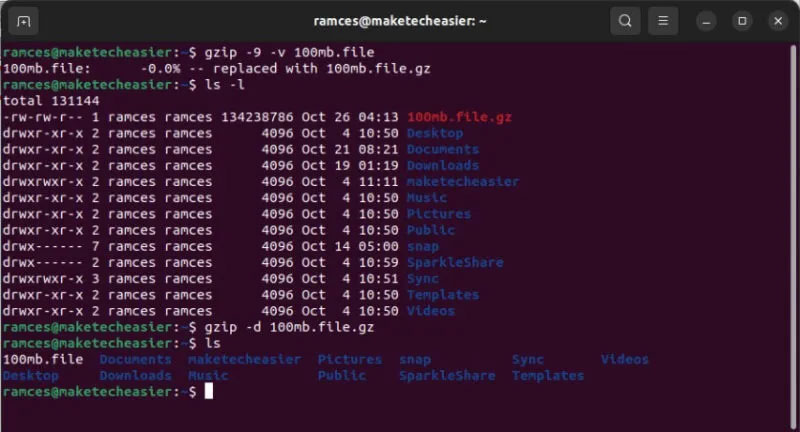
<p style="text-align: justify;">Gzip chắc chắn là một trong những công cụ nén được sử dụng rộng rãi nhất dành cho quản trị viên Linux. Nó tương thích với mọi phần mềm GNU, khiến nó trở thành công cụ nén hoàn hảo cho các kỹ sư làm việc từ xa.</p>

<p style="text-align: justify;">Gzip tận dụng mã hóa Lempel-Ziv ở chế độ DEFLATE để nén file. Nó có thể giảm kích thước của mã nguồn tới 90%. Ngoài ra, nó còn lưu giữ siêu dữ liệu của file, bao gồm các bit quyền và thời gian sửa đổi. Nhìn chung, điều này làm cho gzip trở thành một lựa chọn tuyệt vời cho người dùng Linux cũng như các nhà phát triển phần mềm dày dạn kinh nghiệm.</p>

<figure>
<div style="text-align: justify;"><img alt="Terminal hiển thị Gzip nén và giải nén một file." data-i="3" data-src="https://st.quantrimang.com/photos/image/2023/11/07/cong-cu-nen-file-tot-nhat-tren-linux-4.jpg" data-was-processed="true" height="432" src="https://st.quantrimang.com/photos/image/2023/11/07/cong-cu-nen-file-tot-nhat-tren-linux-4.jpg" width="800" /></div>

<figcaption>
<div style="text-align: justify;">Terminal hiển thị Gzip nén và giải nén một file.</div>
</figcaption>
</figure>

<h2 style="text-align: justify;">5.&nbsp;bzip2</h2>

<div style="text-align: justify;"><span style="color:rgb(192, 57, 43);"><strong>https://www.sourceware.org/bzip2/</strong></span></div>

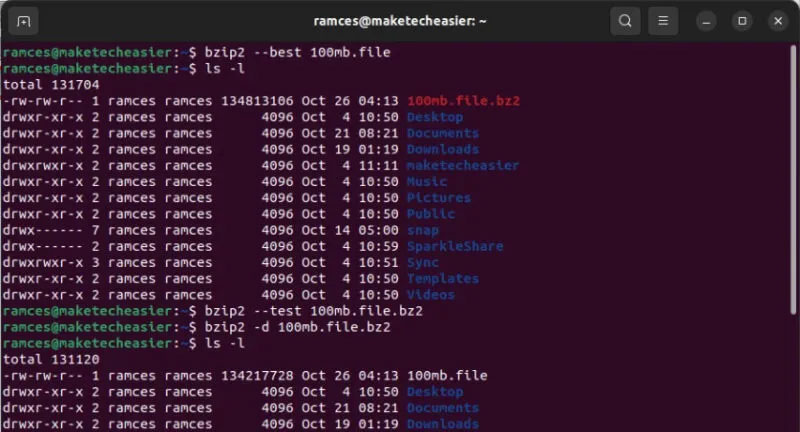
<p style="text-align: justify;">bzip2 là một công cụ nén mã nguồn mở và miễn phí dành cho Linux. Nó nén các file bằng thuật toán nén sắp xếp block Burrows-Wheeler và mã hóa Huffman. bzip2 cũng hỗ trợ một số phương pháp nén bổ sung, chẳng hạn như mã hóa độ dài chạy, mã hóa delta và mảng bit thưa (sparse bit array).</p>

<p style="text-align: justify;">Bzip2 cũng có thể khôi phục dữ liệu từ ổ media bằng cách xây dựng lại dữ liệu bị thiếu, bị hỏng từ kho lưu trữ có sẵn. Nhìn chung, bzip2 là một công cụ nén phù hợp để sử dụng hàng ngày nhờ khả năng nén mạnh mẽ và tốc độ giải nén nhanh.</p>

<figure>
<div style="text-align: justify;"><img alt="Terminal hiển thị bzip2 nén và giải nén một file." data-i="4" data-src="https://st.quantrimang.com/photos/image/2023/11/07/cong-cu-nen-file-tot-nhat-tren-linux-5.jpg" data-was-processed="true" height="432" src="https://st.quantrimang.com/photos/image/2023/11/07/cong-cu-nen-file-tot-nhat-tren-linux-5.jpg" width="800" /></div>

<figcaption>
<div style="text-align: justify;">Terminal hiển thị bzip2 nén và giải nén một file.</div>
</figcaption>
</figure>

<h2 style="text-align: justify;">6.&nbsp;<a href="https://quantrimang.com/url?q=aHR0cHM6Ly83LXppcC5vcmcv" rel="nofollow noopener" target="_blank" title="7zip">7zip</a></h2>

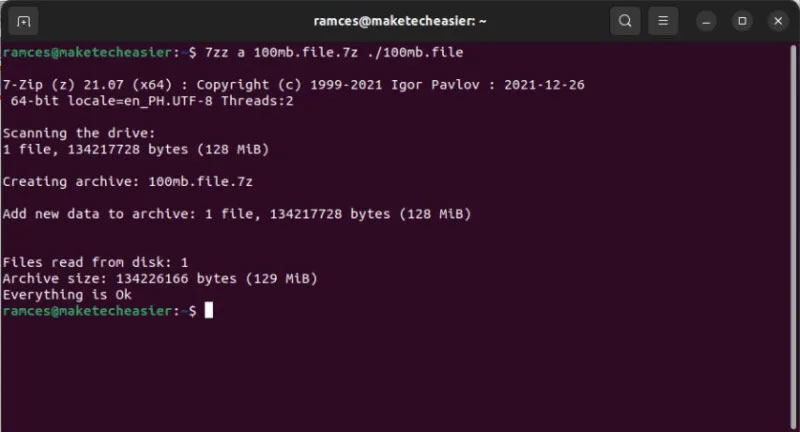
<p style="text-align: justify;">7zip là cổng tiện ích dòng lệnh của&nbsp;<a data-type="internal" href="https://quantrimang.com/download/7-zip-183466" title="7-Zip">7-Zip</a>&nbsp;dành cho Linux. Nó là một công cụ lưu trữ hiệu suất cao với tỷ lệ nén ổn định. Tương tự như đối tác Windows, 7zip hỗ trợ nhiều định dạng phổ biến, bao gồm&nbsp;<a data-type="internal" href="https://quantrimang.com/cong-nghe/file-tar-la-gi-191633" title="File TAR là gì?">tar</a>, xz, gzip, bzip2 và&nbsp;<a data-type="internal" href="https://quantrimang.com/cong-nghe/file-zip-la-gi-183645" title="File Zip là gì? File Zip hoạt động như thế nào?">zip</a>.</p>

<div style="text-align: justify;"><iframe allowtransparency="true" data-google-container-id="a!4" data-google-query-id="COPZvbSCsoIDFU6HpwodQ-kHdA" data-load-complete="true" frameborder="0" height="0" hspace="0" id="aswift_3" marginheight="0" marginwidth="0" name="aswift_3" sandbox="" scrolling="no" vspace="0" width="694"></iframe></div>

<p style="text-align: justify;">7zip cũng sử dụng&nbsp;định dạng 7z&nbsp;theo mặc định, cung cấp khả năng nén tốt hơn 30 đến 50% so với nén zip tiêu chuẩn. Hơn nữa, bạn có thể sử dụng công cụ này để tạo các kho lưu trữ volume tự giải nén và có kích thước linh hoạt.</p>

<figure>
<div style="text-align: justify;"><img alt="Terminal hiển thị 7z nén một file." data-i="5" data-src="https://st.quantrimang.com/photos/image/2023/11/07/cong-cu-nen-file-tot-nhat-tren-linux-6.jpg" data-was-processed="true" height="432" src="https://st.quantrimang.com/photos/image/2023/11/07/cong-cu-nen-file-tot-nhat-tren-linux-6.jpg" width="800" /></div>

<figcaption>
<div style="text-align: justify;">Terminal hiển thị 7z nén một file.</div>
</figcaption>
</figure>

<h2 style="text-align: justify;">7.&nbsp;pigz</h2>

<div style="text-align: justify;"><span style="color:rgb(192, 57, 43);"><strong>https://github.com/madler/pigz</strong></span></div>

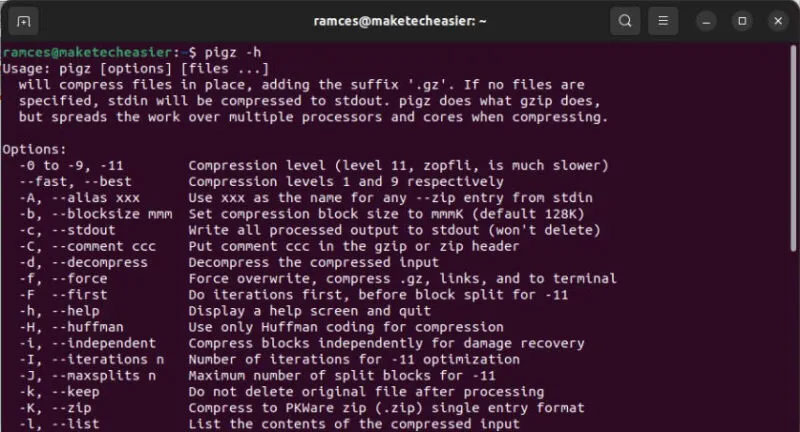
<p style="text-align: justify;">pigz hay parallel implementation of gzip là sự thay thế đáng tin cậy cho công cụ nén gzip. Nó tận dụng nhiều lõi&nbsp;<a data-type="internal" href="https://quantrimang.com/cong-nghe/cpu-la-gi-142876" title="CPU là gì?">CPU</a>&nbsp;để tăng tốc độ nén một cách đáng kể. Nó sử dụng thư viện zlib và pthread để thực hiện quy trình nén đa luồng. Tuy nhiên, pigz không thể giải nén các kho lưu trữ song song. Do đó, bạn sẽ không thể đạt được tốc độ tương tự trong quá trình nén và giải nén.</p>

<figure>
<div style="text-align: justify;"><img alt="Terminal hiển thị màn hình trợ giúp của pigz." data-i="6" data-src="https://st.quantrimang.com/photos/image/2023/11/07/cong-cu-nen-file-tot-nhat-tren-linux-7.jpg" data-was-processed="true" height="432" src="https://st.quantrimang.com/photos/image/2023/11/07/cong-cu-nen-file-tot-nhat-tren-linux-7.jpg" width="800" /></div>

<figcaption>
<div style="text-align: justify;">Terminal hiển thị màn hình trợ giúp của pigz.</div>
</figcaption>
</figure>

<h2 style="text-align: justify;">8.&nbsp;<a href="https://quantrimang.com/url?q=aHR0cHM6Ly9naXRodWIuY29tL3Zhc2kvcGl4eg%3D%3D" rel="nofollow noopener" target="_blank" title="pixz">pixz</a></h2>

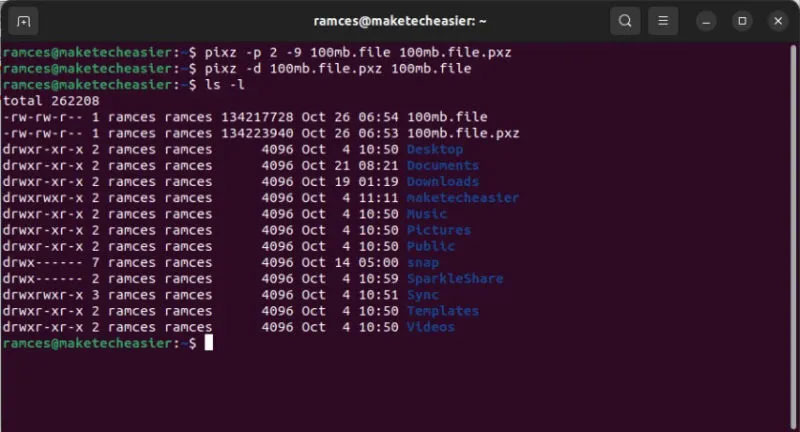
<p style="text-align: justify;">pixz là một triển khai song song của công cụ nén Xperia với sự hỗ trợ lập chỉ mục dữ liệu. Thay vì tạo ra một block dữ liệu nén lớn như xz, nó tạo ra một tập hợp các block nhỏ hơn. Điều này làm cho việc truy cập ngẫu nhiên vào dữ liệu gốc trở nên đơn giản. Hơn nữa, pixz cũng đảm bảo rằng các quyền của file được giữ nguyên trong quá trình nén và giải nén.</p>

<figure>
<div style="text-align: justify;"><img alt="Terminal hiển thị pixz nén và giải nén một file." data-i="7" data-src="https://st.quantrimang.com/photos/image/2023/11/07/cong-cu-nen-file-tot-nhat-tren-linux-8.jpg" data-was-processed="true" height="432" src="https://st.quantrimang.com/photos/image/2023/11/07/cong-cu-nen-file-tot-nhat-tren-linux-8.jpg" width="800" /></div>

<figcaption>
<div style="text-align: justify;">Terminal hiển thị pixz nén và giải nén một file.</div>
</figcaption>
</figure>

<h2 style="text-align: justify;">9.&nbsp;plzip</h2>

<div style="text-align: justify;"><span style="color:rgb(192, 57, 43);"><strong>https://www.nongnu.org/lzip/plzip.html</strong></span></div>

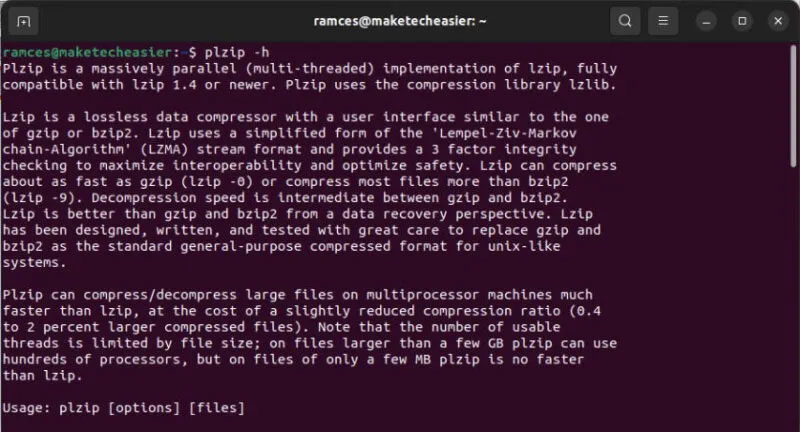
<p style="text-align: justify;">plzip là một công cụ nén không mất dữ liệu giúp sử dụng sáng tạo khả năng đa luồng được hỗ trợ bởi các CPU hiện đại. Nó được xây dựng dựa trên thư viện lzlib và cung cấp giao diện dòng lệnh tương tự như gzip và bzip2.</p>

<p style="text-align: justify;">Một lợi ích chính của plzip là khả năng tận dụng tối đa các máy đa bộ xử lý. Ngoài ra, nhà phát triển thuật toán đã thiết kế nó để đảm bảo dữ liệu an toàn và đáng tin cậy nhất có thể. Điều này làm cho plzip trở thành một lựa chọn hấp dẫn cho những quản trị viên cần một công cụ nén Linux hiệu suất cao, hỗ trợ nén song song và phù hợp để lưu trữ lâu dài.</p>

<figure>
<div style="text-align: justify;"><img alt="Terminal hiển thị màn hình trợ giúp cho plzip." data-i="8" data-src="https://st.quantrimang.com/photos/image/2023/11/07/cong-cu-nen-file-tot-nhat-tren-linux-9.jpg" data-was-processed="true" height="432" src="https://st.quantrimang.com/photos/image/2023/11/07/cong-cu-nen-file-tot-nhat-tren-linux-9.jpg" width="800" /></div>

<figcaption>
<div style="text-align: justify;">Terminal hiển thị màn hình trợ giúp cho plzip.</div>
</figcaption>
</figure>

<h2 style="text-align: justify;">10.&nbsp;XZ Utils</h2>

<div style="text-align: justify;"><span style="color:rgb(192, 57, 43);"><strong>https://tukaani.org/xz/</strong></span></div>

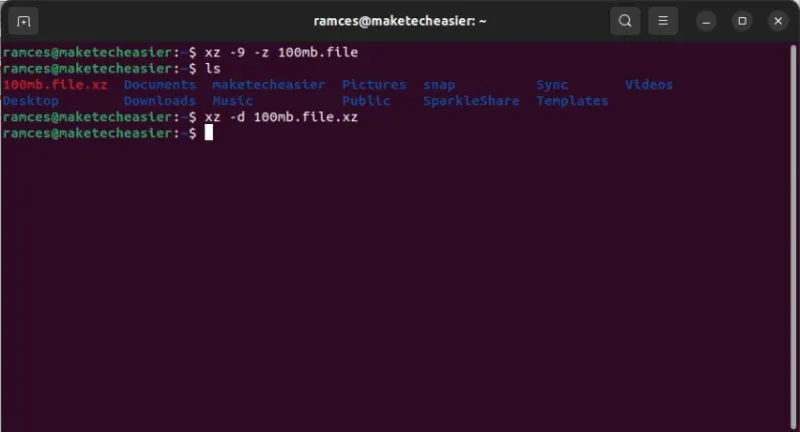
<p style="text-align: justify;">XZ Utils là bộ công cụ nén dành cho Linux có thể nén và giải nén các file .xz và .lzma. Nó chủ yếu sử dụng thuật toán LZMA2 để nén và có thể thực hiện kiểm tra tính toàn vẹn của dữ liệu nén một cách dễ dàng. Vì công cụ này có sẵn cho các bản phân phối Linux phổ biến theo mặc định nên nó có thể là một lựa chọn khả thi để nén trong nhiều trường hợp.</p>

<figure>
<div style="text-align: justify;"><img alt="Terminal hiển thị XZ Utils nén và giải nén một file." data-i="9" data-src="https://st.quantrimang.com/photos/image/2023/11/07/cong-cu-nen-file-tot-nhat-tren-linux-10.jpg" data-was-processed="true" height="432" src="https://st.quantrimang.com/photos/image/2023/11/07/cong-cu-nen-file-tot-nhat-tren-linux-10.jpg" width="800" /></div>

<figcaption>
<div style="text-align: justify;">Terminal hiển thị XZ Utils nén và giải nén một file.</div>
</figcaption>
</figure>

<h2 style="text-align: justify;">11.&nbsp;lrzip</h2>

<div style="text-align: justify;"><span style="color:rgb(192, 57, 43);"><strong>https://github.com/ckolivas/lrzip</strong></span></div>

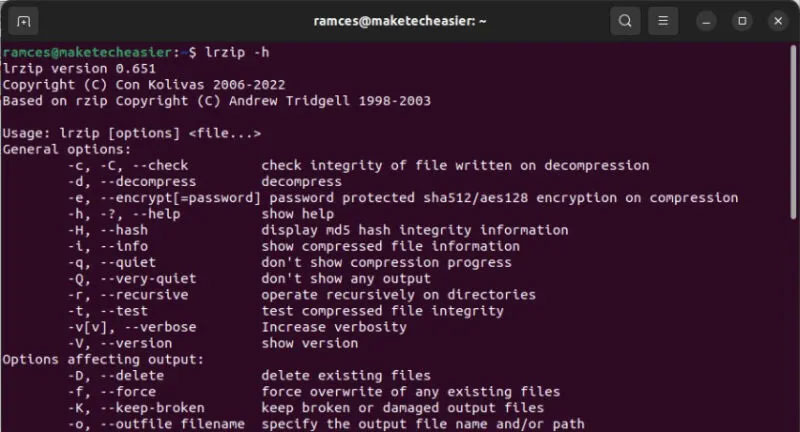
<p style="text-align: justify;">Long Range ZIP (lrzip) là một chương trình nén dữ liệu hiệu quả dành cho Linux nhằm mục đích tối ưu hóa các file nhị phân lớn. Nó thực hiện điều này bằng cách mở rộng thuật toán rzip để phù hợp với kích thước bộ nhớ thay đổi cũng như sử dụng nhiều thuật toán nén.</p>

<p style="text-align: justify;">Bên cạnh đó, lrzip cũng cực kỳ portable. Điều này có nghĩa là bạn có thể tìm thấy gói lrzip trên hầu hết các bản phân phối Linux hiện đại như Ubuntu, Debian và Arch Linux.</p>

<figure>
<div style="text-align: justify;"><img alt="Terminal hiển thị màn hình trợ giúp cho lrzip." data-i="10" data-src="https://st.quantrimang.com/photos/image/2023/11/07/cong-cu-nen-file-tot-nhat-tren-linux-11.jpg" data-was-processed="true" height="432" src="https://st.quantrimang.com/photos/image/2023/11/07/cong-cu-nen-file-tot-nhat-tren-linux-11.jpg" width="800" /></div>

<figcaption>
<div style="text-align: justify;">Terminal hiển thị màn hình trợ giúp cho lrzip.</div>
</figcaption>
</figure>

<h2 style="text-align: justify;">12.&nbsp;Zpaq</h2>

<p style="text-align: justify;"><span style="color:rgb(192, 57, 43);"><strong>https://mattmahoney.net/dc/zpaq.html</strong></span><br />
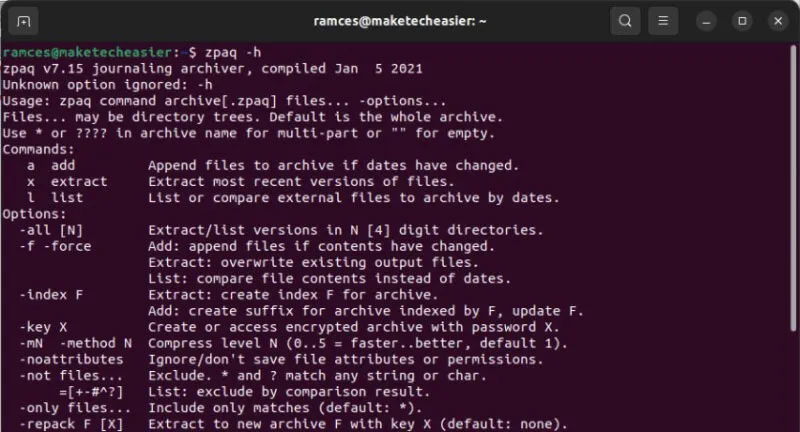
Zpaq là một công cụ nén dữ liệu mạnh mẽ. Không giống như các thuật toán nén khác, Zpaq là bộ phần mềm hoàn chỉnh nhằm cung cấp giải pháp lưu trữ tiết kiệm không gian.</p>

<p style="text-align: justify;">Ngoài ra, Zpaq còn có khả năng quay lại phiên bản cũ hơn của kho lưu trữ. Điều này là do nó theo dõi mọi thứ xảy ra trên kho lưu trữ Zpaq, bao gồm cả các byte chính xác đã thay đổi giữa những phiên bản.</p>

<figure>
<div style="text-align: justify;"><img alt="Terminal hiển thị màn hình trợ giúp cho zpaq." data-i="11" data-src="https://st.quantrimang.com/photos/image/2023/11/07/cong-cu-nen-file-tot-nhat-tren-linux-12.jpg" data-was-processed="true" height="432" src="https://st.quantrimang.com/photos/image/2023/11/07/cong-cu-nen-file-tot-nhat-tren-linux-12.jpg" width="800" /></div>

<figcaption>
<div style="text-align: justify;">Terminal hiển thị màn hình trợ giúp cho zpaq.</div>
</figcaption>
</figure>

<div style="text-align: justify;">&nbsp;</div>
		</div>
				<div id="author">
						<p>
				<strong>Nguồn tin:</strong>
				Quantrimang.com
			</p>
		</div>
	</div>
	<div id="footer" class="clearfix">
		<div id="url">
			<strong>URL của bản tin này: </strong><a href="https://www.nguoicodonvn2008.info/vi/news/savefile/phan-mem/12-cong-cu-nen-file-tot-nhat-tren-linux-7740.html" title="12 công cụ nén file tốt nhất trên Linux">https://www.nguoicodonvn2008.info/vi/news/savefile/phan-mem/12-cong-cu-nen-file-tot-nhat-tren-linux-7740.html</a>

		</div>
		<div class="clear"></div>
		<div class="copyright">
			&copy; .&#x3A; Nguoicodonvn2008.info - Cõi lòng người cô đơn &#x3A;.
		</div>
		<div id="contact">
			<a href="mailto:admin@nguoicodonvn2008.info">admin@nguoicodonvn2008.info</a>
		</div>
	</div>
</div>
        <div id="timeoutsess" class="chromeframe">
            Bạn đã không sử dụng Site, <a onclick="timeoutsesscancel();" href="https://nguoicodonvn2008.info/#">Bấm vào đây để duy trì trạng thái đăng nhập</a>. Thời gian chờ: <span id="secField"> 60 </span> giây
        </div>
        <div id="openidResult" class="nv-alert" style="display:none"></div>
        <div id="openidBt" data-result="" data-redirect=""></div>
		</script>
		<div class="car-top">
  <span><img src="https://nguoicodonvn2008.info/themes/default/images/car.png" alt=""></span>
</div>
<script src="https://nguoicodonvn2008.info/assets/js/jquery/jquery.min.js"></script>
<script>var nv_base_siteurl="/",nv_lang_data="vi",nv_lang_interface="vi",nv_name_variable="nv",nv_fc_variable="op",nv_lang_variable="language",nv_module_name="news",nv_func_name="savefile",nv_is_user=0, nv_my_ofs=-4,nv_my_abbr="EDT",nv_cookie_prefix="nv4c_e856T",nv_check_pass_mstime=1738000,nv_area_admin=0,nv_safemode=0,theme_responsive=0,nv_recaptcha_ver=2,nv_recaptcha_sitekey="",nv_recaptcha_type="image",XSSsanitize=1;</script>
<script src="https://nguoicodonvn2008.info/assets/js/language/vi.js"></script>
<script src="https://nguoicodonvn2008.info/assets/js/DOMPurify/purify3.js"></script>
<script src="https://nguoicodonvn2008.info/assets/js/global.js"></script>
<script src="https://nguoicodonvn2008.info/assets/js/site.js"></script>
<script src="https://nguoicodonvn2008.info/themes/default/js/news.js"></script>
<script src="https://nguoicodonvn2008.info/themes/default/js/main.js"></script>
<script src="https://nguoicodonvn2008.info/themes/default/js/custom.js"></script>
<script type="application/ld+json">
        {
            "@context": "https://schema.org",
            "@type": "Organization",
            "url": "https://nguoicodonvn2008.info",
            "logo": "https://nguoicodonvn2008.info/uploads/angel.gif"
        }
        </script>
<script src="https://nguoicodonvn2008.info/themes/default/js/bootstrap.min.js"></script>
<script type="text/javascript">
var $scrolltop = $('.car-top');
$scrolltop.on('click', function () {
    $('html,body').animate({
        scrollTop: 0
    }, 800);
    $(this).addClass("car-run");
    setTimeout(function(){ $scrolltop.removeClass('car-run');}, 1000);
    return false;
});
$(window).on('scroll', function ()
{ 
    if($(window).scrollTop() >= 200)
    {
        $scrolltop.addClass("show");
        $scrolltop.addClass("car-down");
    }
    else
    {
       $scrolltop.removeClass("show");
       setTimeout(function(){ $scrolltop.removeClass('car-down');}, 300);
    }
});
</script>
</body>
</html>