<!DOCTYPE html>
    <html lang="vi" xmlns="http://www.w3.org/1999/xhtml" prefix="og: http://ogp.me/ns#">
    <head>
<title>Yêu cầu cấu hình Windows 11 tối thiểu</title>
<meta name="description" content="Yêu cầu cấu hình Windows 11 tối thiểu - Savefile - Tin Tức -...">
<meta name="author" content=".: Nguoicodonvn2008.info - Cõi lòng người cô đơn :.">
<meta name="copyright" content=".: Nguoicodonvn2008.info - Cõi lòng người cô đơn :. [admin@nguoicodonvn2008.info]">
<meta name="robots" content="index, archive, follow, noodp">
<meta name="googlebot" content="index,archive,follow,noodp">
<meta name="msnbot" content="all,index,follow">
<meta name="generator" content="NukeViet v4.5">
<meta http-equiv="Content-Type" content="text/html; charset=utf-8">
<meta property="og:title" content="Yêu cầu cấu hình Windows 11 tối thiểu">
<meta property="og:type" content="website">
<meta property="og:description" content="Savefile - Tin Tức - https&#x3A;&#x002F;&#x002F;www.nguoicodonvn2008.info&#x002F;vi&#x002F;news&#x002F;savefile&#x002F;kien-thuc-may-tinh&#x002F;yeu-cau-cau-hinh-windows-11-toi-thieu-4310.html">
<meta property="og:site_name" content=".&#x3A; Nguoicodonvn2008.info - Cõi lòng người cô đơn &#x3A;.">
<meta property="og:url" content="https://www.nguoicodonvn2008.info/vi/news/savefile/kien-thuc-may-tinh/yeu-cau-cau-hinh-windows-11-toi-thieu-4310.html">
<link rel="shortcut icon" href="https://nguoicodonvn2008.info/favicon.ico">
<link rel="canonical" href="https://www.nguoicodonvn2008.info/vi/news/savefile/kien-thuc-may-tinh/yeu-cau-cau-hinh-windows-11-toi-thieu-4310.html">
<link rel="alternate" href="https://nguoicodonvn2008.info/vi/news/rss/" title="Tin Tức" type="application/rss+xml">
<link rel="alternate" href="https://nguoicodonvn2008.info/vi/news/rss/karaoke-dual/" title="Tin Tức - Karaoke Dual" type="application/rss+xml">
<link rel="alternate" href="https://nguoicodonvn2008.info/vi/news/rss/nhac-tre/" title="Tin Tức - Nhạc trẻ" type="application/rss+xml">
<link rel="alternate" href="https://nguoicodonvn2008.info/vi/news/rss/tru-tinh/" title="Tin Tức - Trữ tình" type="application/rss+xml">
<link rel="alternate" href="https://nguoicodonvn2008.info/vi/news/rss/nuoc-ngoai/" title="Tin Tức - Nước ngoài" type="application/rss+xml">
<link rel="alternate" href="https://nguoicodonvn2008.info/vi/news/rss/remix/" title="Tin Tức - Remix" type="application/rss+xml">
<link rel="alternate" href="https://nguoicodonvn2008.info/vi/news/rss/tam-su-tinh-yeu/" title="Tin Tức - Tâm sự tình yêu" type="application/rss+xml">
<link rel="alternate" href="https://nguoicodonvn2008.info/vi/news/rss/tho-suu-tam/" title="Tin Tức - Thơ sưu tầm" type="application/rss+xml">
<link rel="alternate" href="https://nguoicodonvn2008.info/vi/news/rss/cuoc-song/" title="Tin Tức - Cuộc sống" type="application/rss+xml">
<link rel="alternate" href="https://nguoicodonvn2008.info/vi/news/rss/phan-mem/" title="Tin Tức - Phần mềm" type="application/rss+xml">
<link rel="alternate" href="https://nguoicodonvn2008.info/vi/news/rss/kien-thuc-may-tinh/" title="Tin Tức - Kiến thức máy tính" type="application/rss+xml">
<link rel="alternate" href="https://nguoicodonvn2008.info/vi/news/rss/hoc-tap/" title="Tin Tức - Học tập" type="application/rss+xml">
<link rel="alternate" href="https://nguoicodonvn2008.info/vi/news/rss/tai-lieu/" title="Tin Tức - Tài liệu" type="application/rss+xml">
<link rel="alternate" href="https://nguoicodonvn2008.info/vi/news/rss/de-thi/" title="Tin Tức - Đề thi" type="application/rss+xml">
<link rel="preload" as="style" href="https://nguoicodonvn2008.info/assets/css/font-awesome.min.css" type="text/css">
<link rel="preload" as="style" href="https://nguoicodonvn2008.info/themes/default/css/bootstrap.non-responsive.css" type="text/css">
<link rel="preload" as="style" href="https://nguoicodonvn2008.info/themes/default/css/style.css" type="text/css">
<link rel="preload" as="style" href="https://nguoicodonvn2008.info/themes/default/css/style.non-responsive.css" type="text/css">
<link rel="preload" as="style" href="https://nguoicodonvn2008.info/themes/default/css/news.css" type="text/css">
<link rel="preload" as="style" href="https://nguoicodonvn2008.info/themes/default/css/custom.css" type="text/css">
<link rel="preload" as="script" href="https://nguoicodonvn2008.info/assets/js/jquery/jquery.min.js" type="text/javascript">
<link rel="preload" as="script" href="https://nguoicodonvn2008.info/assets/js/language/vi.js" type="text/javascript">
<link rel="preload" as="script" href="https://nguoicodonvn2008.info/assets/js/DOMPurify/purify3.js" type="text/javascript">
<link rel="preload" as="script" href="https://nguoicodonvn2008.info/assets/js/global.js" type="text/javascript">
<link rel="preload" as="script" href="https://nguoicodonvn2008.info/assets/js/site.js" type="text/javascript">
<link rel="preload" as="script" href="https://nguoicodonvn2008.info/themes/default/js/news.js" type="text/javascript">
<link rel="preload" as="script" href="https://nguoicodonvn2008.info/themes/default/js/main.js" type="text/javascript">
<link rel="preload" as="script" href="https://nguoicodonvn2008.info/themes/default/js/custom.js" type="text/javascript">
<link rel="preload" as="script" href="https://nguoicodonvn2008.info/themes/default/js/bootstrap.min.js" type="text/javascript">
<link rel="stylesheet" href="https://nguoicodonvn2008.info/assets/css/font-awesome.min.css">
<link rel="stylesheet" href="https://nguoicodonvn2008.info/themes/default/css/bootstrap.non-responsive.css">
<link rel="stylesheet" href="https://nguoicodonvn2008.info/themes/default/css/style.css">
<link rel="stylesheet" href="https://nguoicodonvn2008.info/themes/default/css/style.non-responsive.css">
<link rel="StyleSheet" href="https://nguoicodonvn2008.info/themes/default/css/news.css">
<link rel="stylesheet" href="https://nguoicodonvn2008.info/themes/default/css/custom.css">
<style type="text/css">
	body{background: #fff;}
</style>
    </head>
    <body>
<div id="print">
	<div id="hd_print">
		<h2 class="pull-left">.&#x3A; Nguoicodonvn2008.info - Cõi lòng người cô đơn &#x3A;.</h2>
		<p class="pull-right"><a title=".&#x3A; Nguoicodonvn2008.info - Cõi lòng người cô đơn &#x3A;." href="https://nguoicodonvn2008.info/">https://nguoicodonvn2008.info</a></p>
	</div>
	<div class="clear"></div>
	<hr />
	<div id="content">
		<h1>Yêu cầu cấu hình Windows 11 tối thiểu</h1>
		<ul class="list-inline">
			<li>Thứ sáu - 25/06/2021 00:56</li>
			<li class="hidden-print txtrequired"><em class="fa fa-print">&nbsp;</em><a title="In ra" href="javascript:;" onclick="window.print()">In ra</a></li>
			<li class="hidden-print txtrequired"><em class="fa fa-power-off">&nbsp;</em><a title="Đóng cửa sổ này" href="javascript:;" onclick="window.close()">Đóng cửa sổ này</a></li>
		</ul>
		<div class="clear"></div>
		<div id="hometext">
		</div>
				<div class="imghome">
			<img alt="Yêu cầu cấu hình Windows 11 tối thiểu" src="https://st.quantrimang.com/photos/image/2021/06/25/huong-dan-su-dung-windows-pc-health-check-12.jpg" width="460" class="img-thumbnail" />
		</div>
		<div class="clear"></div>
		<div id="bodytext" class="clearfix">
			<p style="text-align: justify;">Windows 11&nbsp;là phiên bản Windows hoàn toàn mới mà Microsoft ra mắt vào ngày 24/6/2021. Lúc này, nhiều người đã dặt câu hỏi rằng Windows 11 cần cấu hình máy tính như thế nào? Cấu hình tối thiểu để cài đặt Windows 11 như thế nào?</p>

<p style="text-align: justify;">Trong bài viết này, Quantrimang.com sẽ giải đáp thắc mắc về cấu hình cài đặt Windows 11 của các bạn.</p>

<p style="text-align: justify;">Sau khi trình làng Windows 11, Microsoft cũng đã công bố cấu hình tối thiểu của Windows 11. Do hỗ trợ nhiều loại thiết bị nên chi tiết cấu hình đáp ứng Windows 11 rất phức tạp.</p>

<h2 style="text-align: justify;">Cấu hình tối thiểu của Windows 11</h2>

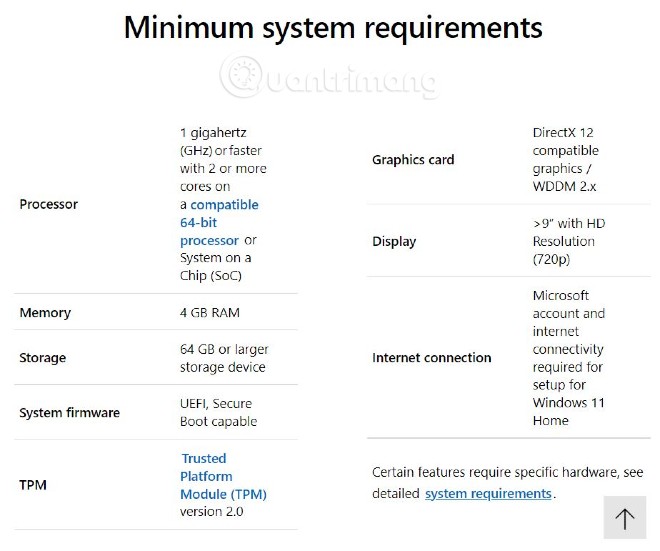
<p style="text-align: justify;">Windows 11 có thể cài được trên các máy tính đời từ 2015 trở lại đây bởi chúng đáp ứng được chuẩn UEFI và TMP 2.0. Dưới đây là cấu hình tối thiểu để cài đặt được Windows 11:</p>

<ul>
	<li style="text-align: justify;">CPU tốc độ 1 GHz trở lên với hai lõi trên vi xử lý tương thích 64-bit hoặc System on a Chip (SoC)</li>
	<li style="text-align: justify;">RAM 4GB trở lên</li>
	<li style="text-align: justify;">Màn hình 9 inch trở lên với độ phân giải HD trở lên</li>
	<li style="text-align: justify;">Dung lượng ổ cứng còn trống 64GB trở lên</li>
	<li style="text-align: justify;">Firmware hệ thống: UEFI, có tính năng Secure Boot</li>
	<li style="text-align: justify;">Hỗ trợ Trusted Platform Mudule (TPM) phiên bản 2.0</li>
	<li style="text-align: justify;">Card đồ họa tương thích DirectX 12/WWDC 2.x</li>
	<li style="text-align: justify;">Với Windows 11 Home bạn cần có tài khoản Microsoft hoặc mạng internet</li>
</ul>

<figure>
<div style="text-align: justify;"><img alt="Bảng cấu hình tối thiểu của Windows 11 do Microsoft công bố" data-i="0" data-src="https://st.quantrimang.com/photos/image/2021/06/24/cau-hinh-toi-thieu-windows-11.jpg" data-was-processed="true" height="551" src="https://st.quantrimang.com/photos/image/2021/06/24/cau-hinh-toi-thieu-windows-11.jpg" width="660" /></div>

<figcaption>
<div style="text-align: justify;">Bảng cấu hình tối thiểu của Windows 11 do Microsoft công bố</div>
</figcaption>
</figure>

<h2 style="text-align: justify;">Cấu hình khuyến nghị của Windows 11</h2>

<p style="text-align: justify;">Microsoft không đưa ra cấu hình khuyến nghị cho Windows 11 nhưng theo Quantrimang để chạy mượt Windows 11 thì bạn cần cấu hình máy tính như sau:</p>

<ul>
	<li style="text-align: justify;">CPU tốc độ 2 GHz trở lên</li>
	<li style="text-align: justify;">RAM 8GB trở lên</li>
	<li style="text-align: justify;">Độ phân giải màn hình 720p</li>
	<li style="text-align: justify;">Dung lượng ổ cứng còn trống 100GB trở lên</li>
	<li style="text-align: justify;">DirectX Version 12</li>
	<li style="text-align: justify;">Hỗ trợ TPM 2.0</li>
	<li style="text-align: justify;">UEFI...</li>
</ul>

<p style="text-align: justify;">Ngoài ra, Windows 11 còn có một số tính năng yêu cầu phải có phần cứng tương ứng thì mới có thể kích hoạt như kết nối 5G, Auto HDR, Bit Locker go Go, Client Hyper-V.</p>

<h2 style="text-align: justify;">Windows 11 không thực sự cần TPM 2.0</h2>

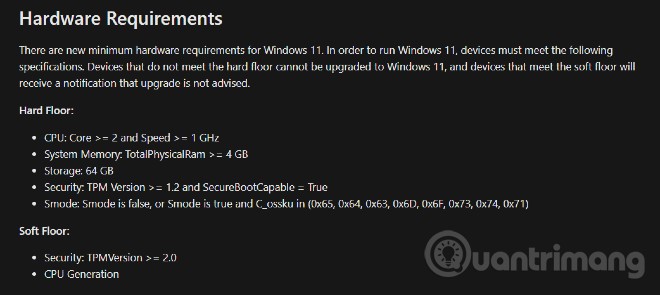
<p style="text-align: justify;">Trên trang giới thiệu về Windows 11, gã khổng lồ phần mềm tuyên bố cấu hình tối thiểu để chạy Windows 11 là phải có TPM (Trusted Platform Module) 2.0. Phiên bản mới TPM này vừa được ra mắt nên hầu như các máy tính ra mắt trước năm 2017 sẽ không có.</p>

<figure>
<div style="text-align: justify;"><img alt="Tài liệu nội bộ của Microsoft tiết lộ Windows 11 không bắt buộc phải có TPM 2.0" data-i="1" data-src="https://st.quantrimang.com/photos/image/2021/06/25/huong-dan-su-dung-windows-pc-health-check-12.jpg" data-was-processed="true" height="295" src="https://st.quantrimang.com/photos/image/2021/06/25/huong-dan-su-dung-windows-pc-health-check-12.jpg" width="660" /></div>

<figcaption>
<div style="text-align: justify;">Tài liệu nội bộ của Microsoft tiết lộ Windows 11 không bắt buộc phải có TPM 2.0</div>
</figcaption>
</figure>

<p style="text-align: justify;">Tuy nhiên, trên trang nội bộ của mình, Micrososft lại chia cấu hình tối thiểu để cài đặt Windows 11 ra làm 2 tầng là Hard Floor và Soft Floor. Những thiết bị không đáp ứng Hard Floor sẽ không thể cài đặt, cập nhật lên Windows 11. Trong khi đó, những máy tính không đáp ứng Soft Floor sẽ nhận được khuyến cáo không nên cài đặt, cập nhật nhưng vẫn có thể cài đặt, cập nhật bình thường.</p>

<p style="text-align: justify;">Trong phần Hard Floor, yêu cầu để cài đặt được Windows 11 chỉ là có tính năng TMP 1.2 kết hợp với SecureBootCapable mà thôi. Yêu cầu TPM 2.0 nằm trong phần Soft Floor.</p>

<h2 style="text-align: justify;">Cài đặt thành công Windows 11 trên máy ảo với RAM 1GB</h2>

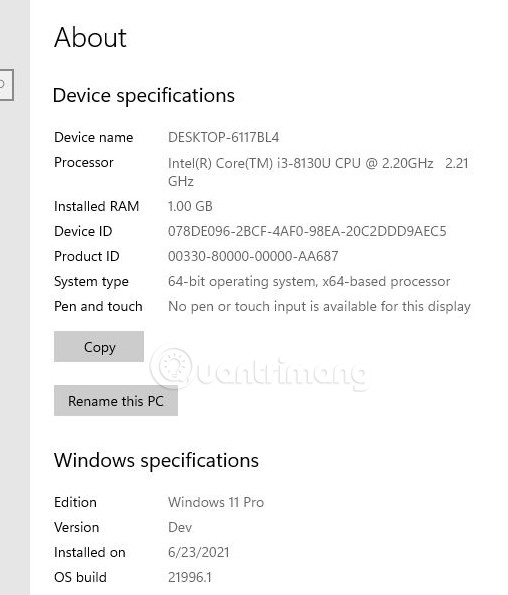
<p style="text-align: justify;">Quantrimang.com đã thử nghiệm thành công việc cài đặt Windows 11 Pro lên máy ảo với chỉ 1GB RAM, CPU Intel Core i3-8130U 2.21GHz. Mặc dù vậy, chúng tôi khuyên bạn không nên cài đặt Windows 11 trên máy tính có cấu hình quá thấp bởi&nbsp; khi đó trải nghiệm sẽ không được mượt mà.</p>

<p style="text-align: justify;"><img alt="" data-i="2" data-src="https://st.quantrimang.com/photos/image/2021/06/23/yeu-cau-cau-hinh-windows-11-toi-thieu.jpg" data-was-processed="true" height="595" src="https://st.quantrimang.com/photos/image/2021/06/23/yeu-cau-cau-hinh-windows-11-toi-thieu.jpg" width="508" /></p>

<p style="text-align: justify;"><strong>Lưu ý:</strong>&nbsp;Với các máy tính cũ không hỗ trợ chuẩn UEFI và TPM 2.0, khi&nbsp;cài đặt Windows 11&nbsp;sẽ xuất hiện lỗi &quot;This PC can&#039;t run Windows 11&quot;. Lúc này, vẫn có cách để cài đặt Windows 11 thành công nhưng sẽ phức tạp hơn một chút.</p>
		</div>
				<div id="author">
						<p>
				<strong>Nguồn tin:</strong>
				Quantrimang.com
			</p>
		</div>
	</div>
	<div id="footer" class="clearfix">
		<div id="url">
			<strong>URL của bản tin này: </strong><a href="https://www.nguoicodonvn2008.info/vi/news/savefile/kien-thuc-may-tinh/yeu-cau-cau-hinh-windows-11-toi-thieu-4310.html" title="Yêu cầu cấu hình Windows 11 tối thiểu">https://www.nguoicodonvn2008.info/vi/news/savefile/kien-thuc-may-tinh/yeu-cau-cau-hinh-windows-11-toi-thieu-4310.html</a>

		</div>
		<div class="clear"></div>
		<div class="copyright">
			&copy; .&#x3A; Nguoicodonvn2008.info - Cõi lòng người cô đơn &#x3A;.
		</div>
		<div id="contact">
			<a href="mailto:admin@nguoicodonvn2008.info">admin@nguoicodonvn2008.info</a>
		</div>
	</div>
</div>
        <div id="timeoutsess" class="chromeframe">
            Bạn đã không sử dụng Site, <a onclick="timeoutsesscancel();" href="https://nguoicodonvn2008.info/#">Bấm vào đây để duy trì trạng thái đăng nhập</a>. Thời gian chờ: <span id="secField"> 60 </span> giây
        </div>
        <div id="openidResult" class="nv-alert" style="display:none"></div>
        <div id="openidBt" data-result="" data-redirect=""></div>
		</script>
		<div class="car-top">
  <span><img src="https://nguoicodonvn2008.info/themes/default/images/car.png" alt=""></span>
</div>
<script src="https://nguoicodonvn2008.info/assets/js/jquery/jquery.min.js"></script>
<script>var nv_base_siteurl="/",nv_lang_data="vi",nv_lang_interface="vi",nv_name_variable="nv",nv_fc_variable="op",nv_lang_variable="language",nv_module_name="news",nv_func_name="savefile",nv_is_user=0, nv_my_ofs=-4,nv_my_abbr="EDT",nv_cookie_prefix="nv4c_e856T",nv_check_pass_mstime=1738000,nv_area_admin=0,nv_safemode=0,theme_responsive=0,nv_recaptcha_ver=2,nv_recaptcha_sitekey="",nv_recaptcha_type="image",XSSsanitize=1;</script>
<script src="https://nguoicodonvn2008.info/assets/js/language/vi.js"></script>
<script src="https://nguoicodonvn2008.info/assets/js/DOMPurify/purify3.js"></script>
<script src="https://nguoicodonvn2008.info/assets/js/global.js"></script>
<script src="https://nguoicodonvn2008.info/assets/js/site.js"></script>
<script src="https://nguoicodonvn2008.info/themes/default/js/news.js"></script>
<script src="https://nguoicodonvn2008.info/themes/default/js/main.js"></script>
<script src="https://nguoicodonvn2008.info/themes/default/js/custom.js"></script>
<script type="application/ld+json">
        {
            "@context": "https://schema.org",
            "@type": "Organization",
            "url": "https://nguoicodonvn2008.info",
            "logo": "https://nguoicodonvn2008.info/uploads/angel.gif"
        }
        </script>
<script src="https://nguoicodonvn2008.info/themes/default/js/bootstrap.min.js"></script>
<script type="text/javascript">
var $scrolltop = $('.car-top');
$scrolltop.on('click', function () {
    $('html,body').animate({
        scrollTop: 0
    }, 800);
    $(this).addClass("car-run");
    setTimeout(function(){ $scrolltop.removeClass('car-run');}, 1000);
    return false;
});
$(window).on('scroll', function ()
{ 
    if($(window).scrollTop() >= 200)
    {
        $scrolltop.addClass("show");
        $scrolltop.addClass("car-down");
    }
    else
    {
       $scrolltop.removeClass("show");
       setTimeout(function(){ $scrolltop.removeClass('car-down');}, 300);
    }
});
</script>
</body>
</html>