<!DOCTYPE html>
    <html lang="vi" xmlns="http://www.w3.org/1999/xhtml" prefix="og: http://ogp.me/ns#">
    <head>
<title>Xóa các thư mục Windows tạm thời này để lấy lại dung lượng lưu trữ quý giá</title>
<meta name="description" content="Xóa các thư mục Windows tạm thời này để lấy lại dung lượng lưu trữ quý giá - Savefile - Tin Tức -...">
<meta name="author" content=".: Nguoicodonvn2008.info - Cõi lòng người cô đơn :.">
<meta name="copyright" content=".: Nguoicodonvn2008.info - Cõi lòng người cô đơn :. [admin@nguoicodonvn2008.info]">
<meta name="robots" content="index, archive, follow, noodp">
<meta name="googlebot" content="index,archive,follow,noodp">
<meta name="msnbot" content="all,index,follow">
<meta name="generator" content="NukeViet v4.5">
<meta http-equiv="Content-Type" content="text/html; charset=utf-8">
<meta property="og:title" content="Xóa các thư mục Windows tạm thời này để lấy lại dung lượng lưu trữ quý giá">
<meta property="og:type" content="website">
<meta property="og:description" content="Savefile - Tin Tức -...">
<meta property="og:site_name" content=".&#x3A; Nguoicodonvn2008.info - Cõi lòng người cô đơn &#x3A;.">
<meta property="og:url" content="https://www.nguoicodonvn2008.info/vi/news/savefile/kien-thuc-may-tinh/xoa-cac-thu-muc-windows-tam-thoi-nay-de-lay-lai-dung-luong-luu-tru-quy-gia-10467.html">
<link rel="shortcut icon" href="https://nguoicodonvn2008.info/favicon.ico">
<link rel="canonical" href="https://www.nguoicodonvn2008.info/vi/news/savefile/kien-thuc-may-tinh/xoa-cac-thu-muc-windows-tam-thoi-nay-de-lay-lai-dung-luong-luu-tru-quy-gia-10467.html">
<link rel="alternate" href="https://nguoicodonvn2008.info/vi/news/rss/" title="Tin Tức" type="application/rss+xml">
<link rel="alternate" href="https://nguoicodonvn2008.info/vi/news/rss/karaoke-dual/" title="Tin Tức - Karaoke Dual" type="application/rss+xml">
<link rel="alternate" href="https://nguoicodonvn2008.info/vi/news/rss/nhac-tre/" title="Tin Tức - Nhạc trẻ" type="application/rss+xml">
<link rel="alternate" href="https://nguoicodonvn2008.info/vi/news/rss/tru-tinh/" title="Tin Tức - Trữ tình" type="application/rss+xml">
<link rel="alternate" href="https://nguoicodonvn2008.info/vi/news/rss/nuoc-ngoai/" title="Tin Tức - Nước ngoài" type="application/rss+xml">
<link rel="alternate" href="https://nguoicodonvn2008.info/vi/news/rss/remix/" title="Tin Tức - Remix" type="application/rss+xml">
<link rel="alternate" href="https://nguoicodonvn2008.info/vi/news/rss/tam-su-tinh-yeu/" title="Tin Tức - Tâm sự tình yêu" type="application/rss+xml">
<link rel="alternate" href="https://nguoicodonvn2008.info/vi/news/rss/tho-suu-tam/" title="Tin Tức - Thơ sưu tầm" type="application/rss+xml">
<link rel="alternate" href="https://nguoicodonvn2008.info/vi/news/rss/cuoc-song/" title="Tin Tức - Cuộc sống" type="application/rss+xml">
<link rel="alternate" href="https://nguoicodonvn2008.info/vi/news/rss/phan-mem/" title="Tin Tức - Phần mềm" type="application/rss+xml">
<link rel="alternate" href="https://nguoicodonvn2008.info/vi/news/rss/kien-thuc-may-tinh/" title="Tin Tức - Kiến thức máy tính" type="application/rss+xml">
<link rel="alternate" href="https://nguoicodonvn2008.info/vi/news/rss/hoc-tap/" title="Tin Tức - Học tập" type="application/rss+xml">
<link rel="alternate" href="https://nguoicodonvn2008.info/vi/news/rss/tai-lieu/" title="Tin Tức - Tài liệu" type="application/rss+xml">
<link rel="alternate" href="https://nguoicodonvn2008.info/vi/news/rss/de-thi/" title="Tin Tức - Đề thi" type="application/rss+xml">
<link rel="preload" as="style" href="https://nguoicodonvn2008.info/assets/css/font-awesome.min.css" type="text/css">
<link rel="preload" as="style" href="https://nguoicodonvn2008.info/themes/default/css/bootstrap.non-responsive.css" type="text/css">
<link rel="preload" as="style" href="https://nguoicodonvn2008.info/themes/default/css/style.css" type="text/css">
<link rel="preload" as="style" href="https://nguoicodonvn2008.info/themes/default/css/style.non-responsive.css" type="text/css">
<link rel="preload" as="style" href="https://nguoicodonvn2008.info/themes/default/css/news.css" type="text/css">
<link rel="preload" as="style" href="https://nguoicodonvn2008.info/themes/default/css/custom.css" type="text/css">
<link rel="preload" as="script" href="https://nguoicodonvn2008.info/assets/js/jquery/jquery.min.js" type="text/javascript">
<link rel="preload" as="script" href="https://nguoicodonvn2008.info/assets/js/language/vi.js" type="text/javascript">
<link rel="preload" as="script" href="https://nguoicodonvn2008.info/assets/js/DOMPurify/purify3.js" type="text/javascript">
<link rel="preload" as="script" href="https://nguoicodonvn2008.info/assets/js/global.js" type="text/javascript">
<link rel="preload" as="script" href="https://nguoicodonvn2008.info/assets/js/site.js" type="text/javascript">
<link rel="preload" as="script" href="https://nguoicodonvn2008.info/themes/default/js/news.js" type="text/javascript">
<link rel="preload" as="script" href="https://nguoicodonvn2008.info/themes/default/js/main.js" type="text/javascript">
<link rel="preload" as="script" href="https://nguoicodonvn2008.info/themes/default/js/custom.js" type="text/javascript">
<link rel="preload" as="script" href="https://nguoicodonvn2008.info/themes/default/js/bootstrap.min.js" type="text/javascript">
<link rel="stylesheet" href="https://nguoicodonvn2008.info/assets/css/font-awesome.min.css">
<link rel="stylesheet" href="https://nguoicodonvn2008.info/themes/default/css/bootstrap.non-responsive.css">
<link rel="stylesheet" href="https://nguoicodonvn2008.info/themes/default/css/style.css">
<link rel="stylesheet" href="https://nguoicodonvn2008.info/themes/default/css/style.non-responsive.css">
<link rel="StyleSheet" href="https://nguoicodonvn2008.info/themes/default/css/news.css">
<link rel="stylesheet" href="https://nguoicodonvn2008.info/themes/default/css/custom.css">
<style type="text/css">
	body{background: #fff;}
</style>
    </head>
    <body>
<div id="print">
	<div id="hd_print">
		<h2 class="pull-left">.&#x3A; Nguoicodonvn2008.info - Cõi lòng người cô đơn &#x3A;.</h2>
		<p class="pull-right"><a title=".&#x3A; Nguoicodonvn2008.info - Cõi lòng người cô đơn &#x3A;." href="https://nguoicodonvn2008.info/">https://nguoicodonvn2008.info</a></p>
	</div>
	<div class="clear"></div>
	<hr />
	<div id="content">
		<h1>Xóa các thư mục Windows tạm thời này để lấy lại dung lượng lưu trữ quý giá</h1>
		<ul class="list-inline">
			<li>Thứ sáu - 30/05/2025 00:44</li>
			<li class="hidden-print txtrequired"><em class="fa fa-print">&nbsp;</em><a title="In ra" href="javascript:;" onclick="window.print()">In ra</a></li>
			<li class="hidden-print txtrequired"><em class="fa fa-power-off">&nbsp;</em><a title="Đóng cửa sổ này" href="javascript:;" onclick="window.close()">Đóng cửa sổ này</a></li>
		</ul>
		<div class="clear"></div>
		<div id="hometext">
		</div>
				<div class="imghome">
			<img alt="Xóa các thư mục Windows tạm thời này để lấy lại dung lượng lưu trữ quý giá" src="https://st.quantrimang.com/photos/image/2025/05/30/nhung-thu-muc-windows-tam-thoi-co-the-xoa-7.jpg" width="460" class="img-thumbnail" />
		</div>
		<div class="clear"></div>
		<div id="bodytext" class="clearfix">
			<h2 style="text-align: justify;">1. Thư mục User Temp (%temp%)</h2>

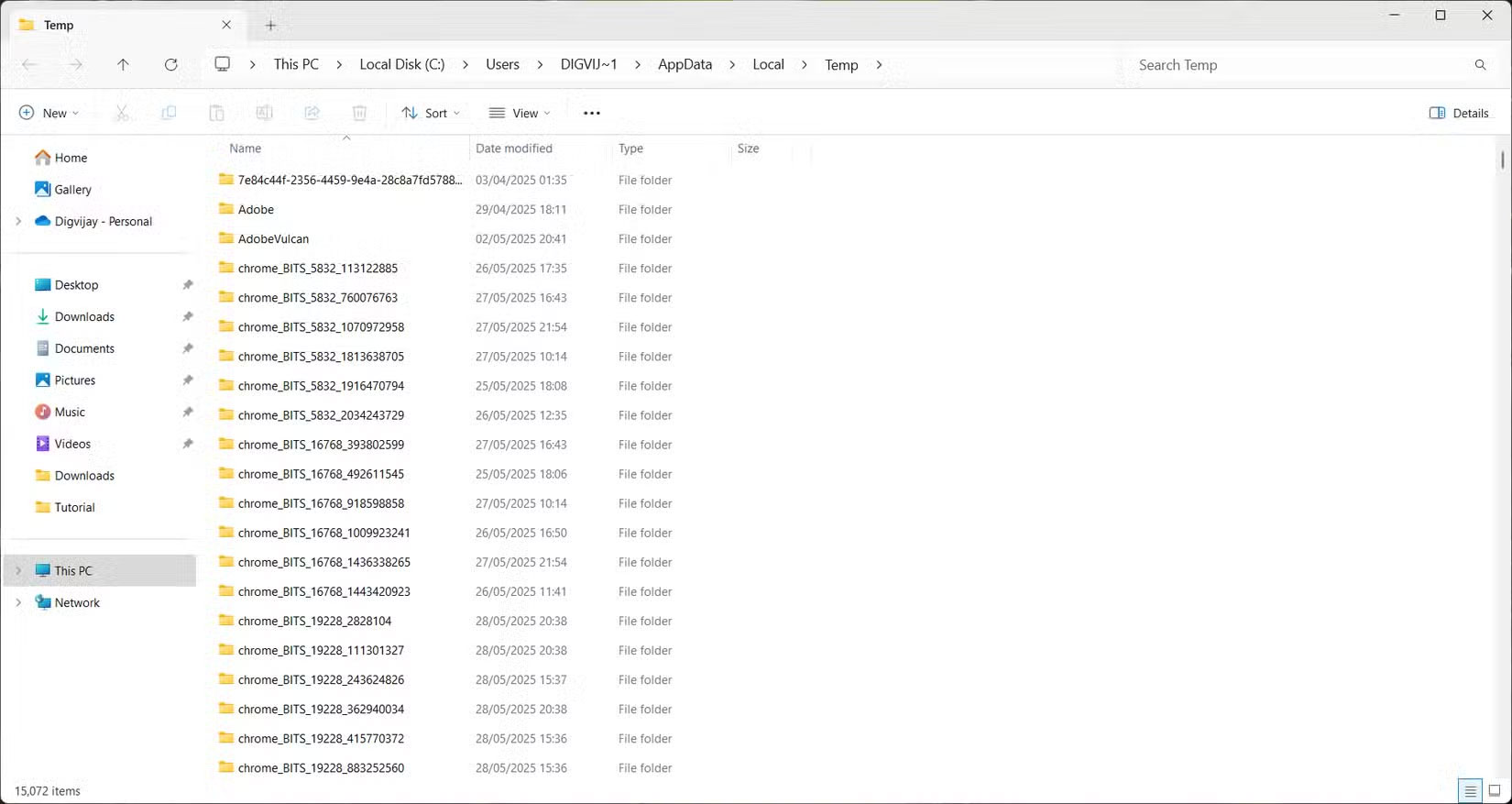
<p style="text-align: justify;">Thư mục User Temp là nơi các ứng dụng, tiến trình nền và Windows lưu trữ những file tạm thời còn sót lại. Các chương trình sử dụng thư mục này cho những tiến trình cài đặt, nhật ký, file bộ đệm và các phần còn sót lại từ những bản cập nhật hoặc sự cố. Các file này được cho là tạm thời nhưng thường không được dọn dẹp.</p>

<p style="text-align: justify;">Theo thời gian, đặc biệt là khi cài đặt hoặc gỡ cài đặt phần mềm thường xuyên, thư mục có thể chứa đầy các file rác và tăng lên đến vài gigabyte mà bạn không nhận ra.</p>

<figure>
<div style="text-align: justify;"><img alt="Hiển thị tất cả các thư mục User Temp trong File Explorer" data-i="0" data-src="https://st.quantrimang.com/photos/image/2025/05/30/nhung-thu-muc-windows-tam-thoi-co-the-xoa-1.jpg" data-was-processed="true" height="877" src="https://st.quantrimang.com/photos/image/2025/05/30/nhung-thu-muc-windows-tam-thoi-co-the-xoa-1.jpg" width="1650" /></div>

<figcaption>
<div style="text-align: justify;">Hiển thị tất cả các thư mục User Temp trong File Explorer</div>
</figcaption>
</figure>

<div style="text-align: justify;">&nbsp;</div>

<p style="text-align: justify;">Để truy cập và dọn dẹp, hãy nhấn&nbsp;<strong>Win + R</strong>&nbsp;để&nbsp;mở hộp thoại Run. Sau đó nhập&nbsp;<strong>%temp%</strong>&nbsp;và nhấn&nbsp;<strong>Enter.</strong>&nbsp;Thao tác này sẽ mở thư mục Temp trong File Explorer. Chọn mọi thứ bên trong bằng&nbsp;<strong>Ctrl + A</strong>, sau đó nhấn&nbsp;<strong>Delete.</strong>&nbsp;Nếu một số file vẫn đang được các ứng dụng hoặc service nền sử dụng, Windows sẽ cho bạn biết. Hãy bỏ qua các file đó và xóa phần còn lại.</p>

<h2 style="text-align: justify;">2. Thư mục Temp hệ thống</h2>

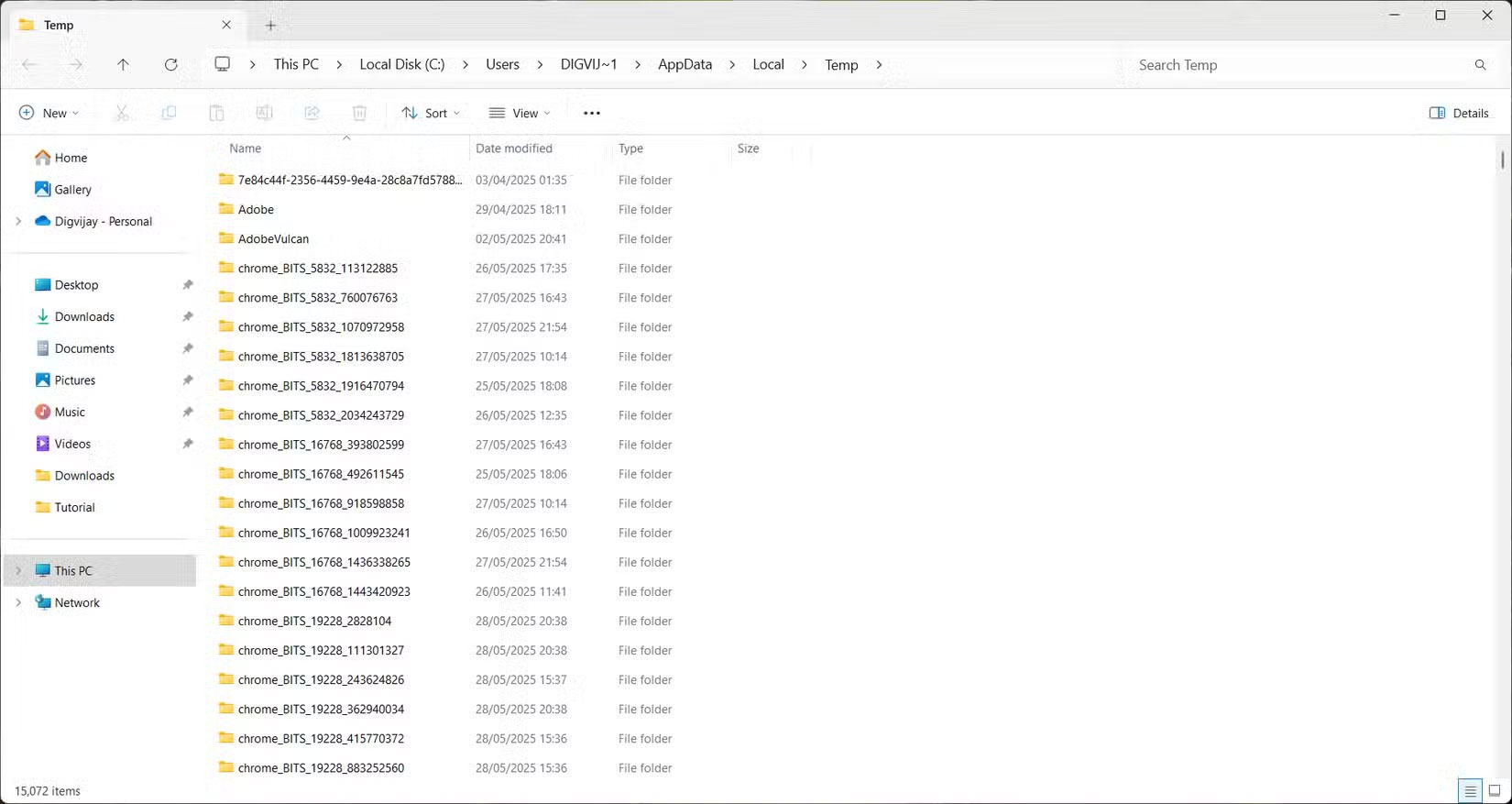
<p style="text-align: justify;">Windows cũng sử dụng thư mục Temp hệ thống để lưu trữ các file tạm thời, nhưng không giống như thư mục dành riêng cho người dùng, thư mục này được hệ điều hành và những service cấp hệ thống sử dụng. Thư mục này thường chứa các file còn sót lại từ những bản cài đặt, bản cập nhật và các tác vụ nền khác.</p>

<figure>
<div style="text-align: justify;"><img alt="Hiển thị thư mục Temp hệ thống trong File Explorer" data-i="1" data-src="https://st.quantrimang.com/photos/image/2025/05/30/nhung-thu-muc-windows-tam-thoi-co-the-xoa-2.jpg" data-was-processed="true" height="877" src="https://st.quantrimang.com/photos/image/2025/05/30/nhung-thu-muc-windows-tam-thoi-co-the-xoa-2.jpg" width="1650" /></div>

<figcaption>
<div style="text-align: justify;">Hiển thị thư mục Temp hệ thống trong File Explorer</div>
</figcaption>
</figure>

<div style="text-align: justify;">&nbsp;</div>

<p style="text-align: justify;">Để tìm thư mục này, hãy mở hộp thoại Run, nhập&nbsp;<strong>temp</strong>&nbsp;và nhấn&nbsp;<strong>Enter.</strong>&nbsp;Bạn cũng có thể đi thẳng đến&nbsp;<strong>C:\Windows\Temp</strong>&nbsp;trong File Explorer.</p>

<h2 style="text-align: justify;">3. Thư mục Software Distribution</h2>

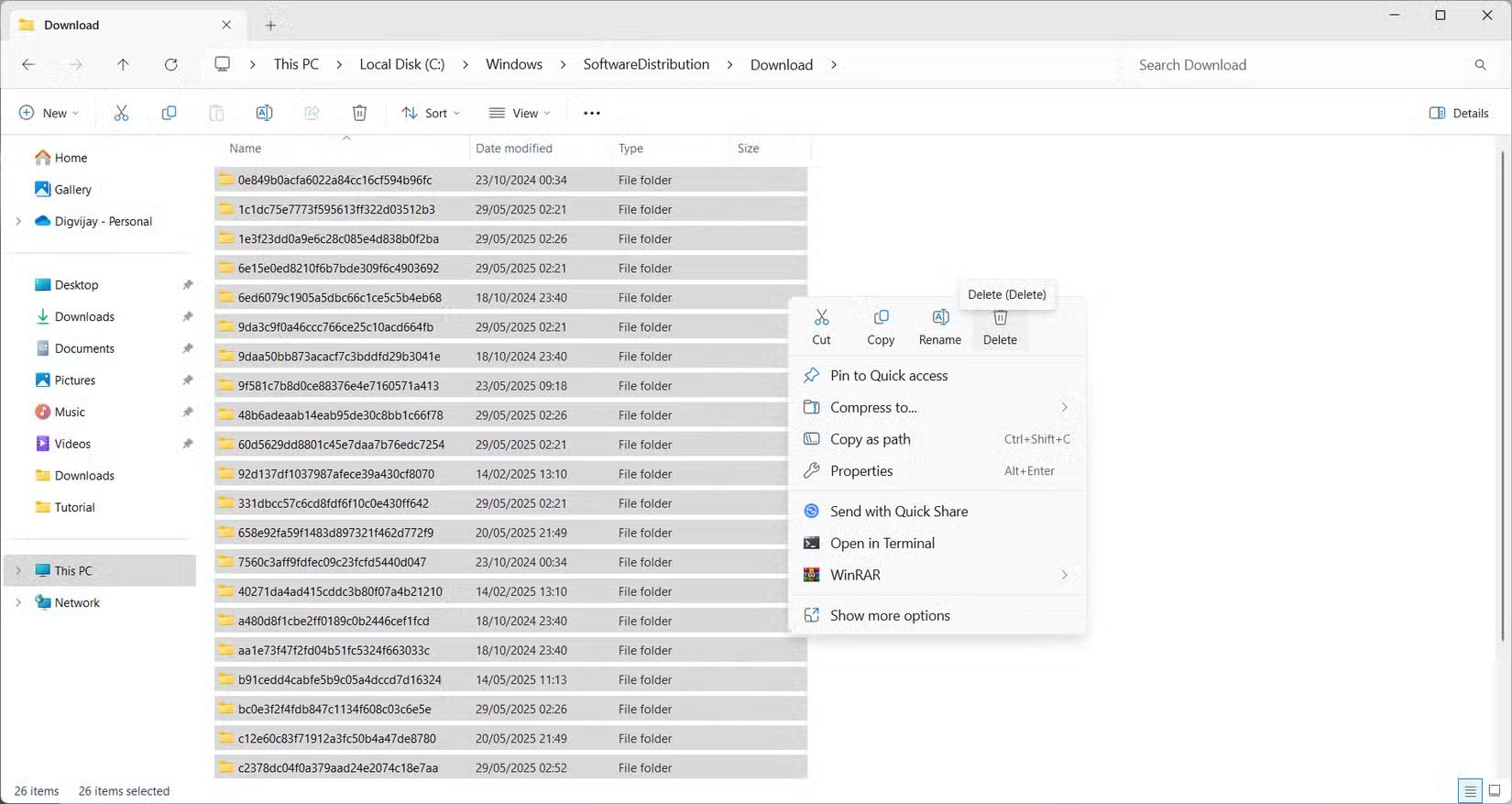
<p style="text-align: justify;">Khi Windows tải xuống các bản cập nhật, nó sẽ lưu trữ tất cả những file cần thiết trong thư mục Software Distribution trước khi cài đặt chúng. Thư mục này chứa hai phần chính: Download, nơi lưu trữ các gói cập nhật và&nbsp;<strong>DataStore</strong>, nơi lưu trữ nhật ký và profile liên quan đến lịch sử cập nhật.</p>

<figure>
<div style="text-align: justify;"><img alt="Xóa các file đã tải xuống khỏi Software Distribution" data-i="2" data-src="https://st.quantrimang.com/photos/image/2025/05/30/nhung-thu-muc-windows-tam-thoi-co-the-xoa-3.jpg" data-was-processed="true" height="877" src="https://st.quantrimang.com/photos/image/2025/05/30/nhung-thu-muc-windows-tam-thoi-co-the-xoa-3.jpg" width="1650" /></div>

<figcaption>
<div style="text-align: justify;">Xóa các file đã tải xuống khỏi Software Distribution</div>
</figcaption>
</figure>

<p style="text-align: justify;">Theo thời gian, thư mục Download có thể chứa đầy các file cập nhật lỗi thời hoặc không đầy đủ mà bạn không còn cần nữa. Những file còn sót lại này không tự động được xóa và chiếm dung lượng ổ đĩa, đặc biệt là sau nhiều lần cập nhật hệ thống hoặc cài đặt không thành công.</p>

<p style="text-align: justify;">Để dọn dẹp, hãy mở File Explorer và điều hướng đến&nbsp;<strong>C:\Windows\SoftwareDistribution\Download.</strong>&nbsp;Chọn mọi thứ bên trong và xóa. Cẩn thận không xóa thư mục Software Distribution chính, chỉ xóa nội dung đã tải xuống.</p>

<h2 style="text-align: justify;">4. Recycle Bin</h2>

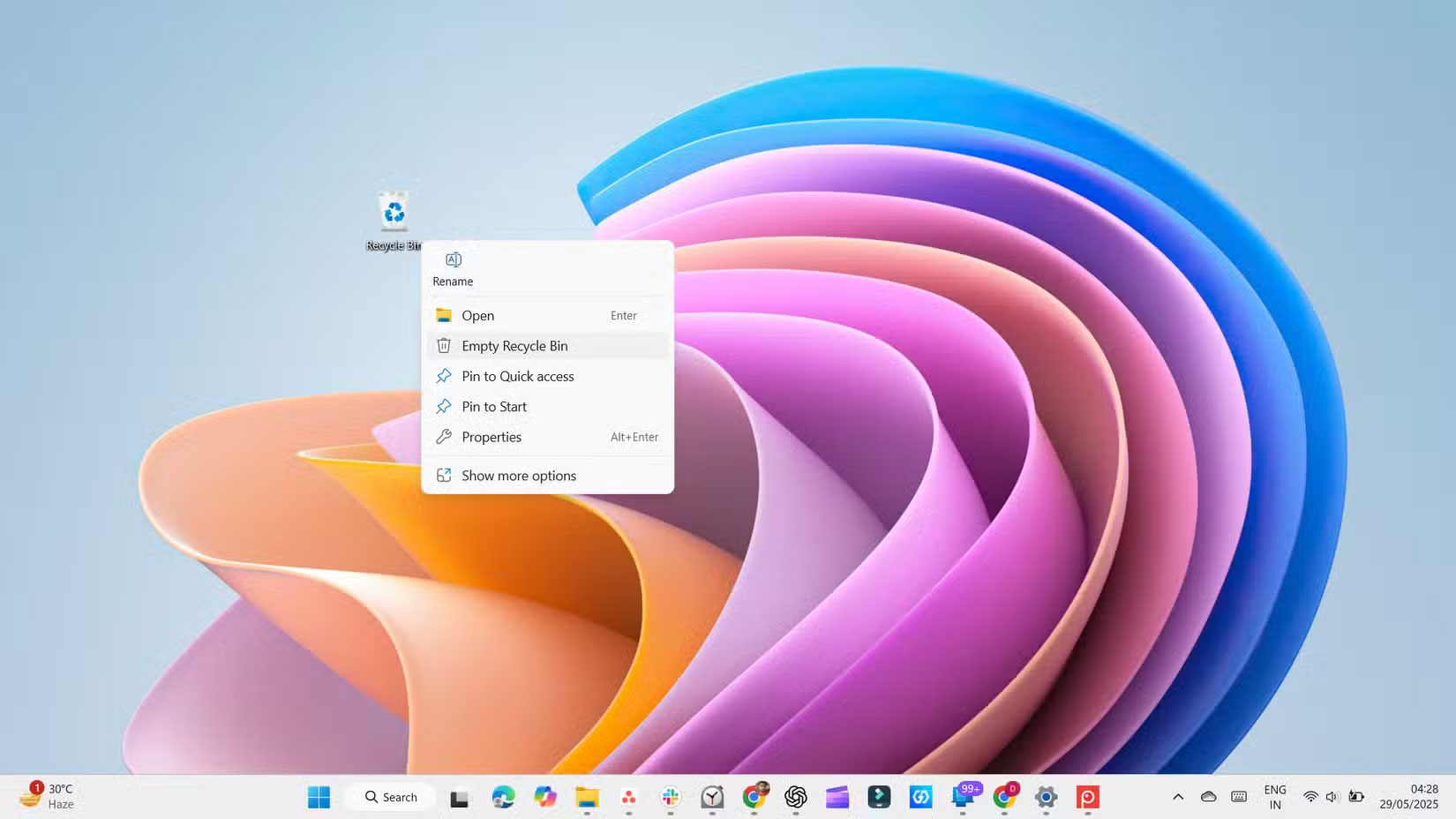
<p style="text-align: justify;">Một nơi khác mà dung lượng ổ đĩa có thể tích tụ là trong&nbsp;Recycle Bin. Khi bạn xóa một file, file đó không ngay lập tức rời khỏi hệ thống của bạn. Thay vào đó, file đó sẽ rơi vào Recycle Bin và ở đó cho đến khi bạn khôi phục file đó hoặc Recycle Bin đạt đến giới hạn của nó. Recycle Bin này hoạt động như một lưới an toàn trong trường hợp bạn vô tình xóa một thứ gì đó quan trọng.</p>

<figure>
<div style="text-align: justify;"><img alt="Làm trống Recycle Bin" data-i="3" data-src="https://st.quantrimang.com/photos/image/2025/05/30/nhung-thu-muc-windows-tam-thoi-co-the-xoa-4.jpg" data-was-processed="true" height="928" src="https://st.quantrimang.com/photos/image/2025/05/30/nhung-thu-muc-windows-tam-thoi-co-the-xoa-4.jpg" width="1650" /></div>

<figcaption>
<div style="text-align: justify;">Làm trống Recycle Bin</div>
</figcaption>
</figure>

<p style="text-align: justify;">Tuy nhiên, nếu không được chọn, Recycle Bin có thể tích tụ một bộ sưu tập lớn các file đã xóa và âm thầm lãng phí vài gigabyte. Để tránh điều đó, hãy tạo thói quen làm trống Recycle Bin thường xuyên hoặc&nbsp;thiết lập Windows tự động xóa Recycle Bin.</p>

<h2 style="text-align: justify;">5. Thư mục Windows.old</h2>

<p style="text-align: justify;">Khi bạn nâng cấp lên phiên bản Windows mới, hệ thống sẽ lưu một bản sao cài đặt cũ trong một thư mục có tên là&nbsp;&nbsp;Windows.old. Thư mục này chứa mọi thứ từ thiết lập trước đó, bao gồm các file hệ thống, ứng dụng đã cài đặt và dữ liệu cá nhân.</p>

<p style="text-align: justify;">Thư mục này tồn tại trong trường hợp bạn muốn quay lại phiên bản trước đó, nhưng nếu quá trình nâng cấp diễn ra suôn sẻ và bạn không có ý định quay lại, thì có thể bạn không cần thư mục này. Thư mục này có thể khá lớn, đôi khi chiếm từ 12 đến 25GB dung lượng trên ổ cứng.</p>

<h2 style="text-align: justify;">6. Delivery Optimization Files</h2>

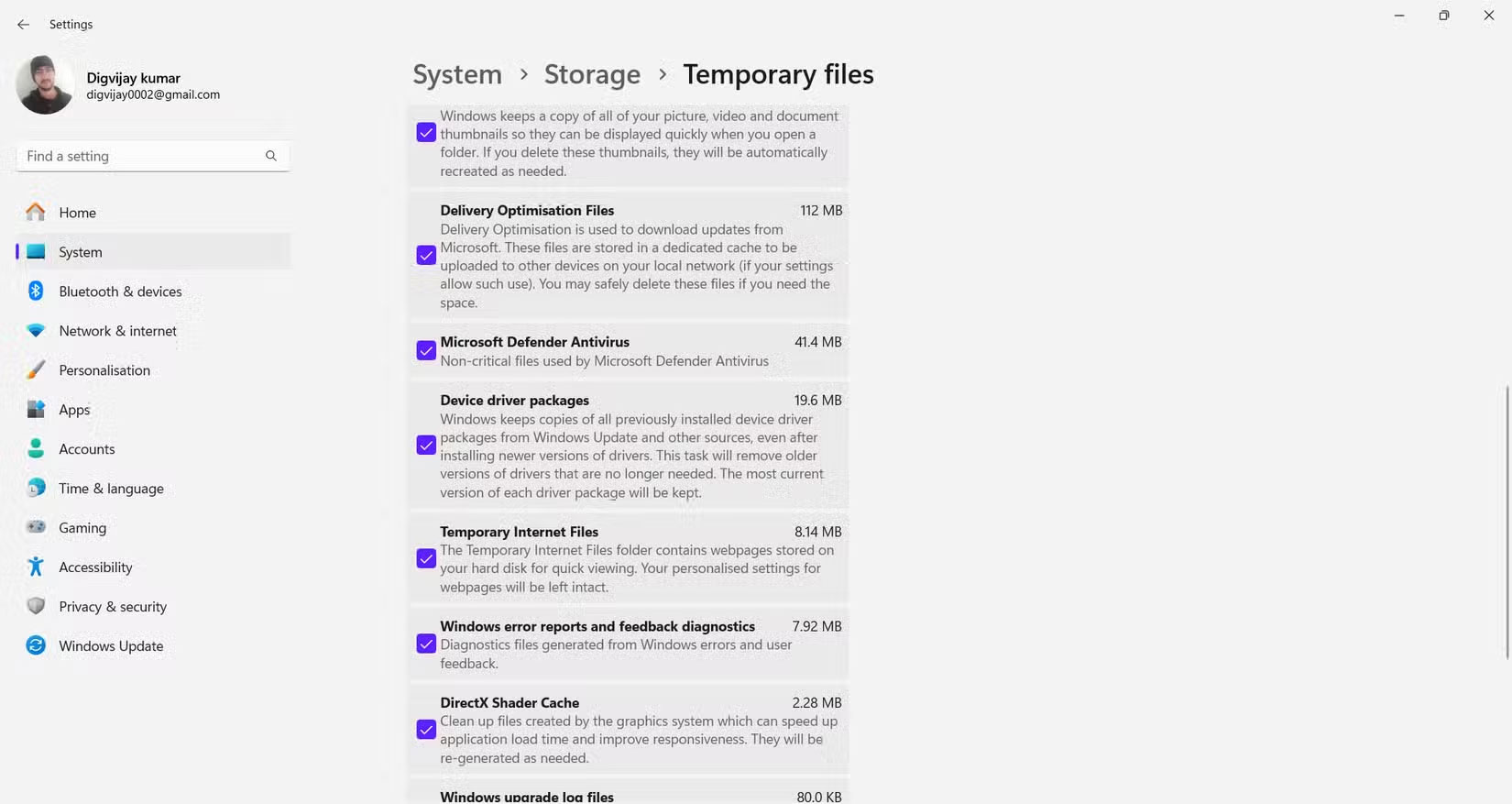
<p style="text-align: justify;">Delivery Optimization Files là bản sao các file Windows Update được lưu trong cache. Chúng giúp tăng tốc độ cập nhật bằng cách cho phép PC chia sẻ các file đó với những thiết bị khác trên mạng hoặc thậm chí là trực tuyến. Điều này làm giảm mức sử dụng&nbsp;Internet&nbsp;và tăng tốc độ cập nhật.</p>

<p style="text-align: justify;">Tuy nhiên, sau khi cài đặt các bản cập nhật, những file này không còn cần thiết nữa và có thể chiếm hàng trăm megabyte. Hoàn toàn an toàn khi xóa chúng và giải phóng một số dung lượng, đặc biệt là sau các bản cập nhật lớn.</p>

<figure>
<div style="text-align: justify;"><img alt="Xóa Delivery Optimization Files khỏi Windows Settings" data-i="4" data-src="https://st.quantrimang.com/photos/image/2025/05/30/nhung-thu-muc-windows-tam-thoi-co-the-xoa-5.jpg" data-was-processed="true" height="877" src="https://st.quantrimang.com/photos/image/2025/05/30/nhung-thu-muc-windows-tam-thoi-co-the-xoa-5.jpg" width="1650" /></div>

<figcaption>
<div style="text-align: justify;">Xóa Delivery Optimization Files khỏi Windows Settings</div>
</figcaption>
</figure>

<p style="text-align: justify;">Để xóa Delivery Optimization Files, hãy điều hướng đến&nbsp;<strong>Settings&nbsp;</strong>&gt;&nbsp;<strong>System&nbsp;</strong>&gt;&nbsp;<strong>Storage</strong>. Trong Local Disk (C), nhấp vào&nbsp;<strong>Temporary files</strong>&nbsp;và tích vào&nbsp;<strong>Delivery Optimization Files</strong>, sau đó nhấp vào&nbsp;<strong>Remove files</strong>&nbsp;để giải phóng dung lượng ổ đĩa.</p>

<h2 style="text-align: justify;">7. Các thư mục file tác động thấp</h2>

<p style="text-align: justify;">Sau khi giải quyết các file lưu trữ lớn, có một số thư mục nhỏ hơn mà bạn có thể xóa để giải phóng thêm một chút dung lượng. Chúng thường không chiếm nhiều dung lượng, nhưng việc dọn dẹp chúng vẫn có thể giúp giảm bớt sự lộn xộn và giữ mọi thứ ngăn nắp.</p>

<h3 style="text-align: justify;">Thư mục&nbsp;Recent Items</h3>

<p style="text-align: justify;">Windows lưu trữ các shortcut đến những file bạn vừa mở trong một thư mục ẩn để bạn có thể nhanh chóng tìm thấy chúng trong menu Start hoặc File Explorer. Đây chỉ là các liên kết, không phải những file thực tế, nhưng chúng có thể tích tụ dần và làm đầy thư mục.</p>

<p style="text-align: justify;">Để xóa chúng, hãy nhấn&nbsp;<strong>Win + R</strong>, nhập&nbsp;<strong>shell:recent</strong>&nbsp;và nhấn&nbsp;<strong>Enter.</strong>&nbsp;Khi thư mục xuất hiện, hãy chọn mọi thứ và xóa. Đừng lo lắng; bạn chỉ xóa các shortcut, không phải những file thực tế của mình.</p>

<h3 style="text-align: justify;">Các file chương trình đã tải xuống</h3>

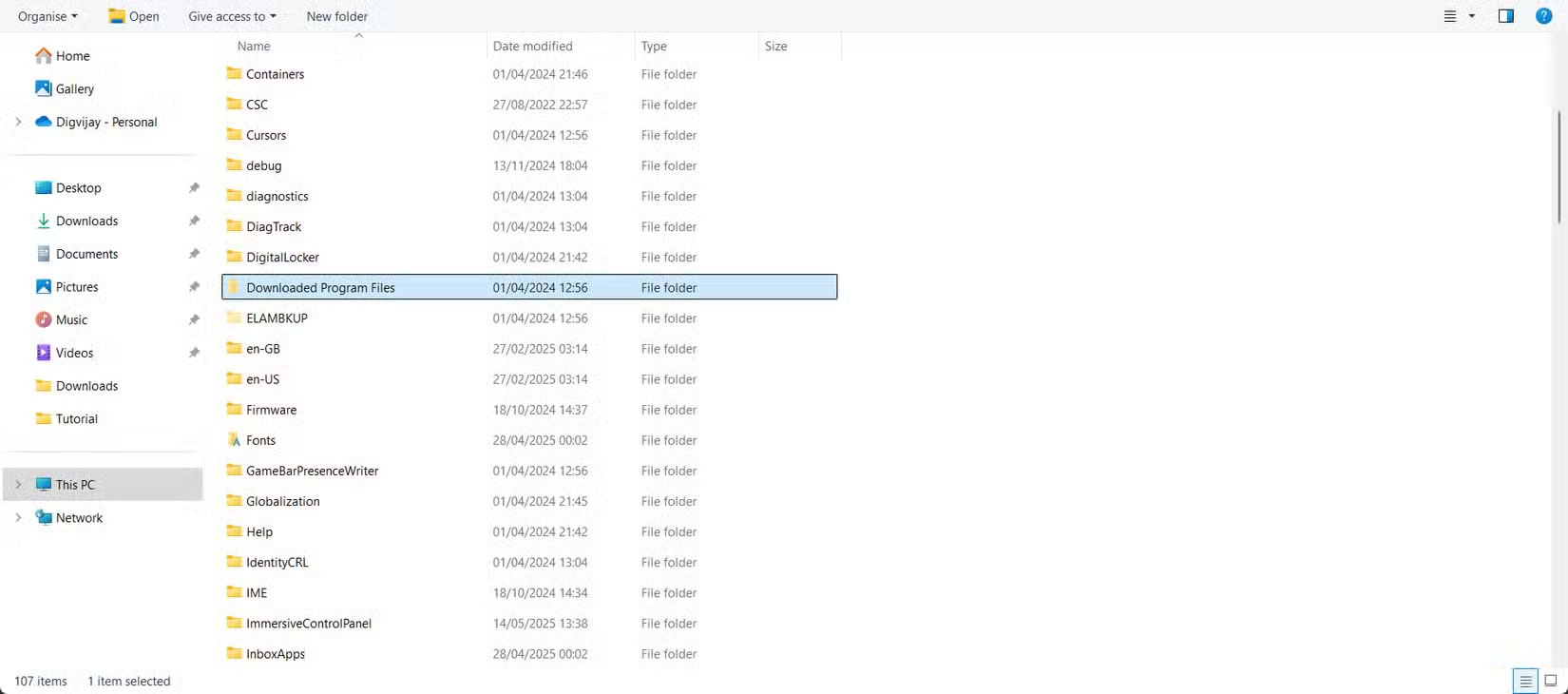
<p style="text-align: justify;">Mặc dù có tên như vậy, nhưng đây không phải là thư mục Downloads thông thường của bạn. Đây là một vị trí cũ được Internet Explorer sử dụng để lưu trữ các điều khiển ActiveX và ứng dụng Java, cả hai đều đã lỗi thời.</p>

<figure>
<div style="text-align: justify;"><img alt="Xóa file chương trình đã tải xuống khỏi File Explorer" data-i="5" data-src="https://st.quantrimang.com/photos/image/2025/05/30/nhung-thu-muc-windows-tam-thoi-co-the-xoa-6.jpg" data-was-processed="true" height="730" src="https://st.quantrimang.com/photos/image/2025/05/30/nhung-thu-muc-windows-tam-thoi-co-the-xoa-6.jpg" width="1650" /></div>

<figcaption>
<div style="text-align: justify;">Xóa file chương trình đã tải xuống khỏi File Explorer</div>
</figcaption>
</figure>

<p style="text-align: justify;">Để dọn dẹp, hãy vào&nbsp;<strong>C:\Windows\Downloaded Program Files</strong>&nbsp;và xóa mọi file bạn thấy. Có khả năng là thư mục này trống hoặc chứa đầy các mục chưa sử dụng mà bạn có thể xóa an toàn.</p>

<h3 id="thumbnail-cache" style="text-align: justify;">Thumbnail Cache</h3>

<p style="text-align: justify;">Windows tạo bản xem trước thu nhỏ cho hình ảnh, video và tài liệu của bạn để duyệt nhanh và dễ dàng hơn. Các bản xem trước này được lưu trữ trong cache, có thể tăng lên theo thời gian.</p>

<figure>
<div style="text-align: justify;"><img alt="Xóa hình thu nhỏ khỏi Windows Settings" data-i="6" data-src="https://st.quantrimang.com/photos/image/2025/05/30/nhung-thu-muc-windows-tam-thoi-co-the-xoa-7.jpg" data-was-processed="true" height="877" src="https://st.quantrimang.com/photos/image/2025/05/30/nhung-thu-muc-windows-tam-thoi-co-the-xoa-7.jpg" width="1650" /></div>

<figcaption>
<div style="text-align: justify;">Xóa hình thu nhỏ khỏi Windows Settings</div>
</figcaption>
</figure>

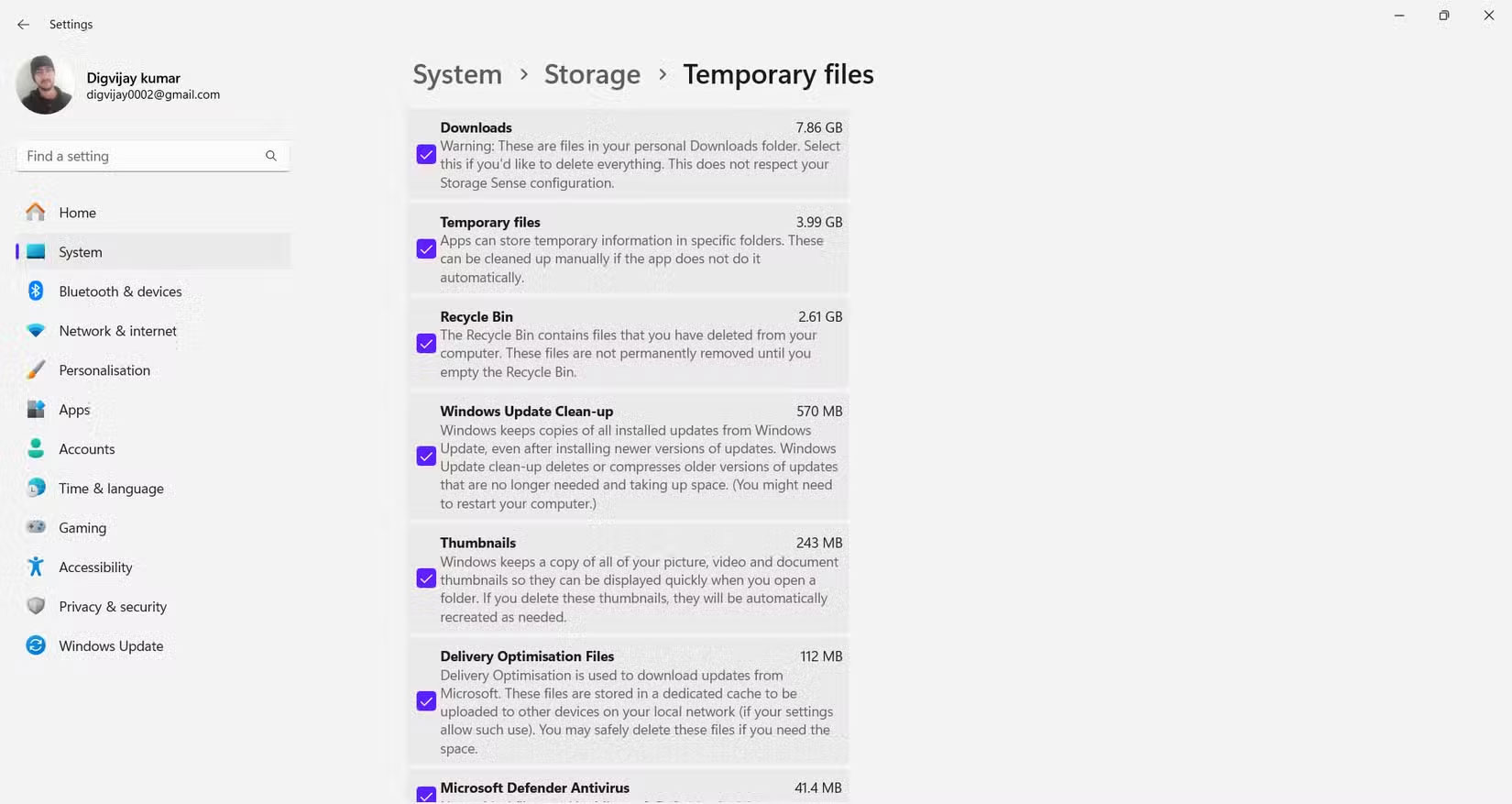
<p style="text-align: justify;">Để xóa, hãy&nbsp;mở System Settings&nbsp;và đi tới&nbsp;<strong>System&nbsp;</strong>&gt;&nbsp;<strong>Storage&nbsp;</strong>&gt;&nbsp;<strong>Temporary files</strong>. Đánh dấu vào ô bên cạnh&nbsp;<strong>Thumbnails</strong>&nbsp;và nhấp vào&nbsp;<strong>Remove files</strong>. Việc loại bỏ các file này sẽ không xóa các file thực tế của bạn, chỉ xóa các bản xem trước mà Windows sẽ tạo lại khi cần.</p>
		</div>
				<div id="author">
						<p>
				<strong>Nguồn tin:</strong>
				Quantrimang.com:
			</p>
		</div>
	</div>
	<div id="footer" class="clearfix">
		<div id="url">
			<strong>URL của bản tin này: </strong><a href="https://www.nguoicodonvn2008.info/vi/news/savefile/kien-thuc-may-tinh/xoa-cac-thu-muc-windows-tam-thoi-nay-de-lay-lai-dung-luong-luu-tru-quy-gia-10467.html" title="Xóa các thư mục Windows tạm thời này để lấy lại dung lượng lưu trữ quý giá">https://www.nguoicodonvn2008.info/vi/news/savefile/kien-thuc-may-tinh/xoa-cac-thu-muc-windows-tam-thoi-nay-de-lay-lai-dung-luong-luu-tru-quy-gia-10467.html</a>

		</div>
		<div class="clear"></div>
		<div class="copyright">
			&copy; .&#x3A; Nguoicodonvn2008.info - Cõi lòng người cô đơn &#x3A;.
		</div>
		<div id="contact">
			<a href="mailto:admin@nguoicodonvn2008.info">admin@nguoicodonvn2008.info</a>
		</div>
	</div>
</div>
        <div id="timeoutsess" class="chromeframe">
            Bạn đã không sử dụng Site, <a onclick="timeoutsesscancel();" href="https://nguoicodonvn2008.info/#">Bấm vào đây để duy trì trạng thái đăng nhập</a>. Thời gian chờ: <span id="secField"> 60 </span> giây
        </div>
        <div id="openidResult" class="nv-alert" style="display:none"></div>
        <div id="openidBt" data-result="" data-redirect=""></div>
		</script>
		<div class="car-top">
  <span><img src="https://nguoicodonvn2008.info/themes/default/images/car.png" alt=""></span>
</div>
<script src="https://nguoicodonvn2008.info/assets/js/jquery/jquery.min.js"></script>
<script>var nv_base_siteurl="/",nv_lang_data="vi",nv_lang_interface="vi",nv_name_variable="nv",nv_fc_variable="op",nv_lang_variable="language",nv_module_name="news",nv_func_name="savefile",nv_is_user=0, nv_my_ofs=-4,nv_my_abbr="EDT",nv_cookie_prefix="nv4c_e856T",nv_check_pass_mstime=1738000,nv_area_admin=0,nv_safemode=0,theme_responsive=0,nv_recaptcha_ver=2,nv_recaptcha_sitekey="",nv_recaptcha_type="image",XSSsanitize=1;</script>
<script src="https://nguoicodonvn2008.info/assets/js/language/vi.js"></script>
<script src="https://nguoicodonvn2008.info/assets/js/DOMPurify/purify3.js"></script>
<script src="https://nguoicodonvn2008.info/assets/js/global.js"></script>
<script src="https://nguoicodonvn2008.info/assets/js/site.js"></script>
<script src="https://nguoicodonvn2008.info/themes/default/js/news.js"></script>
<script src="https://nguoicodonvn2008.info/themes/default/js/main.js"></script>
<script src="https://nguoicodonvn2008.info/themes/default/js/custom.js"></script>
<script type="application/ld+json">
        {
            "@context": "https://schema.org",
            "@type": "Organization",
            "url": "https://nguoicodonvn2008.info",
            "logo": "https://nguoicodonvn2008.info/uploads/angel.gif"
        }
        </script>
<script src="https://nguoicodonvn2008.info/themes/default/js/bootstrap.min.js"></script>
<script type="text/javascript">
var $scrolltop = $('.car-top');
$scrolltop.on('click', function () {
    $('html,body').animate({
        scrollTop: 0
    }, 800);
    $(this).addClass("car-run");
    setTimeout(function(){ $scrolltop.removeClass('car-run');}, 1000);
    return false;
});
$(window).on('scroll', function ()
{ 
    if($(window).scrollTop() >= 200)
    {
        $scrolltop.addClass("show");
        $scrolltop.addClass("car-down");
    }
    else
    {
       $scrolltop.removeClass("show");
       setTimeout(function(){ $scrolltop.removeClass('car-down');}, 300);
    }
});
</script>
</body>
</html>