<!DOCTYPE html>
    <html lang="vi" xmlns="http://www.w3.org/1999/xhtml" prefix="og: http://ogp.me/ns#">
    <head>
<title>Windows Audio Device Graph Isolation là gì và tại sao nó lại chạy trên máy tính?</title>
<meta name="description" content="Windows Audio Device Graph Isolation là gì và tại sao nó lại chạy trên máy tính? - Savefile - Tin Tức -...">
<meta name="author" content=".: Nguoicodonvn2008.info - Cõi lòng người cô đơn :.">
<meta name="copyright" content=".: Nguoicodonvn2008.info - Cõi lòng người cô đơn :. [admin@nguoicodonvn2008.info]">
<meta name="robots" content="index, archive, follow, noodp">
<meta name="googlebot" content="index,archive,follow,noodp">
<meta name="msnbot" content="all,index,follow">
<meta name="generator" content="NukeViet v4.5">
<meta http-equiv="Content-Type" content="text/html; charset=utf-8">
<meta property="og:title" content="Windows Audio Device Graph Isolation là gì và tại sao nó lại chạy trên máy tính?">
<meta property="og:type" content="website">
<meta property="og:description" content="Savefile - Tin Tức -...">
<meta property="og:site_name" content=".&#x3A; Nguoicodonvn2008.info - Cõi lòng người cô đơn &#x3A;.">
<meta property="og:url" content="https://www.nguoicodonvn2008.info/vi/news/savefile/kien-thuc-may-tinh/windows-audio-device-graph-isolation-la-gi-va-tai-sao-no-lai-chay-tren-may-tinh-7891.html">
<link rel="shortcut icon" href="https://nguoicodonvn2008.info/favicon.ico">
<link rel="canonical" href="https://www.nguoicodonvn2008.info/vi/news/savefile/kien-thuc-may-tinh/windows-audio-device-graph-isolation-la-gi-va-tai-sao-no-lai-chay-tren-may-tinh-7891.html">
<link rel="alternate" href="https://nguoicodonvn2008.info/vi/news/rss/" title="Tin Tức" type="application/rss+xml">
<link rel="alternate" href="https://nguoicodonvn2008.info/vi/news/rss/karaoke-dual/" title="Tin Tức - Karaoke Dual" type="application/rss+xml">
<link rel="alternate" href="https://nguoicodonvn2008.info/vi/news/rss/nhac-tre/" title="Tin Tức - Nhạc trẻ" type="application/rss+xml">
<link rel="alternate" href="https://nguoicodonvn2008.info/vi/news/rss/tru-tinh/" title="Tin Tức - Trữ tình" type="application/rss+xml">
<link rel="alternate" href="https://nguoicodonvn2008.info/vi/news/rss/nuoc-ngoai/" title="Tin Tức - Nước ngoài" type="application/rss+xml">
<link rel="alternate" href="https://nguoicodonvn2008.info/vi/news/rss/remix/" title="Tin Tức - Remix" type="application/rss+xml">
<link rel="alternate" href="https://nguoicodonvn2008.info/vi/news/rss/tam-su-tinh-yeu/" title="Tin Tức - Tâm sự tình yêu" type="application/rss+xml">
<link rel="alternate" href="https://nguoicodonvn2008.info/vi/news/rss/tho-suu-tam/" title="Tin Tức - Thơ sưu tầm" type="application/rss+xml">
<link rel="alternate" href="https://nguoicodonvn2008.info/vi/news/rss/cuoc-song/" title="Tin Tức - Cuộc sống" type="application/rss+xml">
<link rel="alternate" href="https://nguoicodonvn2008.info/vi/news/rss/phan-mem/" title="Tin Tức - Phần mềm" type="application/rss+xml">
<link rel="alternate" href="https://nguoicodonvn2008.info/vi/news/rss/kien-thuc-may-tinh/" title="Tin Tức - Kiến thức máy tính" type="application/rss+xml">
<link rel="alternate" href="https://nguoicodonvn2008.info/vi/news/rss/hoc-tap/" title="Tin Tức - Học tập" type="application/rss+xml">
<link rel="alternate" href="https://nguoicodonvn2008.info/vi/news/rss/tai-lieu/" title="Tin Tức - Tài liệu" type="application/rss+xml">
<link rel="alternate" href="https://nguoicodonvn2008.info/vi/news/rss/de-thi/" title="Tin Tức - Đề thi" type="application/rss+xml">
<link rel="preload" as="style" href="https://nguoicodonvn2008.info/assets/css/font-awesome.min.css" type="text/css">
<link rel="preload" as="style" href="https://nguoicodonvn2008.info/themes/default/css/bootstrap.non-responsive.css" type="text/css">
<link rel="preload" as="style" href="https://nguoicodonvn2008.info/themes/default/css/style.css" type="text/css">
<link rel="preload" as="style" href="https://nguoicodonvn2008.info/themes/default/css/style.non-responsive.css" type="text/css">
<link rel="preload" as="style" href="https://nguoicodonvn2008.info/themes/default/css/news.css" type="text/css">
<link rel="preload" as="style" href="https://nguoicodonvn2008.info/themes/default/css/custom.css" type="text/css">
<link rel="preload" as="script" href="https://nguoicodonvn2008.info/assets/js/jquery/jquery.min.js" type="text/javascript">
<link rel="preload" as="script" href="https://nguoicodonvn2008.info/assets/js/language/vi.js" type="text/javascript">
<link rel="preload" as="script" href="https://nguoicodonvn2008.info/assets/js/DOMPurify/purify3.js" type="text/javascript">
<link rel="preload" as="script" href="https://nguoicodonvn2008.info/assets/js/global.js" type="text/javascript">
<link rel="preload" as="script" href="https://nguoicodonvn2008.info/assets/js/site.js" type="text/javascript">
<link rel="preload" as="script" href="https://nguoicodonvn2008.info/themes/default/js/news.js" type="text/javascript">
<link rel="preload" as="script" href="https://nguoicodonvn2008.info/themes/default/js/main.js" type="text/javascript">
<link rel="preload" as="script" href="https://nguoicodonvn2008.info/themes/default/js/custom.js" type="text/javascript">
<link rel="preload" as="script" href="https://nguoicodonvn2008.info/themes/default/js/bootstrap.min.js" type="text/javascript">
<link rel="stylesheet" href="https://nguoicodonvn2008.info/assets/css/font-awesome.min.css">
<link rel="stylesheet" href="https://nguoicodonvn2008.info/themes/default/css/bootstrap.non-responsive.css">
<link rel="stylesheet" href="https://nguoicodonvn2008.info/themes/default/css/style.css">
<link rel="stylesheet" href="https://nguoicodonvn2008.info/themes/default/css/style.non-responsive.css">
<link rel="StyleSheet" href="https://nguoicodonvn2008.info/themes/default/css/news.css">
<link rel="stylesheet" href="https://nguoicodonvn2008.info/themes/default/css/custom.css">
<style type="text/css">
	body{background: #fff;}
</style>
    </head>
    <body>
<div id="print">
	<div id="hd_print">
		<h2 class="pull-left">.&#x3A; Nguoicodonvn2008.info - Cõi lòng người cô đơn &#x3A;.</h2>
		<p class="pull-right"><a title=".&#x3A; Nguoicodonvn2008.info - Cõi lòng người cô đơn &#x3A;." href="https://nguoicodonvn2008.info/">https://nguoicodonvn2008.info</a></p>
	</div>
	<div class="clear"></div>
	<hr />
	<div id="content">
		<h1>Windows Audio Device Graph Isolation là gì và tại sao nó lại chạy trên máy tính?</h1>
		<ul class="list-inline">
			<li>Thứ tư - 27/12/2023 09:16</li>
			<li class="hidden-print txtrequired"><em class="fa fa-print">&nbsp;</em><a title="In ra" href="javascript:;" onclick="window.print()">In ra</a></li>
			<li class="hidden-print txtrequired"><em class="fa fa-power-off">&nbsp;</em><a title="Đóng cửa sổ này" href="javascript:;" onclick="window.close()">Đóng cửa sổ này</a></li>
		</ul>
		<div class="clear"></div>
		<div id="hometext">
		</div>
				<div class="imghome">
			<img alt="Windows Audio Device Graph Isolation là gì và tại sao nó lại chạy trên máy tính?" src="https://st.quantrimang.com/photos/image/2018/04/04/Windows-Audio-Device-Graph-Isolation-la-gi-9.jpg" width="460" class="img-thumbnail" />
		</div>
		<div class="clear"></div>
		<div id="bodytext" class="clearfix">
			<p style="text-align: justify;">Nếu dành thời gian khám phá&nbsp;Task Manager, có thể bạn đã thấy tiến trình có tên là “Windows Audio Device Graph Isolation” và không hiểu tại sao thỉnh thoảng nó lại “ngốn” tài nguyên hệ thống. Bài viết này sẽ giải thích cho các bạn về tiến trình này và các cách khắc phục khi nó sử dụng quá nhiều tài nguyên hệ thống.</p>

<h2 style="text-align: justify;">&quot;Windows Audio Device Graph Isolation&quot; là gì?</h2>

<p style="text-align: justify;">“Windows Audio Device Graph Isolation&quot; là một phần chính thức của Windows, tiến trình này được xem như là công cụ âm thanh chính của Windows 10. Nó xử lý tín hiệu số bao gồm các hiệu ứng tăng cường âm thanh tiên tiến trong Windows.</p>

<p style="text-align: justify;"><img alt="Tiến trình Windows Audio Device Graph Isolation" data-i="0" data-src="https://st.quantrimang.com/photos/image/2018/04/04/Windows-Audio-Device-Graph-Isolation-la-gi-1.jpg" data-was-processed="true" height="89" src="https://st.quantrimang.com/photos/image/2018/04/04/Windows-Audio-Device-Graph-Isolation-la-gi-1.jpg" width="650" /></p>

<p style="text-align: justify;">&quot;Windows Audio Device Graph Isolation&quot; được tách ra khỏi dịch vụ Windows Audio tiêu chuẩn. Việc tác các dịch vụ như vậy cho phép các nhà phát triển sản phẩm phần cứng âm thanh sử dụng dịch vụ tăng cường âm thanh của họ mà không cần phải thay thế dịch vụ Windows Audio và điều này giúp ổn định hơn. Windows Audio “bám rễ sâu” trong Windows, do đó nếu nó sụp đổ có thể làm toàn bộ hệ thống sụp đổ theo mà không chỉ nguyên hệ thống âm thanh. Việc tách quá trình xử lý tín hiệu số, phần có nhiều khả năng xảy ra sự cố, thành một dịch vụ riêng biệt, giúp hạn chế sự cố xảy ra.</p>

<p style="text-align: justify;">Việc tách riêng như thế này cũng đảm bảo người dùng có thể tắt tăng cường âm thanh trong hệ thống đối với tất cả phần mềm được sử dụng. Vì nhiều lý do, các nhà sản xuất phần cứng âm thanh thường không cung cấp tùy chọn này. Bạn cũng nên lưu ý rằng với một số phần cứng âm thanh, các nhà sản xuất có thể thực sự thay thế &quot;Windows Audio Device Graph Isolation&quot; bằng dịch vụ xử lý tín hiệu số của riêng họ. Đây là một dịch vụ được Creative SoundBlaster Recon3D sử dụng.</p>

<div style="text-align: justify;"><iframe allowtransparency="true" data-google-container-id="a!2" data-google-query-id="CLbGyf3mr4MDFbJSwgUdod8MGQ" data-load-complete="true" frameborder="0" height="0" hspace="0" id="aswift_1" marginheight="0" marginwidth="0" name="aswift_1" sandbox="" scrolling="no" vspace="0" width="694"></iframe></div>

<p style="text-align: justify;"><img alt="Dịch vụ thay thế Windows Audio Device Graph" data-i="1" data-src="https://st.quantrimang.com/photos/image/2018/04/04/Windows-Audio-Device-Graph-Isolation-la-gi-2.jpg" data-was-processed="true" height="108" src="https://st.quantrimang.com/photos/image/2018/04/04/Windows-Audio-Device-Graph-Isolation-la-gi-2.jpg" width="650" /></p>

<p style="text-align: justify;">Tất nhiên, nếu không chạy &quot;Windows Audio Device Graph Isolation&quot; trên hệ thống, bạn sẽ không cần phải khắc phục sự cố.</p>

<h2 style="text-align: justify;">Tại sao thỉnh thoảng tiến trình này lại tiêu tốn rất nhiều tài nguyên hệ thống?</h2>

<p style="text-align: justify;">Thật không may, các driver tăng cường âm thanh chất lượng kém có thể gây ra nhiều sự cố ngoài việc sụp đổ hệ thống. Một số người dùng gặp rắc rối với driver tăng cường âm thanh, dẫn đến việc sử dụng nhiều tài nguyên hệ thống, sử dụng CPU, bộ nhớ hoặc thậm chí dẫn đến hiện tượng thrashing ổ cứng. Trong điều kiện bình thường, bạn sẽ thấy “Windows Audio Device Graph Isolation” không sử dụng CPU, bộ nhớ ở mức tối thiểu và không có hoạt động trên đĩa. Những có số này có thể tăng đột ngột khi sử dụng hiệu ứng âm thanh nhưng không nhiều và chúng sẽ trở lại mức bình thường một cách nhanh chóng. Nếu thấy “Windows Audio Device Graph Isolation” thường xuyên sử dụng nhiều tài nguyên hệ thống, thì có nghĩa là bạn đang gặp phải vấn đề.</p>

<p style="text-align: justify;"><img alt="Windows Audio Device Graph Isolation sử dụng nhiều tài nguyên hệ thống" data-i="2" data-src="https://st.quantrimang.com/photos/image/2018/04/04/Windows-Audio-Device-Graph-Isolation-la-gi-3.jpg" data-was-processed="true" height="89" src="https://st.quantrimang.com/photos/image/2018/04/04/Windows-Audio-Device-Graph-Isolation-la-gi-3.jpg" width="650" /></p>

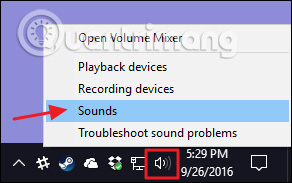
<p style="text-align: justify;">Tuy nhiên, vấn đế này rất dễ giải quyết bởi vì nó đã được tách biệt với Windows Audio tiêu chuẩn, giúp người dùng dễ dàng tắt nó hơn. Bạn có thể thử bất cứ phần mềm nào mà nhà sản xuất phần cứng cung cấp và xem có thể vô hiệu hóa được một số hiệu ứng âm thanh tiên tiến nào hay không. Ngoài ra bạn có thể thực hiện việc này ngay trong Windows đối với những thiết bị hỗ trợ. Mở hộp thoại thuộc tính&nbsp;<strong>Sound</strong>&nbsp;bằng cách click chuột phải vào biểu tượng loa trong khu vực thông báo và sau đó click vào “<strong>Sounds</strong>”. Một cách khác để mở hộp thoại này là sử dụng&nbsp;<strong>Control Panel</strong>&nbsp;và chạy<strong>&nbsp;Sound applet</strong>&nbsp;ở đây.</p>

<p style="text-align: justify;"><img alt="Chọn Sounds" data-i="3" data-src="https://st.quantrimang.com/photos/image/2018/04/04/Windows-Audio-Device-Graph-Isolation-la-gi-4.jpg" data-was-processed="true" height="183" src="https://st.quantrimang.com/photos/image/2018/04/04/Windows-Audio-Device-Graph-Isolation-la-gi-4.jpg" width="292" /></p>

<div style="text-align: justify;"><iframe allowtransparency="true" data-google-container-id="a!3" data-google-query-id="CK_xg4Hnr4MDFTtFwgUdJXEChg" data-load-complete="true" frameborder="0" height="0" hspace="0" id="aswift_2" marginheight="0" marginwidth="0" name="aswift_2" sandbox="" scrolling="no" vspace="0" width="694"></iframe></div>

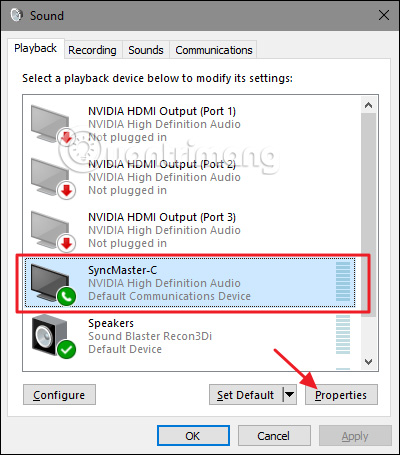
<p style="text-align: justify;">Trên tab &quot;<strong>Playback</strong>&quot; của cửa sổ &quot;<strong>Sound</strong>&quot;, chọn thiết bị mà bạn nghi ngờ gây ra vấn đề và sau đó nhấp vào &quot;<strong>Properties</strong>&quot;.</p>

<p style="text-align: justify;"><img alt="Chọn thiết bị gây ra vấn đề " data-i="4" data-src="https://st.quantrimang.com/photos/image/2018/04/04/Windows-Audio-Device-Graph-Isolation-la-gi-5.jpg" data-was-processed="true" height="455" src="https://st.quantrimang.com/photos/image/2018/04/04/Windows-Audio-Device-Graph-Isolation-la-gi-5.jpg" width="400" /></p>

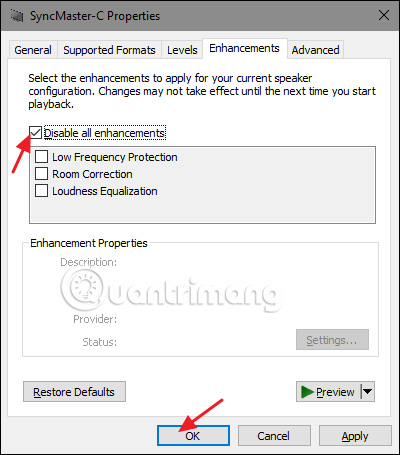
<p style="text-align: justify;">Trên tab &quot;<strong>Enhancements</strong>&quot; của hộp thoại thuộc tính thiết bị, bạn sẽ thấy một danh sách các phụ kiện được thiết bị hỗ trợ, danh sách này sẽ khác nhau tùy thuộc vào thiết bị bạn đang sử dụng. Ở đây chúng ta nhìn thấy webcam/microphone được tích hợp trong màn hình. Bạn nên bắt đầu bằng cách chọn tùy chọn “<strong>Disable all enhancements</strong>” và xem vấn đề có được giải quyết không.</p>

<p style="text-align: justify;">&nbsp;</p>

<div style="text-align: justify;"><img alt="" height="0" src="https://bs.serving-sys.com/Serving/adServer.bs?cn=display&amp;c=19&amp;pli=1079864124&amp;gdpr=${GDPR}&amp;gdpr_consent=${GDPR_CONSENT_68}&amp;us_privacy=${US_PRIVACY}&amp;adid=1092132338&amp;ebaddid=12ae1b6d53ae457086f772e4e9516018&amp;ord=1703686582163" width="0" /></div>

<ul>
	<li data-block-reason="4" data-trans-vn="Che nội dung" style="text-align: justify;">&nbsp;</li>
	<li data-block-reason="2" data-trans-vn="Không quan tâm" style="text-align: justify;">&nbsp;</li>
	<li data-block-reason="3" data-trans-vn="Không phù hợp" style="text-align: justify;">&nbsp;</li>
	<li data-block-reason="1" data-trans-vn="Thấy quá nhiều" style="text-align: justify;">&nbsp;</li>
</ul>

<div style="text-align: justify;"><br />
<iframe id="adbro-vn-2311-omo-hebe-nov23" sandbox=""></iframe><br />
<img alt="Chọn Disablle all enhancements" data-adbro-processed="true" data-i="5" data-src="https://st.quantrimang.com/photos/image/2018/04/04/Windows-Audio-Device-Graph-Isolation-la-gi-6.jpg" data-was-processed="true" height="455" src="https://st.quantrimang.com/photos/image/2018/04/04/Windows-Audio-Device-Graph-Isolation-la-gi-6.jpg" width="400" /><br />
&nbsp;&nbsp;&nbsp;<br />
&nbsp;&nbsp;&nbsp;</div>

<ul>
	<li style="text-align: justify;">&nbsp;</li>
	<li style="text-align: justify;">&nbsp;</li>
	<li style="text-align: justify;">&nbsp;</li>
	<li style="text-align: justify;">&nbsp;</li>
</ul>

<p style="text-align: justify;">Nếu vô hiệu hóa tất cả các tính năng tăng cường có thể khắc phục được sự cố, có nghĩa một trong những tính năng này là nguyên nhân dẫn đến sự cố. Do đó, hãy quay lại và thử tắt từng tùy chọn tăng cường cụ thể một và tìm ra nguyên nhân. Nếu vô hiệu hóa tất cả tính năng tăng cường trong một thiết bị không khắc phục được vấn đề, bạn có thể kích hoạt lại chúng và chuyển sang thiết bị khác.</p>

<h2 style="text-align: justify;">Cách giảm mức tiêu thụ tài nguyên của Audiodg.exe</h2>

<p style="text-align: justify;">Vì tiến trình này nổi tiếng là tiêu tốn nhiều tài nguyên nên các chương trình độc hại có thể ngụy trang dưới dạng audiodg.exe và khai thác tài nguyên hệ thống của bạn. Vì vậy, trước tiên bạn nên xác minh rằng tiến trình tiêu thụ tài nguyên trong Task Manager không phải là bất kỳ phần mềm độc hại nào. Nếu thấy tiến trình này có vấn đề, bạn nên chạy quét Windows Defender để xóa nó.</p>

<div style="text-align: justify;"><iframe allowtransparency="true" data-google-container-id="a!4" data-google-query-id="CPbMzIznr4MDFcJSwgUdhCAPdA" data-load-complete="true" frameborder="0" height="0" hspace="0" id="aswift_3" marginheight="0" marginwidth="0" name="aswift_3" sandbox="" scrolling="no" vspace="0" width="694"></iframe></div>

<p style="text-align: justify;">Nếu đó là một tiến trình Windows chính hãng, đây là một số cách để giảm mức sử dụng tài nguyên của nó:</p>

<ul>
	<li style="text-align: justify;"><strong>Đảm bảo bạn đã cài đặt driver âm thanh mới nhất</strong>.</li>
</ul>

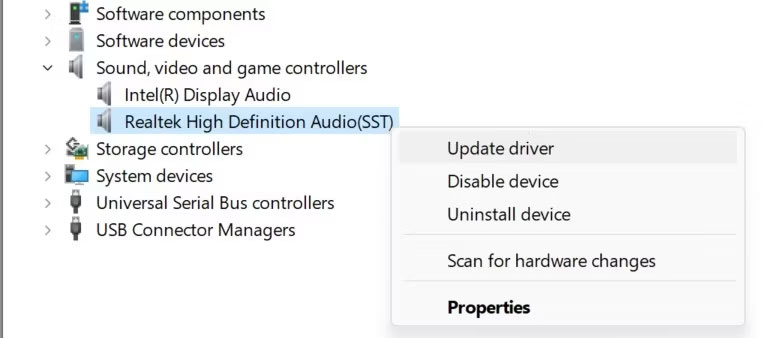
<p style="text-align: justify;">Tải xuống driver âm thanh mới nhất từ trang web của nhà sản xuất. Nếu nó ở định dạng thực thi, hãy nhấp vào file để cài đặt tự động. Nếu cần cài đặt thủ công, hãy nhấp chuột phải vào nút&nbsp;<strong>Start</strong>&nbsp;và mở&nbsp;<strong>Device Manager.</strong>&nbsp;Sau đó, mở rộng tab&nbsp;<strong>Sound, video, and game controllers</strong>, nhấp chuột phải vào driver liên quan và chọn&nbsp;<strong>Update driver</strong>.</p>

<figure>
<div style="text-align: justify;"><img alt="Cập nhật driver âm thanh trong Device Manager trên Windows" data-i="6" data-src="https://st.quantrimang.com/photos/image/2023/12/27/windows-audio-device-graph-isolation-la-gi-1.jpg" data-was-processed="true" height="338" src="https://st.quantrimang.com/photos/image/2023/12/27/windows-audio-device-graph-isolation-la-gi-1.jpg" width="763" /></div>

<figcaption>
<div style="text-align: justify;">Cập nhật driver âm thanh trong Device Manager trên Windows</div>
</figcaption>
</figure>

<p style="text-align: justify;">Sau đó, nhấp vào&nbsp;<strong>Browse my computer for drivers</strong>, định vị và chọn driver đã tải xuống và Windows sẽ cài đặt nó.</p>

<ul>
	<li style="text-align: justify;"><strong>Điều chỉnh định dạng âm thanh mặc định trong cài đặt âm thanh</strong>.</li>
</ul>

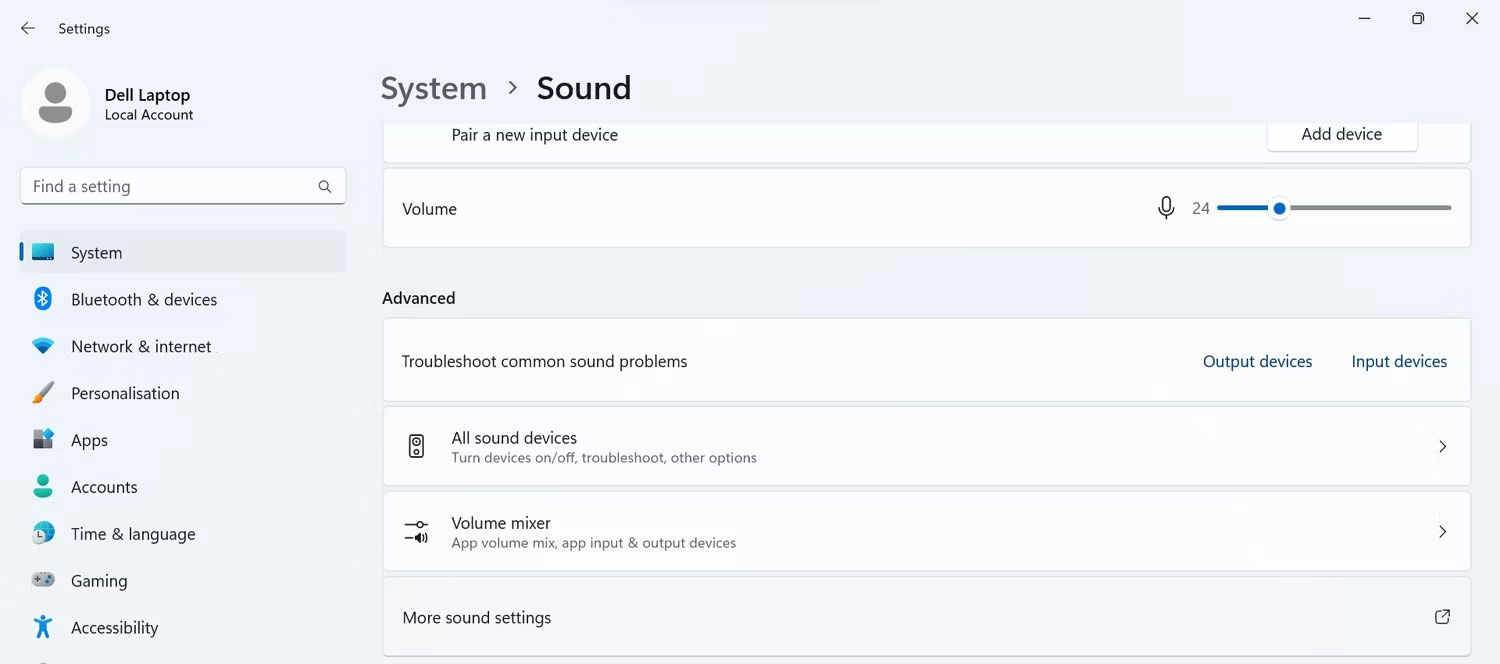
<p style="text-align: justify;">Nhấn&nbsp;<strong>Win + R</strong>, nhập&nbsp;<strong>&quot;ms-settings:sound&quot;</strong>&nbsp;và nhấp vào&nbsp;<strong>OK.</strong>&nbsp;Sau đó, cuộn xuống và nhấp vào&nbsp;<strong>More sound settings</strong>.</p>

<figure>
<div style="text-align: justify;"><img alt="Mở cài đặt âm thanh trong ứng dụng Windows Settings" data-i="7" data-src="https://st.quantrimang.com/photos/image/2023/12/27/windows-audio-device-graph-isolation-la-gi-2.jpg" data-was-processed="true" height="664" src="https://st.quantrimang.com/photos/image/2023/12/27/windows-audio-device-graph-isolation-la-gi-2.jpg" width="1500" /></div>

<figcaption>
<div style="text-align: justify;">Mở cài đặt âm thanh trong ứng dụng Windows Settings</div>
</figcaption>
</figure>

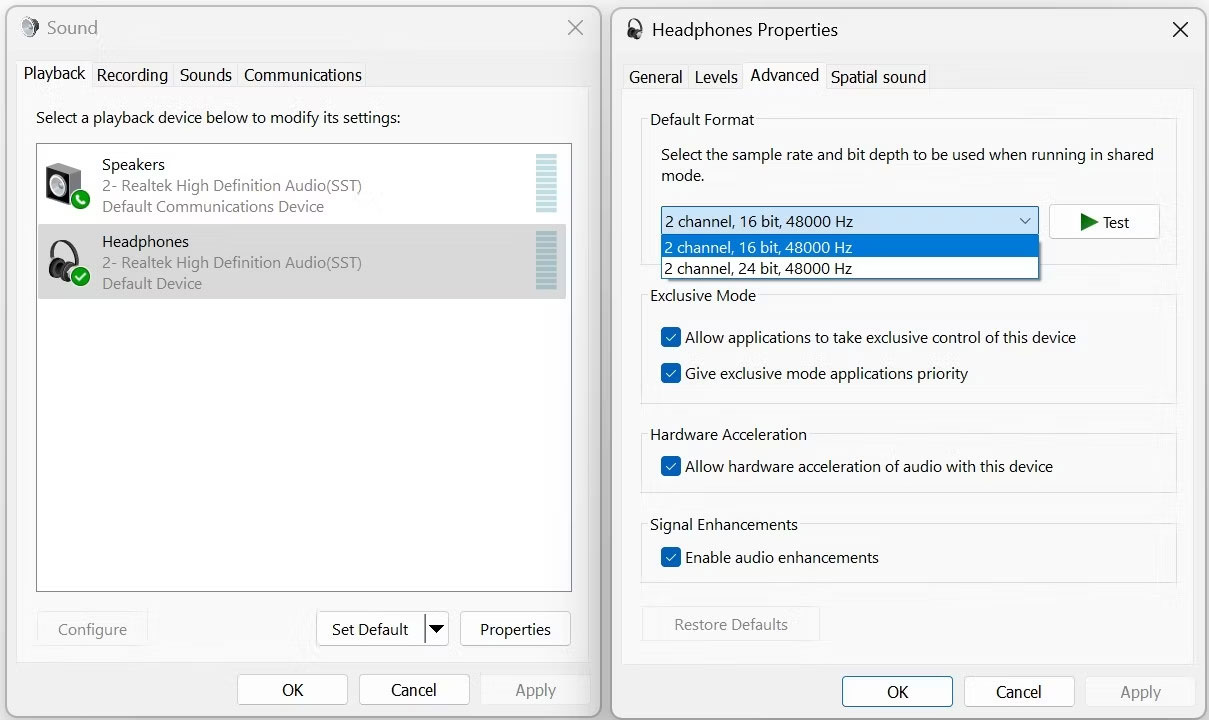
<p style="text-align: justify;">Sau đó, chuyển đến tab&nbsp;<strong>Playback</strong>, nhấp chuột phải vào thiết bị đầu ra âm thanh mặc định của bạn và chọn&nbsp;<strong>Properties</strong>. Sau đó, chuyển đến tab&nbsp;<strong>Advanced</strong>&nbsp;và chọn tốc độ lấy mẫu và độ sâu bit khác từ menu drop-down.</p>

<figure>
<div style="text-align: justify;"><img alt="Thay đổi định dạng âm thanh mặc định trong cài đặt âm thanh trên Windows" data-i="8" data-src="https://st.quantrimang.com/photos/image/2023/12/27/windows-audio-device-graph-isolation-la-gi-3.jpg" data-was-processed="true" height="720" src="https://st.quantrimang.com/photos/image/2023/12/27/windows-audio-device-graph-isolation-la-gi-3.jpg" width="1209" /></div>

<figcaption>
<div style="text-align: justify;">Thay đổi định dạng âm thanh mặc định trong cài đặt âm thanh trên Windows</div>
</figcaption>
</figure>

<div style="text-align: justify;"><iframe allowtransparency="true" data-google-container-id="a!5" data-google-query-id="COKR9I3nr4MDFVNNwgUd-T0Low" data-load-complete="true" frameborder="0" height="0" hspace="0" id="aswift_4" marginheight="0" marginwidth="0" name="aswift_4" sandbox="" scrolling="no" vspace="0" width="694"></iframe></div>

<ul>
	<li style="text-align: justify;"><strong>Vô hiệu hóa các cải tiến âm thanh.</strong></li>
</ul>

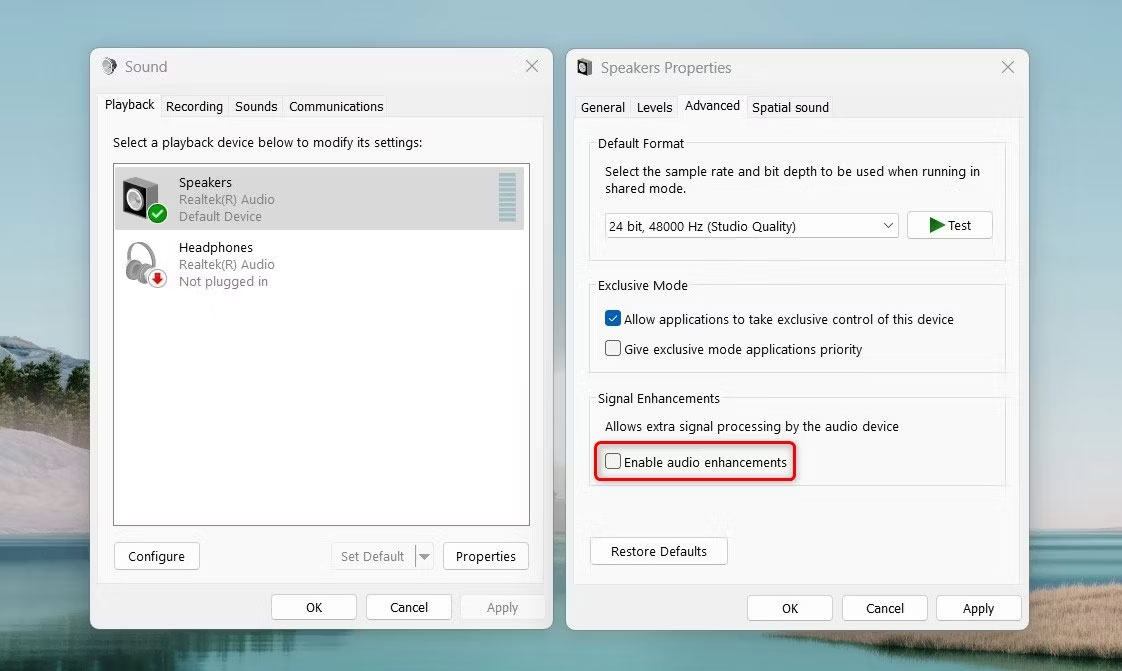
<p style="text-align: justify;">Đi tới tab&nbsp;<strong>Playback</strong>, nhấp chuột phải vào thiết bị đầu ra âm thanh của bạn và chọn&nbsp;<strong>Properties</strong>. Sau đó, chuyển đến tab&nbsp;<strong>Advanced</strong>&nbsp;và bỏ chọn hộp bên cạnh&nbsp;<strong>Enable audio enhancements</strong>.</p>

<figure>
<div style="text-align: justify;"><img alt="Vô hiệu hóa các cải tiến âm thanh từ cài đặt âm thanh." data-i="9" data-src="https://st.quantrimang.com/photos/image/2023/12/27/windows-audio-device-graph-isolation-la-gi-4.jpg" data-was-processed="true" height="671" src="https://st.quantrimang.com/photos/image/2023/12/27/windows-audio-device-graph-isolation-la-gi-4.jpg" width="1122" /></div>

<figcaption>
<div style="text-align: justify;">Vô hiệu hóa các cải tiến âm thanh từ cài đặt âm thanh.</div>
</figcaption>
</figure>

<ul>
	<li style="text-align: justify;">Nếu bạn sử dụng ứng dụng của bên thứ ba để áp dụng các hiệu ứng âm thanh nâng cao, hãy tạm thời ngừng sử dụng ứng dụng đó hoặc tắt một số tính năng của ứng dụng đó.</li>
	<li style="text-align: justify;">Nếu quá trình chỉ sử dụng quá nhiều tài nguyên khi phát âm thanh qua một ứng dụng cụ thể thì ứng dụng đó có thể là thủ phạm. Vì vậy, hãy cập nhật, cài đặt lại ứng dụng hoặc chuyển sang ứng dụng khác.</li>
	<li style="text-align: justify;">Kiểm tra các bản cập nhật Windows đang chờ xử lý và cài đặt chúng nếu có. Ngoài ra, hãy kiểm tra các bản cập nhật driver tùy chọn từ nhà sản xuất thiết bị đầu ra âm thanh của bạn và cài đặt chúng.</li>
	<li style="text-align: justify;">Nếu mức sử dụng tài nguyên chỉ tăng đột biến khi bạn kết nối một thiết bị đầu ra âm thanh cụ thể với máy tính thì phần cứng có thể bị lỗi. Vì vậy, hãy kiểm tra xem nó có khiếm khuyết không.</li>
</ul>

<p style="text-align: justify;">Trong hầu hết các trường hợp, việc tắt một số hiệu ứng âm thanh và cập nhật driver âm thanh sẽ giảm mức tiêu thụ tài nguyên của tiến trình &quot;Windows Audio Device Graph Isolation&quot;. Tuy nhiên, tốt nhất bạn nên kiểm tra kỹ tính xác thực của tiến trình để đảm bảo thiết bị của bạn không bị nhiễm virus.</p>

<h2 style="text-align: justify;">Có thể vô hiệu hoá Windows Audio Device Graph Isolation?</h2>

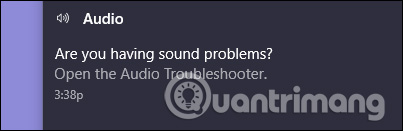
<p style="text-align: justify;">Bạn không thể thực sự vô hiệu hóa &quot;Windows Audio Device Graph Isolation&quot; mà không vô hiệu hóa dịch vụ Windows Audio chính và việc làm này sẽ khiến hệ thống âm thanh mất tiếng. Ngoài ra bạn thậm chí không thể tạm thời end task, nếu cố gắng làm điều này, Windows sẽ hiện thị thông báo yêu cầu bạn mở trình khắc phục sự cố Audio Troubleshooter.</p>

<p style="text-align: justify;"><img alt="Mở Audio Troubleshooter" data-i="10" data-src="https://st.quantrimang.com/photos/image/2018/04/04/Windows-Audio-Device-Graph-Isolation-la-gi-7.jpg" data-was-processed="true" height="131" src="https://st.quantrimang.com/photos/image/2018/04/04/Windows-Audio-Device-Graph-Isolation-la-gi-7.jpg" width="403" /></p>

<p style="text-align: justify;">Và sự thật là khi chạy trình khắc phục sự cố cũng không giải quyết được vấn đề nếu vô hiệu hóa tính năng tăng cường. Bạn cũng có thể truy cập trình khắc phục sự cố bằng cách nhấn vào&nbsp;<strong>Start</strong>, gõ &quot;<strong>troubleshooting</strong>&quot; và sau đó nhấn&nbsp;<strong>Enter</strong>.</p>

<h2 style="text-align: justify;">Tiến trình này có thể là một virus?</h2>

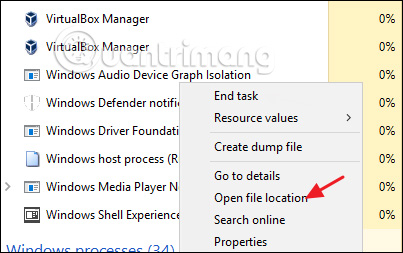
<p style="text-align: justify;">&quot;Windows Audio Device Graph Isolation&quot; là một thành phần chính thức của Windows và không phải là virus. Mặc dù chưa có báo cáo nào cho biết có virus tấn công tiến trình này nhưng biết đâu tương lai có thể. Để đảm bảo chắc chắn, bạn có thể kiểm tra vị trí file của tiến trình bằng cách click chuột phải vào “<strong>Windows Audio Device Graph Isolation</strong>” trong Task Manager và chọn tùy chọn&nbsp;<strong>Open File Location</strong>.</p>

<p style="text-align: justify;"><img alt="Chọn Open File Location " data-i="11" data-src="https://st.quantrimang.com/photos/image/2018/04/04/Windows-Audio-Device-Graph-Isolation-la-gi-8.jpg" data-was-processed="true" height="253" src="https://st.quantrimang.com/photos/image/2018/04/04/Windows-Audio-Device-Graph-Isolation-la-gi-8.jpg" width="403" /></p>

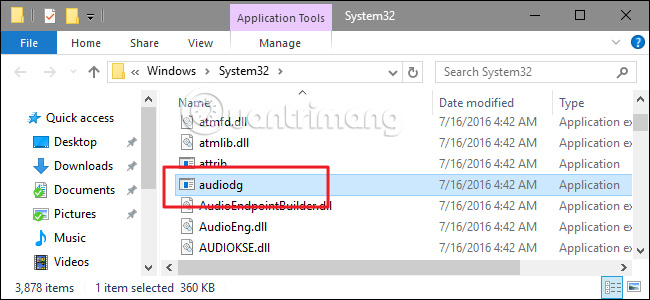
<p style="text-align: justify;">Nếu file được lưu trữ trong&nbsp;thư mục&nbsp;<strong>Windows\System32</strong>, thì đây là file thật và bạn không cần phải đối phó với virus.</p>

<p style="text-align: justify;"><img alt="File lưu trữ trong thư mục System32" data-i="12" data-src="https://st.quantrimang.com/photos/image/2018/04/04/Windows-Audio-Device-Graph-Isolation-la-gi-9.jpg" data-was-processed="true" height="300" src="https://st.quantrimang.com/photos/image/2018/04/04/Windows-Audio-Device-Graph-Isolation-la-gi-9.jpg" width="650" /></p>

<div style="text-align: justify;"><iframe allowtransparency="true" data-google-container-id="a!6" data-google-query-id="CKSJ56Tnr4MDFVpOwgUdSBgAOw" data-load-complete="true" frameborder="0" height="0" hspace="0" id="aswift_5" marginheight="0" marginwidth="0" name="aswift_5" sandbox="" scrolling="no" vspace="0" width="694"></iframe></div>

<p style="text-align: justify;">Nếu muốn chắc chắn hơn hoặc thấy file được lưu trữ ở thư mục khác không phải thư mục System 32, thực hiện quét hệ thống với phần mềm diệt virus ưa thích hoặc tham khảo danh sách&nbsp;11 phần mềm diệt virus hiệu quả nhất cho Windows 2023&nbsp;nhé.</p>

<div style="text-align: justify;">&nbsp;</div>
		</div>
				<div id="author">
						<p>
				<strong>Nguồn tin:</strong>
				Quantrimang.com
			</p>
		</div>
	</div>
	<div id="footer" class="clearfix">
		<div id="url">
			<strong>URL của bản tin này: </strong><a href="https://www.nguoicodonvn2008.info/vi/news/savefile/kien-thuc-may-tinh/windows-audio-device-graph-isolation-la-gi-va-tai-sao-no-lai-chay-tren-may-tinh-7891.html" title="Windows Audio Device Graph Isolation là gì và tại sao nó lại chạy trên máy tính?">https://www.nguoicodonvn2008.info/vi/news/savefile/kien-thuc-may-tinh/windows-audio-device-graph-isolation-la-gi-va-tai-sao-no-lai-chay-tren-may-tinh-7891.html</a>

		</div>
		<div class="clear"></div>
		<div class="copyright">
			&copy; .&#x3A; Nguoicodonvn2008.info - Cõi lòng người cô đơn &#x3A;.
		</div>
		<div id="contact">
			<a href="mailto:admin@nguoicodonvn2008.info">admin@nguoicodonvn2008.info</a>
		</div>
	</div>
</div>
        <div id="timeoutsess" class="chromeframe">
            Bạn đã không sử dụng Site, <a onclick="timeoutsesscancel();" href="https://nguoicodonvn2008.info/#">Bấm vào đây để duy trì trạng thái đăng nhập</a>. Thời gian chờ: <span id="secField"> 60 </span> giây
        </div>
        <div id="openidResult" class="nv-alert" style="display:none"></div>
        <div id="openidBt" data-result="" data-redirect=""></div>
		</script>
		<div class="car-top">
  <span><img src="https://nguoicodonvn2008.info/themes/default/images/car.png" alt=""></span>
</div>
<div id="run_cronjobs" style="visibility:hidden;display:none;"><img alt="cron" src="/index.php?second=cronjobs&amp;p=j4HVJ0Kc" width="1" height="1" /></div>
<script src="https://nguoicodonvn2008.info/assets/js/jquery/jquery.min.js"></script>
<script>var nv_base_siteurl="/",nv_lang_data="vi",nv_lang_interface="vi",nv_name_variable="nv",nv_fc_variable="op",nv_lang_variable="language",nv_module_name="news",nv_func_name="savefile",nv_is_user=0, nv_my_ofs=-4,nv_my_abbr="EDT",nv_cookie_prefix="nv4c_e856T",nv_check_pass_mstime=1738000,nv_area_admin=0,nv_safemode=0,theme_responsive=0,nv_recaptcha_ver=2,nv_recaptcha_sitekey="",nv_recaptcha_type="image",XSSsanitize=1;</script>
<script src="https://nguoicodonvn2008.info/assets/js/language/vi.js"></script>
<script src="https://nguoicodonvn2008.info/assets/js/DOMPurify/purify3.js"></script>
<script src="https://nguoicodonvn2008.info/assets/js/global.js"></script>
<script src="https://nguoicodonvn2008.info/assets/js/site.js"></script>
<script src="https://nguoicodonvn2008.info/themes/default/js/news.js"></script>
<script src="https://nguoicodonvn2008.info/themes/default/js/main.js"></script>
<script src="https://nguoicodonvn2008.info/themes/default/js/custom.js"></script>
<script type="application/ld+json">
        {
            "@context": "https://schema.org",
            "@type": "Organization",
            "url": "https://nguoicodonvn2008.info",
            "logo": "https://nguoicodonvn2008.info/uploads/angel.gif"
        }
        </script>
<script src="https://nguoicodonvn2008.info/themes/default/js/bootstrap.min.js"></script>
<script type="text/javascript">
var $scrolltop = $('.car-top');
$scrolltop.on('click', function () {
    $('html,body').animate({
        scrollTop: 0
    }, 800);
    $(this).addClass("car-run");
    setTimeout(function(){ $scrolltop.removeClass('car-run');}, 1000);
    return false;
});
$(window).on('scroll', function ()
{ 
    if($(window).scrollTop() >= 200)
    {
        $scrolltop.addClass("show");
        $scrolltop.addClass("car-down");
    }
    else
    {
       $scrolltop.removeClass("show");
       setTimeout(function(){ $scrolltop.removeClass('car-down');}, 300);
    }
});
</script>
</body>
</html>