<!DOCTYPE html>
    <html lang="vi" xmlns="http://www.w3.org/1999/xhtml" prefix="og: http://ogp.me/ns#">
    <head>
<title>windows 11 sắp được tích hợp sẵn trình soạn thảo văn bản &quot;edit&quot;</title>
<meta name="description" content="windows 11 sắp được tích hợp sẵn trình soạn thảo văn bản &quot;edit&quot; - Savefile - Tin Tức -...">
<meta name="author" content=".: Nguoicodonvn2008.info - Cõi lòng người cô đơn :.">
<meta name="copyright" content=".: Nguoicodonvn2008.info - Cõi lòng người cô đơn :. [admin@nguoicodonvn2008.info]">
<meta name="robots" content="index, archive, follow, noodp">
<meta name="googlebot" content="index,archive,follow,noodp">
<meta name="msnbot" content="all,index,follow">
<meta name="generator" content="NukeViet v4.5">
<meta http-equiv="Content-Type" content="text/html; charset=utf-8">
<meta property="og:title" content="windows 11 sắp được tích hợp sẵn trình soạn thảo văn bản &quot;edit&quot;">
<meta property="og:type" content="website">
<meta property="og:description" content="Savefile - Tin Tức - https&#x3A;&#x002F;&#x002F;www.nguoicodonvn2008.info&#x002F;vi&#x002F;news&#x002F;savefile&#x002F;kien-thuc-may-tinh&#x002F;windows-11-sap-duoc-tich-hop-san-trinh-soan-thao-van-ban-edit-10516.html">
<meta property="og:site_name" content=".&#x3A; Nguoicodonvn2008.info - Cõi lòng người cô đơn &#x3A;.">
<meta property="og:url" content="https://www.nguoicodonvn2008.info/vi/news/savefile/kien-thuc-may-tinh/windows-11-sap-duoc-tich-hop-san-trinh-soan-thao-van-ban-edit-10516.html">
<link rel="shortcut icon" href="https://nguoicodonvn2008.info/favicon.ico">
<link rel="canonical" href="https://www.nguoicodonvn2008.info/vi/news/savefile/kien-thuc-may-tinh/windows-11-sap-duoc-tich-hop-san-trinh-soan-thao-van-ban-edit-10516.html">
<link rel="alternate" href="https://nguoicodonvn2008.info/vi/news/rss/" title="Tin Tức" type="application/rss+xml">
<link rel="alternate" href="https://nguoicodonvn2008.info/vi/news/rss/karaoke-dual/" title="Tin Tức - Karaoke Dual" type="application/rss+xml">
<link rel="alternate" href="https://nguoicodonvn2008.info/vi/news/rss/nhac-tre/" title="Tin Tức - Nhạc trẻ" type="application/rss+xml">
<link rel="alternate" href="https://nguoicodonvn2008.info/vi/news/rss/tru-tinh/" title="Tin Tức - Trữ tình" type="application/rss+xml">
<link rel="alternate" href="https://nguoicodonvn2008.info/vi/news/rss/nuoc-ngoai/" title="Tin Tức - Nước ngoài" type="application/rss+xml">
<link rel="alternate" href="https://nguoicodonvn2008.info/vi/news/rss/remix/" title="Tin Tức - Remix" type="application/rss+xml">
<link rel="alternate" href="https://nguoicodonvn2008.info/vi/news/rss/tam-su-tinh-yeu/" title="Tin Tức - Tâm sự tình yêu" type="application/rss+xml">
<link rel="alternate" href="https://nguoicodonvn2008.info/vi/news/rss/tho-suu-tam/" title="Tin Tức - Thơ sưu tầm" type="application/rss+xml">
<link rel="alternate" href="https://nguoicodonvn2008.info/vi/news/rss/cuoc-song/" title="Tin Tức - Cuộc sống" type="application/rss+xml">
<link rel="alternate" href="https://nguoicodonvn2008.info/vi/news/rss/phan-mem/" title="Tin Tức - Phần mềm" type="application/rss+xml">
<link rel="alternate" href="https://nguoicodonvn2008.info/vi/news/rss/kien-thuc-may-tinh/" title="Tin Tức - Kiến thức máy tính" type="application/rss+xml">
<link rel="alternate" href="https://nguoicodonvn2008.info/vi/news/rss/hoc-tap/" title="Tin Tức - Học tập" type="application/rss+xml">
<link rel="alternate" href="https://nguoicodonvn2008.info/vi/news/rss/tai-lieu/" title="Tin Tức - Tài liệu" type="application/rss+xml">
<link rel="alternate" href="https://nguoicodonvn2008.info/vi/news/rss/de-thi/" title="Tin Tức - Đề thi" type="application/rss+xml">
<link rel="preload" as="style" href="https://nguoicodonvn2008.info/assets/css/font-awesome.min.css" type="text/css">
<link rel="preload" as="style" href="https://nguoicodonvn2008.info/themes/default/css/bootstrap.non-responsive.css" type="text/css">
<link rel="preload" as="style" href="https://nguoicodonvn2008.info/themes/default/css/style.css" type="text/css">
<link rel="preload" as="style" href="https://nguoicodonvn2008.info/themes/default/css/style.non-responsive.css" type="text/css">
<link rel="preload" as="style" href="https://nguoicodonvn2008.info/themes/default/css/news.css" type="text/css">
<link rel="preload" as="style" href="https://nguoicodonvn2008.info/themes/default/css/custom.css" type="text/css">
<link rel="preload" as="script" href="https://nguoicodonvn2008.info/assets/js/jquery/jquery.min.js" type="text/javascript">
<link rel="preload" as="script" href="https://nguoicodonvn2008.info/assets/js/language/vi.js" type="text/javascript">
<link rel="preload" as="script" href="https://nguoicodonvn2008.info/assets/js/DOMPurify/purify3.js" type="text/javascript">
<link rel="preload" as="script" href="https://nguoicodonvn2008.info/assets/js/global.js" type="text/javascript">
<link rel="preload" as="script" href="https://nguoicodonvn2008.info/assets/js/site.js" type="text/javascript">
<link rel="preload" as="script" href="https://nguoicodonvn2008.info/themes/default/js/news.js" type="text/javascript">
<link rel="preload" as="script" href="https://nguoicodonvn2008.info/themes/default/js/main.js" type="text/javascript">
<link rel="preload" as="script" href="https://nguoicodonvn2008.info/themes/default/js/custom.js" type="text/javascript">
<link rel="preload" as="script" href="https://nguoicodonvn2008.info/themes/default/js/bootstrap.min.js" type="text/javascript">
<link rel="stylesheet" href="https://nguoicodonvn2008.info/assets/css/font-awesome.min.css">
<link rel="stylesheet" href="https://nguoicodonvn2008.info/themes/default/css/bootstrap.non-responsive.css">
<link rel="stylesheet" href="https://nguoicodonvn2008.info/themes/default/css/style.css">
<link rel="stylesheet" href="https://nguoicodonvn2008.info/themes/default/css/style.non-responsive.css">
<link rel="StyleSheet" href="https://nguoicodonvn2008.info/themes/default/css/news.css">
<link rel="stylesheet" href="https://nguoicodonvn2008.info/themes/default/css/custom.css">
<style type="text/css">
	body{background: #fff;}
</style>
    </head>
    <body>
<div id="print">
	<div id="hd_print">
		<h2 class="pull-left">.&#x3A; Nguoicodonvn2008.info - Cõi lòng người cô đơn &#x3A;.</h2>
		<p class="pull-right"><a title=".&#x3A; Nguoicodonvn2008.info - Cõi lòng người cô đơn &#x3A;." href="https://nguoicodonvn2008.info/">https://nguoicodonvn2008.info</a></p>
	</div>
	<div class="clear"></div>
	<hr />
	<div id="content">
		<h1>windows 11 sắp được tích hợp sẵn trình soạn thảo văn bản &quot;edit&quot;</h1>
		<ul class="list-inline">
			<li>Thứ sáu - 06/06/2025 23:25</li>
			<li class="hidden-print txtrequired"><em class="fa fa-print">&nbsp;</em><a title="In ra" href="javascript:;" onclick="window.print()">In ra</a></li>
			<li class="hidden-print txtrequired"><em class="fa fa-power-off">&nbsp;</em><a title="Đóng cửa sổ này" href="javascript:;" onclick="window.close()">Đóng cửa sổ này</a></li>
		</ul>
		<div class="clear"></div>
		<div id="hometext">
		</div>
				<div class="imghome">
			<img alt="windows 11 sắp được tích hợp sẵn trình soạn thảo văn bản &quot;edit&quot;" src="https://st.quantrimang.com/photos/image/2025/06/06/trinh-soan-thao-van-ban-edit1.jpg" width="460" class="img-thumbnail" />
		</div>
		<div class="clear"></div>
		<div id="bodytext" class="clearfix">
			<div class="ckeditor-html5-audio" style="text-align: center;">
<audio controls="controls" controlslist="nodownload" src="https://st.quantrimang.com/photos/media/2025/06/06/209413-2025661543.mp3">&nbsp;</audio>
</div>

<p style="text-align: justify;">Nói về vấn đề xử lý văn bản, Windows 11 đã có Notepad hoặc OneNote/Word (nếu trả phí Microsoft 365). Nhưng có một thực tế là những ứng dụng này đang ngày càng &quot;phình to&quot; với việc được tích hợp hàng loạt tính năng mới mà nhiều người thậm chí không quan tâm. Nếu bạn chỉ muốn chỉnh sửa văn bản đơn thuần, tin tốt là Microsoft vừa ra mắt ứng dụng có tên &quot;Edit&quot; – trình soạn thảo dựa trên dòng lệnh (command-line). Theo Microsoft, ứng dụng này sẽ sớm được tích hợp mặc định trên Windows 11.</p>

<p style="text-align: justify;">Hiện tại, &quot;Edit&quot; đã có mặt trên GitHub để người dùng tự cài đặt. Khác với trình soạn thảo độc lập, công cụ này chạy trong PowerShell hoặc Command Prompt, hỗ trợ chỉnh sửa file và xem trước nội dung.</p>

<p style="text-align: justify;">Trong tuyên bố gửi chuyên trang&nbsp;<em>Windows Latest&nbsp;</em>, Microsoft xác nhận kế hoạch đưa &quot;Edit&quot; thành trình soạn thảo mặc định, nhưng chỉ dành cho môi trường dòng lệnh (Terminal). Điều này không có nghĩa là ứng dụng mới này sẽ thay thế Notepad, mà chỉ đơn thuần là cho phép bạn truy cập nhanh bằng cách gõ lệnh edit trong Terminal.</p>

<p style="text-align: justify;"><em>(Hiện muốn dùng &quot;Edit&quot;, bạn phải tải thủ công từ&nbsp;GitHub)<br />
<span style="color:rgb(39, 174, 96);"><strong>https://github.com/microsoft/edit</strong></span></em></p>

<h2 style="text-align: justify;">Trải nghiệm thực tế với Edit – trình soạn thảo văn bản (dựa trên CLI) cho Windows 11</h2>

<p style="text-align: justify;">Đội ngũ&nbsp;<em>Windows Latest&nbsp;</em>đã thử cài đặt và trải nghiệm phiên bản mới nhất của Edit. Lệnh&nbsp;<strong>Winget&nbsp;</strong>được sử dụng để download và cài đặt trình soạn thảo CLI, quá trình hoàn tất không gặp vấn đề gì. Lý do chọn phương pháp này là vì Winget sửa đổi đường dẫn tệp trực tiếp và không cần thêm thủ công.</p>

<p style="text-align: justify;">Để bắt đầu, bạn cần mở cửa sổ Terminal mới, gõ edit và nhấn Enter. Bạn sẽ vào giao diện trình soạn thảo trông rất quen thuộc. Nhưng bạn có thể sử dụng cả chuột và bàn phím để điều khiển.</p>

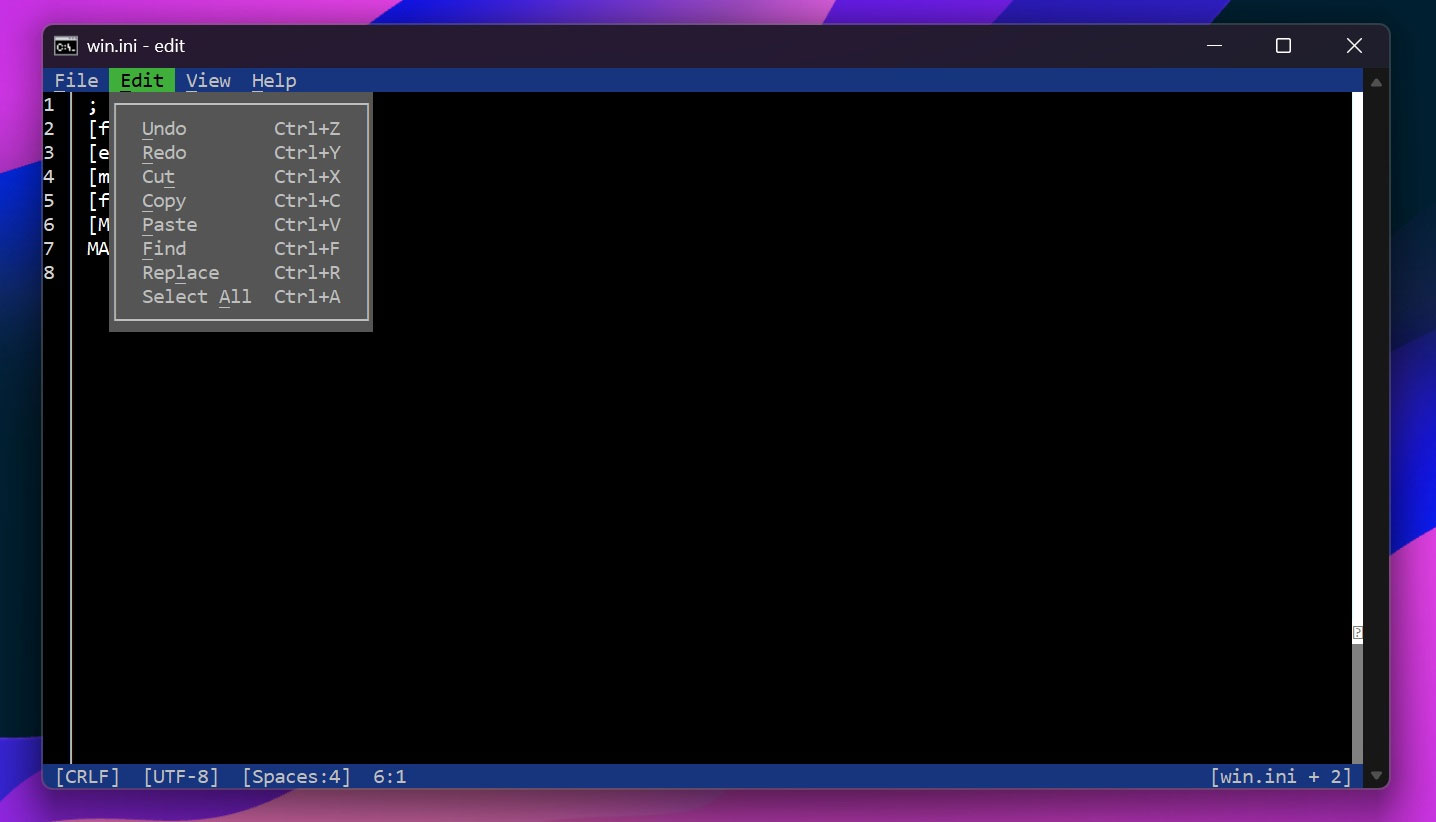
<p style="text-align: justify;">Có thể mở một tệp bằng tùy chọn Open của trình soạn thảo, hoặc trực tiếp truy cập vào giao diện chỉnh sửa với lệnh&nbsp;<strong>edit &#91;tên_tệp&#93;.&#91;phần_mở_rộng&#93;</strong>&nbsp;. Một loạt tệp hệ thống như&nbsp;<em><strong>.log&nbsp;</strong></em>và&nbsp;<em><strong>.ini</strong>&nbsp;</em>… đã được mở và và trình chỉnh sửa không gặp vấn đề gì.</p>

<p style="text-align: justify;">Trình chỉnh sửa tích hợp tất cả các tính năng chỉnh sửa văn bản thiết yếu, bao gồm Tìm kiếm (Find) và Thay thế (Replace) – cả hai đều rất hữu ích cho các tệp lớn.</p>

<figure>
<div style="text-align: justify;"><img alt="" data-i="0" data-src="https://st.quantrimang.com/photos/image/2025/06/06/trinh-soan-thao-van-ban-edit1.jpg" data-was-processed="true" height="822" src="https://st.quantrimang.com/photos/image/2025/06/06/trinh-soan-thao-van-ban-edit1.jpg" width="1436" /></div>
</figure>

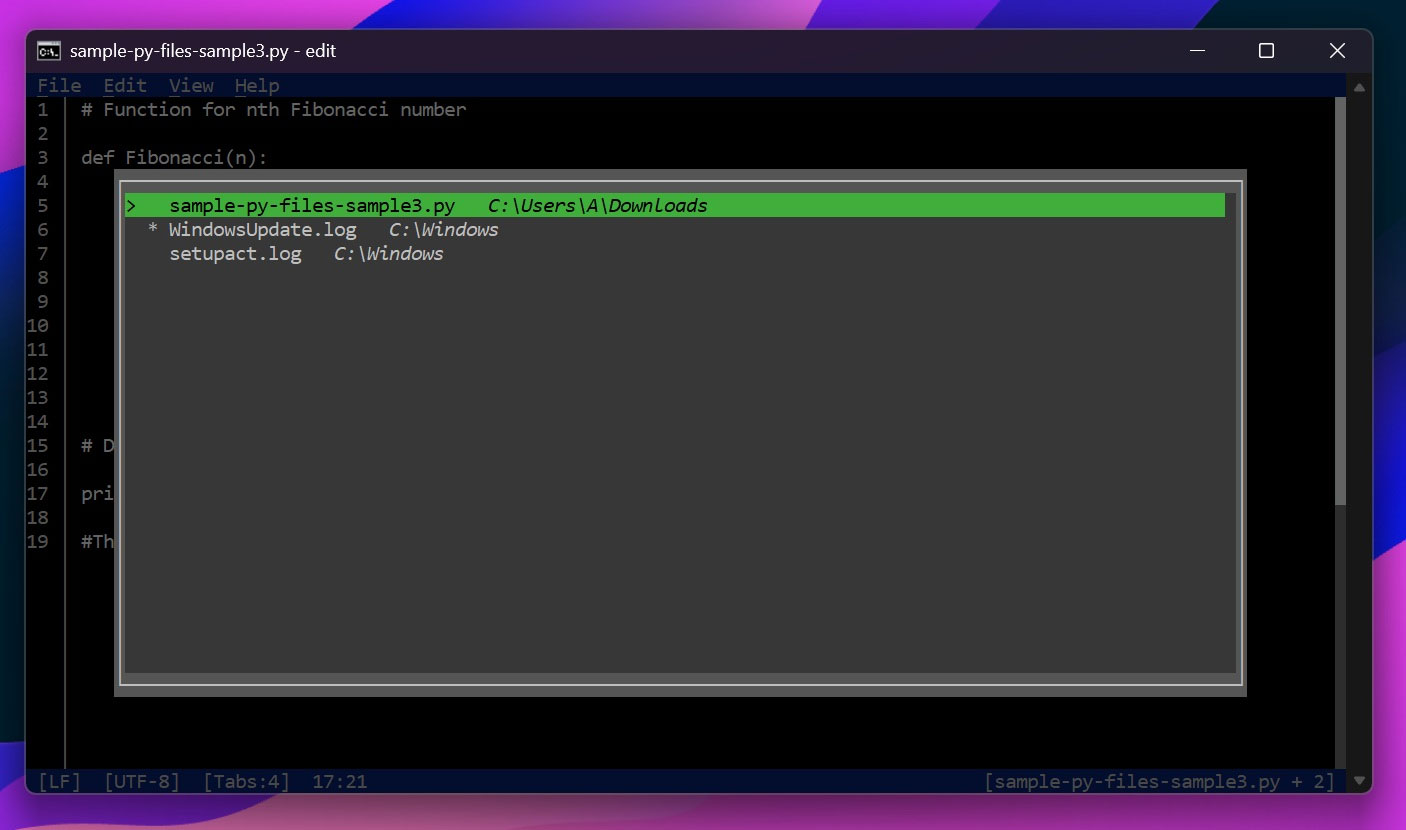
<p style="text-align: justify;">Tương tự, bạn nhận được một vài tính năng bổ sung như Document Picker – liệt kê tất cả các tệp bạn đã mở trong một phiên cụ thể. Nhờ vậy, bạn có thể chuyển đổi ngay lập tức giữa các tệp nếu cần. Lưu ý rằng nó chỉ ghi nhớ chúng cho một phiên duy nhất, và khi bạn đóng trình chỉnh sửa, mọi thứ sẽ mất. Hãy coi nó như một giải pháp thay thế cho tính năng tab bạn dùng trong Notepad.</p>

<figure>
<div style="text-align: justify;"><img alt="" data-i="1" data-src="https://st.quantrimang.com/photos/image/2025/06/06/trinh-soan-thao-van-ban-edit2.jpg" data-was-processed="true" height="830" src="https://st.quantrimang.com/photos/image/2025/06/06/trinh-soan-thao-van-ban-edit2.jpg" width="1406" /></div>
</figure>

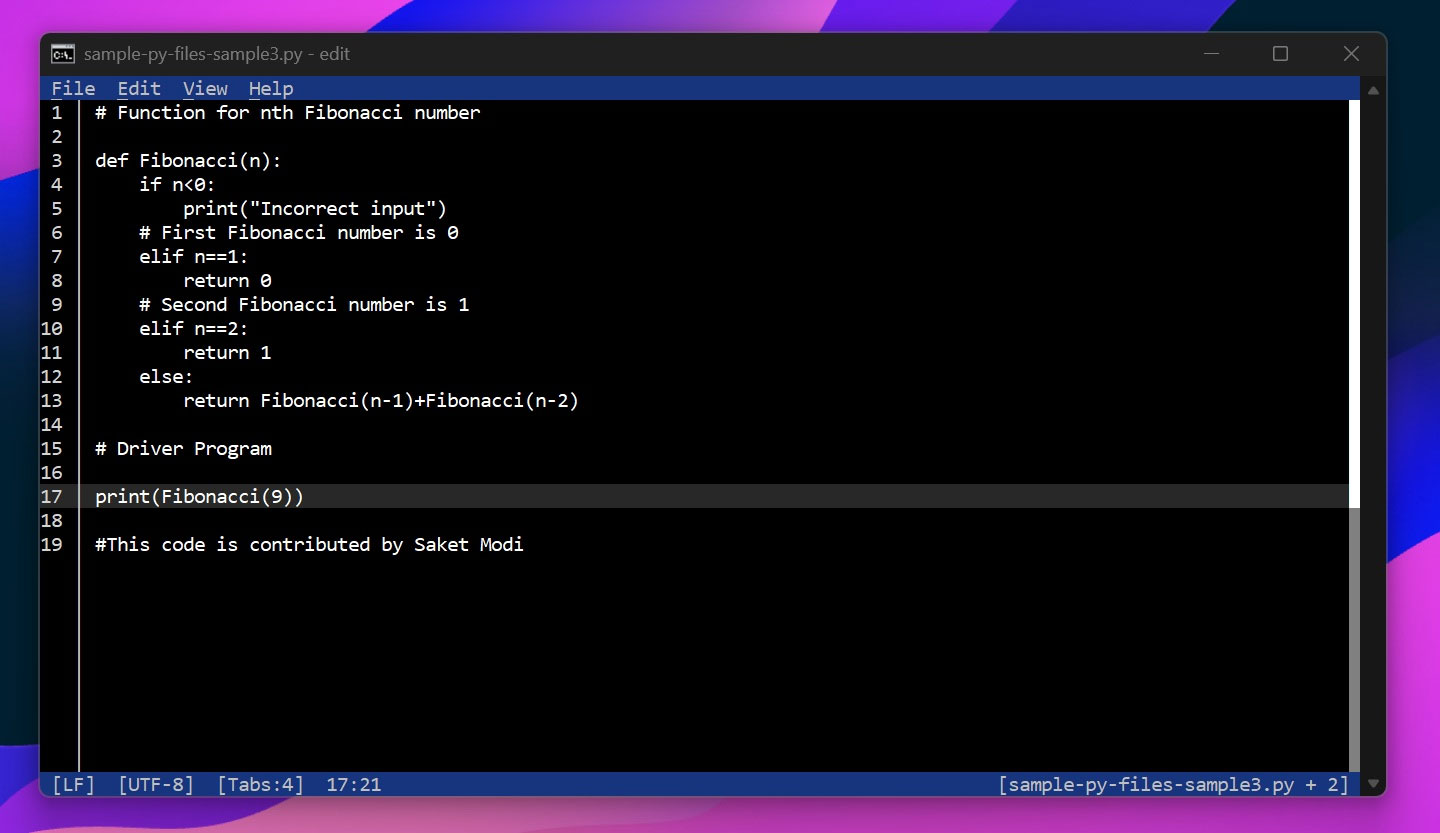
<p style="text-align: justify;">Các tính năng khác bao gồm Word wrap (tự động xuống dòng văn bản trên màn hình) và Go to line (nhảy đến dòng cụ thể trong tệp).</p>

<figure>
<div style="text-align: justify;"><img alt="" data-i="2" data-src="https://st.quantrimang.com/photos/image/2025/06/06/trinh-soan-thao-van-ban-edit3.jpg" data-was-processed="true" height="833" src="https://st.quantrimang.com/photos/image/2025/06/06/trinh-soan-thao-van-ban-edit3.jpg" width="1440" /></div>
</figure>

<p style="text-align: justify;">Edit vẫn đang trong giai đoạn phát triển, do đó vẫn còn cần nhiều tinh chỉnh trước khi chính thức đến tay người dùng.</p>
		</div>
				<div id="author">
						<p>
				<strong>Nguồn tin:</strong>
				Quantrimang.com:
			</p>
		</div>
	</div>
	<div id="footer" class="clearfix">
		<div id="url">
			<strong>URL của bản tin này: </strong><a href="https://www.nguoicodonvn2008.info/vi/news/savefile/kien-thuc-may-tinh/windows-11-sap-duoc-tich-hop-san-trinh-soan-thao-van-ban-edit-10516.html" title="windows 11 sắp được tích hợp sẵn trình soạn thảo văn bản &quot;edit&quot;">https://www.nguoicodonvn2008.info/vi/news/savefile/kien-thuc-may-tinh/windows-11-sap-duoc-tich-hop-san-trinh-soan-thao-van-ban-edit-10516.html</a>

		</div>
		<div class="clear"></div>
		<div class="copyright">
			&copy; .&#x3A; Nguoicodonvn2008.info - Cõi lòng người cô đơn &#x3A;.
		</div>
		<div id="contact">
			<a href="mailto:admin@nguoicodonvn2008.info">admin@nguoicodonvn2008.info</a>
		</div>
	</div>
</div>
        <div id="timeoutsess" class="chromeframe">
            Bạn đã không sử dụng Site, <a onclick="timeoutsesscancel();" href="https://nguoicodonvn2008.info/#">Bấm vào đây để duy trì trạng thái đăng nhập</a>. Thời gian chờ: <span id="secField"> 60 </span> giây
        </div>
        <div id="openidResult" class="nv-alert" style="display:none"></div>
        <div id="openidBt" data-result="" data-redirect=""></div>
		</script>
		<div class="car-top">
  <span><img src="https://nguoicodonvn2008.info/themes/default/images/car.png" alt=""></span>
</div>
<script src="https://nguoicodonvn2008.info/assets/js/jquery/jquery.min.js"></script>
<script>var nv_base_siteurl="/",nv_lang_data="vi",nv_lang_interface="vi",nv_name_variable="nv",nv_fc_variable="op",nv_lang_variable="language",nv_module_name="news",nv_func_name="savefile",nv_is_user=0, nv_my_ofs=-4,nv_my_abbr="EDT",nv_cookie_prefix="nv4c_e856T",nv_check_pass_mstime=1738000,nv_area_admin=0,nv_safemode=0,theme_responsive=0,nv_recaptcha_ver=2,nv_recaptcha_sitekey="",nv_recaptcha_type="image",XSSsanitize=1;</script>
<script src="https://nguoicodonvn2008.info/assets/js/language/vi.js"></script>
<script src="https://nguoicodonvn2008.info/assets/js/DOMPurify/purify3.js"></script>
<script src="https://nguoicodonvn2008.info/assets/js/global.js"></script>
<script src="https://nguoicodonvn2008.info/assets/js/site.js"></script>
<script src="https://nguoicodonvn2008.info/themes/default/js/news.js"></script>
<script src="https://nguoicodonvn2008.info/themes/default/js/main.js"></script>
<script src="https://nguoicodonvn2008.info/themes/default/js/custom.js"></script>
<script type="application/ld+json">
        {
            "@context": "https://schema.org",
            "@type": "Organization",
            "url": "https://nguoicodonvn2008.info",
            "logo": "https://nguoicodonvn2008.info/uploads/angel.gif"
        }
        </script>
<script src="https://nguoicodonvn2008.info/themes/default/js/bootstrap.min.js"></script>
<script type="text/javascript">
var $scrolltop = $('.car-top');
$scrolltop.on('click', function () {
    $('html,body').animate({
        scrollTop: 0
    }, 800);
    $(this).addClass("car-run");
    setTimeout(function(){ $scrolltop.removeClass('car-run');}, 1000);
    return false;
});
$(window).on('scroll', function ()
{ 
    if($(window).scrollTop() >= 200)
    {
        $scrolltop.addClass("show");
        $scrolltop.addClass("car-down");
    }
    else
    {
       $scrolltop.removeClass("show");
       setTimeout(function(){ $scrolltop.removeClass('car-down');}, 300);
    }
});
</script>
</body>
</html>