<!DOCTYPE html>
    <html lang="vi" xmlns="http://www.w3.org/1999/xhtml" prefix="og: http://ogp.me/ns#">
    <head>
<title>Việc sao chép đường dẫn tệp, thư mục trong File Explorer hiện đã đơn giản hơn nhiều trên Windows 11</title>
<meta name="description" content="Việc sao chép đường dẫn tệp, thư mục trong File Explorer hiện đã đơn giản hơn nhiều trên Windows 11 - Savefile - Tin Tức -...">
<meta name="author" content=".: Nguoicodonvn2008.info - Cõi lòng người cô đơn :.">
<meta name="copyright" content=".: Nguoicodonvn2008.info - Cõi lòng người cô đơn :. [admin@nguoicodonvn2008.info]">
<meta name="robots" content="index, archive, follow, noodp">
<meta name="googlebot" content="index,archive,follow,noodp">
<meta name="msnbot" content="all,index,follow">
<meta name="generator" content="NukeViet v4.5">
<meta http-equiv="Content-Type" content="text/html; charset=utf-8">
<meta property="og:title" content="Việc sao chép đường dẫn tệp, thư mục trong File Explorer hiện đã đơn giản hơn nhiều trên Windows 11">
<meta property="og:type" content="website">
<meta property="og:description" content="Savefile - Tin Tức -...">
<meta property="og:site_name" content=".&#x3A; Nguoicodonvn2008.info - Cõi lòng người cô đơn &#x3A;.">
<meta property="og:url" content="https://www.nguoicodonvn2008.info/vi/news/savefile/kien-thuc-may-tinh/viec-sao-chep-duong-dan-tep-thu-muc-trong-file-explorer-hien-da-don-gian-hon-nhieu-tren-windows-11-4940.html">
<link rel="shortcut icon" href="https://nguoicodonvn2008.info/favicon.ico">
<link rel="canonical" href="https://www.nguoicodonvn2008.info/vi/news/savefile/kien-thuc-may-tinh/viec-sao-chep-duong-dan-tep-thu-muc-trong-file-explorer-hien-da-don-gian-hon-nhieu-tren-windows-11-4940.html">
<link rel="alternate" href="https://nguoicodonvn2008.info/vi/news/rss/" title="Tin Tức" type="application/rss+xml">
<link rel="alternate" href="https://nguoicodonvn2008.info/vi/news/rss/karaoke-dual/" title="Tin Tức - Karaoke Dual" type="application/rss+xml">
<link rel="alternate" href="https://nguoicodonvn2008.info/vi/news/rss/nhac-tre/" title="Tin Tức - Nhạc trẻ" type="application/rss+xml">
<link rel="alternate" href="https://nguoicodonvn2008.info/vi/news/rss/tru-tinh/" title="Tin Tức - Trữ tình" type="application/rss+xml">
<link rel="alternate" href="https://nguoicodonvn2008.info/vi/news/rss/nuoc-ngoai/" title="Tin Tức - Nước ngoài" type="application/rss+xml">
<link rel="alternate" href="https://nguoicodonvn2008.info/vi/news/rss/remix/" title="Tin Tức - Remix" type="application/rss+xml">
<link rel="alternate" href="https://nguoicodonvn2008.info/vi/news/rss/tam-su-tinh-yeu/" title="Tin Tức - Tâm sự tình yêu" type="application/rss+xml">
<link rel="alternate" href="https://nguoicodonvn2008.info/vi/news/rss/tho-suu-tam/" title="Tin Tức - Thơ sưu tầm" type="application/rss+xml">
<link rel="alternate" href="https://nguoicodonvn2008.info/vi/news/rss/cuoc-song/" title="Tin Tức - Cuộc sống" type="application/rss+xml">
<link rel="alternate" href="https://nguoicodonvn2008.info/vi/news/rss/phan-mem/" title="Tin Tức - Phần mềm" type="application/rss+xml">
<link rel="alternate" href="https://nguoicodonvn2008.info/vi/news/rss/kien-thuc-may-tinh/" title="Tin Tức - Kiến thức máy tính" type="application/rss+xml">
<link rel="alternate" href="https://nguoicodonvn2008.info/vi/news/rss/hoc-tap/" title="Tin Tức - Học tập" type="application/rss+xml">
<link rel="alternate" href="https://nguoicodonvn2008.info/vi/news/rss/tai-lieu/" title="Tin Tức - Tài liệu" type="application/rss+xml">
<link rel="alternate" href="https://nguoicodonvn2008.info/vi/news/rss/de-thi/" title="Tin Tức - Đề thi" type="application/rss+xml">
<link rel="preload" as="style" href="https://nguoicodonvn2008.info/assets/css/font-awesome.min.css" type="text/css">
<link rel="preload" as="style" href="https://nguoicodonvn2008.info/themes/default/css/bootstrap.non-responsive.css" type="text/css">
<link rel="preload" as="style" href="https://nguoicodonvn2008.info/themes/default/css/style.css" type="text/css">
<link rel="preload" as="style" href="https://nguoicodonvn2008.info/themes/default/css/style.non-responsive.css" type="text/css">
<link rel="preload" as="style" href="https://nguoicodonvn2008.info/themes/default/css/news.css" type="text/css">
<link rel="preload" as="style" href="https://nguoicodonvn2008.info/themes/default/css/custom.css" type="text/css">
<link rel="preload" as="script" href="https://nguoicodonvn2008.info/assets/js/jquery/jquery.min.js" type="text/javascript">
<link rel="preload" as="script" href="https://nguoicodonvn2008.info/assets/js/language/vi.js" type="text/javascript">
<link rel="preload" as="script" href="https://nguoicodonvn2008.info/assets/js/DOMPurify/purify3.js" type="text/javascript">
<link rel="preload" as="script" href="https://nguoicodonvn2008.info/assets/js/global.js" type="text/javascript">
<link rel="preload" as="script" href="https://nguoicodonvn2008.info/assets/js/site.js" type="text/javascript">
<link rel="preload" as="script" href="https://nguoicodonvn2008.info/themes/default/js/news.js" type="text/javascript">
<link rel="preload" as="script" href="https://nguoicodonvn2008.info/themes/default/js/main.js" type="text/javascript">
<link rel="preload" as="script" href="https://nguoicodonvn2008.info/themes/default/js/custom.js" type="text/javascript">
<link rel="preload" as="script" href="https://nguoicodonvn2008.info/themes/default/js/bootstrap.min.js" type="text/javascript">
<link rel="stylesheet" href="https://nguoicodonvn2008.info/assets/css/font-awesome.min.css">
<link rel="stylesheet" href="https://nguoicodonvn2008.info/themes/default/css/bootstrap.non-responsive.css">
<link rel="stylesheet" href="https://nguoicodonvn2008.info/themes/default/css/style.css">
<link rel="stylesheet" href="https://nguoicodonvn2008.info/themes/default/css/style.non-responsive.css">
<link rel="StyleSheet" href="https://nguoicodonvn2008.info/themes/default/css/news.css">
<link rel="stylesheet" href="https://nguoicodonvn2008.info/themes/default/css/custom.css">
<style type="text/css">
	body{background: #fff;}
</style>
    </head>
    <body>
<div id="print">
	<div id="hd_print">
		<h2 class="pull-left">.&#x3A; Nguoicodonvn2008.info - Cõi lòng người cô đơn &#x3A;.</h2>
		<p class="pull-right"><a title=".&#x3A; Nguoicodonvn2008.info - Cõi lòng người cô đơn &#x3A;." href="https://nguoicodonvn2008.info/">https://nguoicodonvn2008.info</a></p>
	</div>
	<div class="clear"></div>
	<hr />
	<div id="content">
		<h1>Việc sao chép đường dẫn tệp, thư mục trong File Explorer hiện đã đơn giản hơn nhiều trên Windows 11</h1>
		<ul class="list-inline">
			<li>Thứ ba - 28/12/2021 23:25</li>
			<li class="hidden-print txtrequired"><em class="fa fa-print">&nbsp;</em><a title="In ra" href="javascript:;" onclick="window.print()">In ra</a></li>
			<li class="hidden-print txtrequired"><em class="fa fa-power-off">&nbsp;</em><a title="Đóng cửa sổ này" href="javascript:;" onclick="window.close()">Đóng cửa sổ này</a></li>
		</ul>
		<div class="clear"></div>
		<div id="hometext">
		</div>
				<div class="imghome">
			<img alt="Việc sao chép đường dẫn tệp, thư mục trong File Explorer hiện đã đơn giản hơn nhiều trên Windows 11" src="https://st.quantrimang.com/photos/image/2021/12/28/sao-chep-duong-dan-tep-thu-muc-trong-file-explorer-windows111.jpg" width="460" class="img-thumbnail" />
		</div>
		<div class="clear"></div>
		<div id="bodytext" class="clearfix">
			<p style="text-align: justify;">Đôi khi trong quá trình sử dụng Windows, bạn cần sao chép đường dẫn đầy đủ của tệp hoặc thư mục trong hệ điều hành. Chẳng hạn, đây là yêu cầu bắt buộc khi bạn muốn dán đường dẫn trong cửa sổ dòng lệnh hay các công cụ như Windows Run. Hoặc đơn giản là bạn chỉ muốn sao chép vị trí chính xác của một tệp, thư mục cụ thế nào đó vào khay nhớ tạm (clipboard) của hệ thống.</p>

<p style="text-align: justify;">Trên Windows 10, bạn có thể sao chép đường dẫn đầy đủ của một tệp hoặc thư mục bằng cách nhấn giữ phím Shift trên bàn phím và nhấp chuột phải vào tệp/thư mục đó. Khi bạn giữ phím Shift, menu ngữ cảnh sẽ có thêm một tùy chọn bổ được là “Copy As Path”. Chỉ cần nhấp vào tùy chọn này để sao chép đường dẫn đầy đủ của tệp/thư mục đã chọn vào khay nhớ tạm, sau đó “Paste” vào bất cứ đâu mà bạn muốn.</p>

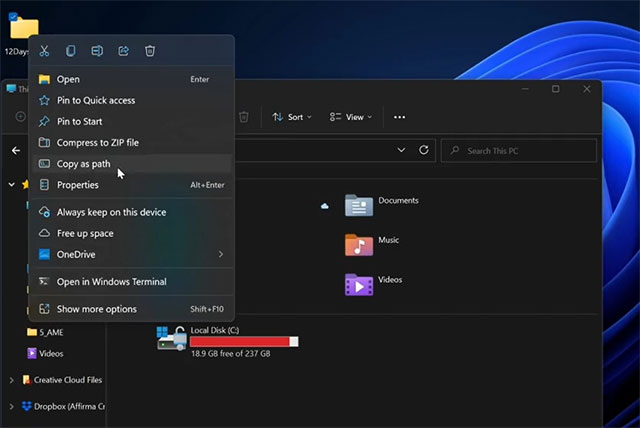
<p style="text-align: justify;">Tuy nhiên đối với Windows 11, quy trình này đã được đơn giản hóa hơn đáng kể. Menu ngữ cảnh của Windows 11 hiện đã bao gồm tùy chọn &quot;Copy as path&quot; theo mặc định. Tức là giờ đây, bạn chỉ cần nhấp chuột phải một tệp hoặc thư mục, sau đó bấm vào tùy chọn &quot;Copy as path&quot; trong menu ngữ cảnh hiện ra để sao chép đường dẫn đầy đủ của nó, thay vì phải nhấn Shift hay duyệt vị trí theo cách thủ công.</p>

<p style="text-align: justify;"><img alt="Tùy chọn &#039;Copy as path&#039;" data-i="0" data-src="https://st.quantrimang.com/photos/image/2021/12/28/sao-chep-duong-dan-tep-thu-muc-trong-file-explorer-windows111.jpg" data-was-processed="true" height="428" src="https://st.quantrimang.com/photos/image/2021/12/28/sao-chep-duong-dan-tep-thu-muc-trong-file-explorer-windows111.jpg" width="640" /></p>

<p style="text-align: justify;">Không dừng lại ở đó, các báo cáo gần đây cho thấy trong một bản cập nhật tương lai gần, Microsoft sẽ giới bổ sung thêm một cụm phím tắt hỗ trợ hỗ trợ người dùng nhanh chóng sao chép đường dẫn tệp, thư mục chỉ với một thao tác nhấn phím đơn giản. Trên thực tế, tính năng này hiện đã khả dụng trên một số phiên bản preview build cho cộng đồng người dùng thử nghiệm. Bạn chỉ cần chọn một tệp hoặc thư mục trong File Explorer, sau đó nhấn tổ hợp phím&nbsp;<strong>CTRL + Shift + C&nbsp;</strong>để sao chép đường dẫn đầy đủ của nó.</p>

<p style="text-align: justify;">Tương tự như tùy chọn “Copy as path” trong menu ngữ cảnh, cụm phím tắt này cũng sẽ sao chép đường dẫn Windows Clipboard. Nếu sử dụng Windows Clipboard Cloud, bạn sẽ có thể đồng bộ hóa loại dữ liệu này trên các thiết bị của mình, bao gồm cả điện thoại Android khi sử dụng ứng dụng SwiftKey hoặc Your Phone (hiện chỉ dành cho thiết bị Samsung).</p>

<p style="text-align: justify;">Cần lưu rằng vị trí của tùy chọn “Copy As Path” sẽ phụ thuộc vào cấu hình hệ thống và đường dẫn sao chép sẽ vẫn bao gồm dấu ngoặc kép. Nếu bạn muốn dán đường dẫn trong địa chỉ Explorer để điều hướng trực tiếp đến tệp/thư mục, hãy đảm bảo rằng bạn đã xóa dấu ngoặc kép trước khi nhấn phím enter.</p>
		</div>
				<div id="author">
						<p>
				<strong>Nguồn tin:</strong>
				Quantrimang.com
			</p>
		</div>
	</div>
	<div id="footer" class="clearfix">
		<div id="url">
			<strong>URL của bản tin này: </strong><a href="https://www.nguoicodonvn2008.info/vi/news/savefile/kien-thuc-may-tinh/viec-sao-chep-duong-dan-tep-thu-muc-trong-file-explorer-hien-da-don-gian-hon-nhieu-tren-windows-11-4940.html" title="Việc sao chép đường dẫn tệp, thư mục trong File Explorer hiện đã đơn giản hơn nhiều trên Windows 11">https://www.nguoicodonvn2008.info/vi/news/savefile/kien-thuc-may-tinh/viec-sao-chep-duong-dan-tep-thu-muc-trong-file-explorer-hien-da-don-gian-hon-nhieu-tren-windows-11-4940.html</a>

		</div>
		<div class="clear"></div>
		<div class="copyright">
			&copy; .&#x3A; Nguoicodonvn2008.info - Cõi lòng người cô đơn &#x3A;.
		</div>
		<div id="contact">
			<a href="mailto:admin@nguoicodonvn2008.info">admin@nguoicodonvn2008.info</a>
		</div>
	</div>
</div>
        <div id="timeoutsess" class="chromeframe">
            Bạn đã không sử dụng Site, <a onclick="timeoutsesscancel();" href="https://nguoicodonvn2008.info/#">Bấm vào đây để duy trì trạng thái đăng nhập</a>. Thời gian chờ: <span id="secField"> 60 </span> giây
        </div>
        <div id="openidResult" class="nv-alert" style="display:none"></div>
        <div id="openidBt" data-result="" data-redirect=""></div>
		</script>
		<div class="car-top">
  <span><img src="https://nguoicodonvn2008.info/themes/default/images/car.png" alt=""></span>
</div>
<script src="https://nguoicodonvn2008.info/assets/js/jquery/jquery.min.js"></script>
<script>var nv_base_siteurl="/",nv_lang_data="vi",nv_lang_interface="vi",nv_name_variable="nv",nv_fc_variable="op",nv_lang_variable="language",nv_module_name="news",nv_func_name="savefile",nv_is_user=0, nv_my_ofs=-4,nv_my_abbr="EDT",nv_cookie_prefix="nv4c_e856T",nv_check_pass_mstime=1738000,nv_area_admin=0,nv_safemode=0,theme_responsive=0,nv_recaptcha_ver=2,nv_recaptcha_sitekey="",nv_recaptcha_type="image",XSSsanitize=1;</script>
<script src="https://nguoicodonvn2008.info/assets/js/language/vi.js"></script>
<script src="https://nguoicodonvn2008.info/assets/js/DOMPurify/purify3.js"></script>
<script src="https://nguoicodonvn2008.info/assets/js/global.js"></script>
<script src="https://nguoicodonvn2008.info/assets/js/site.js"></script>
<script src="https://nguoicodonvn2008.info/themes/default/js/news.js"></script>
<script src="https://nguoicodonvn2008.info/themes/default/js/main.js"></script>
<script src="https://nguoicodonvn2008.info/themes/default/js/custom.js"></script>
<script type="application/ld+json">
        {
            "@context": "https://schema.org",
            "@type": "Organization",
            "url": "https://nguoicodonvn2008.info",
            "logo": "https://nguoicodonvn2008.info/uploads/angel.gif"
        }
        </script>
<script src="https://nguoicodonvn2008.info/themes/default/js/bootstrap.min.js"></script>
<script type="text/javascript">
var $scrolltop = $('.car-top');
$scrolltop.on('click', function () {
    $('html,body').animate({
        scrollTop: 0
    }, 800);
    $(this).addClass("car-run");
    setTimeout(function(){ $scrolltop.removeClass('car-run');}, 1000);
    return false;
});
$(window).on('scroll', function ()
{ 
    if($(window).scrollTop() >= 200)
    {
        $scrolltop.addClass("show");
        $scrolltop.addClass("car-down");
    }
    else
    {
       $scrolltop.removeClass("show");
       setTimeout(function(){ $scrolltop.removeClass('car-down');}, 300);
    }
});
</script>
</body>
</html>