<!DOCTYPE html>
    <html lang="vi" xmlns="http://www.w3.org/1999/xhtml" prefix="og: http://ogp.me/ns#">
    <head>
<title>Ứng dụng này có thể thay thế File Explorer trên Windows 11 của bạn</title>
<meta name="description" content="Ứng dụng này có thể thay thế File Explorer trên Windows 11 của bạn - Savefile - Tin Tức -...">
<meta name="author" content=".: Nguoicodonvn2008.info - Cõi lòng người cô đơn :.">
<meta name="copyright" content=".: Nguoicodonvn2008.info - Cõi lòng người cô đơn :. [admin@nguoicodonvn2008.info]">
<meta name="robots" content="index, archive, follow, noodp">
<meta name="googlebot" content="index,archive,follow,noodp">
<meta name="msnbot" content="all,index,follow">
<meta name="generator" content="NukeViet v4.5">
<meta http-equiv="Content-Type" content="text/html; charset=utf-8">
<meta property="og:title" content="Ứng dụng này có thể thay thế File Explorer trên Windows 11 của bạn">
<meta property="og:type" content="website">
<meta property="og:description" content="Savefile - Tin Tức - https&#x3A;&#x002F;&#x002F;www.nguoicodonvn2008.info&#x002F;vi&#x002F;news&#x002F;savefile&#x002F;kien-thuc-may-tinh&#x002F;ung-dung-nay-co-the-thay-the-file-explorer-tren-windows-11-cua-ban-8378.html">
<meta property="og:site_name" content=".&#x3A; Nguoicodonvn2008.info - Cõi lòng người cô đơn &#x3A;.">
<meta property="og:url" content="https://www.nguoicodonvn2008.info/vi/news/savefile/kien-thuc-may-tinh/ung-dung-nay-co-the-thay-the-file-explorer-tren-windows-11-cua-ban-8378.html">
<link rel="shortcut icon" href="https://nguoicodonvn2008.info/favicon.ico">
<link rel="canonical" href="https://www.nguoicodonvn2008.info/vi/news/savefile/kien-thuc-may-tinh/ung-dung-nay-co-the-thay-the-file-explorer-tren-windows-11-cua-ban-8378.html">
<link rel="alternate" href="https://nguoicodonvn2008.info/vi/news/rss/" title="Tin Tức" type="application/rss+xml">
<link rel="alternate" href="https://nguoicodonvn2008.info/vi/news/rss/karaoke-dual/" title="Tin Tức - Karaoke Dual" type="application/rss+xml">
<link rel="alternate" href="https://nguoicodonvn2008.info/vi/news/rss/nhac-tre/" title="Tin Tức - Nhạc trẻ" type="application/rss+xml">
<link rel="alternate" href="https://nguoicodonvn2008.info/vi/news/rss/tru-tinh/" title="Tin Tức - Trữ tình" type="application/rss+xml">
<link rel="alternate" href="https://nguoicodonvn2008.info/vi/news/rss/nuoc-ngoai/" title="Tin Tức - Nước ngoài" type="application/rss+xml">
<link rel="alternate" href="https://nguoicodonvn2008.info/vi/news/rss/remix/" title="Tin Tức - Remix" type="application/rss+xml">
<link rel="alternate" href="https://nguoicodonvn2008.info/vi/news/rss/tam-su-tinh-yeu/" title="Tin Tức - Tâm sự tình yêu" type="application/rss+xml">
<link rel="alternate" href="https://nguoicodonvn2008.info/vi/news/rss/tho-suu-tam/" title="Tin Tức - Thơ sưu tầm" type="application/rss+xml">
<link rel="alternate" href="https://nguoicodonvn2008.info/vi/news/rss/cuoc-song/" title="Tin Tức - Cuộc sống" type="application/rss+xml">
<link rel="alternate" href="https://nguoicodonvn2008.info/vi/news/rss/phan-mem/" title="Tin Tức - Phần mềm" type="application/rss+xml">
<link rel="alternate" href="https://nguoicodonvn2008.info/vi/news/rss/kien-thuc-may-tinh/" title="Tin Tức - Kiến thức máy tính" type="application/rss+xml">
<link rel="alternate" href="https://nguoicodonvn2008.info/vi/news/rss/hoc-tap/" title="Tin Tức - Học tập" type="application/rss+xml">
<link rel="alternate" href="https://nguoicodonvn2008.info/vi/news/rss/tai-lieu/" title="Tin Tức - Tài liệu" type="application/rss+xml">
<link rel="alternate" href="https://nguoicodonvn2008.info/vi/news/rss/de-thi/" title="Tin Tức - Đề thi" type="application/rss+xml">
<link rel="preload" as="style" href="https://nguoicodonvn2008.info/assets/css/font-awesome.min.css" type="text/css">
<link rel="preload" as="style" href="https://nguoicodonvn2008.info/themes/default/css/bootstrap.non-responsive.css" type="text/css">
<link rel="preload" as="style" href="https://nguoicodonvn2008.info/themes/default/css/style.css" type="text/css">
<link rel="preload" as="style" href="https://nguoicodonvn2008.info/themes/default/css/style.non-responsive.css" type="text/css">
<link rel="preload" as="style" href="https://nguoicodonvn2008.info/themes/default/css/news.css" type="text/css">
<link rel="preload" as="style" href="https://nguoicodonvn2008.info/themes/default/css/custom.css" type="text/css">
<link rel="preload" as="script" href="https://nguoicodonvn2008.info/assets/js/jquery/jquery.min.js" type="text/javascript">
<link rel="preload" as="script" href="https://nguoicodonvn2008.info/assets/js/language/vi.js" type="text/javascript">
<link rel="preload" as="script" href="https://nguoicodonvn2008.info/assets/js/DOMPurify/purify3.js" type="text/javascript">
<link rel="preload" as="script" href="https://nguoicodonvn2008.info/assets/js/global.js" type="text/javascript">
<link rel="preload" as="script" href="https://nguoicodonvn2008.info/assets/js/site.js" type="text/javascript">
<link rel="preload" as="script" href="https://nguoicodonvn2008.info/themes/default/js/news.js" type="text/javascript">
<link rel="preload" as="script" href="https://nguoicodonvn2008.info/themes/default/js/main.js" type="text/javascript">
<link rel="preload" as="script" href="https://nguoicodonvn2008.info/themes/default/js/custom.js" type="text/javascript">
<link rel="preload" as="script" href="https://nguoicodonvn2008.info/themes/default/js/bootstrap.min.js" type="text/javascript">
<link rel="stylesheet" href="https://nguoicodonvn2008.info/assets/css/font-awesome.min.css">
<link rel="stylesheet" href="https://nguoicodonvn2008.info/themes/default/css/bootstrap.non-responsive.css">
<link rel="stylesheet" href="https://nguoicodonvn2008.info/themes/default/css/style.css">
<link rel="stylesheet" href="https://nguoicodonvn2008.info/themes/default/css/style.non-responsive.css">
<link rel="StyleSheet" href="https://nguoicodonvn2008.info/themes/default/css/news.css">
<link rel="stylesheet" href="https://nguoicodonvn2008.info/themes/default/css/custom.css">
<style type="text/css">
	body{background: #fff;}
</style>
    </head>
    <body>
<div id="print">
	<div id="hd_print">
		<h2 class="pull-left">.&#x3A; Nguoicodonvn2008.info - Cõi lòng người cô đơn &#x3A;.</h2>
		<p class="pull-right"><a title=".&#x3A; Nguoicodonvn2008.info - Cõi lòng người cô đơn &#x3A;." href="https://nguoicodonvn2008.info/">https://nguoicodonvn2008.info</a></p>
	</div>
	<div class="clear"></div>
	<hr />
	<div id="content">
		<h1>Ứng dụng này có thể thay thế File Explorer trên Windows 11 của bạn</h1>
		<ul class="list-inline">
			<li>Thứ hai - 20/05/2024 00:14</li>
			<li class="hidden-print txtrequired"><em class="fa fa-print">&nbsp;</em><a title="In ra" href="javascript:;" onclick="window.print()">In ra</a></li>
			<li class="hidden-print txtrequired"><em class="fa fa-power-off">&nbsp;</em><a title="Đóng cửa sổ này" href="javascript:;" onclick="window.close()">Đóng cửa sổ này</a></li>
		</ul>
		<div class="clear"></div>
		<div id="hometext">
		</div>
				<div class="imghome">
			<img alt="Ứng dụng này có thể thay thế File Explorer trên Windows 11 của bạn" src="https://st.quantrimang.com/photos/image/2024/05/19/File-Explorer-1.jpg" width="460" class="img-thumbnail" />
		</div>
		<div class="clear"></div>
		<div id="bodytext" class="clearfix">
			<p style="text-align: justify;">File Explorer trên Windows 11 đang gặp khá nhiều vấn đề. Giao diện được thiết kế lại từ Windows 10 khiến người dùng khó quen, menu chuột phải bị cắt giảm tính năng, menu ribbon cũng vậy.</p>

<p style="text-align: justify;">Mặc dù sau một vài bản cập nhật, mọi thứ đã được cải thiện đôi chút, và Windows 11 cuối cùng cũng hỗ trợ tab trong File Explorer. Nhưng nếu bạn vẫn cảm thấy khó chịu với sự thiếu nhất quán của File Explorer, thì bạn sẽ có một lựa chọn thay thế miễn phí, mã nguồn mở và được cộng đồng hỗ trợ, và nhất là có khả năng tùy chỉnh cao hơn nhiều. Nó đơn giản chỉ có tên là Files.</p>

<h2 style="text-align: justify;">Cách tải Files miễn phí</h2>

<p style="text-align: justify;">Bạn có thể tải Files app từ Microsoft Store chính thức với giá 8 đô la, nhưng nó cũng hoàn toàn miễn phí trên trang web của nhà phát triển. Sau khi mở liên kết ở dưới đây, hãy nhấp vào nút &quot;Classic installer&quot; (Trình cài đặt cổ điển) ở cuối trang để bắt đầu tải xuống&nbsp;<strong>File.Stable.exe</strong>&nbsp;miễn phí.</p>

<p style="text-align: justify;"><strong>Link tải Files<br />
<span style="color:rgb(192, 57, 43);">https://files.community/download</span></strong></p>

<p style="text-align: justify;">Tuy nhiên, trước khi làm điều đó, bạn nên sao lưu máy tính và tất cả các file quan trọng của mình, vì đây là một ứng dụng có quyền can thiệp trực tiếp vào tất cả các file trên máy tính của bạn.</p>

<p style="text-align: justify;"><img alt="file explorer" data-i="0" data-src="https://st.quantrimang.com/photos/image/2024/05/19/File-Explorer-1.jpg" data-was-processed="true" height="414" src="https://st.quantrimang.com/photos/image/2024/05/19/File-Explorer-1.jpg" width="640" /></p>

<div style="text-align: justify;">&nbsp;</div>

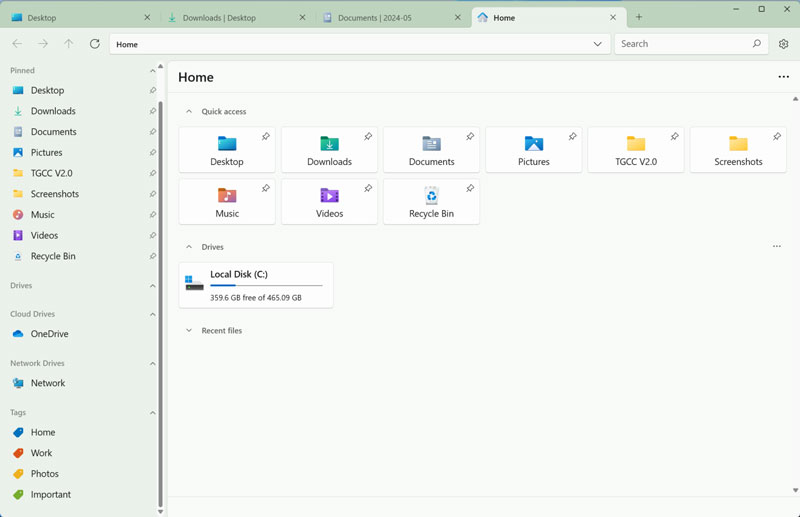
<p style="text-align: justify;">Không thiếu các lựa chọn thay thế File Explorer (trong đó XYPlorer là một lựa chọn phổ biến), và cũng có rất nhiều người sử dụng trình quản lý dữ liệu này. Nhưng ít có ứng dụng nào có thiết kế hiện đại và tinh tế như Files.</p>

<p style="text-align: justify;">Nó lấy cảm hứng từ hệ thống thiết kế Fluent của Microsoft và trông đẹp hơn trên Windows 11 so với File Explorer của chính Microsoft, vốn trông giống như một phiên bản áo khoác giá rẻ của File Explorer trên Windows 10.</p>

<p style="text-align: justify;">Sự nhấn mạnh vào thiết kế này tiếp tục với các tùy chọn tùy chỉnh, có rất nhiều tùy chọn. Bạn có thể chọn từ một vài chủ đề mặc định hoặc tùy chỉnh màu sắc và hiệu ứng trong suốt phù hợp với bạn. Và chế độ tối thì cực kỳ tuyệt vời.</p>

<p style="text-align: justify;"><img alt="file explorer" data-adbro-processed="true" data-i="1" data-src="https://st.quantrimang.com/photos/image/2024/05/19/File-Explorer-1.jpg" data-was-processed="true" height="414" src="https://st.quantrimang.com/photos/image/2024/05/19/File-Explorer-1.jpg" width="640" /></p>

<p style="text-align: justify;">Nếu bạn đang tìm kiếm một giao diện gần giống với macOS, bạn có thể chuyển sang chế độ xem cột (Column view). Giống như Finder trên Mac, ứng dụng này cũng có tính năng xem nhanh cho phép bạn xem ảnh và PDF bằng cách nhấn phím Space (thực hiện việc này trong File Explorer yêu cầu một ứng dụng của bên thứ ba).</p>

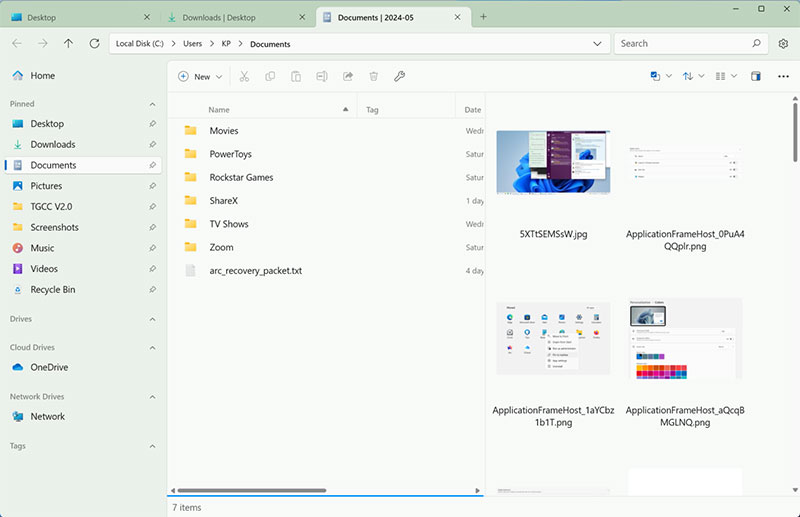
<p style="text-align: justify;">Tuy nhiên, phần yêu thích của tôi là khả năng phóng to các biểu tượng và bản xem trước cực kỳ lớn, vì vậy bạn có thể xem nội dung trong ảnh hoặc PDF mà không cần phải vào menu xem nhanh - điều mà ứng dụng File Explorer gốc không thể làm được.</p>

<p style="text-align: justify;">Giao diện trực quan trong Files cũng mang đến tính năng tuyệt vời. Duyệt theo tab nhanh chóng và dễ dàng, đồng thời hỗ trợ Bảng kép (Dual Pane) giúp bạn có thể thêm một bảng vào tab từ nút Menu. Tính năng này chia nhỏ từng cửa sổ thành hai phần. Bảng thứ hai hiển thị các phím tắt nhanh và cho phép bạn duyệt đến bất kỳ thư mục nào. Từ đó, chỉ cần kéo và thả file, sắp xếp lại hoặc chỉnh sửa theo ý thích.</p>

<div style="text-align: justify;">&nbsp;</div>

<p style="text-align: justify;"><img alt="file explorer" data-i="2" data-src="https://st.quantrimang.com/photos/image/2024/05/19/File-Explorer-3.jpg" data-was-processed="true" height="414" src="https://st.quantrimang.com/photos/image/2024/05/19/File-Explorer-3.jpg" width="640" /></p>

<p style="text-align: justify;">Bố cục Bảng kép giúp việc truyền file trở nên dễ dàng và bạn cũng không cần lo lắng về việc quản lý cửa sổ. Nút Chi tiết (Details) là một điểm nhấn thú vị khác. Thanh bên có thể hiển thị bản xem trước và chi tiết của file được chọn.</p>

<p style="text-align: justify;">Như đã đề cập ở trên, chế độ xem Cột là một cách hữu ích khác để điều hướng sâu hơn vào cấu trúc thư mục phức tạp mà không bị mất ngữ cảnh, vì bạn có thể thấy thư mục gốc ở bên trái.</p>

<p style="text-align: justify;">Một tính năng khác của macOS Finder hoạt động tốt trong Files là hỗ trợ Thẻ (Tagging). Thẻ có thể được tạo từ thanh bên và nhiều thẻ có thể được gán cho một file duy nhất. Khi bạn mở một thẻ từ thanh bên, nó sẽ hiển thị tất cả các file liên quan đến thẻ đó. Đây là một cách tuyệt vời để tập hợp các file từ các thư mục khác nhau mà không cần thực sự di chuyển chúng.</p>

<p style="text-align: justify;">Theo mặc định, Files app hoạt động cả với OneDrive và Google Drive, bạn có thể xem tất cả các file được lưu trữ trong tài khoản lưu trữ đám mây của mình và nó có thể xem trước và giải nén các file. Bạn có thể thêm hỗ trợ cho các dịch vụ khác như&nbsp;iCloud&nbsp;Drive và&nbsp;Dropbox.</p>
		</div>
				<div id="author">
						<p>
				<strong>Nguồn tin:</strong>
				Quantrimang.com
			</p>
		</div>
	</div>
	<div id="footer" class="clearfix">
		<div id="url">
			<strong>URL của bản tin này: </strong><a href="https://www.nguoicodonvn2008.info/vi/news/savefile/kien-thuc-may-tinh/ung-dung-nay-co-the-thay-the-file-explorer-tren-windows-11-cua-ban-8378.html" title="Ứng dụng này có thể thay thế File Explorer trên Windows 11 của bạn">https://www.nguoicodonvn2008.info/vi/news/savefile/kien-thuc-may-tinh/ung-dung-nay-co-the-thay-the-file-explorer-tren-windows-11-cua-ban-8378.html</a>

		</div>
		<div class="clear"></div>
		<div class="copyright">
			&copy; .&#x3A; Nguoicodonvn2008.info - Cõi lòng người cô đơn &#x3A;.
		</div>
		<div id="contact">
			<a href="mailto:admin@nguoicodonvn2008.info">admin@nguoicodonvn2008.info</a>
		</div>
	</div>
</div>
        <div id="timeoutsess" class="chromeframe">
            Bạn đã không sử dụng Site, <a onclick="timeoutsesscancel();" href="https://nguoicodonvn2008.info/#">Bấm vào đây để duy trì trạng thái đăng nhập</a>. Thời gian chờ: <span id="secField"> 60 </span> giây
        </div>
        <div id="openidResult" class="nv-alert" style="display:none"></div>
        <div id="openidBt" data-result="" data-redirect=""></div>
		</script>
		<div class="car-top">
  <span><img src="https://nguoicodonvn2008.info/themes/default/images/car.png" alt=""></span>
</div>
<script src="https://nguoicodonvn2008.info/assets/js/jquery/jquery.min.js"></script>
<script>var nv_base_siteurl="/",nv_lang_data="vi",nv_lang_interface="vi",nv_name_variable="nv",nv_fc_variable="op",nv_lang_variable="language",nv_module_name="news",nv_func_name="savefile",nv_is_user=0, nv_my_ofs=-4,nv_my_abbr="EDT",nv_cookie_prefix="nv4c_e856T",nv_check_pass_mstime=1738000,nv_area_admin=0,nv_safemode=0,theme_responsive=0,nv_recaptcha_ver=2,nv_recaptcha_sitekey="",nv_recaptcha_type="image",XSSsanitize=1;</script>
<script src="https://nguoicodonvn2008.info/assets/js/language/vi.js"></script>
<script src="https://nguoicodonvn2008.info/assets/js/DOMPurify/purify3.js"></script>
<script src="https://nguoicodonvn2008.info/assets/js/global.js"></script>
<script src="https://nguoicodonvn2008.info/assets/js/site.js"></script>
<script src="https://nguoicodonvn2008.info/themes/default/js/news.js"></script>
<script src="https://nguoicodonvn2008.info/themes/default/js/main.js"></script>
<script src="https://nguoicodonvn2008.info/themes/default/js/custom.js"></script>
<script type="application/ld+json">
        {
            "@context": "https://schema.org",
            "@type": "Organization",
            "url": "https://nguoicodonvn2008.info",
            "logo": "https://nguoicodonvn2008.info/uploads/angel.gif"
        }
        </script>
<script src="https://nguoicodonvn2008.info/themes/default/js/bootstrap.min.js"></script>
<script type="text/javascript">
var $scrolltop = $('.car-top');
$scrolltop.on('click', function () {
    $('html,body').animate({
        scrollTop: 0
    }, 800);
    $(this).addClass("car-run");
    setTimeout(function(){ $scrolltop.removeClass('car-run');}, 1000);
    return false;
});
$(window).on('scroll', function ()
{ 
    if($(window).scrollTop() >= 200)
    {
        $scrolltop.addClass("show");
        $scrolltop.addClass("car-down");
    }
    else
    {
       $scrolltop.removeClass("show");
       setTimeout(function(){ $scrolltop.removeClass('car-down');}, 300);
    }
});
</script>
</body>
</html>