<!DOCTYPE html>
    <html lang="vi" xmlns="http://www.w3.org/1999/xhtml" prefix="og: http://ogp.me/ns#">
    <head>
<title>UID trong Linux là gì? Cách tìm và thay đổi UID</title>
<meta name="description" content="UID trong Linux là gì? Cách tìm và thay đổi UID - Savefile - Tin Tức -...">
<meta name="author" content=".: Nguoicodonvn2008.info - Cõi lòng người cô đơn :.">
<meta name="copyright" content=".: Nguoicodonvn2008.info - Cõi lòng người cô đơn :. [admin@nguoicodonvn2008.info]">
<meta name="robots" content="index, archive, follow, noodp">
<meta name="googlebot" content="index,archive,follow,noodp">
<meta name="msnbot" content="all,index,follow">
<meta name="generator" content="NukeViet v4.5">
<meta http-equiv="Content-Type" content="text/html; charset=utf-8">
<meta property="og:title" content="UID trong Linux là gì? Cách tìm và thay đổi UID">
<meta property="og:type" content="website">
<meta property="og:description" content="Savefile - Tin Tức - https&#x3A;&#x002F;&#x002F;www.nguoicodonvn2008.info&#x002F;vi&#x002F;news&#x002F;savefile&#x002F;kien-thuc-may-tinh&#x002F;uid-trong-linux-la-gi-cach-tim-va-thay-doi-uid-2165.html">
<meta property="og:site_name" content=".&#x3A; Nguoicodonvn2008.info - Cõi lòng người cô đơn &#x3A;.">
<meta property="og:url" content="https://www.nguoicodonvn2008.info/vi/news/savefile/kien-thuc-may-tinh/uid-trong-linux-la-gi-cach-tim-va-thay-doi-uid-2165.html">
<link rel="shortcut icon" href="https://nguoicodonvn2008.info/favicon.ico">
<link rel="canonical" href="https://www.nguoicodonvn2008.info/vi/news/savefile/kien-thuc-may-tinh/uid-trong-linux-la-gi-cach-tim-va-thay-doi-uid-2165.html">
<link rel="alternate" href="https://nguoicodonvn2008.info/vi/news/rss/" title="Tin Tức" type="application/rss+xml">
<link rel="alternate" href="https://nguoicodonvn2008.info/vi/news/rss/karaoke-dual/" title="Tin Tức - Karaoke Dual" type="application/rss+xml">
<link rel="alternate" href="https://nguoicodonvn2008.info/vi/news/rss/nhac-tre/" title="Tin Tức - Nhạc trẻ" type="application/rss+xml">
<link rel="alternate" href="https://nguoicodonvn2008.info/vi/news/rss/tru-tinh/" title="Tin Tức - Trữ tình" type="application/rss+xml">
<link rel="alternate" href="https://nguoicodonvn2008.info/vi/news/rss/nuoc-ngoai/" title="Tin Tức - Nước ngoài" type="application/rss+xml">
<link rel="alternate" href="https://nguoicodonvn2008.info/vi/news/rss/remix/" title="Tin Tức - Remix" type="application/rss+xml">
<link rel="alternate" href="https://nguoicodonvn2008.info/vi/news/rss/tam-su-tinh-yeu/" title="Tin Tức - Tâm sự tình yêu" type="application/rss+xml">
<link rel="alternate" href="https://nguoicodonvn2008.info/vi/news/rss/tho-suu-tam/" title="Tin Tức - Thơ sưu tầm" type="application/rss+xml">
<link rel="alternate" href="https://nguoicodonvn2008.info/vi/news/rss/cuoc-song/" title="Tin Tức - Cuộc sống" type="application/rss+xml">
<link rel="alternate" href="https://nguoicodonvn2008.info/vi/news/rss/phan-mem/" title="Tin Tức - Phần mềm" type="application/rss+xml">
<link rel="alternate" href="https://nguoicodonvn2008.info/vi/news/rss/kien-thuc-may-tinh/" title="Tin Tức - Kiến thức máy tính" type="application/rss+xml">
<link rel="alternate" href="https://nguoicodonvn2008.info/vi/news/rss/hoc-tap/" title="Tin Tức - Học tập" type="application/rss+xml">
<link rel="alternate" href="https://nguoicodonvn2008.info/vi/news/rss/tai-lieu/" title="Tin Tức - Tài liệu" type="application/rss+xml">
<link rel="alternate" href="https://nguoicodonvn2008.info/vi/news/rss/de-thi/" title="Tin Tức - Đề thi" type="application/rss+xml">
<link rel="preload" as="style" href="https://nguoicodonvn2008.info/assets/css/font-awesome.min.css" type="text/css">
<link rel="preload" as="style" href="https://nguoicodonvn2008.info/themes/default/css/bootstrap.non-responsive.css" type="text/css">
<link rel="preload" as="style" href="https://nguoicodonvn2008.info/themes/default/css/style.css" type="text/css">
<link rel="preload" as="style" href="https://nguoicodonvn2008.info/themes/default/css/style.non-responsive.css" type="text/css">
<link rel="preload" as="style" href="https://nguoicodonvn2008.info/themes/default/css/news.css" type="text/css">
<link rel="preload" as="style" href="https://nguoicodonvn2008.info/themes/default/css/custom.css" type="text/css">
<link rel="preload" as="script" href="https://nguoicodonvn2008.info/assets/js/jquery/jquery.min.js" type="text/javascript">
<link rel="preload" as="script" href="https://nguoicodonvn2008.info/assets/js/language/vi.js" type="text/javascript">
<link rel="preload" as="script" href="https://nguoicodonvn2008.info/assets/js/DOMPurify/purify3.js" type="text/javascript">
<link rel="preload" as="script" href="https://nguoicodonvn2008.info/assets/js/global.js" type="text/javascript">
<link rel="preload" as="script" href="https://nguoicodonvn2008.info/assets/js/site.js" type="text/javascript">
<link rel="preload" as="script" href="https://nguoicodonvn2008.info/themes/default/js/news.js" type="text/javascript">
<link rel="preload" as="script" href="https://nguoicodonvn2008.info/themes/default/js/main.js" type="text/javascript">
<link rel="preload" as="script" href="https://nguoicodonvn2008.info/themes/default/js/custom.js" type="text/javascript">
<link rel="preload" as="script" href="https://nguoicodonvn2008.info/themes/default/js/bootstrap.min.js" type="text/javascript">
<link rel="stylesheet" href="https://nguoicodonvn2008.info/assets/css/font-awesome.min.css">
<link rel="stylesheet" href="https://nguoicodonvn2008.info/themes/default/css/bootstrap.non-responsive.css">
<link rel="stylesheet" href="https://nguoicodonvn2008.info/themes/default/css/style.css">
<link rel="stylesheet" href="https://nguoicodonvn2008.info/themes/default/css/style.non-responsive.css">
<link rel="StyleSheet" href="https://nguoicodonvn2008.info/themes/default/css/news.css">
<link rel="stylesheet" href="https://nguoicodonvn2008.info/themes/default/css/custom.css">
<style type="text/css">
	body{background: #fff;}
</style>
    </head>
    <body>
<div id="print">
	<div id="hd_print">
		<h2 class="pull-left">.&#x3A; Nguoicodonvn2008.info - Cõi lòng người cô đơn &#x3A;.</h2>
		<p class="pull-right"><a title=".&#x3A; Nguoicodonvn2008.info - Cõi lòng người cô đơn &#x3A;." href="https://nguoicodonvn2008.info/">https://nguoicodonvn2008.info</a></p>
	</div>
	<div class="clear"></div>
	<hr />
	<div id="content">
		<h1>UID trong Linux là gì? Cách tìm và thay đổi UID</h1>
		<ul class="list-inline">
			<li>Thứ bảy - 06/06/2020 00:58</li>
			<li class="hidden-print txtrequired"><em class="fa fa-print">&nbsp;</em><a title="In ra" href="javascript:;" onclick="window.print()">In ra</a></li>
			<li class="hidden-print txtrequired"><em class="fa fa-power-off">&nbsp;</em><a title="Đóng cửa sổ này" href="javascript:;" onclick="window.close()">Đóng cửa sổ này</a></li>
		</ul>
		<div class="clear"></div>
		<div id="hometext">
		</div>
				<div class="imghome">
			<img alt="UID trong Linux là gì? Cách tìm và thay đổi UID" src="https://st.quantrimang.com/photos/image/2020/06/06/uid-trong-linu-7.jpg" width="460" class="img-thumbnail" />
		</div>
		<div class="clear"></div>
		<div id="bodytext" class="clearfix">
			<p style="text-align: justify;">Nếu từng tương tác với các hệ thống Linux, có khả năng bạn đã bắt gặp hai từ này, UID và GID. Nếu bạn chưa nắm rõ về chúng, thì hãy cùng tìm hiểu sâu hơn qua bài viết sau đây.</p>

<h2 style="text-align: justify;">UID trong Linux là gì?</h2>

<p style="text-align: justify;">UID là tên viết tắt của User Identifier, trong khi GID là tên viết tắt của Group Identifier. Trong bài viết cụ thể này,&nbsp;<strong>Quantrimang.com</strong>&nbsp;sẽ tập trung vào User Identifier (UID).</p>

<p style="text-align: justify;">UID là số nhận dạng duy nhất được gán cho mọi người dùng có trong hệ thống Linux. Vai trò chính của UID là xác định người dùng với&nbsp;Linux kernel.</p>

<p style="text-align: justify;">Nó được sử dụng để quản lý tài nguyên mà người dùng có quyền truy cập trong hệ thống. Đó là một trong những lý do để sử dụng UID duy nhất cho mọi người dùng có sẵn. Mặt khác, nếu có hai người dùng được liệt kê với cùng một UID, thì cả hai đều có thể có quyền truy cập vào tài nguyên dành cho người kia.</p>

<div style="text-align: justify;">&nbsp;</div>

<h2 style="text-align: justify;">Tìm UID được lưu trữ ở đâu?</h2>

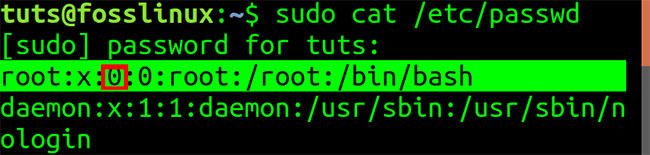
<p style="text-align: justify;">Bạn có thể tìm thấy UID trong file&nbsp;<strong>/etc/passwd,</strong>&nbsp;đây cũng là file lưu trữ tất cả người dùng đã đăng ký trong hệ thống. Để xem nội dung file&nbsp;<strong>/etc/passwd,</strong>&nbsp;hãy chạy lệnh&nbsp;<code>cat</code>&nbsp;trên file, như hiển thị bên dưới trên Terminal.</p>

<figure>
<div style="text-align: justify;"><img alt="Xem nội dung file /etc/passwd" data-i="0" data-src="https://st.quantrimang.com/photos/image/2020/06/06/uid-trong-linu-1.jpg" data-was-processed="true" height="170" src="https://st.quantrimang.com/photos/image/2020/06/06/uid-trong-linu-1.jpg" width="650" /></div>

<figcaption>
<div style="text-align: justify;">Xem nội dung file /etc/passwd</div>
</figcaption>
</figure>

<p style="text-align: justify;">File&nbsp;<strong>/etc/passwd</strong>&nbsp;chứa tất cả các thuộc tính cần thiết hoặc thông tin cơ bản về mọi người dùng trong hệ thống. Dữ liệu được hiển thị trong 7 cột, như được liệt kê dưới đây. Các trường này được phân tách bằng dấu hai chấm (:). File này cũng chứa các tài khoản và nhóm do hệ thống xác định cần thiết để cài đặt, chạy và cập nhật hệ thống thích hợp.</p>

<ul>
	<li style="text-align: justify;">Cột 1 - Tên</li>
	<li style="text-align: justify;">Cột 2 - Mật khẩu - Nếu người dùng đã đặt mật khẩu trên trường này, thì nó được chỉ định bằng chữ cái (x).</li>
	<li style="text-align: justify;">Cột 3 - UID (User ID)</li>
	<li style="text-align: justify;">Cột 4 - GID (Group ID)</li>
	<li style="text-align: justify;">Cột 5 - Gecos - Chứa thông tin chung về người dùng và có thể để trống.</li>
	<li style="text-align: justify;">Cột 6 - Thư mục Home</li>
	<li style="text-align: justify;">Cột 7 - Shell - Đường dẫn đến shell mặc định cho người dùng.</li>
</ul>

<h2 style="text-align: justify;">Xác định UID</h2>

<p style="text-align: justify;">Từ hình ảnh trên, người dùng đầu tiên được liệt kê trên file là&nbsp;<a href="https://quantrimang.com/cach-tro-thanh-root-trong-linux-170876" title="Root là gì? Làm sao để trở thành root trong Linux?">root</a>. Root có toàn quyền kiểm soát mọi khía cạnh của hệ thống. Người dùng root được gán UID Zero (O) và GID (0). Theo sau là các tài khoản và nhóm do hệ thống xác định.</p>

<figure>
<div style="text-align: justify;"><img alt="Root có toàn quyền kiểm soát mọi khía cạnh của hệ thống" data-i="1" data-src="https://st.quantrimang.com/photos/image/2020/06/06/uid-trong-linu-2.jpg" data-was-processed="true" height="155" src="https://st.quantrimang.com/photos/image/2020/06/06/uid-trong-linu-2.jpg" width="650" /></div>

<figcaption>
<div style="text-align: justify;">Root có toàn quyền kiểm soát mọi khía cạnh của hệ thống</div>
</figcaption>
</figure>

<p style="text-align: justify;">Một điều nữa cần lưu ý là UID = 0 và GID = 0 là những gì cung cấp cho người dùng root tất cả các quyền hạn trong hệ thống. Nếu muốn chứng minh điều đó, hãy đổi tên root thành một thứ gì đó khác như&nbsp;<strong>example_User</strong>&nbsp;và tạo người dùng root mới với UID và GID mới.</p>

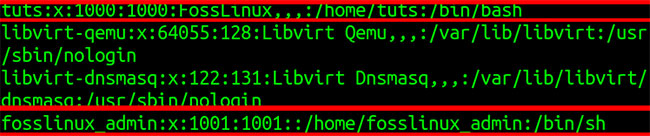
<p style="text-align: justify;">Ngoài ra, các tài khoản và nhóm do hệ thống xác định theo người dùng root có UID 1,2,3,4, v.v... Đó là bởi vì hầu hết các hệ thống Linux dành 500 UID đầu tiên cho người dùng hệ thống. Những người dùng khác thêm bằng lệnh&nbsp;<code>useradd</code>&nbsp;được gán UID từ 500 trở đi. Trong các hệ thống&nbsp;<a href="https://quantrimang.com/so-sanh-fedora-va-ubuntu-165167" title="So sánh Fedora và Ubuntu">Ubuntu và Fedora</a>, một người dùng mới, hay thậm chí một người dùng được tạo trong quá trình cài đặt, được cấp UID từ 1000 trở lên.</p>

<p style="text-align: justify;">Bạn có thể thấy điều này trong hình ảnh bên dưới, nơi có 2 người dùng&nbsp;<strong>Fosslinux_admin</strong>&nbsp;và&nbsp;<strong>Tuts.</strong></p>

<figure>
<div style="text-align: justify;"><img alt="Có 2 người dùng Fosslinux_admin và Tuts" data-i="2" data-src="https://st.quantrimang.com/photos/image/2020/06/06/uid-trong-linu-3.jpg" data-was-processed="true" height="136" src="https://st.quantrimang.com/photos/image/2020/06/06/uid-trong-linu-3.jpg" width="650" /></div>

<figcaption>
<div style="text-align: justify;">Có 2 người dùng Fosslinux_admin và Tuts</div>
</figcaption>
</figure>

<p style="text-align: justify;">Người dùng tuts đã được tạo trong quá trình cài đặt và gán UID 1000. Người dùng còn lại, fosslinux, đã được thêm vào sau đó và cấp UID 1001.</p>

<div style="text-align: justify;"><iframe allowfullscreen="true" allowtransparency="true" data-google-container-id="a!4" data-google-query-id="CInLyNSz7OkCFRqDrAIduq0Ndw" data-load-complete="true" frameborder="0" height="160" hspace="0" id="aswift_3" marginheight="0" marginwidth="0" name="aswift_3" sandbox="allow-forms allow-pointer-lock allow-popups allow-popups-to-escape-sandbox allow-same-origin allow-scripts allow-top-navigation-by-user-activation" scrolling="no" src="https://googleads.g.doubleclick.net/pagead/ads?client=ca-pub-9275417305531302&amp;output=html&amp;h=160&amp;slotname=4889239415&amp;adk=2251247195&amp;adf=1878685485&amp;w=638&amp;fwrn=4&amp;lmt=1591416492&amp;rafmt=11&amp;psa=1&amp;guci=2.2.0.0.2.2.0.0&amp;format=638x160&amp;url=https%3A%2F%2Fquantrimang.com%2Fuid-trong-linux-172393&amp;flash=32.0.0&amp;wgl=1&amp;adsid=ChEI8Nrn9gUQ5NjnstaH697PARIvABsf7JaRD2LKLIx2VV2Na7JNGTABLpj7r1M6bo470TTeHoqEUvqbxTnuSuuUwyw&amp;dt=1591419495733&amp;bpp=4&amp;bdt=625&amp;idt=2078&amp;shv=r20200602&amp;cbv=r20190131&amp;ptt=9&amp;saldr=aa&amp;abxe=1&amp;cookie=ID%3D95a2f8afa81be7d9%3AT%3D1591416209%3AS%3DALNI_MaBi9OkJXXTi2-m-mrb2bdVVVu9mg&amp;crv=1&amp;prev_fmts=334x250%2C334x90_0ads_al%2C638x160%2C336x280%2C0x0&amp;prev_slotnames=8803994080&amp;nras=1&amp;correlator=7465586011018&amp;frm=20&amp;pv=1&amp;ga_vid=296795504.1591416209&amp;ga_sid=1591419496&amp;ga_hid=486097788&amp;ga_fc=0&amp;iag=0&amp;icsg=8522284&amp;dssz=26&amp;mdo=0&amp;mso=0&amp;rplot=4&amp;u_tz=420&amp;u_his=13&amp;u_java=0&amp;u_h=768&amp;u_w=1366&amp;u_ah=728&amp;u_aw=1366&amp;u_cd=24&amp;u_nplug=4&amp;u_nmime=6&amp;adx=24&amp;ady=2534&amp;biw=1305&amp;bih=623&amp;scr_x=0&amp;scr_y=52&amp;eid=21066004%2C21066124&amp;oid=3&amp;psts=AGkb-H-cAptJW9yBYNUddu-glJe-p_fVIy5D_DwJKCgs4m6T8bhKnCcwNszQREH4jEM%2CAGkb-H-NX6-tlKJDLblL0wGJ8c2a-7ATqHBSPVBbeEYOMKepYb-u1cyMgA%2CAGkb-H865y1B7cJYHPaddU1MbfLfjSqFLSuC7rF9gPTsKMlNNjXTvrIwqEI%2CAGkb-H865y1B7cJYHPaddU1MbfLfjSqFLSuC7rF9gPTsKMlNNjXTvrIwqEI%2CAGkb-H865y1B7cJYHPaddU1MbfLfjSqFLSuC7rF9gPTsKMlNNjXTvrIwqEI%2CAGkb-H865y1B7cJYHPaddU1MbfLfjSqFLSuC7rF9gPTsKMlNNjXTvrIwqEI&amp;pvsid=1625551130697419&amp;pem=962&amp;ref=https%3A%2F%2Fquantrimang.com%2F&amp;rx=0&amp;eae=0&amp;fc=896&amp;brdim=0%2C0%2C0%2C0%2C1366%2C0%2C1366%2C728%2C1322%2C623&amp;vis=1&amp;rsz=o%7Co%7CoeEbr%7C&amp;abl=NS&amp;pfx=0&amp;fu=8336&amp;bc=31&amp;jar=2020-06-06-04&amp;ifi=4&amp;uci=a!4&amp;btvi=2&amp;fsb=1&amp;xpc=ssVnu5NvgJ&amp;p=https%3A//quantrimang.com&amp;dtd=12864" vspace="0" width="638"></iframe></div>

<h2 style="text-align: justify;">Cách tìm UID của người dùng, nhóm hoặc tài khoản</h2>

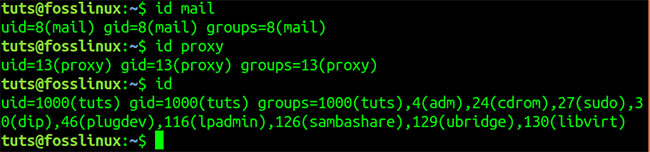
<p style="text-align: justify;">Bài viết đã thảo luận về cách có thể tìm thấy một UID thông qua việc hiển thị nội dung của file&nbsp;<strong>/etc/passwd.</strong>&nbsp;Có một cách nhanh chóng và dễ dàng hơn bằng cách sử dụng lệnh&nbsp;<code>id</code>.</p>

<p style="text-align: justify;">Ví dụ, để tìm UID của người dùng Fosslinux_admin và Tuts, hãy thực thi lệnh bên dưới. Bạn có thể được yêu cầu nhập mật khẩu root.</p>

<pre id="pre0">
<code>id fosslinux_admin
 id tuts</code></pre>

<p style="text-align: justify;">Bạn cũng có thể chạy lệnh&nbsp;<code>id</code>&nbsp;trên các nhóm khác. Bằng cách thực thi một mình lệnh&nbsp;<code>id</code>&nbsp;trong Terminal, nó sẽ hiển thị UID của người dùng đã đăng nhập hiện tại.</p>

<figure>
<div style="text-align: justify;"><img alt="Bạn cũng có thể chạy lệnh id trên các nhóm khác" data-i="3" data-src="https://st.quantrimang.com/photos/image/2020/06/06/uid-trong-linu-4.jpg" data-was-processed="true" height="152" src="https://st.quantrimang.com/photos/image/2020/06/06/uid-trong-linu-4.jpg" width="650" /></div>

<figcaption>
<div style="text-align: justify;">Bạn cũng có thể chạy lệnh id trên các nhóm khác</div>
</figcaption>
</figure>

<h2 style="text-align: justify;">Cách thay đổi UID</h2>

<p style="text-align: justify;">Giả sử bạn đang quản lý một hệ thống có nhiều người dùng. Nếu một người dùng rời khỏi công ty, có lẽ bạn sẽ cần gán cho người dùng mới UID của nhân viên đã nghỉ việc.</p>

<p style="text-align: justify;">Trước tiên, hãy tạo một người dùng tạm thời cho ví dụ này. Bài viết sẽ sử dụng lệnh&nbsp;<code>useradd</code>. Bạn sẽ cần phải có quyền root.&nbsp;</p>

<pre id="pre1">
<code>useradd example_user</code></pre>

<p style="text-align: justify;">Bằng cách chạy lệnh&nbsp;<code>id</code>&nbsp;trên user&nbsp;<strong>example_user</strong>, bạn có thể thấy rằng người dùng mới này có UID 1003.</p>

<figure>
<div style="text-align: justify;"><img alt="Người dùng mới này có UID 1003" data-i="4" data-src="https://st.quantrimang.com/photos/image/2020/06/06/uid-trong-linu-5.jpg" data-was-processed="true" height="101" src="https://st.quantrimang.com/photos/image/2020/06/06/uid-trong-linu-5.jpg" width="650" /></div>

<figcaption>
<div style="text-align: justify;">Người dùng mới này có UID 1003</div>
</figcaption>
</figure>

<p style="text-align: justify;">Bây giờ, hãy xóa người dùng Fosslinux_admin có UID = 1001 và gán nó cho người dùng mới. Bài viết sẽ sử dụng lệnh&nbsp;<code>userdel</code>&nbsp;để loại bỏ người dùng.</p>

<pre id="pre2">
<code>sudo userdel -r fosslinux_admin</code></pre>

<p style="text-align: justify;">Sau khi thực hiện điều đó, UID sẽ được chỉ định người dùng mới -&nbsp;<strong>example_user</strong>&nbsp;- UID thuộc về Fosslinux_admin. Đó là UID = 1001. Bài viết sẽ thực hiện việc này bằng lệnh&nbsp;<code>usermod</code>.</p>

<pre id="pre3">
<code>usermod -u 1001 exmple_user</code></pre>

<p style="text-align: justify;">Bằng cách chạy lệnh id trên người dùng, ví dụ, _user, ta thấy rằng người dùng hiện có UID = 1001.</p>

<figure>
<div style="text-align: justify;"><img alt="Người dùng hiện có UID = 1001" data-i="5" data-src="https://st.quantrimang.com/photos/image/2020/06/06/uid-trong-linu-6.jpg" data-was-processed="true" height="84" src="https://st.quantrimang.com/photos/image/2020/06/06/uid-trong-linu-6.jpg" width="650" /></div>

<figcaption>
<div style="text-align: justify;">Người dùng hiện có UID = 1001</div>
</figcaption>
</figure>

<p style="text-align: justify;">Bây giờ, khi gán UID của người dùng cũ cho người dùng mới, bạn sẽ cần đồng bộ những file này với tất cả các file khác thuộc về người dùng cũ. Bạn có thể làm điều này bằng cách thực thi lệnh dưới đây.</p>

<pre id="pre4">
<code>find / -user &#91;UID_of_old_user&#93; -exec chown -h &#91;new_user&#93; {} \;
 e.g
 sudo find / -user 1001 -exec chown -h user_2 {} \;</code></pre>

<h2 style="text-align: justify;">Tạo người dùng mới với UID cụ thể</h2>

<p style="text-align: justify;">Ngoài ra, bạn có thể tạo người dùng mới bằng lệnh&nbsp;<code>useradd</code>&nbsp;và gán cho người dùng một UID cụ thể. Xem cú pháp dưới đây.</p>

<pre id="pre5">
<code>sudo useradd -u 1111 user_2</code></pre>

<figure>
<div style="text-align: justify;"><img alt="Tạo người dùng mới với UID cụ thể" data-i="6" data-src="https://st.quantrimang.com/photos/image/2020/06/06/uid-trong-linu-7.jpg" data-was-processed="true" height="92" src="https://st.quantrimang.com/photos/image/2020/06/06/uid-trong-linu-7.jpg" width="650" /></div>

<figcaption>
<div style="text-align: justify;">Tạo người dùng mới với UID cụ thể</div>
</figcaption>
</figure>

<p style="text-align: justify;">Bằng cách chạy lệnh&nbsp;<code>id</code>&nbsp;trên&nbsp;<strong>user_2</strong>, ta thấy rằng UID của người dùng = 1111.</p>
		</div>
				<div id="author">
						<p>
				<strong>Nguồn tin:</strong>
				Quantrimang.com
			</p>
		</div>
	</div>
	<div id="footer" class="clearfix">
		<div id="url">
			<strong>URL của bản tin này: </strong><a href="https://www.nguoicodonvn2008.info/vi/news/savefile/kien-thuc-may-tinh/uid-trong-linux-la-gi-cach-tim-va-thay-doi-uid-2165.html" title="UID trong Linux là gì? Cách tìm và thay đổi UID">https://www.nguoicodonvn2008.info/vi/news/savefile/kien-thuc-may-tinh/uid-trong-linux-la-gi-cach-tim-va-thay-doi-uid-2165.html</a>

		</div>
		<div class="clear"></div>
		<div class="copyright">
			&copy; .&#x3A; Nguoicodonvn2008.info - Cõi lòng người cô đơn &#x3A;.
		</div>
		<div id="contact">
			<a href="mailto:admin@nguoicodonvn2008.info">admin@nguoicodonvn2008.info</a>
		</div>
	</div>
</div>
        <div id="timeoutsess" class="chromeframe">
            Bạn đã không sử dụng Site, <a onclick="timeoutsesscancel();" href="https://nguoicodonvn2008.info/#">Bấm vào đây để duy trì trạng thái đăng nhập</a>. Thời gian chờ: <span id="secField"> 60 </span> giây
        </div>
        <div id="openidResult" class="nv-alert" style="display:none"></div>
        <div id="openidBt" data-result="" data-redirect=""></div>
		</script>
		<div class="car-top">
  <span><img src="https://nguoicodonvn2008.info/themes/default/images/car.png" alt=""></span>
</div>
<script src="https://nguoicodonvn2008.info/assets/js/jquery/jquery.min.js"></script>
<script>var nv_base_siteurl="/",nv_lang_data="vi",nv_lang_interface="vi",nv_name_variable="nv",nv_fc_variable="op",nv_lang_variable="language",nv_module_name="news",nv_func_name="savefile",nv_is_user=0, nv_my_ofs=-4,nv_my_abbr="EDT",nv_cookie_prefix="nv4c_e856T",nv_check_pass_mstime=1738000,nv_area_admin=0,nv_safemode=0,theme_responsive=0,nv_recaptcha_ver=2,nv_recaptcha_sitekey="",nv_recaptcha_type="image",XSSsanitize=1;</script>
<script src="https://nguoicodonvn2008.info/assets/js/language/vi.js"></script>
<script src="https://nguoicodonvn2008.info/assets/js/DOMPurify/purify3.js"></script>
<script src="https://nguoicodonvn2008.info/assets/js/global.js"></script>
<script src="https://nguoicodonvn2008.info/assets/js/site.js"></script>
<script src="https://nguoicodonvn2008.info/themes/default/js/news.js"></script>
<script src="https://nguoicodonvn2008.info/themes/default/js/main.js"></script>
<script src="https://nguoicodonvn2008.info/themes/default/js/custom.js"></script>
<script type="application/ld+json">
        {
            "@context": "https://schema.org",
            "@type": "Organization",
            "url": "https://nguoicodonvn2008.info",
            "logo": "https://nguoicodonvn2008.info/uploads/angel.gif"
        }
        </script>
<script src="https://nguoicodonvn2008.info/themes/default/js/bootstrap.min.js"></script>
<script type="text/javascript">
var $scrolltop = $('.car-top');
$scrolltop.on('click', function () {
    $('html,body').animate({
        scrollTop: 0
    }, 800);
    $(this).addClass("car-run");
    setTimeout(function(){ $scrolltop.removeClass('car-run');}, 1000);
    return false;
});
$(window).on('scroll', function ()
{ 
    if($(window).scrollTop() >= 200)
    {
        $scrolltop.addClass("show");
        $scrolltop.addClass("car-down");
    }
    else
    {
       $scrolltop.removeClass("show");
       setTimeout(function(){ $scrolltop.removeClass('car-down');}, 300);
    }
});
</script>
</body>
</html>