<!DOCTYPE html>
    <html lang="vi" xmlns="http://www.w3.org/1999/xhtml" prefix="og: http://ogp.me/ns#">
    <head>
<title>Tìm hiểu về mã lỗi 0xc00000e và cách khắc phục</title>
<meta name="description" content="Tìm hiểu về mã lỗi 0xc00000e và cách khắc phục - Savefile - Tin Tức -...">
<meta name="author" content=".: Nguoicodonvn2008.info - Cõi lòng người cô đơn :.">
<meta name="copyright" content=".: Nguoicodonvn2008.info - Cõi lòng người cô đơn :. [admin@nguoicodonvn2008.info]">
<meta name="robots" content="index, archive, follow, noodp">
<meta name="googlebot" content="index,archive,follow,noodp">
<meta name="msnbot" content="all,index,follow">
<meta name="generator" content="NukeViet v4.5">
<meta http-equiv="Content-Type" content="text/html; charset=utf-8">
<meta property="og:title" content="Tìm hiểu về mã lỗi 0xc00000e và cách khắc phục">
<meta property="og:type" content="website">
<meta property="og:description" content="Savefile - Tin Tức - https&#x3A;&#x002F;&#x002F;www.nguoicodonvn2008.info&#x002F;vi&#x002F;news&#x002F;savefile&#x002F;kien-thuc-may-tinh&#x002F;tim-hieu-ve-ma-loi-0xc00000e-va-cach-khac-phuc-2777.html">
<meta property="og:site_name" content=".&#x3A; Nguoicodonvn2008.info - Cõi lòng người cô đơn &#x3A;.">
<meta property="og:url" content="https://www.nguoicodonvn2008.info/vi/news/savefile/kien-thuc-may-tinh/tim-hieu-ve-ma-loi-0xc00000e-va-cach-khac-phuc-2777.html">
<link rel="shortcut icon" href="https://nguoicodonvn2008.info/favicon.ico">
<link rel="canonical" href="https://www.nguoicodonvn2008.info/vi/news/savefile/kien-thuc-may-tinh/tim-hieu-ve-ma-loi-0xc00000e-va-cach-khac-phuc-2777.html">
<link rel="alternate" href="https://nguoicodonvn2008.info/vi/news/rss/" title="Tin Tức" type="application/rss+xml">
<link rel="alternate" href="https://nguoicodonvn2008.info/vi/news/rss/karaoke-dual/" title="Tin Tức - Karaoke Dual" type="application/rss+xml">
<link rel="alternate" href="https://nguoicodonvn2008.info/vi/news/rss/nhac-tre/" title="Tin Tức - Nhạc trẻ" type="application/rss+xml">
<link rel="alternate" href="https://nguoicodonvn2008.info/vi/news/rss/tru-tinh/" title="Tin Tức - Trữ tình" type="application/rss+xml">
<link rel="alternate" href="https://nguoicodonvn2008.info/vi/news/rss/nuoc-ngoai/" title="Tin Tức - Nước ngoài" type="application/rss+xml">
<link rel="alternate" href="https://nguoicodonvn2008.info/vi/news/rss/remix/" title="Tin Tức - Remix" type="application/rss+xml">
<link rel="alternate" href="https://nguoicodonvn2008.info/vi/news/rss/tam-su-tinh-yeu/" title="Tin Tức - Tâm sự tình yêu" type="application/rss+xml">
<link rel="alternate" href="https://nguoicodonvn2008.info/vi/news/rss/tho-suu-tam/" title="Tin Tức - Thơ sưu tầm" type="application/rss+xml">
<link rel="alternate" href="https://nguoicodonvn2008.info/vi/news/rss/cuoc-song/" title="Tin Tức - Cuộc sống" type="application/rss+xml">
<link rel="alternate" href="https://nguoicodonvn2008.info/vi/news/rss/phan-mem/" title="Tin Tức - Phần mềm" type="application/rss+xml">
<link rel="alternate" href="https://nguoicodonvn2008.info/vi/news/rss/kien-thuc-may-tinh/" title="Tin Tức - Kiến thức máy tính" type="application/rss+xml">
<link rel="alternate" href="https://nguoicodonvn2008.info/vi/news/rss/hoc-tap/" title="Tin Tức - Học tập" type="application/rss+xml">
<link rel="alternate" href="https://nguoicodonvn2008.info/vi/news/rss/tai-lieu/" title="Tin Tức - Tài liệu" type="application/rss+xml">
<link rel="alternate" href="https://nguoicodonvn2008.info/vi/news/rss/de-thi/" title="Tin Tức - Đề thi" type="application/rss+xml">
<link rel="preload" as="style" href="https://nguoicodonvn2008.info/assets/css/font-awesome.min.css" type="text/css">
<link rel="preload" as="style" href="https://nguoicodonvn2008.info/themes/default/css/bootstrap.non-responsive.css" type="text/css">
<link rel="preload" as="style" href="https://nguoicodonvn2008.info/themes/default/css/style.css" type="text/css">
<link rel="preload" as="style" href="https://nguoicodonvn2008.info/themes/default/css/style.non-responsive.css" type="text/css">
<link rel="preload" as="style" href="https://nguoicodonvn2008.info/themes/default/css/news.css" type="text/css">
<link rel="preload" as="style" href="https://nguoicodonvn2008.info/themes/default/css/custom.css" type="text/css">
<link rel="preload" as="script" href="https://nguoicodonvn2008.info/assets/js/jquery/jquery.min.js" type="text/javascript">
<link rel="preload" as="script" href="https://nguoicodonvn2008.info/assets/js/language/vi.js" type="text/javascript">
<link rel="preload" as="script" href="https://nguoicodonvn2008.info/assets/js/DOMPurify/purify3.js" type="text/javascript">
<link rel="preload" as="script" href="https://nguoicodonvn2008.info/assets/js/global.js" type="text/javascript">
<link rel="preload" as="script" href="https://nguoicodonvn2008.info/assets/js/site.js" type="text/javascript">
<link rel="preload" as="script" href="https://nguoicodonvn2008.info/themes/default/js/news.js" type="text/javascript">
<link rel="preload" as="script" href="https://nguoicodonvn2008.info/themes/default/js/main.js" type="text/javascript">
<link rel="preload" as="script" href="https://nguoicodonvn2008.info/themes/default/js/custom.js" type="text/javascript">
<link rel="preload" as="script" href="https://nguoicodonvn2008.info/themes/default/js/bootstrap.min.js" type="text/javascript">
<link rel="stylesheet" href="https://nguoicodonvn2008.info/assets/css/font-awesome.min.css">
<link rel="stylesheet" href="https://nguoicodonvn2008.info/themes/default/css/bootstrap.non-responsive.css">
<link rel="stylesheet" href="https://nguoicodonvn2008.info/themes/default/css/style.css">
<link rel="stylesheet" href="https://nguoicodonvn2008.info/themes/default/css/style.non-responsive.css">
<link rel="StyleSheet" href="https://nguoicodonvn2008.info/themes/default/css/news.css">
<link rel="stylesheet" href="https://nguoicodonvn2008.info/themes/default/css/custom.css">
<style type="text/css">
	body{background: #fff;}
</style>
    </head>
    <body>
<div id="print">
	<div id="hd_print">
		<h2 class="pull-left">.&#x3A; Nguoicodonvn2008.info - Cõi lòng người cô đơn &#x3A;.</h2>
		<p class="pull-right"><a title=".&#x3A; Nguoicodonvn2008.info - Cõi lòng người cô đơn &#x3A;." href="https://nguoicodonvn2008.info/">https://nguoicodonvn2008.info</a></p>
	</div>
	<div class="clear"></div>
	<hr />
	<div id="content">
		<h1>Tìm hiểu về mã lỗi 0xc00000e và cách khắc phục</h1>
		<ul class="list-inline">
			<li>Thứ năm - 24/09/2020 00:53</li>
			<li class="hidden-print txtrequired"><em class="fa fa-print">&nbsp;</em><a title="In ra" href="javascript:;" onclick="window.print()">In ra</a></li>
			<li class="hidden-print txtrequired"><em class="fa fa-power-off">&nbsp;</em><a title="Đóng cửa sổ này" href="javascript:;" onclick="window.close()">Đóng cửa sổ này</a></li>
		</ul>
		<div class="clear"></div>
		<div id="hometext">
		</div>
				<div class="imghome">
			<img alt="Tìm hiểu về mã lỗi 0xc00000e và cách khắc phục" src="https://st.quantrimang.com/photos/image/2020/09/24/ma-loi-0xc00000e-2.jpg" width="460" class="img-thumbnail" />
		</div>
		<div class="clear"></div>
		<div id="bodytext" class="clearfix">
			<p style="text-align: justify;">Mã lỗi 0xc00000e là một lỗi Windows gây ra do cấu trúc file bị hỏng hoặc hiếm gặp hơn là một thành phần trong máy tính bị ngắt kết nối vật lý. Đây là mã lỗi phổ biến trong tất cả các phiên bản Windows, từ Windows Vista trở đi, mặc dù cách trình bày và ngôn ngữ sử dụng để mô tả lỗi có khác nhau đôi chút.</p>

<p style="text-align: justify;">Thông tin trong bài viết này áp dụng cho các máy tính chạy Windows 10, Windows 8, Windows 7 hoặc Windows Vista.</p>

<h2 style="text-align: justify;">Mã lỗi 0xc00000e xuất hiện như thế nào?</h2>

<p style="text-align: justify;">Mã lỗi 0xc00000e xuất hiện khi khởi động máy tính. Nó có một trong hai dạng:</p>

<p style="text-align: justify;">- Màn hình đen với &quot;<strong>Windows Boot Manager</strong>&quot; ở trên cùng trong biểu ngữ màu xám. Nó cho biết rằng, &quot;<em>The selected entry could not be loaded because the application is missing or corrupt</em>” (Không thể load mục nhập đã chọn vì ứng dụng bị thiếu hoặc bị hỏng).</p>

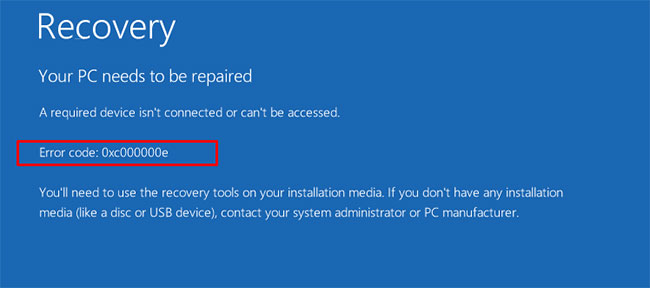
<p style="text-align: justify;">- Màn hình màu xanh lam có dòng tiêu đề &quot;<strong>Your PC Needs To Be Repaired</strong>” (Máy tính của bạn cần được sửa chữa) với nội dung &quot;<em>A required device isn&#039;t connected or can&#039;t be accessed</em>” (Thiết bị cần thiết không được kết nối hoặc không thể truy cập).</p>

<figure data-inimage-loaded="true">
<div style="text-align: justify;"><br />
<img alt="Mã lỗi 0xc00000e" data-i="0" data-src="https://st.quantrimang.com/photos/image/2020/09/24/ma-loi-0xc00000e-1.jpg" data-was-processed="true" height="288" src="https://st.quantrimang.com/photos/image/2020/09/24/ma-loi-0xc00000e-1.jpg" width="650" /></div>

<figcaption>
<div style="text-align: justify;">Mã lỗi 0xc00000e</div>
</figcaption>
</figure>

<div style="text-align: justify;">&nbsp;</div>

<h2 style="text-align: justify;">Nguyên nhân nào gây ra mã lỗi 0xc00000e?</h2>

<p style="text-align: justify;">Phần mô tả lỗi trên một số thiết bị là nguyên nhân gây nhầm lẫn, khiến một số người tin rằng máy in hoặc phụ kiện khác đã gây ra sự cố.</p>

<p style="text-align: justify;">Tuy nhiên, lỗi thường do sự cố trong Boot Configuration Database. Hãy coi BCD như một danh sách việc cần làm mà một máy tính tuân theo để khởi động và làm Windows có sẵn để sử dụng. Các file này có thể bị hỏng hoặc cấu hình sai. Nếu không có danh sách chính xác - và tất cả các mục được đề cập trong danh sách đó - thì máy tính sẽ ngừng hoạt động. Đây là lý do tại sao bạn tiếp tục gặp lỗi cho dù bạn&nbsp;khởi động lại máy tính&nbsp;bao lâu một lần.</p>

<figure>
<div style="text-align: justify;"><img alt="Lỗi thường do sự cố trong Boot Configuration Database gây ra" data-i="1" data-src="https://st.quantrimang.com/photos/image/2020/09/24/ma-loi-0xc00000e-2.jpg" data-was-processed="true" height="429" src="https://st.quantrimang.com/photos/image/2020/09/24/ma-loi-0xc00000e-2.jpg" width="650" /></div>

<figcaption>
<div style="text-align: justify;">Lỗi thường do sự cố trong Boot Configuration Database gây ra</div>
</figcaption>
</figure>

<h2 style="text-align: justify;">Cách sửa mã lỗi 0xc00000e</h2>

<p style="text-align: justify;">Công cụ hiệu quả nhất để ngăn chặn lỗi này là tắt máy tính đúng cách mỗi khi bạn làm việc xong. Tuy nhiên, nếu bạn gặp lỗi, có một số bản sửa lỗi có sẵn để giúp bạn.</p>

<p style="text-align: justify;"><strong>Lưu ý</strong>:&nbsp;<strong>Advanced Startup Options</strong>&nbsp;trong Windows 10 và Windows 8 đã thay thế menu&nbsp;<strong>System Recovery Options</strong>&nbsp;trong Windows 7 và Windows Vista.</p>

<div style="text-align: justify;">&nbsp;</div>

<h3 style="text-align: justify;">1. Kiểm tra xem có các kết nối lỏng lẻo không</h3>

<p style="text-align: justify;">Tắt máy tính và kiểm tra từng kết nối hoặc bộ phận để đảm bảo rằng không có gì bị lỏng, đặc biệt nếu gần đây bạn đã sửa chữa thứ gì đó. Mặc dù không chắc chắn đây là vấn đề, nhưng trước tiên cần loại trừ nguyên nhân này.</p>

<h3 style="text-align: justify;">2. Sử dụng công cụ khôi phục</h3>

<p style="text-align: justify;">Bạn có thể cần thay đổi thứ tự boot trên PC để chạy công cụ khôi phục từ thiết bị USB.</p>

<h3 style="text-align: justify;">3.&nbsp;Sử dụng System Restore</h3>

<p style="text-align: justify;">System Restore cho phép bạn đưa máy tính của mình quay trở lại về những cài đặt trước đó. Bạn có thể mất một số dữ liệu khi làm như vậy, cũng như cần tải lại và cài đặt lại bất kỳ chương trình hoặc bản cập nhật nào bạn đã cài đặt trước đó trên máy.</p>

<div style="text-align: justify;">&nbsp;</div>

<h3 style="text-align: justify;">4.&nbsp;Sử dụng Command Prompt</h3>

<p style="text-align: justify;">Để chạy sửa chữa BCD, chọn Command Prompt trong menu&nbsp;<strong>Advanced Options</strong>&nbsp;(Windows 10 và Windows 8) hoặc menu&nbsp;<strong>System Recovery Options</strong>&nbsp;(Windows 7 và Windows Vista) và nhập code này:</p>

<pre id="pre0">
<code>bootrec/rebuildbcd</code></pre>

<p style="text-align: justify;">Chọn<strong>&nbsp;Y</strong>&nbsp;khi được nhắc.</p>

<h3 style="text-align: justify;">5.&nbsp;Chạy lệnh checkdisk</h3>

<p style="text-align: justify;">Để sửa các file từ Command Prompt, hãy nhập:</p>

<pre id="pre1">
<code>CHKDSK C: /r /f</code></pre>

<p style="text-align: justify;">Sau đó, nhấn&nbsp;<strong>Enter.</strong>&nbsp;Điều này sửa chữa các file bị hỏng trên máy tính.</p>

<h3 style="text-align: justify;">6. Khôi phục các file boot về mặc định</h3>

<p style="text-align: justify;">Từ Command Prompt, nhập:</p>

<pre id="pre2">
<code>DISM /Online/Cleanup-Image/RestoreHealth sfc/scannow</code></pre>

<p style="text-align: justify;">Sau đó, chạy các lệnh.</p>

<h3 style="text-align: justify;">7. Tiến hành cài đặt mới Windows</h3>

<p style="text-align: justify;">Khởi động công cụ khôi phục hoặc phương tiện cài đặt và chọn&nbsp;<strong>Install Now.</strong>&nbsp;Thao tác này sẽ xóa hoàn toàn PC và tất cả dữ liệu, vì vậy chỉ thực hiện nếu bạn không còn tùy chọn nào khác.</p>

<h2 style="text-align: justify;">Các lỗi tương tự như mã lỗi 0xc00000e</h2>

<p style="text-align: justify;">Các lỗi bạn có thể gặp phải với các giải pháp tương tự bao gồm:</p>

<ul>
	<li style="text-align: justify;"><strong>0xc0000467:</strong>&nbsp;Được mô tả là &quot;<em>The file is temporarily unavailable</em>” (File tạm thời không khả dụng).</li>
	<li style="text-align: justify;"><strong>0xc000000f:</strong>&nbsp;Được mô tả là &quot;<em>File not found</em>” (Không tìm thấy file).</li>
	<li style="text-align: justify;"><strong>0xc0000001:</strong>&nbsp;Được trình bày là &quot;<em>The requested operation was unsuccessful</em>” (Thao tác được yêu cầu không thành công).</li>
</ul>
		</div>
				<div id="author">
						<p>
				<strong>Nguồn tin:</strong>
				Quantrimang.com
			</p>
		</div>
	</div>
	<div id="footer" class="clearfix">
		<div id="url">
			<strong>URL của bản tin này: </strong><a href="https://www.nguoicodonvn2008.info/vi/news/savefile/kien-thuc-may-tinh/tim-hieu-ve-ma-loi-0xc00000e-va-cach-khac-phuc-2777.html" title="Tìm hiểu về mã lỗi 0xc00000e và cách khắc phục">https://www.nguoicodonvn2008.info/vi/news/savefile/kien-thuc-may-tinh/tim-hieu-ve-ma-loi-0xc00000e-va-cach-khac-phuc-2777.html</a>

		</div>
		<div class="clear"></div>
		<div class="copyright">
			&copy; .&#x3A; Nguoicodonvn2008.info - Cõi lòng người cô đơn &#x3A;.
		</div>
		<div id="contact">
			<a href="mailto:admin@nguoicodonvn2008.info">admin@nguoicodonvn2008.info</a>
		</div>
	</div>
</div>
        <div id="timeoutsess" class="chromeframe">
            Bạn đã không sử dụng Site, <a onclick="timeoutsesscancel();" href="https://nguoicodonvn2008.info/#">Bấm vào đây để duy trì trạng thái đăng nhập</a>. Thời gian chờ: <span id="secField"> 60 </span> giây
        </div>
        <div id="openidResult" class="nv-alert" style="display:none"></div>
        <div id="openidBt" data-result="" data-redirect=""></div>
		</script>
		<div class="car-top">
  <span><img src="https://nguoicodonvn2008.info/themes/default/images/car.png" alt=""></span>
</div>
<script src="https://nguoicodonvn2008.info/assets/js/jquery/jquery.min.js"></script>
<script>var nv_base_siteurl="/",nv_lang_data="vi",nv_lang_interface="vi",nv_name_variable="nv",nv_fc_variable="op",nv_lang_variable="language",nv_module_name="news",nv_func_name="savefile",nv_is_user=0, nv_my_ofs=-4,nv_my_abbr="EDT",nv_cookie_prefix="nv4c_e856T",nv_check_pass_mstime=1738000,nv_area_admin=0,nv_safemode=0,theme_responsive=0,nv_recaptcha_ver=2,nv_recaptcha_sitekey="",nv_recaptcha_type="image",XSSsanitize=1;</script>
<script src="https://nguoicodonvn2008.info/assets/js/language/vi.js"></script>
<script src="https://nguoicodonvn2008.info/assets/js/DOMPurify/purify3.js"></script>
<script src="https://nguoicodonvn2008.info/assets/js/global.js"></script>
<script src="https://nguoicodonvn2008.info/assets/js/site.js"></script>
<script src="https://nguoicodonvn2008.info/themes/default/js/news.js"></script>
<script src="https://nguoicodonvn2008.info/themes/default/js/main.js"></script>
<script src="https://nguoicodonvn2008.info/themes/default/js/custom.js"></script>
<script type="application/ld+json">
        {
            "@context": "https://schema.org",
            "@type": "Organization",
            "url": "https://nguoicodonvn2008.info",
            "logo": "https://nguoicodonvn2008.info/uploads/angel.gif"
        }
        </script>
<script src="https://nguoicodonvn2008.info/themes/default/js/bootstrap.min.js"></script>
<script type="text/javascript">
var $scrolltop = $('.car-top');
$scrolltop.on('click', function () {
    $('html,body').animate({
        scrollTop: 0
    }, 800);
    $(this).addClass("car-run");
    setTimeout(function(){ $scrolltop.removeClass('car-run');}, 1000);
    return false;
});
$(window).on('scroll', function ()
{ 
    if($(window).scrollTop() >= 200)
    {
        $scrolltop.addClass("show");
        $scrolltop.addClass("car-down");
    }
    else
    {
       $scrolltop.removeClass("show");
       setTimeout(function(){ $scrolltop.removeClass('car-down');}, 300);
    }
});
</script>
</body>
</html>