<!DOCTYPE html>
    <html lang="vi" xmlns="http://www.w3.org/1999/xhtml" prefix="og: http://ogp.me/ns#">
    <head>
<title>Tìm hiểu về lệnh Attrib</title>
<meta name="description" content="Tìm hiểu về lệnh Attrib - Savefile - Tin Tức - https&#x3A;&#x002F;&#x002F;www.nguoicodonvn2008.info&#x002F;vi&#x002F;news&#x002F;savefile&#x002F;kien-thuc-may-tinh&#x002F;tim-hieu-ve-lenh-attrib-1467.html">
<meta name="author" content=".: Nguoicodonvn2008.info - Cõi lòng người cô đơn :.">
<meta name="copyright" content=".: Nguoicodonvn2008.info - Cõi lòng người cô đơn :. [admin@nguoicodonvn2008.info]">
<meta name="robots" content="index, archive, follow, noodp">
<meta name="googlebot" content="index,archive,follow,noodp">
<meta name="msnbot" content="all,index,follow">
<meta name="generator" content="NukeViet v4.5">
<meta http-equiv="Content-Type" content="text/html; charset=utf-8">
<meta property="og:title" content="Tìm hiểu về lệnh Attrib">
<meta property="og:type" content="website">
<meta property="og:description" content="Savefile - Tin Tức - https&#x3A;&#x002F;&#x002F;www.nguoicodonvn2008.info&#x002F;vi&#x002F;news&#x002F;savefile&#x002F;kien-thuc-may-tinh&#x002F;tim-hieu-ve-lenh-attrib-1467.html">
<meta property="og:site_name" content=".&#x3A; Nguoicodonvn2008.info - Cõi lòng người cô đơn &#x3A;.">
<meta property="og:url" content="https://www.nguoicodonvn2008.info/vi/news/savefile/kien-thuc-may-tinh/tim-hieu-ve-lenh-attrib-1467.html">
<link rel="shortcut icon" href="https://nguoicodonvn2008.info/favicon.ico">
<link rel="canonical" href="https://www.nguoicodonvn2008.info/vi/news/savefile/kien-thuc-may-tinh/tim-hieu-ve-lenh-attrib-1467.html">
<link rel="alternate" href="https://nguoicodonvn2008.info/vi/news/rss/" title="Tin Tức" type="application/rss+xml">
<link rel="alternate" href="https://nguoicodonvn2008.info/vi/news/rss/karaoke-dual/" title="Tin Tức - Karaoke Dual" type="application/rss+xml">
<link rel="alternate" href="https://nguoicodonvn2008.info/vi/news/rss/nhac-tre/" title="Tin Tức - Nhạc trẻ" type="application/rss+xml">
<link rel="alternate" href="https://nguoicodonvn2008.info/vi/news/rss/tru-tinh/" title="Tin Tức - Trữ tình" type="application/rss+xml">
<link rel="alternate" href="https://nguoicodonvn2008.info/vi/news/rss/nuoc-ngoai/" title="Tin Tức - Nước ngoài" type="application/rss+xml">
<link rel="alternate" href="https://nguoicodonvn2008.info/vi/news/rss/remix/" title="Tin Tức - Remix" type="application/rss+xml">
<link rel="alternate" href="https://nguoicodonvn2008.info/vi/news/rss/tam-su-tinh-yeu/" title="Tin Tức - Tâm sự tình yêu" type="application/rss+xml">
<link rel="alternate" href="https://nguoicodonvn2008.info/vi/news/rss/tho-suu-tam/" title="Tin Tức - Thơ sưu tầm" type="application/rss+xml">
<link rel="alternate" href="https://nguoicodonvn2008.info/vi/news/rss/cuoc-song/" title="Tin Tức - Cuộc sống" type="application/rss+xml">
<link rel="alternate" href="https://nguoicodonvn2008.info/vi/news/rss/phan-mem/" title="Tin Tức - Phần mềm" type="application/rss+xml">
<link rel="alternate" href="https://nguoicodonvn2008.info/vi/news/rss/kien-thuc-may-tinh/" title="Tin Tức - Kiến thức máy tính" type="application/rss+xml">
<link rel="alternate" href="https://nguoicodonvn2008.info/vi/news/rss/hoc-tap/" title="Tin Tức - Học tập" type="application/rss+xml">
<link rel="alternate" href="https://nguoicodonvn2008.info/vi/news/rss/tai-lieu/" title="Tin Tức - Tài liệu" type="application/rss+xml">
<link rel="alternate" href="https://nguoicodonvn2008.info/vi/news/rss/de-thi/" title="Tin Tức - Đề thi" type="application/rss+xml">
<link rel="preload" as="style" href="https://nguoicodonvn2008.info/assets/css/font-awesome.min.css" type="text/css">
<link rel="preload" as="style" href="https://nguoicodonvn2008.info/themes/default/css/bootstrap.non-responsive.css" type="text/css">
<link rel="preload" as="style" href="https://nguoicodonvn2008.info/themes/default/css/style.css" type="text/css">
<link rel="preload" as="style" href="https://nguoicodonvn2008.info/themes/default/css/style.non-responsive.css" type="text/css">
<link rel="preload" as="style" href="https://nguoicodonvn2008.info/themes/default/css/news.css" type="text/css">
<link rel="preload" as="style" href="https://nguoicodonvn2008.info/themes/default/css/custom.css" type="text/css">
<link rel="preload" as="script" href="https://nguoicodonvn2008.info/assets/js/jquery/jquery.min.js" type="text/javascript">
<link rel="preload" as="script" href="https://nguoicodonvn2008.info/assets/js/language/vi.js" type="text/javascript">
<link rel="preload" as="script" href="https://nguoicodonvn2008.info/assets/js/DOMPurify/purify3.js" type="text/javascript">
<link rel="preload" as="script" href="https://nguoicodonvn2008.info/assets/js/global.js" type="text/javascript">
<link rel="preload" as="script" href="https://nguoicodonvn2008.info/assets/js/site.js" type="text/javascript">
<link rel="preload" as="script" href="https://nguoicodonvn2008.info/themes/default/js/news.js" type="text/javascript">
<link rel="preload" as="script" href="https://nguoicodonvn2008.info/themes/default/js/main.js" type="text/javascript">
<link rel="preload" as="script" href="https://nguoicodonvn2008.info/themes/default/js/custom.js" type="text/javascript">
<link rel="preload" as="script" href="https://nguoicodonvn2008.info/themes/default/js/bootstrap.min.js" type="text/javascript">
<link rel="stylesheet" href="https://nguoicodonvn2008.info/assets/css/font-awesome.min.css">
<link rel="stylesheet" href="https://nguoicodonvn2008.info/themes/default/css/bootstrap.non-responsive.css">
<link rel="stylesheet" href="https://nguoicodonvn2008.info/themes/default/css/style.css">
<link rel="stylesheet" href="https://nguoicodonvn2008.info/themes/default/css/style.non-responsive.css">
<link rel="StyleSheet" href="https://nguoicodonvn2008.info/themes/default/css/news.css">
<link rel="stylesheet" href="https://nguoicodonvn2008.info/themes/default/css/custom.css">
<style type="text/css">
	body{background: #fff;}
</style>
    </head>
    <body>
<div id="print">
	<div id="hd_print">
		<h2 class="pull-left">.&#x3A; Nguoicodonvn2008.info - Cõi lòng người cô đơn &#x3A;.</h2>
		<p class="pull-right"><a title=".&#x3A; Nguoicodonvn2008.info - Cõi lòng người cô đơn &#x3A;." href="https://nguoicodonvn2008.info/">https://nguoicodonvn2008.info</a></p>
	</div>
	<div class="clear"></div>
	<hr />
	<div id="content">
		<h1>Tìm hiểu về lệnh Attrib</h1>
		<ul class="list-inline">
			<li>Thứ bảy - 14/12/2019 06:27</li>
			<li class="hidden-print txtrequired"><em class="fa fa-print">&nbsp;</em><a title="In ra" href="javascript:;" onclick="window.print()">In ra</a></li>
			<li class="hidden-print txtrequired"><em class="fa fa-power-off">&nbsp;</em><a title="Đóng cửa sổ này" href="javascript:;" onclick="window.close()">Đóng cửa sổ này</a></li>
		</ul>
		<div class="clear"></div>
		<div id="hometext">
		</div>
				<div class="imghome">
			<img alt="Tìm hiểu về lệnh Attrib" src="https://st.quantrimang.com/photos/image/2019/12/13/tim-hieu-ve-lenh-attrib-3.jpg" width="460" class="img-thumbnail" />
		</div>
		<div class="clear"></div>
		<div id="bodytext" class="clearfix">
			<p style="text-align: justify;">Lệnh attrib là lệnh Command Prompt được sử dụng để hiển thị hoặc thay đổi các thuộc tính cho file hoặc thư mục.</p>

<p style="text-align: justify;">Bạn cũng có thể tìm và đặt hầu hết các thuộc tính file và thư mục trong Explorer. Lệnh attrib có sẵn ở đâu?</p>

<p style="text-align: justify;">Lệnh attrib có sẵn trong&nbsp;Command Prompt&nbsp;trên tất cả&nbsp;các hệ điều hành Windows, bao gồm Windows 10, Windows 8, Windows 7, Windows Vista, Windows XP, cùng với các phiên bản Windows cũ hơn.</p>

<p style="text-align: justify;">Tất cả các công cụ chẩn đoán và sửa chữa ngoại tuyến có sẵn với các phiên bản Windows khác nhau, bao gồm&nbsp;Advanced Startup Options,&nbsp;System Recovery Options, và&nbsp;Recovery Console, cũng bao gồm lệnh attrib với một số khả năng.</p>

<p style="text-align: justify;">Lệnh attrib này cũng có sẵn trong MS-DOS dưới dạng lệnh DOS.</p>

<p style="text-align: justify;"><strong>Lưu ý</strong>: Tính khả dụng của các switch lệnh attrib nhất định và cú pháp lệnh attrib khác có thể khác nhau trên mỗi hệ điều hành.</p>

<h2 style="text-align: justify;">&nbsp;</h2>

<h2 id="mcetoc_1drv4f33c0" style="text-align: justify;">Cú pháp và switch lệnh attrib</h2>

<pre id="pre0">
<code>attrib &#91;+a|-a&#93; &#91;+h|-h&#93; &#91;+i|-i&#93; &#91;+r|-r&#93; &#91;+s|-s&#93; &#91;+v|-v&#93; &#91;+x|-x&#93; &#91;drive:&#93;&#91;path&#93;&#91;filename&#93; &#91;/s &#91;/d&#93; &#91;/l&#93;&#93;</code></pre>

<p style="text-align: justify;"><strong>Mẹo</strong>: Nếu không chắc chắn làm thế nào để diễn giải cú pháp lệnh attrib đã thấy ở trên hoặc được hiển thị trong bảng bên dưới, bạn nên học cách đọc cú pháp lệnh trước tiên.</p>

<p style="text-align: justify;"><img alt="Cú pháp và switch lệnh attrib" data-i="0" data-src="https://st.quantrimang.com/photos/image/2019/12/13/tim-hieu-ve-lenh-attrib-1.jpg" data-was-processed="true" height="147" src="https://st.quantrimang.com/photos/image/2019/12/13/tim-hieu-ve-lenh-attrib-1.jpg" width="398" /></p>

<table border="1">
		<tr>
			<th colspan="2" style="text-align: justify;">Các tùy chọn lệnh Attrib</th>
		</tr>
	<tbody data-check="-1">
		<tr>
			<td style="text-align: justify;"><strong>Tùy chọn</strong></td>
			<td style="text-align: justify;"><strong>Giải thích</strong></td>
		</tr>
		<tr>
			<td style="text-align: justify;"><strong>attrib</strong></td>
			<td style="text-align: justify;">Thực thi lệnh attrib một mình để xem các thuộc tính được đặt trên những file trong thư mục mà bạn thực thi lệnh từ đó.</td>
		</tr>
		<tr>
			<td style="text-align: justify;"><strong>+a</strong></td>
			<td style="text-align: justify;">Đặt thuộc tính file lưu trữ (archive file) cho file hoặc thư mục.</td>
		</tr>
		<tr>
			<td style="text-align: justify;"><strong>-a</strong></td>
			<td style="text-align: justify;">Xóa thuộc tính lưu trữ.</td>
		</tr>
		<tr>
			<td style="text-align: justify;"><strong>+h</strong></td>
			<td style="text-align: justify;">Đặt thuộc tính ẩn cho file hoặc thư mục.</td>
		</tr>
		<tr>
			<td style="text-align: justify;"><strong>-h</strong></td>
			<td style="text-align: justify;">Xóa thuộc tính ẩn.</td>
		</tr>
		<tr>
			<td style="text-align: justify;"><strong>+i</strong></td>
			<td style="text-align: justify;">Đặt thuộc tính &quot;not content indexed&quot; (không được lập chỉ mục nội dung) cho file hoặc thư mục.</td>
		</tr>
		<tr>
			<td style="text-align: justify;"><strong>-i</strong></td>
			<td style="text-align: justify;">Xóa thuộc tính &quot;not content indexed&quot;.</td>
		</tr>
		<tr>
			<td style="text-align: justify;"><strong>+r</strong></td>
			<td style="text-align: justify;">Đặt thuộc tính chỉ đọc cho file hoặc thư mục.</td>
		</tr>
		<tr>
			<td style="text-align: justify;"><strong>-r</strong></td>
			<td style="text-align: justify;">Xóa thuộc tính chỉ đọc.</td>
		</tr>
		<tr>
			<td style="text-align: justify;"><strong>+s</strong></td>
			<td style="text-align: justify;">Đặt thuộc tính file hệ thống cho file hoặc thư mục.</td>
		</tr>
		<tr>
			<td style="text-align: justify;"><strong>-s</strong></td>
			<td style="text-align: justify;">Xóa thuộc tính hệ thống.</td>
		</tr>
		<tr>
			<td style="text-align: justify;"><strong>+v</strong></td>
			<td style="text-align: justify;">Đặt thuộc tính integrity (toàn vẹn) cho file hoặc thư mục.</td>
		</tr>
		<tr>
			<td style="text-align: justify;"><strong>-v</strong></td>
			<td style="text-align: justify;">Xóa thuộc tính integrity.</td>
		</tr>
		<tr>
			<td style="text-align: justify;"><strong>+x</strong></td>
			<td style="text-align: justify;">Đặt thuộc tính no scrub file cho file hoặc thư mục.</td>
		</tr>
		<tr>
			<td style="text-align: justify;"><strong>-x</strong></td>
			<td style="text-align: justify;">Xóa thuộc tính no scrub.</td>
		</tr>
		<tr>
			<td style="text-align: justify;"><em>drive</em><strong>:</strong><em>, path, filename</em></td>
			<td style="text-align: justify;">Đây là file (<em>filename</em>,&nbsp;<em>drive</em>&nbsp;và&nbsp;<em>path&nbsp;</em>là tùy chọn), thư mục (<em>path</em>,&nbsp;<em>drive&nbsp;</em>là tùy chọn), hoặc&nbsp;<em>drive</em>&nbsp;(ổ) mà bạn muốn xem hoặc thay đổi các thuộc tính. Có thể sử dụng ký tự đại diện.</td>
		</tr>
		<tr>
			<td style="text-align: justify;"><strong>/s</strong></td>
			<td style="text-align: justify;">Sử dụng switch này để thực thi bất cứ thuộc tính file nào được hiển thị, hoặc những thay đổi bạn đang tạo trên thư mục con trong bất cứ&nbsp;<em>drive</em>&nbsp;(ổ) và/hoặc&nbsp;<em>path</em>&nbsp;(đường dẫn) đã chỉ định hoặc những thứ trong thư mục đang thực thi, nếu bạn không chỉ định ổ hoặc đường dẫn.</td>
		</tr>
		<tr>
			<td style="text-align: justify;"><strong>/d</strong></td>
			<td style="text-align: justify;">Tùy chọn attrib này bao gồm các thư mục, chứ không chỉ các file, cho bất cứ điều gì bạn đang thực thi. Bạn chỉ có thể sử dụng<strong>&nbsp;/d</strong>&nbsp;với&nbsp;<strong>/s</strong>.</td>
		</tr>
		<tr>
			<td style="text-align: justify;"><strong>/l</strong></td>
			<td style="text-align: justify;">Tùy chọn&nbsp;<strong>/l</strong>&nbsp;áp dụng bất cứ điều gì bạn đang làm với lệnh attrib cho bản thân Symbolic Link (liên kết tượng trưng) thay vì mục tiêu của Symbolic Link. Switch&nbsp;<strong>/l</strong>&nbsp;chỉ hoạt động khi bạn đồng thời sử dụng switch&nbsp;<strong>/s</strong>.</td>
		</tr>
		<tr>
			<td style="text-align: justify;"><strong>/?</strong></td>
			<td style="text-align: justify;">Sử dụng switch help với lệnh attrib để hiển thị chi tiết về các tùy chọn trên ngay trong cửa sổ Command Prompt. Việc thực thi&nbsp;<strong>attrib /?</strong>&nbsp;cũng giống như sử dụng lệnh help để thực thi&nbsp;<strong>help attrib</strong>.</td>
		</tr>
	</tbody>
</table>

<p style="text-align: justify;"><strong>Lưu ý</strong>: Trong&nbsp;<a href="https://quantrimang.com/cai-dat-va-su-dung-recovery-console-trong-win-xp-61397" title="Cài đặt và sử dụng Recovery Console trong Win XP">Recovery Console</a>, các switch&nbsp;<strong>+c</strong>&nbsp;và&nbsp;<strong>-c</strong>&nbsp;có sẵn cho lệnh attrib, lần lượt đặt và xóa thuộc tính file nén. Bên ngoài khu vực chẩn đoán này trong Windows XP, sử dụng lệnh compact để xử lý việc nén file từ dòng lệnh.</p>

<p style="text-align: justify;">Khi ký tự đại diện được phép với lệnh attrib, điều đó có nghĩa là bạn có thể sử dụng dấu hoa thị (*) để áp dụng thuộc tính cho một nhóm file. Tuy nhiên, nếu có thể, bạn cần xóa thuộc tính ẩn hoặc thuộc tính hệ thống trước khi có thể thay đổi bất kỳ thuộc tính nào khác của file.</p>

<h2 id="mcetoc_1drv4f33d1" style="text-align: justify;">Ví dụ về lệnh attrib</h2>

<pre id="pre1">
<code>attrib +r c:\windows\system\secretfolder</code></pre>

<p style="text-align: justify;">Trong ví dụ trên, lệnh attrib được sử dụng để kích hoạt thuộc tính chỉ đọc, sử dụng tùy chọn&nbsp;<strong>+r,</strong>&nbsp;cho thư mục&nbsp;<em>secretfolder</em>&nbsp;nằm trong&nbsp;<em>c:\windows\system.</em></p>

<pre id="pre2">
<code>attrib -h c:\config.sys</code></pre>

<p style="text-align: justify;">Trong ví dụ này, file&nbsp;<em>config.sys</em>&nbsp;nằm trong thư mục root của ổ&nbsp;<em>c:</em>&nbsp;có thuộc tính file ẩn bị xóa bằng cách sử dụng tùy chọn&nbsp;<strong>-h.</strong></p>

<pre id="pre3">
<code>attrib -h -r -s c:\boot\bcd</code></pre>

<p style="text-align: justify;">Lần này, lệnh attrib được sử dụng để xóa nhiều thuộc tính khỏi file bcd, một file quan trọng phải hoạt động để giúp Windows khởi động. Trong thực tế, thực thi lệnh attrib, như được hiển thị ở trên, là một phần quan trọng của quy trình được nêu trong các bước cần thiết để xây dựng lại BCD trong Windows.</p>

<pre id="pre4">
<code>attrib +a f:*.* &amp; attrib -a f:*.bak</code></pre>

<p style="text-align: justify;">Với ví dụ về lệnh attrib ở trên, bài viết đang áp dụng&nbsp;<strong>+a</strong>&nbsp;để đặt thuộc tính lưu trữ trên tất cả các file tồn tại trên ổ&nbsp;<em>f</em>, nhưng sau đó sử dụng&nbsp;<strong>&amp;</strong>&nbsp;để xóa thuộc tính lưu trữ trên mọi file trên&nbsp;<em>f:</em>&nbsp;có phần mở rộng file .bak.</p>

<p style="text-align: justify;"><strong>Mẹo:</strong>&nbsp;Trong ví dụ trên, các file BAK chỉ ra những file đã được sao lưu, nghĩa là chúng không cần được lưu trữ hay sao lưu lại, do đó cần phải xóa thuộc tính lưu trữ.</p>

<pre id="pre5">
<code>attrib myimage.jpg</code></pre>

<p style="text-align: justify;">Để kết thúc với một ví dụ attrib đơn giản, lệnh này chỉ đơn giản hiển thị các thuộc tính của một file có tên&nbsp;<em>myimage.jpg.</em>&nbsp;Nếu bạn đã loại bỏ nửa thứ hai và chỉ thực hiện lệnh attrib, thuộc tính cho tất cả các file trong thư mục hiện tại sẽ được hiển thị.</p>

<h2 id="mcetoc_1drv4f33d2" style="text-align: justify;">Lỗi lệnh attrib</h2>

<p style="text-align: justify;"><img alt="Lỗi lệnh attrib" data-i="1" data-src="https://st.quantrimang.com/photos/image/2019/12/13/tim-hieu-ve-lenh-attrib-3.jpg" data-was-processed="true" height="365" src="https://st.quantrimang.com/photos/image/2019/12/13/tim-hieu-ve-lenh-attrib-3.jpg" width="581" /></p>

<p style="text-align: justify;">Giống như với hầu hết các lệnh trong Command Prompt, hãy nhớ sử dụng dấu ngoặc kép quanh tên thư mục hoặc file có khoảng trắng. Nếu bạn quên làm điều này với lệnh attrib, bạn sẽ gặp lỗi&nbsp;<strong>&quot;Parameter format not correct -&quot;</strong>.</p>

<p style="text-align: justify;">Ví dụ, thay vì nhập&nbsp;<em>my folder</em>&nbsp;vào Command Prompt để hiển thị đường dẫn đến thư mục theo tên đó, bạn sẽ nhập&nbsp;<em>&quot;my folder&quot;</em>&nbsp;(sử dụng dấu ngoặc kép).</p>

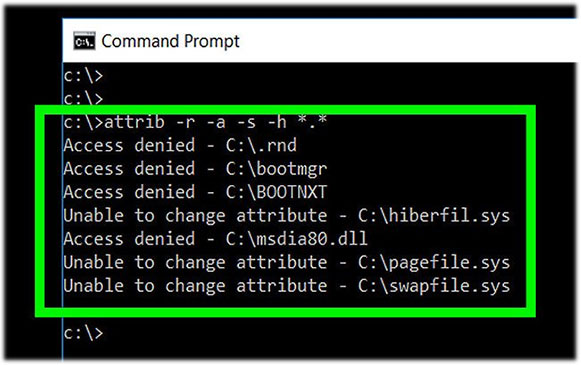
<p style="text-align: justify;">Lỗi lệnh attrib như&nbsp;<strong>&quot;Access Denied&quot;</strong>&nbsp;có nghĩa là bạn không có đủ quyền truy cập vào (các) file mà bạn đang cố thực hiện thay đổi thuộc tính. Hãy thiết lập quyền sở hữu những file đó trong Windows và rồi thử lại.</p>

<div style="text-align: justify;">&nbsp;</div>

<h2 id="mcetoc_1drv4f33d3" style="text-align: justify;">Thay đổi trong lệnh attrib</h2>

<p style="text-align: justify;"><img alt="Thay đổi trong lệnh attrib" data-i="2" data-src="https://st.quantrimang.com/photos/image/2019/12/13/tim-hieu-ve-lenh-attrib-2.jpg" data-was-processed="true" height="455" src="https://st.quantrimang.com/photos/image/2019/12/13/tim-hieu-ve-lenh-attrib-2.jpg" width="650" /></p>

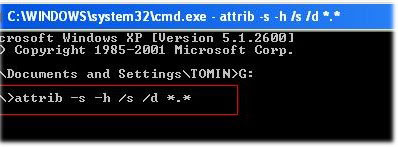
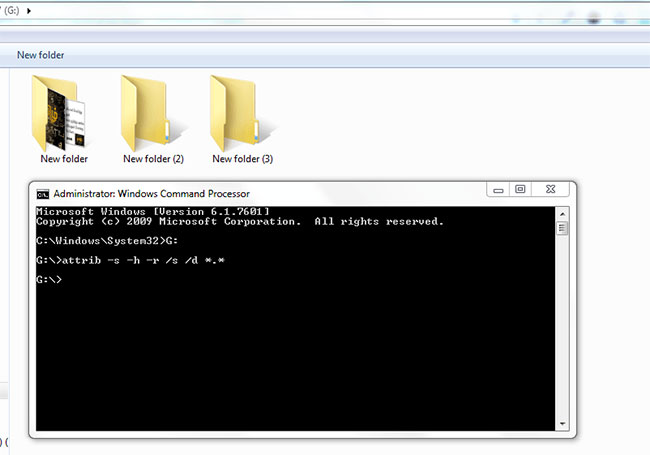
<p style="text-align: justify;">Các tùy chọn lệnh attrib&nbsp;<strong>+i, -i</strong>&nbsp;và&nbsp;<strong>/l</strong>&nbsp;lần đầu tiên có sẵn trong Windows Vista và đã được giữ lại cho đến&nbsp;<a href="https://quantrimang.com/windows-10-os" title="Chuyên mục Windows 10">Windows 10</a>.</p>

<p style="text-align: justify;">Các switch&nbsp;<strong>+v, -v, +x</strong>&nbsp;và&nbsp;<strong>-x</strong>&nbsp;cho lệnh attrib chỉ khả dụng trong Windows 7, Windows 8 và Windows 10.</p>

<h2 id="mcetoc_1drv4f33d4" style="text-align: justify;">Các lệnh liên quan</h2>

<p style="text-align: justify;">Thông thường lệnh xcopy tác động đến thuộc tính của file sau khi sao lưu thứ gì đó. Ví dụ, switch&nbsp;<strong>/m</strong>&nbsp;của lệnh xcopy tắt thuộc tính lưu trữ sau khi file đã được sao chép.</p>

<p style="text-align: justify;">Tương tự, switch&nbsp;<strong>/k</strong>&nbsp;của lệnh xcopy giữ thuộc tính chỉ đọc của file sau khi được sao chép.</p>

<h2 id="mcetoc_1drv4f33d5" style="text-align: justify;">Xem thuộc tính trong Explorer</h2>

<p style="text-align: justify;"><img alt="Xem thuộc tính trong Explorer" data-i="3" data-src="https://st.quantrimang.com/photos/image/2019/12/13/tim-hieu-ve-lenh-attrib-4.jpg" data-was-processed="true" height="433" src="https://st.quantrimang.com/photos/image/2019/12/13/tim-hieu-ve-lenh-attrib-4.jpg" width="650" /></p>

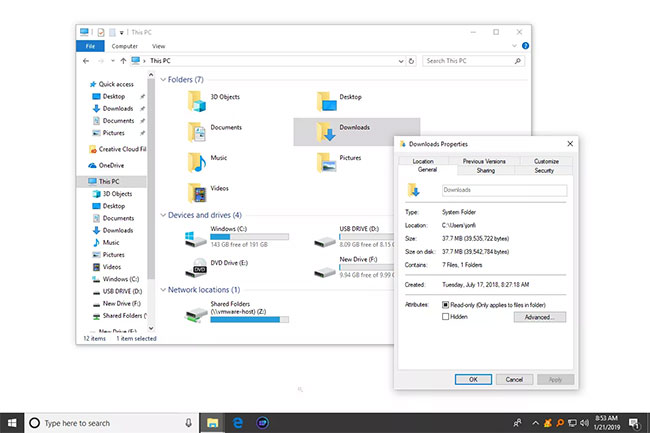
<p style="text-align: justify;">Bạn cũng có thể xem và quản lý các thuộc tính cho file và thư mục trong Explorer bằng các nút menu thông thường. Điều này có thể tốt hơn, nếu bạn không quen thuộc với dòng lệnh.</p>

<p style="text-align: justify;">Thực hiện việc này bằng cách bấm chuột phải vào đối tượng và đi đến&nbsp;<strong>Properties &gt; tab General</strong>.</p>
		</div>
				<div id="author">
						<p>
				<strong>Nguồn tin:</strong>
				Quantrimang.com
			</p>
		</div>
	</div>
	<div id="footer" class="clearfix">
		<div id="url">
			<strong>URL của bản tin này: </strong><a href="https://www.nguoicodonvn2008.info/vi/news/savefile/kien-thuc-may-tinh/tim-hieu-ve-lenh-attrib-1467.html" title="Tìm hiểu về lệnh Attrib">https://www.nguoicodonvn2008.info/vi/news/savefile/kien-thuc-may-tinh/tim-hieu-ve-lenh-attrib-1467.html</a>

		</div>
		<div class="clear"></div>
		<div class="copyright">
			&copy; .&#x3A; Nguoicodonvn2008.info - Cõi lòng người cô đơn &#x3A;.
		</div>
		<div id="contact">
			<a href="mailto:admin@nguoicodonvn2008.info">admin@nguoicodonvn2008.info</a>
		</div>
	</div>
</div>
        <div id="timeoutsess" class="chromeframe">
            Bạn đã không sử dụng Site, <a onclick="timeoutsesscancel();" href="https://nguoicodonvn2008.info/#">Bấm vào đây để duy trì trạng thái đăng nhập</a>. Thời gian chờ: <span id="secField"> 60 </span> giây
        </div>
        <div id="openidResult" class="nv-alert" style="display:none"></div>
        <div id="openidBt" data-result="" data-redirect=""></div>
		</script>
		<div class="car-top">
  <span><img src="https://nguoicodonvn2008.info/themes/default/images/car.png" alt=""></span>
</div>
<script src="https://nguoicodonvn2008.info/assets/js/jquery/jquery.min.js"></script>
<script>var nv_base_siteurl="/",nv_lang_data="vi",nv_lang_interface="vi",nv_name_variable="nv",nv_fc_variable="op",nv_lang_variable="language",nv_module_name="news",nv_func_name="savefile",nv_is_user=0, nv_my_ofs=-4,nv_my_abbr="EDT",nv_cookie_prefix="nv4c_e856T",nv_check_pass_mstime=1738000,nv_area_admin=0,nv_safemode=0,theme_responsive=0,nv_recaptcha_ver=2,nv_recaptcha_sitekey="",nv_recaptcha_type="image",XSSsanitize=1;</script>
<script src="https://nguoicodonvn2008.info/assets/js/language/vi.js"></script>
<script src="https://nguoicodonvn2008.info/assets/js/DOMPurify/purify3.js"></script>
<script src="https://nguoicodonvn2008.info/assets/js/global.js"></script>
<script src="https://nguoicodonvn2008.info/assets/js/site.js"></script>
<script src="https://nguoicodonvn2008.info/themes/default/js/news.js"></script>
<script src="https://nguoicodonvn2008.info/themes/default/js/main.js"></script>
<script src="https://nguoicodonvn2008.info/themes/default/js/custom.js"></script>
<script type="application/ld+json">
        {
            "@context": "https://schema.org",
            "@type": "Organization",
            "url": "https://nguoicodonvn2008.info",
            "logo": "https://nguoicodonvn2008.info/uploads/angel.gif"
        }
        </script>
<script src="https://nguoicodonvn2008.info/themes/default/js/bootstrap.min.js"></script>
<script type="text/javascript">
var $scrolltop = $('.car-top');
$scrolltop.on('click', function () {
    $('html,body').animate({
        scrollTop: 0
    }, 800);
    $(this).addClass("car-run");
    setTimeout(function(){ $scrolltop.removeClass('car-run');}, 1000);
    return false;
});
$(window).on('scroll', function ()
{ 
    if($(window).scrollTop() >= 200)
    {
        $scrolltop.addClass("show");
        $scrolltop.addClass("car-down");
    }
    else
    {
       $scrolltop.removeClass("show");
       setTimeout(function(){ $scrolltop.removeClass('car-down');}, 300);
    }
});
</script>
</body>
</html>