<!DOCTYPE html>
    <html lang="vi" xmlns="http://www.w3.org/1999/xhtml" prefix="og: http://ogp.me/ns#">
    <head>
<title>Tìm hiểu về công cụ quản lý tác vụ OmniFocus</title>
<meta name="description" content="Tìm hiểu về công cụ quản lý tác vụ OmniFocus - Savefile - Tin Tức -...">
<meta name="author" content=".: Nguoicodonvn2008.info - Cõi lòng người cô đơn :.">
<meta name="copyright" content=".: Nguoicodonvn2008.info - Cõi lòng người cô đơn :. [admin@nguoicodonvn2008.info]">
<meta name="robots" content="index, archive, follow, noodp">
<meta name="googlebot" content="index,archive,follow,noodp">
<meta name="msnbot" content="all,index,follow">
<meta name="generator" content="NukeViet v4.5">
<meta http-equiv="Content-Type" content="text/html; charset=utf-8">
<meta property="og:title" content="Tìm hiểu về công cụ quản lý tác vụ OmniFocus">
<meta property="og:type" content="website">
<meta property="og:description" content="Savefile - Tin Tức - https&#x3A;&#x002F;&#x002F;www.nguoicodonvn2008.info&#x002F;vi&#x002F;news&#x002F;savefile&#x002F;kien-thuc-may-tinh&#x002F;tim-hieu-ve-cong-cu-quan-ly-tac-vu-omnifocus-8990.html">
<meta property="og:site_name" content=".&#x3A; Nguoicodonvn2008.info - Cõi lòng người cô đơn &#x3A;.">
<meta property="og:url" content="https://www.nguoicodonvn2008.info/vi/news/savefile/kien-thuc-may-tinh/tim-hieu-ve-cong-cu-quan-ly-tac-vu-omnifocus-8990.html">
<link rel="shortcut icon" href="https://nguoicodonvn2008.info/favicon.ico">
<link rel="canonical" href="https://www.nguoicodonvn2008.info/vi/news/savefile/kien-thuc-may-tinh/tim-hieu-ve-cong-cu-quan-ly-tac-vu-omnifocus-8990.html">
<link rel="alternate" href="https://nguoicodonvn2008.info/vi/news/rss/" title="Tin Tức" type="application/rss+xml">
<link rel="alternate" href="https://nguoicodonvn2008.info/vi/news/rss/karaoke-dual/" title="Tin Tức - Karaoke Dual" type="application/rss+xml">
<link rel="alternate" href="https://nguoicodonvn2008.info/vi/news/rss/nhac-tre/" title="Tin Tức - Nhạc trẻ" type="application/rss+xml">
<link rel="alternate" href="https://nguoicodonvn2008.info/vi/news/rss/tru-tinh/" title="Tin Tức - Trữ tình" type="application/rss+xml">
<link rel="alternate" href="https://nguoicodonvn2008.info/vi/news/rss/nuoc-ngoai/" title="Tin Tức - Nước ngoài" type="application/rss+xml">
<link rel="alternate" href="https://nguoicodonvn2008.info/vi/news/rss/remix/" title="Tin Tức - Remix" type="application/rss+xml">
<link rel="alternate" href="https://nguoicodonvn2008.info/vi/news/rss/tam-su-tinh-yeu/" title="Tin Tức - Tâm sự tình yêu" type="application/rss+xml">
<link rel="alternate" href="https://nguoicodonvn2008.info/vi/news/rss/tho-suu-tam/" title="Tin Tức - Thơ sưu tầm" type="application/rss+xml">
<link rel="alternate" href="https://nguoicodonvn2008.info/vi/news/rss/cuoc-song/" title="Tin Tức - Cuộc sống" type="application/rss+xml">
<link rel="alternate" href="https://nguoicodonvn2008.info/vi/news/rss/phan-mem/" title="Tin Tức - Phần mềm" type="application/rss+xml">
<link rel="alternate" href="https://nguoicodonvn2008.info/vi/news/rss/kien-thuc-may-tinh/" title="Tin Tức - Kiến thức máy tính" type="application/rss+xml">
<link rel="alternate" href="https://nguoicodonvn2008.info/vi/news/rss/hoc-tap/" title="Tin Tức - Học tập" type="application/rss+xml">
<link rel="alternate" href="https://nguoicodonvn2008.info/vi/news/rss/tai-lieu/" title="Tin Tức - Tài liệu" type="application/rss+xml">
<link rel="alternate" href="https://nguoicodonvn2008.info/vi/news/rss/de-thi/" title="Tin Tức - Đề thi" type="application/rss+xml">
<link rel="preload" as="style" href="https://nguoicodonvn2008.info/assets/css/font-awesome.min.css" type="text/css">
<link rel="preload" as="style" href="https://nguoicodonvn2008.info/themes/default/css/bootstrap.non-responsive.css" type="text/css">
<link rel="preload" as="style" href="https://nguoicodonvn2008.info/themes/default/css/style.css" type="text/css">
<link rel="preload" as="style" href="https://nguoicodonvn2008.info/themes/default/css/style.non-responsive.css" type="text/css">
<link rel="preload" as="style" href="https://nguoicodonvn2008.info/themes/default/css/news.css" type="text/css">
<link rel="preload" as="style" href="https://nguoicodonvn2008.info/themes/default/css/custom.css" type="text/css">
<link rel="preload" as="script" href="https://nguoicodonvn2008.info/assets/js/jquery/jquery.min.js" type="text/javascript">
<link rel="preload" as="script" href="https://nguoicodonvn2008.info/assets/js/language/vi.js" type="text/javascript">
<link rel="preload" as="script" href="https://nguoicodonvn2008.info/assets/js/DOMPurify/purify3.js" type="text/javascript">
<link rel="preload" as="script" href="https://nguoicodonvn2008.info/assets/js/global.js" type="text/javascript">
<link rel="preload" as="script" href="https://nguoicodonvn2008.info/assets/js/site.js" type="text/javascript">
<link rel="preload" as="script" href="https://nguoicodonvn2008.info/themes/default/js/news.js" type="text/javascript">
<link rel="preload" as="script" href="https://nguoicodonvn2008.info/themes/default/js/main.js" type="text/javascript">
<link rel="preload" as="script" href="https://nguoicodonvn2008.info/themes/default/js/custom.js" type="text/javascript">
<link rel="preload" as="script" href="https://nguoicodonvn2008.info/themes/default/js/bootstrap.min.js" type="text/javascript">
<link rel="stylesheet" href="https://nguoicodonvn2008.info/assets/css/font-awesome.min.css">
<link rel="stylesheet" href="https://nguoicodonvn2008.info/themes/default/css/bootstrap.non-responsive.css">
<link rel="stylesheet" href="https://nguoicodonvn2008.info/themes/default/css/style.css">
<link rel="stylesheet" href="https://nguoicodonvn2008.info/themes/default/css/style.non-responsive.css">
<link rel="StyleSheet" href="https://nguoicodonvn2008.info/themes/default/css/news.css">
<link rel="stylesheet" href="https://nguoicodonvn2008.info/themes/default/css/custom.css">
<style type="text/css">
	body{background: #fff;}
</style>
    </head>
    <body>
<div id="print">
	<div id="hd_print">
		<h2 class="pull-left">.&#x3A; Nguoicodonvn2008.info - Cõi lòng người cô đơn &#x3A;.</h2>
		<p class="pull-right"><a title=".&#x3A; Nguoicodonvn2008.info - Cõi lòng người cô đơn &#x3A;." href="https://nguoicodonvn2008.info/">https://nguoicodonvn2008.info</a></p>
	</div>
	<div class="clear"></div>
	<hr />
	<div id="content">
		<h1>Tìm hiểu về công cụ quản lý tác vụ OmniFocus</h1>
		<ul class="list-inline">
			<li>Thứ sáu - 13/09/2024 00:26</li>
			<li class="hidden-print txtrequired"><em class="fa fa-print">&nbsp;</em><a title="In ra" href="javascript:;" onclick="window.print()">In ra</a></li>
			<li class="hidden-print txtrequired"><em class="fa fa-power-off">&nbsp;</em><a title="Đóng cửa sổ này" href="javascript:;" onclick="window.close()">Đóng cửa sổ này</a></li>
		</ul>
		<div class="clear"></div>
		<div id="hometext">
		</div>
				<div class="imghome">
			<img alt="Tìm hiểu về công cụ quản lý tác vụ OmniFocus" src="https://st.quantrimang.com/photos/image/2024/09/13/cong-cu-quan-ly-tac-vu-omnifocus-5.jpg" width="460" class="img-thumbnail" />
		</div>
		<div class="clear"></div>
		<div id="bodytext" class="clearfix">
			<p style="text-align: justify;">Phương pháp Getting Things Done là hệ thống năng suất đáng tin cậy giúp duy trì sự ngăn nắp và tập trung. Tuy nhiên, kết hợp với công cụ quản lý tác vụ phù hợp sẽ giúp hệ thống hiệu quả hơn. Sau khi thử nhiều công cụ quản lý tác vụ khác nhau, OmniFocus là công cụ tốt nhất để hoàn thành công việc.</p>

<h2 style="text-align: justify;">1. Ghi lại tác vụ và ý tưởng trong Inbox</h2>

<p style="text-align: justify;">Bước đầu tiên để quản lý hiệu quả các tác vụ bằng phương pháp GTD là ghi lại chúng ở một nơi. Điều này bao gồm việc thu thập mọi tác vụ, ý tưởng, email đến và sự kiện lịch quan trọng vào một hệ thống đáng tin cậy bên ngoài tâm trí bạn.</p>

<p style="text-align: justify;">Điều này rất quan trọng vì việc giữ những cam kết này trong đầu có thể làm lộn xộn không gian tinh thần của bạn và dẫn đến căng thẳng và trì hoãn. OmniFocus là một trong những ứng dụng tốt nhất giúp bạn biến sự trì hoãn thành năng suất. Tính năng Inbox của ứng dụng hoạt động như một trung tâm nơi bạn có thể nhanh chóng nhập tất cả các tác vụ của mình ngay khi chúng xuất hiện trong đầu hoặc từ các nguồn khác mà không cần lo lắng về việc sắp xếp chúng ngay lập tức.</p>

<figure>
<div style="text-align: justify;"><img alt="Tab Inbox của OmniFocus hiển thị cách ghi lại các tác vụ" data-i="0" data-src="https://st.quantrimang.com/photos/image/2024/09/13/cong-cu-quan-ly-tac-vu-omnifocus-1.jpg" data-was-processed="true" height="752" src="https://st.quantrimang.com/photos/image/2024/09/13/cong-cu-quan-ly-tac-vu-omnifocus-1.jpg" width="1200" /></div>

<figcaption>
<div style="text-align: justify;">Tab Inbox của OmniFocus hiển thị cách ghi lại các tác vụ</div>
</figcaption>
</figure>

<div style="text-align: justify;">&nbsp;</div>

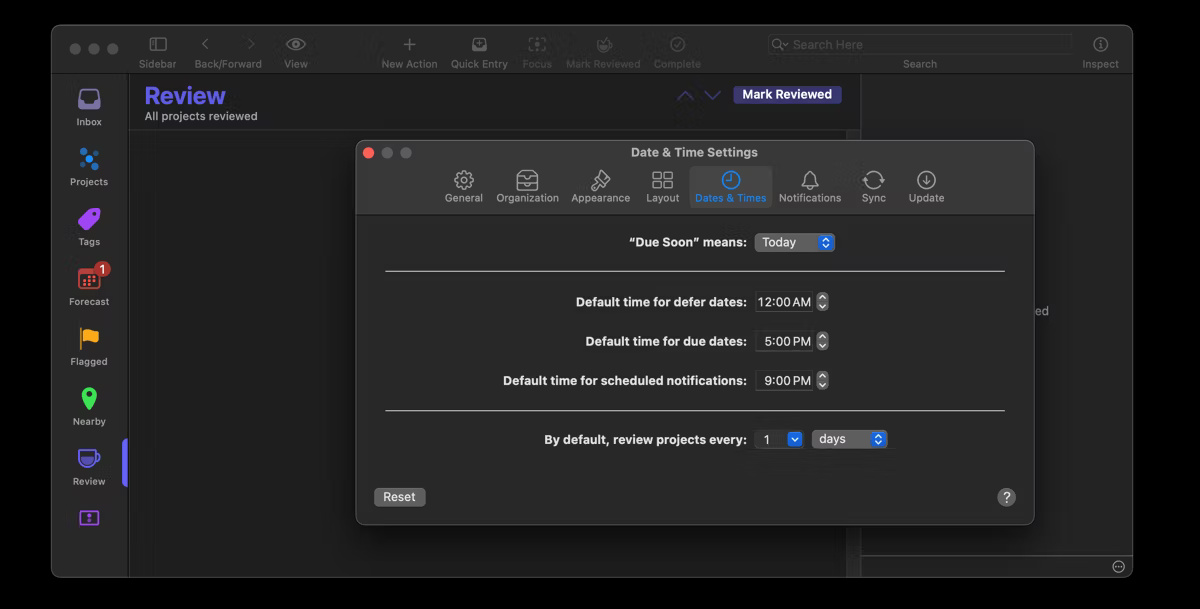
<p style="text-align: justify;">Có một số cách để thêm tác vụ vào Inbox OmniFocus, bao gồm shortcut Quick Entry. Theo mặc định, tùy chọn này được đặt thành&nbsp;<strong>Control + Option + Space</strong>, nhưng bạn có thể tùy chỉnh bằng cách vào&nbsp;<strong>OmniFocus &gt; Settings &gt; Quick Entry shortcut</strong>. Đây là cách nhanh nhất để ghi lại các tác vụ trên máy Mac từ bất kỳ ứng dụng hoặc cửa sổ trình duyệt nào mà không làm gián đoạn quy trình làm việc của bạn.</p>

<p style="text-align: justify;">Hoặc, hãy mở OmniFocus và nhấp vào tab<strong>&nbsp;Inbox</strong>. Tiếp theo, nhấp vào nút&nbsp;<strong>New Action</strong>&nbsp;trên thanh công cụ để nhập tác vụ.</p>

<p style="text-align: justify;"><strong>Mẹo</strong>: Ngoài mục nhập thủ công, bạn có thể chia sẻ thông tin từ các ứng dụng tương thích như Mail và Safari. Ví dụ, trong ứng dụng Mail, nhấp chuột phải (giữ&nbsp;<strong>Control</strong>&nbsp;và nhấp) vào chủ đề của email, chọn&nbsp;<strong>Share</strong>&nbsp;và chọn&nbsp;<strong>OmniFocus</strong>&nbsp;từ các tùy chọn để thêm vào Inbox của bạn.</p>

<h2 style="text-align: justify;">2. Xử lý Inbox</h2>

<p style="text-align: justify;">Sau khi bạn đã ghi lại tất cả các tác vụ của mình vào OmniFocus Inbox, bước quan trọng tiếp theo trong phương pháp GTD là xử lý các mục này. Giai đoạn này bao gồm việc đánh giá từng mục Inbox để biến các tác vụ hỗn loạn của bạn thành các hành động rõ ràng. Điều quan trọng là phải dành thời gian mỗi ngày để xử lý Inbox.</p>

<p style="text-align: justify;">Trong OmniFocus, hãy bắt đầu bằng cách xử lý từng mục trong Inbox để quyết định xem mục đó có thể thực hiện được hay không. Nếu có, bạn có thể hoàn thành trong vòng chưa đầy 2 phút không? Nếu có, hãy thực hiện ngay lập tức, ví dụ, bằng cách trả lời email. Nếu không, hãy ủy quyền, hoãn lại hoặc xóa mục nhập.</p>

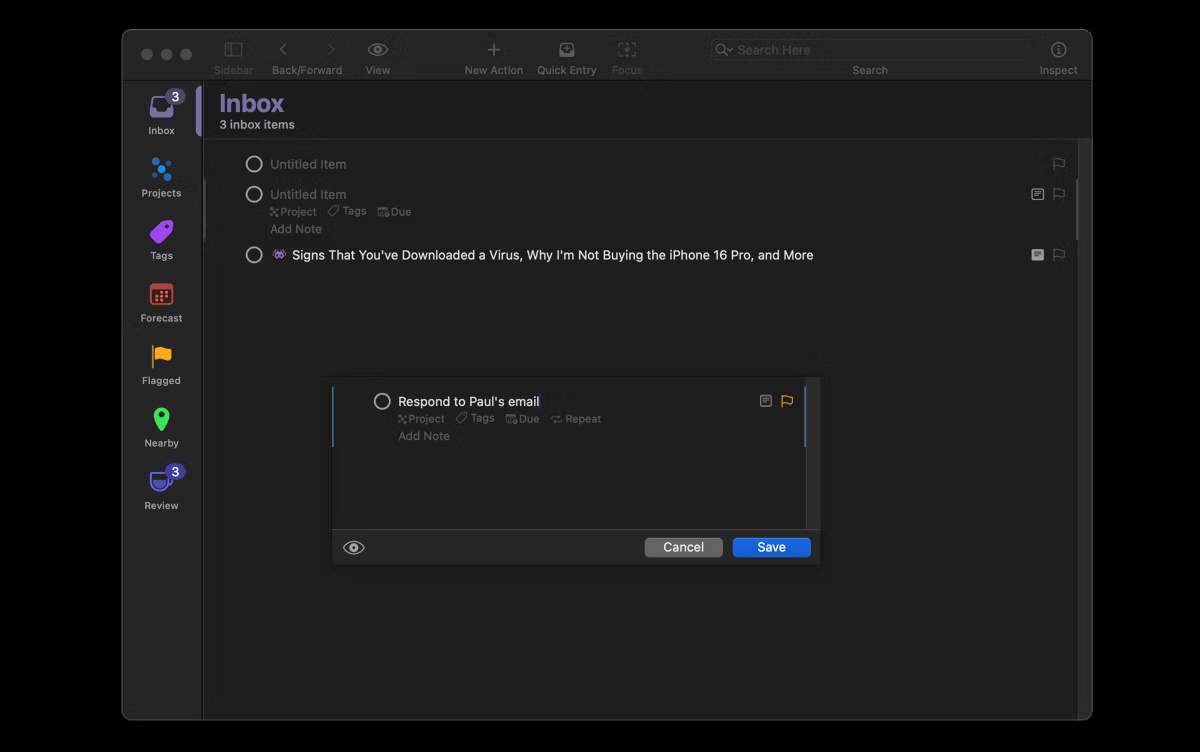
<p style="text-align: justify;">Bạn có thể chỉ định các nhiệm vụ cần ủy quyền cho một người cụ thể và theo dõi chúng bằng tag&nbsp;<strong>Waiting</strong>. Nhấp vào nhiệm vụ có liên quan trong Inbox của bạn và chọn tag&nbsp;<strong>Waiting</strong>.</p>

<p style="text-align: justify;">Hoặc, tạo một tag cụ thể cho từng người mà bạn ủy quyền nhiệm vụ trong tab&nbsp;<strong>Tags</strong>. Tiếp theo, bạn có thể đặt lời nhắc và ngày đến hạn cho thời điểm bạn mong đợi nhiệm vụ được hoàn thành. Các nhiệm vụ còn lại không thể hoàn thành ngay lập tức hoặc ủy quyền sẽ được hoãn lại.</p>

<figure>
<div style="text-align: justify;"><img alt="Inbox OmniFocus cho thấy cách thêm tag" data-adbro-processed="true" data-i="1" data-src="https://st.quantrimang.com/photos/image/2024/09/13/cong-cu-quan-ly-tac-vu-omnifocus-2.jpg" data-was-processed="true" height="791" src="https://st.quantrimang.com/photos/image/2024/09/13/cong-cu-quan-ly-tac-vu-omnifocus-2.jpg" width="1200" /></div>
</figure>

<div style="text-align: justify;"><iframe allow="autoplay" allowtransparency="true" aria-label="Advertisement" data-google-container-id="a!3" data-google-query-id="CKSn04CKv4gDFczKFgUdLPcfyQ" data-load-complete="true" frameborder="0" height="0" hspace="0" id="aswift_2" marginheight="0" marginwidth="0" name="aswift_2" sandbox="allow-scripts allow-same-origin allow-forms allow-presentation allow-popups" scrolling="no" tabindex="0" title="Advertisement" vspace="0" width="694"></iframe></div>

<p style="text-align: justify;">Nếu đó là nhiệm vụ một bước, bạn có thể chỉ định nhiệm vụ đó cho một dự án hoặc tag cụ thể và thêm ngày đến hạn. Nếu đó là nhiệm vụ nhiều bước, bạn có thể tạo một dự án mới bằng cách nhập tên vào ô&nbsp;<strong>Project</strong>&nbsp;và nhấn&nbsp;<strong>Command + Return</strong>&nbsp;để tạo dự án. Nếu bạn muốn thêm nhiệm vụ đó vào dự án hiện có, hãy kéo và thả nhiệm vụ vào dự án mong muốn trên thanh bên.</p>

<h2 style="text-align: justify;">3. Sắp xếp công việc thành dự án</h2>

<p style="text-align: justify;">Sau khi xử lý từng mục trong Inbox OmniFocus, đã đến lúc sắp xếp chúng thành các dự án. Bước này giúp sắp xếp khối lượng công việc của bạn thành các đơn vị dễ quản lý, có thể theo dõi và hoàn thành một cách có hệ thống. May mắn thay, OmniFocus cung cấp một số tính năng giúp sắp xếp công việc theo bản chất và kết quả mong muốn.</p>

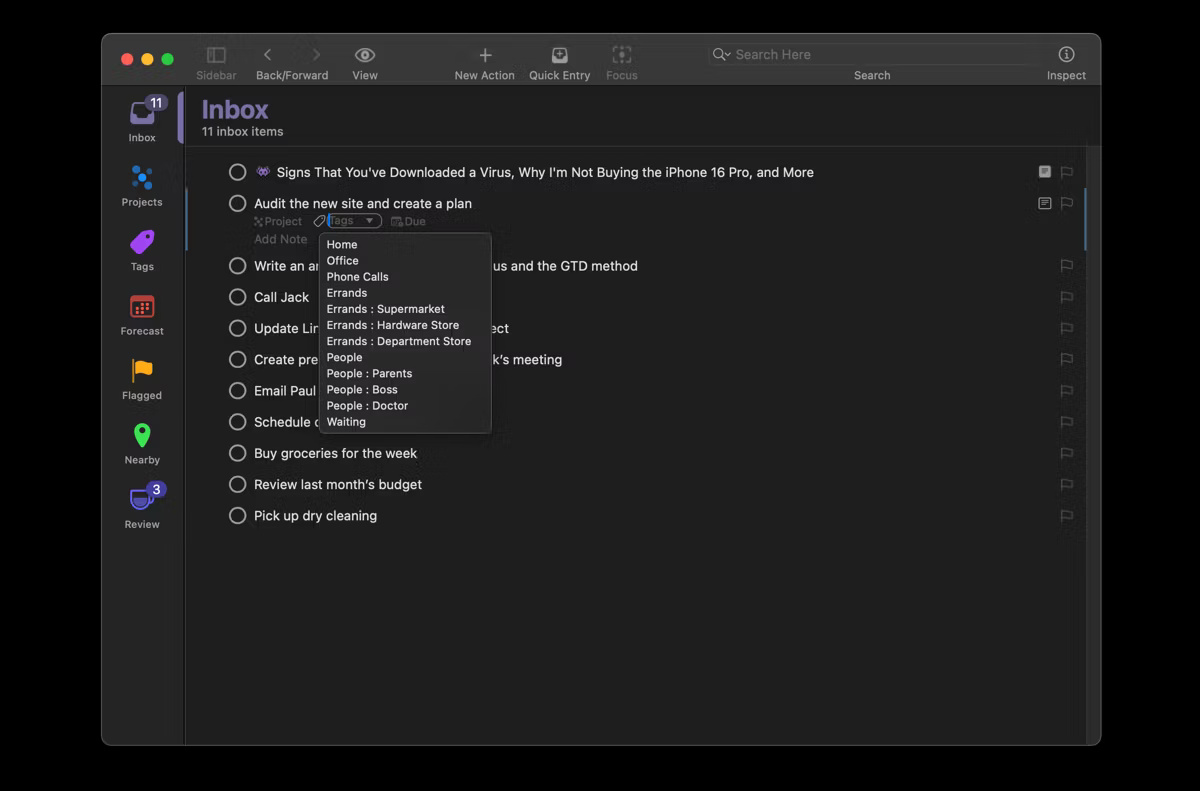
<p style="text-align: justify;">Trước tiên, hãy cân nhắc sử dụng&nbsp;<strong>Folders</strong>&nbsp;trong OmniFocus để nhóm các công việc liên quan thành những danh mục rộng hơn. Ví dụ, bạn có thể có một thư mục&nbsp;<strong>Personal</strong>&nbsp;cho tất cả các công việc cá nhân, một thư mục&nbsp;<strong>Work</strong>&nbsp;cho các công việc liên quan đến công việc và một thư mục&nbsp;<strong>School</strong>&nbsp;cho các công việc học tập của bạn.</p>

<p style="text-align: justify;">Mỗi&nbsp;<strong>Folder</strong>&nbsp;chứa một số dự án liên quan đến lĩnh vực cụ thể đó trong cuộc sống của bạn, mỗi dự án có một tập hợp hành động hoặc nhiệm vụ riêng. Để tạo&nbsp;<strong>Folder</strong>&nbsp;trong OmniFocus, hãy chuyển đến tab&nbsp;<strong>Projects</strong>, nhấp vào nút&nbsp;<strong>+</strong>&nbsp;ở cuối thanh bên và chọn&nbsp;<strong>Add Folder</strong>.</p>

<figure>
<div style="text-align: justify;"><img alt="Tab Projects của OmniFocus" data-i="2" data-src="https://st.quantrimang.com/photos/image/2024/09/13/cong-cu-quan-ly-tac-vu-omnifocus-3.jpg" data-was-processed="true" height="648" src="https://st.quantrimang.com/photos/image/2024/09/13/cong-cu-quan-ly-tac-vu-omnifocus-3.jpg" width="1200" /></div>

<figcaption>
<div style="text-align: justify;">Tab Projects của OmniFocus</div>
</figcaption>
</figure>

<p style="text-align: justify;">Tiếp theo, trong mỗi&nbsp;<strong>Folder</strong>, hãy tạo các dự án cụ thể và có thể thực hiện được. Một dự án trong OmniFocus là một nhóm các nhiệm vụ liên quan với kết quả hoặc mục tiêu đã xác định. OmniFocus cung cấp 3 loại&nbsp;<strong>Projects</strong>&nbsp;chính, bao gồm:</p>

<ul>
	<li style="text-align: justify;"><strong>Sequential Project</strong>&nbsp;bao gồm các nhiệm vụ bạn phải hoàn thành theo thứ tự cụ thể. Ví dụ, một dự án viết bài báo thường bao gồm các nhiệm vụ nghiên cứu, phác thảo, viết, biên tập và xuất bản phải được thực hiện theo trình tự cụ thể.</li>
	<li style="text-align: justify;"><strong>Parallel Projects</strong>&nbsp;bao gồm các nhiệm vụ bạn có thể thực hiện theo bất kỳ thứ tự nào hoặc đồng thời, chẳng hạn như thiết lập văn phòng tại nhà của bạn.</li>
	<li style="text-align: justify;"><strong>Single Action Lists</strong>&nbsp;dành cho các nhiệm vụ hoặc dự án không nằm trong tầm ngắm của bạn. Tuy nhiên, bạn có thể muốn theo đuổi trong tương lai - như viết sách hoặc học một ngôn ngữ mới - hoặc cho các nhiệm vụ hàng ngày, đang diễn ra, chẳng hạn như mua hàng tạp hóa.</li>
</ul>

<div style="text-align: justify;"><iframe allow="autoplay" allowtransparency="true" aria-label="Advertisement" data-google-container-id="a!4" data-google-query-id="CMXw84GKv4gDFXDKFgUdTYQQ4g" data-load-complete="true" frameborder="0" height="0" hspace="0" id="aswift_3" marginheight="0" marginwidth="0" name="aswift_3" sandbox="allow-scripts allow-same-origin allow-forms allow-presentation allow-popups" scrolling="no" tabindex="0" title="Advertisement" vspace="0" width="694"></iframe></div>

<h2 style="text-align: justify;">4. Tham gia vào các việc cần làm</h2>

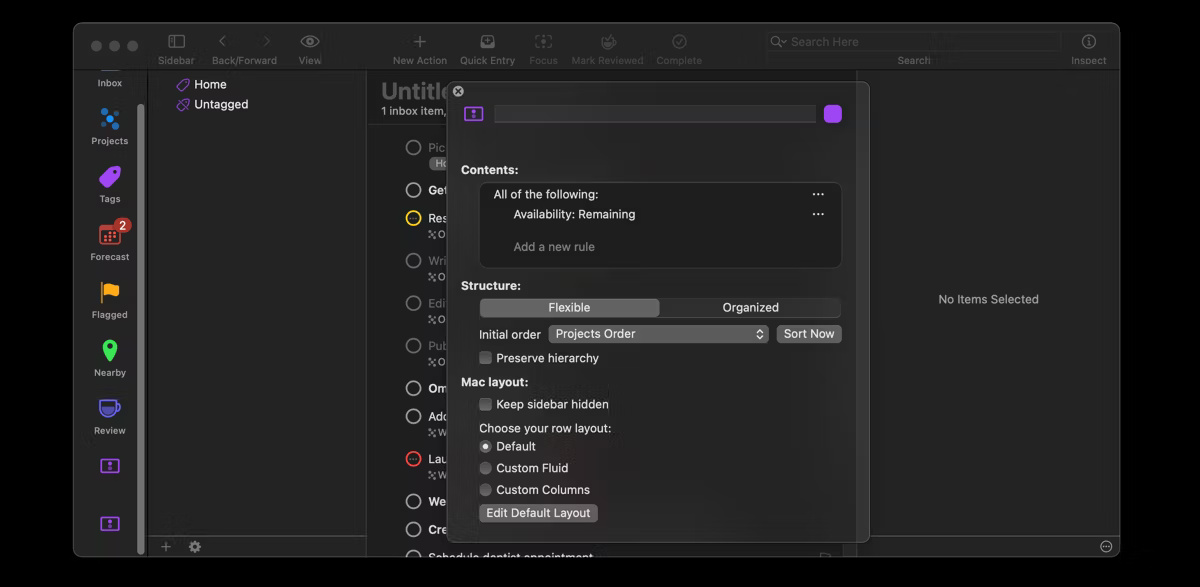
<p style="text-align: justify;">Tham gia vào các nhiệm vụ của bạn là bước tiếp theo và có thể nói là quan trọng nhất của phương pháp GTD. Bước này bao gồm việc lựa chọn nhiệm vụ nào để thực hiện dựa trên bối cảnh, mức độ ưu tiên, thời gian khả dụng và mức năng lượng. Điều này giúp bạn đưa ra quyết định thông minh phù hợp với khả năng và mục tiêu của mình.</p>

<figure>
<div style="text-align: justify;"><img alt="Trang OmniFocus hiển thị cách tạo góc nhìn tùy chỉnh" data-i="3" data-src="https://st.quantrimang.com/photos/image/2024/09/13/cong-cu-quan-ly-tac-vu-omnifocus-4.jpg" data-was-processed="true" height="587" src="https://st.quantrimang.com/photos/image/2024/09/13/cong-cu-quan-ly-tac-vu-omnifocus-4.jpg" width="1200" /></div>

<figcaption>
<div style="text-align: justify;">Trang OmniFocus hiển thị cách tạo góc nhìn tùy chỉnh</div>
</figcaption>
</figure>

<p style="text-align: justify;">Rất may là OmniFocus cung cấp một số tính năng lọc để giúp bạn tham gia vào các nhiệm vụ của mình một cách hiệu quả.</p>

<h2 style="text-align: justify;">5. Xem lại để duy trì tiến độ</h2>

<p style="text-align: justify;">Bước xem lại rất quan trọng trong phương pháp Getting Things Done. Bước này đảm bảo rằng bạn thường xuyên đánh giá lại nhiệm vụ và mục tiêu của mình để phản ánh bất kỳ thay đổi nào về mức độ ưu tiên hoặc hoàn cảnh. Điều này ngăn không cho các nhiệm vụ quan trọng bị bỏ qua và giúp bạn duy trì tiến độ với các mục tiêu dài hạn của mình.</p>

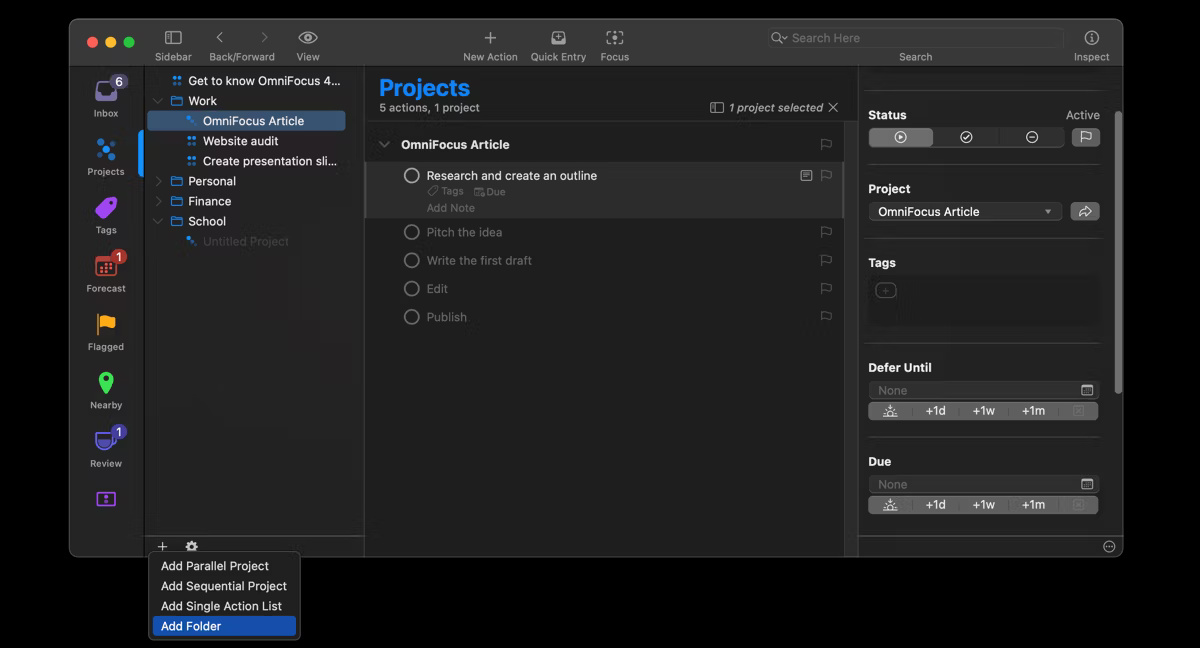
<p style="text-align: justify;">Bạn có thể dễ dàng xem lại nhiệm vụ của mình trong OmniFocus bằng cách điều hướng đến tab&nbsp;<strong>Review</strong>, nơi hiển thị các dự án cần xem xét. Theo mặc định, các dự án trong OmniFocus được thiết lập để xem xét hàng tuần, nhưng bạn có thể tùy chỉnh tần suất xem xét bằng cách vào&nbsp;<strong>OmniFocus &gt; Settings &gt; Dates &amp; Times</strong>.</p>

<figure>
<div style="text-align: justify;"><img alt="Trang OmniFocus hiển thị cách thay đổi ngày đánh giá" data-i="4" data-src="https://st.quantrimang.com/photos/image/2024/09/13/cong-cu-quan-ly-tac-vu-omnifocus-5.jpg" data-was-processed="true" height="609" src="https://st.quantrimang.com/photos/image/2024/09/13/cong-cu-quan-ly-tac-vu-omnifocus-5.jpg" width="1200" /></div>

<figcaption>
<div style="text-align: justify;">Trang OmniFocus hiển thị cách thay đổi ngày đánh giá</div>
</figcaption>
</figure>

<p style="text-align: justify;">Trong quá trình đánh giá, bạn có thể đánh giá xem một dự án có cần thêm nhiệm vụ hay không, vẫn còn phù hợp hay nên loại bỏ hoàn toàn. Khi đã hài lòng, hãy nhấp chuột phải vào dự án và chọn&nbsp;<strong>Mark Reviewed</strong>.</p>

<p style="text-align: justify;">Nếu đang tìm kiếm một trình quản lý tác vụ giúp sắp xếp các tác vụ của mình bằng phương pháp GTD, bạn nên thử OmniFocus. Các tính năng và chức năng của OmniFocus biến nó thành một công cụ hiệu quả để luôn theo dõi các ưu tiên và cuối cùng là đạt được mục tiêu của bạn.</p>
		</div>
				<div id="author">
						<p>
				<strong>Nguồn tin:</strong>
				Quantrimang.com:
			</p>
		</div>
	</div>
	<div id="footer" class="clearfix">
		<div id="url">
			<strong>URL của bản tin này: </strong><a href="https://www.nguoicodonvn2008.info/vi/news/savefile/kien-thuc-may-tinh/tim-hieu-ve-cong-cu-quan-ly-tac-vu-omnifocus-8990.html" title="Tìm hiểu về công cụ quản lý tác vụ OmniFocus">https://www.nguoicodonvn2008.info/vi/news/savefile/kien-thuc-may-tinh/tim-hieu-ve-cong-cu-quan-ly-tac-vu-omnifocus-8990.html</a>

		</div>
		<div class="clear"></div>
		<div class="copyright">
			&copy; .&#x3A; Nguoicodonvn2008.info - Cõi lòng người cô đơn &#x3A;.
		</div>
		<div id="contact">
			<a href="mailto:admin@nguoicodonvn2008.info">admin@nguoicodonvn2008.info</a>
		</div>
	</div>
</div>
        <div id="timeoutsess" class="chromeframe">
            Bạn đã không sử dụng Site, <a onclick="timeoutsesscancel();" href="https://nguoicodonvn2008.info/#">Bấm vào đây để duy trì trạng thái đăng nhập</a>. Thời gian chờ: <span id="secField"> 60 </span> giây
        </div>
        <div id="openidResult" class="nv-alert" style="display:none"></div>
        <div id="openidBt" data-result="" data-redirect=""></div>
		</script>
		<div class="car-top">
  <span><img src="https://nguoicodonvn2008.info/themes/default/images/car.png" alt=""></span>
</div>
<div id="run_cronjobs" style="visibility:hidden;display:none;"><img alt="cron" src="/index.php?second=cronjobs&amp;p=o3oiywDx" width="1" height="1" /></div>
<script src="https://nguoicodonvn2008.info/assets/js/jquery/jquery.min.js"></script>
<script>var nv_base_siteurl="/",nv_lang_data="vi",nv_lang_interface="vi",nv_name_variable="nv",nv_fc_variable="op",nv_lang_variable="language",nv_module_name="news",nv_func_name="savefile",nv_is_user=0, nv_my_ofs=-4,nv_my_abbr="EDT",nv_cookie_prefix="nv4c_e856T",nv_check_pass_mstime=1738000,nv_area_admin=0,nv_safemode=0,theme_responsive=0,nv_recaptcha_ver=2,nv_recaptcha_sitekey="",nv_recaptcha_type="image",XSSsanitize=1;</script>
<script src="https://nguoicodonvn2008.info/assets/js/language/vi.js"></script>
<script src="https://nguoicodonvn2008.info/assets/js/DOMPurify/purify3.js"></script>
<script src="https://nguoicodonvn2008.info/assets/js/global.js"></script>
<script src="https://nguoicodonvn2008.info/assets/js/site.js"></script>
<script src="https://nguoicodonvn2008.info/themes/default/js/news.js"></script>
<script src="https://nguoicodonvn2008.info/themes/default/js/main.js"></script>
<script src="https://nguoicodonvn2008.info/themes/default/js/custom.js"></script>
<script type="application/ld+json">
        {
            "@context": "https://schema.org",
            "@type": "Organization",
            "url": "https://nguoicodonvn2008.info",
            "logo": "https://nguoicodonvn2008.info/uploads/angel.gif"
        }
        </script>
<script src="https://nguoicodonvn2008.info/themes/default/js/bootstrap.min.js"></script>
<script type="text/javascript">
var $scrolltop = $('.car-top');
$scrolltop.on('click', function () {
    $('html,body').animate({
        scrollTop: 0
    }, 800);
    $(this).addClass("car-run");
    setTimeout(function(){ $scrolltop.removeClass('car-run');}, 1000);
    return false;
});
$(window).on('scroll', function ()
{ 
    if($(window).scrollTop() >= 200)
    {
        $scrolltop.addClass("show");
        $scrolltop.addClass("car-down");
    }
    else
    {
       $scrolltop.removeClass("show");
       setTimeout(function(){ $scrolltop.removeClass('car-down');}, 300);
    }
});
</script>
</body>
</html>