<!DOCTYPE html>
    <html lang="vi" xmlns="http://www.w3.org/1999/xhtml" prefix="og: http://ogp.me/ns#">
    <head>
<title>Tiến trình YourPhone.exe trong Windows 10 là gì?</title>
<meta name="description" content="Tiến trình YourPhone.exe trong Windows 10 là gì? - Savefile - Tin Tức -...">
<meta name="author" content=".: Nguoicodonvn2008.info - Cõi lòng người cô đơn :.">
<meta name="copyright" content=".: Nguoicodonvn2008.info - Cõi lòng người cô đơn :. [admin@nguoicodonvn2008.info]">
<meta name="robots" content="index, archive, follow, noodp">
<meta name="googlebot" content="index,archive,follow,noodp">
<meta name="msnbot" content="all,index,follow">
<meta name="generator" content="NukeViet v4.5">
<meta http-equiv="Content-Type" content="text/html; charset=utf-8">
<meta property="og:title" content="Tiến trình YourPhone.exe trong Windows 10 là gì?">
<meta property="og:type" content="website">
<meta property="og:description" content="Savefile - Tin Tức - https&#x3A;&#x002F;&#x002F;www.nguoicodonvn2008.info&#x002F;vi&#x002F;news&#x002F;savefile&#x002F;kien-thuc-may-tinh&#x002F;tien-trinh-yourphone-exe-trong-windows-10-la-gi-2191.html">
<meta property="og:site_name" content=".&#x3A; Nguoicodonvn2008.info - Cõi lòng người cô đơn &#x3A;.">
<meta property="og:url" content="https://www.nguoicodonvn2008.info/vi/news/savefile/kien-thuc-may-tinh/tien-trinh-yourphone-exe-trong-windows-10-la-gi-2191.html">
<link rel="shortcut icon" href="https://nguoicodonvn2008.info/favicon.ico">
<link rel="canonical" href="https://www.nguoicodonvn2008.info/vi/news/savefile/kien-thuc-may-tinh/tien-trinh-yourphone-exe-trong-windows-10-la-gi-2191.html">
<link rel="alternate" href="https://nguoicodonvn2008.info/vi/news/rss/" title="Tin Tức" type="application/rss+xml">
<link rel="alternate" href="https://nguoicodonvn2008.info/vi/news/rss/karaoke-dual/" title="Tin Tức - Karaoke Dual" type="application/rss+xml">
<link rel="alternate" href="https://nguoicodonvn2008.info/vi/news/rss/nhac-tre/" title="Tin Tức - Nhạc trẻ" type="application/rss+xml">
<link rel="alternate" href="https://nguoicodonvn2008.info/vi/news/rss/tru-tinh/" title="Tin Tức - Trữ tình" type="application/rss+xml">
<link rel="alternate" href="https://nguoicodonvn2008.info/vi/news/rss/nuoc-ngoai/" title="Tin Tức - Nước ngoài" type="application/rss+xml">
<link rel="alternate" href="https://nguoicodonvn2008.info/vi/news/rss/remix/" title="Tin Tức - Remix" type="application/rss+xml">
<link rel="alternate" href="https://nguoicodonvn2008.info/vi/news/rss/tam-su-tinh-yeu/" title="Tin Tức - Tâm sự tình yêu" type="application/rss+xml">
<link rel="alternate" href="https://nguoicodonvn2008.info/vi/news/rss/tho-suu-tam/" title="Tin Tức - Thơ sưu tầm" type="application/rss+xml">
<link rel="alternate" href="https://nguoicodonvn2008.info/vi/news/rss/cuoc-song/" title="Tin Tức - Cuộc sống" type="application/rss+xml">
<link rel="alternate" href="https://nguoicodonvn2008.info/vi/news/rss/phan-mem/" title="Tin Tức - Phần mềm" type="application/rss+xml">
<link rel="alternate" href="https://nguoicodonvn2008.info/vi/news/rss/kien-thuc-may-tinh/" title="Tin Tức - Kiến thức máy tính" type="application/rss+xml">
<link rel="alternate" href="https://nguoicodonvn2008.info/vi/news/rss/hoc-tap/" title="Tin Tức - Học tập" type="application/rss+xml">
<link rel="alternate" href="https://nguoicodonvn2008.info/vi/news/rss/tai-lieu/" title="Tin Tức - Tài liệu" type="application/rss+xml">
<link rel="alternate" href="https://nguoicodonvn2008.info/vi/news/rss/de-thi/" title="Tin Tức - Đề thi" type="application/rss+xml">
<link rel="preload" as="style" href="https://nguoicodonvn2008.info/assets/css/font-awesome.min.css" type="text/css">
<link rel="preload" as="style" href="https://nguoicodonvn2008.info/themes/default/css/bootstrap.non-responsive.css" type="text/css">
<link rel="preload" as="style" href="https://nguoicodonvn2008.info/themes/default/css/style.css" type="text/css">
<link rel="preload" as="style" href="https://nguoicodonvn2008.info/themes/default/css/style.non-responsive.css" type="text/css">
<link rel="preload" as="style" href="https://nguoicodonvn2008.info/themes/default/css/news.css" type="text/css">
<link rel="preload" as="style" href="https://nguoicodonvn2008.info/themes/default/css/custom.css" type="text/css">
<link rel="preload" as="script" href="https://nguoicodonvn2008.info/assets/js/jquery/jquery.min.js" type="text/javascript">
<link rel="preload" as="script" href="https://nguoicodonvn2008.info/assets/js/language/vi.js" type="text/javascript">
<link rel="preload" as="script" href="https://nguoicodonvn2008.info/assets/js/DOMPurify/purify3.js" type="text/javascript">
<link rel="preload" as="script" href="https://nguoicodonvn2008.info/assets/js/global.js" type="text/javascript">
<link rel="preload" as="script" href="https://nguoicodonvn2008.info/assets/js/site.js" type="text/javascript">
<link rel="preload" as="script" href="https://nguoicodonvn2008.info/themes/default/js/news.js" type="text/javascript">
<link rel="preload" as="script" href="https://nguoicodonvn2008.info/themes/default/js/main.js" type="text/javascript">
<link rel="preload" as="script" href="https://nguoicodonvn2008.info/themes/default/js/custom.js" type="text/javascript">
<link rel="preload" as="script" href="https://nguoicodonvn2008.info/themes/default/js/bootstrap.min.js" type="text/javascript">
<link rel="stylesheet" href="https://nguoicodonvn2008.info/assets/css/font-awesome.min.css">
<link rel="stylesheet" href="https://nguoicodonvn2008.info/themes/default/css/bootstrap.non-responsive.css">
<link rel="stylesheet" href="https://nguoicodonvn2008.info/themes/default/css/style.css">
<link rel="stylesheet" href="https://nguoicodonvn2008.info/themes/default/css/style.non-responsive.css">
<link rel="StyleSheet" href="https://nguoicodonvn2008.info/themes/default/css/news.css">
<link rel="stylesheet" href="https://nguoicodonvn2008.info/themes/default/css/custom.css">
<style type="text/css">
	body{background: #fff;}
</style>
    </head>
    <body>
<div id="print">
	<div id="hd_print">
		<h2 class="pull-left">.&#x3A; Nguoicodonvn2008.info - Cõi lòng người cô đơn &#x3A;.</h2>
		<p class="pull-right"><a title=".&#x3A; Nguoicodonvn2008.info - Cõi lòng người cô đơn &#x3A;." href="https://nguoicodonvn2008.info/">https://nguoicodonvn2008.info</a></p>
	</div>
	<div class="clear"></div>
	<hr />
	<div id="content">
		<h1>Tiến trình YourPhone.exe trong Windows 10 là gì?</h1>
		<ul class="list-inline">
			<li>Thứ tư - 10/06/2020 01:00</li>
			<li class="hidden-print txtrequired"><em class="fa fa-print">&nbsp;</em><a title="In ra" href="javascript:;" onclick="window.print()">In ra</a></li>
			<li class="hidden-print txtrequired"><em class="fa fa-power-off">&nbsp;</em><a title="Đóng cửa sổ này" href="javascript:;" onclick="window.close()">Đóng cửa sổ này</a></li>
		</ul>
		<div class="clear"></div>
		<div id="hometext">
		</div>
				<div class="imghome">
			<img alt="Tiến trình YourPhone.exe trong Windows 10 là gì?" src="https://st.quantrimang.com/photos/image/2020/06/09/yourphone-exe-la-gi-3.jpg" width="460" class="img-thumbnail" />
		</div>
		<div class="clear"></div>
		<div id="bodytext" class="clearfix">
			<p style="text-align: justify;">Trong trường hợp bạn đang tự hỏi YourPhone.exe không phải là virus, mà là một tiến trình của Microsoft, thông qua đó về cơ bản bạn có thể liên kết điện thoại với hệ điều hành PC.</p>

<p style="text-align: justify;">Your Phone&nbsp;là một trong những ứng dụng nền mà bạn có thể dễ dàng bỏ qua nếu bạn không có ý định gửi tin nhắn SMS từ máy tính để bàn Windows 10 của mình.</p>

<p style="text-align: justify;">Tuy nhiên, ứng dụng sẽ tiêu tốn một chút RAM, nên bạn có thể xem xét việc làm gì đó với nó, nếu không quan tâm đến việc&nbsp;đồng bộ ảnh giữa điện thoại di động và laptop. Xem xét các giải pháp dưới đây để gỡ bỏ an toàn hoặc đơn giản là tắt ứng dụng.</p>

<h2 style="text-align: justify;">1. Cách tắt tiến trình YourPhone.exe</h2>

<p style="text-align: justify;">YourPhone.exe sẽ làm lãng phí một ít RAM với người dùng không sử dụng ứng dụng Your Phone. Người dùng có thể tiết kiệm tài nguyên hệ thống bằng cách tắt tiến trình YourPhone.exe cùng với các tiến trình ứng dụng UWP khác mà mình không cần. Đây là cách người dùng có thể vô hiệu hóa tiến trình YourPhone.exe trong Windows 10:</p>

<ul>
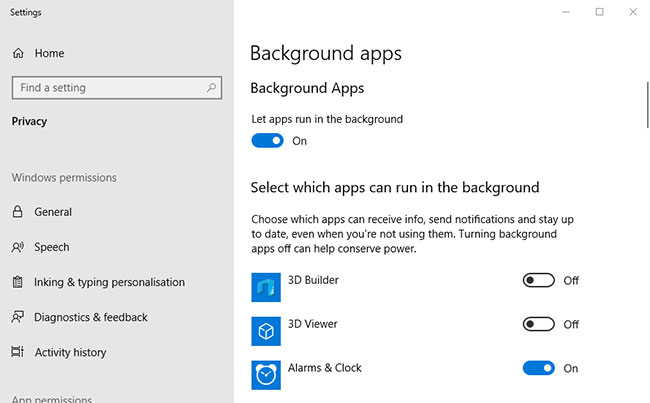
	<li style="text-align: justify;">Mở hộp tìm kiếm Windows 10 bằng cách nhấn phím&nbsp;<strong>Win + S</strong>.</li>
	<li style="text-align: justify;">Nhập&nbsp;<strong>background apps</strong>&nbsp;trong hộp&nbsp;<strong>Type here to search</strong>.</li>
	<li style="text-align: justify;">Nhấp vào&nbsp;<strong>Background apps</strong>&nbsp;để mở&nbsp;<strong>Settings</strong>&nbsp;như trong ảnh chụp nhanh bên dưới.</li>
</ul>

<figure>
<div style="text-align: justify;"><img alt="Nhấp vào Background apps để mở Settings" data-i="0" data-src="https://st.quantrimang.com/photos/image/2020/06/09/yourphone-exe-la-gi-1.jpg" data-was-processed="true" height="403" src="https://st.quantrimang.com/photos/image/2020/06/09/yourphone-exe-la-gi-1.jpg" width="650" /></div>

<figcaption>
<div style="text-align: justify;">Nhấp vào Background apps để mở Settings</div>
</figcaption>
</figure>

<ul>
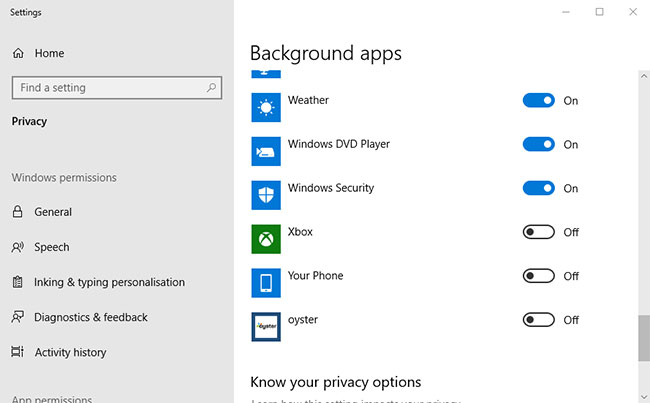
	<li style="text-align: justify;">Cuộn xuống ứng dụng&nbsp;<strong>Your Phone.</strong></li>
</ul>

<figure>
<div style="text-align: justify;"><img alt="Cuộn xuống ứng dụng Your Phone" data-i="1" data-src="https://st.quantrimang.com/photos/image/2020/06/09/yourphone-exe-la-gi-2.jpg" data-was-processed="true" height="403" src="https://st.quantrimang.com/photos/image/2020/06/09/yourphone-exe-la-gi-2.jpg" width="650" /></div>

<figcaption>
<div style="text-align: justify;">Cuộn xuống ứng dụng Your Phone</div>
</figcaption>
</figure>

<ul>
	<li style="text-align: justify;">Tắt tùy chọn&nbsp;<strong>Your Phone.</strong></li>
	<li style="text-align: justify;">Sau đó, đóng&nbsp;<strong>Settings.</strong></li>
	<li style="text-align: justify;">Cuối cùng, khởi động lại Windows.</li>
</ul>

<div style="text-align: justify;">&nbsp;</div>

<h2 style="text-align: justify;">2. Xóa ứng dụng Your Phone</h2>

<p style="text-align: justify;">Ngoài ra, người dùng có thể gỡ cài đặt Your Phone để đảm bảo các tiến trình của nó không tiêu tốn tài nguyên hệ thống. Tuy nhiên, người dùng không thể loại bỏ Your Phone thông qua&nbsp;<strong>Settings</strong>&nbsp;trong Windows 10 1903, vì nó là một ứng dụng tích hợp sẵn. Do đó, người dùng cần gỡ cài đặt ứng dụng bằng&nbsp;PowerShell&nbsp;như sau.</p>

<ul>
	<li style="text-align: justify;">Mở hộp tìm kiếm Cortana.</li>
	<li style="text-align: justify;">Nhập từ khóa&nbsp;<strong>PowerShell</strong>&nbsp;vào hộp&nbsp;<strong>Type here to search</strong>.</li>
	<li style="text-align: justify;">Mở Windows PowerShell với quyền admin.</li>
	<li style="text-align: justify;">Sau đó, nhập lệnh sau và nhấn phím&nbsp;<strong>Return</strong>:</li>
</ul>

<pre id="pre0">
<code>Get-AppxPackage Microsoft.YourPhone -AllUsers | Remove-AppxPackage in PowerShell</code></pre>

<figure>
<div style="text-align: justify;"><img alt="Gỡ cài đặt ứng dụng bằng PowerShell" data-i="2" data-src="https://st.quantrimang.com/photos/image/2020/06/09/yourphone-exe-la-gi-3.jpg" data-was-processed="true" height="97" src="https://st.quantrimang.com/photos/image/2020/06/09/yourphone-exe-la-gi-3.jpg" width="650" /></div>

<figcaption>
<div style="text-align: justify;">Gỡ cài đặt ứng dụng bằng PowerShell</div>
</figcaption>
</figure>

<ul>
	<li style="text-align: justify;">Khởi động lại Windows sau khi gỡ cài đặt Your Phone.</li>
</ul>
		</div>
				<div id="author">
						<p>
				<strong>Nguồn tin:</strong>
				Quantrimang.com
			</p>
		</div>
	</div>
	<div id="footer" class="clearfix">
		<div id="url">
			<strong>URL của bản tin này: </strong><a href="https://www.nguoicodonvn2008.info/vi/news/savefile/kien-thuc-may-tinh/tien-trinh-yourphone-exe-trong-windows-10-la-gi-2191.html" title="Tiến trình YourPhone.exe trong Windows 10 là gì?">https://www.nguoicodonvn2008.info/vi/news/savefile/kien-thuc-may-tinh/tien-trinh-yourphone-exe-trong-windows-10-la-gi-2191.html</a>

		</div>
		<div class="clear"></div>
		<div class="copyright">
			&copy; .&#x3A; Nguoicodonvn2008.info - Cõi lòng người cô đơn &#x3A;.
		</div>
		<div id="contact">
			<a href="mailto:admin@nguoicodonvn2008.info">admin@nguoicodonvn2008.info</a>
		</div>
	</div>
</div>
        <div id="timeoutsess" class="chromeframe">
            Bạn đã không sử dụng Site, <a onclick="timeoutsesscancel();" href="https://nguoicodonvn2008.info/#">Bấm vào đây để duy trì trạng thái đăng nhập</a>. Thời gian chờ: <span id="secField"> 60 </span> giây
        </div>
        <div id="openidResult" class="nv-alert" style="display:none"></div>
        <div id="openidBt" data-result="" data-redirect=""></div>
		</script>
		<div class="car-top">
  <span><img src="https://nguoicodonvn2008.info/themes/default/images/car.png" alt=""></span>
</div>
<script src="https://nguoicodonvn2008.info/assets/js/jquery/jquery.min.js"></script>
<script>var nv_base_siteurl="/",nv_lang_data="vi",nv_lang_interface="vi",nv_name_variable="nv",nv_fc_variable="op",nv_lang_variable="language",nv_module_name="news",nv_func_name="savefile",nv_is_user=0, nv_my_ofs=-4,nv_my_abbr="EDT",nv_cookie_prefix="nv4c_e856T",nv_check_pass_mstime=1738000,nv_area_admin=0,nv_safemode=0,theme_responsive=0,nv_recaptcha_ver=2,nv_recaptcha_sitekey="",nv_recaptcha_type="image",XSSsanitize=1;</script>
<script src="https://nguoicodonvn2008.info/assets/js/language/vi.js"></script>
<script src="https://nguoicodonvn2008.info/assets/js/DOMPurify/purify3.js"></script>
<script src="https://nguoicodonvn2008.info/assets/js/global.js"></script>
<script src="https://nguoicodonvn2008.info/assets/js/site.js"></script>
<script src="https://nguoicodonvn2008.info/themes/default/js/news.js"></script>
<script src="https://nguoicodonvn2008.info/themes/default/js/main.js"></script>
<script src="https://nguoicodonvn2008.info/themes/default/js/custom.js"></script>
<script type="application/ld+json">
        {
            "@context": "https://schema.org",
            "@type": "Organization",
            "url": "https://nguoicodonvn2008.info",
            "logo": "https://nguoicodonvn2008.info/uploads/angel.gif"
        }
        </script>
<script src="https://nguoicodonvn2008.info/themes/default/js/bootstrap.min.js"></script>
<script type="text/javascript">
var $scrolltop = $('.car-top');
$scrolltop.on('click', function () {
    $('html,body').animate({
        scrollTop: 0
    }, 800);
    $(this).addClass("car-run");
    setTimeout(function(){ $scrolltop.removeClass('car-run');}, 1000);
    return false;
});
$(window).on('scroll', function ()
{ 
    if($(window).scrollTop() >= 200)
    {
        $scrolltop.addClass("show");
        $scrolltop.addClass("car-down");
    }
    else
    {
       $scrolltop.removeClass("show");
       setTimeout(function(){ $scrolltop.removeClass('car-down');}, 300);
    }
});
</script>
</body>
</html>