<!DOCTYPE html>
    <html lang="vi" xmlns="http://www.w3.org/1999/xhtml" prefix="og: http://ogp.me/ns#">
    <head>
<title>Thư mục root là gì?</title>
<meta name="description" content="Thư mục root là gì? - Savefile - Tin Tức - https&#x3A;&#x002F;&#x002F;www.nguoicodonvn2008.info&#x002F;vi&#x002F;news&#x002F;savefile&#x002F;kien-thuc-may-tinh&#x002F;thu-muc-root-la-gi-847.html">
<meta name="author" content=".: Nguoicodonvn2008.info - Cõi lòng người cô đơn :.">
<meta name="copyright" content=".: Nguoicodonvn2008.info - Cõi lòng người cô đơn :. [admin@nguoicodonvn2008.info]">
<meta name="robots" content="index, archive, follow, noodp">
<meta name="googlebot" content="index,archive,follow,noodp">
<meta name="msnbot" content="all,index,follow">
<meta name="generator" content="NukeViet v4.5">
<meta http-equiv="Content-Type" content="text/html; charset=utf-8">
<meta property="og:title" content="Thư mục root là gì?">
<meta property="og:type" content="website">
<meta property="og:description" content="Savefile - Tin Tức - https&#x3A;&#x002F;&#x002F;www.nguoicodonvn2008.info&#x002F;vi&#x002F;news&#x002F;savefile&#x002F;kien-thuc-may-tinh&#x002F;thu-muc-root-la-gi-847.html">
<meta property="og:site_name" content=".&#x3A; Nguoicodonvn2008.info - Cõi lòng người cô đơn &#x3A;.">
<meta property="og:url" content="https://www.nguoicodonvn2008.info/vi/news/savefile/kien-thuc-may-tinh/thu-muc-root-la-gi-847.html">
<link rel="shortcut icon" href="https://nguoicodonvn2008.info/favicon.ico">
<link rel="canonical" href="https://www.nguoicodonvn2008.info/vi/news/savefile/kien-thuc-may-tinh/thu-muc-root-la-gi-847.html">
<link rel="alternate" href="https://nguoicodonvn2008.info/vi/news/rss/" title="Tin Tức" type="application/rss+xml">
<link rel="alternate" href="https://nguoicodonvn2008.info/vi/news/rss/karaoke-dual/" title="Tin Tức - Karaoke Dual" type="application/rss+xml">
<link rel="alternate" href="https://nguoicodonvn2008.info/vi/news/rss/nhac-tre/" title="Tin Tức - Nhạc trẻ" type="application/rss+xml">
<link rel="alternate" href="https://nguoicodonvn2008.info/vi/news/rss/tru-tinh/" title="Tin Tức - Trữ tình" type="application/rss+xml">
<link rel="alternate" href="https://nguoicodonvn2008.info/vi/news/rss/nuoc-ngoai/" title="Tin Tức - Nước ngoài" type="application/rss+xml">
<link rel="alternate" href="https://nguoicodonvn2008.info/vi/news/rss/remix/" title="Tin Tức - Remix" type="application/rss+xml">
<link rel="alternate" href="https://nguoicodonvn2008.info/vi/news/rss/tam-su-tinh-yeu/" title="Tin Tức - Tâm sự tình yêu" type="application/rss+xml">
<link rel="alternate" href="https://nguoicodonvn2008.info/vi/news/rss/tho-suu-tam/" title="Tin Tức - Thơ sưu tầm" type="application/rss+xml">
<link rel="alternate" href="https://nguoicodonvn2008.info/vi/news/rss/cuoc-song/" title="Tin Tức - Cuộc sống" type="application/rss+xml">
<link rel="alternate" href="https://nguoicodonvn2008.info/vi/news/rss/phan-mem/" title="Tin Tức - Phần mềm" type="application/rss+xml">
<link rel="alternate" href="https://nguoicodonvn2008.info/vi/news/rss/kien-thuc-may-tinh/" title="Tin Tức - Kiến thức máy tính" type="application/rss+xml">
<link rel="alternate" href="https://nguoicodonvn2008.info/vi/news/rss/hoc-tap/" title="Tin Tức - Học tập" type="application/rss+xml">
<link rel="alternate" href="https://nguoicodonvn2008.info/vi/news/rss/tai-lieu/" title="Tin Tức - Tài liệu" type="application/rss+xml">
<link rel="alternate" href="https://nguoicodonvn2008.info/vi/news/rss/de-thi/" title="Tin Tức - Đề thi" type="application/rss+xml">
<link rel="preload" as="style" href="https://nguoicodonvn2008.info/assets/css/font-awesome.min.css" type="text/css">
<link rel="preload" as="style" href="https://nguoicodonvn2008.info/themes/default/css/bootstrap.non-responsive.css" type="text/css">
<link rel="preload" as="style" href="https://nguoicodonvn2008.info/themes/default/css/style.css" type="text/css">
<link rel="preload" as="style" href="https://nguoicodonvn2008.info/themes/default/css/style.non-responsive.css" type="text/css">
<link rel="preload" as="style" href="https://nguoicodonvn2008.info/themes/default/css/news.css" type="text/css">
<link rel="preload" as="style" href="https://nguoicodonvn2008.info/themes/default/css/custom.css" type="text/css">
<link rel="preload" as="script" href="https://nguoicodonvn2008.info/assets/js/jquery/jquery.min.js" type="text/javascript">
<link rel="preload" as="script" href="https://nguoicodonvn2008.info/assets/js/language/vi.js" type="text/javascript">
<link rel="preload" as="script" href="https://nguoicodonvn2008.info/assets/js/DOMPurify/purify3.js" type="text/javascript">
<link rel="preload" as="script" href="https://nguoicodonvn2008.info/assets/js/global.js" type="text/javascript">
<link rel="preload" as="script" href="https://nguoicodonvn2008.info/assets/js/site.js" type="text/javascript">
<link rel="preload" as="script" href="https://nguoicodonvn2008.info/themes/default/js/news.js" type="text/javascript">
<link rel="preload" as="script" href="https://nguoicodonvn2008.info/themes/default/js/main.js" type="text/javascript">
<link rel="preload" as="script" href="https://nguoicodonvn2008.info/themes/default/js/custom.js" type="text/javascript">
<link rel="preload" as="script" href="https://nguoicodonvn2008.info/themes/default/js/bootstrap.min.js" type="text/javascript">
<link rel="stylesheet" href="https://nguoicodonvn2008.info/assets/css/font-awesome.min.css">
<link rel="stylesheet" href="https://nguoicodonvn2008.info/themes/default/css/bootstrap.non-responsive.css">
<link rel="stylesheet" href="https://nguoicodonvn2008.info/themes/default/css/style.css">
<link rel="stylesheet" href="https://nguoicodonvn2008.info/themes/default/css/style.non-responsive.css">
<link rel="StyleSheet" href="https://nguoicodonvn2008.info/themes/default/css/news.css">
<link rel="stylesheet" href="https://nguoicodonvn2008.info/themes/default/css/custom.css">
<style type="text/css">
	body{background: #fff;}
</style>
    </head>
    <body>
<div id="print">
	<div id="hd_print">
		<h2 class="pull-left">.&#x3A; Nguoicodonvn2008.info - Cõi lòng người cô đơn &#x3A;.</h2>
		<p class="pull-right"><a title=".&#x3A; Nguoicodonvn2008.info - Cõi lòng người cô đơn &#x3A;." href="https://nguoicodonvn2008.info/">https://nguoicodonvn2008.info</a></p>
	</div>
	<div class="clear"></div>
	<hr />
	<div id="content">
		<h1>Thư mục root là gì?</h1>
		<ul class="list-inline">
			<li>Thứ ba - 27/08/2019 09:58</li>
			<li class="hidden-print txtrequired"><em class="fa fa-print">&nbsp;</em><a title="In ra" href="javascript:;" onclick="window.print()">In ra</a></li>
			<li class="hidden-print txtrequired"><em class="fa fa-power-off">&nbsp;</em><a title="Đóng cửa sổ này" href="javascript:;" onclick="window.close()">Đóng cửa sổ này</a></li>
		</ul>
		<div class="clear"></div>
		<div id="hometext">
		</div>
				<div class="imghome">
			<img alt="Thư mục root là gì?" src="https://st.quantrimang.com/photos/image/2019/08/26/thu-muc-root-la-gi-1.jpg" width="460" class="img-thumbnail" />
		</div>
		<div class="clear"></div>
		<div id="bodytext" class="clearfix">
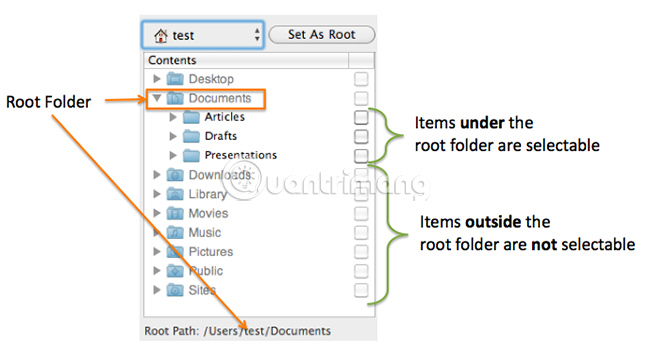
			<p style="text-align: justify;">Thư mục root, còn được gọi là thư mục gốc hoặc đôi khi chỉ là đơn giản là root, của bất kỳ phân vùng nào là thư mục &quot;cao nhất&quot; trong hệ thống phân cấp. Bạn cũng có thể coi đây là điểm bắt đầu của một cấu trúc thư mục cụ thể.</p>

<p style="text-align: justify;">Thư mục root chứa tất cả các thư mục khác trong ổ, và dĩ nhiên, cũng có thể chứa các file. Bạn có thể hình dung điều này giống như một hình cây úp ngược, trong đó phần gốc (thư mục root) ở trên cùng và các nhánh (thư mục con) nằm bên dưới. Root là nơi nắm giữ tất cả các mục cấp thấp hơn của nó.</p>

<p style="text-align: justify;">Ví dụ, thư mục root của phân vùng chính trên máy tính của bạn có thể là&nbsp;<strong>C:\.</strong>&nbsp;Thư mục gốc của ổ DVD hoặc CD có thể là&nbsp;<strong>D:\.</strong>&nbsp;Root của&nbsp;Windows Registry&nbsp;là nơi lưu trữ các&nbsp;hive&nbsp;như&nbsp;<strong>HKEY_CLASSES_ROOT.</strong></p>

<p style="text-align: justify;"><strong>ROOT</strong>&nbsp;cũng là từ viết tắt của&nbsp;<strong>ROOT&#039;s Object Oriented Technologies</strong>, nhưng nó không liên quan gì đến các thư mục root.</p>

<h2 style="text-align: justify;">Ví dụ về thư mục root</h2>

<p style="text-align: justify;">Thuật ngữ root cũng có thể liên quan đến bất kỳ vị trí nào bạn đang nói đến.</p>

<p style="text-align: justify;">Ví dụ, giả sử bạn đang làm việc trên thư mục&nbsp;<strong>C:\Program Files\Adobe\</strong>&nbsp;vì bất kỳ lý do gì. Nếu phần mềm bạn đang sử dụng hoặc hướng dẫn khắc phục sự cố bạn đang đọc bảo bạn đi đến root của thư mục cài đặt Adobe, thì tức là chúng đang nói về thư mục &quot;chính&quot; chứa tất cả các file Adobe có liên quan đến bất cứ thứ gì bạn đang thực hiện.</p>

<p style="text-align: justify;">Trong ví dụ này, vì&nbsp;<strong>C:\Program Files\</strong>&nbsp;cũng chứa rất nhiều thư mục cho những chương trình khác, root của thư mục Adobe, cụ thể, sẽ là thư mục&nbsp;<strong>\Adobe\.</strong>&nbsp;Tuy nhiên, thư mục root cho tất cả các file chương trình trên máy tính của bạn sẽ là thư mục&nbsp;<strong>C:\Program Files\.</strong></p>

<p style="text-align: justify;">Điều này cũng áp dụng cho bất kỳ thư mục nào khác. Bạn có cần truy cập root của thư mục người dùng cho&nbsp;<strong>User1</strong>&nbsp;trong Windows không? Đó chính là thư mục&nbsp;<strong>C:\Users\Name1\.</strong>&nbsp;Tất nhiên, điều này thay đổi tùy thuộc vào người dùng mà bạn đang nói đến - thư mục root của&nbsp;<strong>User2</strong>&nbsp;sẽ là&nbsp;<strong>C:\Users\User2\.</strong></p>

<p style="text-align: justify;"><strong><img alt="Thư mục root" data-i="0" data-src="https://st.quantrimang.com/photos/image/2019/08/26/thu-muc-root-la-gi-1.jpg" data-was-processed="true" height="355" src="https://st.quantrimang.com/photos/image/2019/08/26/thu-muc-root-la-gi-1.jpg" width="650" /></strong></p>

<div style="text-align: justify;">&nbsp;</div>

<h2 style="text-align: justify;">Truy cập thư mục root</h2>

<p style="text-align: justify;">Một cách nhanh chóng để đến thư mục root của ổ cứng khi bạn đang ở trong Windows&nbsp;<a href="https://quantrimang.com/huong-dan-su-dung-command-prompt-85301" title="Hướng dẫn sử dụng Command Prompt">Command Prompt</a>&nbsp;là thực thi lệnh&nbsp;<strong>change directory (cd)</strong>&nbsp;như sau:</p>

<pre id="pre0">
<code>cd \</code></pre>

<p style="text-align: justify;">Sau khi thực thi, bạn sẽ ngay lập tức được chuyển từ thư mục làm việc hiện hành đến thư mục root. Vì vậy, ví dụ, nếu bạn đang ở trong thư mục&nbsp;<strong>C:\Windows\System32</strong>&nbsp;và sau đó nhập lệnh&nbsp;<strong>cd</strong>&nbsp;với dấu gạch chéo ngược (như được hiển thị ở trên), bạn sẽ ngay lập tức được chuyển từ vị trí này đến&nbsp;<strong>C:\.</strong></p>

<p style="text-align: justify;">Tương tự, thực thi lệnh cd như thế này:</p>

<pre id="pre1">
<code>cd..</code></pre>

<p style="text-align: justify;">... sẽ di chuyển thư mục lên một vị trí, rất hữu ích nếu bạn cần truy cập vào root của một thư mục, nhưng không phải là root của toàn bộ ổ. Ví dụ, thực thi&nbsp;<code>cd..</code>&nbsp;khi ở trong thư mục&nbsp;<strong>C:\Users\User1\Downloads\</strong>&nbsp;sẽ thay đổi thư mục hiện hành thành&nbsp;<strong>C:\Users\User1\.</strong>Thực hiện lại lệnh trên một lần nữa sẽ đưa bạn đến&nbsp;<strong>C:\Users\</strong>, v.v.</p>

<p style="text-align: justify;">Dưới đây là ví dụ nơi bài viết bắt đầu trong một thư mục có tên là&nbsp;<strong>Germany</strong>&nbsp;trên ổ&nbsp;<strong>C:\.</strong>Như bạn có thể thấy, thực thi cùng một lệnh trong&nbsp;<strong>Command Prompt</strong>&nbsp;sẽ chuyển thư mục làm việc sang thư mục ngay trước/phía trên nó, tất cả đều đến root của ổ cứng.</p>

<pre id="pre2">
<code>C:\AMYS-PHONE\Pictures\Germany&gt;cd..
 C:\AMYS-PHONE\Pictures&gt;cd..
 C:\AMYS-PHONE&gt;cd..
 C:\&gt;</code></pre>

<p style="text-align: justify;"><strong>Mẹo</strong>: Bạn có thể cố gắng truy cập một thư mục root vì thấy rằng mình không thể thấy nó khi duyệt qua Explorer. Điều này là do một số thư mục được ẩn trong Windows theo mặc định.</p>

<h2 style="text-align: justify;">Thông tin thêm về thư mục root</h2>

<p style="text-align: justify;">Thuật ngữ thư mục root web đôi khi có thể được sử dụng để mô tả thư mục chứa tất cả các file tạo nên một trang web. Khái niệm tương tự ở đây được áp dụng như trên máy tính cục bộ của bạn - các file và thư mục trong thư mục root này chứa những file trang web chính, chẳng hạn như file HTML, sẽ được hiển thị khi ai đó truy cập&nbsp;<a href="https://quantrimang.com/url-la-gi-158090" title="Tìm hiểu về URL">URL</a>&nbsp;chính của trang web.</p>

<p style="text-align: justify;">Thuật ngữ root được sử dụng ở đây không nên bị nhầm lẫn với thư mục&nbsp;<strong>/root</strong>&nbsp;được tìm thấy trên một số hệ điều hành Unix. Đây là thư mục chính của một tài khoản người dùng cụ thể (đôi khi được gọi là tài khoản root). Tuy nhiên, theo một nghĩa nào đó, vì đây là thư mục chính cho người dùng cụ thể đó, bạn có thể gọi nó là thư mục root.</p>

<p style="text-align: justify;">Trong một số hệ điều hành, các file có thể được lưu trữ trong thư mục root, như ổ&nbsp;<strong>C:/</strong>trong Windows, nhưng một số hệ điều hành không hỗ trợ điều đó.</p>

<p style="text-align: justify;">Thuật ngữ thư mục root được sử dụng trong hệ điều hành VMS để xác định nơi lưu trữ tất cả các file của người dùng.</p>
		</div>
				<div id="author">
						<p>
				<strong>Nguồn tin:</strong>
				Quantrimang.com
			</p>
		</div>
	</div>
	<div id="footer" class="clearfix">
		<div id="url">
			<strong>URL của bản tin này: </strong><a href="https://www.nguoicodonvn2008.info/vi/news/savefile/kien-thuc-may-tinh/thu-muc-root-la-gi-847.html" title="Thư mục root là gì?">https://www.nguoicodonvn2008.info/vi/news/savefile/kien-thuc-may-tinh/thu-muc-root-la-gi-847.html</a>

		</div>
		<div class="clear"></div>
		<div class="copyright">
			&copy; .&#x3A; Nguoicodonvn2008.info - Cõi lòng người cô đơn &#x3A;.
		</div>
		<div id="contact">
			<a href="mailto:admin@nguoicodonvn2008.info">admin@nguoicodonvn2008.info</a>
		</div>
	</div>
</div>
        <div id="timeoutsess" class="chromeframe">
            Bạn đã không sử dụng Site, <a onclick="timeoutsesscancel();" href="https://nguoicodonvn2008.info/#">Bấm vào đây để duy trì trạng thái đăng nhập</a>. Thời gian chờ: <span id="secField"> 60 </span> giây
        </div>
        <div id="openidResult" class="nv-alert" style="display:none"></div>
        <div id="openidBt" data-result="" data-redirect=""></div>
		</script>
		<div class="car-top">
  <span><img src="https://nguoicodonvn2008.info/themes/default/images/car.png" alt=""></span>
</div>
<script src="https://nguoicodonvn2008.info/assets/js/jquery/jquery.min.js"></script>
<script>var nv_base_siteurl="/",nv_lang_data="vi",nv_lang_interface="vi",nv_name_variable="nv",nv_fc_variable="op",nv_lang_variable="language",nv_module_name="news",nv_func_name="savefile",nv_is_user=0, nv_my_ofs=-4,nv_my_abbr="EDT",nv_cookie_prefix="nv4c_e856T",nv_check_pass_mstime=1738000,nv_area_admin=0,nv_safemode=0,theme_responsive=0,nv_recaptcha_ver=2,nv_recaptcha_sitekey="",nv_recaptcha_type="image",XSSsanitize=1;</script>
<script src="https://nguoicodonvn2008.info/assets/js/language/vi.js"></script>
<script src="https://nguoicodonvn2008.info/assets/js/DOMPurify/purify3.js"></script>
<script src="https://nguoicodonvn2008.info/assets/js/global.js"></script>
<script src="https://nguoicodonvn2008.info/assets/js/site.js"></script>
<script src="https://nguoicodonvn2008.info/themes/default/js/news.js"></script>
<script src="https://nguoicodonvn2008.info/themes/default/js/main.js"></script>
<script src="https://nguoicodonvn2008.info/themes/default/js/custom.js"></script>
<script type="application/ld+json">
        {
            "@context": "https://schema.org",
            "@type": "Organization",
            "url": "https://nguoicodonvn2008.info",
            "logo": "https://nguoicodonvn2008.info/uploads/angel.gif"
        }
        </script>
<script src="https://nguoicodonvn2008.info/themes/default/js/bootstrap.min.js"></script>
<script type="text/javascript">
var $scrolltop = $('.car-top');
$scrolltop.on('click', function () {
    $('html,body').animate({
        scrollTop: 0
    }, 800);
    $(this).addClass("car-run");
    setTimeout(function(){ $scrolltop.removeClass('car-run');}, 1000);
    return false;
});
$(window).on('scroll', function ()
{ 
    if($(window).scrollTop() >= 200)
    {
        $scrolltop.addClass("show");
        $scrolltop.addClass("car-down");
    }
    else
    {
       $scrolltop.removeClass("show");
       setTimeout(function(){ $scrolltop.removeClass('car-down');}, 300);
    }
});
</script>
</body>
</html>