<!DOCTYPE html>
    <html lang="vi" xmlns="http://www.w3.org/1999/xhtml" prefix="og: http://ogp.me/ns#">
    <head>
<title>Thư mục AppData trong Windows là gì? Khi nào nên sử dụng?</title>
<meta name="description" content="Thư mục AppData trong Windows là gì? Khi nào nên sử dụng? - Savefile - Tin Tức -...">
<meta name="author" content=".: Nguoicodonvn2008.info - Cõi lòng người cô đơn :.">
<meta name="copyright" content=".: Nguoicodonvn2008.info - Cõi lòng người cô đơn :. [admin@nguoicodonvn2008.info]">
<meta name="robots" content="index, archive, follow, noodp">
<meta name="googlebot" content="index,archive,follow,noodp">
<meta name="msnbot" content="all,index,follow">
<meta name="generator" content="NukeViet v4.5">
<meta http-equiv="Content-Type" content="text/html; charset=utf-8">
<meta property="og:title" content="Thư mục AppData trong Windows là gì? Khi nào nên sử dụng?">
<meta property="og:type" content="website">
<meta property="og:description" content="Savefile - Tin Tức - https&#x3A;&#x002F;&#x002F;www.nguoicodonvn2008.info&#x002F;vi&#x002F;news&#x002F;savefile&#x002F;kien-thuc-may-tinh&#x002F;thu-muc-appdata-trong-windows-la-gi-khi-nao-nen-su-dung-8726.html">
<meta property="og:site_name" content=".&#x3A; Nguoicodonvn2008.info - Cõi lòng người cô đơn &#x3A;.">
<meta property="og:url" content="https://www.nguoicodonvn2008.info/vi/news/savefile/kien-thuc-may-tinh/thu-muc-appdata-trong-windows-la-gi-khi-nao-nen-su-dung-8726.html">
<link rel="shortcut icon" href="https://nguoicodonvn2008.info/favicon.ico">
<link rel="canonical" href="https://www.nguoicodonvn2008.info/vi/news/savefile/kien-thuc-may-tinh/thu-muc-appdata-trong-windows-la-gi-khi-nao-nen-su-dung-8726.html">
<link rel="alternate" href="https://nguoicodonvn2008.info/vi/news/rss/" title="Tin Tức" type="application/rss+xml">
<link rel="alternate" href="https://nguoicodonvn2008.info/vi/news/rss/karaoke-dual/" title="Tin Tức - Karaoke Dual" type="application/rss+xml">
<link rel="alternate" href="https://nguoicodonvn2008.info/vi/news/rss/nhac-tre/" title="Tin Tức - Nhạc trẻ" type="application/rss+xml">
<link rel="alternate" href="https://nguoicodonvn2008.info/vi/news/rss/tru-tinh/" title="Tin Tức - Trữ tình" type="application/rss+xml">
<link rel="alternate" href="https://nguoicodonvn2008.info/vi/news/rss/nuoc-ngoai/" title="Tin Tức - Nước ngoài" type="application/rss+xml">
<link rel="alternate" href="https://nguoicodonvn2008.info/vi/news/rss/remix/" title="Tin Tức - Remix" type="application/rss+xml">
<link rel="alternate" href="https://nguoicodonvn2008.info/vi/news/rss/tam-su-tinh-yeu/" title="Tin Tức - Tâm sự tình yêu" type="application/rss+xml">
<link rel="alternate" href="https://nguoicodonvn2008.info/vi/news/rss/tho-suu-tam/" title="Tin Tức - Thơ sưu tầm" type="application/rss+xml">
<link rel="alternate" href="https://nguoicodonvn2008.info/vi/news/rss/cuoc-song/" title="Tin Tức - Cuộc sống" type="application/rss+xml">
<link rel="alternate" href="https://nguoicodonvn2008.info/vi/news/rss/phan-mem/" title="Tin Tức - Phần mềm" type="application/rss+xml">
<link rel="alternate" href="https://nguoicodonvn2008.info/vi/news/rss/kien-thuc-may-tinh/" title="Tin Tức - Kiến thức máy tính" type="application/rss+xml">
<link rel="alternate" href="https://nguoicodonvn2008.info/vi/news/rss/hoc-tap/" title="Tin Tức - Học tập" type="application/rss+xml">
<link rel="alternate" href="https://nguoicodonvn2008.info/vi/news/rss/tai-lieu/" title="Tin Tức - Tài liệu" type="application/rss+xml">
<link rel="alternate" href="https://nguoicodonvn2008.info/vi/news/rss/de-thi/" title="Tin Tức - Đề thi" type="application/rss+xml">
<link rel="preload" as="style" href="https://nguoicodonvn2008.info/assets/css/font-awesome.min.css" type="text/css">
<link rel="preload" as="style" href="https://nguoicodonvn2008.info/themes/default/css/bootstrap.non-responsive.css" type="text/css">
<link rel="preload" as="style" href="https://nguoicodonvn2008.info/themes/default/css/style.css" type="text/css">
<link rel="preload" as="style" href="https://nguoicodonvn2008.info/themes/default/css/style.non-responsive.css" type="text/css">
<link rel="preload" as="style" href="https://nguoicodonvn2008.info/themes/default/css/news.css" type="text/css">
<link rel="preload" as="style" href="https://nguoicodonvn2008.info/themes/default/css/custom.css" type="text/css">
<link rel="preload" as="script" href="https://nguoicodonvn2008.info/assets/js/jquery/jquery.min.js" type="text/javascript">
<link rel="preload" as="script" href="https://nguoicodonvn2008.info/assets/js/language/vi.js" type="text/javascript">
<link rel="preload" as="script" href="https://nguoicodonvn2008.info/assets/js/DOMPurify/purify3.js" type="text/javascript">
<link rel="preload" as="script" href="https://nguoicodonvn2008.info/assets/js/global.js" type="text/javascript">
<link rel="preload" as="script" href="https://nguoicodonvn2008.info/assets/js/site.js" type="text/javascript">
<link rel="preload" as="script" href="https://nguoicodonvn2008.info/themes/default/js/news.js" type="text/javascript">
<link rel="preload" as="script" href="https://nguoicodonvn2008.info/themes/default/js/main.js" type="text/javascript">
<link rel="preload" as="script" href="https://nguoicodonvn2008.info/themes/default/js/custom.js" type="text/javascript">
<link rel="preload" as="script" href="https://nguoicodonvn2008.info/themes/default/js/bootstrap.min.js" type="text/javascript">
<link rel="stylesheet" href="https://nguoicodonvn2008.info/assets/css/font-awesome.min.css">
<link rel="stylesheet" href="https://nguoicodonvn2008.info/themes/default/css/bootstrap.non-responsive.css">
<link rel="stylesheet" href="https://nguoicodonvn2008.info/themes/default/css/style.css">
<link rel="stylesheet" href="https://nguoicodonvn2008.info/themes/default/css/style.non-responsive.css">
<link rel="StyleSheet" href="https://nguoicodonvn2008.info/themes/default/css/news.css">
<link rel="stylesheet" href="https://nguoicodonvn2008.info/themes/default/css/custom.css">
<style type="text/css">
	body{background: #fff;}
</style>
    </head>
    <body>
<div id="print">
	<div id="hd_print">
		<h2 class="pull-left">.&#x3A; Nguoicodonvn2008.info - Cõi lòng người cô đơn &#x3A;.</h2>
		<p class="pull-right"><a title=".&#x3A; Nguoicodonvn2008.info - Cõi lòng người cô đơn &#x3A;." href="https://nguoicodonvn2008.info/">https://nguoicodonvn2008.info</a></p>
	</div>
	<div class="clear"></div>
	<hr />
	<div id="content">
		<h1>Thư mục AppData trong Windows là gì? Khi nào nên sử dụng?</h1>
		<ul class="list-inline">
			<li>Chủ nhật - 21/07/2024 22:05</li>
			<li class="hidden-print txtrequired"><em class="fa fa-print">&nbsp;</em><a title="In ra" href="javascript:;" onclick="window.print()">In ra</a></li>
			<li class="hidden-print txtrequired"><em class="fa fa-power-off">&nbsp;</em><a title="Đóng cửa sổ này" href="javascript:;" onclick="window.close()">Đóng cửa sổ này</a></li>
		</ul>
		<div class="clear"></div>
		<div id="hometext">
		</div>
				<div class="imghome">
			<img alt="Thư mục AppData trong Windows là gì? Khi nào nên sử dụng?" src="https://st.quantrimang.com/photos/image/2024/07/17/thu-muc-appdata-trong-windows-3.jpg" width="460" class="img-thumbnail" />
		</div>
		<div class="clear"></div>
		<div id="bodytext" class="clearfix">
			<p style="text-align: justify;">Bạn đã bao giờ tình cờ phát hiện ra thư mục AppData bí ẩn khi lục lọi các file trên máy tính của mình hoặc cố gắng làm cho một mod Minecraft hoạt động chưa? Đây là mọi thứ bạn cần biết về thư mục AppData trong Windows.</p>

<h2 style="text-align: justify;">Thư mục AppData là gì?</h2>

<p style="text-align: justify;">Theo mặc định, bạn sẽ tìm thấy dữ liệu cài đặt của chương trình trong&nbsp;<strong>C:\ProgramFiles</strong>&nbsp;hoặc&nbsp;<strong>C:\ProgramFiles (x86)</strong>&nbsp;trừ khi đặt đường dẫn tùy chỉnh trong khi cài đặt.</p>

<p style="text-align: justify;">Thư mục AppData, viết tắt của Application Data, là nơi các chương trình lưu trữ dữ liệu được tạo cho người dùng. Điều này bao gồm các file tạm thời, cache, phiên trình duyệt, kho thư, lịch sử người dùng, v.v... Ngoài ra, mỗi người dùng trên PC đều có thư mục AppData riêng.</p>

<p style="text-align: justify;">Bằng cách này, nhiều người dùng có thể lưu tùy chọn của mình mà không ảnh hưởng đến nhau. Nếu từng thắc mắc Windows lưu trữ các file và thư mục chương trình cho những người dùng khác nhau trên cùng một PC ở đâu thì bây giờ bạn đã biết.</p>

<figure>
<div style="text-align: justify;"><img alt="Windows 11 File Explorer hiển thị các mục con của thư mục AppData" data-i="0" data-src="https://st.quantrimang.com/photos/image/2024/07/17/thu-muc-appdata-trong-windows-1.jpg" data-was-processed="true" height="342" src="https://st.quantrimang.com/photos/image/2024/07/17/thu-muc-appdata-trong-windows-1.jpg" width="934" /></div>

<figcaption>
<div style="text-align: justify;">Windows 11 File Explorer hiển thị các mục con của thư mục AppData</div>
</figcaption>
</figure>

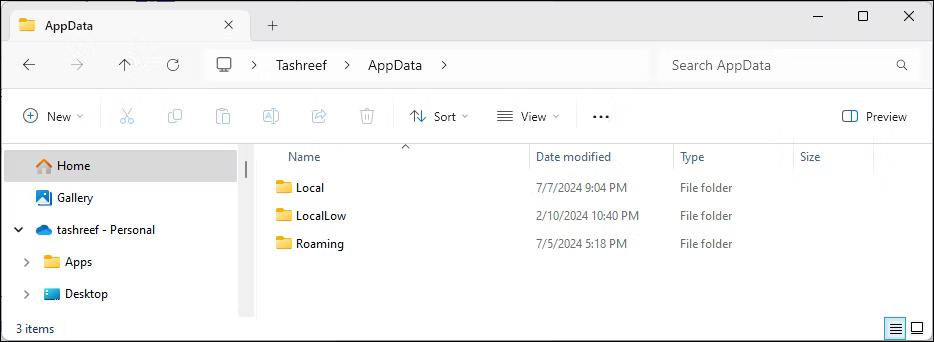
<p style="text-align: justify;">Thư mục AppData có 3 thư mục con: Local, LocalLow và Roaming. Cả 3 thư mục đều chứa các file giống nhau nhưng phục vụ những mục đích khác nhau:</p>

<div style="text-align: justify;"><iframe allow="autoplay" allowtransparency="true" aria-label="Advertisement" data-google-container-id="a!2" data-google-query-id="CKKnzNvHuYcDFSyS6QUdBtIyug" data-load-complete="true" frameborder="0" height="0" hspace="0" id="aswift_1" marginheight="0" marginwidth="0" name="aswift_1" sandbox="allow-scripts allow-same-origin allow-forms allow-presentation" scrolling="no" tabindex="0" title="Advertisement" vspace="0" width="694"></iframe></div>

<ul>
	<li style="text-align: justify;"><strong>Thư mục Local</strong>: Thư mục này chứa dữ liệu được lưu trữ trên máy tính cục bộ cho người dùng cụ thể và không được đồng bộ với các thiết bị khác. Điều này bao gồm các file tạm thời, cache và dữ liệu khác mà ứng dụng sẽ tạo lại khi cần.</li>
	<li style="text-align: justify;"><strong>Thư mục LocalLow</strong>: Tương tự như thư mục Local nhưng lưu trữ dữ liệu từ các ứng dụng có tính toàn vẹn thấp. Các ứng dụng này có quyền truy cập hạn chế vào tài nguyên hệ thống vì lý do bảo mật, như trình duyệt web ở chế độ riêng tư, ứng dụng email, máy ảo hoặc chương trình chạy ở chế độ sandbox. Nếu một ứng dụng có tính toàn vẹn thấp bị phần mềm độc hại xâm phạm thì thiệt hại đối với dữ liệu sẽ được giới hạn ở thư mục LocalLow.</li>
	<li style="text-align: justify;"><strong>Thư mục Roaming</strong>: Không giống như thư mục Local, thư mục này lưu trữ dữ liệu dành riêng cho người dùng như tùy chọn, cấu hình và tùy chỉnh có thể được đồng bộ trên nhiều hệ thống Windows trong domain. Khi bạn đăng nhập vào một máy tính khác trong cùng một domain bằng cùng một tài khoản, dữ liệu thư mục Roaming sẽ được đồng bộ để truy cập liền mạch.</li>
</ul>

<figure>
<div style="text-align: justify;"><img alt="Windows 11 File Explorer hiển thị nội dung của thư mục AppData" data-i="1" data-src="https://st.quantrimang.com/photos/image/2024/07/17/thu-muc-appdata-trong-windows-2.jpg" data-was-processed="true" height="509" src="https://st.quantrimang.com/photos/image/2024/07/17/thu-muc-appdata-trong-windows-2.jpg" width="948" /></div>

<figcaption>
<div style="text-align: justify;">Windows 11 File Explorer hiển thị nội dung của thư mục AppData</div>
</figcaption>
</figure>

<p style="text-align: justify;">Mặc dù đây là mục đích dự định của các thư mục này nhưng cuối cùng, nhà phát triển ứng dụng mới là người quyết định dữ liệu nào sẽ được chuyển đến đâu. Do đó, bạn có thể tìm thấy một số dữ liệu chương trình trong thư mục Local và một số dữ liệu trong thư mục Roaming, tùy thuộc vào lựa chọn của nhà phát triển. Tuy nhiên, sự không nhất quán này thường không ảnh hưởng đến chức năng của ứng dụng.</p>

<div style="text-align: justify;"><iframe allow="autoplay" allowtransparency="true" aria-label="Advertisement" data-google-container-id="a!3" data-google-query-id="CObBzNvHuYcDFXCR6QUdBu0GrA" data-load-complete="true" frameborder="0" height="0" hspace="0" id="aswift_2" marginheight="0" marginwidth="0" name="aswift_2" sandbox="allow-scripts allow-same-origin allow-forms allow-presentation" scrolling="no" tabindex="0" title="Advertisement" vspace="0" width="694"></iframe></div>

<h2 style="text-align: justify;">Cách tìm thư mục AppData trong Windows</h2>

<p style="text-align: justify;">Thư mục AppData nằm trong thư mục profile của mỗi người dùng trong Windows. Đó là một thư mục ẩn nên bạn cần có khả năng nhìn thấy các file ẩn để truy cập vào nó. Dưới đây là cách hiển thị các file ẩn này trong Windows:</p>

<ol>
	<li style="text-align: justify;">Nhấn&nbsp;<strong>Win + E</strong>&nbsp;để&nbsp;mở File Explorer.</li>
	<li style="text-align: justify;">Trong Windows 11, nhấp vào&nbsp;<strong>View &gt; Show &gt; Show Hidden Items</strong>&nbsp;từ thanh công cụ. Trong Windows 10, mở tab&nbsp;<strong>View</strong>&nbsp;ở trên cùng và chọn hộp kiểm&nbsp;<strong>Hidden Items.</strong></li>
</ol>

<figure>
<div style="text-align: justify;"><img alt="Windows 11 File Explorer hiển thị đường dẫn của thư mục AppData" data-adbro-processed="true" data-i="2" data-src="https://st.quantrimang.com/photos/image/2024/07/17/thu-muc-appdata-trong-windows-3.jpg" data-was-processed="true" height="509" src="https://st.quantrimang.com/photos/image/2024/07/17/thu-muc-appdata-trong-windows-3.jpg" width="948" /></div>

<figcaption>
<div style="text-align: justify;">Windows 11 File Explorer hiển thị đường dẫn của thư mục AppData</div>
</figcaption>
</figure>

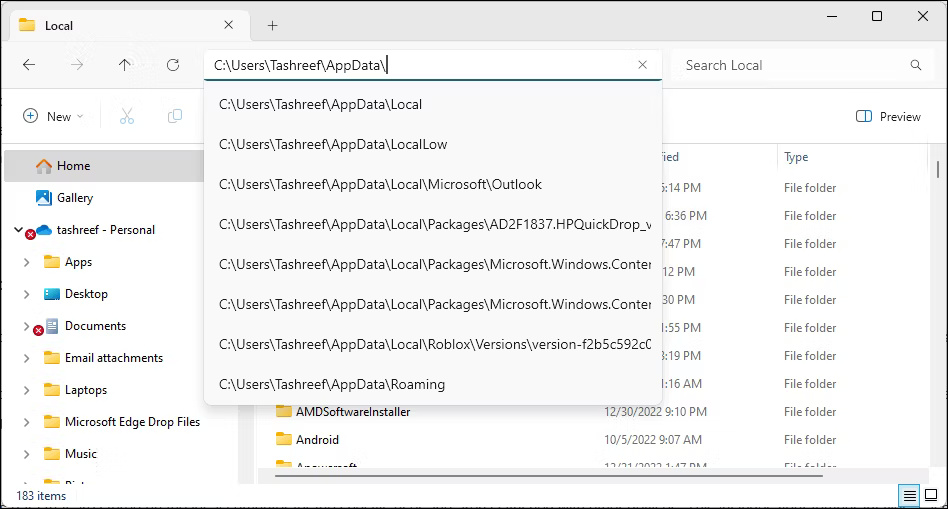
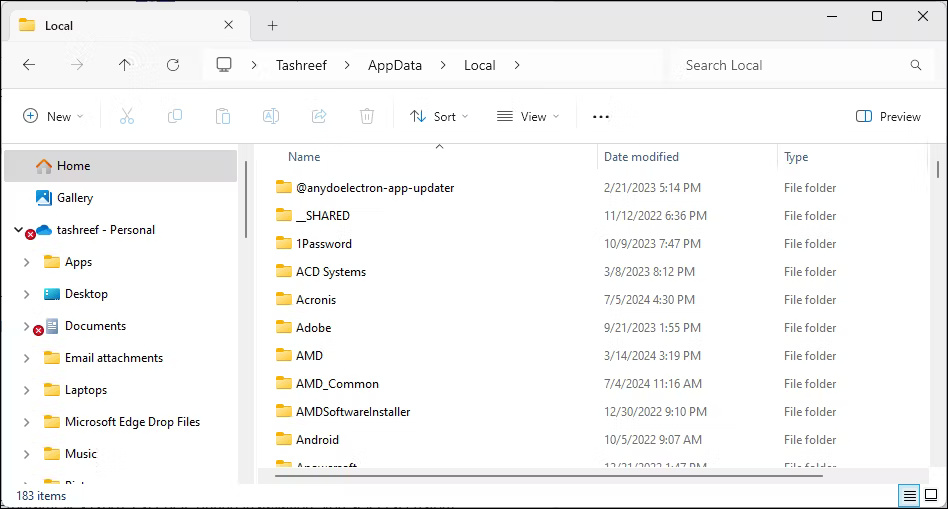
<p style="text-align: justify;">Để xem thư mục AppData, hãy mở File Explorer và truy cập&nbsp;<strong>C:\Users\Username\AppData.</strong>&nbsp;Ở đây,&nbsp;<strong>&quot;Username&quot;</strong>&nbsp;là thư mục profile của bạn. Ví dụ, trên máy tính này, thư mục&nbsp;<strong>AppData</strong>&nbsp;nằm ở&nbsp;<strong>C:\users\Tashreef\AppData.</strong></p>

<p style="text-align: justify;">Ngoài ra, bạn có thể sử dụng hộp thoại Run để truy cập thư mục AppData. Nhấn&nbsp;<strong>Win + R</strong>&nbsp;để&nbsp;mở hộp thoại Run, nhập&nbsp;<strong>appdata</strong>&nbsp;và nhấp&nbsp;<strong>OK.</strong></p>

<h2 style="text-align: justify;">Có nên truy cập thư mục AppData không?</h2>

<p style="text-align: justify;">Thư mục AppData bị ẩn theo mặc định vì một lý do chính đáng. Việc sửa đổi các file trong thư mục này có thể khiến các chương trình của bạn hoạt động, làm mất dữ liệu đã lưu và hỏng một phần cài đặt hệ thống và cá nhân hóa. Trong những trường hợp nghiêm trọng hơn liên quan đến việc sửa đổi thư mục Users, bạn có thể cần phải cài đặt lại Windows để máy tính của bạn hoạt động trở lại.</p>

<p style="text-align: justify;">Điều đó có nghĩa là, trong một số trường hợp, việc sửa đổi file trong thư mục AppData có thể cần thiết. Đó có thể là thêm hoặc xóa mod game hoặc xóa các file tạm thời khi ứng dụng không hoạt động. Nếu bạn quyết định thực hiện bất kỳ sửa đổi nào, hãy tạo bản sao lưu của toàn bộ thư mục. Bằng cách đó, nếu có sự cố xảy ra, bạn có thể nhanh chóng khôi phục thư mục để hoàn tác mọi thay đổi.</p>

<div style="text-align: justify;">&nbsp;</div>
		</div>
				<div id="author">
						<p>
				<strong>Nguồn tin:</strong>
				Quantrimang.com:
			</p>
		</div>
	</div>
	<div id="footer" class="clearfix">
		<div id="url">
			<strong>URL của bản tin này: </strong><a href="https://www.nguoicodonvn2008.info/vi/news/savefile/kien-thuc-may-tinh/thu-muc-appdata-trong-windows-la-gi-khi-nao-nen-su-dung-8726.html" title="Thư mục AppData trong Windows là gì? Khi nào nên sử dụng?">https://www.nguoicodonvn2008.info/vi/news/savefile/kien-thuc-may-tinh/thu-muc-appdata-trong-windows-la-gi-khi-nao-nen-su-dung-8726.html</a>

		</div>
		<div class="clear"></div>
		<div class="copyright">
			&copy; .&#x3A; Nguoicodonvn2008.info - Cõi lòng người cô đơn &#x3A;.
		</div>
		<div id="contact">
			<a href="mailto:admin@nguoicodonvn2008.info">admin@nguoicodonvn2008.info</a>
		</div>
	</div>
</div>
        <div id="timeoutsess" class="chromeframe">
            Bạn đã không sử dụng Site, <a onclick="timeoutsesscancel();" href="https://nguoicodonvn2008.info/#">Bấm vào đây để duy trì trạng thái đăng nhập</a>. Thời gian chờ: <span id="secField"> 60 </span> giây
        </div>
        <div id="openidResult" class="nv-alert" style="display:none"></div>
        <div id="openidBt" data-result="" data-redirect=""></div>
		</script>
		<div class="car-top">
  <span><img src="https://nguoicodonvn2008.info/themes/default/images/car.png" alt=""></span>
</div>
<script src="https://nguoicodonvn2008.info/assets/js/jquery/jquery.min.js"></script>
<script>var nv_base_siteurl="/",nv_lang_data="vi",nv_lang_interface="vi",nv_name_variable="nv",nv_fc_variable="op",nv_lang_variable="language",nv_module_name="news",nv_func_name="savefile",nv_is_user=0, nv_my_ofs=-4,nv_my_abbr="EDT",nv_cookie_prefix="nv4c_e856T",nv_check_pass_mstime=1738000,nv_area_admin=0,nv_safemode=0,theme_responsive=0,nv_recaptcha_ver=2,nv_recaptcha_sitekey="",nv_recaptcha_type="image",XSSsanitize=1;</script>
<script src="https://nguoicodonvn2008.info/assets/js/language/vi.js"></script>
<script src="https://nguoicodonvn2008.info/assets/js/DOMPurify/purify3.js"></script>
<script src="https://nguoicodonvn2008.info/assets/js/global.js"></script>
<script src="https://nguoicodonvn2008.info/assets/js/site.js"></script>
<script src="https://nguoicodonvn2008.info/themes/default/js/news.js"></script>
<script src="https://nguoicodonvn2008.info/themes/default/js/main.js"></script>
<script src="https://nguoicodonvn2008.info/themes/default/js/custom.js"></script>
<script type="application/ld+json">
        {
            "@context": "https://schema.org",
            "@type": "Organization",
            "url": "https://nguoicodonvn2008.info",
            "logo": "https://nguoicodonvn2008.info/uploads/angel.gif"
        }
        </script>
<script src="https://nguoicodonvn2008.info/themes/default/js/bootstrap.min.js"></script>
<script type="text/javascript">
var $scrolltop = $('.car-top');
$scrolltop.on('click', function () {
    $('html,body').animate({
        scrollTop: 0
    }, 800);
    $(this).addClass("car-run");
    setTimeout(function(){ $scrolltop.removeClass('car-run');}, 1000);
    return false;
});
$(window).on('scroll', function ()
{ 
    if($(window).scrollTop() >= 200)
    {
        $scrolltop.addClass("show");
        $scrolltop.addClass("car-down");
    }
    else
    {
       $scrolltop.removeClass("show");
       setTimeout(function(){ $scrolltop.removeClass('car-down');}, 300);
    }
});
</script>
</body>
</html>