<!DOCTYPE html>
    <html lang="vi" xmlns="http://www.w3.org/1999/xhtml" prefix="og: http://ogp.me/ns#">
    <head>
<title>Thêm dấu hiệu cho thấy Control Panel trên Windows 10 sắp bị khai tử</title>
<meta name="description" content="Thêm dấu hiệu cho thấy Control Panel trên Windows 10 sắp bị khai tử - Savefile - Tin Tức -...">
<meta name="author" content=".: Nguoicodonvn2008.info - Cõi lòng người cô đơn :.">
<meta name="copyright" content=".: Nguoicodonvn2008.info - Cõi lòng người cô đơn :. [admin@nguoicodonvn2008.info]">
<meta name="robots" content="index, archive, follow, noodp">
<meta name="googlebot" content="index,archive,follow,noodp">
<meta name="msnbot" content="all,index,follow">
<meta name="generator" content="NukeViet v4.5">
<meta http-equiv="Content-Type" content="text/html; charset=utf-8">
<meta property="og:title" content="Thêm dấu hiệu cho thấy Control Panel trên Windows 10 sắp bị khai tử">
<meta property="og:type" content="website">
<meta property="og:description" content="Savefile - Tin Tức - https&#x3A;&#x002F;&#x002F;www.nguoicodonvn2008.info&#x002F;vi&#x002F;news&#x002F;savefile&#x002F;kien-thuc-may-tinh&#x002F;them-dau-hieu-cho-thay-control-panel-tren-windows-10-sap-bi-khai-tu-2718.html">
<meta property="og:site_name" content=".&#x3A; Nguoicodonvn2008.info - Cõi lòng người cô đơn &#x3A;.">
<meta property="og:url" content="https://www.nguoicodonvn2008.info/vi/news/savefile/kien-thuc-may-tinh/them-dau-hieu-cho-thay-control-panel-tren-windows-10-sap-bi-khai-tu-2718.html">
<link rel="shortcut icon" href="https://nguoicodonvn2008.info/favicon.ico">
<link rel="canonical" href="https://www.nguoicodonvn2008.info/vi/news/savefile/kien-thuc-may-tinh/them-dau-hieu-cho-thay-control-panel-tren-windows-10-sap-bi-khai-tu-2718.html">
<link rel="alternate" href="https://nguoicodonvn2008.info/vi/news/rss/" title="Tin Tức" type="application/rss+xml">
<link rel="alternate" href="https://nguoicodonvn2008.info/vi/news/rss/karaoke-dual/" title="Tin Tức - Karaoke Dual" type="application/rss+xml">
<link rel="alternate" href="https://nguoicodonvn2008.info/vi/news/rss/nhac-tre/" title="Tin Tức - Nhạc trẻ" type="application/rss+xml">
<link rel="alternate" href="https://nguoicodonvn2008.info/vi/news/rss/tru-tinh/" title="Tin Tức - Trữ tình" type="application/rss+xml">
<link rel="alternate" href="https://nguoicodonvn2008.info/vi/news/rss/nuoc-ngoai/" title="Tin Tức - Nước ngoài" type="application/rss+xml">
<link rel="alternate" href="https://nguoicodonvn2008.info/vi/news/rss/remix/" title="Tin Tức - Remix" type="application/rss+xml">
<link rel="alternate" href="https://nguoicodonvn2008.info/vi/news/rss/tam-su-tinh-yeu/" title="Tin Tức - Tâm sự tình yêu" type="application/rss+xml">
<link rel="alternate" href="https://nguoicodonvn2008.info/vi/news/rss/tho-suu-tam/" title="Tin Tức - Thơ sưu tầm" type="application/rss+xml">
<link rel="alternate" href="https://nguoicodonvn2008.info/vi/news/rss/cuoc-song/" title="Tin Tức - Cuộc sống" type="application/rss+xml">
<link rel="alternate" href="https://nguoicodonvn2008.info/vi/news/rss/phan-mem/" title="Tin Tức - Phần mềm" type="application/rss+xml">
<link rel="alternate" href="https://nguoicodonvn2008.info/vi/news/rss/kien-thuc-may-tinh/" title="Tin Tức - Kiến thức máy tính" type="application/rss+xml">
<link rel="alternate" href="https://nguoicodonvn2008.info/vi/news/rss/hoc-tap/" title="Tin Tức - Học tập" type="application/rss+xml">
<link rel="alternate" href="https://nguoicodonvn2008.info/vi/news/rss/tai-lieu/" title="Tin Tức - Tài liệu" type="application/rss+xml">
<link rel="alternate" href="https://nguoicodonvn2008.info/vi/news/rss/de-thi/" title="Tin Tức - Đề thi" type="application/rss+xml">
<link rel="preload" as="style" href="https://nguoicodonvn2008.info/assets/css/font-awesome.min.css" type="text/css">
<link rel="preload" as="style" href="https://nguoicodonvn2008.info/themes/default/css/bootstrap.non-responsive.css" type="text/css">
<link rel="preload" as="style" href="https://nguoicodonvn2008.info/themes/default/css/style.css" type="text/css">
<link rel="preload" as="style" href="https://nguoicodonvn2008.info/themes/default/css/style.non-responsive.css" type="text/css">
<link rel="preload" as="style" href="https://nguoicodonvn2008.info/themes/default/css/news.css" type="text/css">
<link rel="preload" as="style" href="https://nguoicodonvn2008.info/themes/default/css/custom.css" type="text/css">
<link rel="preload" as="script" href="https://nguoicodonvn2008.info/assets/js/jquery/jquery.min.js" type="text/javascript">
<link rel="preload" as="script" href="https://nguoicodonvn2008.info/assets/js/language/vi.js" type="text/javascript">
<link rel="preload" as="script" href="https://nguoicodonvn2008.info/assets/js/DOMPurify/purify3.js" type="text/javascript">
<link rel="preload" as="script" href="https://nguoicodonvn2008.info/assets/js/global.js" type="text/javascript">
<link rel="preload" as="script" href="https://nguoicodonvn2008.info/assets/js/site.js" type="text/javascript">
<link rel="preload" as="script" href="https://nguoicodonvn2008.info/themes/default/js/news.js" type="text/javascript">
<link rel="preload" as="script" href="https://nguoicodonvn2008.info/themes/default/js/main.js" type="text/javascript">
<link rel="preload" as="script" href="https://nguoicodonvn2008.info/themes/default/js/custom.js" type="text/javascript">
<link rel="preload" as="script" href="https://nguoicodonvn2008.info/themes/default/js/bootstrap.min.js" type="text/javascript">
<link rel="stylesheet" href="https://nguoicodonvn2008.info/assets/css/font-awesome.min.css">
<link rel="stylesheet" href="https://nguoicodonvn2008.info/themes/default/css/bootstrap.non-responsive.css">
<link rel="stylesheet" href="https://nguoicodonvn2008.info/themes/default/css/style.css">
<link rel="stylesheet" href="https://nguoicodonvn2008.info/themes/default/css/style.non-responsive.css">
<link rel="StyleSheet" href="https://nguoicodonvn2008.info/themes/default/css/news.css">
<link rel="stylesheet" href="https://nguoicodonvn2008.info/themes/default/css/custom.css">
<style type="text/css">
	body{background: #fff;}
</style>
    </head>
    <body>
<div id="print">
	<div id="hd_print">
		<h2 class="pull-left">.&#x3A; Nguoicodonvn2008.info - Cõi lòng người cô đơn &#x3A;.</h2>
		<p class="pull-right"><a title=".&#x3A; Nguoicodonvn2008.info - Cõi lòng người cô đơn &#x3A;." href="https://nguoicodonvn2008.info/">https://nguoicodonvn2008.info</a></p>
	</div>
	<div class="clear"></div>
	<hr />
	<div id="content">
		<h1>Thêm dấu hiệu cho thấy Control Panel trên Windows 10 sắp bị khai tử</h1>
		<ul class="list-inline">
			<li>Thứ ba - 15/09/2020 00:52</li>
			<li class="hidden-print txtrequired"><em class="fa fa-print">&nbsp;</em><a title="In ra" href="javascript:;" onclick="window.print()">In ra</a></li>
			<li class="hidden-print txtrequired"><em class="fa fa-power-off">&nbsp;</em><a title="Đóng cửa sổ này" href="javascript:;" onclick="window.close()">Đóng cửa sổ này</a></li>
		</ul>
		<div class="clear"></div>
		<div id="hometext">
		</div>
				<div class="imghome">
			<img alt="Thêm dấu hiệu cho thấy Control Panel trên Windows 10 sắp bị khai tử" src="https://st.quantrimang.com/photos/image/2020/09/14/them-dau-hieu-cho-thay-control-panel-tren-windows-10-sap-bi-khai-tu-1.gif" width="460" class="img-thumbnail" />
		</div>
		<div class="clear"></div>
		<div id="bodytext" class="clearfix">
			<p style="text-align: justify;">Khi phát hành Windows 8, người dùng đã cảm thấy khó hiểu khi phải tùy chỉnh hệ điều hành bằng cách tính năng pha trộn giữa&nbsp;Cotrol Panel&nbsp;cũ kỹ và ứng dụng Settings mới, hiện đại. Cho tới nay, người dùng&nbsp;Windows 10&nbsp;vẫn sử dụng song song cả Control Panel và Settings.</p>

<p style="text-align: justify;">Trong những năm qua, Microsoft đã bắt đầu phát triển các trang Settings hiện đại để thay thế cho các cài đặt, tùy chỉnh ứng dụng hiện có của Control Panel và Microsoft Management Console (MMC). Đây là những bước thay đổi của Microsoft để chuẩn bị loại bỏ hoàn toàn Control Panel.</p>

<h2 style="text-align: justify;">Thêm một dấu hiệu nữa cho thấy Control Panel sắp bị khai tử</h2>

<p style="text-align: justify;">Mới đây, nhà nghiên cứu Rafael Rivera đã phát hiện ra một&nbsp;tính năng ẩn&nbsp;khá thú vị trên phiên bản thử nghiệm Windows 10 20211. Khi được kích hoạt, tính năng ẩn này sẽ khiến Control Panel mất đi thêm một giao diện nữa.</p>

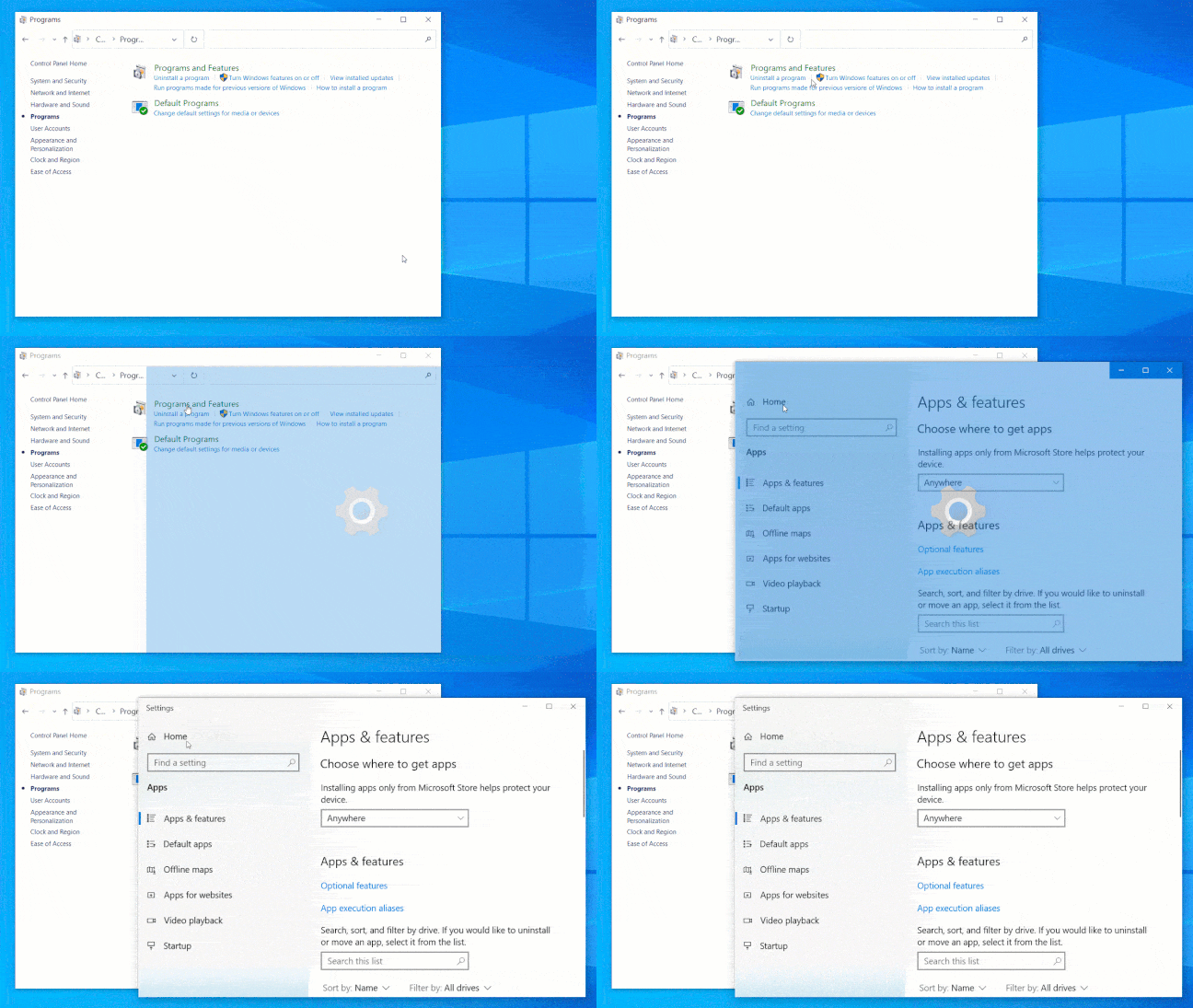
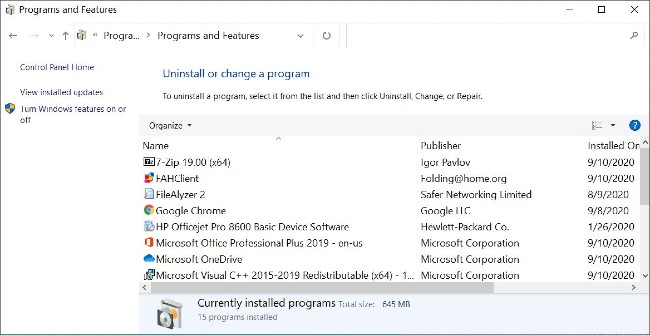
<p style="text-align: justify;">Cụ thể, trên Windows 10, khi người dùng nhập vào &quot;<strong>Programs and Features</strong>&quot; trong Control Panel, họ sẽ dược đưa tới giao diện gỡ cài đặt hoặc thay đổi tùy chọn cài đặt cho các ứng dụng. Nhưng trên Windows 10 20211 với tính năng bị ẩn kể trên được kích hoạt, người dùng sẽ được đưa tới trang &quot;<strong>App &amp; Features</strong>&quot; hiện đại của ứng dụng Settings khi nhấp vào &quot;<strong>Programs and Features</strong>&quot;.</p>

<figure data-inimage-loaded="true">
<div style="text-align: justify;"><br />
<img alt="Giao diện gỡ cài đặt, chỉnh sửa cài đặt ứng dụng cũ" data-i="1" data-src="https://st.quantrimang.com/photos/image/2020/09/14/them-dau-hieu-cho-thay-control-panel-tren-windows-10-sap-bi-khai-tu.jpg" data-was-processed="true" height="335" src="https://st.quantrimang.com/photos/image/2020/09/14/them-dau-hieu-cho-thay-control-panel-tren-windows-10-sap-bi-khai-tu.jpg" width="650" /></div>

<figcaption>
<div style="text-align: justify;">Giao diện gỡ cài đặt, chỉnh sửa cài đặt ứng dụng cũ</div>
</figcaption>
</figure>

<figure>
<div style="text-align: justify;"><img alt="Giao diện &#039;App &amp; Features&#039; mới" data-i="2" data-src="https://st.quantrimang.com/photos/image/2020/09/14/them-dau-hieu-cho-thay-control-panel-tren-windows-10-sap-bi-khai-tu-1.gif" data-was-processed="true" height="365" src="https://st.quantrimang.com/photos/image/2020/09/14/them-dau-hieu-cho-thay-control-panel-tren-windows-10-sap-bi-khai-tu-1.gif" width="648" /></div>

<figcaption>
<div style="text-align: justify;">Giao diện &quot;App &amp; Features&quot; mới</div>
</figcaption>
</figure>

<div style="text-align: justify;">&nbsp;</div>

<h2 style="text-align: justify;">Làm thế nào để dùng thử tính năng ẩn mới mẻ này?</h2>

<p style="text-align: justify;">Đầu tiên, bạn cần tham gia chương trình thử nghiệm Windows Insider của Microsoft theo kênh nhà phát triển. Tiếp theo, bạn cần tải về phiên bản Windows 10 20211 trở lên và cài đặt trên máy tính của mình.</p>

<p style="text-align: justify;">Sau khi cài đặt Windows 10 20211 bạn hãy tải về phần mềm ViveTool, công cụ được dùng để kích hoạt các tính năng ẩn dành cho nhà phát triển trong Windows 10. Giải nén tập tin zip của ViveTool vừa được tải về.</p>

<p style="text-align: justify;">Kế tiếp, bạn cần chạy cửa sổ lệnh Command Prompt dưới quyền Administrator. Trong cửa sổ lệnh, bạn hãy điều hướng tới thư mục chứa ViveTool đã được giải nén. Điều hướng xong bạn gõ dòng lệnh sau:</p>

<pre id="pre0">
<code>vivetool addconfig 26003950 2</code></pre>

<p style="text-align: justify;">Sau khi nhấn Enter, ViveTool sẽ gửi thông báo &quot;Đã thiết lập thành công cấu hình&quot;.</p>

<p style="text-align: justify;">Bây giờ, bạn có thể dùng thử tính năng ẩn mới mà không cần phải khởi động lại Windows. Khi thử xong, bạn có thể tắt tính năng này bằng cách mở Command Prompt dưới quyền Administrator, điều hướng tới thư mục ViveTool và nhập câu lệnh sau:</p>

<pre id="pre1">
<code>vivetool delconfig 26003950 0</code></pre>

<p style="text-align: justify;">Lưu ý: Hãy sao lưu dữ liệu trước khi thực hiện bất cứ thử nghiệm nào trên Windows 10. Chúng tôi sẽ không chịu trách nhiệm nếu có sự cố xảy ra với máy tính của bạn trong quá trình thử nghiệm.</p>
		</div>
				<div id="author">
						<p>
				<strong>Nguồn tin:</strong>
				Quantrimang.com
			</p>
		</div>
	</div>
	<div id="footer" class="clearfix">
		<div id="url">
			<strong>URL của bản tin này: </strong><a href="https://www.nguoicodonvn2008.info/vi/news/savefile/kien-thuc-may-tinh/them-dau-hieu-cho-thay-control-panel-tren-windows-10-sap-bi-khai-tu-2718.html" title="Thêm dấu hiệu cho thấy Control Panel trên Windows 10 sắp bị khai tử">https://www.nguoicodonvn2008.info/vi/news/savefile/kien-thuc-may-tinh/them-dau-hieu-cho-thay-control-panel-tren-windows-10-sap-bi-khai-tu-2718.html</a>

		</div>
		<div class="clear"></div>
		<div class="copyright">
			&copy; .&#x3A; Nguoicodonvn2008.info - Cõi lòng người cô đơn &#x3A;.
		</div>
		<div id="contact">
			<a href="mailto:admin@nguoicodonvn2008.info">admin@nguoicodonvn2008.info</a>
		</div>
	</div>
</div>
        <div id="timeoutsess" class="chromeframe">
            Bạn đã không sử dụng Site, <a onclick="timeoutsesscancel();" href="https://nguoicodonvn2008.info/#">Bấm vào đây để duy trì trạng thái đăng nhập</a>. Thời gian chờ: <span id="secField"> 60 </span> giây
        </div>
        <div id="openidResult" class="nv-alert" style="display:none"></div>
        <div id="openidBt" data-result="" data-redirect=""></div>
		</script>
		<div class="car-top">
  <span><img src="https://nguoicodonvn2008.info/themes/default/images/car.png" alt=""></span>
</div>
<script src="https://nguoicodonvn2008.info/assets/js/jquery/jquery.min.js"></script>
<script>var nv_base_siteurl="/",nv_lang_data="vi",nv_lang_interface="vi",nv_name_variable="nv",nv_fc_variable="op",nv_lang_variable="language",nv_module_name="news",nv_func_name="savefile",nv_is_user=0, nv_my_ofs=-4,nv_my_abbr="EDT",nv_cookie_prefix="nv4c_e856T",nv_check_pass_mstime=1738000,nv_area_admin=0,nv_safemode=0,theme_responsive=0,nv_recaptcha_ver=2,nv_recaptcha_sitekey="",nv_recaptcha_type="image",XSSsanitize=1;</script>
<script src="https://nguoicodonvn2008.info/assets/js/language/vi.js"></script>
<script src="https://nguoicodonvn2008.info/assets/js/DOMPurify/purify3.js"></script>
<script src="https://nguoicodonvn2008.info/assets/js/global.js"></script>
<script src="https://nguoicodonvn2008.info/assets/js/site.js"></script>
<script src="https://nguoicodonvn2008.info/themes/default/js/news.js"></script>
<script src="https://nguoicodonvn2008.info/themes/default/js/main.js"></script>
<script src="https://nguoicodonvn2008.info/themes/default/js/custom.js"></script>
<script type="application/ld+json">
        {
            "@context": "https://schema.org",
            "@type": "Organization",
            "url": "https://nguoicodonvn2008.info",
            "logo": "https://nguoicodonvn2008.info/uploads/angel.gif"
        }
        </script>
<script src="https://nguoicodonvn2008.info/themes/default/js/bootstrap.min.js"></script>
<script type="text/javascript">
var $scrolltop = $('.car-top');
$scrolltop.on('click', function () {
    $('html,body').animate({
        scrollTop: 0
    }, 800);
    $(this).addClass("car-run");
    setTimeout(function(){ $scrolltop.removeClass('car-run');}, 1000);
    return false;
});
$(window).on('scroll', function ()
{ 
    if($(window).scrollTop() >= 200)
    {
        $scrolltop.addClass("show");
        $scrolltop.addClass("car-down");
    }
    else
    {
       $scrolltop.removeClass("show");
       setTimeout(function(){ $scrolltop.removeClass('car-down');}, 300);
    }
});
</script>
</body>
</html>