<!DOCTYPE html>
    <html lang="vi" xmlns="http://www.w3.org/1999/xhtml" prefix="og: http://ogp.me/ns#">
    <head>
<title>Thay đổi âm thanh thông báo thư mới trong Windows 10</title>
<meta name="description" content="Thay đổi âm thanh thông báo thư mới trong Windows 10 - Savefile - Tin Tức -...">
<meta name="author" content=".: Nguoicodonvn2008.info - Cõi lòng người cô đơn :.">
<meta name="copyright" content=".: Nguoicodonvn2008.info - Cõi lòng người cô đơn :. [admin@nguoicodonvn2008.info]">
<meta name="robots" content="index, archive, follow, noodp">
<meta name="googlebot" content="index,archive,follow,noodp">
<meta name="msnbot" content="all,index,follow">
<meta name="generator" content="NukeViet v4.5">
<meta http-equiv="Content-Type" content="text/html; charset=utf-8">
<meta property="og:title" content="Thay đổi âm thanh thông báo thư mới trong Windows 10">
<meta property="og:type" content="website">
<meta property="og:description" content="Savefile - Tin Tức - https&#x3A;&#x002F;&#x002F;www.nguoicodonvn2008.info&#x002F;vi&#x002F;news&#x002F;savefile&#x002F;kien-thuc-may-tinh&#x002F;thay-doi-am-thanh-thong-bao-thu-moi-trong-windows-10-2442.html">
<meta property="og:site_name" content=".&#x3A; Nguoicodonvn2008.info - Cõi lòng người cô đơn &#x3A;.">
<meta property="og:url" content="https://www.nguoicodonvn2008.info/vi/news/savefile/kien-thuc-may-tinh/thay-doi-am-thanh-thong-bao-thu-moi-trong-windows-10-2442.html">
<link rel="shortcut icon" href="https://nguoicodonvn2008.info/favicon.ico">
<link rel="canonical" href="https://www.nguoicodonvn2008.info/vi/news/savefile/kien-thuc-may-tinh/thay-doi-am-thanh-thong-bao-thu-moi-trong-windows-10-2442.html">
<link rel="alternate" href="https://nguoicodonvn2008.info/vi/news/rss/" title="Tin Tức" type="application/rss+xml">
<link rel="alternate" href="https://nguoicodonvn2008.info/vi/news/rss/karaoke-dual/" title="Tin Tức - Karaoke Dual" type="application/rss+xml">
<link rel="alternate" href="https://nguoicodonvn2008.info/vi/news/rss/nhac-tre/" title="Tin Tức - Nhạc trẻ" type="application/rss+xml">
<link rel="alternate" href="https://nguoicodonvn2008.info/vi/news/rss/tru-tinh/" title="Tin Tức - Trữ tình" type="application/rss+xml">
<link rel="alternate" href="https://nguoicodonvn2008.info/vi/news/rss/nuoc-ngoai/" title="Tin Tức - Nước ngoài" type="application/rss+xml">
<link rel="alternate" href="https://nguoicodonvn2008.info/vi/news/rss/remix/" title="Tin Tức - Remix" type="application/rss+xml">
<link rel="alternate" href="https://nguoicodonvn2008.info/vi/news/rss/tam-su-tinh-yeu/" title="Tin Tức - Tâm sự tình yêu" type="application/rss+xml">
<link rel="alternate" href="https://nguoicodonvn2008.info/vi/news/rss/tho-suu-tam/" title="Tin Tức - Thơ sưu tầm" type="application/rss+xml">
<link rel="alternate" href="https://nguoicodonvn2008.info/vi/news/rss/cuoc-song/" title="Tin Tức - Cuộc sống" type="application/rss+xml">
<link rel="alternate" href="https://nguoicodonvn2008.info/vi/news/rss/phan-mem/" title="Tin Tức - Phần mềm" type="application/rss+xml">
<link rel="alternate" href="https://nguoicodonvn2008.info/vi/news/rss/kien-thuc-may-tinh/" title="Tin Tức - Kiến thức máy tính" type="application/rss+xml">
<link rel="alternate" href="https://nguoicodonvn2008.info/vi/news/rss/hoc-tap/" title="Tin Tức - Học tập" type="application/rss+xml">
<link rel="alternate" href="https://nguoicodonvn2008.info/vi/news/rss/tai-lieu/" title="Tin Tức - Tài liệu" type="application/rss+xml">
<link rel="alternate" href="https://nguoicodonvn2008.info/vi/news/rss/de-thi/" title="Tin Tức - Đề thi" type="application/rss+xml">
<link rel="preload" as="style" href="https://nguoicodonvn2008.info/assets/css/font-awesome.min.css" type="text/css">
<link rel="preload" as="style" href="https://nguoicodonvn2008.info/themes/default/css/bootstrap.non-responsive.css" type="text/css">
<link rel="preload" as="style" href="https://nguoicodonvn2008.info/themes/default/css/style.css" type="text/css">
<link rel="preload" as="style" href="https://nguoicodonvn2008.info/themes/default/css/style.non-responsive.css" type="text/css">
<link rel="preload" as="style" href="https://nguoicodonvn2008.info/themes/default/css/news.css" type="text/css">
<link rel="preload" as="style" href="https://nguoicodonvn2008.info/themes/default/css/custom.css" type="text/css">
<link rel="preload" as="script" href="https://nguoicodonvn2008.info/assets/js/jquery/jquery.min.js" type="text/javascript">
<link rel="preload" as="script" href="https://nguoicodonvn2008.info/assets/js/language/vi.js" type="text/javascript">
<link rel="preload" as="script" href="https://nguoicodonvn2008.info/assets/js/DOMPurify/purify3.js" type="text/javascript">
<link rel="preload" as="script" href="https://nguoicodonvn2008.info/assets/js/global.js" type="text/javascript">
<link rel="preload" as="script" href="https://nguoicodonvn2008.info/assets/js/site.js" type="text/javascript">
<link rel="preload" as="script" href="https://nguoicodonvn2008.info/themes/default/js/news.js" type="text/javascript">
<link rel="preload" as="script" href="https://nguoicodonvn2008.info/themes/default/js/main.js" type="text/javascript">
<link rel="preload" as="script" href="https://nguoicodonvn2008.info/themes/default/js/custom.js" type="text/javascript">
<link rel="preload" as="script" href="https://nguoicodonvn2008.info/themes/default/js/bootstrap.min.js" type="text/javascript">
<link rel="stylesheet" href="https://nguoicodonvn2008.info/assets/css/font-awesome.min.css">
<link rel="stylesheet" href="https://nguoicodonvn2008.info/themes/default/css/bootstrap.non-responsive.css">
<link rel="stylesheet" href="https://nguoicodonvn2008.info/themes/default/css/style.css">
<link rel="stylesheet" href="https://nguoicodonvn2008.info/themes/default/css/style.non-responsive.css">
<link rel="StyleSheet" href="https://nguoicodonvn2008.info/themes/default/css/news.css">
<link rel="stylesheet" href="https://nguoicodonvn2008.info/themes/default/css/custom.css">
<style type="text/css">
	body{background: #fff;}
</style>
    </head>
    <body>
<div id="print">
	<div id="hd_print">
		<h2 class="pull-left">.&#x3A; Nguoicodonvn2008.info - Cõi lòng người cô đơn &#x3A;.</h2>
		<p class="pull-right"><a title=".&#x3A; Nguoicodonvn2008.info - Cõi lòng người cô đơn &#x3A;." href="https://nguoicodonvn2008.info/">https://nguoicodonvn2008.info</a></p>
	</div>
	<div class="clear"></div>
	<hr />
	<div id="content">
		<h1>Thay đổi âm thanh thông báo thư mới trong Windows 10</h1>
		<ul class="list-inline">
			<li>Thứ sáu - 31/07/2020 00:29</li>
			<li class="hidden-print txtrequired"><em class="fa fa-print">&nbsp;</em><a title="In ra" href="javascript:;" onclick="window.print()">In ra</a></li>
			<li class="hidden-print txtrequired"><em class="fa fa-power-off">&nbsp;</em><a title="Đóng cửa sổ này" href="javascript:;" onclick="window.close()">Đóng cửa sổ này</a></li>
		</ul>
		<div class="clear"></div>
		<div id="hometext">
		</div>
				<div class="imghome">
			<img alt="Thay đổi âm thanh thông báo thư mới trong Windows 10" src="https://st.quantrimang.com/photos/image/2020/07/29/thay-doi-am-bao-thu-moi-1.png" width="460" class="img-thumbnail" />
		</div>
		<div class="clear"></div>
		<div id="bodytext" class="clearfix">
			<p style="text-align: justify;">Khi Windows 10 hiển thị thông báo, ví dụ, lúc cần cập nhật chữ ký Defender hoặc thực hiện một số hành động liên quan đến bảo trì hệ thống, âm thanh sẽ được phát theo mặc định. Tuy nhiên, đối với một thông báo email mới, Windows 10 lại phát một âm thanh riêng lẻ. Đây là cách thay đổi hoặc vô hiệu hóa nó.</p>

<p style="text-align: justify;">Windows 10 đi kèm với một ứng dụng Universal, &quot;Mail&quot;. Ứng dụng này nhằm cung cấp chức năng email cơ bản cho người dùng Windows 10. Nó hỗ trợ nhiều tài khoản, đi kèm với các cài đặt preset để nhanh chóng thêm tài khoản thư từ các dịch vụ phổ biến và bao gồm tất cả những chức năng cần thiết để đọc, gửi và nhận email.</p>

<p style="text-align: justify;">Nếu bạn muốn thay đổi hoặc vô hiệu hóa âm thanh thông báo thư mới trong Windows 10, bạn cần mở applet&nbsp;<strong>Sounds</strong>&nbsp;cổ điển. Cách thực hiện chi tiết như sau.</p>

<h2 style="text-align: justify;">Thay đổi âm thanh thông báo thư mới trong Windows 10</h2>

<p style="text-align: justify;">1.&nbsp;Mở ứng dụng Settings.</p>

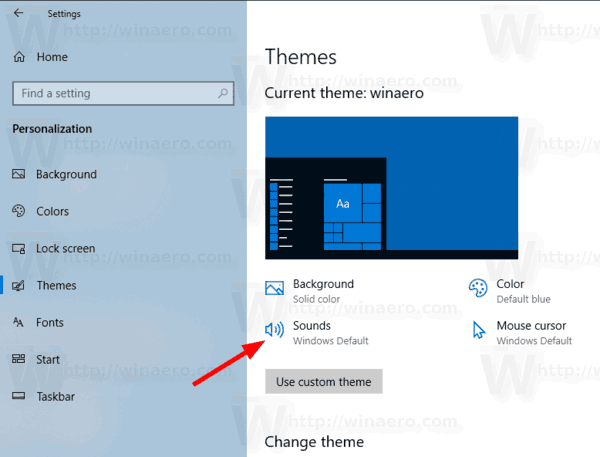
<p style="text-align: justify;">2. Chuyển đến&nbsp;<strong>Personalization &gt; Themes</strong>.</p>

<p style="text-align: justify;">3. Ở bên phải, nhấp vào nút&nbsp;<strong>Sounds.</strong></p>

<figure>
<div style="text-align: justify;"><img alt="Nhấp vào nút Sounds" data-i="0" data-src="https://st.quantrimang.com/photos/image/2020/07/29/thay-doi-am-bao-thu-moi-1.png" data-was-processed="true" height="457" src="https://st.quantrimang.com/photos/image/2020/07/29/thay-doi-am-bao-thu-moi-1.png" width="600" /></div>

<figcaption>
<div style="text-align: justify;">Nhấp vào nút Sounds</div>
</figcaption>
</figure>

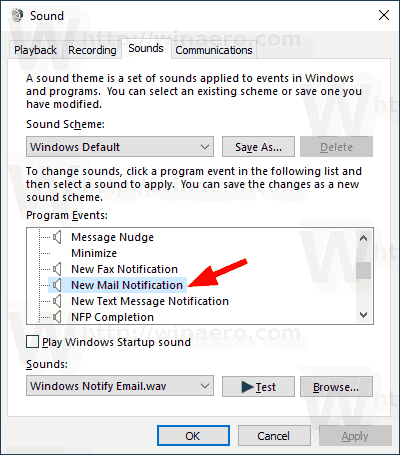
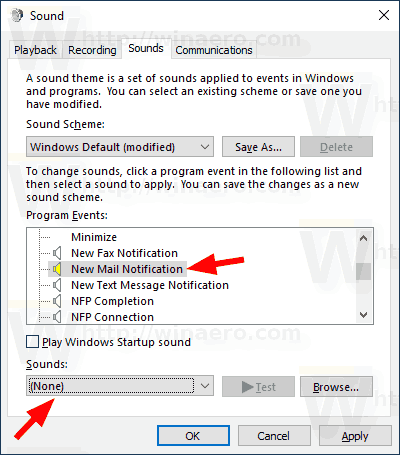
<p style="text-align: justify;">4. Trong hộp thoại&nbsp;<strong>Sounds</strong>, cuộn đến&nbsp;<strong>New Mail Notification</strong>&nbsp;trong danh sách&nbsp;<strong>Program Events.</strong></p>

<figure>
<div style="text-align: justify;"><img alt="Cuộn đến New Mail Notification" data-i="1" data-src="https://st.quantrimang.com/photos/image/2020/07/29/thay-doi-am-bao-thu-moi-2.png" data-was-processed="true" height="455" src="https://st.quantrimang.com/photos/image/2020/07/29/thay-doi-am-bao-thu-moi-2.png" width="400" /></div>

<figcaption>
<div style="text-align: justify;">Cuộn đến New Mail Notification</div>
</figcaption>
</figure>

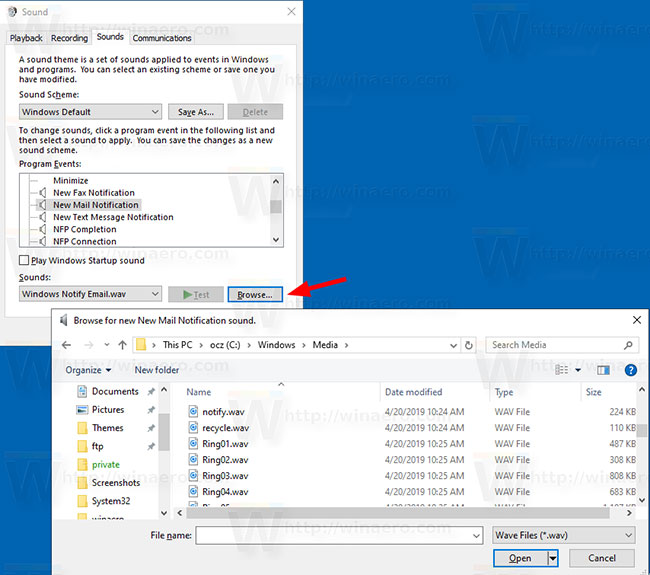
<p style="text-align: justify;">5. Để thay đổi âm thanh thông báo thư trong Windows 10, hãy nhấp vào nút&nbsp;<strong>Browse</strong>&nbsp;để chọn file WAV.</p>

<figure>
<div style="text-align: justify;"><img alt="Nhấp vào nút Browse để chọn file WAV" data-i="2" data-src="https://st.quantrimang.com/photos/image/2020/07/29/thay-doi-am-bao-thu-moi-3.jpg" data-was-processed="true" height="575" src="https://st.quantrimang.com/photos/image/2020/07/29/thay-doi-am-bao-thu-moi-3.jpg" width="650" /></div>

<figcaption>
<div style="text-align: justify;">Nhấp vào nút Browse để chọn file WAV</div>
</figcaption>
</figure>

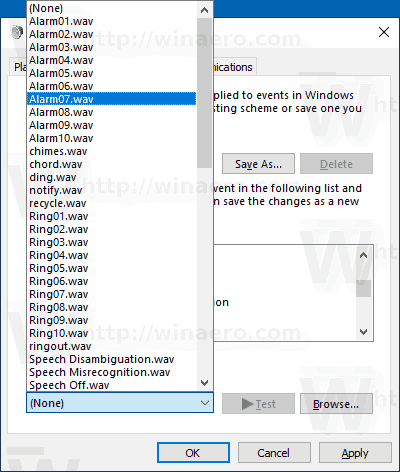
<p style="text-align: justify;">6. Ngoài ra, bạn có thể chọn bất kỳ âm thanh nào khác từ danh sách drop-down cũng được. Những âm thanh này là các file *.wav được lưu trữ trong thư mục&nbsp;<strong>C:\Windows\Media.</strong></p>

<figure>
<div style="text-align: justify;"><img alt="Có thể chọn bất kỳ âm thanh nào khác từ danh sách drop-down" data-i="3" data-src="https://st.quantrimang.com/photos/image/2020/07/29/thay-doi-am-bao-thu-moi-4.png" data-was-processed="true" height="472" src="https://st.quantrimang.com/photos/image/2020/07/29/thay-doi-am-bao-thu-moi-4.png" width="400" /></div>

<figcaption>
<div style="text-align: justify;">Có thể chọn bất kỳ âm thanh nào khác từ danh sách drop-down</div>
</figcaption>
</figure>

<p style="text-align: justify;">7. Nhấp vào nút&nbsp;<strong>Apply &gt; OK</strong>&nbsp;để đóng hộp thoại&nbsp;<strong>Sound.</strong></p>

<p style="text-align: justify;">Cuối cùng, applet Sound cũng có thể được mở từ Control Panel. Đi đến&nbsp;<strong>Control Panel &gt; Hardware and Sound</strong>. Ở đó, nhấp vào biểu tượng&nbsp;<strong>Sound.</strong></p>

<p style="text-align: justify;"><strong>Lưu ý</strong>: Thay đổi Sound Scheme hiện tại sẽ reset lại âm thanh thông báo thư mới tùy chỉnh. Ngoài ra, thay đổi theme cũng có thể reset lại âm báo, vì theme mới đi kèm với các cài đặt riêng cho âm thanh Windows.</p>

<div style="text-align: justify;">&nbsp;</div>

<h2 style="text-align: justify;">Vô hiệu hóa âm thanh thông báo thư trong Windows 10</h2>

<p style="text-align: justify;">Để vô hiệu hóa âm thanh thông báo thư trong Windows 10, làm theo các bước từ 1 đến 4 ở trên, rồi chọn&nbsp;<strong>(None)</strong>&nbsp;trong danh sách drop-down&nbsp;<strong>Sounds.</strong>&nbsp;Cuối cùng, nhấp vào nút&nbsp;<strong>Apply &gt; OK</strong>&nbsp;để đóng hộp thoại&nbsp;<strong>Sound</strong>&nbsp;là xong.</p>

<figure>
<div style="text-align: justify;"><img alt="Chọn (None) trong danh sách drop-down Sounds" data-i="4" data-src="https://st.quantrimang.com/photos/image/2020/07/29/thay-doi-am-bao-thu-moi-5.png" data-was-processed="true" height="455" src="https://st.quantrimang.com/photos/image/2020/07/29/thay-doi-am-bao-thu-moi-5.png" width="400" /></div>

<figcaption>
<div style="text-align: justify;">Chọn (None) trong danh sách drop-down Sounds</div>
</figcaption>
</figure>
		</div>
				<div id="author">
						<p>
				<strong>Nguồn tin:</strong>
				Quantrimang.com
			</p>
		</div>
	</div>
	<div id="footer" class="clearfix">
		<div id="url">
			<strong>URL của bản tin này: </strong><a href="https://www.nguoicodonvn2008.info/vi/news/savefile/kien-thuc-may-tinh/thay-doi-am-thanh-thong-bao-thu-moi-trong-windows-10-2442.html" title="Thay đổi âm thanh thông báo thư mới trong Windows 10">https://www.nguoicodonvn2008.info/vi/news/savefile/kien-thuc-may-tinh/thay-doi-am-thanh-thong-bao-thu-moi-trong-windows-10-2442.html</a>

		</div>
		<div class="clear"></div>
		<div class="copyright">
			&copy; .&#x3A; Nguoicodonvn2008.info - Cõi lòng người cô đơn &#x3A;.
		</div>
		<div id="contact">
			<a href="mailto:admin@nguoicodonvn2008.info">admin@nguoicodonvn2008.info</a>
		</div>
	</div>
</div>
        <div id="timeoutsess" class="chromeframe">
            Bạn đã không sử dụng Site, <a onclick="timeoutsesscancel();" href="https://nguoicodonvn2008.info/#">Bấm vào đây để duy trì trạng thái đăng nhập</a>. Thời gian chờ: <span id="secField"> 60 </span> giây
        </div>
        <div id="openidResult" class="nv-alert" style="display:none"></div>
        <div id="openidBt" data-result="" data-redirect=""></div>
		</script>
		<div class="car-top">
  <span><img src="https://nguoicodonvn2008.info/themes/default/images/car.png" alt=""></span>
</div>
<script src="https://nguoicodonvn2008.info/assets/js/jquery/jquery.min.js"></script>
<script>var nv_base_siteurl="/",nv_lang_data="vi",nv_lang_interface="vi",nv_name_variable="nv",nv_fc_variable="op",nv_lang_variable="language",nv_module_name="news",nv_func_name="savefile",nv_is_user=0, nv_my_ofs=-4,nv_my_abbr="EDT",nv_cookie_prefix="nv4c_e856T",nv_check_pass_mstime=1738000,nv_area_admin=0,nv_safemode=0,theme_responsive=0,nv_recaptcha_ver=2,nv_recaptcha_sitekey="",nv_recaptcha_type="image",XSSsanitize=1;</script>
<script src="https://nguoicodonvn2008.info/assets/js/language/vi.js"></script>
<script src="https://nguoicodonvn2008.info/assets/js/DOMPurify/purify3.js"></script>
<script src="https://nguoicodonvn2008.info/assets/js/global.js"></script>
<script src="https://nguoicodonvn2008.info/assets/js/site.js"></script>
<script src="https://nguoicodonvn2008.info/themes/default/js/news.js"></script>
<script src="https://nguoicodonvn2008.info/themes/default/js/main.js"></script>
<script src="https://nguoicodonvn2008.info/themes/default/js/custom.js"></script>
<script type="application/ld+json">
        {
            "@context": "https://schema.org",
            "@type": "Organization",
            "url": "https://nguoicodonvn2008.info",
            "logo": "https://nguoicodonvn2008.info/uploads/angel.gif"
        }
        </script>
<script src="https://nguoicodonvn2008.info/themes/default/js/bootstrap.min.js"></script>
<script type="text/javascript">
var $scrolltop = $('.car-top');
$scrolltop.on('click', function () {
    $('html,body').animate({
        scrollTop: 0
    }, 800);
    $(this).addClass("car-run");
    setTimeout(function(){ $scrolltop.removeClass('car-run');}, 1000);
    return false;
});
$(window).on('scroll', function ()
{ 
    if($(window).scrollTop() >= 200)
    {
        $scrolltop.addClass("show");
        $scrolltop.addClass("car-down");
    }
    else
    {
       $scrolltop.removeClass("show");
       setTimeout(function(){ $scrolltop.removeClass('car-down');}, 300);
    }
});
</script>
</body>
</html>