<!DOCTYPE html>
    <html lang="vi" xmlns="http://www.w3.org/1999/xhtml" prefix="og: http://ogp.me/ns#">
    <head>
<title>TFTP &#40;Trivial File Transfer Protocol&#41; là gì?</title>
<meta name="description" content="TFTP &#40;Trivial File Transfer Protocol&#41; là gì? - Savefile - Tin Tức -...">
<meta name="author" content=".: Nguoicodonvn2008.info - Cõi lòng người cô đơn :.">
<meta name="copyright" content=".: Nguoicodonvn2008.info - Cõi lòng người cô đơn :. [admin@nguoicodonvn2008.info]">
<meta name="robots" content="index, archive, follow, noodp">
<meta name="googlebot" content="index,archive,follow,noodp">
<meta name="msnbot" content="all,index,follow">
<meta name="generator" content="NukeViet v4.5">
<meta http-equiv="Content-Type" content="text/html; charset=utf-8">
<meta property="og:title" content="TFTP &#40;Trivial File Transfer Protocol&#41; là gì?">
<meta property="og:type" content="website">
<meta property="og:description" content="Savefile - Tin Tức - https&#x3A;&#x002F;&#x002F;www.nguoicodonvn2008.info&#x002F;vi&#x002F;news&#x002F;savefile&#x002F;kien-thuc-may-tinh&#x002F;tftp-trivial-file-transfer-protocol-la-gi-4465.html">
<meta property="og:site_name" content=".&#x3A; Nguoicodonvn2008.info - Cõi lòng người cô đơn &#x3A;.">
<meta property="og:url" content="https://www.nguoicodonvn2008.info/vi/news/savefile/kien-thuc-may-tinh/tftp-trivial-file-transfer-protocol-la-gi-4465.html">
<link rel="shortcut icon" href="https://nguoicodonvn2008.info/favicon.ico">
<link rel="canonical" href="https://www.nguoicodonvn2008.info/vi/news/savefile/kien-thuc-may-tinh/tftp-trivial-file-transfer-protocol-la-gi-4465.html">
<link rel="alternate" href="https://nguoicodonvn2008.info/vi/news/rss/" title="Tin Tức" type="application/rss+xml">
<link rel="alternate" href="https://nguoicodonvn2008.info/vi/news/rss/karaoke-dual/" title="Tin Tức - Karaoke Dual" type="application/rss+xml">
<link rel="alternate" href="https://nguoicodonvn2008.info/vi/news/rss/nhac-tre/" title="Tin Tức - Nhạc trẻ" type="application/rss+xml">
<link rel="alternate" href="https://nguoicodonvn2008.info/vi/news/rss/tru-tinh/" title="Tin Tức - Trữ tình" type="application/rss+xml">
<link rel="alternate" href="https://nguoicodonvn2008.info/vi/news/rss/nuoc-ngoai/" title="Tin Tức - Nước ngoài" type="application/rss+xml">
<link rel="alternate" href="https://nguoicodonvn2008.info/vi/news/rss/remix/" title="Tin Tức - Remix" type="application/rss+xml">
<link rel="alternate" href="https://nguoicodonvn2008.info/vi/news/rss/tam-su-tinh-yeu/" title="Tin Tức - Tâm sự tình yêu" type="application/rss+xml">
<link rel="alternate" href="https://nguoicodonvn2008.info/vi/news/rss/tho-suu-tam/" title="Tin Tức - Thơ sưu tầm" type="application/rss+xml">
<link rel="alternate" href="https://nguoicodonvn2008.info/vi/news/rss/cuoc-song/" title="Tin Tức - Cuộc sống" type="application/rss+xml">
<link rel="alternate" href="https://nguoicodonvn2008.info/vi/news/rss/phan-mem/" title="Tin Tức - Phần mềm" type="application/rss+xml">
<link rel="alternate" href="https://nguoicodonvn2008.info/vi/news/rss/kien-thuc-may-tinh/" title="Tin Tức - Kiến thức máy tính" type="application/rss+xml">
<link rel="alternate" href="https://nguoicodonvn2008.info/vi/news/rss/hoc-tap/" title="Tin Tức - Học tập" type="application/rss+xml">
<link rel="alternate" href="https://nguoicodonvn2008.info/vi/news/rss/tai-lieu/" title="Tin Tức - Tài liệu" type="application/rss+xml">
<link rel="alternate" href="https://nguoicodonvn2008.info/vi/news/rss/de-thi/" title="Tin Tức - Đề thi" type="application/rss+xml">
<link rel="preload" as="style" href="https://nguoicodonvn2008.info/assets/css/font-awesome.min.css" type="text/css">
<link rel="preload" as="style" href="https://nguoicodonvn2008.info/themes/default/css/bootstrap.non-responsive.css" type="text/css">
<link rel="preload" as="style" href="https://nguoicodonvn2008.info/themes/default/css/style.css" type="text/css">
<link rel="preload" as="style" href="https://nguoicodonvn2008.info/themes/default/css/style.non-responsive.css" type="text/css">
<link rel="preload" as="style" href="https://nguoicodonvn2008.info/themes/default/css/news.css" type="text/css">
<link rel="preload" as="style" href="https://nguoicodonvn2008.info/themes/default/css/custom.css" type="text/css">
<link rel="preload" as="script" href="https://nguoicodonvn2008.info/assets/js/jquery/jquery.min.js" type="text/javascript">
<link rel="preload" as="script" href="https://nguoicodonvn2008.info/assets/js/language/vi.js" type="text/javascript">
<link rel="preload" as="script" href="https://nguoicodonvn2008.info/assets/js/DOMPurify/purify3.js" type="text/javascript">
<link rel="preload" as="script" href="https://nguoicodonvn2008.info/assets/js/global.js" type="text/javascript">
<link rel="preload" as="script" href="https://nguoicodonvn2008.info/assets/js/site.js" type="text/javascript">
<link rel="preload" as="script" href="https://nguoicodonvn2008.info/themes/default/js/news.js" type="text/javascript">
<link rel="preload" as="script" href="https://nguoicodonvn2008.info/themes/default/js/main.js" type="text/javascript">
<link rel="preload" as="script" href="https://nguoicodonvn2008.info/themes/default/js/custom.js" type="text/javascript">
<link rel="preload" as="script" href="https://nguoicodonvn2008.info/themes/default/js/bootstrap.min.js" type="text/javascript">
<link rel="stylesheet" href="https://nguoicodonvn2008.info/assets/css/font-awesome.min.css">
<link rel="stylesheet" href="https://nguoicodonvn2008.info/themes/default/css/bootstrap.non-responsive.css">
<link rel="stylesheet" href="https://nguoicodonvn2008.info/themes/default/css/style.css">
<link rel="stylesheet" href="https://nguoicodonvn2008.info/themes/default/css/style.non-responsive.css">
<link rel="StyleSheet" href="https://nguoicodonvn2008.info/themes/default/css/news.css">
<link rel="stylesheet" href="https://nguoicodonvn2008.info/themes/default/css/custom.css">
<style type="text/css">
	body{background: #fff;}
</style>
    </head>
    <body>
<div id="print">
	<div id="hd_print">
		<h2 class="pull-left">.&#x3A; Nguoicodonvn2008.info - Cõi lòng người cô đơn &#x3A;.</h2>
		<p class="pull-right"><a title=".&#x3A; Nguoicodonvn2008.info - Cõi lòng người cô đơn &#x3A;." href="https://nguoicodonvn2008.info/">https://nguoicodonvn2008.info</a></p>
	</div>
	<div class="clear"></div>
	<hr />
	<div id="content">
		<h1>TFTP &#40;Trivial File Transfer Protocol&#41; là gì?</h1>
		<ul class="list-inline">
			<li>Thứ ba - 20/07/2021 00:49</li>
			<li class="hidden-print txtrequired"><em class="fa fa-print">&nbsp;</em><a title="In ra" href="javascript:;" onclick="window.print()">In ra</a></li>
			<li class="hidden-print txtrequired"><em class="fa fa-power-off">&nbsp;</em><a title="Đóng cửa sổ này" href="javascript:;" onclick="window.close()">Đóng cửa sổ này</a></li>
		</ul>
		<div class="clear"></div>
		<div id="hometext">
		</div>
				<div class="imghome">
			<img alt="TFTP &#40;Trivial File Transfer Protocol&#41; là gì?" src="https://st.quantrimang.com/photos/image/2021/07/20/tftp-trivial-file-transfer-protocol-4.jpg" width="460" class="img-thumbnail" />
		</div>
		<div class="clear"></div>
		<div id="bodytext" class="clearfix">
			<p style="text-align: justify;">Trivial File Transfer Protocol là công nghệ truyền file giữa các thiết bị mạng và là phiên bản đơn giản hóa của&nbsp;File Transfer Protocol&nbsp;mạnh mẽ hơn. TFTP được phát triển vào những năm 1970 dành cho các máy tính thiếu đủ bộ nhớ hoặc không gian ổ đĩa để cung cấp hỗ trợ FTP đầy đủ. Ngày nay, TFTP được tìm thấy trên các router băng thông rộng tiêu dùng và router mạng thương mại.</p>

<p style="text-align: justify;">Quản trị viên mạng gia đình sử dụng TFTP để&nbsp;nâng cấp firmware của router, trong khi quản trị viên chuyên nghiệp sử dụng TFTP để phân phối phần mềm trên các mạng công ty.</p>

<h2 style="text-align: justify;">Cách thức hoạt động của TFTP</h2>

<p style="text-align: justify;">Giống như FTP, TFTP sử dụng phần mềm client và server để tạo kết nối giữa hai thiết bị. Từ TFTP client, các file riêng lẻ có thể được upload hoặc download từ&nbsp;server. Server host các file và client yêu cầu hoặc gửi file.</p>

<p style="text-align: justify;">TFTP cũng có thể được sử dụng để khởi động máy tính từ xa và sao lưu các file cấu hình mạng hoặc&nbsp;router. TFTP dựa vào UDP để vận chuyển dữ liệu.</p>

<h2 style="text-align: justify;">Phần mềm TFTP client và server</h2>

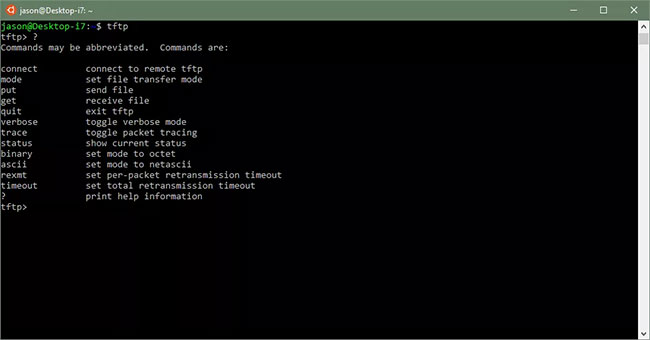
<p style="text-align: justify;">TFTP client dòng lệnh được bao gồm trong các phiên bản hiện tại của Microsoft Windows, Linux và macOS. Các TFTP client có giao diện đồ họa cũng có sẵn dưới dạng phần mềm miễn phí, chẳng hạn như TFTPD32, bao gồm một&nbsp;TFTP server. Windows TFTP Utility là một ví dụ khác về GUI client và server cho TFTP, nhưng cũng có&nbsp;các FTP client miễn phí&nbsp;khác.</p>

<figure>
<div style="text-align: justify;"><img alt="TFTP client dòng lệnh trong Linux" data-i="0" data-src="https://st.quantrimang.com/photos/image/2021/07/20/tftp-trivial-file-transfer-protocol-1.jpg" data-was-processed="true" height="340" src="https://st.quantrimang.com/photos/image/2021/07/20/tftp-trivial-file-transfer-protocol-1.jpg" width="650" /></div>

<figcaption>
<div style="text-align: justify;">TFTP client dòng lệnh trong Linux</div>
</figcaption>
</figure>

<p style="text-align: justify;">Microsoft Windows không đi kèm với TFTP server, nhưng một số TFTP server của Windows miễn phí có sẵn để tải xuống. Hệ thống Linux và macOS sử dụng tftpd TFTP server, mặc dù nó có thể bị tắt theo mặc định.</p>

<p style="text-align: justify;">Các chuyên gia mạng khuyên bạn nên cấu hình TFTP server cẩn thận để tránh các sự cố bảo mật tiềm ẩn.</p>

<h2 style="text-align: justify;">Cách sử dụng TFTP client trong Windows</h2>

<p style="text-align: justify;">TFTP client trong Windows không được bật theo mặc định. Hãy bật nó lên thông qua applet Control Panel&nbsp;<strong>Programs and Features</strong>.</p>

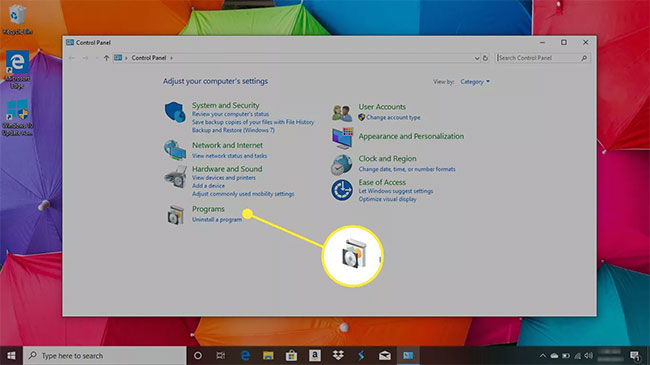
<p style="text-align: justify;">1.&nbsp;Mở Control Panel: Đi tới&nbsp;<strong>Windows Search</strong>&nbsp;và tìm kiếm&nbsp;<strong>Control Panel.</strong></p>

<p style="text-align: justify;">2. Trong&nbsp;<strong>Control Panel</strong>, chọn&nbsp;<strong>Programs.</strong></p>

<figure>
<div style="text-align: justify;"><img alt="Chọn Programs" data-i="1" data-src="https://st.quantrimang.com/photos/image/2021/07/20/tftp-trivial-file-transfer-protocol-2.jpg" data-was-processed="true" height="365" src="https://st.quantrimang.com/photos/image/2021/07/20/tftp-trivial-file-transfer-protocol-2.jpg" width="650" /></div>

<figcaption>
<div style="text-align: justify;">Chọn Programs</div>
</figcaption>
</figure>

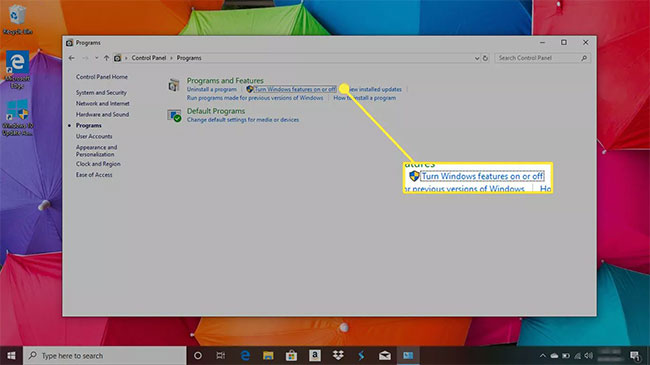
<p style="text-align: justify;">3. Chọn&nbsp;<strong>Turn Windows features on or off</strong>.</p>

<p style="text-align: justify;">Hoặc, bạn có thể thực thi lệnh&nbsp;<strong>optionalfeatures</strong>&nbsp;trong&nbsp;<strong>Command Prompt</strong>&nbsp;hoặc hộp thoại&nbsp;<strong>Run.</strong></p>

<figure>
<div style="text-align: justify;"><img alt="Chọn Turn Windows features on or off" data-i="2" data-src="https://st.quantrimang.com/photos/image/2021/07/20/tftp-trivial-file-transfer-protocol-3.jpg" data-was-processed="true" height="365" src="https://st.quantrimang.com/photos/image/2021/07/20/tftp-trivial-file-transfer-protocol-3.jpg" width="650" /></div>

<figcaption>
<div style="text-align: justify;">Chọn Turn Windows features on or off</div>
</figcaption>
</figure>

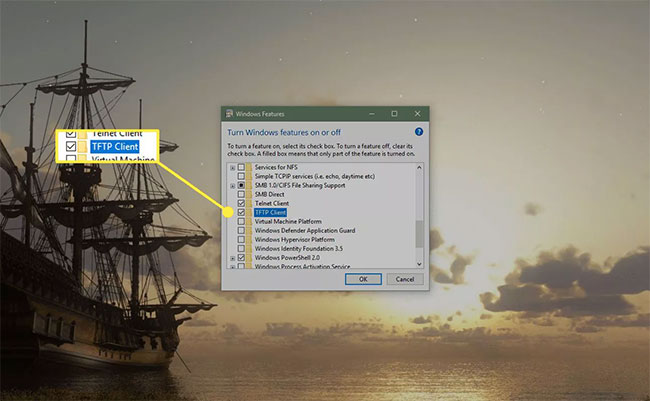
<p style="text-align: justify;">4. Trong hộp thoại&nbsp;<strong>Windows Features</strong>, chọn&nbsp;<strong>TFTP Client.</strong></p>

<p style="text-align: justify;"><strong>Lưu ý</strong>: Bạn có thể cần phải khởi động lại để các thay đổi có hiệu lực.</p>

<figure>
<div style="text-align: justify;"><img alt="Chọn TFTP Client" data-i="3" data-src="https://st.quantrimang.com/photos/image/2021/07/20/tftp-trivial-file-transfer-protocol-4.jpg" data-was-processed="true" height="401" src="https://st.quantrimang.com/photos/image/2021/07/20/tftp-trivial-file-transfer-protocol-4.jpg" width="650" /></div>

<figcaption>
<div style="text-align: justify;">Chọn TFTP Client</div>
</figcaption>
</figure>

<p style="text-align: justify;">5. Truy cập TFTP thông qua Command Prompt bằng lệnh tftp. Sử dụng lệnh help hoặc xem trang tham chiếu dòng lệnh tftp trên trang web của Microsoft tại:</p>

<pre id="pre0">
<code>https://docs.microsoft.com/en-us/previous-versions/windows/it-pro/windows-server-20</code></pre>
		</div>
				<div id="author">
						<p>
				<strong>Nguồn tin:</strong>
				Quantrimang.com
			</p>
		</div>
	</div>
	<div id="footer" class="clearfix">
		<div id="url">
			<strong>URL của bản tin này: </strong><a href="https://www.nguoicodonvn2008.info/vi/news/savefile/kien-thuc-may-tinh/tftp-trivial-file-transfer-protocol-la-gi-4465.html" title="TFTP &#40;Trivial File Transfer Protocol&#41; là gì?">https://www.nguoicodonvn2008.info/vi/news/savefile/kien-thuc-may-tinh/tftp-trivial-file-transfer-protocol-la-gi-4465.html</a>

		</div>
		<div class="clear"></div>
		<div class="copyright">
			&copy; .&#x3A; Nguoicodonvn2008.info - Cõi lòng người cô đơn &#x3A;.
		</div>
		<div id="contact">
			<a href="mailto:admin@nguoicodonvn2008.info">admin@nguoicodonvn2008.info</a>
		</div>
	</div>
</div>
        <div id="timeoutsess" class="chromeframe">
            Bạn đã không sử dụng Site, <a onclick="timeoutsesscancel();" href="https://nguoicodonvn2008.info/#">Bấm vào đây để duy trì trạng thái đăng nhập</a>. Thời gian chờ: <span id="secField"> 60 </span> giây
        </div>
        <div id="openidResult" class="nv-alert" style="display:none"></div>
        <div id="openidBt" data-result="" data-redirect=""></div>
		</script>
		<div class="car-top">
  <span><img src="https://nguoicodonvn2008.info/themes/default/images/car.png" alt=""></span>
</div>
<script src="https://nguoicodonvn2008.info/assets/js/jquery/jquery.min.js"></script>
<script>var nv_base_siteurl="/",nv_lang_data="vi",nv_lang_interface="vi",nv_name_variable="nv",nv_fc_variable="op",nv_lang_variable="language",nv_module_name="news",nv_func_name="savefile",nv_is_user=0, nv_my_ofs=-4,nv_my_abbr="EDT",nv_cookie_prefix="nv4c_e856T",nv_check_pass_mstime=1738000,nv_area_admin=0,nv_safemode=0,theme_responsive=0,nv_recaptcha_ver=2,nv_recaptcha_sitekey="",nv_recaptcha_type="image",XSSsanitize=1;</script>
<script src="https://nguoicodonvn2008.info/assets/js/language/vi.js"></script>
<script src="https://nguoicodonvn2008.info/assets/js/DOMPurify/purify3.js"></script>
<script src="https://nguoicodonvn2008.info/assets/js/global.js"></script>
<script src="https://nguoicodonvn2008.info/assets/js/site.js"></script>
<script src="https://nguoicodonvn2008.info/themes/default/js/news.js"></script>
<script src="https://nguoicodonvn2008.info/themes/default/js/main.js"></script>
<script src="https://nguoicodonvn2008.info/themes/default/js/custom.js"></script>
<script type="application/ld+json">
        {
            "@context": "https://schema.org",
            "@type": "Organization",
            "url": "https://nguoicodonvn2008.info",
            "logo": "https://nguoicodonvn2008.info/uploads/angel.gif"
        }
        </script>
<script src="https://nguoicodonvn2008.info/themes/default/js/bootstrap.min.js"></script>
<script type="text/javascript">
var $scrolltop = $('.car-top');
$scrolltop.on('click', function () {
    $('html,body').animate({
        scrollTop: 0
    }, 800);
    $(this).addClass("car-run");
    setTimeout(function(){ $scrolltop.removeClass('car-run');}, 1000);
    return false;
});
$(window).on('scroll', function ()
{ 
    if($(window).scrollTop() >= 200)
    {
        $scrolltop.addClass("show");
        $scrolltop.addClass("car-down");
    }
    else
    {
       $scrolltop.removeClass("show");
       setTimeout(function(){ $scrolltop.removeClass('car-down');}, 300);
    }
});
</script>
</body>
</html>