<!DOCTYPE html>
    <html lang="vi" xmlns="http://www.w3.org/1999/xhtml" prefix="og: http://ogp.me/ns#">
    <head>
<title>Tạo hiệu ứng pháo hoa với CSS</title>
<meta name="description" content="Tạo hiệu ứng pháo hoa với CSS - Savefile - Tin Tức - https&#x3A;&#x002F;&#x002F;www.nguoicodonvn2008.info&#x002F;vi&#x002F;news&#x002F;savefile&#x002F;kien-thuc-may-tinh&#x002F;tao-hieu-ung-phao-hoa-voi-css-6598.html">
<meta name="author" content=".: Nguoicodonvn2008.info - Cõi lòng người cô đơn :.">
<meta name="copyright" content=".: Nguoicodonvn2008.info - Cõi lòng người cô đơn :. [admin@nguoicodonvn2008.info]">
<meta name="robots" content="index, archive, follow, noodp">
<meta name="googlebot" content="index,archive,follow,noodp">
<meta name="msnbot" content="all,index,follow">
<meta name="generator" content="NukeViet v4.5">
<meta http-equiv="Content-Type" content="text/html; charset=utf-8">
<meta property="og:title" content="Tạo hiệu ứng pháo hoa với CSS">
<meta property="og:type" content="website">
<meta property="og:description" content="Savefile - Tin Tức - https&#x3A;&#x002F;&#x002F;www.nguoicodonvn2008.info&#x002F;vi&#x002F;news&#x002F;savefile&#x002F;kien-thuc-may-tinh&#x002F;tao-hieu-ung-phao-hoa-voi-css-6598.html">
<meta property="og:site_name" content=".&#x3A; Nguoicodonvn2008.info - Cõi lòng người cô đơn &#x3A;.">
<meta property="og:url" content="https://www.nguoicodonvn2008.info/vi/news/savefile/kien-thuc-may-tinh/tao-hieu-ung-phao-hoa-voi-css-6598.html">
<link rel="shortcut icon" href="https://nguoicodonvn2008.info/favicon.ico">
<link rel="canonical" href="https://www.nguoicodonvn2008.info/vi/news/savefile/kien-thuc-may-tinh/tao-hieu-ung-phao-hoa-voi-css-6598.html">
<link rel="alternate" href="https://nguoicodonvn2008.info/vi/news/rss/" title="Tin Tức" type="application/rss+xml">
<link rel="alternate" href="https://nguoicodonvn2008.info/vi/news/rss/karaoke-dual/" title="Tin Tức - Karaoke Dual" type="application/rss+xml">
<link rel="alternate" href="https://nguoicodonvn2008.info/vi/news/rss/nhac-tre/" title="Tin Tức - Nhạc trẻ" type="application/rss+xml">
<link rel="alternate" href="https://nguoicodonvn2008.info/vi/news/rss/tru-tinh/" title="Tin Tức - Trữ tình" type="application/rss+xml">
<link rel="alternate" href="https://nguoicodonvn2008.info/vi/news/rss/nuoc-ngoai/" title="Tin Tức - Nước ngoài" type="application/rss+xml">
<link rel="alternate" href="https://nguoicodonvn2008.info/vi/news/rss/remix/" title="Tin Tức - Remix" type="application/rss+xml">
<link rel="alternate" href="https://nguoicodonvn2008.info/vi/news/rss/tam-su-tinh-yeu/" title="Tin Tức - Tâm sự tình yêu" type="application/rss+xml">
<link rel="alternate" href="https://nguoicodonvn2008.info/vi/news/rss/tho-suu-tam/" title="Tin Tức - Thơ sưu tầm" type="application/rss+xml">
<link rel="alternate" href="https://nguoicodonvn2008.info/vi/news/rss/cuoc-song/" title="Tin Tức - Cuộc sống" type="application/rss+xml">
<link rel="alternate" href="https://nguoicodonvn2008.info/vi/news/rss/phan-mem/" title="Tin Tức - Phần mềm" type="application/rss+xml">
<link rel="alternate" href="https://nguoicodonvn2008.info/vi/news/rss/kien-thuc-may-tinh/" title="Tin Tức - Kiến thức máy tính" type="application/rss+xml">
<link rel="alternate" href="https://nguoicodonvn2008.info/vi/news/rss/hoc-tap/" title="Tin Tức - Học tập" type="application/rss+xml">
<link rel="alternate" href="https://nguoicodonvn2008.info/vi/news/rss/tai-lieu/" title="Tin Tức - Tài liệu" type="application/rss+xml">
<link rel="alternate" href="https://nguoicodonvn2008.info/vi/news/rss/de-thi/" title="Tin Tức - Đề thi" type="application/rss+xml">
<link rel="preload" as="style" href="https://nguoicodonvn2008.info/assets/css/font-awesome.min.css" type="text/css">
<link rel="preload" as="style" href="https://nguoicodonvn2008.info/themes/default/css/bootstrap.non-responsive.css" type="text/css">
<link rel="preload" as="style" href="https://nguoicodonvn2008.info/themes/default/css/style.css" type="text/css">
<link rel="preload" as="style" href="https://nguoicodonvn2008.info/themes/default/css/style.non-responsive.css" type="text/css">
<link rel="preload" as="style" href="https://nguoicodonvn2008.info/themes/default/css/news.css" type="text/css">
<link rel="preload" as="style" href="https://nguoicodonvn2008.info/themes/default/css/custom.css" type="text/css">
<link rel="preload" as="script" href="https://nguoicodonvn2008.info/assets/js/jquery/jquery.min.js" type="text/javascript">
<link rel="preload" as="script" href="https://nguoicodonvn2008.info/assets/js/language/vi.js" type="text/javascript">
<link rel="preload" as="script" href="https://nguoicodonvn2008.info/assets/js/DOMPurify/purify3.js" type="text/javascript">
<link rel="preload" as="script" href="https://nguoicodonvn2008.info/assets/js/global.js" type="text/javascript">
<link rel="preload" as="script" href="https://nguoicodonvn2008.info/assets/js/site.js" type="text/javascript">
<link rel="preload" as="script" href="https://nguoicodonvn2008.info/themes/default/js/news.js" type="text/javascript">
<link rel="preload" as="script" href="https://nguoicodonvn2008.info/themes/default/js/main.js" type="text/javascript">
<link rel="preload" as="script" href="https://nguoicodonvn2008.info/themes/default/js/custom.js" type="text/javascript">
<link rel="preload" as="script" href="https://nguoicodonvn2008.info/themes/default/js/bootstrap.min.js" type="text/javascript">
<link rel="stylesheet" href="https://nguoicodonvn2008.info/assets/css/font-awesome.min.css">
<link rel="stylesheet" href="https://nguoicodonvn2008.info/themes/default/css/bootstrap.non-responsive.css">
<link rel="stylesheet" href="https://nguoicodonvn2008.info/themes/default/css/style.css">
<link rel="stylesheet" href="https://nguoicodonvn2008.info/themes/default/css/style.non-responsive.css">
<link rel="StyleSheet" href="https://nguoicodonvn2008.info/themes/default/css/news.css">
<link rel="stylesheet" href="https://nguoicodonvn2008.info/themes/default/css/custom.css">
<style type="text/css">
	body{background: #fff;}
</style>
    </head>
    <body>
<div id="print">
	<div id="hd_print">
		<h2 class="pull-left">.&#x3A; Nguoicodonvn2008.info - Cõi lòng người cô đơn &#x3A;.</h2>
		<p class="pull-right"><a title=".&#x3A; Nguoicodonvn2008.info - Cõi lòng người cô đơn &#x3A;." href="https://nguoicodonvn2008.info/">https://nguoicodonvn2008.info</a></p>
	</div>
	<div class="clear"></div>
	<hr />
	<div id="content">
		<h1>Tạo hiệu ứng pháo hoa với CSS</h1>
		<ul class="list-inline">
			<li>Thứ tư - 11/01/2023 22:59</li>
			<li class="hidden-print txtrequired"><em class="fa fa-print">&nbsp;</em><a title="In ra" href="javascript:;" onclick="window.print()">In ra</a></li>
			<li class="hidden-print txtrequired"><em class="fa fa-power-off">&nbsp;</em><a title="Đóng cửa sổ này" href="javascript:;" onclick="window.close()">Đóng cửa sổ này</a></li>
		</ul>
		<div class="clear"></div>
		<div id="hometext">
		</div>
				<div class="imghome">
			<img alt="Tạo hiệu ứng pháo hoa với CSS" src="https://st.quantrimang.com/photos/image/2023/01/11/code-phao-hoa-css.gif" width="460" class="img-thumbnail" />
		</div>
		<div class="clear"></div>
		<div id="bodytext" class="clearfix">
			<p style="text-align: justify;"><strong>Tạo pháo hoa bằng CSS</strong>&nbsp;khá đơn giản. Dưới đây là chi tiết&nbsp;<strong>cách tạo hiệu ứng pháo hoa với CSS</strong>.</p>

<h2 style="text-align: justify;">Cách thức tạo hiệu ứng pháo hoa bằng CSS</h2>

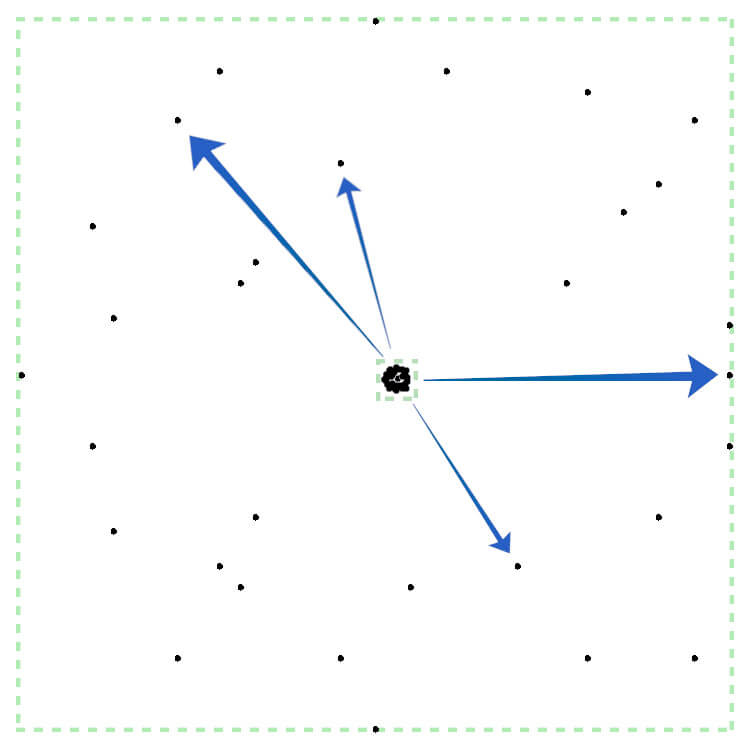
<p style="text-align: justify;">Ý tưởng ở đây là tạo một phần tử nhỏ với background có kích thước tuyệt đối được đặt ở những vị trí tương đối khác nhau. Sử dụng tương đối và tuyệt đối là cần thiết ở đây.</p>

<p style="text-align: justify;">Background tuyệt đối có nghĩa kích thước của chúng sẽ không thay đổi theo kích thước của container, nhưng vị trí sẽ là tương đối. Do đó, nó sẽ thay đổi khi container được chỉnh lại kích thước.</p>

<p style="text-align: justify;">Khoảng cách tương đối giữa các chấm luôn giống nhau. Nhưng khi container mở rộng, khoảng cách tuyệt đối giữa chúng cũng mở rộng để hiệu ứng pháo hoa giống thật.</p>

<p style="text-align: justify;"><img alt="Cách thức tạo hiệu ứng pháo hoa bằng CSS" data-i="0" data-src="https://st.quantrimang.com/photos/image/2023/01/11/firework-0.jpg" data-was-processed="true" height="650" src="https://st.quantrimang.com/photos/image/2023/01/11/firework-0.jpg" width="650" /></p>

<p style="text-align: justify;">Nhìn vào hình tròn ở bên phải được chỉ bởi mũi tên. Vị trí của nó là 100% theo chiều ngang và 50% theo chiều dọc. Tỷ lệ này vẫn được giữ nguyên khi container thay đổi.</p>

<h2 style="text-align: justify;">Code tạo pháo hoa cho web bằng CSS</h2>

<h3 style="text-align: justify;">HTML</h3>

<p style="text-align: justify;">Như đã đề cập ở trên, phần HTML đơn giản. Chúng ta chỉ cần một phần tử cho mỗi firework:</p>

<pre id="pre0" style="text-align: justify;">
&lt;div class=&quot;firework&quot;&gt;&lt;/div&gt;</pre>

<p style="text-align: justify;">Nếu muốn kèm hình ảnh để tăng thêm hiệu ứng thị giác, bạn có thể thêm thẻ&nbsp;<code>img</code>&nbsp;và một&nbsp;<code>aria-label</code>&nbsp;kèm mô tả ngắn.</p>

<h3 style="text-align: justify;">CSS</h3>

<p style="text-align: justify;">Bắt đầu bằng cách xác định các kiểu cơ bản cho pháo hoa. Một container chứa khối đơn giản nằm trên màn hình:</p>

<pre id="pre1" style="text-align: justify;">
.firework {
  position: absolute;
  top: 50%;
  left: 50%;
  transform: translate(-50%, -50%);
  width: 0.5vmin;
  aspect-ratio: 1;
  background:
      /* background intentionally blank */
    ;
  background-size: 0.5vmin 0.5vmin;
  background-repeat: no-repeat;
}</pre>

<p style="text-align: justify;"><strong>Giải thích chi tiết thuộc tính và giá trị:</strong></p>

<ul>
	<li style="text-align: justify;"><code>position: absolute;</code>: Phần tử sẽ được di chuyển xung quanh màn hình. Vị trí tuyệt đối là lý tưởng để không ảnh hưởng tới các thành phần khác.</li>
	<li style="text-align: justify;"><code>top: 50%; left: 50%;</code>: là mặc định. Firework là nằm ở vị trí trung tâm tuyệt đối. Bạn có thể thay đổi điều đó sau.</li>
	<li style="text-align: justify;"><code>transform: translate(-50%, -50%);</code>: Điều này quan trọng. Bằng cách biên dịch phần tử -50% theo chiều ngang và dọc, nó sẽ mở rộng theo tất cả các hướng khi bạn thay đổi kích thước.</li>
	<li style="text-align: justify;"><code>width: 0.5vmin; aspect-ratio: 1;</code>: phần tử này sẽ là một hình vuông nhỏ. Ở đây dùng đơn vị vmin vì nó đáp ứng nhưng bạn có thể dùng px, rem hoặc đơn vị CSS yêu thích.</li>
	<li style="text-align: justify;"><code>background-size: 0.5vmin 0.5vmin;</code>: Quan trọng. Ví dụ thiết lập một kích thước background cố định nên khi xác định gradient, chúng sẽ luôn có cùng kích thước, không phụ thuộc vào kích thước của container.</li>
	<li style="text-align: justify;"><code>background-repeat: no-repeat;</code>: Không lặp lại gradient để tránh rối mắt.</li>
</ul>

<p style="text-align: justify;">Đối với background, ví dụ thêm một loạt gradient tỏa tròn:</p>

<pre id="pre2" style="text-align: justify;">
radial-gradient(circle, yellow 0.5vmin, #0000 0) 50% 0%</pre>

<p style="text-align: justify;">Gradient sẽ đặt một hình tròn kích thước 0.5vmin ở trung tâm (50%), trên (0%) của phần tử pháo hoa. Đảm bảo bạn phân bổ chúng trên khắp container.</p>

<p style="text-align: justify;">Hoạt ảnh sẽ được chia thành 2 phần: pháo hoa bay lên bầu trời và nổ pháo hoa.</p>

<pre id="pre3" style="text-align: justify;">
@keyframes firework {
  0% { 
    transform: translate(-50%, 60vh);
    width: 0.5vmin;
    opacity: 1;
  }
  50% { 
    width: 0.5vmin;
    opacity: 1;
  }
  100% { 
    width: 45vmin; 
    opacity: 0; 
  }
}</pre>

<p style="text-align: justify;">Code này sẽ di chuyển pháo hoa ra ngoài phía dưới cùng của màn hình (translate(-50%, 60vh)), giữ nó nhỏ (width: 0.5vmin) và hiện (opacity: 1).</p>

<p style="text-align: justify;">Một nửa hoạt ảnh, các phần tử hiển thị vẫn nhỏ, sau đó, nó mở rộng tới kích thước cuối cùng (45vmin) và hợp nhất với nền.</p>

<pre id="pre4" style="text-align: justify;">
.firework {
  animation: firework 2s infinite;
  ...
}</pre>

<p style="text-align: justify;">Cuối cùng, áp dụng các kiểu tương tự cho pseudo-elements&nbsp;<code>::before</code>&nbsp;và&nbsp;<code>::after</code>&nbsp;của pháo hoa.</p>

<pre id="pre5" style="text-align: justify;">
.firework,
.firework::before,
.firework::after {
  content: &quot;&quot;;
  ...
}
.firework::before {
  transform: translate(-50%, -50%) rotate(25deg) !important; 
}
.firework::after {
  transform: translate(-50%, -50%) rotate(-37deg) !important;
}</pre>

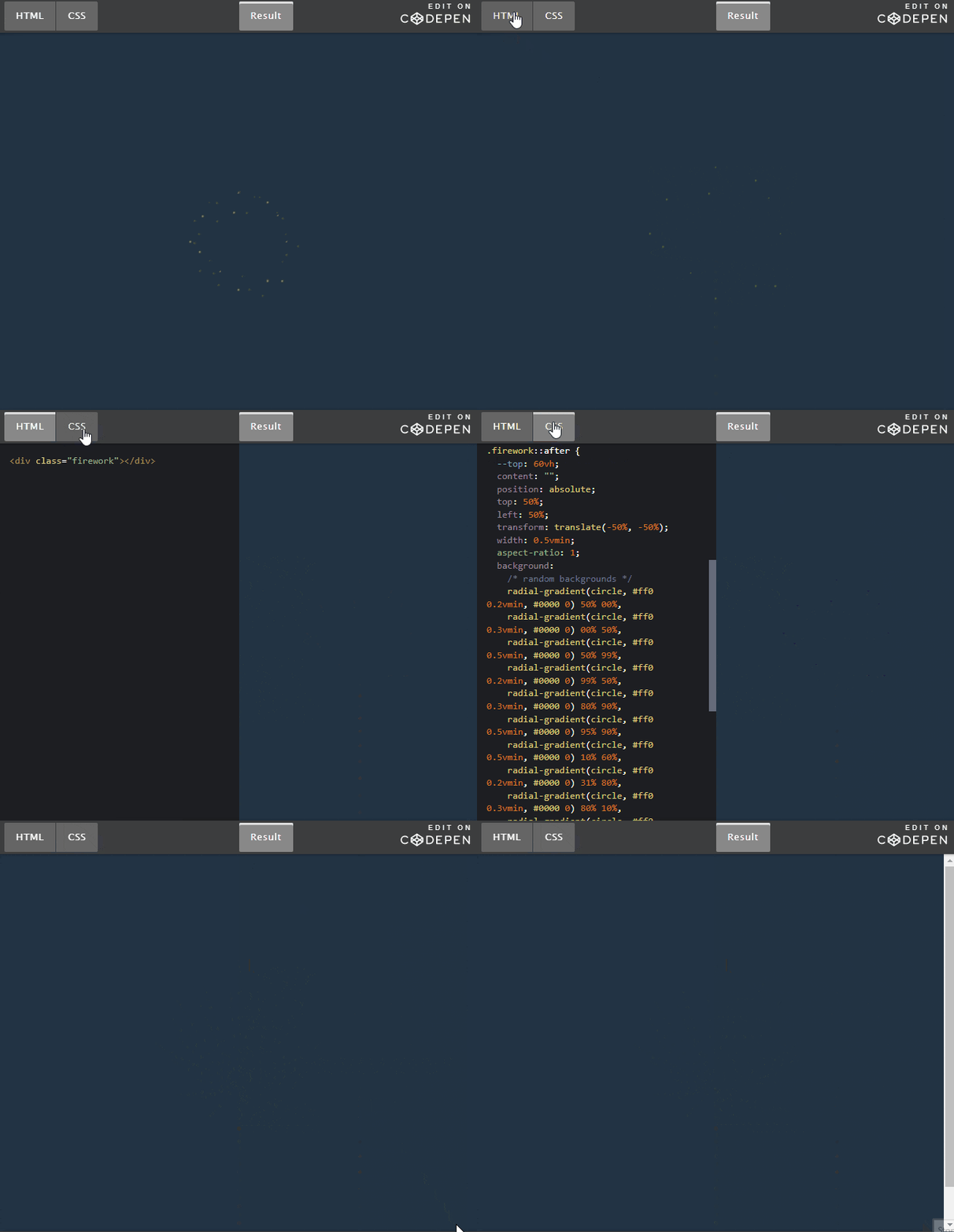
<p style="text-align: justify;">Kết quả:</p>

<p style="text-align: justify;"><img alt="Code pháo hoa bằng CSS" data-i="1" data-src="https://st.quantrimang.com/photos/image/2023/01/11/code-phao-hoa-css.gif" data-was-processed="true" height="561" src="https://st.quantrimang.com/photos/image/2023/01/11/code-phao-hoa-css.gif" width="650" /></p>

<p style="text-align: justify;">Chúc các bạn thành công!</p>
		</div>
				<div id="author">
						<p>
				<strong>Nguồn tin:</strong>
				Quantrimang.com
			</p>
		</div>
	</div>
	<div id="footer" class="clearfix">
		<div id="url">
			<strong>URL của bản tin này: </strong><a href="https://www.nguoicodonvn2008.info/vi/news/savefile/kien-thuc-may-tinh/tao-hieu-ung-phao-hoa-voi-css-6598.html" title="Tạo hiệu ứng pháo hoa với CSS">https://www.nguoicodonvn2008.info/vi/news/savefile/kien-thuc-may-tinh/tao-hieu-ung-phao-hoa-voi-css-6598.html</a>

		</div>
		<div class="clear"></div>
		<div class="copyright">
			&copy; .&#x3A; Nguoicodonvn2008.info - Cõi lòng người cô đơn &#x3A;.
		</div>
		<div id="contact">
			<a href="mailto:admin@nguoicodonvn2008.info">admin@nguoicodonvn2008.info</a>
		</div>
	</div>
</div>
        <div id="timeoutsess" class="chromeframe">
            Bạn đã không sử dụng Site, <a onclick="timeoutsesscancel();" href="https://nguoicodonvn2008.info/#">Bấm vào đây để duy trì trạng thái đăng nhập</a>. Thời gian chờ: <span id="secField"> 60 </span> giây
        </div>
        <div id="openidResult" class="nv-alert" style="display:none"></div>
        <div id="openidBt" data-result="" data-redirect=""></div>
		</script>
		<div class="car-top">
  <span><img src="https://nguoicodonvn2008.info/themes/default/images/car.png" alt=""></span>
</div>
<div id="run_cronjobs" style="visibility:hidden;display:none;"><img alt="cron" src="/index.php?second=cronjobs&amp;p=f7avddV6" width="1" height="1" /></div>
<script src="https://nguoicodonvn2008.info/assets/js/jquery/jquery.min.js"></script>
<script>var nv_base_siteurl="/",nv_lang_data="vi",nv_lang_interface="vi",nv_name_variable="nv",nv_fc_variable="op",nv_lang_variable="language",nv_module_name="news",nv_func_name="savefile",nv_is_user=0, nv_my_ofs=-4,nv_my_abbr="EDT",nv_cookie_prefix="nv4c_e856T",nv_check_pass_mstime=1738000,nv_area_admin=0,nv_safemode=0,theme_responsive=0,nv_recaptcha_ver=2,nv_recaptcha_sitekey="",nv_recaptcha_type="image",XSSsanitize=1;</script>
<script src="https://nguoicodonvn2008.info/assets/js/language/vi.js"></script>
<script src="https://nguoicodonvn2008.info/assets/js/DOMPurify/purify3.js"></script>
<script src="https://nguoicodonvn2008.info/assets/js/global.js"></script>
<script src="https://nguoicodonvn2008.info/assets/js/site.js"></script>
<script src="https://nguoicodonvn2008.info/themes/default/js/news.js"></script>
<script src="https://nguoicodonvn2008.info/themes/default/js/main.js"></script>
<script src="https://nguoicodonvn2008.info/themes/default/js/custom.js"></script>
<script type="application/ld+json">
        {
            "@context": "https://schema.org",
            "@type": "Organization",
            "url": "https://nguoicodonvn2008.info",
            "logo": "https://nguoicodonvn2008.info/uploads/angel.gif"
        }
        </script>
<script src="https://nguoicodonvn2008.info/themes/default/js/bootstrap.min.js"></script>
<script type="text/javascript">
var $scrolltop = $('.car-top');
$scrolltop.on('click', function () {
    $('html,body').animate({
        scrollTop: 0
    }, 800);
    $(this).addClass("car-run");
    setTimeout(function(){ $scrolltop.removeClass('car-run');}, 1000);
    return false;
});
$(window).on('scroll', function ()
{ 
    if($(window).scrollTop() >= 200)
    {
        $scrolltop.addClass("show");
        $scrolltop.addClass("car-down");
    }
    else
    {
       $scrolltop.removeClass("show");
       setTimeout(function(){ $scrolltop.removeClass('car-down');}, 300);
    }
});
</script>
</body>
</html>