<!DOCTYPE html>
    <html lang="vi" xmlns="http://www.w3.org/1999/xhtml" prefix="og: http://ogp.me/ns#">
    <head>
<title>Tại sao thư mục SoftwareDistribution lại chiếm nhiều dung lượng lưu trữ trên PC?</title>
<meta name="description" content="Tại sao thư mục SoftwareDistribution lại chiếm nhiều dung lượng lưu trữ trên PC? - Savefile - Tin Tức -...">
<meta name="author" content=".: Nguoicodonvn2008.info - Cõi lòng người cô đơn :.">
<meta name="copyright" content=".: Nguoicodonvn2008.info - Cõi lòng người cô đơn :. [admin@nguoicodonvn2008.info]">
<meta name="robots" content="index, archive, follow, noodp">
<meta name="googlebot" content="index,archive,follow,noodp">
<meta name="msnbot" content="all,index,follow">
<meta name="generator" content="NukeViet v4.5">
<meta http-equiv="Content-Type" content="text/html; charset=utf-8">
<meta property="og:title" content="Tại sao thư mục SoftwareDistribution lại chiếm nhiều dung lượng lưu trữ trên PC?">
<meta property="og:type" content="website">
<meta property="og:description" content="Savefile - Tin Tức -...">
<meta property="og:site_name" content=".&#x3A; Nguoicodonvn2008.info - Cõi lòng người cô đơn &#x3A;.">
<meta property="og:url" content="https://www.nguoicodonvn2008.info/vi/news/savefile/kien-thuc-may-tinh/tai-sao-thu-muc-softwaredistribution-lai-chiem-nhieu-dung-luong-luu-tru-tren-pc-11748.html">
<link rel="shortcut icon" href="https://nguoicodonvn2008.info/favicon.ico">
<link rel="canonical" href="https://www.nguoicodonvn2008.info/vi/news/savefile/kien-thuc-may-tinh/tai-sao-thu-muc-softwaredistribution-lai-chiem-nhieu-dung-luong-luu-tru-tren-pc-11748.html">
<link rel="alternate" href="https://nguoicodonvn2008.info/vi/news/rss/" title="Tin Tức" type="application/rss+xml">
<link rel="alternate" href="https://nguoicodonvn2008.info/vi/news/rss/karaoke-dual/" title="Tin Tức - Karaoke Dual" type="application/rss+xml">
<link rel="alternate" href="https://nguoicodonvn2008.info/vi/news/rss/nhac-tre/" title="Tin Tức - Nhạc trẻ" type="application/rss+xml">
<link rel="alternate" href="https://nguoicodonvn2008.info/vi/news/rss/tru-tinh/" title="Tin Tức - Trữ tình" type="application/rss+xml">
<link rel="alternate" href="https://nguoicodonvn2008.info/vi/news/rss/nuoc-ngoai/" title="Tin Tức - Nước ngoài" type="application/rss+xml">
<link rel="alternate" href="https://nguoicodonvn2008.info/vi/news/rss/remix/" title="Tin Tức - Remix" type="application/rss+xml">
<link rel="alternate" href="https://nguoicodonvn2008.info/vi/news/rss/tam-su-tinh-yeu/" title="Tin Tức - Tâm sự tình yêu" type="application/rss+xml">
<link rel="alternate" href="https://nguoicodonvn2008.info/vi/news/rss/tho-suu-tam/" title="Tin Tức - Thơ sưu tầm" type="application/rss+xml">
<link rel="alternate" href="https://nguoicodonvn2008.info/vi/news/rss/cuoc-song/" title="Tin Tức - Cuộc sống" type="application/rss+xml">
<link rel="alternate" href="https://nguoicodonvn2008.info/vi/news/rss/phan-mem/" title="Tin Tức - Phần mềm" type="application/rss+xml">
<link rel="alternate" href="https://nguoicodonvn2008.info/vi/news/rss/kien-thuc-may-tinh/" title="Tin Tức - Kiến thức máy tính" type="application/rss+xml">
<link rel="alternate" href="https://nguoicodonvn2008.info/vi/news/rss/hoc-tap/" title="Tin Tức - Học tập" type="application/rss+xml">
<link rel="alternate" href="https://nguoicodonvn2008.info/vi/news/rss/tai-lieu/" title="Tin Tức - Tài liệu" type="application/rss+xml">
<link rel="alternate" href="https://nguoicodonvn2008.info/vi/news/rss/de-thi/" title="Tin Tức - Đề thi" type="application/rss+xml">
<link rel="preload" as="style" href="https://nguoicodonvn2008.info/assets/css/font-awesome.min.css" type="text/css">
<link rel="preload" as="style" href="https://nguoicodonvn2008.info/themes/default/css/bootstrap.non-responsive.css" type="text/css">
<link rel="preload" as="style" href="https://nguoicodonvn2008.info/themes/default/css/style.css" type="text/css">
<link rel="preload" as="style" href="https://nguoicodonvn2008.info/themes/default/css/style.non-responsive.css" type="text/css">
<link rel="preload" as="style" href="https://nguoicodonvn2008.info/themes/default/css/news.css" type="text/css">
<link rel="preload" as="style" href="https://nguoicodonvn2008.info/themes/default/css/custom.css" type="text/css">
<link rel="preload" as="script" href="https://nguoicodonvn2008.info/assets/js/jquery/jquery.min.js" type="text/javascript">
<link rel="preload" as="script" href="https://nguoicodonvn2008.info/assets/js/language/vi.js" type="text/javascript">
<link rel="preload" as="script" href="https://nguoicodonvn2008.info/assets/js/DOMPurify/purify3.js" type="text/javascript">
<link rel="preload" as="script" href="https://nguoicodonvn2008.info/assets/js/global.js" type="text/javascript">
<link rel="preload" as="script" href="https://nguoicodonvn2008.info/assets/js/site.js" type="text/javascript">
<link rel="preload" as="script" href="https://nguoicodonvn2008.info/themes/default/js/news.js" type="text/javascript">
<link rel="preload" as="script" href="https://nguoicodonvn2008.info/themes/default/js/main.js" type="text/javascript">
<link rel="preload" as="script" href="https://nguoicodonvn2008.info/themes/default/js/custom.js" type="text/javascript">
<link rel="preload" as="script" href="https://nguoicodonvn2008.info/themes/default/js/bootstrap.min.js" type="text/javascript">
<link rel="stylesheet" href="https://nguoicodonvn2008.info/assets/css/font-awesome.min.css">
<link rel="stylesheet" href="https://nguoicodonvn2008.info/themes/default/css/bootstrap.non-responsive.css">
<link rel="stylesheet" href="https://nguoicodonvn2008.info/themes/default/css/style.css">
<link rel="stylesheet" href="https://nguoicodonvn2008.info/themes/default/css/style.non-responsive.css">
<link rel="StyleSheet" href="https://nguoicodonvn2008.info/themes/default/css/news.css">
<link rel="stylesheet" href="https://nguoicodonvn2008.info/themes/default/css/custom.css">
<style type="text/css">
	body{background: #fff;}
</style>
    </head>
    <body>
<div id="print">
	<div id="hd_print">
		<h2 class="pull-left">.&#x3A; Nguoicodonvn2008.info - Cõi lòng người cô đơn &#x3A;.</h2>
		<p class="pull-right"><a title=".&#x3A; Nguoicodonvn2008.info - Cõi lòng người cô đơn &#x3A;." href="https://nguoicodonvn2008.info/">https://nguoicodonvn2008.info</a></p>
	</div>
	<div class="clear"></div>
	<hr />
	<div id="content">
		<h1>Tại sao thư mục SoftwareDistribution lại chiếm nhiều dung lượng lưu trữ trên PC?</h1>
		<ul class="list-inline">
			<li>Thứ sáu - 28/11/2025 23:21</li>
			<li class="hidden-print txtrequired"><em class="fa fa-print">&nbsp;</em><a title="In ra" href="javascript:;" onclick="window.print()">In ra</a></li>
			<li class="hidden-print txtrequired"><em class="fa fa-power-off">&nbsp;</em><a title="Đóng cửa sổ này" href="javascript:;" onclick="window.close()">Đóng cửa sổ này</a></li>
		</ul>
		<div class="clear"></div>
		<div id="hometext">
		</div>
				<div class="imghome">
			<img alt="Tại sao thư mục SoftwareDistribution lại chiếm nhiều dung lượng lưu trữ trên PC?" src="https://st.quantrimang.com/photos/image/2025/11/29/thu-muc-softwaredistribution-chiem-nhieu-dung-luong-pc-6.jpg" width="460" class="img-thumbnail" />
		</div>
		<div class="clear"></div>
		<div id="bodytext" class="clearfix">
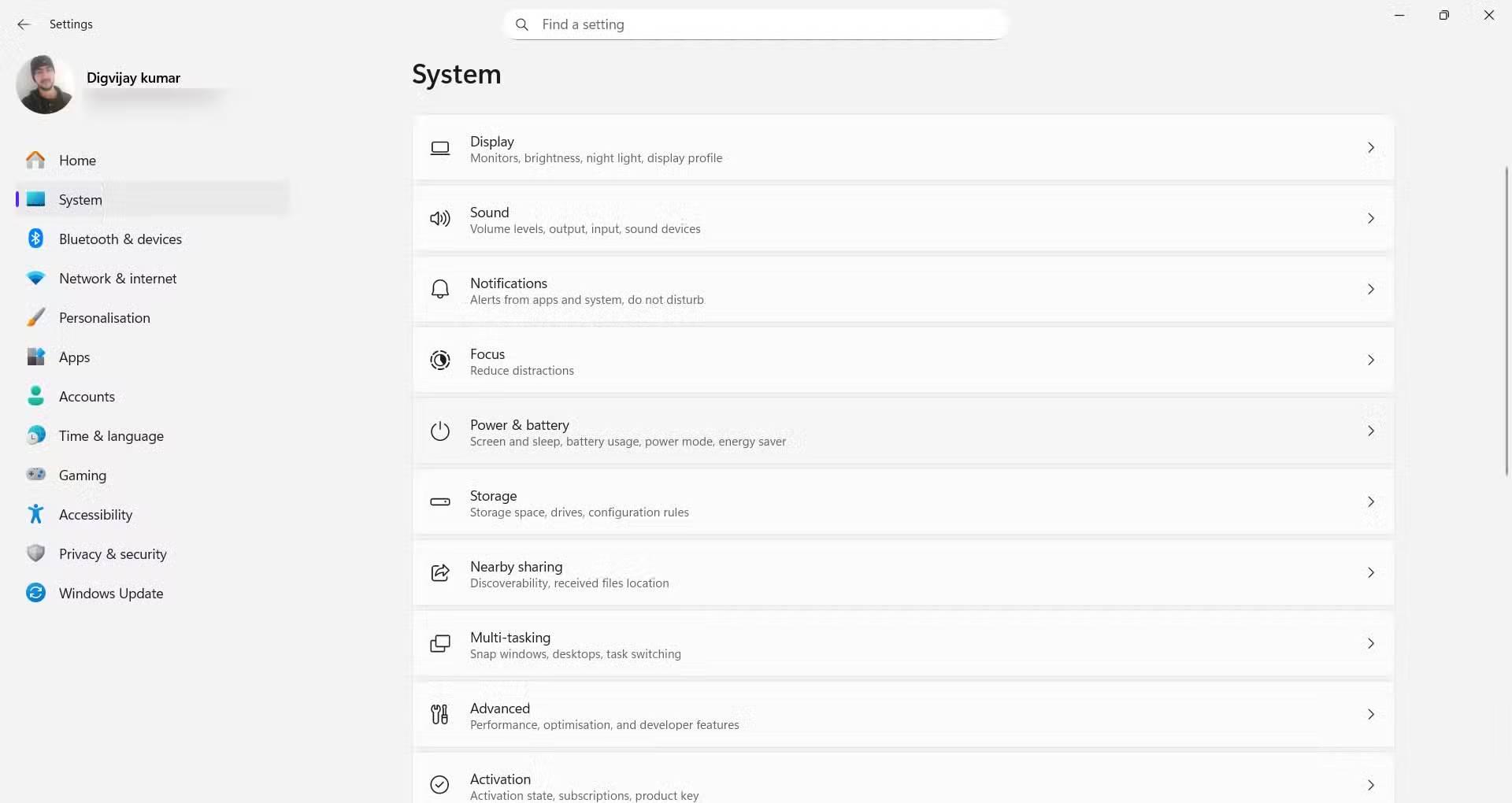
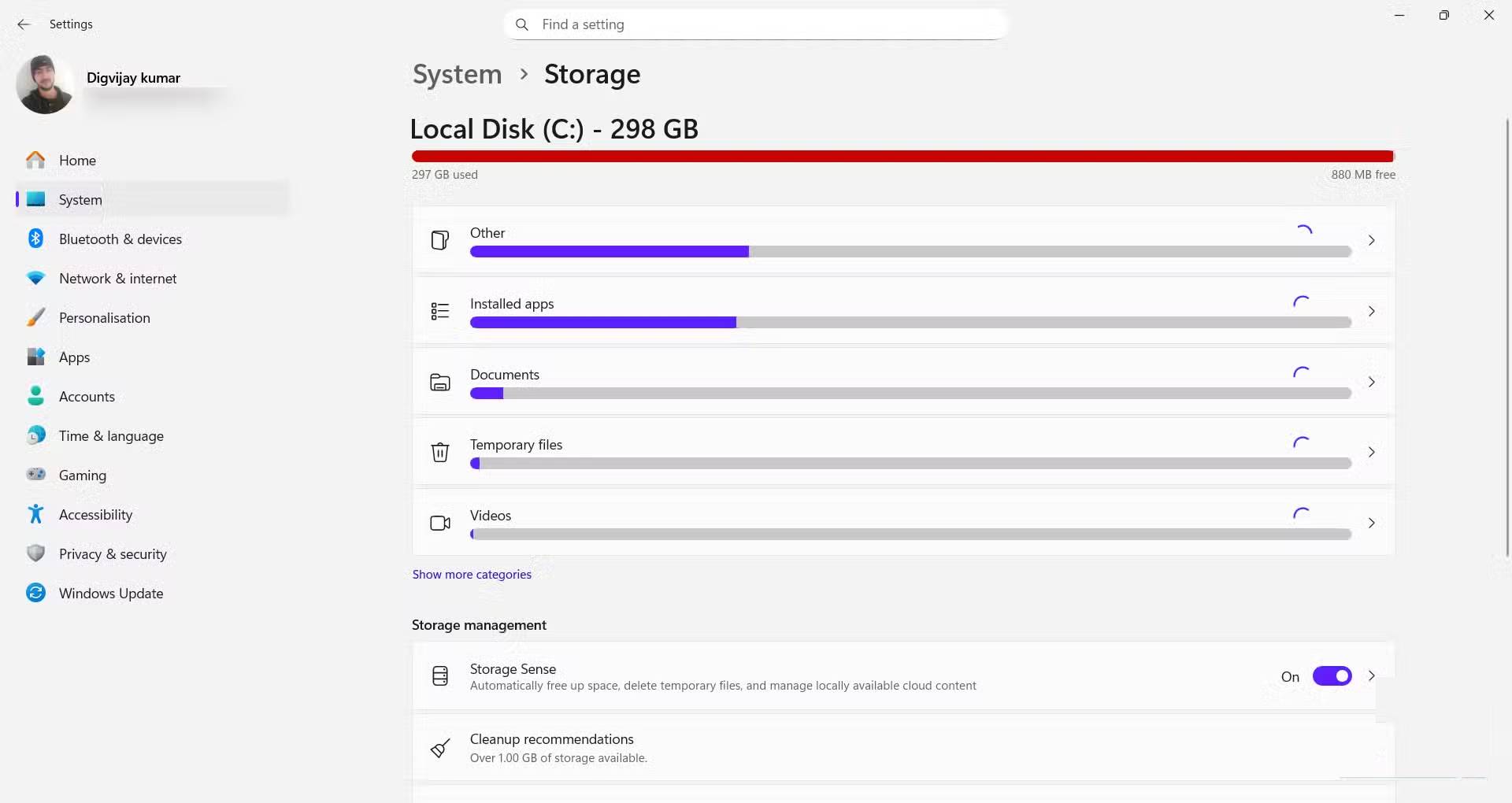
			<p style="text-align: justify;">Nhiều người sử dụng một chiếc laptop nhỏ gọn với dung lượng lưu trữ hạn chế, vì vậy họ thường xuyên xóa các bản tải xuống cũ và gỡ cài đặt các ứng dụng không còn cần thiết. Một ngày nọ, họ mở mục Storage trong Windows và thấy thanh Local Disk C có màu đỏ, nghĩa là ổ đã gần đầy. Họ không tải xuống bất kỳ file nào lớn, vì vậy họ đã thực hiện các bước kiểm tra thông thường. Dù đã dọn sạch Recycle Bin, xóa các file tạm thời và loại bỏ một vài mục khỏi thư mục Downloads, nhưng dung lượng khả dụng hầu như không thay đổi. Không có cách nào giải thích được dung lượng đã biến mất ở đâu.</p>

<div style="text-align: justify;">&nbsp;</div>

<p style="text-align: justify;">Để tìm ra thứ gì đang chiếm dụng dung lượng, họ mở ổ hệ thống trong File Explorer và kiểm tra lần lượt từng thư mục. Sắp xếp chế độ xem theo kích thước và chờ Windows tính toán mức sử dụng cho từng thư mục. Hầu hết các vị trí thông thường, chẳng hạn như Users và Program Files, đều nằm trong phạm vi mong đợi. Khi cuộn qua thư mục Windows, có một thư mục hiển thị kích thước lớn bất thường.</p>

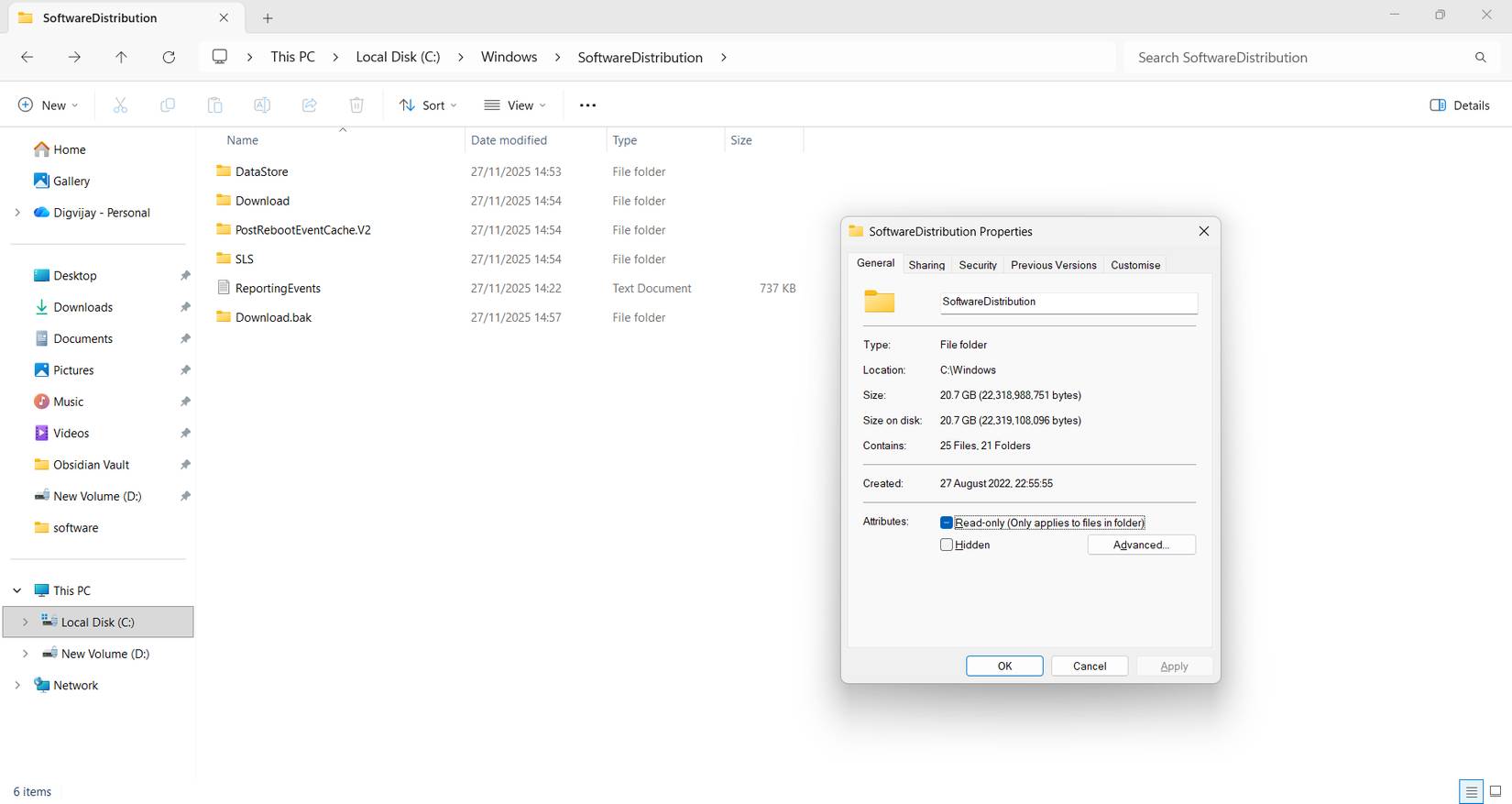
<p style="text-align: justify;">Riêng nó đã chiếm hơn 20 gigabyte, một điều khá bất ngờ đến từ thư mục hệ thống. Nhấp chuột phải vào nó, mở Properties, và các con số xác nhận rằng chỉ riêng thư mục này đã chiếm một phần lớn ổ C nhỏ bé.</p>

<h2 style="text-align: justify;">Tại sao SoftwareDistribution lại chiếm nhiều gigabyte đến vậy?</h2>

<h3 style="text-align: justify;">Các file cập nhật Windows tích tụ và chiếm dung lượng</h3>

<figure>
<div style="text-align: justify;"><img alt="" data-adbro-processed="true" data-i="0" data-src="https://st.quantrimang.com/photos/image/2025/11/29/thu-muc-softwaredistribution-chiem-nhieu-dung-luong-pc-1.jpg" data-was-processed="true" height="1020" src="https://st.quantrimang.com/photos/image/2025/11/29/thu-muc-softwaredistribution-chiem-nhieu-dung-luong-pc-1.jpg" width="1920" /></div>
</figure>

<figure>
<div style="text-align: justify;"><img alt="" data-i="1" data-src="https://st.quantrimang.com/photos/image/2025/11/29/thu-muc-softwaredistribution-chiem-nhieu-dung-luong-pc-2.jpg" data-was-processed="true" height="1020" src="https://st.quantrimang.com/photos/image/2025/11/29/thu-muc-softwaredistribution-chiem-nhieu-dung-luong-pc-2.jpg" width="1920" /></div>
</figure>

<p style="text-align: justify;">Thư mục này có tên là SoftwareDistribution. Nó là một phần của hệ thống Windows Update và lưu trữ các bản cập nhật, bản vá và trình cài đặt nâng cấp đã tải xuống cho đến khi chúng được áp dụng. Thông thường, Windows sẽ tự động dọn dẹp các file này, nhưng điều đó không phải lúc nào cũng xảy ra. Các bản cập nhật tính năng lớn có thể để lại những file khôi phục để bạn có thể hoàn nguyên nếu cài đặt không thành công. Các bản cập nhật bị gián đoạn hoặc không thành công cũng có thể tạo ra những gói trùng lặp.</p>

<p style="text-align: justify;">Bên trong SoftwareDistribution, có một số thư mục con xử lý các phần khác nhau của quy trình cập nhật. Thư mục Download thường là thư mục lớn nhất vì nó chứa các trình cài đặt cho những bản cập nhật tích lũy và tính năng. DataStore duy trì một cơ sở dữ liệu cục bộ theo dõi bản cập nhật nào đã được cài đặt và bản cập nhật nào đang chờ xử lý. Các thư mục khác lưu trữ siêu dữ liệu tạm thời, dữ liệu tối ưu hóa phân phối hoặc số liệu thống kê mà Windows sử dụng để quyết định cách thức và thời điểm cung cấp những bản cập nhật trong tương lai. Không có file nào trong số này là file cá nhân, nhưng khi kết hợp lại, chúng có thể lớn hơn nhiều so với dự kiến ​​khi các bản cập nhật bị lặp lại hoặc gián đoạn.</p>

<p style="text-align: justify;">Nếu bạn trì hoãn cập nhật trong nhiều tháng, Windows có thể giữ lại các file cache cũ hơn thay vì xóa chúng ngay lập tức. Theo thời gian, chúng tích tụ âm thầm và có thể lên đến hàng chục gigabyte, đặc biệt là trên các hệ thống đã trải qua nhiều lần nâng cấp tính năng. Vì SoftwareDistribution nằm trong thư mục Windows, các công cụ dọn dẹp tích hợp như&nbsp;Storage Sense&nbsp;không phải lúc nào cũng xóa những file được lưu trong cache.</p>

<p style="text-align: justify;">Các file được lưu trữ trong đó không đi qua&nbsp;Recycle Bin&nbsp;và không được liệt kê riêng trong Storage Sense, vì vậy bạn sẽ không nhận thấy chúng trừ khi nhìn trực tiếp vào thư mục. Nhiều người chưa bao giờ mở nó trước đây, cứ nghĩ rằng Windows tự động quản lý, nhưng kích thước của nó cho thấy các file cập nhật cũ có thể chiếm một ổ nhỏ như thế nào khi bạn chỉ dựa vào những tùy chọn dọn dẹp mặc định.</p>

<h2 style="text-align: justify;">Xóa cache an toàn</h2>

<h3 style="text-align: justify;">Tạm dừng các service trước khi xóa nội dung thư mục</h3>

<figure>
<div style="text-align: justify;"><img alt="Cửa sổ thuộc tính SoftwareDistribution hiển thị kích thước thư mục" data-i="5" data-src="https://st.quantrimang.com/photos/image/2025/11/29/thu-muc-softwaredistribution-chiem-nhieu-dung-luong-pc-6.jpg" data-was-processed="true" height="877" src="https://st.quantrimang.com/photos/image/2025/11/29/thu-muc-softwaredistribution-chiem-nhieu-dung-luong-pc-6.jpg" width="1650" /></div>

<figcaption>
<div style="text-align: justify;">Cửa sổ thuộc tính SoftwareDistribution hiển thị kích thước thư mục</div>
</figcaption>
</figure>

<p style="text-align: justify;">Trước khi xóa bất kỳ thứ gì, hãy kiểm tra xem máy tính của bạn đã cài đặt các bản cập nhật mới nhất chưa. Điều đó cho thấy các file bên trong SoftwareDistribution là các trình cài đặt còn sót lại chứ không phải bất kỳ thứ gì Windows vẫn cần.</p>

<p style="text-align: justify;">Để xóa thư mục an toàn, trước tiên cần tạm dừng các service liên quan đến cập nhật.</p>

<ol>
	<li style="text-align: justify;">Nhấn&nbsp;<strong>Win + R&nbsp;</strong>để&nbsp;mở hộp thoại Run.</li>
	<li style="text-align: justify;">Nhập&nbsp;<strong>services.msc</strong>&nbsp;và nhấn&nbsp;<strong>Enter</strong>.</li>
	<li style="text-align: justify;">Tìm&nbsp;<strong>Windows Update</strong>&nbsp;và&nbsp;<strong>Background Intelligent Transfer Service</strong>.</li>
	<li style="text-align: justify;">Nhấp chuột phải vào từng service và chọn&nbsp;<strong>Stop</strong>.</li>
</ol>

<p style="text-align: justify;">Việc tạm dừng các service này sẽ mở khóa các file SoftwareDistribution. Sau đó,&nbsp;mở File Explorer, vào&nbsp;<strong>C:\Windows\SoftwareDistribution</strong>&nbsp;và xóa mọi thứ bên trong thư mục. Đừng xóa thư mục vì Windows cần nó ở nguyên vị trí cho các bản cập nhật trong tương lai. Việc xóa mất vài phút và giải phóng hơn 20 gigabyte dung lượng. Khi thư mục đã trống, hãy quay lại cửa sổ&nbsp;<strong>Services</strong>&nbsp;và khởi động lại&nbsp;<strong>Windows Update</strong>&nbsp;và&nbsp;<strong>Background Intelligent Transfer Service</strong>, đưa hệ thống trở lại hoạt động bình thường.</p>
		</div>
				<div id="author">
						<p>
				<strong>Nguồn tin:</strong>
				Quantrimang.com:
			</p>
		</div>
	</div>
	<div id="footer" class="clearfix">
		<div id="url">
			<strong>URL của bản tin này: </strong><a href="https://www.nguoicodonvn2008.info/vi/news/savefile/kien-thuc-may-tinh/tai-sao-thu-muc-softwaredistribution-lai-chiem-nhieu-dung-luong-luu-tru-tren-pc-11748.html" title="Tại sao thư mục SoftwareDistribution lại chiếm nhiều dung lượng lưu trữ trên PC?">https://www.nguoicodonvn2008.info/vi/news/savefile/kien-thuc-may-tinh/tai-sao-thu-muc-softwaredistribution-lai-chiem-nhieu-dung-luong-luu-tru-tren-pc-11748.html</a>

		</div>
		<div class="clear"></div>
		<div class="copyright">
			&copy; .&#x3A; Nguoicodonvn2008.info - Cõi lòng người cô đơn &#x3A;.
		</div>
		<div id="contact">
			<a href="mailto:admin@nguoicodonvn2008.info">admin@nguoicodonvn2008.info</a>
		</div>
	</div>
</div>
        <div id="timeoutsess" class="chromeframe">
            Bạn đã không sử dụng Site, <a onclick="timeoutsesscancel();" href="https://nguoicodonvn2008.info/#">Bấm vào đây để duy trì trạng thái đăng nhập</a>. Thời gian chờ: <span id="secField"> 60 </span> giây
        </div>
        <div id="openidResult" class="nv-alert" style="display:none"></div>
        <div id="openidBt" data-result="" data-redirect=""></div>
		</script>
		<div class="car-top">
  <span><img src="https://nguoicodonvn2008.info/themes/default/images/car.png" alt=""></span>
</div>
<script src="https://nguoicodonvn2008.info/assets/js/jquery/jquery.min.js"></script>
<script>var nv_base_siteurl="/",nv_lang_data="vi",nv_lang_interface="vi",nv_name_variable="nv",nv_fc_variable="op",nv_lang_variable="language",nv_module_name="news",nv_func_name="savefile",nv_is_user=0, nv_my_ofs=-4,nv_my_abbr="EDT",nv_cookie_prefix="nv4c_e856T",nv_check_pass_mstime=1738000,nv_area_admin=0,nv_safemode=0,theme_responsive=0,nv_recaptcha_ver=2,nv_recaptcha_sitekey="",nv_recaptcha_type="image",XSSsanitize=1;</script>
<script src="https://nguoicodonvn2008.info/assets/js/language/vi.js"></script>
<script src="https://nguoicodonvn2008.info/assets/js/DOMPurify/purify3.js"></script>
<script src="https://nguoicodonvn2008.info/assets/js/global.js"></script>
<script src="https://nguoicodonvn2008.info/assets/js/site.js"></script>
<script src="https://nguoicodonvn2008.info/themes/default/js/news.js"></script>
<script src="https://nguoicodonvn2008.info/themes/default/js/main.js"></script>
<script src="https://nguoicodonvn2008.info/themes/default/js/custom.js"></script>
<script type="application/ld+json">
        {
            "@context": "https://schema.org",
            "@type": "Organization",
            "url": "https://nguoicodonvn2008.info",
            "logo": "https://nguoicodonvn2008.info/uploads/angel.gif"
        }
        </script>
<script src="https://nguoicodonvn2008.info/themes/default/js/bootstrap.min.js"></script>
<script type="text/javascript">
var $scrolltop = $('.car-top');
$scrolltop.on('click', function () {
    $('html,body').animate({
        scrollTop: 0
    }, 800);
    $(this).addClass("car-run");
    setTimeout(function(){ $scrolltop.removeClass('car-run');}, 1000);
    return false;
});
$(window).on('scroll', function ()
{ 
    if($(window).scrollTop() >= 200)
    {
        $scrolltop.addClass("show");
        $scrolltop.addClass("car-down");
    }
    else
    {
       $scrolltop.removeClass("show");
       setTimeout(function(){ $scrolltop.removeClass('car-down');}, 300);
    }
});
</script>
</body>
</html>