<!DOCTYPE html>
    <html lang="vi" xmlns="http://www.w3.org/1999/xhtml" prefix="og: http://ogp.me/ns#">
    <head>
<title>Tại sao bạn nên có một USB SystemRescue tiện dụng?</title>
<meta name="description" content="Tại sao bạn nên có một USB SystemRescue tiện dụng? - Savefile - Tin Tức -...">
<meta name="author" content=".: Nguoicodonvn2008.info - Cõi lòng người cô đơn :.">
<meta name="copyright" content=".: Nguoicodonvn2008.info - Cõi lòng người cô đơn :. [admin@nguoicodonvn2008.info]">
<meta name="robots" content="index, archive, follow, noodp">
<meta name="googlebot" content="index,archive,follow,noodp">
<meta name="msnbot" content="all,index,follow">
<meta name="generator" content="NukeViet v4.5">
<meta http-equiv="Content-Type" content="text/html; charset=utf-8">
<meta property="og:title" content="Tại sao bạn nên có một USB SystemRescue tiện dụng?">
<meta property="og:type" content="website">
<meta property="og:description" content="Savefile - Tin Tức - https&#x3A;&#x002F;&#x002F;www.nguoicodonvn2008.info&#x002F;vi&#x002F;news&#x002F;savefile&#x002F;kien-thuc-may-tinh&#x002F;tai-sao-ban-nen-co-mot-usb-systemrescue-tien-dung-9639.html">
<meta property="og:site_name" content=".&#x3A; Nguoicodonvn2008.info - Cõi lòng người cô đơn &#x3A;.">
<meta property="og:url" content="https://www.nguoicodonvn2008.info/vi/news/savefile/kien-thuc-may-tinh/tai-sao-ban-nen-co-mot-usb-systemrescue-tien-dung-9639.html">
<link rel="shortcut icon" href="https://nguoicodonvn2008.info/favicon.ico">
<link rel="canonical" href="https://www.nguoicodonvn2008.info/vi/news/savefile/kien-thuc-may-tinh/tai-sao-ban-nen-co-mot-usb-systemrescue-tien-dung-9639.html">
<link rel="alternate" href="https://nguoicodonvn2008.info/vi/news/rss/" title="Tin Tức" type="application/rss+xml">
<link rel="alternate" href="https://nguoicodonvn2008.info/vi/news/rss/karaoke-dual/" title="Tin Tức - Karaoke Dual" type="application/rss+xml">
<link rel="alternate" href="https://nguoicodonvn2008.info/vi/news/rss/nhac-tre/" title="Tin Tức - Nhạc trẻ" type="application/rss+xml">
<link rel="alternate" href="https://nguoicodonvn2008.info/vi/news/rss/tru-tinh/" title="Tin Tức - Trữ tình" type="application/rss+xml">
<link rel="alternate" href="https://nguoicodonvn2008.info/vi/news/rss/nuoc-ngoai/" title="Tin Tức - Nước ngoài" type="application/rss+xml">
<link rel="alternate" href="https://nguoicodonvn2008.info/vi/news/rss/remix/" title="Tin Tức - Remix" type="application/rss+xml">
<link rel="alternate" href="https://nguoicodonvn2008.info/vi/news/rss/tam-su-tinh-yeu/" title="Tin Tức - Tâm sự tình yêu" type="application/rss+xml">
<link rel="alternate" href="https://nguoicodonvn2008.info/vi/news/rss/tho-suu-tam/" title="Tin Tức - Thơ sưu tầm" type="application/rss+xml">
<link rel="alternate" href="https://nguoicodonvn2008.info/vi/news/rss/cuoc-song/" title="Tin Tức - Cuộc sống" type="application/rss+xml">
<link rel="alternate" href="https://nguoicodonvn2008.info/vi/news/rss/phan-mem/" title="Tin Tức - Phần mềm" type="application/rss+xml">
<link rel="alternate" href="https://nguoicodonvn2008.info/vi/news/rss/kien-thuc-may-tinh/" title="Tin Tức - Kiến thức máy tính" type="application/rss+xml">
<link rel="alternate" href="https://nguoicodonvn2008.info/vi/news/rss/hoc-tap/" title="Tin Tức - Học tập" type="application/rss+xml">
<link rel="alternate" href="https://nguoicodonvn2008.info/vi/news/rss/tai-lieu/" title="Tin Tức - Tài liệu" type="application/rss+xml">
<link rel="alternate" href="https://nguoicodonvn2008.info/vi/news/rss/de-thi/" title="Tin Tức - Đề thi" type="application/rss+xml">
<link rel="preload" as="style" href="https://nguoicodonvn2008.info/assets/css/font-awesome.min.css" type="text/css">
<link rel="preload" as="style" href="https://nguoicodonvn2008.info/themes/default/css/bootstrap.non-responsive.css" type="text/css">
<link rel="preload" as="style" href="https://nguoicodonvn2008.info/themes/default/css/style.css" type="text/css">
<link rel="preload" as="style" href="https://nguoicodonvn2008.info/themes/default/css/style.non-responsive.css" type="text/css">
<link rel="preload" as="style" href="https://nguoicodonvn2008.info/themes/default/css/news.css" type="text/css">
<link rel="preload" as="style" href="https://nguoicodonvn2008.info/themes/default/css/custom.css" type="text/css">
<link rel="preload" as="script" href="https://nguoicodonvn2008.info/assets/js/jquery/jquery.min.js" type="text/javascript">
<link rel="preload" as="script" href="https://nguoicodonvn2008.info/assets/js/language/vi.js" type="text/javascript">
<link rel="preload" as="script" href="https://nguoicodonvn2008.info/assets/js/DOMPurify/purify3.js" type="text/javascript">
<link rel="preload" as="script" href="https://nguoicodonvn2008.info/assets/js/global.js" type="text/javascript">
<link rel="preload" as="script" href="https://nguoicodonvn2008.info/assets/js/site.js" type="text/javascript">
<link rel="preload" as="script" href="https://nguoicodonvn2008.info/themes/default/js/news.js" type="text/javascript">
<link rel="preload" as="script" href="https://nguoicodonvn2008.info/themes/default/js/main.js" type="text/javascript">
<link rel="preload" as="script" href="https://nguoicodonvn2008.info/themes/default/js/custom.js" type="text/javascript">
<link rel="preload" as="script" href="https://nguoicodonvn2008.info/themes/default/js/bootstrap.min.js" type="text/javascript">
<link rel="stylesheet" href="https://nguoicodonvn2008.info/assets/css/font-awesome.min.css">
<link rel="stylesheet" href="https://nguoicodonvn2008.info/themes/default/css/bootstrap.non-responsive.css">
<link rel="stylesheet" href="https://nguoicodonvn2008.info/themes/default/css/style.css">
<link rel="stylesheet" href="https://nguoicodonvn2008.info/themes/default/css/style.non-responsive.css">
<link rel="StyleSheet" href="https://nguoicodonvn2008.info/themes/default/css/news.css">
<link rel="stylesheet" href="https://nguoicodonvn2008.info/themes/default/css/custom.css">
<style type="text/css">
	body{background: #fff;}
</style>
    </head>
    <body>
<div id="print">
	<div id="hd_print">
		<h2 class="pull-left">.&#x3A; Nguoicodonvn2008.info - Cõi lòng người cô đơn &#x3A;.</h2>
		<p class="pull-right"><a title=".&#x3A; Nguoicodonvn2008.info - Cõi lòng người cô đơn &#x3A;." href="https://nguoicodonvn2008.info/">https://nguoicodonvn2008.info</a></p>
	</div>
	<div class="clear"></div>
	<hr />
	<div id="content">
		<h1>Tại sao bạn nên có một USB SystemRescue tiện dụng?</h1>
		<ul class="list-inline">
			<li>Thứ ba - 07/01/2025 23:19</li>
			<li class="hidden-print txtrequired"><em class="fa fa-print">&nbsp;</em><a title="In ra" href="javascript:;" onclick="window.print()">In ra</a></li>
			<li class="hidden-print txtrequired"><em class="fa fa-power-off">&nbsp;</em><a title="Đóng cửa sổ này" href="javascript:;" onclick="window.close()">Đóng cửa sổ này</a></li>
		</ul>
		<div class="clear"></div>
		<div id="hometext">
		</div>
				<div class="imghome">
			<img alt="Tại sao bạn nên có một USB SystemRescue tiện dụng?" src="https://st.quantrimang.com/photos/image/2025/01/07/tai-sao-nen-co-usb-systemrescue-1.png" width="460" class="img-thumbnail" />
		</div>
		<div class="clear"></div>
		<div id="bodytext" class="clearfix">
			<p style="text-align: justify;">Máy tính hiện đại được chế tạo để bền lâu và bạn hiếm khi gặp phải sự cố khiến máy tính của mình trở nên vô dụng. Trong khi các sự cố phần cứng đòi hỏi một mức độ kỹ năng nhất định để khắc phục sự cố, hầu hết những vấn đề phần mềm có thể được xử lý bằng các công cụ bạn có thể giữ trong USB cứu hộ.</p>

<h2 style="text-align: justify;">Tại sao nên có USB SystemRescue tiện dụng?</h2>

<p style="text-align: justify;">Có thể tự sửa chữa PC của mình là một kỹ năng có giá trị mà mọi người dùng PC nhiệt thành đều nên có. SystemRescue giúp việc này trở nên dễ dàng hơn vì bạn có thể tạo USB SystemRescue một lần và mang theo bên mình để truy cập hoặc sửa chữa hệ thống khi cần. Có USB khôi phục có thể tiện dụng, nhưng cài đặt lại hệ điều hành không phải lúc nào cũng là một lựa chọn.</p>

<p style="text-align: justify;">Ngoài việc cứu hộ PC, còn có một số lý do khác khiến bạn muốn có USB cứu hộ tiện dụng. Nó cho phép bạn sử dụng các công cụ quản trị và công cụ CNTT khác mà bạn không nhất thiết phải sử dụng hàng ngày và xây dựng kiến ​​thức trực tiếp về cách máy tính của mình hoạt động.</p>

<p style="text-align: justify;">Vì hầu hết các bộ công cụ này, bao gồm cả SystemRescue, đều dựa trên Linux, nên việc sử dụng USB cứu hộ cũng giúp bạn có cơ hội tìm hiểu về Linux cùng lúc nếu bạn chưa biết. Hầu hết kiến ​​thức về máy tính, đặc biệt là Linux, đều xuất phát từ việc cố gắng tự mình giải quyết các sự cố và thử nghiệm những hệ điều hành hoặc chương trình mới mỗi khi có cơ hội.</p>

<h2 style="text-align: justify;">Cách tạo USB SystemRescue</h2>

<p style="text-align: justify;">Quy trình tạo USB SystemRescue rất đơn giản. Bạn chỉ cần tải xuống phiên bản mới nhất của SystemRescue,&nbsp;tải Rufus, lấy một USB có dung lượng lưu trữ ít nhất 8GB và tự tạo cho mình một USB SystemRescue có khả năng boot trong thời gian ngắn. Quy trình này giống hệt như tạo USB boot từ ISO.</p>

<div style="text-align: justify;">&nbsp;</div>

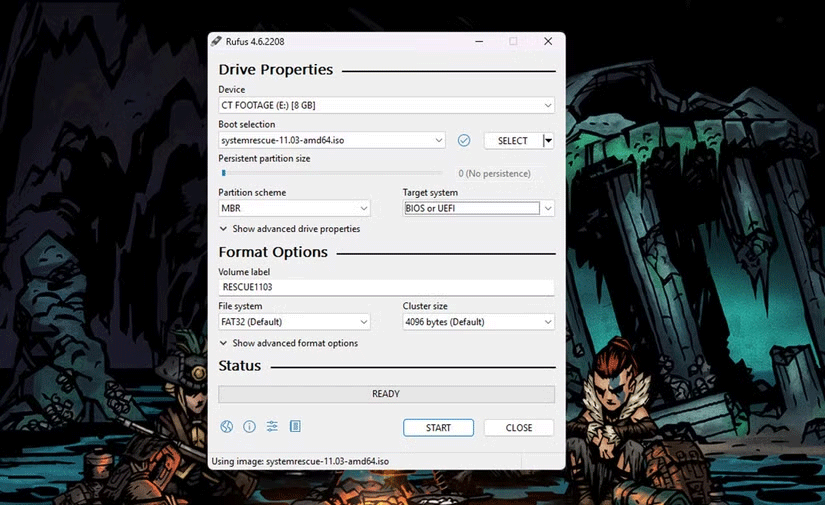
<p style="text-align: justify;">Nếu bạn đang sử dụng Linux, SystemRescue cung cấp SystemRescue USB Writer riêng, hoạt động trên hầu hết, nếu không muốn nói là tất cả, các bản phân phối Linux. Sau đây là cách bạn có thể nhanh chóng tạo một USB nếu đang sử dụng Windows:</p>

<ol>
	<li style="text-align: justify;">Tải xuống và cài đặt Rufus.</li>
	<li style="text-align: justify;">Trong mục&nbsp;<strong>Boot selection</strong>, hãy nhấp vào nút&nbsp;<strong>SELECT</strong>&nbsp;để chọn file ISO SystemRescue.</li>
	<li style="text-align: justify;">Trong mục&nbsp;<strong>Partition scheme</strong>, hãy chọn&nbsp;<strong>MBR</strong>&nbsp;từ danh sách drop-down.</li>
	<li style="text-align: justify;">Trong mục&nbsp;<strong>Target system</strong>, hãy chọn&nbsp;<strong>BIOS</strong>&nbsp;hoặc&nbsp;<strong>UEFI.</strong></li>
	<li style="text-align: justify;">Tiếp theo, hãy kiểm tra trường&nbsp;<strong>Volume label</strong>, trường này sẽ ghi là&nbsp;<strong>RESCUEXXXX.</strong>&nbsp;Các dấu&nbsp;<strong>X&nbsp;</strong>biểu thị số phiên bản của file ISO mà bạn đã tải xuống.</li>
	<li style="text-align: justify;">Đặt&nbsp;<strong>File system</strong>&nbsp;thành<strong>&nbsp;FAT32</strong>. Bạn có thể để cài đặt&nbsp;<strong>Cluster size</strong>&nbsp;ở giá trị mặc định.</li>
	<li style="text-align: justify;">Nhấp vào nút&nbsp;<strong>Start</strong>&nbsp;để tạo ổ boot.</li>
</ol>

<figure>
<div style="text-align: justify;"><img alt="" data-adbro-processed="true" data-i="0" data-src="https://st.quantrimang.com/photos/image/2025/01/07/tai-sao-nen-co-usb-systemrescue-1.png" data-was-processed="true" height="505" src="https://st.quantrimang.com/photos/image/2025/01/07/tai-sao-nen-co-usb-systemrescue-1.png" width="825" /></div>
</figure>

<p style="text-align: justify;">Từ thời điểm này trở đi, bạn có thể thoải mái khởi động PC của mình bằng ổ có khả năng boot mới tạo. Bạn có thể bắt đầu ngay; PC sẽ không bị hỏng khi chạy SystemRescue. Bạn có thể khởi động vào bộ công cụ để thử các công cụ, xem công cụ nào hoạt động hoặc cài đặt các công cụ hoặc script của riêng mình.</p>

<h2 style="text-align: justify;">Các lựa chọn thay thế cho SystemRescue</h2>

<p style="text-align: justify;">SystemRescue là một công cụ miễn phí có mọi thứ bạn cần để sao lưu và chạy PC. Tuy nhiên, nếu bạn muốn sử dụng công cụ khác, hãy thử&nbsp;<a href="https://quantrimang.com/url?u=aHR0cDovL2Nsb25lemlsbGEtc3lzcmVzY2NkLmhlbGx1Zy5nci8%3D" rel="nofollow noopener" target="_blank">Clonezilla-SysRescCD</a>,&nbsp;<a href="https://quantrimang.com/url?u=aHR0cHM6Ly93d3cuc3VwZXJncnViZGlzay5vcmcvcmVzY2F0dXgv" rel="nofollow noopener" target="_blank">Rescatux</a>&nbsp;hoặc&nbsp;<a href="https://quantrimang.com/url?u=aHR0cHM6Ly9ncGFydGVkLm9yZy9saXZlY2QucGhw" rel="nofollow noopener" target="_blank">GParted Live</a>. Tất cả chúng đều là các công cụ cứu hộ hệ thống có khả năng boot dựa trên Linux có thể cứu cả hệ thống Windows và Linux.</p>

<p style="text-align: justify;">PC không bị hỏng thường xuyên, nhưng sẽ rất rắc rối khi chúng hỏng và việc có một USB cứu hộ tiện dụng có thể giúp bạn tiết kiệm rất nhiều thời gian và công sức để đưa phần cứng của mình trở lại trực tuyến.</p>
		</div>
				<div id="author">
						<p>
				<strong>Nguồn tin:</strong>
				Quantrimang.com::
			</p>
		</div>
	</div>
	<div id="footer" class="clearfix">
		<div id="url">
			<strong>URL của bản tin này: </strong><a href="https://www.nguoicodonvn2008.info/vi/news/savefile/kien-thuc-may-tinh/tai-sao-ban-nen-co-mot-usb-systemrescue-tien-dung-9639.html" title="Tại sao bạn nên có một USB SystemRescue tiện dụng?">https://www.nguoicodonvn2008.info/vi/news/savefile/kien-thuc-may-tinh/tai-sao-ban-nen-co-mot-usb-systemrescue-tien-dung-9639.html</a>

		</div>
		<div class="clear"></div>
		<div class="copyright">
			&copy; .&#x3A; Nguoicodonvn2008.info - Cõi lòng người cô đơn &#x3A;.
		</div>
		<div id="contact">
			<a href="mailto:admin@nguoicodonvn2008.info">admin@nguoicodonvn2008.info</a>
		</div>
	</div>
</div>
        <div id="timeoutsess" class="chromeframe">
            Bạn đã không sử dụng Site, <a onclick="timeoutsesscancel();" href="https://nguoicodonvn2008.info/#">Bấm vào đây để duy trì trạng thái đăng nhập</a>. Thời gian chờ: <span id="secField"> 60 </span> giây
        </div>
        <div id="openidResult" class="nv-alert" style="display:none"></div>
        <div id="openidBt" data-result="" data-redirect=""></div>
		</script>
		<div class="car-top">
  <span><img src="https://nguoicodonvn2008.info/themes/default/images/car.png" alt=""></span>
</div>
<script src="https://nguoicodonvn2008.info/assets/js/jquery/jquery.min.js"></script>
<script>var nv_base_siteurl="/",nv_lang_data="vi",nv_lang_interface="vi",nv_name_variable="nv",nv_fc_variable="op",nv_lang_variable="language",nv_module_name="news",nv_func_name="savefile",nv_is_user=0, nv_my_ofs=-4,nv_my_abbr="EDT",nv_cookie_prefix="nv4c_e856T",nv_check_pass_mstime=1738000,nv_area_admin=0,nv_safemode=0,theme_responsive=0,nv_recaptcha_ver=2,nv_recaptcha_sitekey="",nv_recaptcha_type="image",XSSsanitize=1;</script>
<script src="https://nguoicodonvn2008.info/assets/js/language/vi.js"></script>
<script src="https://nguoicodonvn2008.info/assets/js/DOMPurify/purify3.js"></script>
<script src="https://nguoicodonvn2008.info/assets/js/global.js"></script>
<script src="https://nguoicodonvn2008.info/assets/js/site.js"></script>
<script src="https://nguoicodonvn2008.info/themes/default/js/news.js"></script>
<script src="https://nguoicodonvn2008.info/themes/default/js/main.js"></script>
<script src="https://nguoicodonvn2008.info/themes/default/js/custom.js"></script>
<script type="application/ld+json">
        {
            "@context": "https://schema.org",
            "@type": "Organization",
            "url": "https://nguoicodonvn2008.info",
            "logo": "https://nguoicodonvn2008.info/uploads/angel.gif"
        }
        </script>
<script src="https://nguoicodonvn2008.info/themes/default/js/bootstrap.min.js"></script>
<script type="text/javascript">
var $scrolltop = $('.car-top');
$scrolltop.on('click', function () {
    $('html,body').animate({
        scrollTop: 0
    }, 800);
    $(this).addClass("car-run");
    setTimeout(function(){ $scrolltop.removeClass('car-run');}, 1000);
    return false;
});
$(window).on('scroll', function ()
{ 
    if($(window).scrollTop() >= 200)
    {
        $scrolltop.addClass("show");
        $scrolltop.addClass("car-down");
    }
    else
    {
       $scrolltop.removeClass("show");
       setTimeout(function(){ $scrolltop.removeClass('car-down');}, 300);
    }
});
</script>
</body>
</html>