<!DOCTYPE html>
    <html lang="vi" xmlns="http://www.w3.org/1999/xhtml" prefix="og: http://ogp.me/ns#">
    <head>
<title>Sửa mã lỗi Windows 0xc0000098&#x3A; Sao lưu ACPI.sys để ngăn ngừa lỗi boot</title>
<meta name="description" content="Sửa mã lỗi Windows 0xc0000098&#x3A; Sao lưu ACPI.sys để ngăn ngừa lỗi boot - Savefile - Tin Tức -...">
<meta name="author" content=".: Nguoicodonvn2008.info - Cõi lòng người cô đơn :.">
<meta name="copyright" content=".: Nguoicodonvn2008.info - Cõi lòng người cô đơn :. [admin@nguoicodonvn2008.info]">
<meta name="robots" content="index, archive, follow, noodp">
<meta name="googlebot" content="index,archive,follow,noodp">
<meta name="msnbot" content="all,index,follow">
<meta name="generator" content="NukeViet v4.5">
<meta http-equiv="Content-Type" content="text/html; charset=utf-8">
<meta property="og:title" content="Sửa mã lỗi Windows 0xc0000098&#x3A; Sao lưu ACPI.sys để ngăn ngừa lỗi boot">
<meta property="og:type" content="website">
<meta property="og:description" content="Savefile - Tin Tức - https&#x3A;&#x002F;&#x002F;www.nguoicodonvn2008.info&#x002F;vi&#x002F;news&#x002F;savefile&#x002F;kien-thuc-may-tinh&#x002F;sua-ma-loi-windows-0xc0000098-sao-luu-acpi-sys-de-ngan-ngua-loi-boot-10510.html">
<meta property="og:site_name" content=".&#x3A; Nguoicodonvn2008.info - Cõi lòng người cô đơn &#x3A;.">
<meta property="og:url" content="https://www.nguoicodonvn2008.info/vi/news/savefile/kien-thuc-may-tinh/sua-ma-loi-windows-0xc0000098-sao-luu-acpi-sys-de-ngan-ngua-loi-boot-10510.html">
<link rel="shortcut icon" href="https://nguoicodonvn2008.info/favicon.ico">
<link rel="canonical" href="https://www.nguoicodonvn2008.info/vi/news/savefile/kien-thuc-may-tinh/sua-ma-loi-windows-0xc0000098-sao-luu-acpi-sys-de-ngan-ngua-loi-boot-10510.html">
<link rel="alternate" href="https://nguoicodonvn2008.info/vi/news/rss/" title="Tin Tức" type="application/rss+xml">
<link rel="alternate" href="https://nguoicodonvn2008.info/vi/news/rss/karaoke-dual/" title="Tin Tức - Karaoke Dual" type="application/rss+xml">
<link rel="alternate" href="https://nguoicodonvn2008.info/vi/news/rss/nhac-tre/" title="Tin Tức - Nhạc trẻ" type="application/rss+xml">
<link rel="alternate" href="https://nguoicodonvn2008.info/vi/news/rss/tru-tinh/" title="Tin Tức - Trữ tình" type="application/rss+xml">
<link rel="alternate" href="https://nguoicodonvn2008.info/vi/news/rss/nuoc-ngoai/" title="Tin Tức - Nước ngoài" type="application/rss+xml">
<link rel="alternate" href="https://nguoicodonvn2008.info/vi/news/rss/remix/" title="Tin Tức - Remix" type="application/rss+xml">
<link rel="alternate" href="https://nguoicodonvn2008.info/vi/news/rss/tam-su-tinh-yeu/" title="Tin Tức - Tâm sự tình yêu" type="application/rss+xml">
<link rel="alternate" href="https://nguoicodonvn2008.info/vi/news/rss/tho-suu-tam/" title="Tin Tức - Thơ sưu tầm" type="application/rss+xml">
<link rel="alternate" href="https://nguoicodonvn2008.info/vi/news/rss/cuoc-song/" title="Tin Tức - Cuộc sống" type="application/rss+xml">
<link rel="alternate" href="https://nguoicodonvn2008.info/vi/news/rss/phan-mem/" title="Tin Tức - Phần mềm" type="application/rss+xml">
<link rel="alternate" href="https://nguoicodonvn2008.info/vi/news/rss/kien-thuc-may-tinh/" title="Tin Tức - Kiến thức máy tính" type="application/rss+xml">
<link rel="alternate" href="https://nguoicodonvn2008.info/vi/news/rss/hoc-tap/" title="Tin Tức - Học tập" type="application/rss+xml">
<link rel="alternate" href="https://nguoicodonvn2008.info/vi/news/rss/tai-lieu/" title="Tin Tức - Tài liệu" type="application/rss+xml">
<link rel="alternate" href="https://nguoicodonvn2008.info/vi/news/rss/de-thi/" title="Tin Tức - Đề thi" type="application/rss+xml">
<link rel="preload" as="style" href="https://nguoicodonvn2008.info/assets/css/font-awesome.min.css" type="text/css">
<link rel="preload" as="style" href="https://nguoicodonvn2008.info/themes/default/css/bootstrap.non-responsive.css" type="text/css">
<link rel="preload" as="style" href="https://nguoicodonvn2008.info/themes/default/css/style.css" type="text/css">
<link rel="preload" as="style" href="https://nguoicodonvn2008.info/themes/default/css/style.non-responsive.css" type="text/css">
<link rel="preload" as="style" href="https://nguoicodonvn2008.info/themes/default/css/news.css" type="text/css">
<link rel="preload" as="style" href="https://nguoicodonvn2008.info/themes/default/css/custom.css" type="text/css">
<link rel="preload" as="script" href="https://nguoicodonvn2008.info/assets/js/jquery/jquery.min.js" type="text/javascript">
<link rel="preload" as="script" href="https://nguoicodonvn2008.info/assets/js/language/vi.js" type="text/javascript">
<link rel="preload" as="script" href="https://nguoicodonvn2008.info/assets/js/DOMPurify/purify3.js" type="text/javascript">
<link rel="preload" as="script" href="https://nguoicodonvn2008.info/assets/js/global.js" type="text/javascript">
<link rel="preload" as="script" href="https://nguoicodonvn2008.info/assets/js/site.js" type="text/javascript">
<link rel="preload" as="script" href="https://nguoicodonvn2008.info/themes/default/js/news.js" type="text/javascript">
<link rel="preload" as="script" href="https://nguoicodonvn2008.info/themes/default/js/main.js" type="text/javascript">
<link rel="preload" as="script" href="https://nguoicodonvn2008.info/themes/default/js/custom.js" type="text/javascript">
<link rel="preload" as="script" href="https://nguoicodonvn2008.info/themes/default/js/bootstrap.min.js" type="text/javascript">
<link rel="stylesheet" href="https://nguoicodonvn2008.info/assets/css/font-awesome.min.css">
<link rel="stylesheet" href="https://nguoicodonvn2008.info/themes/default/css/bootstrap.non-responsive.css">
<link rel="stylesheet" href="https://nguoicodonvn2008.info/themes/default/css/style.css">
<link rel="stylesheet" href="https://nguoicodonvn2008.info/themes/default/css/style.non-responsive.css">
<link rel="StyleSheet" href="https://nguoicodonvn2008.info/themes/default/css/news.css">
<link rel="stylesheet" href="https://nguoicodonvn2008.info/themes/default/css/custom.css">
<style type="text/css">
	body{background: #fff;}
</style>
    </head>
    <body>
<div id="print">
	<div id="hd_print">
		<h2 class="pull-left">.&#x3A; Nguoicodonvn2008.info - Cõi lòng người cô đơn &#x3A;.</h2>
		<p class="pull-right"><a title=".&#x3A; Nguoicodonvn2008.info - Cõi lòng người cô đơn &#x3A;." href="https://nguoicodonvn2008.info/">https://nguoicodonvn2008.info</a></p>
	</div>
	<div class="clear"></div>
	<hr />
	<div id="content">
		<h1>Sửa mã lỗi Windows 0xc0000098&#x3A; Sao lưu ACPI.sys để ngăn ngừa lỗi boot</h1>
		<ul class="list-inline">
			<li>Thứ năm - 05/06/2025 08:44</li>
			<li class="hidden-print txtrequired"><em class="fa fa-print">&nbsp;</em><a title="In ra" href="javascript:;" onclick="window.print()">In ra</a></li>
			<li class="hidden-print txtrequired"><em class="fa fa-power-off">&nbsp;</em><a title="Đóng cửa sổ này" href="javascript:;" onclick="window.close()">Đóng cửa sổ này</a></li>
		</ul>
		<div class="clear"></div>
		<div id="hometext">
		</div>
				<div class="imghome">
			<img alt="Sửa mã lỗi Windows 0xc0000098&#x3A; Sao lưu ACPI.sys để ngăn ngừa lỗi boot" src="https://st.quantrimang.com/photos/image/2025/06/05/sua-ma-loi-windows-0xc0000098-4.jpg" width="460" class="img-thumbnail" />
		</div>
		<div class="clear"></div>
		<div id="bodytext" class="clearfix">
			<p style="text-align: justify;">Mã lỗi 0xc0000098 trong Windows gây ra lỗi màn hình xanh khi khởi động. Driver ACPI.sys thường bị đổ lỗi, đặc biệt là trên các phiên bản Windows 11 không được hỗ trợ như 23H2 hoặc 22H2 hoặc Windows 10, phiên bản này sẽ sớm ngừng nhận bản cập nhật. Ngay cả trên Windows 11 24H2 được hỗ trợ, lỗi file ACPI.sys vẫn có thể xảy ra và bản sửa lỗi của Microsoft có thể không đến kịp. Để ngăn lỗi khởi động 0xc0000098 và tránh sự cố màn hình xanh, hãy hành động ngay bằng cách sử dụng kế hoạch sao lưu đơn giản được chia sẻ tại đây.</p>

<h2 style="text-align: justify;">Xác thực tính toàn vẹn của hệ thống ACPI.sys trong PowerShell</h2>

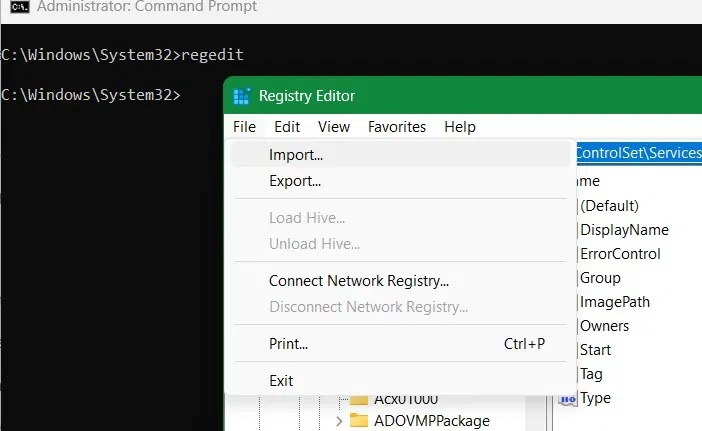
<p style="text-align: justify;">Mở cửa sổ PowerShell với quyền admin. Bây giờ hãy nhập lệnh sau để lấy hash file cho ACPI.sys.</p>

<pre id="pre0">
<code>Get-FileHash C:\Windows\System32\drivers\ACPI.sys</code></pre>

<figure>
<div style="text-align: justify;"><img alt="Kiểm tra hash file của ACPI trong PowerShell ở chế độ admin." data-i="0" data-src="https://st.quantrimang.com/photos/image/2025/06/05/sua-ma-loi-windows-0xc0000098-1.jpg" data-was-processed="true" height="419" src="https://st.quantrimang.com/photos/image/2025/06/05/sua-ma-loi-windows-0xc0000098-1.jpg" width="700" /></div>

<figcaption>
<div style="text-align: justify;">Kiểm tra hash file của ACPI trong PowerShell ở chế độ admin.</div>
</figcaption>
</figure>

<p style="text-align: justify;">Bạn sẽ thấy mã chữ số và chữ cái gồm 64 ký tự mà bạn có thể ghi lại để tham khảo sau này hoặc xuất mã này vào email của mình. Xác thực tính toàn vẹn của hệ thống ACPI.sys là một phần của quá trình bảo trì và bảo dưỡng hệ thống,&nbsp;tránh các sự cố khởi động Windows.</p>

<p style="text-align: justify;">Trong tương lai, bất cứ khi nào bạn nhận thấy hệ thống chậm lại, sập hoặc không ổn định, hãy kiểm tra xem hash file ACPI.sys của bạn có giống nhau không.</p>

<h2 style="text-align: justify;">Sử dụng ACPI.sys Registry Backup để sửa mã lỗi 0xc0000098</h2>

<p style="text-align: justify;">Đây là giải pháp thực tế sẽ giúp bạn lấy lại quyền truy cập vào màn hình đăng nhập Windows sau khi gặp sự cố 0xc0000098 trong khi boot.</p>

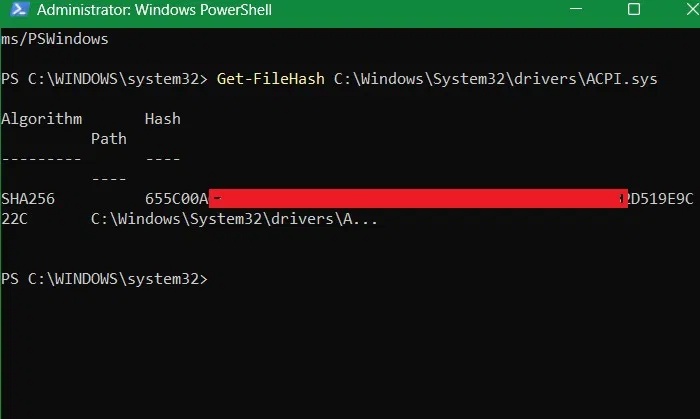
<p style="text-align: justify;">Đầu tiên, hãy&nbsp;mở Registry Editor&nbsp;bằng cách nhập&nbsp;<strong>regedit</strong>&nbsp;vào thanh tìm kiếm hoặc lệnh Run. Điều hướng đến đường dẫn sau:</p>

<pre id="pre1">
<code>Computer\HKEY_LOCAL_MACHINE\SYSTEM\CurrentControlSet\Services\ACPI</code></pre>

<figure>
<div style="text-align: justify;"><img alt="Vị trí registry của file ACPI.sys với đường dẫn chi tiết." data-i="1" data-src="https://st.quantrimang.com/photos/image/2025/06/05/sua-ma-loi-windows-0xc0000098-2.jpg" data-was-processed="true" height="439" src="https://st.quantrimang.com/photos/image/2025/06/05/sua-ma-loi-windows-0xc0000098-2.jpg" width="700" /></div>

<figcaption>
<div style="text-align: justify;">Vị trí registry của file ACPI.sys với đường dẫn chi tiết.</div>
</figcaption>
</figure>

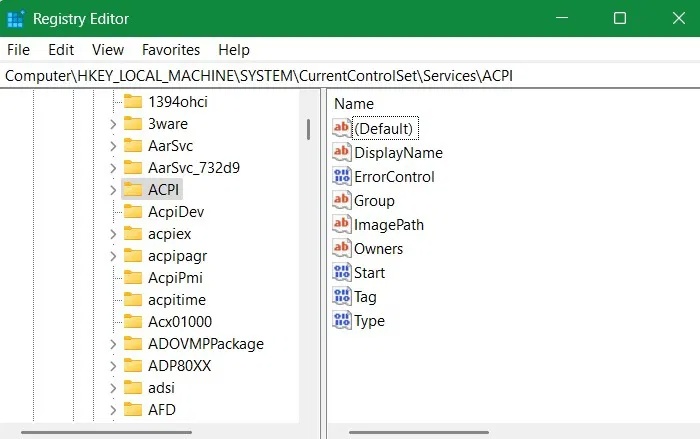
<p style="text-align: justify;">Tiếp theo, nhấp vào&nbsp;<strong>File -&gt; Export</strong>. Một&nbsp;file .reg&nbsp;được tạo, bạn có thể đặt tên là &quot;ACPI&quot; để tham khảo nhanh. Bạn có thể xuất file đó sang bất kỳ vị trí an toàn nào như USB hoặc thậm chí là vị trí lưu trữ đám mây. Bạn cũng có thể lưu bản sao lưu vào thư mục cục bộ trên PC của mình. Bài viết đang lưu file đó vào thư mục cục bộ có tên là &quot;backup&quot; trên PC của mình.</p>

<figure>
<div style="text-align: justify;"><img alt="Lưu file registry ACPI.sys vào thư mục cục bộ trên PC chạy Windows có tên là &#039;Backup&#039;." data-i="2" data-src="https://st.quantrimang.com/photos/image/2025/06/05/sua-ma-loi-windows-0xc0000098-3.jpg" data-was-processed="true" height="590" src="https://st.quantrimang.com/photos/image/2025/06/05/sua-ma-loi-windows-0xc0000098-3.jpg" width="700" /></div>

<figcaption>
<div style="text-align: justify;">Lưu file registry ACPI.sys vào thư mục cục bộ trên PC chạy Windows có tên là &quot;Backup&quot;.</div>
</figcaption>
</figure>

<p style="text-align: justify;">Bất cứ khi nào bạn gặp màn hình lỗi 0xc0000098 trong khi khởi động, tất cả những gì bạn phải làm là khởi chạy môi trường khôi phục Windows. Có nhiều cách để thực hiện điều đó, nhưng khi nhìn chằm chằm vào màn hình xanh, cách dễ nhất là nhấn nút nguồn và ngay lập tức nhấn phím khởi động Windows của PC như&nbsp;<strong>F2</strong>,<strong>&nbsp;F6</strong>&nbsp;hoặc&nbsp;<strong>Esc</strong>, tùy thuộc vào nhãn hiệu PC của bạn.</p>

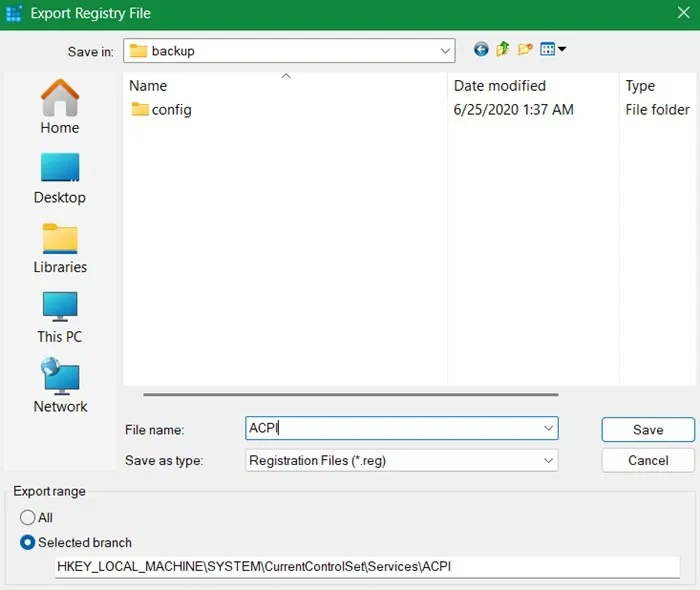
<p style="text-align: justify;">Tại đây, hãy vào&nbsp;<strong>Troubleshoot -&gt; Advanced Options -&gt; Command Prompt</strong>. Nhập&nbsp;<strong>regedit</strong>&nbsp;và nó sẽ mở Registry Editor trong môi trường khôi phục Windows. Nhấp vào&nbsp;<strong>File -&gt; Import&nbsp;</strong>để nhập file registry chính xác.</p>

<figure>
<div style="text-align: justify;"><img alt="Sử dụng Registry &#039;Import&#039; để nhập bản sao lưu ACPI.sys bằng Command Prompt." data-i="3" data-src="https://st.quantrimang.com/photos/image/2025/06/05/sua-ma-loi-windows-0xc0000098-4.jpg" data-was-processed="true" height="431" src="https://st.quantrimang.com/photos/image/2025/06/05/sua-ma-loi-windows-0xc0000098-4.jpg" width="702" /></div>

<figcaption>
<div style="text-align: justify;">Sử dụng Registry &quot;Import&quot; để nhập bản sao lưu ACPI.sys bằng Command Prompt.</div>
</figcaption>
</figure>

<p style="text-align: justify;">Các giá trị của file .reg đã lưu sẽ được thêm thành công vào registry key xung quanh ACPI.sys. Bây giờ, tất cả những gì bạn phải làm là khởi động lại thiết bị của mình và các cài đặt liên quan đến ACPI sẽ được lưu ở định dạng gốc. Bạn có thể ngăn ngừa lỗi registry bằng các mẹo này.</p>

<h2 style="text-align: justify;">Các giải pháp khác</h2>

<p style="text-align: justify;">Giữ khởi động an toàn là biện pháp tốt nhất để đảm bảo các file ACPI.sys không bị can thiệp. Bạn có thể bật tính năng này trong ứng dụng Windows Security, từ&nbsp;<strong>Device Security -&gt; Secure boot</strong>, tại đó tính năng này sẽ hiển thị là On. Bạn cũng có thể bật tính năng này trong UEFI trên các thiết bị Windows 10 cũ.</p>

<p style="text-align: justify;">Mặc dù sao lưu ACPI.sys là cách tốt nhất để ngăn ngừa và xử lý các lỗi Windows 0xc0000098 trong tương lai, nhưng vẫn còn nhiều sự cố khởi động khác gây ra màn hình xanh khi khởi động Windows. Các lỗi phổ biến nhất trong số này là lỗi Ntoskernl.exe,&nbsp;BAD SYSTEM CONFIG INFO&nbsp;và&nbsp;CRITICAL PROCESS DIED</p>

<p style="text-align: justify;">Chạy kiểm tra DISM/SFC đảm bảo tính toàn vẹn của file trong tất cả các thành phần System32, bao gồm cả ACPI.sys.</p>
		</div>
				<div id="author">
						<p>
				<strong>Nguồn tin:</strong>
				Quantrimang.com:
			</p>
		</div>
	</div>
	<div id="footer" class="clearfix">
		<div id="url">
			<strong>URL của bản tin này: </strong><a href="https://www.nguoicodonvn2008.info/vi/news/savefile/kien-thuc-may-tinh/sua-ma-loi-windows-0xc0000098-sao-luu-acpi-sys-de-ngan-ngua-loi-boot-10510.html" title="Sửa mã lỗi Windows 0xc0000098&#x3A; Sao lưu ACPI.sys để ngăn ngừa lỗi boot">https://www.nguoicodonvn2008.info/vi/news/savefile/kien-thuc-may-tinh/sua-ma-loi-windows-0xc0000098-sao-luu-acpi-sys-de-ngan-ngua-loi-boot-10510.html</a>

		</div>
		<div class="clear"></div>
		<div class="copyright">
			&copy; .&#x3A; Nguoicodonvn2008.info - Cõi lòng người cô đơn &#x3A;.
		</div>
		<div id="contact">
			<a href="mailto:admin@nguoicodonvn2008.info">admin@nguoicodonvn2008.info</a>
		</div>
	</div>
</div>
        <div id="timeoutsess" class="chromeframe">
            Bạn đã không sử dụng Site, <a onclick="timeoutsesscancel();" href="https://nguoicodonvn2008.info/#">Bấm vào đây để duy trì trạng thái đăng nhập</a>. Thời gian chờ: <span id="secField"> 60 </span> giây
        </div>
        <div id="openidResult" class="nv-alert" style="display:none"></div>
        <div id="openidBt" data-result="" data-redirect=""></div>
		</script>
		<div class="car-top">
  <span><img src="https://nguoicodonvn2008.info/themes/default/images/car.png" alt=""></span>
</div>
<div id="run_cronjobs" style="visibility:hidden;display:none;"><img alt="cron" src="/index.php?second=cronjobs&amp;p=j82QrE4v" width="1" height="1" /></div>
<script src="https://nguoicodonvn2008.info/assets/js/jquery/jquery.min.js"></script>
<script>var nv_base_siteurl="/",nv_lang_data="vi",nv_lang_interface="vi",nv_name_variable="nv",nv_fc_variable="op",nv_lang_variable="language",nv_module_name="news",nv_func_name="savefile",nv_is_user=0, nv_my_ofs=-4,nv_my_abbr="EDT",nv_cookie_prefix="nv4c_e856T",nv_check_pass_mstime=1738000,nv_area_admin=0,nv_safemode=0,theme_responsive=0,nv_recaptcha_ver=2,nv_recaptcha_sitekey="",nv_recaptcha_type="image",XSSsanitize=1;</script>
<script src="https://nguoicodonvn2008.info/assets/js/language/vi.js"></script>
<script src="https://nguoicodonvn2008.info/assets/js/DOMPurify/purify3.js"></script>
<script src="https://nguoicodonvn2008.info/assets/js/global.js"></script>
<script src="https://nguoicodonvn2008.info/assets/js/site.js"></script>
<script src="https://nguoicodonvn2008.info/themes/default/js/news.js"></script>
<script src="https://nguoicodonvn2008.info/themes/default/js/main.js"></script>
<script src="https://nguoicodonvn2008.info/themes/default/js/custom.js"></script>
<script type="application/ld+json">
        {
            "@context": "https://schema.org",
            "@type": "Organization",
            "url": "https://nguoicodonvn2008.info",
            "logo": "https://nguoicodonvn2008.info/uploads/angel.gif"
        }
        </script>
<script src="https://nguoicodonvn2008.info/themes/default/js/bootstrap.min.js"></script>
<script type="text/javascript">
var $scrolltop = $('.car-top');
$scrolltop.on('click', function () {
    $('html,body').animate({
        scrollTop: 0
    }, 800);
    $(this).addClass("car-run");
    setTimeout(function(){ $scrolltop.removeClass('car-run');}, 1000);
    return false;
});
$(window).on('scroll', function ()
{ 
    if($(window).scrollTop() >= 200)
    {
        $scrolltop.addClass("show");
        $scrolltop.addClass("car-down");
    }
    else
    {
       $scrolltop.removeClass("show");
       setTimeout(function(){ $scrolltop.removeClass('car-down');}, 300);
    }
});
</script>
</body>
</html>