<!DOCTYPE html>
    <html lang="vi" xmlns="http://www.w3.org/1999/xhtml" prefix="og: http://ogp.me/ns#">
    <head>
<title>Sửa lỗi USB&#x002F;ổ đĩa ngoài hiển thị dung lượng không chính xác</title>
<meta name="description" content="Sửa lỗi USB&#x002F;ổ đĩa ngoài hiển thị dung lượng không chính xác - Savefile - Tin Tức -...">
<meta name="author" content=".: Nguoicodonvn2008.info - Cõi lòng người cô đơn :.">
<meta name="copyright" content=".: Nguoicodonvn2008.info - Cõi lòng người cô đơn :. [admin@nguoicodonvn2008.info]">
<meta name="robots" content="index, archive, follow, noodp">
<meta name="googlebot" content="index,archive,follow,noodp">
<meta name="msnbot" content="all,index,follow">
<meta name="generator" content="NukeViet v4.5">
<meta http-equiv="Content-Type" content="text/html; charset=utf-8">
<meta property="og:title" content="Sửa lỗi USB&#x002F;ổ đĩa ngoài hiển thị dung lượng không chính xác">
<meta property="og:type" content="website">
<meta property="og:description" content="Savefile - Tin Tức - https&#x3A;&#x002F;&#x002F;www.nguoicodonvn2008.info&#x002F;vi&#x002F;news&#x002F;savefile&#x002F;kien-thuc-may-tinh&#x002F;sua-loi-usb-o-dia-ngoai-hien-thi-dung-luong-khong-chinh-xac-3049.html">
<meta property="og:site_name" content=".&#x3A; Nguoicodonvn2008.info - Cõi lòng người cô đơn &#x3A;.">
<meta property="og:url" content="https://www.nguoicodonvn2008.info/vi/news/savefile/kien-thuc-may-tinh/sua-loi-usb-o-dia-ngoai-hien-thi-dung-luong-khong-chinh-xac-3049.html">
<link rel="shortcut icon" href="https://nguoicodonvn2008.info/favicon.ico">
<link rel="canonical" href="https://www.nguoicodonvn2008.info/vi/news/savefile/kien-thuc-may-tinh/sua-loi-usb-o-dia-ngoai-hien-thi-dung-luong-khong-chinh-xac-3049.html">
<link rel="alternate" href="https://nguoicodonvn2008.info/vi/news/rss/" title="Tin Tức" type="application/rss+xml">
<link rel="alternate" href="https://nguoicodonvn2008.info/vi/news/rss/karaoke-dual/" title="Tin Tức - Karaoke Dual" type="application/rss+xml">
<link rel="alternate" href="https://nguoicodonvn2008.info/vi/news/rss/nhac-tre/" title="Tin Tức - Nhạc trẻ" type="application/rss+xml">
<link rel="alternate" href="https://nguoicodonvn2008.info/vi/news/rss/tru-tinh/" title="Tin Tức - Trữ tình" type="application/rss+xml">
<link rel="alternate" href="https://nguoicodonvn2008.info/vi/news/rss/nuoc-ngoai/" title="Tin Tức - Nước ngoài" type="application/rss+xml">
<link rel="alternate" href="https://nguoicodonvn2008.info/vi/news/rss/remix/" title="Tin Tức - Remix" type="application/rss+xml">
<link rel="alternate" href="https://nguoicodonvn2008.info/vi/news/rss/tam-su-tinh-yeu/" title="Tin Tức - Tâm sự tình yêu" type="application/rss+xml">
<link rel="alternate" href="https://nguoicodonvn2008.info/vi/news/rss/tho-suu-tam/" title="Tin Tức - Thơ sưu tầm" type="application/rss+xml">
<link rel="alternate" href="https://nguoicodonvn2008.info/vi/news/rss/cuoc-song/" title="Tin Tức - Cuộc sống" type="application/rss+xml">
<link rel="alternate" href="https://nguoicodonvn2008.info/vi/news/rss/phan-mem/" title="Tin Tức - Phần mềm" type="application/rss+xml">
<link rel="alternate" href="https://nguoicodonvn2008.info/vi/news/rss/kien-thuc-may-tinh/" title="Tin Tức - Kiến thức máy tính" type="application/rss+xml">
<link rel="alternate" href="https://nguoicodonvn2008.info/vi/news/rss/hoc-tap/" title="Tin Tức - Học tập" type="application/rss+xml">
<link rel="alternate" href="https://nguoicodonvn2008.info/vi/news/rss/tai-lieu/" title="Tin Tức - Tài liệu" type="application/rss+xml">
<link rel="alternate" href="https://nguoicodonvn2008.info/vi/news/rss/de-thi/" title="Tin Tức - Đề thi" type="application/rss+xml">
<link rel="preload" as="style" href="https://nguoicodonvn2008.info/assets/css/font-awesome.min.css" type="text/css">
<link rel="preload" as="style" href="https://nguoicodonvn2008.info/themes/default/css/bootstrap.non-responsive.css" type="text/css">
<link rel="preload" as="style" href="https://nguoicodonvn2008.info/themes/default/css/style.css" type="text/css">
<link rel="preload" as="style" href="https://nguoicodonvn2008.info/themes/default/css/style.non-responsive.css" type="text/css">
<link rel="preload" as="style" href="https://nguoicodonvn2008.info/themes/default/css/news.css" type="text/css">
<link rel="preload" as="style" href="https://nguoicodonvn2008.info/themes/default/css/custom.css" type="text/css">
<link rel="preload" as="script" href="https://nguoicodonvn2008.info/assets/js/jquery/jquery.min.js" type="text/javascript">
<link rel="preload" as="script" href="https://nguoicodonvn2008.info/assets/js/language/vi.js" type="text/javascript">
<link rel="preload" as="script" href="https://nguoicodonvn2008.info/assets/js/DOMPurify/purify3.js" type="text/javascript">
<link rel="preload" as="script" href="https://nguoicodonvn2008.info/assets/js/global.js" type="text/javascript">
<link rel="preload" as="script" href="https://nguoicodonvn2008.info/assets/js/site.js" type="text/javascript">
<link rel="preload" as="script" href="https://nguoicodonvn2008.info/themes/default/js/news.js" type="text/javascript">
<link rel="preload" as="script" href="https://nguoicodonvn2008.info/themes/default/js/main.js" type="text/javascript">
<link rel="preload" as="script" href="https://nguoicodonvn2008.info/themes/default/js/custom.js" type="text/javascript">
<link rel="preload" as="script" href="https://nguoicodonvn2008.info/themes/default/js/bootstrap.min.js" type="text/javascript">
<link rel="stylesheet" href="https://nguoicodonvn2008.info/assets/css/font-awesome.min.css">
<link rel="stylesheet" href="https://nguoicodonvn2008.info/themes/default/css/bootstrap.non-responsive.css">
<link rel="stylesheet" href="https://nguoicodonvn2008.info/themes/default/css/style.css">
<link rel="stylesheet" href="https://nguoicodonvn2008.info/themes/default/css/style.non-responsive.css">
<link rel="StyleSheet" href="https://nguoicodonvn2008.info/themes/default/css/news.css">
<link rel="stylesheet" href="https://nguoicodonvn2008.info/themes/default/css/custom.css">
<style type="text/css">
	body{background: #fff;}
</style>
    </head>
    <body>
<div id="print">
	<div id="hd_print">
		<h2 class="pull-left">.&#x3A; Nguoicodonvn2008.info - Cõi lòng người cô đơn &#x3A;.</h2>
		<p class="pull-right"><a title=".&#x3A; Nguoicodonvn2008.info - Cõi lòng người cô đơn &#x3A;." href="https://nguoicodonvn2008.info/">https://nguoicodonvn2008.info</a></p>
	</div>
	<div class="clear"></div>
	<hr />
	<div id="content">
		<h1>Sửa lỗi USB&#x002F;ổ đĩa ngoài hiển thị dung lượng không chính xác</h1>
		<ul class="list-inline">
			<li>Chủ nhật - 08/11/2020 23:53</li>
			<li class="hidden-print txtrequired"><em class="fa fa-print">&nbsp;</em><a title="In ra" href="javascript:;" onclick="window.print()">In ra</a></li>
			<li class="hidden-print txtrequired"><em class="fa fa-power-off">&nbsp;</em><a title="Đóng cửa sổ này" href="javascript:;" onclick="window.close()">Đóng cửa sổ này</a></li>
		</ul>
		<div class="clear"></div>
		<div id="hometext">
		</div>
				<div class="imghome">
			<img alt="Sửa lỗi USB&#x002F;ổ đĩa ngoài hiển thị dung lượng không chính xác" src="https://st.quantrimang.com/photos/image/2020/10/23/usb-hien-thi-dung-luong-khong-chinh-xac-2.jpg" width="460" class="img-thumbnail" />
		</div>
		<div class="clear"></div>
		<div id="bodytext" class="clearfix">
			<p style="text-align: justify;">Đôi khi, khi bạn cố&nbsp;format USB&nbsp;hoặc ổ đĩa ngoài, nó hiển thị ít hơn tổng dung lượng. Ngoài ra, một số thông báo lỗi có thể được đưa ra vào cuối quá trình. Không rõ lý do tại sao lỗi xảy ra nhưng bạn chắc chắn có thể khắc phục nó bằng cách làm theo một số phương pháp.</p>

<h2 style="text-align: justify;">USB hiển thị sai dung lượng trên Windows 10</h2>

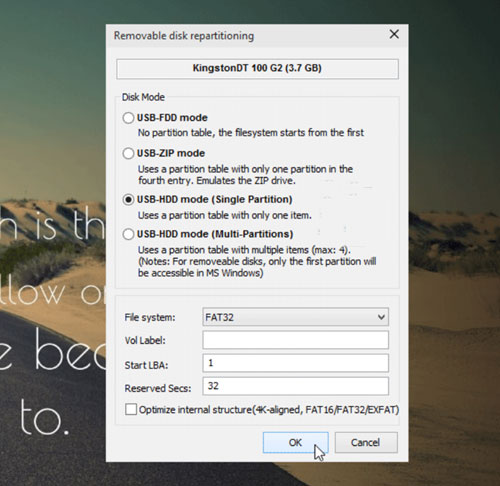
<p style="text-align: justify;">Bạn có thể sửa lỗi USB hiển thị không chính xác hoặc sai dung lượng, cũng như reset và khôi phục USB trở lại dung lượng đầy đủ bằng phần mềm miễn phí Bootice hoặc CMD.</p>

<div style="text-align: justify;">&nbsp;</div>

<h3 style="text-align: justify;">1. Sử dụng phần mềm miễn phí Bootice</h3>

<figure>
<div style="text-align: justify;"><img alt="Sử dụng phần mềm miễn phí Bootice để lấy lại dung lượng đã mất" data-i="0" data-src="https://st.quantrimang.com/photos/image/2020/10/23/usb-hien-thi-dung-luong-khong-chinh-xac-1.jpg" data-was-processed="true" height="486" src="https://st.quantrimang.com/photos/image/2020/10/23/usb-hien-thi-dung-luong-khong-chinh-xac-1.jpg" width="500" /></div>

<figcaption>
<div style="text-align: justify;">Sử dụng phần mềm miễn phí Bootice để lấy lại dung lượng đã mất</div>
</figcaption>
</figure>

<p style="text-align: justify;">Chức năng chính của phần mềm là format USB mới để chúng chạy mượt mà trên Windows. Phần mềm miễn phí cũng được trang bị trình quản lý tích hợp, cho phép bạn xóa hoặc sửa đổi dữ liệu mà không gây hại cho các file và thư mục trong những phần khác của máy tính.</p>

<p style="text-align: justify;">Nếu ổ flash của bạn không hiển thị hoặc không hiển thị dung lượng như quảng cáo, hãy chạy Bootice để yêu cầu hiện đúng lại dung lượng đã mất.</p>

<ul>
	<li style="text-align: justify;">Tải Bootice:&nbsp;<strong><span style="color:rgb(192, 57, 43);">https://www.softpedia.com/get/System/Boot-Manager-Disk/Bootice.shtml#download</span></strong></li>
</ul>

<h3 style="text-align: justify;">2.&nbsp;Sử dụng Command Prompt</h3>

<figure>
<div style="text-align: justify;"><img alt="Vấn đề dung lượng USB không chính xác trong Windows 10 cũng có thể được khắc phục bằng Command Prompt" data-i="1" data-src="https://st.quantrimang.com/photos/image/2020/10/23/usb-hien-thi-dung-luong-khong-chinh-xac-2.jpg" data-was-processed="true" height="137" src="https://st.quantrimang.com/photos/image/2020/10/23/usb-hien-thi-dung-luong-khong-chinh-xac-2.jpg" width="650" /></div>

<figcaption>
<div style="text-align: justify;">Vấn đề dung lượng USB không chính xác trong Windows 10 cũng có thể được khắc phục bằng Command Prompt</div>
</figcaption>
</figure>

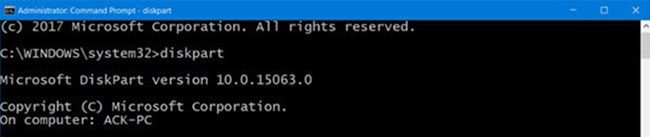
<p style="text-align: justify;">Công cụ Command Prompt trong Windows 10 là công cụ đáng tin cậy để khắc phục một số vấn đề kỳ lạ nhất. Vấn đề dung lượng USB không chính xác trong Windows 10 cũng có thể được khắc phục bằng công cụ này.</p>

<p style="text-align: justify;">Mở công cụ Command Prompt&nbsp;và gõ lệnh sau, khởi chạy&nbsp;chương trình Disk Utility.</p>

<pre id="pre0">
<code>diskpart</code></pre>

<p style="text-align: justify;">Tiếp theo, gõ lệnh dưới đây để xem tất cả các ổ được gắn vào máy tính. USB sẽ là một trong những ổ này.</p>

<pre id="pre1">
<code>list disk</code></pre>

<p style="text-align: justify;">Bây giờ, để bắt đầu một hoạt động trên ổ, hãy chạy lệnh sau.</p>

<pre id="pre2">
<code>select disk (Disk Name)</code></pre>

<p style="text-align: justify;">Trong ví dụ trên, thay thế&nbsp;<strong>Disk Name</strong>&nbsp;bằng chữ cái đại diện cho ổ flash của bạn.</p>

<p style="text-align: justify;">Tiếp theo, gõ lệnh sau để dọn dẹp USB.</p>

<pre id="pre3">
<code>Clean</code></pre>

<p style="text-align: justify;">Sau khi ổ được làm sạch, hãy chạy lệnh sau để tạo phân vùng mới.</p>

<pre id="pre4">
<code>create partition primary</code></pre>

<p style="text-align: justify;">Cuối cùng, để định dạng ổ sang định dạng FAT32.</p>

<pre id="pre5">
<code>format fs=fat32 quick</code></pre>

<p style="text-align: justify;">Rút USB ra và sau đó cắm lại vào máy tính.</p>

<p style="text-align: justify;">Giờ đây, PC của bạn sẽ cho phép bạn sử dụng toàn bộ dung lượng lưu trữ của ổ.</p>
		</div>
				<div id="author">
						<p>
				<strong>Nguồn tin:</strong>
				Quantrimang.com
			</p>
		</div>
	</div>
	<div id="footer" class="clearfix">
		<div id="url">
			<strong>URL của bản tin này: </strong><a href="https://www.nguoicodonvn2008.info/vi/news/savefile/kien-thuc-may-tinh/sua-loi-usb-o-dia-ngoai-hien-thi-dung-luong-khong-chinh-xac-3049.html" title="Sửa lỗi USB&#x002F;ổ đĩa ngoài hiển thị dung lượng không chính xác">https://www.nguoicodonvn2008.info/vi/news/savefile/kien-thuc-may-tinh/sua-loi-usb-o-dia-ngoai-hien-thi-dung-luong-khong-chinh-xac-3049.html</a>

		</div>
		<div class="clear"></div>
		<div class="copyright">
			&copy; .&#x3A; Nguoicodonvn2008.info - Cõi lòng người cô đơn &#x3A;.
		</div>
		<div id="contact">
			<a href="mailto:admin@nguoicodonvn2008.info">admin@nguoicodonvn2008.info</a>
		</div>
	</div>
</div>
        <div id="timeoutsess" class="chromeframe">
            Bạn đã không sử dụng Site, <a onclick="timeoutsesscancel();" href="https://nguoicodonvn2008.info/#">Bấm vào đây để duy trì trạng thái đăng nhập</a>. Thời gian chờ: <span id="secField"> 60 </span> giây
        </div>
        <div id="openidResult" class="nv-alert" style="display:none"></div>
        <div id="openidBt" data-result="" data-redirect=""></div>
		</script>
		<div class="car-top">
  <span><img src="https://nguoicodonvn2008.info/themes/default/images/car.png" alt=""></span>
</div>
<script src="https://nguoicodonvn2008.info/assets/js/jquery/jquery.min.js"></script>
<script>var nv_base_siteurl="/",nv_lang_data="vi",nv_lang_interface="vi",nv_name_variable="nv",nv_fc_variable="op",nv_lang_variable="language",nv_module_name="news",nv_func_name="savefile",nv_is_user=0, nv_my_ofs=-4,nv_my_abbr="EDT",nv_cookie_prefix="nv4c_e856T",nv_check_pass_mstime=1738000,nv_area_admin=0,nv_safemode=0,theme_responsive=0,nv_recaptcha_ver=2,nv_recaptcha_sitekey="",nv_recaptcha_type="image",XSSsanitize=1;</script>
<script src="https://nguoicodonvn2008.info/assets/js/language/vi.js"></script>
<script src="https://nguoicodonvn2008.info/assets/js/DOMPurify/purify3.js"></script>
<script src="https://nguoicodonvn2008.info/assets/js/global.js"></script>
<script src="https://nguoicodonvn2008.info/assets/js/site.js"></script>
<script src="https://nguoicodonvn2008.info/themes/default/js/news.js"></script>
<script src="https://nguoicodonvn2008.info/themes/default/js/main.js"></script>
<script src="https://nguoicodonvn2008.info/themes/default/js/custom.js"></script>
<script type="application/ld+json">
        {
            "@context": "https://schema.org",
            "@type": "Organization",
            "url": "https://nguoicodonvn2008.info",
            "logo": "https://nguoicodonvn2008.info/uploads/angel.gif"
        }
        </script>
<script src="https://nguoicodonvn2008.info/themes/default/js/bootstrap.min.js"></script>
<script type="text/javascript">
var $scrolltop = $('.car-top');
$scrolltop.on('click', function () {
    $('html,body').animate({
        scrollTop: 0
    }, 800);
    $(this).addClass("car-run");
    setTimeout(function(){ $scrolltop.removeClass('car-run');}, 1000);
    return false;
});
$(window).on('scroll', function ()
{ 
    if($(window).scrollTop() >= 200)
    {
        $scrolltop.addClass("show");
        $scrolltop.addClass("car-down");
    }
    else
    {
       $scrolltop.removeClass("show");
       setTimeout(function(){ $scrolltop.removeClass('car-down');}, 300);
    }
});
</script>
</body>
</html>