<!DOCTYPE html>
    <html lang="vi" xmlns="http://www.w3.org/1999/xhtml" prefix="og: http://ogp.me/ns#">
    <head>
<title>Sửa lỗi “These Files Can’t Be Opened” trên Windows 10&#x002F;8.1&#x002F;7</title>
<meta name="description" content="Sửa lỗi “These Files Can’t Be Opened” trên Windows 10&#x002F;8.1&#x002F;7 - Savefile - Tin Tức -...">
<meta name="author" content=".: Nguoicodonvn2008.info - Cõi lòng người cô đơn :.">
<meta name="copyright" content=".: Nguoicodonvn2008.info - Cõi lòng người cô đơn :. [admin@nguoicodonvn2008.info]">
<meta name="robots" content="index, archive, follow, noodp">
<meta name="googlebot" content="index,archive,follow,noodp">
<meta name="msnbot" content="all,index,follow">
<meta name="generator" content="NukeViet v4.5">
<meta http-equiv="Content-Type" content="text/html; charset=utf-8">
<meta property="og:title" content="Sửa lỗi “These Files Can’t Be Opened” trên Windows 10&#x002F;8.1&#x002F;7">
<meta property="og:type" content="website">
<meta property="og:description" content="Savefile - Tin Tức - https&#x3A;&#x002F;&#x002F;www.nguoicodonvn2008.info&#x002F;vi&#x002F;news&#x002F;savefile&#x002F;kien-thuc-may-tinh&#x002F;sua-loi-these-files-can-t-be-opened-tren-windows-10-8-1-7-4678.html">
<meta property="og:site_name" content=".&#x3A; Nguoicodonvn2008.info - Cõi lòng người cô đơn &#x3A;.">
<meta property="og:url" content="https://www.nguoicodonvn2008.info/vi/news/savefile/kien-thuc-may-tinh/sua-loi-these-files-can-t-be-opened-tren-windows-10-8-1-7-4678.html">
<link rel="shortcut icon" href="https://nguoicodonvn2008.info/favicon.ico">
<link rel="canonical" href="https://www.nguoicodonvn2008.info/vi/news/savefile/kien-thuc-may-tinh/sua-loi-these-files-can-t-be-opened-tren-windows-10-8-1-7-4678.html">
<link rel="alternate" href="https://nguoicodonvn2008.info/vi/news/rss/" title="Tin Tức" type="application/rss+xml">
<link rel="alternate" href="https://nguoicodonvn2008.info/vi/news/rss/karaoke-dual/" title="Tin Tức - Karaoke Dual" type="application/rss+xml">
<link rel="alternate" href="https://nguoicodonvn2008.info/vi/news/rss/nhac-tre/" title="Tin Tức - Nhạc trẻ" type="application/rss+xml">
<link rel="alternate" href="https://nguoicodonvn2008.info/vi/news/rss/tru-tinh/" title="Tin Tức - Trữ tình" type="application/rss+xml">
<link rel="alternate" href="https://nguoicodonvn2008.info/vi/news/rss/nuoc-ngoai/" title="Tin Tức - Nước ngoài" type="application/rss+xml">
<link rel="alternate" href="https://nguoicodonvn2008.info/vi/news/rss/remix/" title="Tin Tức - Remix" type="application/rss+xml">
<link rel="alternate" href="https://nguoicodonvn2008.info/vi/news/rss/tam-su-tinh-yeu/" title="Tin Tức - Tâm sự tình yêu" type="application/rss+xml">
<link rel="alternate" href="https://nguoicodonvn2008.info/vi/news/rss/tho-suu-tam/" title="Tin Tức - Thơ sưu tầm" type="application/rss+xml">
<link rel="alternate" href="https://nguoicodonvn2008.info/vi/news/rss/cuoc-song/" title="Tin Tức - Cuộc sống" type="application/rss+xml">
<link rel="alternate" href="https://nguoicodonvn2008.info/vi/news/rss/phan-mem/" title="Tin Tức - Phần mềm" type="application/rss+xml">
<link rel="alternate" href="https://nguoicodonvn2008.info/vi/news/rss/kien-thuc-may-tinh/" title="Tin Tức - Kiến thức máy tính" type="application/rss+xml">
<link rel="alternate" href="https://nguoicodonvn2008.info/vi/news/rss/hoc-tap/" title="Tin Tức - Học tập" type="application/rss+xml">
<link rel="alternate" href="https://nguoicodonvn2008.info/vi/news/rss/tai-lieu/" title="Tin Tức - Tài liệu" type="application/rss+xml">
<link rel="alternate" href="https://nguoicodonvn2008.info/vi/news/rss/de-thi/" title="Tin Tức - Đề thi" type="application/rss+xml">
<link rel="preload" as="style" href="https://nguoicodonvn2008.info/assets/css/font-awesome.min.css" type="text/css">
<link rel="preload" as="style" href="https://nguoicodonvn2008.info/themes/default/css/bootstrap.non-responsive.css" type="text/css">
<link rel="preload" as="style" href="https://nguoicodonvn2008.info/themes/default/css/style.css" type="text/css">
<link rel="preload" as="style" href="https://nguoicodonvn2008.info/themes/default/css/style.non-responsive.css" type="text/css">
<link rel="preload" as="style" href="https://nguoicodonvn2008.info/themes/default/css/news.css" type="text/css">
<link rel="preload" as="style" href="https://nguoicodonvn2008.info/themes/default/css/custom.css" type="text/css">
<link rel="preload" as="script" href="https://nguoicodonvn2008.info/assets/js/jquery/jquery.min.js" type="text/javascript">
<link rel="preload" as="script" href="https://nguoicodonvn2008.info/assets/js/language/vi.js" type="text/javascript">
<link rel="preload" as="script" href="https://nguoicodonvn2008.info/assets/js/DOMPurify/purify3.js" type="text/javascript">
<link rel="preload" as="script" href="https://nguoicodonvn2008.info/assets/js/global.js" type="text/javascript">
<link rel="preload" as="script" href="https://nguoicodonvn2008.info/assets/js/site.js" type="text/javascript">
<link rel="preload" as="script" href="https://nguoicodonvn2008.info/themes/default/js/news.js" type="text/javascript">
<link rel="preload" as="script" href="https://nguoicodonvn2008.info/themes/default/js/main.js" type="text/javascript">
<link rel="preload" as="script" href="https://nguoicodonvn2008.info/themes/default/js/custom.js" type="text/javascript">
<link rel="preload" as="script" href="https://nguoicodonvn2008.info/themes/default/js/bootstrap.min.js" type="text/javascript">
<link rel="stylesheet" href="https://nguoicodonvn2008.info/assets/css/font-awesome.min.css">
<link rel="stylesheet" href="https://nguoicodonvn2008.info/themes/default/css/bootstrap.non-responsive.css">
<link rel="stylesheet" href="https://nguoicodonvn2008.info/themes/default/css/style.css">
<link rel="stylesheet" href="https://nguoicodonvn2008.info/themes/default/css/style.non-responsive.css">
<link rel="StyleSheet" href="https://nguoicodonvn2008.info/themes/default/css/news.css">
<link rel="stylesheet" href="https://nguoicodonvn2008.info/themes/default/css/custom.css">
<style type="text/css">
	body{background: #fff;}
</style>
    </head>
    <body>
<div id="print">
	<div id="hd_print">
		<h2 class="pull-left">.&#x3A; Nguoicodonvn2008.info - Cõi lòng người cô đơn &#x3A;.</h2>
		<p class="pull-right"><a title=".&#x3A; Nguoicodonvn2008.info - Cõi lòng người cô đơn &#x3A;." href="https://nguoicodonvn2008.info/">https://nguoicodonvn2008.info</a></p>
	</div>
	<div class="clear"></div>
	<hr />
	<div id="content">
		<h1>Sửa lỗi “These Files Can’t Be Opened” trên Windows 10&#x002F;8.1&#x002F;7</h1>
		<ul class="list-inline">
			<li>Thứ ba - 02/11/2021 00:43</li>
			<li class="hidden-print txtrequired"><em class="fa fa-print">&nbsp;</em><a title="In ra" href="javascript:;" onclick="window.print()">In ra</a></li>
			<li class="hidden-print txtrequired"><em class="fa fa-power-off">&nbsp;</em><a title="Đóng cửa sổ này" href="javascript:;" onclick="window.close()">Đóng cửa sổ này</a></li>
		</ul>
		<div class="clear"></div>
		<div id="hometext">
		</div>
				<div class="imghome">
			<img alt="Sửa lỗi “These Files Can’t Be Opened” trên Windows 10&#x002F;8.1&#x002F;7" src="https://st.quantrimang.com/photos/image/2021/11/01/sua-loi-these-files-cant-be-opened-5.jpg" width="460" class="img-thumbnail" />
		</div>
		<div class="clear"></div>
		<div id="bodytext" class="clearfix">
			<p style="text-align: justify;">Có phải bạn vừa cố mở một file trên Windows và nhận được thông báo lỗi &quot;These files can&#039;t be opened” không? Lỗi chủ yếu xảy ra đối với các&nbsp;file .exe, nhưng một số người dùng cũng gặp phải lỗi này với các loại file khác. Sự cố thường gặp nhất trên Windows 7 và 8, nhưng bạn vẫn có thể gặp phải sự cố trên PC chạy Windows 10.</p>

<p style="text-align: justify;">May mắn thay, việc sửa lỗi sẽ không khiến bạn mất nhiều thời gian. Tuy nhiên, việc xác định nguyên nhân gây ra lỗi để bạn có thể áp dụng cách khắc phục phù hợp sẽ mất thời gian hơn.</p>

<p style="text-align: justify;">Dù nguyên nhân là gì, một trong những cách sửa lỗi sau đây sẽ giúp bạn truy cập lại các file mình cần.</p>

<h2 style="text-align: justify;">1. Kiểm tra xem file có bị chặn không</h2>

<p style="text-align: justify;">Đôi khi, khi bạn tải xuống file thực thi từ Internet hoặc chuyển file giữa các PC, Windows có thể quyết định chặn file đó để bảo vệ hệ thống của bạn. Khi điều này xảy ra, bạn sẽ thấy lỗi &quot;These files can&#039;t be opened&quot;, nhưng bạn chỉ cần khắc phục hai bước để bỏ chặn file này.</p>

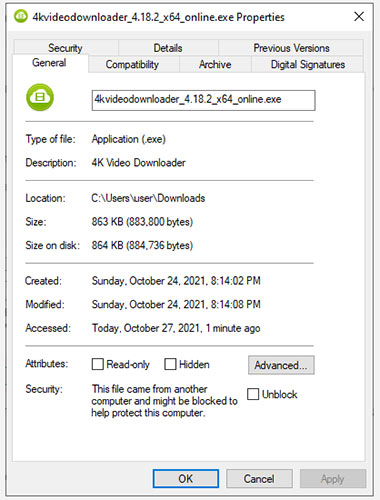
<p style="text-align: justify;">Để minh họa hành vi này tại đây, bài viết đã tải file thiết lập của&nbsp;4K Video Downloader&nbsp;xuống PC. Windows không chặn quyền truy cập vào file này, nhưng đã cảnh báo trong phần&nbsp;<strong>Security</strong>&nbsp;thuộc tab&nbsp;<strong>File Properties &gt; General</strong>.</p>

<figure>
<div style="text-align: justify;"><img alt="Kiểm tra xem file có bị chặn không" data-i="0" data-src="https://st.quantrimang.com/photos/image/2021/11/01/sua-loi-these-files-cant-be-opened-1.jpg" data-was-processed="true" height="500" src="https://st.quantrimang.com/photos/image/2021/11/01/sua-loi-these-files-cant-be-opened-1.jpg" width="380" /></div>

<figcaption>
<div style="text-align: justify;">Kiểm tra xem file có bị chặn không</div>
</figcaption>
</figure>

<p style="text-align: justify;">Thông báo cho biết<em>&nbsp;&quot;This file came from another computer and might be blocked to help protect this computer&quot;</em>. Nếu không thể truy cập file, bạn có thể khắc phục bằng cách chọn hộp&nbsp;<strong>Unblock</strong>&nbsp;và nhấn&nbsp;<strong>OK.</strong>&nbsp;Nếu đang sử dụng phiên bản Windows khác, bạn có thể thấy một nút thay vì hộp kiểm, nhưng quá trình này vẫn diễn ra như cũ.</p>

<p style="text-align: justify;">Sau khi bạn hoàn tất, hãy thử chạy file và xem mọi thứ có trở lại đúng hướng hay không.</p>

<h2 style="text-align: justify;">2. Thay đổi Internet Properties</h2>

<p style="text-align: justify;">Windows sẽ kiểm tra Internet Properties khi quyết định xem file có được phép chạy trên PC hay không. Nếu Internet Properties của bạn đánh dấu một file là không an toàn, Windows sẽ đưa ra lỗi &quot;These files can&#039;t be opened&quot;. Do đó, để thay đổi hành vi của Windows, bạn cần thực hiện một số thay đổi đối với Internet Properties.</p>

<p style="text-align: justify;">Lưu ý rằng điều này sẽ yêu cầu bạn thực hiện cài đặt bảo mật ít nghiêm ngặt hơn từ Internet Properties. Mặc dù bạn có thể sửa lỗi bằng cách làm này, nhưng nó cũng sẽ khiến hệ thống dễ bị tấn công bởi các mối đe dọa bảo mật, nếu bạn không để ý đến việc tải file nào xuống hệ thống của mình.</p>

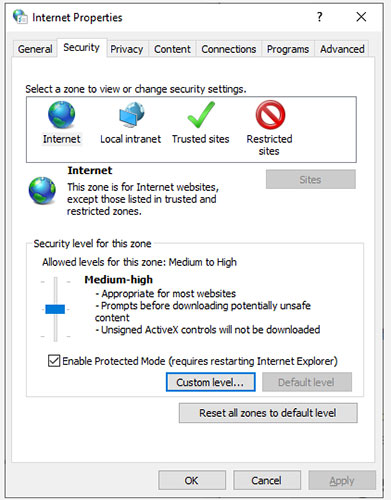
<p style="text-align: justify;">Nếu quyết định đi theo con đường này, hãy bắt đầu bằng cách mở Internet Properties. Để thực hiện việc này, hãy nhấn&nbsp;<strong>Win + R</strong>, nhập&nbsp;<strong>inetcpl.cpl</strong>&nbsp;và nhấn&nbsp;<strong>Enter.</strong>&nbsp;Chuyển sang tab&nbsp;<strong>Security</strong>&nbsp;trong cửa sổ&nbsp;<strong>Internet Properties</strong>&nbsp;và nhấp vào nút&nbsp;<strong>Custom level.</strong></p>

<figure>
<div style="text-align: justify;"><img alt="Nhấp vào nút Custom level" data-i="1" data-src="https://st.quantrimang.com/photos/image/2021/11/01/sua-loi-these-files-cant-be-opened-2.jpg" data-was-processed="true" height="500" src="https://st.quantrimang.com/photos/image/2021/11/01/sua-loi-these-files-cant-be-opened-2.jpg" width="391" /></div>

<figcaption>
<div style="text-align: justify;">Nhấp vào nút Custom level</div>
</figcaption>
</figure>

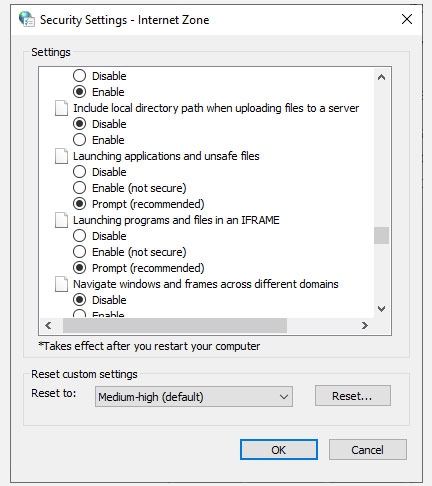
<p style="text-align: justify;">Bây giờ bạn sẽ thấy một cửa sổ có tên là&nbsp;<strong>Security Settings - Internet Zone</strong>. Cuộn qua danh sách trong phần&nbsp;<strong>Settings</strong>&nbsp;và tìm&nbsp;<strong>Launching applications and unsafe files</strong>.</p>

<figure>
<div style="text-align: justify;"><img alt="Tìm Launching applications and unsafe files" data-i="2" data-src="https://st.quantrimang.com/photos/image/2021/11/01/sua-loi-these-files-cant-be-opened-3.jpg" data-was-processed="true" height="486" src="https://st.quantrimang.com/photos/image/2021/11/01/sua-loi-these-files-cant-be-opened-3.jpg" width="432" /></div>

<figcaption>
<div style="text-align: justify;">Tìm Launching applications and unsafe files</div>
</figcaption>
</figure>

<p style="text-align: justify;">Đảm bảo rằng&nbsp;<strong>Prompt (recommended)</strong>&nbsp;được chọn. Tùy chọn này thường được chọn theo mặc định, nhưng nếu đã tìm hiểu các thuộc tính Internet của mình trước đây, bạn có thể đã vô tình thay đổi nó thành&nbsp;<strong>Disable.</strong></p>

<p style="text-align: justify;">Sau khi hoàn tất, hãy nhấp vào&nbsp;<strong>OK</strong>&nbsp;và xem liệu bạn có thể chạy file hay không.</p>

<h2 style="text-align: justify;">3. Thử chỉnh sửa giá trị trong Windows Registry</h2>

<p style="text-align: justify;">Nếu các bản sửa lỗi trước đó không hiệu quả, bạn cũng có thể thử cho phép các file không an toàn bằng cách chỉnh sửa Windows Registry. Bạn sẽ cần thêm một mục registry mới bằng&nbsp;Command Prompt. Bắt đầu bằng cách&nbsp;khởi chạy Command Prompt với quyền admin.</p>

<p style="text-align: justify;">Thực thi từng lệnh sau:</p>

<pre id="pre0">
<code>reg add &quot;HKCU\Software\Microsoft\Windows\CurrentVersion\Policies\Associations&quot; /v &quot;DefaultFileTypeRisk&quot; /t REG_DWORD /d &quot;1808&quot; /f</code></pre>

<pre id="pre1">
<code>reg add &quot;HKCU\Software\Microsoft\Windows\CurrentVersion\Policies\Attachments&quot; /v &quot;SaveZoneInformation&quot; /t REG_DWORD /d &quot;1&quot; /f</code></pre>

<p style="text-align: justify;">Thao tác này sẽ thêm hai registry key mới. Sau khi hoàn tất, hãy&nbsp;khởi động lại PC&nbsp;và thử mở các file.</p>

<h2 style="text-align: justify;">4. Reset Internet Explorer</h2>

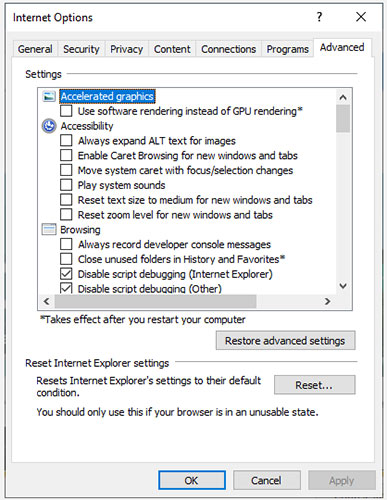
<p style="text-align: justify;">Nếu bạn sử dụng&nbsp;Internet Explorer, việc reset cài đặt về mặc định có thể hữu ích. Để&nbsp;reset lại cài đặt của Internet Explorer, hãy nhấp vào biểu tượng dấu chấm lửng ở trên cùng bên phải của trình duyệt và nhấp vào&nbsp;<strong>Internet Options.</strong>&nbsp;Chuyển sang tab&nbsp;<strong>Advanced</strong>&nbsp;và nhấp vào nút&nbsp;<strong>Reset.&nbsp;</strong>Khi được nhắc, hãy xác nhận việc reset và sau đó khởi động lại PC.</p>

<figure>
<div style="text-align: justify;"><img alt="Reset Internet Explorer" data-i="3" data-src="https://st.quantrimang.com/photos/image/2021/11/01/sua-loi-these-files-cant-be-opened-4.jpg" data-was-processed="true" height="500" src="https://st.quantrimang.com/photos/image/2021/11/01/sua-loi-these-files-cant-be-opened-4.jpg" width="387" /></div>

<figcaption>
<div style="text-align: justify;">Reset Internet Explorer</div>
</figcaption>
</figure>

<p style="text-align: justify;">Nếu bạn vẫn không thể chạy các file mà mình muốn, có lẽ đã đến lúc thử giải pháp cuối cùng.</p>

<h2 style="text-align: justify;">5.&nbsp;Hoàn nguyên máy tính về điểm khôi phục hệ thống trước đó</h2>

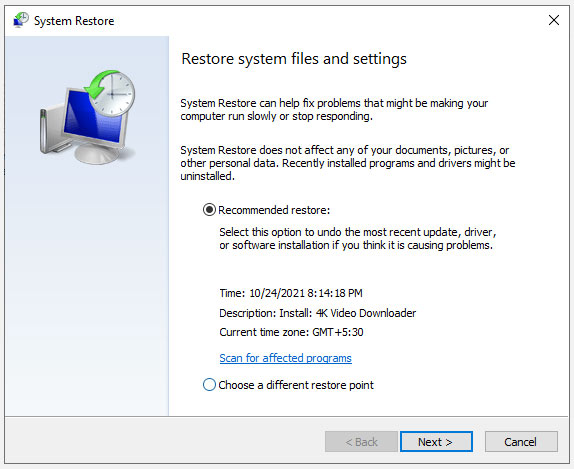
<p style="text-align: justify;">Nếu trước đây bạn có thể chạy một file cụ thể nhưng bắt đầu gặp lỗi này sau khi làm hỏng một số cài đặt, bạn có thể khôi phục hệ thống của mình về trạng thái trước đó, khi mọi thứ đang diễn ra bình thường.</p>

<p style="text-align: justify;">Nếu không có điểm khôi phục, bạn sẽ thấy thông báo&nbsp;<strong>&quot;No restore points have been created on your computer&#039;s system drive&quot;</strong>. Điều này có nghĩa là PC của bạn không có điểm tham chiếu nào để hoàn nguyên và do đó, bạn không thể sử dụng phương pháp này để khắc phục sự cố của mình.</p>

<figure>
<div style="text-align: justify;"><img alt="Hoàn nguyên máy tính về điểm khôi phục hệ thống trước đó" data-i="4" data-src="https://st.quantrimang.com/photos/image/2021/11/01/sua-loi-these-files-cant-be-opened-5.jpg" data-was-processed="true" height="469" src="https://st.quantrimang.com/photos/image/2021/11/01/sua-loi-these-files-cant-be-opened-5.jpg" width="574" /></div>

<figcaption>
<div style="text-align: justify;">Hoàn nguyên máy tính về điểm khôi phục hệ thống trước đó</div>
</figcaption>
</figure>

<p style="text-align: justify;">Nếu bạn có một điểm khôi phục trên hệ thống, hãy chọn điểm khôi phục được đề xuất hoặc chọn một điểm khác dựa trên thời điểm sự cố bắt đầu xảy ra và nhấp vào&nbsp;<strong>Next.</strong>&nbsp;Tiếp tục làm theo lời nhắc của trình hướng dẫn. Sau khi hệ thống được khôi phục, PC sẽ khởi động lại và bây giờ bạn có thể chạy các file mình muốn.</p>

<p style="text-align: justify;">Chúc các bạn thành công!</p>
		</div>
				<div id="author">
						<p>
				<strong>Nguồn tin:</strong>
				Quantrimang.com
			</p>
		</div>
	</div>
	<div id="footer" class="clearfix">
		<div id="url">
			<strong>URL của bản tin này: </strong><a href="https://www.nguoicodonvn2008.info/vi/news/savefile/kien-thuc-may-tinh/sua-loi-these-files-can-t-be-opened-tren-windows-10-8-1-7-4678.html" title="Sửa lỗi “These Files Can’t Be Opened” trên Windows 10&#x002F;8.1&#x002F;7">https://www.nguoicodonvn2008.info/vi/news/savefile/kien-thuc-may-tinh/sua-loi-these-files-can-t-be-opened-tren-windows-10-8-1-7-4678.html</a>

		</div>
		<div class="clear"></div>
		<div class="copyright">
			&copy; .&#x3A; Nguoicodonvn2008.info - Cõi lòng người cô đơn &#x3A;.
		</div>
		<div id="contact">
			<a href="mailto:admin@nguoicodonvn2008.info">admin@nguoicodonvn2008.info</a>
		</div>
	</div>
</div>
        <div id="timeoutsess" class="chromeframe">
            Bạn đã không sử dụng Site, <a onclick="timeoutsesscancel();" href="https://nguoicodonvn2008.info/#">Bấm vào đây để duy trì trạng thái đăng nhập</a>. Thời gian chờ: <span id="secField"> 60 </span> giây
        </div>
        <div id="openidResult" class="nv-alert" style="display:none"></div>
        <div id="openidBt" data-result="" data-redirect=""></div>
		</script>
		<div class="car-top">
  <span><img src="https://nguoicodonvn2008.info/themes/default/images/car.png" alt=""></span>
</div>
<script src="https://nguoicodonvn2008.info/assets/js/jquery/jquery.min.js"></script>
<script>var nv_base_siteurl="/",nv_lang_data="vi",nv_lang_interface="vi",nv_name_variable="nv",nv_fc_variable="op",nv_lang_variable="language",nv_module_name="news",nv_func_name="savefile",nv_is_user=0, nv_my_ofs=-4,nv_my_abbr="EDT",nv_cookie_prefix="nv4c_e856T",nv_check_pass_mstime=1738000,nv_area_admin=0,nv_safemode=0,theme_responsive=0,nv_recaptcha_ver=2,nv_recaptcha_sitekey="",nv_recaptcha_type="image",XSSsanitize=1;</script>
<script src="https://nguoicodonvn2008.info/assets/js/language/vi.js"></script>
<script src="https://nguoicodonvn2008.info/assets/js/DOMPurify/purify3.js"></script>
<script src="https://nguoicodonvn2008.info/assets/js/global.js"></script>
<script src="https://nguoicodonvn2008.info/assets/js/site.js"></script>
<script src="https://nguoicodonvn2008.info/themes/default/js/news.js"></script>
<script src="https://nguoicodonvn2008.info/themes/default/js/main.js"></script>
<script src="https://nguoicodonvn2008.info/themes/default/js/custom.js"></script>
<script type="application/ld+json">
        {
            "@context": "https://schema.org",
            "@type": "Organization",
            "url": "https://nguoicodonvn2008.info",
            "logo": "https://nguoicodonvn2008.info/uploads/angel.gif"
        }
        </script>
<script src="https://nguoicodonvn2008.info/themes/default/js/bootstrap.min.js"></script>
<script type="text/javascript">
var $scrolltop = $('.car-top');
$scrolltop.on('click', function () {
    $('html,body').animate({
        scrollTop: 0
    }, 800);
    $(this).addClass("car-run");
    setTimeout(function(){ $scrolltop.removeClass('car-run');}, 1000);
    return false;
});
$(window).on('scroll', function ()
{ 
    if($(window).scrollTop() >= 200)
    {
        $scrolltop.addClass("show");
        $scrolltop.addClass("car-down");
    }
    else
    {
       $scrolltop.removeClass("show");
       setTimeout(function(){ $scrolltop.removeClass('car-down');}, 300);
    }
});
</script>
</body>
</html>