<!DOCTYPE html>
    <html lang="vi" xmlns="http://www.w3.org/1999/xhtml" prefix="og: http://ogp.me/ns#">
    <head>
<title>Sửa lỗi phím tắt Windows + Shift + S không hoạt động trên Windows 10</title>
<meta name="description" content="Sửa lỗi phím tắt Windows + Shift + S không hoạt động trên Windows 10 - Savefile - Tin Tức -...">
<meta name="author" content=".: Nguoicodonvn2008.info - Cõi lòng người cô đơn :.">
<meta name="copyright" content=".: Nguoicodonvn2008.info - Cõi lòng người cô đơn :. [admin@nguoicodonvn2008.info]">
<meta name="robots" content="index, archive, follow, noodp">
<meta name="googlebot" content="index,archive,follow,noodp">
<meta name="msnbot" content="all,index,follow">
<meta name="generator" content="NukeViet v4.5">
<meta http-equiv="Content-Type" content="text/html; charset=utf-8">
<meta property="og:title" content="Sửa lỗi phím tắt Windows + Shift + S không hoạt động trên Windows 10">
<meta property="og:type" content="website">
<meta property="og:description" content="Savefile - Tin Tức - https&#x3A;&#x002F;&#x002F;www.nguoicodonvn2008.info&#x002F;vi&#x002F;news&#x002F;savefile&#x002F;kien-thuc-may-tinh&#x002F;sua-loi-phim-tat-windows-shift-s-khong-hoat-dong-tren-windows-10-8740.html">
<meta property="og:site_name" content=".&#x3A; Nguoicodonvn2008.info - Cõi lòng người cô đơn &#x3A;.">
<meta property="og:url" content="https://www.nguoicodonvn2008.info/vi/news/savefile/kien-thuc-may-tinh/sua-loi-phim-tat-windows-shift-s-khong-hoat-dong-tren-windows-10-8740.html">
<link rel="shortcut icon" href="https://nguoicodonvn2008.info/favicon.ico">
<link rel="canonical" href="https://www.nguoicodonvn2008.info/vi/news/savefile/kien-thuc-may-tinh/sua-loi-phim-tat-windows-shift-s-khong-hoat-dong-tren-windows-10-8740.html">
<link rel="alternate" href="https://nguoicodonvn2008.info/vi/news/rss/" title="Tin Tức" type="application/rss+xml">
<link rel="alternate" href="https://nguoicodonvn2008.info/vi/news/rss/karaoke-dual/" title="Tin Tức - Karaoke Dual" type="application/rss+xml">
<link rel="alternate" href="https://nguoicodonvn2008.info/vi/news/rss/nhac-tre/" title="Tin Tức - Nhạc trẻ" type="application/rss+xml">
<link rel="alternate" href="https://nguoicodonvn2008.info/vi/news/rss/tru-tinh/" title="Tin Tức - Trữ tình" type="application/rss+xml">
<link rel="alternate" href="https://nguoicodonvn2008.info/vi/news/rss/nuoc-ngoai/" title="Tin Tức - Nước ngoài" type="application/rss+xml">
<link rel="alternate" href="https://nguoicodonvn2008.info/vi/news/rss/remix/" title="Tin Tức - Remix" type="application/rss+xml">
<link rel="alternate" href="https://nguoicodonvn2008.info/vi/news/rss/tam-su-tinh-yeu/" title="Tin Tức - Tâm sự tình yêu" type="application/rss+xml">
<link rel="alternate" href="https://nguoicodonvn2008.info/vi/news/rss/tho-suu-tam/" title="Tin Tức - Thơ sưu tầm" type="application/rss+xml">
<link rel="alternate" href="https://nguoicodonvn2008.info/vi/news/rss/cuoc-song/" title="Tin Tức - Cuộc sống" type="application/rss+xml">
<link rel="alternate" href="https://nguoicodonvn2008.info/vi/news/rss/phan-mem/" title="Tin Tức - Phần mềm" type="application/rss+xml">
<link rel="alternate" href="https://nguoicodonvn2008.info/vi/news/rss/kien-thuc-may-tinh/" title="Tin Tức - Kiến thức máy tính" type="application/rss+xml">
<link rel="alternate" href="https://nguoicodonvn2008.info/vi/news/rss/hoc-tap/" title="Tin Tức - Học tập" type="application/rss+xml">
<link rel="alternate" href="https://nguoicodonvn2008.info/vi/news/rss/tai-lieu/" title="Tin Tức - Tài liệu" type="application/rss+xml">
<link rel="alternate" href="https://nguoicodonvn2008.info/vi/news/rss/de-thi/" title="Tin Tức - Đề thi" type="application/rss+xml">
<link rel="preload" as="style" href="https://nguoicodonvn2008.info/assets/css/font-awesome.min.css" type="text/css">
<link rel="preload" as="style" href="https://nguoicodonvn2008.info/themes/default/css/bootstrap.non-responsive.css" type="text/css">
<link rel="preload" as="style" href="https://nguoicodonvn2008.info/themes/default/css/style.css" type="text/css">
<link rel="preload" as="style" href="https://nguoicodonvn2008.info/themes/default/css/style.non-responsive.css" type="text/css">
<link rel="preload" as="style" href="https://nguoicodonvn2008.info/themes/default/css/news.css" type="text/css">
<link rel="preload" as="style" href="https://nguoicodonvn2008.info/themes/default/css/custom.css" type="text/css">
<link rel="preload" as="script" href="https://nguoicodonvn2008.info/assets/js/jquery/jquery.min.js" type="text/javascript">
<link rel="preload" as="script" href="https://nguoicodonvn2008.info/assets/js/language/vi.js" type="text/javascript">
<link rel="preload" as="script" href="https://nguoicodonvn2008.info/assets/js/DOMPurify/purify3.js" type="text/javascript">
<link rel="preload" as="script" href="https://nguoicodonvn2008.info/assets/js/global.js" type="text/javascript">
<link rel="preload" as="script" href="https://nguoicodonvn2008.info/assets/js/site.js" type="text/javascript">
<link rel="preload" as="script" href="https://nguoicodonvn2008.info/themes/default/js/news.js" type="text/javascript">
<link rel="preload" as="script" href="https://nguoicodonvn2008.info/themes/default/js/main.js" type="text/javascript">
<link rel="preload" as="script" href="https://nguoicodonvn2008.info/themes/default/js/custom.js" type="text/javascript">
<link rel="preload" as="script" href="https://nguoicodonvn2008.info/themes/default/js/bootstrap.min.js" type="text/javascript">
<link rel="stylesheet" href="https://nguoicodonvn2008.info/assets/css/font-awesome.min.css">
<link rel="stylesheet" href="https://nguoicodonvn2008.info/themes/default/css/bootstrap.non-responsive.css">
<link rel="stylesheet" href="https://nguoicodonvn2008.info/themes/default/css/style.css">
<link rel="stylesheet" href="https://nguoicodonvn2008.info/themes/default/css/style.non-responsive.css">
<link rel="StyleSheet" href="https://nguoicodonvn2008.info/themes/default/css/news.css">
<link rel="stylesheet" href="https://nguoicodonvn2008.info/themes/default/css/custom.css">
<style type="text/css">
	body{background: #fff;}
</style>
    </head>
    <body>
<div id="print">
	<div id="hd_print">
		<h2 class="pull-left">.&#x3A; Nguoicodonvn2008.info - Cõi lòng người cô đơn &#x3A;.</h2>
		<p class="pull-right"><a title=".&#x3A; Nguoicodonvn2008.info - Cõi lòng người cô đơn &#x3A;." href="https://nguoicodonvn2008.info/">https://nguoicodonvn2008.info</a></p>
	</div>
	<div class="clear"></div>
	<hr />
	<div id="content">
		<h1>Sửa lỗi phím tắt Windows + Shift + S không hoạt động trên Windows 10</h1>
		<ul class="list-inline">
			<li>Thứ hai - 22/07/2024 23:41</li>
			<li class="hidden-print txtrequired"><em class="fa fa-print">&nbsp;</em><a title="In ra" href="javascript:;" onclick="window.print()">In ra</a></li>
			<li class="hidden-print txtrequired"><em class="fa fa-power-off">&nbsp;</em><a title="Đóng cửa sổ này" href="javascript:;" onclick="window.close()">Đóng cửa sổ này</a></li>
		</ul>
		<div class="clear"></div>
		<div id="hometext">
		</div>
				<div class="imghome">
			<img alt="Sửa lỗi phím tắt Windows + Shift + S không hoạt động trên Windows 10" src="https://st.quantrimang.com/photos/image/2021/09/04/phim-tat-windows-shift-s-khong-hoat-dong-2.jpg" width="460" class="img-thumbnail" />
		</div>
		<div class="clear"></div>
		<div id="bodytext" class="clearfix">
			<p style="text-align: justify;">Phím tắt&nbsp;<strong>Win + Shift + S</strong>&nbsp;trong Windows 10, cho phép người dùng chụp một phần hoặc toàn màn hình và sao chép nó vào clipboard. Trong hầu hết các trường hợp, tính năng này hoạt động tốt như mong đợi, nhưng đôi khi nó cũng có thể không phản hồi. Nếu bạn phải đối mặt với vấn đề này, thì bài viết sau đây của Quantrimang.com sẽ giúp ích cho bạn.</p>

<h2 style="text-align: justify;">&nbsp;</h2>

<h3 id="mcetoc_1h9fjfk3h9r" style="text-align: justify;">1. Làm sạch các phím</h3>

<p style="text-align: justify;">Kiểm tra xem có gì bị kẹt trong các phím&nbsp;<strong>Win, Shift</strong>&nbsp;và&nbsp;<strong>S</strong>&nbsp;hay không và làm sạch vật lý các phím trên bàn phím. Tham khảo bài viết:&nbsp;Hướng dẫn tự vệ sinh bàn phím, làm sạch bàn phím Laptop&nbsp;nếu cần trợ giúp.</p>

<h3 id="mcetoc_1h9fjfk3h9s" style="text-align: justify;">2. Bật công tắc chuyển đổi Clipboard History</h3>

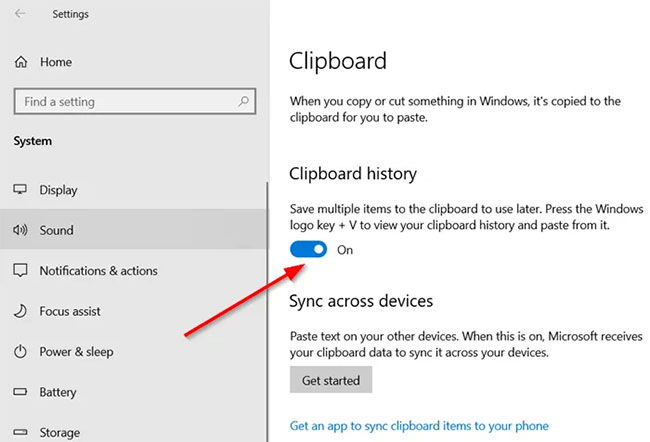
<p style="text-align: justify;">Nhấn nút&nbsp;<strong>Start</strong>&nbsp;và chọn&nbsp;<strong>Settings.</strong></p>

<p style="text-align: justify;">Chọn ô&nbsp;<strong>System &gt; Sound</strong>&nbsp;và cuộn xuống để tìm tùy chọn&nbsp;<strong>Clipboard.</strong></p>

<p style="text-align: justify;">Nhấp vào nó và trong bảng điều khiển bên phải, hãy xem công tắc chuyển đổi&nbsp;<strong>Clipboard History</strong>&nbsp;có được bật hay không.</p>

<figure>
<div style="text-align: justify;"><img alt="Bật công tắc chuyển đổi Clipboard History" data-i="0" data-src="https://st.quantrimang.com/photos/image/2021/09/04/phim-tat-windows-shift-s-khong-hoat-dong-1.jpg" data-was-processed="true" height="442" src="https://st.quantrimang.com/photos/image/2021/09/04/phim-tat-windows-shift-s-khong-hoat-dong-1.jpg" width="650" /></div>

<figcaption>
<div style="text-align: justify;">Bật công tắc chuyển đổi Clipboard History</div>
</figcaption>
</figure>

<div style="text-align: justify;"><iframe allow="autoplay" allowtransparency="true" aria-label="Advertisement" data-google-container-id="a!2" data-google-query-id="CLeSmOWevIcDFWIhewcdKuwPrw" data-load-complete="true" frameborder="0" height="0" hspace="0" id="aswift_1" marginheight="0" marginwidth="0" name="aswift_1" sandbox="allow-scripts allow-same-origin allow-forms allow-presentation" scrolling="no" tabindex="0" title="Advertisement" vspace="0" width="694"></iframe></div>

<p style="text-align: justify;">Nếu không, hãy chuyển nút gạt sang vị trí&nbsp;<strong>On.</strong></p>

<h3 id="mcetoc_1h9fjfk3h9t" style="text-align: justify;">3. Kiểm tra công tắc chuyển đổi Snip &amp; Sketch</h3>

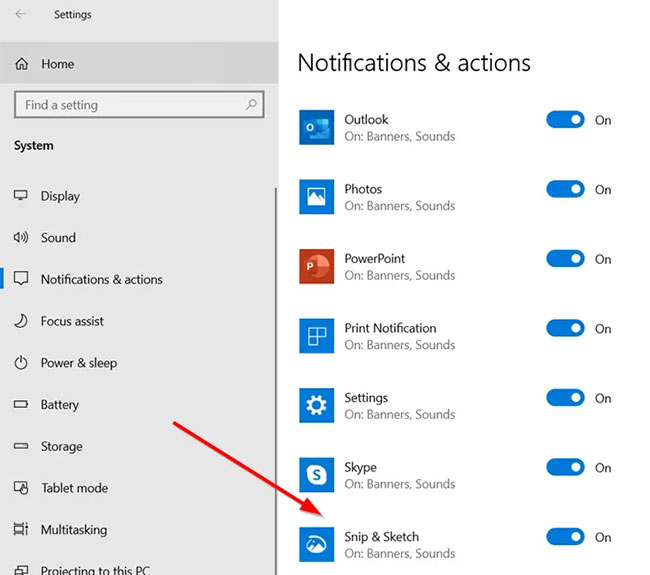
<p style="text-align: justify;">Một lần nữa, hãy&nbsp;mở&nbsp;<strong>Settings</strong>, chọn ô&nbsp;<strong>System</strong>&nbsp;và điều hướng đến phần&nbsp;<strong>Notifications &amp; actions</strong>.</p>

<figure>
<div style="text-align: justify;"><img alt="Bật công tắc chuyển đổi Snip &amp; Sketch" data-adbro-processed="true" data-i="1" data-src="https://st.quantrimang.com/photos/image/2021/09/04/phim-tat-windows-shift-s-khong-hoat-dong-2.jpg" data-was-processed="true" height="575" src="https://st.quantrimang.com/photos/image/2021/09/04/phim-tat-windows-shift-s-khong-hoat-dong-2.jpg" width="650" /></div>

<figcaption>
<div style="text-align: justify;">Bật công tắc chuyển đổi Snip &amp; Sketch</div>
</figcaption>
</figure>

<p style="text-align: justify;">Tại đây, hãy đảm bảo rằng công tắc chuyển đổi&nbsp;<strong>Snip &amp; Sketch</strong>&nbsp;được đặt ở vị trí&nbsp;<strong>On.</strong></p>

<h3 id="mcetoc_1h9fjfk3h9u" style="text-align: justify;">4. Reset Snip &amp; Sketch</h3>

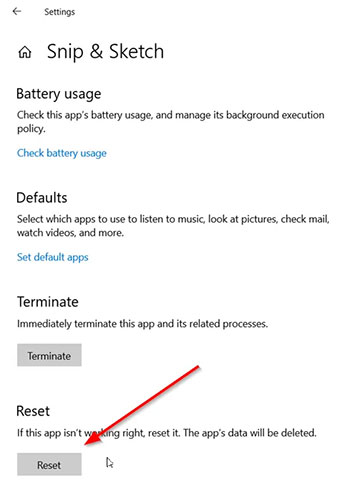
<p style="text-align: justify;">Nếu các phương pháp trên không mang lại kết quả mong muốn, hãy reset lại&nbsp;<strong>Snip &amp; Sketch</strong>. Để làm điều này, hãy đi tới&nbsp;<strong>Settings &gt; Apps &gt; Apps &amp; features</strong>. Tại đây, hãy nhấp vào&nbsp;<strong>Snip &amp; Sketch</strong>.</p>

<p style="text-align: justify;">Bạn sẽ thấy liên kết&nbsp;<strong>Advanced options</strong>&nbsp;xuất hiện bên dưới tùy chọn. Nhấp vào nó và nhấn nút&nbsp;<strong>Reset</strong>&nbsp;trong màn hình tiếp theo.</p>

<figure>
<div style="text-align: justify;"><img alt="Reset Snip &amp; Sketch" data-i="2" data-src="https://st.quantrimang.com/photos/image/2021/09/04/phim-tat-windows-shift-s-khong-hoat-dong-3.jpg" data-was-processed="true" height="500" src="https://st.quantrimang.com/photos/image/2021/09/04/phim-tat-windows-shift-s-khong-hoat-dong-3.jpg" width="358" /></div>

<figcaption>
<div style="text-align: justify;">Reset Snip &amp; Sketch</div>
</figcaption>
</figure>

<div style="text-align: justify;"><iframe allow="autoplay" allowtransparency="true" aria-label="Advertisement" data-google-container-id="a!3" data-google-query-id="CMKGmeWevIcDFRmFuQUdQgoPHQ" data-load-complete="true" frameborder="0" height="0" hspace="0" id="aswift_2" marginheight="0" marginwidth="0" name="aswift_2" sandbox="allow-scripts allow-same-origin allow-forms allow-presentation" scrolling="no" tabindex="0" title="Advertisement" vspace="0" width="694"></iframe></div>

<p style="text-align: justify;">Ngoài ra, bạn có thể gỡ và cài đặt lại ứng dụng từ Microsoft Store. Đi tới&nbsp;<strong>Settings &gt; Apps &gt; Apps &amp; features</strong>&nbsp;và bạn sẽ thấy nút&nbsp;<strong>Uninstall</strong>&nbsp;cho Snip &amp; Sketch. Tiếp tục và gỡ cài đặt ứng dụng. Sau đó, hãy truy cập Microsoft Store và cài đặt lại ứng dụng.</p>

<h3 id="mcetoc_1h9fjfk3h9v" style="text-align: justify;">5. Rút và cắm lại các thiết bị USB</h3>

<p style="text-align: justify;">Hãy rút và cắm lại các thiết bị USB của bạn như tay cầm chơi game, v.v... và xem điều đó có hữu ích không.</p>

<h3 id="mcetoc_1h9fjfk3ha0" style="text-align: justify;">6. Sử dụng PrintScreen thay cho Win + Shift + S</h3>

<p style="text-align: justify;">Thay vào đó, bạn có thể sử dụng phím&nbsp;<strong>PrintScreen</strong>&nbsp;thay cho&nbsp;<strong>Win + Shift + S</strong>.</p>

<p style="text-align: justify;">Để làm như vậy, hãy nhấn&nbsp;<strong>Win + I&nbsp;</strong>để mở&nbsp;<strong>Settings &gt; Ease of Access &gt; Keyboard</strong>, tìm vị trí tùy chọn<strong>&nbsp;Locate Use the PrtScrn button to open screen snipping</strong>, rồi bật tính năng này.</p>

<h3 id="mcetoc_1h9fjfk3ha1" style="text-align: justify;">7. Khắc phục sự cố trong Clean Boot State</h3>

<p style="text-align: justify;">Tiến trình của bên thứ ba cũng có thể can thiệp vào hoạt động của phím tắt&nbsp;<strong>Windows + Shift + S</strong>. Để xác định thủ phạm, hãy&nbsp;thực hiện Clean Boot&nbsp;và khắc phục sự cố theo cách thủ công như được mô tả trong bài viết.</p>

<p style="text-align: justify;">Chúc bạn khắc phục sự cố thành công!</p>

<div style="text-align: justify;">&nbsp;</div>
		</div>
				<div id="author">
						<p>
				<strong>Nguồn tin:</strong>
				Quantrimang.com:
			</p>
		</div>
	</div>
	<div id="footer" class="clearfix">
		<div id="url">
			<strong>URL của bản tin này: </strong><a href="https://www.nguoicodonvn2008.info/vi/news/savefile/kien-thuc-may-tinh/sua-loi-phim-tat-windows-shift-s-khong-hoat-dong-tren-windows-10-8740.html" title="Sửa lỗi phím tắt Windows + Shift + S không hoạt động trên Windows 10">https://www.nguoicodonvn2008.info/vi/news/savefile/kien-thuc-may-tinh/sua-loi-phim-tat-windows-shift-s-khong-hoat-dong-tren-windows-10-8740.html</a>

		</div>
		<div class="clear"></div>
		<div class="copyright">
			&copy; .&#x3A; Nguoicodonvn2008.info - Cõi lòng người cô đơn &#x3A;.
		</div>
		<div id="contact">
			<a href="mailto:admin@nguoicodonvn2008.info">admin@nguoicodonvn2008.info</a>
		</div>
	</div>
</div>
        <div id="timeoutsess" class="chromeframe">
            Bạn đã không sử dụng Site, <a onclick="timeoutsesscancel();" href="https://nguoicodonvn2008.info/#">Bấm vào đây để duy trì trạng thái đăng nhập</a>. Thời gian chờ: <span id="secField"> 60 </span> giây
        </div>
        <div id="openidResult" class="nv-alert" style="display:none"></div>
        <div id="openidBt" data-result="" data-redirect=""></div>
		</script>
		<div class="car-top">
  <span><img src="https://nguoicodonvn2008.info/themes/default/images/car.png" alt=""></span>
</div>
<script src="https://nguoicodonvn2008.info/assets/js/jquery/jquery.min.js"></script>
<script>var nv_base_siteurl="/",nv_lang_data="vi",nv_lang_interface="vi",nv_name_variable="nv",nv_fc_variable="op",nv_lang_variable="language",nv_module_name="news",nv_func_name="savefile",nv_is_user=0, nv_my_ofs=-4,nv_my_abbr="EDT",nv_cookie_prefix="nv4c_e856T",nv_check_pass_mstime=1738000,nv_area_admin=0,nv_safemode=0,theme_responsive=0,nv_recaptcha_ver=2,nv_recaptcha_sitekey="",nv_recaptcha_type="image",XSSsanitize=1;</script>
<script src="https://nguoicodonvn2008.info/assets/js/language/vi.js"></script>
<script src="https://nguoicodonvn2008.info/assets/js/DOMPurify/purify3.js"></script>
<script src="https://nguoicodonvn2008.info/assets/js/global.js"></script>
<script src="https://nguoicodonvn2008.info/assets/js/site.js"></script>
<script src="https://nguoicodonvn2008.info/themes/default/js/news.js"></script>
<script src="https://nguoicodonvn2008.info/themes/default/js/main.js"></script>
<script src="https://nguoicodonvn2008.info/themes/default/js/custom.js"></script>
<script type="application/ld+json">
        {
            "@context": "https://schema.org",
            "@type": "Organization",
            "url": "https://nguoicodonvn2008.info",
            "logo": "https://nguoicodonvn2008.info/uploads/angel.gif"
        }
        </script>
<script src="https://nguoicodonvn2008.info/themes/default/js/bootstrap.min.js"></script>
<script type="text/javascript">
var $scrolltop = $('.car-top');
$scrolltop.on('click', function () {
    $('html,body').animate({
        scrollTop: 0
    }, 800);
    $(this).addClass("car-run");
    setTimeout(function(){ $scrolltop.removeClass('car-run');}, 1000);
    return false;
});
$(window).on('scroll', function ()
{ 
    if($(window).scrollTop() >= 200)
    {
        $scrolltop.addClass("show");
        $scrolltop.addClass("car-down");
    }
    else
    {
       $scrolltop.removeClass("show");
       setTimeout(function(){ $scrolltop.removeClass('car-down');}, 300);
    }
});
</script>
</body>
</html>