<!DOCTYPE html>
    <html lang="vi" xmlns="http://www.w3.org/1999/xhtml" prefix="og: http://ogp.me/ns#">
    <head>
<title>Sửa lỗi mất hộp kiểm &quot;Users Must Enter a User Name and Password to Use This Computer&quot;</title>
<meta name="description" content="Sửa lỗi mất hộp kiểm &quot;Users Must Enter a User Name and Password to Use This Computer&quot; - Savefile - Tin Tức -...">
<meta name="author" content=".: Nguoicodonvn2008.info - Cõi lòng người cô đơn :.">
<meta name="copyright" content=".: Nguoicodonvn2008.info - Cõi lòng người cô đơn :. [admin@nguoicodonvn2008.info]">
<meta name="robots" content="index, archive, follow, noodp">
<meta name="googlebot" content="index,archive,follow,noodp">
<meta name="msnbot" content="all,index,follow">
<meta name="generator" content="NukeViet v4.5">
<meta http-equiv="Content-Type" content="text/html; charset=utf-8">
<meta property="og:title" content="Sửa lỗi mất hộp kiểm &quot;Users Must Enter a User Name and Password to Use This Computer&quot;">
<meta property="og:type" content="website">
<meta property="og:description" content="Savefile - Tin Tức -...">
<meta property="og:site_name" content=".&#x3A; Nguoicodonvn2008.info - Cõi lòng người cô đơn &#x3A;.">
<meta property="og:url" content="https://www.nguoicodonvn2008.info/vi/news/savefile/kien-thuc-may-tinh/sua-loi-mat-hop-kiem-users-must-enter-a-user-name-and-password-to-use-this-computer-3921.html">
<link rel="shortcut icon" href="https://nguoicodonvn2008.info/favicon.ico">
<link rel="canonical" href="https://www.nguoicodonvn2008.info/vi/news/savefile/kien-thuc-may-tinh/sua-loi-mat-hop-kiem-users-must-enter-a-user-name-and-password-to-use-this-computer-3921.html">
<link rel="alternate" href="https://nguoicodonvn2008.info/vi/news/rss/" title="Tin Tức" type="application/rss+xml">
<link rel="alternate" href="https://nguoicodonvn2008.info/vi/news/rss/karaoke-dual/" title="Tin Tức - Karaoke Dual" type="application/rss+xml">
<link rel="alternate" href="https://nguoicodonvn2008.info/vi/news/rss/nhac-tre/" title="Tin Tức - Nhạc trẻ" type="application/rss+xml">
<link rel="alternate" href="https://nguoicodonvn2008.info/vi/news/rss/tru-tinh/" title="Tin Tức - Trữ tình" type="application/rss+xml">
<link rel="alternate" href="https://nguoicodonvn2008.info/vi/news/rss/nuoc-ngoai/" title="Tin Tức - Nước ngoài" type="application/rss+xml">
<link rel="alternate" href="https://nguoicodonvn2008.info/vi/news/rss/remix/" title="Tin Tức - Remix" type="application/rss+xml">
<link rel="alternate" href="https://nguoicodonvn2008.info/vi/news/rss/tam-su-tinh-yeu/" title="Tin Tức - Tâm sự tình yêu" type="application/rss+xml">
<link rel="alternate" href="https://nguoicodonvn2008.info/vi/news/rss/tho-suu-tam/" title="Tin Tức - Thơ sưu tầm" type="application/rss+xml">
<link rel="alternate" href="https://nguoicodonvn2008.info/vi/news/rss/cuoc-song/" title="Tin Tức - Cuộc sống" type="application/rss+xml">
<link rel="alternate" href="https://nguoicodonvn2008.info/vi/news/rss/phan-mem/" title="Tin Tức - Phần mềm" type="application/rss+xml">
<link rel="alternate" href="https://nguoicodonvn2008.info/vi/news/rss/kien-thuc-may-tinh/" title="Tin Tức - Kiến thức máy tính" type="application/rss+xml">
<link rel="alternate" href="https://nguoicodonvn2008.info/vi/news/rss/hoc-tap/" title="Tin Tức - Học tập" type="application/rss+xml">
<link rel="alternate" href="https://nguoicodonvn2008.info/vi/news/rss/tai-lieu/" title="Tin Tức - Tài liệu" type="application/rss+xml">
<link rel="alternate" href="https://nguoicodonvn2008.info/vi/news/rss/de-thi/" title="Tin Tức - Đề thi" type="application/rss+xml">
<link rel="preload" as="style" href="https://nguoicodonvn2008.info/assets/css/font-awesome.min.css" type="text/css">
<link rel="preload" as="style" href="https://nguoicodonvn2008.info/themes/default/css/bootstrap.non-responsive.css" type="text/css">
<link rel="preload" as="style" href="https://nguoicodonvn2008.info/themes/default/css/style.css" type="text/css">
<link rel="preload" as="style" href="https://nguoicodonvn2008.info/themes/default/css/style.non-responsive.css" type="text/css">
<link rel="preload" as="style" href="https://nguoicodonvn2008.info/themes/default/css/news.css" type="text/css">
<link rel="preload" as="style" href="https://nguoicodonvn2008.info/themes/default/css/custom.css" type="text/css">
<link rel="preload" as="script" href="https://nguoicodonvn2008.info/assets/js/jquery/jquery.min.js" type="text/javascript">
<link rel="preload" as="script" href="https://nguoicodonvn2008.info/assets/js/language/vi.js" type="text/javascript">
<link rel="preload" as="script" href="https://nguoicodonvn2008.info/assets/js/DOMPurify/purify3.js" type="text/javascript">
<link rel="preload" as="script" href="https://nguoicodonvn2008.info/assets/js/global.js" type="text/javascript">
<link rel="preload" as="script" href="https://nguoicodonvn2008.info/assets/js/site.js" type="text/javascript">
<link rel="preload" as="script" href="https://nguoicodonvn2008.info/themes/default/js/news.js" type="text/javascript">
<link rel="preload" as="script" href="https://nguoicodonvn2008.info/themes/default/js/main.js" type="text/javascript">
<link rel="preload" as="script" href="https://nguoicodonvn2008.info/themes/default/js/custom.js" type="text/javascript">
<link rel="preload" as="script" href="https://nguoicodonvn2008.info/themes/default/js/bootstrap.min.js" type="text/javascript">
<link rel="stylesheet" href="https://nguoicodonvn2008.info/assets/css/font-awesome.min.css">
<link rel="stylesheet" href="https://nguoicodonvn2008.info/themes/default/css/bootstrap.non-responsive.css">
<link rel="stylesheet" href="https://nguoicodonvn2008.info/themes/default/css/style.css">
<link rel="stylesheet" href="https://nguoicodonvn2008.info/themes/default/css/style.non-responsive.css">
<link rel="StyleSheet" href="https://nguoicodonvn2008.info/themes/default/css/news.css">
<link rel="stylesheet" href="https://nguoicodonvn2008.info/themes/default/css/custom.css">
<style type="text/css">
	body{background: #fff;}
</style>
    </head>
    <body>
<div id="print">
	<div id="hd_print">
		<h2 class="pull-left">.&#x3A; Nguoicodonvn2008.info - Cõi lòng người cô đơn &#x3A;.</h2>
		<p class="pull-right"><a title=".&#x3A; Nguoicodonvn2008.info - Cõi lòng người cô đơn &#x3A;." href="https://nguoicodonvn2008.info/">https://nguoicodonvn2008.info</a></p>
	</div>
	<div class="clear"></div>
	<hr />
	<div id="content">
		<h1>Sửa lỗi mất hộp kiểm &quot;Users Must Enter a User Name and Password to Use This Computer&quot;</h1>
		<ul class="list-inline">
			<li>Thứ bảy - 10/04/2021 00:52</li>
			<li class="hidden-print txtrequired"><em class="fa fa-print">&nbsp;</em><a title="In ra" href="javascript:;" onclick="window.print()">In ra</a></li>
			<li class="hidden-print txtrequired"><em class="fa fa-power-off">&nbsp;</em><a title="Đóng cửa sổ này" href="javascript:;" onclick="window.close()">Đóng cửa sổ này</a></li>
		</ul>
		<div class="clear"></div>
		<div id="hometext">
		</div>
				<div class="imghome">
			<img alt="Sửa lỗi mất hộp kiểm &quot;Users Must Enter a User Name and Password to Use This Computer&quot;" src="https://st.quantrimang.com/photos/image/2021/04/09/sua-loi-mat-hop-kiem-users-must-enter-a-user-name-and-password-to-use-this-computer-1.jpg" width="460" class="img-thumbnail" />
		</div>
		<div class="clear"></div>
		<div id="bodytext" class="clearfix">
			<p style="text-align: justify;">Nếu bạn không thể thấy hộp kiểm&nbsp;<em>“Users must enter a user name and password to use this computer”</em>&nbsp;trong netplwiz, hãy làm theo các bước sau để kích hoạt lại nó.</p>

<h2 style="text-align: justify;">Thêm hộp kiểm &quot;Users must enter a user name and password to use this computer&quot; bị thiếu</h2>

<p style="text-align: justify;">Để hiển thị hộp kiểm&nbsp;<em>&quot;Users must enter a user name and password to use this computer&quot;</em>&nbsp;bị thiếu, bạn phải tắt tùy chọn&nbsp;<strong>&quot;Require Windows Hello&quot;</strong>&nbsp;trong ứng dụng&nbsp;<strong>Settings</strong>. Đây là bản tóm tắt cách thực hiện:</p>

<p style="text-align: justify;">1.&nbsp;Mở ứng dụng&nbsp;<strong>Settings.</strong></p>

<p style="text-align: justify;">2. Nhấp vào&nbsp;<strong>Accounts</strong>.</p>

<p style="text-align: justify;">3. Chọn&nbsp;<strong>Sign-in options</strong>&nbsp;trên thanh bên.</p>

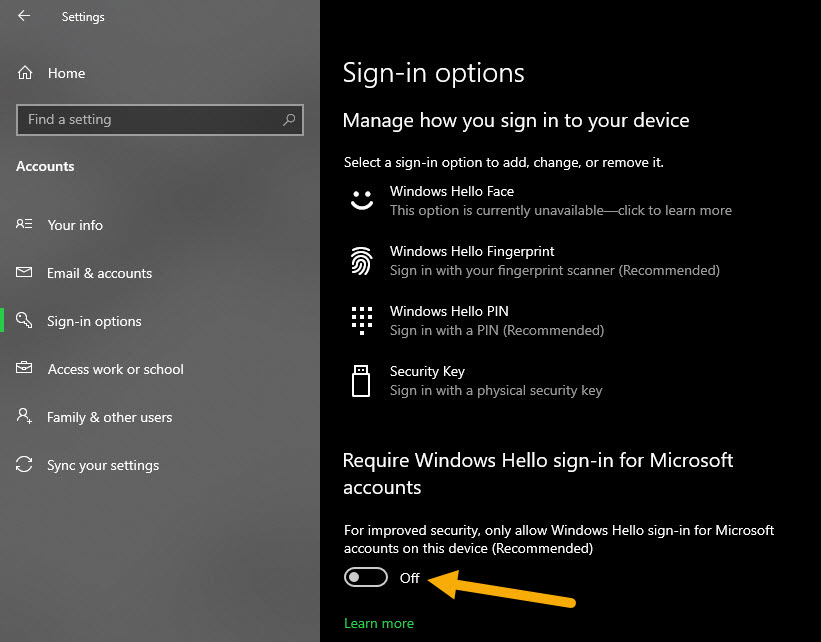
<p style="text-align: justify;">4. Tắt tùy chọn&nbsp;<strong>Require Windows Hello sign-in for Microsoft accounts</strong>.</p>

<p style="text-align: justify;">5. Tắt tùy chọn&nbsp;<strong>Make your device passwordless</strong>.</p>

<p style="text-align: justify;">6. Đóng ứng dụng&nbsp;<strong>Settings.</strong></p>

<p style="text-align: justify;">7.&nbsp;<a href="https://quantrimang.com/6-cach-khoi-dong-lai-windows-that-pro-116819" title="6 cách khởi động lại máy tính Windows từ đơn giản đến &#039;Pro&#039;">Khởi động lại Windows 10</a>.</p>

<p style="text-align: justify;">Điều này sẽ khắc phục sự cố&nbsp;<em>“Users must enter a user name and password to use this computer”</em>&nbsp;không xuất hiện.</p>

<ul>
	<li style="text-align: justify;"><a href="https://quantrimang.com/khac-phuc-su-co-hien-thi-thong-bao-no-internet-secured-tren-windows-161529" title="Khắc phục sự cố hiển thị thông báo “No Internet, Secured” trên Windows 10">Khắc phục sự cố hiển thị thông báo “No Internet, Secured” trên Windows 10</a></li>
</ul>

<p style="text-align: justify;">Cụ thể như sau:</p>

<p style="text-align: justify;">Điều đầu tiên, hãy mở ứng dụng Settings trên Windows 10. Bạn có thể làm điều đó bằng cách tìm kiếm nó trong menu Start hoặc bằng cách nhấn phím tắt&nbsp;<strong>Win + I</strong>. Trong ứng dụng&nbsp;<strong>Settings</strong>, chuyển đến trang&nbsp;<strong>Accounts &gt; Sign-in options</strong>. Đây là nơi bạn sẽ tìm thấy một số tùy chọn liên quan đến việc cấu hình và quản lý các tùy chọn và phương pháp đăng nhập khác nhau.</p>

<p style="text-align: justify;">Trên trang bên phải, tắt tùy chọn&nbsp;<strong>“Require Windows Hello sign-in for Microsoft accounts”</strong>. Nếu bạn thấy tùy chọn&nbsp;<strong>“Make your device passwordless”</strong>, hãy tắt nó đi. Thông báo&nbsp;<strong>“Make your device passwordless”</strong>&nbsp;có thể không xuất hiện trong một số phiên bản/bản build Windows 10. Vì vậy, đừng lo lắng nếu bạn không thể nhìn thấy nó.</p>

<figure>
<div style="text-align: justify;"><img alt="Tắt tùy chọn “Require Windows Hello sign-in for Microsoft accounts”" data-i="0" data-src="https://st.quantrimang.com/photos/image/2021/04/09/sua-loi-mat-hop-kiem-users-must-enter-a-user-name-and-password-to-use-this-computer-1.jpg" data-was-processed="true" height="642" src="https://st.quantrimang.com/photos/image/2021/04/09/sua-loi-mat-hop-kiem-users-must-enter-a-user-name-and-password-to-use-this-computer-1.jpg" width="821" /></div>

<figcaption>
<div style="text-align: justify;">Tắt tùy chọn “Require Windows Hello sign-in for Microsoft accounts”</div>
</figcaption>
</figure>

<p style="text-align: justify;">Sau khi hoàn tất, hãy đóng ứng dụng Settings và khởi động lại Windows 10. Điều này sẽ đảm bảo các thay đổi được áp dụng đúng cách.</p>

<figure>
<div style="text-align: justify;"><img alt="Hộp kiểm “Users must enter a user name and password to use this computer” trong cửa sổ netplwiz sẽ xuất hiện trở lại" data-i="1" data-src="https://st.quantrimang.com/photos/image/2021/04/09/sua-loi-mat-hop-kiem-users-must-enter-a-user-name-and-password-to-use-this-computer-2.jpg" data-was-processed="true" height="510" src="https://st.quantrimang.com/photos/image/2021/04/09/sua-loi-mat-hop-kiem-users-must-enter-a-user-name-and-password-to-use-this-computer-2.jpg" width="463" /></div>

<figcaption>
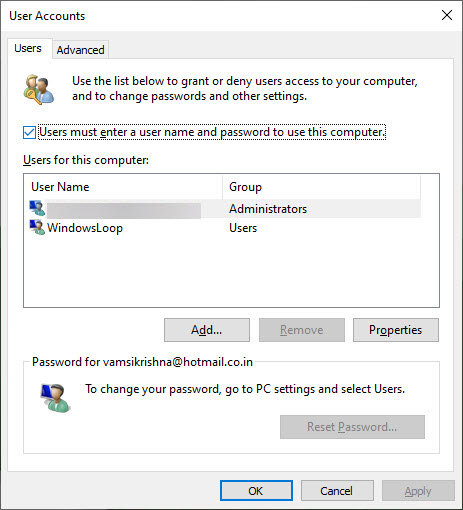
<div style="text-align: justify;">Hộp kiểm “Users must enter a user name and password to use this computer” trong cửa sổ netplwiz sẽ xuất hiện trở lại</div>
</figcaption>
</figure>

<p style="text-align: justify;">Mọi thao tác đã hoàn tất. Từ bây giờ, bạn sẽ thấy hộp kiểm&nbsp;<em>“Users must enter a user name and password to use this computer”</em>&nbsp;trong cửa sổ netplwiz. Bây giờ, bạn có thể tiến hành thiết lập đăng nhập tự động trong Windows 10. Nếu bạn muốn ẩn lại, hãy bật tùy chọn&nbsp;<strong>Require Windows Hello sign-in for Microsoft accounts</strong>&nbsp;và<strong>&nbsp;Make your device passwordless</strong>.</p>

<p style="text-align: justify;">Chúc bạn thực hiện thành công!</p>
		</div>
				<div id="author">
						<p>
				<strong>Nguồn tin:</strong>
				Quantrimang.com
			</p>
		</div>
	</div>
	<div id="footer" class="clearfix">
		<div id="url">
			<strong>URL của bản tin này: </strong><a href="https://www.nguoicodonvn2008.info/vi/news/savefile/kien-thuc-may-tinh/sua-loi-mat-hop-kiem-users-must-enter-a-user-name-and-password-to-use-this-computer-3921.html" title="Sửa lỗi mất hộp kiểm &quot;Users Must Enter a User Name and Password to Use This Computer&quot;">https://www.nguoicodonvn2008.info/vi/news/savefile/kien-thuc-may-tinh/sua-loi-mat-hop-kiem-users-must-enter-a-user-name-and-password-to-use-this-computer-3921.html</a>

		</div>
		<div class="clear"></div>
		<div class="copyright">
			&copy; .&#x3A; Nguoicodonvn2008.info - Cõi lòng người cô đơn &#x3A;.
		</div>
		<div id="contact">
			<a href="mailto:admin@nguoicodonvn2008.info">admin@nguoicodonvn2008.info</a>
		</div>
	</div>
</div>
        <div id="timeoutsess" class="chromeframe">
            Bạn đã không sử dụng Site, <a onclick="timeoutsesscancel();" href="https://nguoicodonvn2008.info/#">Bấm vào đây để duy trì trạng thái đăng nhập</a>. Thời gian chờ: <span id="secField"> 60 </span> giây
        </div>
        <div id="openidResult" class="nv-alert" style="display:none"></div>
        <div id="openidBt" data-result="" data-redirect=""></div>
		</script>
		<div class="car-top">
  <span><img src="https://nguoicodonvn2008.info/themes/default/images/car.png" alt=""></span>
</div>
<script src="https://nguoicodonvn2008.info/assets/js/jquery/jquery.min.js"></script>
<script>var nv_base_siteurl="/",nv_lang_data="vi",nv_lang_interface="vi",nv_name_variable="nv",nv_fc_variable="op",nv_lang_variable="language",nv_module_name="news",nv_func_name="savefile",nv_is_user=0, nv_my_ofs=-4,nv_my_abbr="EDT",nv_cookie_prefix="nv4c_e856T",nv_check_pass_mstime=1738000,nv_area_admin=0,nv_safemode=0,theme_responsive=0,nv_recaptcha_ver=2,nv_recaptcha_sitekey="",nv_recaptcha_type="image",XSSsanitize=1;</script>
<script src="https://nguoicodonvn2008.info/assets/js/language/vi.js"></script>
<script src="https://nguoicodonvn2008.info/assets/js/DOMPurify/purify3.js"></script>
<script src="https://nguoicodonvn2008.info/assets/js/global.js"></script>
<script src="https://nguoicodonvn2008.info/assets/js/site.js"></script>
<script src="https://nguoicodonvn2008.info/themes/default/js/news.js"></script>
<script src="https://nguoicodonvn2008.info/themes/default/js/main.js"></script>
<script src="https://nguoicodonvn2008.info/themes/default/js/custom.js"></script>
<script type="application/ld+json">
        {
            "@context": "https://schema.org",
            "@type": "Organization",
            "url": "https://nguoicodonvn2008.info",
            "logo": "https://nguoicodonvn2008.info/uploads/angel.gif"
        }
        </script>
<script src="https://nguoicodonvn2008.info/themes/default/js/bootstrap.min.js"></script>
<script type="text/javascript">
var $scrolltop = $('.car-top');
$scrolltop.on('click', function () {
    $('html,body').animate({
        scrollTop: 0
    }, 800);
    $(this).addClass("car-run");
    setTimeout(function(){ $scrolltop.removeClass('car-run');}, 1000);
    return false;
});
$(window).on('scroll', function ()
{ 
    if($(window).scrollTop() >= 200)
    {
        $scrolltop.addClass("show");
        $scrolltop.addClass("car-down");
    }
    else
    {
       $scrolltop.removeClass("show");
       setTimeout(function(){ $scrolltop.removeClass('car-down');}, 300);
    }
});
</script>
</body>
</html>