<!DOCTYPE html>
    <html lang="vi" xmlns="http://www.w3.org/1999/xhtml" prefix="og: http://ogp.me/ns#">
    <head>
<title>Sửa lỗi không mở được Windows Security trên Windows 11</title>
<meta name="description" content="Sửa lỗi không mở được Windows Security trên Windows 11 - Savefile - Tin Tức -...">
<meta name="author" content=".: Nguoicodonvn2008.info - Cõi lòng người cô đơn :.">
<meta name="copyright" content=".: Nguoicodonvn2008.info - Cõi lòng người cô đơn :. [admin@nguoicodonvn2008.info]">
<meta name="robots" content="index, archive, follow, noodp">
<meta name="googlebot" content="index,archive,follow,noodp">
<meta name="msnbot" content="all,index,follow">
<meta name="generator" content="NukeViet v4.5">
<meta http-equiv="Content-Type" content="text/html; charset=utf-8">
<meta property="og:title" content="Sửa lỗi không mở được Windows Security trên Windows 11">
<meta property="og:type" content="website">
<meta property="og:description" content="Savefile - Tin Tức - https&#x3A;&#x002F;&#x002F;www.nguoicodonvn2008.info&#x002F;vi&#x002F;news&#x002F;savefile&#x002F;kien-thuc-may-tinh&#x002F;sua-loi-khong-mo-duoc-windows-security-tren-windows-11-5515.html">
<meta property="og:site_name" content=".&#x3A; Nguoicodonvn2008.info - Cõi lòng người cô đơn &#x3A;.">
<meta property="og:url" content="https://www.nguoicodonvn2008.info/vi/news/savefile/kien-thuc-may-tinh/sua-loi-khong-mo-duoc-windows-security-tren-windows-11-5515.html">
<link rel="shortcut icon" href="https://nguoicodonvn2008.info/favicon.ico">
<link rel="canonical" href="https://www.nguoicodonvn2008.info/vi/news/savefile/kien-thuc-may-tinh/sua-loi-khong-mo-duoc-windows-security-tren-windows-11-5515.html">
<link rel="alternate" href="https://nguoicodonvn2008.info/vi/news/rss/" title="Tin Tức" type="application/rss+xml">
<link rel="alternate" href="https://nguoicodonvn2008.info/vi/news/rss/karaoke-dual/" title="Tin Tức - Karaoke Dual" type="application/rss+xml">
<link rel="alternate" href="https://nguoicodonvn2008.info/vi/news/rss/nhac-tre/" title="Tin Tức - Nhạc trẻ" type="application/rss+xml">
<link rel="alternate" href="https://nguoicodonvn2008.info/vi/news/rss/tru-tinh/" title="Tin Tức - Trữ tình" type="application/rss+xml">
<link rel="alternate" href="https://nguoicodonvn2008.info/vi/news/rss/nuoc-ngoai/" title="Tin Tức - Nước ngoài" type="application/rss+xml">
<link rel="alternate" href="https://nguoicodonvn2008.info/vi/news/rss/remix/" title="Tin Tức - Remix" type="application/rss+xml">
<link rel="alternate" href="https://nguoicodonvn2008.info/vi/news/rss/tam-su-tinh-yeu/" title="Tin Tức - Tâm sự tình yêu" type="application/rss+xml">
<link rel="alternate" href="https://nguoicodonvn2008.info/vi/news/rss/tho-suu-tam/" title="Tin Tức - Thơ sưu tầm" type="application/rss+xml">
<link rel="alternate" href="https://nguoicodonvn2008.info/vi/news/rss/cuoc-song/" title="Tin Tức - Cuộc sống" type="application/rss+xml">
<link rel="alternate" href="https://nguoicodonvn2008.info/vi/news/rss/phan-mem/" title="Tin Tức - Phần mềm" type="application/rss+xml">
<link rel="alternate" href="https://nguoicodonvn2008.info/vi/news/rss/kien-thuc-may-tinh/" title="Tin Tức - Kiến thức máy tính" type="application/rss+xml">
<link rel="alternate" href="https://nguoicodonvn2008.info/vi/news/rss/hoc-tap/" title="Tin Tức - Học tập" type="application/rss+xml">
<link rel="alternate" href="https://nguoicodonvn2008.info/vi/news/rss/tai-lieu/" title="Tin Tức - Tài liệu" type="application/rss+xml">
<link rel="alternate" href="https://nguoicodonvn2008.info/vi/news/rss/de-thi/" title="Tin Tức - Đề thi" type="application/rss+xml">
<link rel="preload" as="style" href="https://nguoicodonvn2008.info/assets/css/font-awesome.min.css" type="text/css">
<link rel="preload" as="style" href="https://nguoicodonvn2008.info/themes/default/css/bootstrap.non-responsive.css" type="text/css">
<link rel="preload" as="style" href="https://nguoicodonvn2008.info/themes/default/css/style.css" type="text/css">
<link rel="preload" as="style" href="https://nguoicodonvn2008.info/themes/default/css/style.non-responsive.css" type="text/css">
<link rel="preload" as="style" href="https://nguoicodonvn2008.info/themes/default/css/news.css" type="text/css">
<link rel="preload" as="style" href="https://nguoicodonvn2008.info/themes/default/css/custom.css" type="text/css">
<link rel="preload" as="script" href="https://nguoicodonvn2008.info/assets/js/jquery/jquery.min.js" type="text/javascript">
<link rel="preload" as="script" href="https://nguoicodonvn2008.info/assets/js/language/vi.js" type="text/javascript">
<link rel="preload" as="script" href="https://nguoicodonvn2008.info/assets/js/DOMPurify/purify3.js" type="text/javascript">
<link rel="preload" as="script" href="https://nguoicodonvn2008.info/assets/js/global.js" type="text/javascript">
<link rel="preload" as="script" href="https://nguoicodonvn2008.info/assets/js/site.js" type="text/javascript">
<link rel="preload" as="script" href="https://nguoicodonvn2008.info/themes/default/js/news.js" type="text/javascript">
<link rel="preload" as="script" href="https://nguoicodonvn2008.info/themes/default/js/main.js" type="text/javascript">
<link rel="preload" as="script" href="https://nguoicodonvn2008.info/themes/default/js/custom.js" type="text/javascript">
<link rel="preload" as="script" href="https://nguoicodonvn2008.info/themes/default/js/bootstrap.min.js" type="text/javascript">
<link rel="stylesheet" href="https://nguoicodonvn2008.info/assets/css/font-awesome.min.css">
<link rel="stylesheet" href="https://nguoicodonvn2008.info/themes/default/css/bootstrap.non-responsive.css">
<link rel="stylesheet" href="https://nguoicodonvn2008.info/themes/default/css/style.css">
<link rel="stylesheet" href="https://nguoicodonvn2008.info/themes/default/css/style.non-responsive.css">
<link rel="StyleSheet" href="https://nguoicodonvn2008.info/themes/default/css/news.css">
<link rel="stylesheet" href="https://nguoicodonvn2008.info/themes/default/css/custom.css">
<style type="text/css">
	body{background: #fff;}
</style>
    </head>
    <body>
<div id="print">
	<div id="hd_print">
		<h2 class="pull-left">.&#x3A; Nguoicodonvn2008.info - Cõi lòng người cô đơn &#x3A;.</h2>
		<p class="pull-right"><a title=".&#x3A; Nguoicodonvn2008.info - Cõi lòng người cô đơn &#x3A;." href="https://nguoicodonvn2008.info/">https://nguoicodonvn2008.info</a></p>
	</div>
	<div class="clear"></div>
	<hr />
	<div id="content">
		<h1>Sửa lỗi không mở được Windows Security trên Windows 11</h1>
		<ul class="list-inline">
			<li>Thứ hai - 25/04/2022 00:26</li>
			<li class="hidden-print txtrequired"><em class="fa fa-print">&nbsp;</em><a title="In ra" href="javascript:;" onclick="window.print()">In ra</a></li>
			<li class="hidden-print txtrequired"><em class="fa fa-power-off">&nbsp;</em><a title="Đóng cửa sổ này" href="javascript:;" onclick="window.close()">Đóng cửa sổ này</a></li>
		</ul>
		<div class="clear"></div>
		<div id="hometext">
		</div>
				<div class="imghome">
			<img alt="Sửa lỗi không mở được Windows Security trên Windows 11" src="https://st.quantrimang.com/photos/image/2022/01/19/sua-loi-khong-mo-duoc-windows-security-tren-windows-11-8.jpg" width="460" class="img-thumbnail" />
		</div>
		<div class="clear"></div>
		<div id="bodytext" class="clearfix">
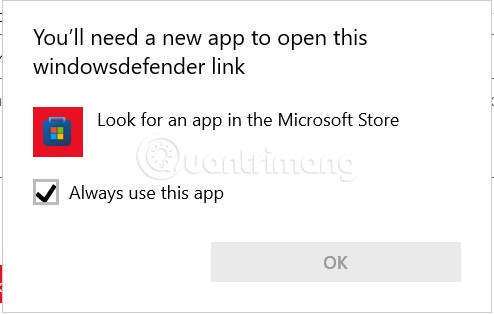
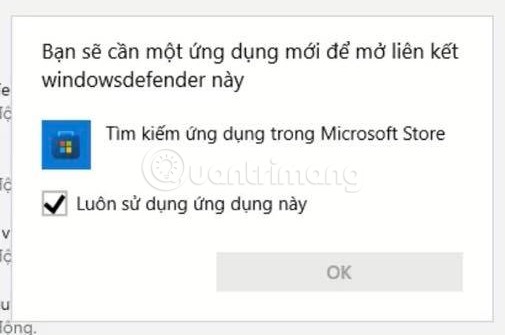
			<p style="text-align: justify;">Đôi khi&nbsp;Windows Security&nbsp;gặp các lỗi khó hiểu dẫn tới không thể chạy được trên&nbsp;Windows 11. Ví dụ, nó có thể gợi ý là bạn sẽ cần một ứng dụng mới để mở liên kết windowsdefender này. Vậy giải quyết vấn đề này như thế nào? Quản Trị Mạng sẽ giúp bạn tìm ra câu trả lời.</p>

<p style="text-align: justify;"><img alt="Sửa lỗi không mở được Windows Security trên Windows 11" data-i="0" data-src="https://st.quantrimang.com/photos/image/2022/01/19/sua-loi-khong-mo-duoc-windows-security-tren-windows-11.jpg" data-was-processed="true" height="314" src="https://st.quantrimang.com/photos/image/2022/01/19/sua-loi-khong-mo-duoc-windows-security-tren-windows-11.jpg" width="494" /></p>

<p style="text-align: justify;"><img alt="Sửa lỗi không mở được Windows Security trên Windows 11" data-i="1" data-src="https://st.quantrimang.com/photos/image/2022/01/19/sua-loi-khong-mo-duoc-windows-security-tren-windows-11-1.jpg" data-was-processed="true" height="335" src="https://st.quantrimang.com/photos/image/2022/01/19/sua-loi-khong-mo-duoc-windows-security-tren-windows-11-1.jpg" width="505" /></p>

<h2 style="text-align: justify;">Cách sửa lỗi không thể mở Windows Security trên Windows 11</h2>

<h3 style="text-align: justify;">Repair và Reset ứng dụng Windows Security</h3>

<p style="text-align: justify;">Cách đầu tiên bạn có thể thử đó chính là sửa hoặc thiết lập lại ứng dụng Windows Security, các bước thực hiện cụ thể như sau:</p>

<p style="text-align: justify;"><strong>B1</strong>: Truy cập&nbsp;<strong>Settings.</strong></p>

<p style="text-align: justify;"><strong>B2</strong>: Chọn&nbsp;<strong>Apps.</strong></p>

<p style="text-align: justify;"><strong>B3</strong>: Chọn&nbsp;<strong>Apps &amp; features.</strong></p>

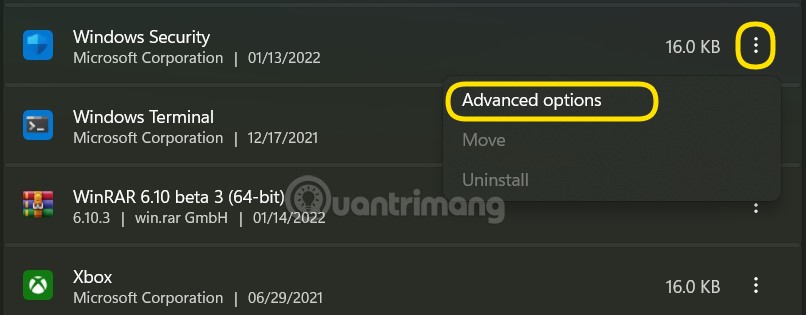
<p style="text-align: justify;"><strong>B4</strong>: Tìm kiếm ứng dụng&nbsp;<strong>Windows Security.</strong></p>

<p style="text-align: justify;"><strong>B5</strong>: Nhấp vào dấu ba chấm rồi chọn&nbsp;<strong>Advanced options.</strong></p>

<p style="text-align: justify;"><strong><img alt="Sửa lỗi không mở được Windows Security trên Windows 11" data-i="2" data-src="https://st.quantrimang.com/photos/image/2022/01/19/sua-loi-khong-mo-duoc-windows-security-tren-windows-11-2.jpg" data-was-processed="true" height="315" src="https://st.quantrimang.com/photos/image/2022/01/19/sua-loi-khong-mo-duoc-windows-security-tren-windows-11-2.jpg" width="806" /></strong></p>

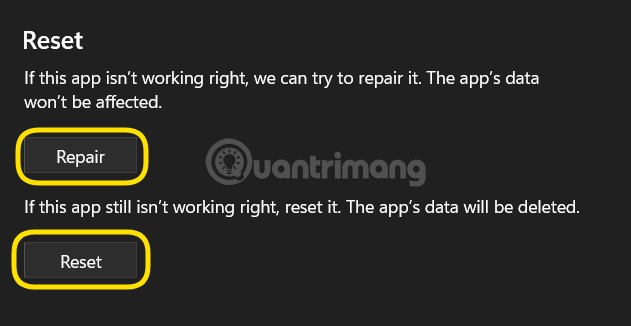
<p style="text-align: justify;"><strong>B6</strong>: Nhấn nút&nbsp;<strong>Repair.</strong></p>

<p style="text-align: justify;"><strong>B7</strong>: Nếu vấn đề vẫn chưa được khắc phục bạn có thể nhấn nút&nbsp;<strong>Reset.</strong></p>

<p style="text-align: justify;"><strong><img alt="Sửa lỗi không mở được Windows Security trên Windows 11" data-i="3" data-src="https://st.quantrimang.com/photos/image/2022/01/19/sua-loi-khong-mo-duoc-windows-security-tren-windows-11-3.jpg" data-was-processed="true" height="326" src="https://st.quantrimang.com/photos/image/2022/01/19/sua-loi-khong-mo-duoc-windows-security-tren-windows-11-3.jpg" width="631" /></strong></p>

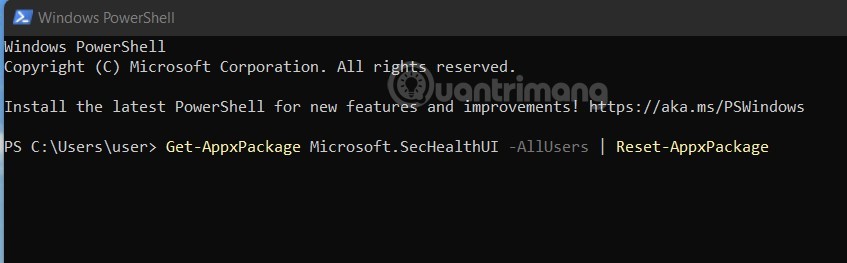
<p style="text-align: justify;">Bạn cũng có thể dùng&nbsp;<strong>PowerShell</strong>&nbsp;để reset gói dữ liệu của ứng dụng Windows Security. Chạy PowerShell dưới quyền admin sau đó nhập và chạy câu lệnh sau:&nbsp;<strong>Get-AppxPackage Microsoft.SecHealthUI -AllUsers | Reset-AppxPackage</strong>.</p>

<p style="text-align: justify;"><img alt="Sửa lỗi không mở được Windows Security trên Windows 11" data-i="4" data-src="https://st.quantrimang.com/photos/image/2022/01/19/sua-loi-khong-mo-duoc-windows-security-tren-windows-11-4.jpg" data-was-processed="true" height="263" src="https://st.quantrimang.com/photos/image/2022/01/19/sua-loi-khong-mo-duoc-windows-security-tren-windows-11-4.jpg" width="847" /></p>

<h3 style="text-align: justify;">Chạy SFC và DISM</h3>

<p style="text-align: justify;">Nếu file hệ thống của bạn gặp vấn đề, các thành phần tích hợp của Windows 11, ví dụ Windows Security sẽ không thể chạy được. Vì vậy, bạn nên thử dùng các công cụ kiểm tra và sửa lỗi file hệ thống tự động như System File Checker (SFC) và Deployment Image Servicing and Management (DISM). Các làm cụ thể như sau:</p>

<p style="text-align: justify;"><strong>B1</strong>: Nhấn nút&nbsp;<strong>Start</strong>&nbsp;sau đó nhập&nbsp;<strong>cmd</strong>&nbsp;để tìm kiếm.</p>

<p style="text-align: justify;"><strong>B2</strong>: Nhấn chuột phải vào&nbsp;<strong>Command Prompt</strong>&nbsp;và chọn&nbsp;<strong>Run as administrator</strong>.</p>

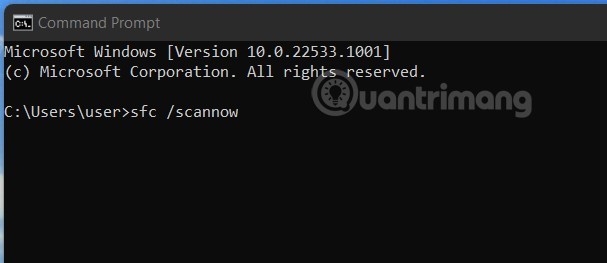
<p style="text-align: justify;"><strong>B3</strong>: Nhập&nbsp;<strong>sfc /scannow</strong>&nbsp;rồi chờ công cụ quét và sửa hệ thống của bạn.</p>

<p style="text-align: justify;"><img alt="Sửa lỗi không mở được Windows Security trên Windows 11" data-i="5" data-src="https://st.quantrimang.com/photos/image/2022/01/19/sua-loi-khong-mo-duoc-windows-security-tren-windows-11-5.jpg" data-was-processed="true" height="263" src="https://st.quantrimang.com/photos/image/2022/01/19/sua-loi-khong-mo-duoc-windows-security-tren-windows-11-5.jpg" width="607" /></p>

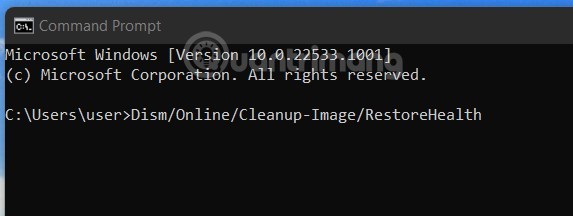
<p style="text-align: justify;"><strong>B4</strong>: Nhập&nbsp;<strong>Dism/Online/Cleanup-Image/RestoreHealth</strong>&nbsp;rồi tiếp tục chờ công cụ quét và sửa hệ thống của bạn.</p>

<p style="text-align: justify;"><img alt="Sửa lỗi không mở được Windows Security trên Windows 11" data-i="6" data-src="https://st.quantrimang.com/photos/image/2022/01/19/sua-loi-khong-mo-duoc-windows-security-tren-windows-11-6.jpg" data-was-processed="true" height="216" src="https://st.quantrimang.com/photos/image/2022/01/19/sua-loi-khong-mo-duoc-windows-security-tren-windows-11-6.jpg" width="573" /></p>

<p style="text-align: justify;"><strong>B5</strong>: Khởi động lại máy xem vấn đề đã được khắc phục hay chưa.</p>

<h3 style="text-align: justify;">Vô hiệu hóa các ứng dụng chạy nền</h3>

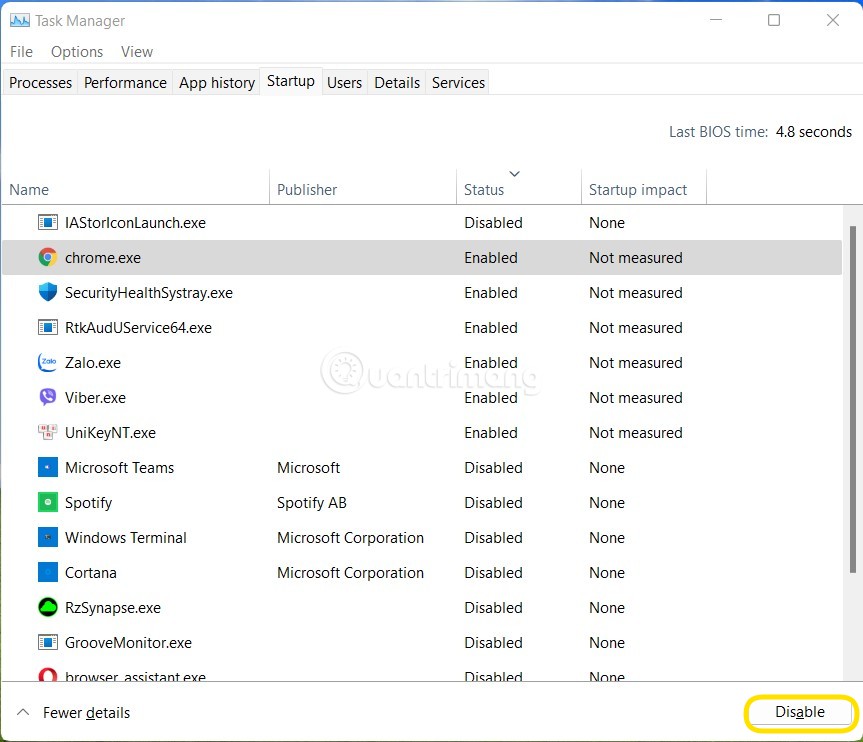
<p style="text-align: justify;">Đôi khi các ứng dụng chạy nền gây xung đột khiến Windows Security không thể mở được trên Windows 11. Vì vậy, bạn có thể thử vô hiệu hóa các ứng dụng chạy nền để xem có khắc phục được vấn đề hay không. Bạn cũng có thể thử tắt tất cả các dịch vụ để khởi động Windows theo cách &quot;sạch&quot; nhất xem Windows Security có hoạt động trở lại không.</p>

<p style="text-align: justify;">Cách thực hiện tắt ứng dụng chạy nền và tắt dịch vụ như sau:</p>

<p style="text-align: justify;"><strong>B1</strong>: Nhấn&nbsp;<strong>Ctrl + Shift + Esc</strong>&nbsp;để mở&nbsp;<strong>Task Manager</strong>.</p>

<p style="text-align: justify;"><strong>B2</strong>: Nếu không nhìn thấy các thể bạn hãy tìm và nhấn vào nút&nbsp;<strong>More details.</strong></p>

<p style="text-align: justify;"><strong>B3</strong>: Nhấn vào thẻ&nbsp;<strong>Startup,</strong>&nbsp;tìm tất cả các ứng dụng đang&nbsp;<strong>Enable</strong>&nbsp;để&nbsp;<strong>Disable</strong>&nbsp;chúng đi.</p>

<p style="text-align: justify;"><img alt="Sửa lỗi không mở được Windows Security trên Windows 11" data-i="7" data-src="https://st.quantrimang.com/photos/image/2022/01/19/sua-loi-khong-mo-duoc-windows-security-tren-windows-11-7.jpg" data-was-processed="true" height="742" src="https://st.quantrimang.com/photos/image/2022/01/19/sua-loi-khong-mo-duoc-windows-security-tren-windows-11-7.jpg" width="863" /></p>

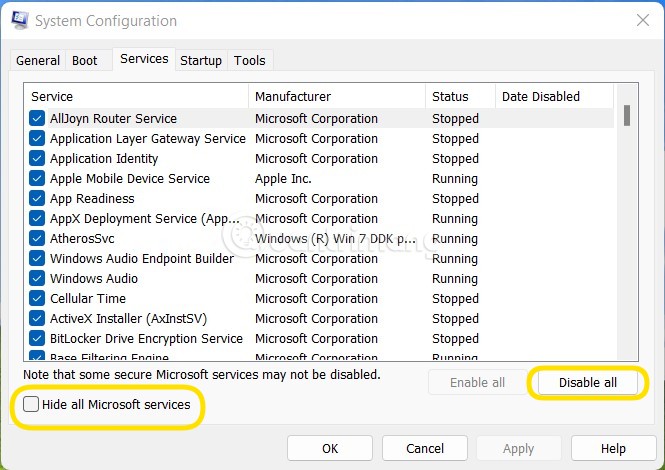
<p style="text-align: justify;"><strong>B4</strong>: Nhấn&nbsp;<strong>Win + R</strong>&nbsp;để mở&nbsp;<strong>Run</strong>&nbsp;sau đó nhập&nbsp;<strong>msconfig</strong>&nbsp;rồi nhấn&nbsp;<strong>Enter.</strong></p>

<p style="text-align: justify;"><strong>B5</strong>: Nhấn vào thẻ&nbsp;<strong>Services</strong>&nbsp;sau đó nhấn check ở ô&nbsp;<strong>Hide all Microsoft sevices</strong>&nbsp;rồi nhấn nút&nbsp;<strong>Disable All.</strong></p>

<p style="text-align: justify;"><strong><img alt="Sửa lỗi không mở được Windows Security trên Windows 11" data-i="8" data-src="https://st.quantrimang.com/photos/image/2022/01/19/sua-loi-khong-mo-duoc-windows-security-tren-windows-11-8.jpg" data-was-processed="true" height="470" src="https://st.quantrimang.com/photos/image/2022/01/19/sua-loi-khong-mo-duoc-windows-security-tren-windows-11-8.jpg" width="665" /></strong></p>

<p style="text-align: justify;"><strong>B6</strong>: Khởi động lại máy rồi thử xem Windows Security có hoạt động trở lại hay không.</p>

<p style="text-align: justify;"><strong>B7</strong>: Nếu Windows Security hoạt động trở lại, bạn có thể thử bật từng dịch vụ để kiểm tra xem dịch vụ nào gây ra lỗi. Quá trình này có thể thực hiện nhanh bằng cách bật ứng dụng theo từng nhóm.</p>

<p style="text-align: justify;"><strong>Lưu ý</strong>: Một số ứng dụng, tính năng sẽ bị ảnh hưởng khi bạn tắt tất cả các dịch vụ khởi động cùng Windows. Sau khi khắc phục xong lỗi Windows Security bạn nên bật lại các dịch vụ để đảm bảo Windows hoạt động ổn định nhất.</p>

<h3 style="text-align: justify;">Vô hiệu hóa hoặc gỡ phần mềm diệt virus, bảo mật của bên thứ ba</h3>

<p style="text-align: justify;">Bạn cần phải biết rằng bạn không thể chạy cùng lúc hai phần mềm diệt virus khác nhau trên máy tính của mình. Nếu đang có phần mềm diệt virus của bên thứ ba cài đặt trên máy thì bạn cần vô hiệu hóa hoặc gỡ bỏ nó thì mới có thể chạy Windows Security.</p>

<p style="text-align: justify;">Chúc các bạn thành công!</p>
		</div>
				<div id="author">
						<p>
				<strong>Nguồn tin:</strong>
				Quantrimang.com
			</p>
		</div>
	</div>
	<div id="footer" class="clearfix">
		<div id="url">
			<strong>URL của bản tin này: </strong><a href="https://www.nguoicodonvn2008.info/vi/news/savefile/kien-thuc-may-tinh/sua-loi-khong-mo-duoc-windows-security-tren-windows-11-5515.html" title="Sửa lỗi không mở được Windows Security trên Windows 11">https://www.nguoicodonvn2008.info/vi/news/savefile/kien-thuc-may-tinh/sua-loi-khong-mo-duoc-windows-security-tren-windows-11-5515.html</a>

		</div>
		<div class="clear"></div>
		<div class="copyright">
			&copy; .&#x3A; Nguoicodonvn2008.info - Cõi lòng người cô đơn &#x3A;.
		</div>
		<div id="contact">
			<a href="mailto:admin@nguoicodonvn2008.info">admin@nguoicodonvn2008.info</a>
		</div>
	</div>
</div>
        <div id="timeoutsess" class="chromeframe">
            Bạn đã không sử dụng Site, <a onclick="timeoutsesscancel();" href="https://nguoicodonvn2008.info/#">Bấm vào đây để duy trì trạng thái đăng nhập</a>. Thời gian chờ: <span id="secField"> 60 </span> giây
        </div>
        <div id="openidResult" class="nv-alert" style="display:none"></div>
        <div id="openidBt" data-result="" data-redirect=""></div>
		</script>
		<div class="car-top">
  <span><img src="https://nguoicodonvn2008.info/themes/default/images/car.png" alt=""></span>
</div>
<script src="https://nguoicodonvn2008.info/assets/js/jquery/jquery.min.js"></script>
<script>var nv_base_siteurl="/",nv_lang_data="vi",nv_lang_interface="vi",nv_name_variable="nv",nv_fc_variable="op",nv_lang_variable="language",nv_module_name="news",nv_func_name="savefile",nv_is_user=0, nv_my_ofs=-4,nv_my_abbr="EDT",nv_cookie_prefix="nv4c_e856T",nv_check_pass_mstime=1738000,nv_area_admin=0,nv_safemode=0,theme_responsive=0,nv_recaptcha_ver=2,nv_recaptcha_sitekey="",nv_recaptcha_type="image",XSSsanitize=1;</script>
<script src="https://nguoicodonvn2008.info/assets/js/language/vi.js"></script>
<script src="https://nguoicodonvn2008.info/assets/js/DOMPurify/purify3.js"></script>
<script src="https://nguoicodonvn2008.info/assets/js/global.js"></script>
<script src="https://nguoicodonvn2008.info/assets/js/site.js"></script>
<script src="https://nguoicodonvn2008.info/themes/default/js/news.js"></script>
<script src="https://nguoicodonvn2008.info/themes/default/js/main.js"></script>
<script src="https://nguoicodonvn2008.info/themes/default/js/custom.js"></script>
<script type="application/ld+json">
        {
            "@context": "https://schema.org",
            "@type": "Organization",
            "url": "https://nguoicodonvn2008.info",
            "logo": "https://nguoicodonvn2008.info/uploads/angel.gif"
        }
        </script>
<script src="https://nguoicodonvn2008.info/themes/default/js/bootstrap.min.js"></script>
<script type="text/javascript">
var $scrolltop = $('.car-top');
$scrolltop.on('click', function () {
    $('html,body').animate({
        scrollTop: 0
    }, 800);
    $(this).addClass("car-run");
    setTimeout(function(){ $scrolltop.removeClass('car-run');}, 1000);
    return false;
});
$(window).on('scroll', function ()
{ 
    if($(window).scrollTop() >= 200)
    {
        $scrolltop.addClass("show");
        $scrolltop.addClass("car-down");
    }
    else
    {
       $scrolltop.removeClass("show");
       setTimeout(function(){ $scrolltop.removeClass('car-down');}, 300);
    }
});
</script>
</body>
</html>