<!DOCTYPE html>
    <html lang="vi" xmlns="http://www.w3.org/1999/xhtml" prefix="og: http://ogp.me/ns#">
    <head>
<title>Sửa lỗi không đổi được theme</title>
<meta name="description" content="Sửa lỗi không đổi được theme - Savefile - Tin Tức - https&#x3A;&#x002F;&#x002F;www.nguoicodonvn2008.info&#x002F;vi&#x002F;news&#x002F;savefile&#x002F;kien-thuc-may-tinh&#x002F;sua-loi-khong-doi-duoc-theme-2498.html">
<meta name="author" content=".: Nguoicodonvn2008.info - Cõi lòng người cô đơn :.">
<meta name="copyright" content=".: Nguoicodonvn2008.info - Cõi lòng người cô đơn :. [admin@nguoicodonvn2008.info]">
<meta name="robots" content="index, archive, follow, noodp">
<meta name="googlebot" content="index,archive,follow,noodp">
<meta name="msnbot" content="all,index,follow">
<meta name="generator" content="NukeViet v4.5">
<meta http-equiv="Content-Type" content="text/html; charset=utf-8">
<meta property="og:title" content="Sửa lỗi không đổi được theme">
<meta property="og:type" content="website">
<meta property="og:description" content="Savefile - Tin Tức - https&#x3A;&#x002F;&#x002F;www.nguoicodonvn2008.info&#x002F;vi&#x002F;news&#x002F;savefile&#x002F;kien-thuc-may-tinh&#x002F;sua-loi-khong-doi-duoc-theme-2498.html">
<meta property="og:site_name" content=".&#x3A; Nguoicodonvn2008.info - Cõi lòng người cô đơn &#x3A;.">
<meta property="og:url" content="https://www.nguoicodonvn2008.info/vi/news/savefile/kien-thuc-may-tinh/sua-loi-khong-doi-duoc-theme-2498.html">
<link rel="shortcut icon" href="https://nguoicodonvn2008.info/favicon.ico">
<link rel="canonical" href="https://www.nguoicodonvn2008.info/vi/news/savefile/kien-thuc-may-tinh/sua-loi-khong-doi-duoc-theme-2498.html">
<link rel="alternate" href="https://nguoicodonvn2008.info/vi/news/rss/" title="Tin Tức" type="application/rss+xml">
<link rel="alternate" href="https://nguoicodonvn2008.info/vi/news/rss/karaoke-dual/" title="Tin Tức - Karaoke Dual" type="application/rss+xml">
<link rel="alternate" href="https://nguoicodonvn2008.info/vi/news/rss/nhac-tre/" title="Tin Tức - Nhạc trẻ" type="application/rss+xml">
<link rel="alternate" href="https://nguoicodonvn2008.info/vi/news/rss/tru-tinh/" title="Tin Tức - Trữ tình" type="application/rss+xml">
<link rel="alternate" href="https://nguoicodonvn2008.info/vi/news/rss/nuoc-ngoai/" title="Tin Tức - Nước ngoài" type="application/rss+xml">
<link rel="alternate" href="https://nguoicodonvn2008.info/vi/news/rss/remix/" title="Tin Tức - Remix" type="application/rss+xml">
<link rel="alternate" href="https://nguoicodonvn2008.info/vi/news/rss/tam-su-tinh-yeu/" title="Tin Tức - Tâm sự tình yêu" type="application/rss+xml">
<link rel="alternate" href="https://nguoicodonvn2008.info/vi/news/rss/tho-suu-tam/" title="Tin Tức - Thơ sưu tầm" type="application/rss+xml">
<link rel="alternate" href="https://nguoicodonvn2008.info/vi/news/rss/cuoc-song/" title="Tin Tức - Cuộc sống" type="application/rss+xml">
<link rel="alternate" href="https://nguoicodonvn2008.info/vi/news/rss/phan-mem/" title="Tin Tức - Phần mềm" type="application/rss+xml">
<link rel="alternate" href="https://nguoicodonvn2008.info/vi/news/rss/kien-thuc-may-tinh/" title="Tin Tức - Kiến thức máy tính" type="application/rss+xml">
<link rel="alternate" href="https://nguoicodonvn2008.info/vi/news/rss/hoc-tap/" title="Tin Tức - Học tập" type="application/rss+xml">
<link rel="alternate" href="https://nguoicodonvn2008.info/vi/news/rss/tai-lieu/" title="Tin Tức - Tài liệu" type="application/rss+xml">
<link rel="alternate" href="https://nguoicodonvn2008.info/vi/news/rss/de-thi/" title="Tin Tức - Đề thi" type="application/rss+xml">
<link rel="preload" as="style" href="https://nguoicodonvn2008.info/assets/css/font-awesome.min.css" type="text/css">
<link rel="preload" as="style" href="https://nguoicodonvn2008.info/themes/default/css/bootstrap.non-responsive.css" type="text/css">
<link rel="preload" as="style" href="https://nguoicodonvn2008.info/themes/default/css/style.css" type="text/css">
<link rel="preload" as="style" href="https://nguoicodonvn2008.info/themes/default/css/style.non-responsive.css" type="text/css">
<link rel="preload" as="style" href="https://nguoicodonvn2008.info/themes/default/css/news.css" type="text/css">
<link rel="preload" as="style" href="https://nguoicodonvn2008.info/themes/default/css/custom.css" type="text/css">
<link rel="preload" as="script" href="https://nguoicodonvn2008.info/assets/js/jquery/jquery.min.js" type="text/javascript">
<link rel="preload" as="script" href="https://nguoicodonvn2008.info/assets/js/language/vi.js" type="text/javascript">
<link rel="preload" as="script" href="https://nguoicodonvn2008.info/assets/js/DOMPurify/purify3.js" type="text/javascript">
<link rel="preload" as="script" href="https://nguoicodonvn2008.info/assets/js/global.js" type="text/javascript">
<link rel="preload" as="script" href="https://nguoicodonvn2008.info/assets/js/site.js" type="text/javascript">
<link rel="preload" as="script" href="https://nguoicodonvn2008.info/themes/default/js/news.js" type="text/javascript">
<link rel="preload" as="script" href="https://nguoicodonvn2008.info/themes/default/js/main.js" type="text/javascript">
<link rel="preload" as="script" href="https://nguoicodonvn2008.info/themes/default/js/custom.js" type="text/javascript">
<link rel="preload" as="script" href="https://nguoicodonvn2008.info/themes/default/js/bootstrap.min.js" type="text/javascript">
<link rel="stylesheet" href="https://nguoicodonvn2008.info/assets/css/font-awesome.min.css">
<link rel="stylesheet" href="https://nguoicodonvn2008.info/themes/default/css/bootstrap.non-responsive.css">
<link rel="stylesheet" href="https://nguoicodonvn2008.info/themes/default/css/style.css">
<link rel="stylesheet" href="https://nguoicodonvn2008.info/themes/default/css/style.non-responsive.css">
<link rel="StyleSheet" href="https://nguoicodonvn2008.info/themes/default/css/news.css">
<link rel="stylesheet" href="https://nguoicodonvn2008.info/themes/default/css/custom.css">
<style type="text/css">
	body{background: #fff;}
</style>
    </head>
    <body>
<div id="print">
	<div id="hd_print">
		<h2 class="pull-left">.&#x3A; Nguoicodonvn2008.info - Cõi lòng người cô đơn &#x3A;.</h2>
		<p class="pull-right"><a title=".&#x3A; Nguoicodonvn2008.info - Cõi lòng người cô đơn &#x3A;." href="https://nguoicodonvn2008.info/">https://nguoicodonvn2008.info</a></p>
	</div>
	<div class="clear"></div>
	<hr />
	<div id="content">
		<h1>Sửa lỗi không đổi được theme</h1>
		<ul class="list-inline">
			<li>Thứ ba - 11/08/2020 00:50</li>
			<li class="hidden-print txtrequired"><em class="fa fa-print">&nbsp;</em><a title="In ra" href="javascript:;" onclick="window.print()">In ra</a></li>
			<li class="hidden-print txtrequired"><em class="fa fa-power-off">&nbsp;</em><a title="Đóng cửa sổ này" href="javascript:;" onclick="window.close()">Đóng cửa sổ này</a></li>
		</ul>
		<div class="clear"></div>
		<div id="hometext">
		</div>
				<div class="imghome">
			<img alt="Sửa lỗi không đổi được theme" src="https://st.quantrimang.com/photos/image/2020/08/10/sua-loi-khong-doi-duoc-theme-1.jpg" width="460" class="img-thumbnail" />
		</div>
		<div class="clear"></div>
		<div id="bodytext" class="clearfix">
			<p style="text-align: justify;">Không thể thay đổi theme Windows 7? Theme Windows 7 của bạn có bị mắc kẹt ở tùy chọn &quot;cổ điển&quot; (classic) không? Nếu đó là trường hợp bạn đang gặp phải, thì bạn có thể thử áp dụng một số cách khắc phục để xem liệu bạn có giải quyết được vấn đề không!</p>

<p style="text-align: justify;">Thường thì lỗi không đổi được theme là do PC của bạn được cấu hình để được tối ưu hóa cho hiệu suất tốt nhất, thay vì diện mạo đẹp nhất!</p>

<h2 style="text-align: justify;">Kiểm tra tùy chọn “Use Visual Styles on Windows and Buttons”</h2>

<p style="text-align: justify;">Thông thường, lý do tại sao theme Windows 7 của bạn bị mắc kẹt trên phiên bản cổ điển là do PC được cấu hình để tối ưu hóa cho hiệu suất tốt hơn. Một số laptop thậm chí còn được cấu hình sẵn theo cách đó. Trên thực tế, đó là một cài đặt tốt, nhưng nếu bạn muốn có một giao diện đẹp hơn, sẽ thật khó chịu khi không đổi được theme. Vì vậy, nếu không thể thay đổi theme Windows 7, bạn có thể muốn kiểm tra cấu hình PC của mình trước tiên:</p>

<p style="text-align: justify;">1.&nbsp;Mở Control Panel.</p>

<p style="text-align: justify;">2. Nhấp vào&nbsp;<strong>System and Security</strong>.</p>

<p style="text-align: justify;">3. Nhấp vào&nbsp;<strong>System.</strong></p>

<p style="text-align: justify;">4. Trong thanh bên, nhấp vào&nbsp;<strong>Advanced System Settings.</strong></p>

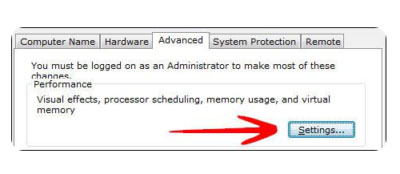
<p style="text-align: justify;">5. Chuyển đến tab&nbsp;<strong>Advanced</strong>&nbsp;và nhấp vào&nbsp;<strong>Settings.</strong></p>

<figure>
<div style="text-align: justify;"><img alt="Chuyển đến tab Advanced và nhấp vào Settings" data-i="0" data-src="https://st.quantrimang.com/photos/image/2020/08/10/sua-loi-khong-doi-duoc-theme-1.jpg" data-was-processed="true" height="174" src="https://st.quantrimang.com/photos/image/2020/08/10/sua-loi-khong-doi-duoc-theme-1.jpg" width="400" /></div>

<figcaption>
<div style="text-align: justify;">Chuyển đến tab Advanced và nhấp vào Settings</div>
</figcaption>
</figure>

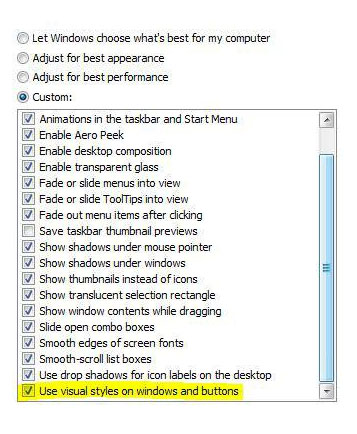
<p style="text-align: justify;">6. Cuộn danh sách xuống dưới cùng, kiểm tra kỹ xem mục “<strong>Use Visual Styles on Windows and Buttons</strong>” đã được chọn chưa. Nếu tùy chọn này không được chọn, theme Windows 7 của bạn sẽ bị mắc kẹt ở trạng thái “cổ điển” trong một thời gian dài, vì điều này hoàn toàn vô hiệu hóa giao diện Aero trực quan ưa thích.</p>

<figure>
<div style="text-align: justify;"><img alt="Kiểm tra kỹ xem mục “Use Visual Styles on Windows and Buttons” đã được chọn chưa" data-i="1" data-src="https://st.quantrimang.com/photos/image/2020/08/10/sua-loi-khong-doi-duoc-theme-2.jpg" data-was-processed="true" height="434" src="https://st.quantrimang.com/photos/image/2020/08/10/sua-loi-khong-doi-duoc-theme-2.jpg" width="357" /></div>

<figcaption>
<div style="text-align: justify;">Kiểm tra kỹ xem mục “Use Visual Styles on Windows and Buttons” đã được chọn chưa</div>
</figcaption>
</figure>

<p style="text-align: justify;">Đây cũng thường là vấn đề khiến mọi người dường như không thể kích hoạt theme Windows 7 Aero, vì PC của họ được cấu hình để tối ưu hóa cho hiệu suất tốt nhất chứ không phải giao diện đẹp nhất.</p>

<div style="text-align: justify;">&nbsp;</div>

<h2 style="text-align: justify;">Service Themes không được khởi động</h2>

<p style="text-align: justify;">Nếu service Windows 7 Themes không được khởi động, theme Windows 7 sẽ bị kẹt ở chế độ “cổ điển”. Bạn không thể thay đổi theme Windows 7 của mình khi service Themes bị vô hiệu hóa. Vì vậy, hãy kiểm tra xem service Themes có đang hoạt động hay không.</p>

<p style="text-align: justify;">1. Nhấp vào&nbsp;<strong>Start</strong>&nbsp;và nhập&nbsp;<strong>services.msc</strong>&nbsp;vào trường tìm kiếm. Bấm vào mục xuất hiện.</p>

<p style="text-align: justify;">2. Cuộn xuống danh sách cho đến khi bạn tìm thấy mục&nbsp;<strong>Themes</strong>&nbsp;(hoặc nhập&nbsp;<strong>Themes</strong>&nbsp;khi một mục được chọn).</p>

<p style="text-align: justify;">3. Bây giờ, bạn có thể xem service Themes hiện có đang chạy hay không và nó đang ở chế độ nào (<strong>Automatic, Disabled, Manual</strong>).</p>

<p style="text-align: justify;">Nếu hiện nó ở chế độ&nbsp;<strong>“Disabled”</strong>&nbsp;hoặc&nbsp;<strong>“Manual”</strong>&nbsp;và chưa khởi động, bạn phải khởi động theo cách thủ công và thay đổi chế độ thành&nbsp;<strong>“Automatic”.</strong></p>

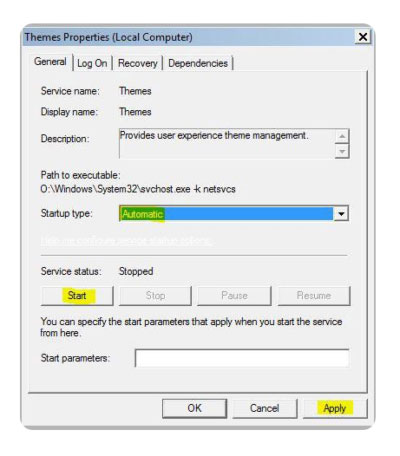
<p style="text-align: justify;">4. Nhấp đúp vào&nbsp;<strong>Themes</strong>&nbsp;và từ menu drop-down, chọn&nbsp;<strong>Automatic</strong>, nhấp vào&nbsp;<strong>Start</strong>&nbsp;và sau đó chọn&nbsp;<strong>Apply.</strong></p>

<figure>
<div style="text-align: justify;"><img alt="Chọn Automatic" data-i="2" data-src="https://st.quantrimang.com/photos/image/2020/08/10/sua-loi-khong-doi-duoc-theme-3.jpg" data-was-processed="true" height="456" src="https://st.quantrimang.com/photos/image/2020/08/10/sua-loi-khong-doi-duoc-theme-3.jpg" width="400" /></div>

<figcaption>
<div style="text-align: justify;">Chọn Automatic</div>
</figcaption>
</figure>
		</div>
				<div id="author">
						<p>
				<strong>Nguồn tin:</strong>
				Quantrimang.com
			</p>
		</div>
	</div>
	<div id="footer" class="clearfix">
		<div id="url">
			<strong>URL của bản tin này: </strong><a href="https://www.nguoicodonvn2008.info/vi/news/savefile/kien-thuc-may-tinh/sua-loi-khong-doi-duoc-theme-2498.html" title="Sửa lỗi không đổi được theme">https://www.nguoicodonvn2008.info/vi/news/savefile/kien-thuc-may-tinh/sua-loi-khong-doi-duoc-theme-2498.html</a>

		</div>
		<div class="clear"></div>
		<div class="copyright">
			&copy; .&#x3A; Nguoicodonvn2008.info - Cõi lòng người cô đơn &#x3A;.
		</div>
		<div id="contact">
			<a href="mailto:admin@nguoicodonvn2008.info">admin@nguoicodonvn2008.info</a>
		</div>
	</div>
</div>
        <div id="timeoutsess" class="chromeframe">
            Bạn đã không sử dụng Site, <a onclick="timeoutsesscancel();" href="https://nguoicodonvn2008.info/#">Bấm vào đây để duy trì trạng thái đăng nhập</a>. Thời gian chờ: <span id="secField"> 60 </span> giây
        </div>
        <div id="openidResult" class="nv-alert" style="display:none"></div>
        <div id="openidBt" data-result="" data-redirect=""></div>
		</script>
		<div class="car-top">
  <span><img src="https://nguoicodonvn2008.info/themes/default/images/car.png" alt=""></span>
</div>
<script src="https://nguoicodonvn2008.info/assets/js/jquery/jquery.min.js"></script>
<script>var nv_base_siteurl="/",nv_lang_data="vi",nv_lang_interface="vi",nv_name_variable="nv",nv_fc_variable="op",nv_lang_variable="language",nv_module_name="news",nv_func_name="savefile",nv_is_user=0, nv_my_ofs=-4,nv_my_abbr="EDT",nv_cookie_prefix="nv4c_e856T",nv_check_pass_mstime=1738000,nv_area_admin=0,nv_safemode=0,theme_responsive=0,nv_recaptcha_ver=2,nv_recaptcha_sitekey="",nv_recaptcha_type="image",XSSsanitize=1;</script>
<script src="https://nguoicodonvn2008.info/assets/js/language/vi.js"></script>
<script src="https://nguoicodonvn2008.info/assets/js/DOMPurify/purify3.js"></script>
<script src="https://nguoicodonvn2008.info/assets/js/global.js"></script>
<script src="https://nguoicodonvn2008.info/assets/js/site.js"></script>
<script src="https://nguoicodonvn2008.info/themes/default/js/news.js"></script>
<script src="https://nguoicodonvn2008.info/themes/default/js/main.js"></script>
<script src="https://nguoicodonvn2008.info/themes/default/js/custom.js"></script>
<script type="application/ld+json">
        {
            "@context": "https://schema.org",
            "@type": "Organization",
            "url": "https://nguoicodonvn2008.info",
            "logo": "https://nguoicodonvn2008.info/uploads/angel.gif"
        }
        </script>
<script src="https://nguoicodonvn2008.info/themes/default/js/bootstrap.min.js"></script>
<script type="text/javascript">
var $scrolltop = $('.car-top');
$scrolltop.on('click', function () {
    $('html,body').animate({
        scrollTop: 0
    }, 800);
    $(this).addClass("car-run");
    setTimeout(function(){ $scrolltop.removeClass('car-run');}, 1000);
    return false;
});
$(window).on('scroll', function ()
{ 
    if($(window).scrollTop() >= 200)
    {
        $scrolltop.addClass("show");
        $scrolltop.addClass("car-down");
    }
    else
    {
       $scrolltop.removeClass("show");
       setTimeout(function(){ $scrolltop.removeClass('car-down');}, 300);
    }
});
</script>
</body>
</html>