<!DOCTYPE html>
    <html lang="vi" xmlns="http://www.w3.org/1999/xhtml" prefix="og: http://ogp.me/ns#">
    <head>
<title>Sửa lỗi cập nhật ứng dụng Microsoft Store - Something Unexpected Happened Code&#x3A; 0x80070141</title>
<meta name="description" content="Sửa lỗi cập nhật ứng dụng Microsoft Store - Something Unexpected Happened Code&#x3A; 0x80070141 - Savefile - Tin Tức -...">
<meta name="author" content=".: Nguoicodonvn2008.info - Cõi lòng người cô đơn :.">
<meta name="copyright" content=".: Nguoicodonvn2008.info - Cõi lòng người cô đơn :. [admin@nguoicodonvn2008.info]">
<meta name="robots" content="index, archive, follow, noodp">
<meta name="googlebot" content="index,archive,follow,noodp">
<meta name="msnbot" content="all,index,follow">
<meta name="generator" content="NukeViet v4.5">
<meta http-equiv="Content-Type" content="text/html; charset=utf-8">
<meta property="og:title" content="Sửa lỗi cập nhật ứng dụng Microsoft Store - Something Unexpected Happened Code&#x3A; 0x80070141">
<meta property="og:type" content="website">
<meta property="og:description" content="Savefile - Tin Tức -...">
<meta property="og:site_name" content=".&#x3A; Nguoicodonvn2008.info - Cõi lòng người cô đơn &#x3A;.">
<meta property="og:url" content="https://www.nguoicodonvn2008.info/vi/news/savefile/kien-thuc-may-tinh/sua-loi-cap-nhat-ung-dung-microsoft-store-something-unexpected-happened-code-0x80070141-3018.html">
<link rel="shortcut icon" href="https://nguoicodonvn2008.info/favicon.ico">
<link rel="canonical" href="https://www.nguoicodonvn2008.info/vi/news/savefile/kien-thuc-may-tinh/sua-loi-cap-nhat-ung-dung-microsoft-store-something-unexpected-happened-code-0x80070141-3018.html">
<link rel="alternate" href="https://nguoicodonvn2008.info/vi/news/rss/" title="Tin Tức" type="application/rss+xml">
<link rel="alternate" href="https://nguoicodonvn2008.info/vi/news/rss/karaoke-dual/" title="Tin Tức - Karaoke Dual" type="application/rss+xml">
<link rel="alternate" href="https://nguoicodonvn2008.info/vi/news/rss/nhac-tre/" title="Tin Tức - Nhạc trẻ" type="application/rss+xml">
<link rel="alternate" href="https://nguoicodonvn2008.info/vi/news/rss/tru-tinh/" title="Tin Tức - Trữ tình" type="application/rss+xml">
<link rel="alternate" href="https://nguoicodonvn2008.info/vi/news/rss/nuoc-ngoai/" title="Tin Tức - Nước ngoài" type="application/rss+xml">
<link rel="alternate" href="https://nguoicodonvn2008.info/vi/news/rss/remix/" title="Tin Tức - Remix" type="application/rss+xml">
<link rel="alternate" href="https://nguoicodonvn2008.info/vi/news/rss/tam-su-tinh-yeu/" title="Tin Tức - Tâm sự tình yêu" type="application/rss+xml">
<link rel="alternate" href="https://nguoicodonvn2008.info/vi/news/rss/tho-suu-tam/" title="Tin Tức - Thơ sưu tầm" type="application/rss+xml">
<link rel="alternate" href="https://nguoicodonvn2008.info/vi/news/rss/cuoc-song/" title="Tin Tức - Cuộc sống" type="application/rss+xml">
<link rel="alternate" href="https://nguoicodonvn2008.info/vi/news/rss/phan-mem/" title="Tin Tức - Phần mềm" type="application/rss+xml">
<link rel="alternate" href="https://nguoicodonvn2008.info/vi/news/rss/kien-thuc-may-tinh/" title="Tin Tức - Kiến thức máy tính" type="application/rss+xml">
<link rel="alternate" href="https://nguoicodonvn2008.info/vi/news/rss/hoc-tap/" title="Tin Tức - Học tập" type="application/rss+xml">
<link rel="alternate" href="https://nguoicodonvn2008.info/vi/news/rss/tai-lieu/" title="Tin Tức - Tài liệu" type="application/rss+xml">
<link rel="alternate" href="https://nguoicodonvn2008.info/vi/news/rss/de-thi/" title="Tin Tức - Đề thi" type="application/rss+xml">
<link rel="preload" as="style" href="https://nguoicodonvn2008.info/assets/css/font-awesome.min.css" type="text/css">
<link rel="preload" as="style" href="https://nguoicodonvn2008.info/themes/default/css/bootstrap.non-responsive.css" type="text/css">
<link rel="preload" as="style" href="https://nguoicodonvn2008.info/themes/default/css/style.css" type="text/css">
<link rel="preload" as="style" href="https://nguoicodonvn2008.info/themes/default/css/style.non-responsive.css" type="text/css">
<link rel="preload" as="style" href="https://nguoicodonvn2008.info/themes/default/css/news.css" type="text/css">
<link rel="preload" as="style" href="https://nguoicodonvn2008.info/themes/default/css/custom.css" type="text/css">
<link rel="preload" as="script" href="https://nguoicodonvn2008.info/assets/js/jquery/jquery.min.js" type="text/javascript">
<link rel="preload" as="script" href="https://nguoicodonvn2008.info/assets/js/language/vi.js" type="text/javascript">
<link rel="preload" as="script" href="https://nguoicodonvn2008.info/assets/js/DOMPurify/purify3.js" type="text/javascript">
<link rel="preload" as="script" href="https://nguoicodonvn2008.info/assets/js/global.js" type="text/javascript">
<link rel="preload" as="script" href="https://nguoicodonvn2008.info/assets/js/site.js" type="text/javascript">
<link rel="preload" as="script" href="https://nguoicodonvn2008.info/themes/default/js/news.js" type="text/javascript">
<link rel="preload" as="script" href="https://nguoicodonvn2008.info/themes/default/js/main.js" type="text/javascript">
<link rel="preload" as="script" href="https://nguoicodonvn2008.info/themes/default/js/custom.js" type="text/javascript">
<link rel="preload" as="script" href="https://nguoicodonvn2008.info/themes/default/js/bootstrap.min.js" type="text/javascript">
<link rel="stylesheet" href="https://nguoicodonvn2008.info/assets/css/font-awesome.min.css">
<link rel="stylesheet" href="https://nguoicodonvn2008.info/themes/default/css/bootstrap.non-responsive.css">
<link rel="stylesheet" href="https://nguoicodonvn2008.info/themes/default/css/style.css">
<link rel="stylesheet" href="https://nguoicodonvn2008.info/themes/default/css/style.non-responsive.css">
<link rel="StyleSheet" href="https://nguoicodonvn2008.info/themes/default/css/news.css">
<link rel="stylesheet" href="https://nguoicodonvn2008.info/themes/default/css/custom.css">
<style type="text/css">
	body{background: #fff;}
</style>
    </head>
    <body>
<div id="print">
	<div id="hd_print">
		<h2 class="pull-left">.&#x3A; Nguoicodonvn2008.info - Cõi lòng người cô đơn &#x3A;.</h2>
		<p class="pull-right"><a title=".&#x3A; Nguoicodonvn2008.info - Cõi lòng người cô đơn &#x3A;." href="https://nguoicodonvn2008.info/">https://nguoicodonvn2008.info</a></p>
	</div>
	<div class="clear"></div>
	<hr />
	<div id="content">
		<h1>Sửa lỗi cập nhật ứng dụng Microsoft Store - Something Unexpected Happened Code&#x3A; 0x80070141</h1>
		<ul class="list-inline">
			<li>Thứ ba - 03/11/2020 23:49</li>
			<li class="hidden-print txtrequired"><em class="fa fa-print">&nbsp;</em><a title="In ra" href="javascript:;" onclick="window.print()">In ra</a></li>
			<li class="hidden-print txtrequired"><em class="fa fa-power-off">&nbsp;</em><a title="Đóng cửa sổ này" href="javascript:;" onclick="window.close()">Đóng cửa sổ này</a></li>
		</ul>
		<div class="clear"></div>
		<div id="hometext">
		</div>
				<div class="imghome">
			<img alt="Sửa lỗi cập nhật ứng dụng Microsoft Store - Something Unexpected Happened Code&#x3A; 0x80070141" src="https://st.quantrimang.com/photos/image/2020/11/03/loi-cap-nhat-microsoft-store-0x80070141-1.jpg" width="460" class="img-thumbnail" />
		</div>
		<div class="clear"></div>
		<div id="bodytext" class="clearfix">
			<p style="text-align: justify;">Nếu bạn gặp phải lỗi Windows 10 Store - Something unexpected happened, Code: 0x80070141 trên máy tính thì bài viết này có thể giúp bạn khắc phục sự cố. Bạn có thể thấy trạng thái thay đổi từ<em>&nbsp;Acquiring Licenses</em>&nbsp;thành&nbsp;<em>Downloading…</em>&nbsp;Lỗi này đã xảy ra khi người dùng tìm thấy hai bản cập nhật cho ứng dụng Store nhưng thất bại khi cập nhật với mã lỗi này.</p>

<pre id="pre0">
<code>There were some problems installing updates, but we’ll try again later. If you keep seeing this and want to search the web or contact support for information, this may help: (0x80070141)</code></pre>

<p style="text-align: justify;">Tạm dịch:</p>

<p style="text-align: justify;"><em>Đã xảy ra một số sự cố khi cài đặt bản cập nhật nhưng chúng tôi sẽ thử lại sau. Nếu bạn vẫn thấy thông báo này và muốn tìm kiếm trên web hoặc liên hệ với bộ phận hỗ trợ để biết thông tin, điều này có thể hữu ích: (0x80070141)</em></p>

<h2 style="text-align: justify;">Lỗi cập nhật ứng dụng Microsoft Store 0x80070141</h2>

<div style="text-align: justify;">&nbsp;</div>

<h3 style="text-align: justify;">1. Chạy Windows Store Apps Troubleshooter</h3>

<figure>
<div style="text-align: justify;"><img alt="Chạy Windows Store Apps Troubleshooter" data-i="0" data-src="https://st.quantrimang.com/photos/image/2020/11/03/loi-cap-nhat-microsoft-store-0x80070141-1.jpg" data-was-processed="true" height="408" src="https://st.quantrimang.com/photos/image/2020/11/03/loi-cap-nhat-microsoft-store-0x80070141-1.jpg" width="600" /></div>

<figcaption>
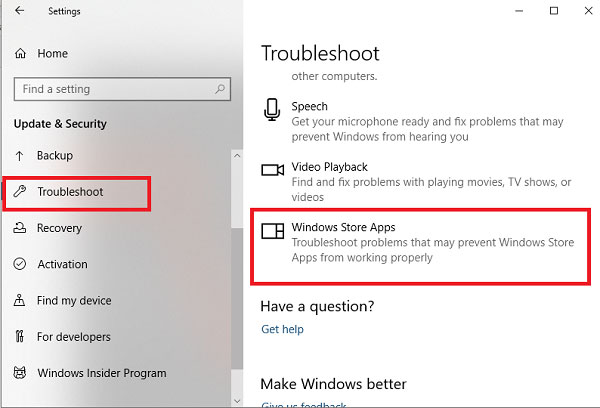
<div style="text-align: justify;">Chạy Windows Store Apps Troubleshooter</div>
</figcaption>
</figure>

<p style="text-align: justify;">Sự cố này có thể xảy ra vì nhiều lý do nhưng bài viết khuyên bạn nên chạy Windows Store Apps Troubleshooter trước và xem liệu nó có giải quyết được sự cố hay không. Ứng dụng này tìm kiếm các điểm không nhất quán phổ biến với ứng dụng Store và tự động sửa chúng.</p>

<ul>
	<li style="text-align: justify;">Để bắt đầu, trước tiên hãy&nbsp;mở Settings trên Windows 10.</li>
	<li style="text-align: justify;">Sau đó nhấp vào&nbsp;<strong>Update &amp; Security &gt; Troubleshoot &gt; Windows Store Apps</strong>.</li>
	<li style="text-align: justify;">Bây giờ, hãy nhấn vào nút&nbsp;<strong>Run the troubleshooter</strong>&nbsp;để tự động phát hiện và khắc phục sự cố.</li>
</ul>

<h3 style="text-align: justify;">2. Tạm thời tắt phần mềm diệt virus</h3>

<p style="text-align: justify;">Nếu bạn có bất kỳ&nbsp;chương trình diệt virus&nbsp;nào của bên thứ ba, hãy tạm thời tắt chúng và kiểm tra xem điều đó có giải quyết được sự cố không.</p>

<div style="text-align: justify;">&nbsp;</div>

<h3 style="text-align: justify;">3. Sửa chữa Windows Store và các thành phần cập nhật</h3>

<p style="text-align: justify;">Sửa chữa Windows Store và các thành phần cập nhật của nó là một trong những giải pháp hiệu quả nhất để khắc phục mọi sự cố liên quan đến Windows Store.</p>

<p style="text-align: justify;">Để bắt đầu, hãy&nbsp;mở PowerShell với quyền admin&nbsp;trên máy tính Windows 10.</p>

<p style="text-align: justify;">Trong cửa sổ&nbsp;PowerShell, hãy chạy lần lượt các dòng lệnh dưới đây và kiểm tra xem nó có hoạt động không.</p>

<pre id="pre1">
<code>net stop bits
 net stop wuauserv
 net stop appidsvc
 net stop cryptsvc
 Del &quot;%ALLUSERSPROFILE%\Application Data\Microsoft\Network\Downloader\*.*&quot;
 rmdir %systemroot%\SoftwareDistribution /S /Q
 rmdir %systemroot%\system32\catroot2 /S /Q
 regsvr32.exe /s atl.dll
 regsvr32.exe /s urlmon.dll
 regsvr32.exe /s mshtml.dll
 netsh winsock reset
 netsh winsock reset proxy
 net start bits
 net start wuauserv
 net start appidsvc
 net start cryptsvc</code></pre>

<p style="text-align: justify;">Sau khi hoàn tất, hãy&nbsp;khởi động lại máy tính&nbsp;và xem nó có giúp khắc phục được lỗi 0x80070141 hay không.</p>

<h3 style="text-align: justify;">4. Reset lại Microsoft Store qua Settings</h3>

<figure>
<div style="text-align: justify;"><img alt="Reset lại Microsoft Store qua Settings" data-i="1" data-src="https://st.quantrimang.com/photos/image/2020/11/03/loi-cap-nhat-microsoft-store-0x80070141-2.jpg" data-was-processed="true" height="465" src="https://st.quantrimang.com/photos/image/2020/11/03/loi-cap-nhat-microsoft-store-0x80070141-2.jpg" width="600" /></div>

<figcaption>
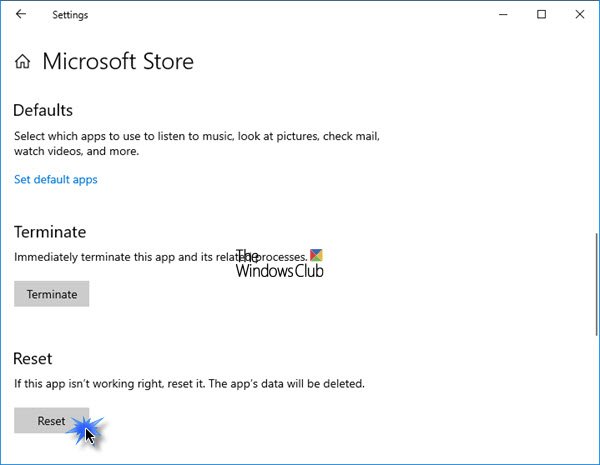
<div style="text-align: justify;">Reset lại Microsoft Store qua Settings</div>
</figcaption>
</figure>

<p style="text-align: justify;">Windows 10 hiện cho phép bạn&nbsp;reset lại ứng dụng Windows Store trong Windows 10&nbsp;thông qua Settings.</p>

<p style="text-align: justify;">Để reset lại Microsoft Store, hãy mở&nbsp;<strong>Settings &gt; Apps &gt; Apps and features &gt; Search for Microsoft Store &gt; Advanced options</strong>, rồi nhấp vào nút&nbsp;<strong>Reset.</strong></p>

<p style="text-align: justify;">Phương pháp này yêu cầu bạn cài đặt lại ứng dụng Windows Store bằng Windows PowerShell. Để làm như vậy, hãy làm theo các bước sau:</p>

<p style="text-align: justify;">Nhấp chuột phải vào nút&nbsp;<strong>Start</strong>&nbsp;và chọn&nbsp;<strong>Windows PowerShell (Admin)</strong>&nbsp;để khởi chạy PowerShell với quyền admin.</p>

<p style="text-align: justify;">Trong cửa sổ Windows PowerShell, sao chép và dán dòng lệnh bên dưới và nhấn&nbsp;<strong>Enter</strong>&nbsp;để thực thi:</p>

<pre id="pre2">
<code>Get-AppxPackage -allusers Microsoft.WindowsStore | Foreach {Add-AppxPackage -DisableDevelopmentMode -Register “$($_.InstallLocation)\\AppXManifest.xml”}</code></pre>

<p style="text-align: justify;">Sau khi thực thi lệnh, hãy khởi động lại máy tính rồi thử lại.</p>
		</div>
				<div id="author">
						<p>
				<strong>Nguồn tin:</strong>
				Quantrimang.com
			</p>
		</div>
	</div>
	<div id="footer" class="clearfix">
		<div id="url">
			<strong>URL của bản tin này: </strong><a href="https://www.nguoicodonvn2008.info/vi/news/savefile/kien-thuc-may-tinh/sua-loi-cap-nhat-ung-dung-microsoft-store-something-unexpected-happened-code-0x80070141-3018.html" title="Sửa lỗi cập nhật ứng dụng Microsoft Store - Something Unexpected Happened Code&#x3A; 0x80070141">https://www.nguoicodonvn2008.info/vi/news/savefile/kien-thuc-may-tinh/sua-loi-cap-nhat-ung-dung-microsoft-store-something-unexpected-happened-code-0x80070141-3018.html</a>

		</div>
		<div class="clear"></div>
		<div class="copyright">
			&copy; .&#x3A; Nguoicodonvn2008.info - Cõi lòng người cô đơn &#x3A;.
		</div>
		<div id="contact">
			<a href="mailto:admin@nguoicodonvn2008.info">admin@nguoicodonvn2008.info</a>
		</div>
	</div>
</div>
        <div id="timeoutsess" class="chromeframe">
            Bạn đã không sử dụng Site, <a onclick="timeoutsesscancel();" href="https://nguoicodonvn2008.info/#">Bấm vào đây để duy trì trạng thái đăng nhập</a>. Thời gian chờ: <span id="secField"> 60 </span> giây
        </div>
        <div id="openidResult" class="nv-alert" style="display:none"></div>
        <div id="openidBt" data-result="" data-redirect=""></div>
		</script>
		<div class="car-top">
  <span><img src="https://nguoicodonvn2008.info/themes/default/images/car.png" alt=""></span>
</div>
<script src="https://nguoicodonvn2008.info/assets/js/jquery/jquery.min.js"></script>
<script>var nv_base_siteurl="/",nv_lang_data="vi",nv_lang_interface="vi",nv_name_variable="nv",nv_fc_variable="op",nv_lang_variable="language",nv_module_name="news",nv_func_name="savefile",nv_is_user=0, nv_my_ofs=-4,nv_my_abbr="EDT",nv_cookie_prefix="nv4c_e856T",nv_check_pass_mstime=1738000,nv_area_admin=0,nv_safemode=0,theme_responsive=0,nv_recaptcha_ver=2,nv_recaptcha_sitekey="",nv_recaptcha_type="image",XSSsanitize=1;</script>
<script src="https://nguoicodonvn2008.info/assets/js/language/vi.js"></script>
<script src="https://nguoicodonvn2008.info/assets/js/DOMPurify/purify3.js"></script>
<script src="https://nguoicodonvn2008.info/assets/js/global.js"></script>
<script src="https://nguoicodonvn2008.info/assets/js/site.js"></script>
<script src="https://nguoicodonvn2008.info/themes/default/js/news.js"></script>
<script src="https://nguoicodonvn2008.info/themes/default/js/main.js"></script>
<script src="https://nguoicodonvn2008.info/themes/default/js/custom.js"></script>
<script type="application/ld+json">
        {
            "@context": "https://schema.org",
            "@type": "Organization",
            "url": "https://nguoicodonvn2008.info",
            "logo": "https://nguoicodonvn2008.info/uploads/angel.gif"
        }
        </script>
<script src="https://nguoicodonvn2008.info/themes/default/js/bootstrap.min.js"></script>
<script type="text/javascript">
var $scrolltop = $('.car-top');
$scrolltop.on('click', function () {
    $('html,body').animate({
        scrollTop: 0
    }, 800);
    $(this).addClass("car-run");
    setTimeout(function(){ $scrolltop.removeClass('car-run');}, 1000);
    return false;
});
$(window).on('scroll', function ()
{ 
    if($(window).scrollTop() >= 200)
    {
        $scrolltop.addClass("show");
        $scrolltop.addClass("car-down");
    }
    else
    {
       $scrolltop.removeClass("show");
       setTimeout(function(){ $scrolltop.removeClass('car-down');}, 300);
    }
});
</script>
</body>
</html>