<!DOCTYPE html>
    <html lang="vi" xmlns="http://www.w3.org/1999/xhtml" prefix="og: http://ogp.me/ns#">
    <head>
<title>Sử dụng tcpdump để phân tích lưu lượng</title>
<meta name="description" content="Sử dụng tcpdump để phân tích lưu lượng - Savefile - Tin Tức -...">
<meta name="author" content=".: Nguoicodonvn2008.info - Cõi lòng người cô đơn :.">
<meta name="copyright" content=".: Nguoicodonvn2008.info - Cõi lòng người cô đơn :. [admin@nguoicodonvn2008.info]">
<meta name="robots" content="index, archive, follow, noodp">
<meta name="googlebot" content="index,archive,follow,noodp">
<meta name="msnbot" content="all,index,follow">
<meta name="generator" content="NukeViet v4.5">
<meta http-equiv="Content-Type" content="text/html; charset=utf-8">
<meta property="og:title" content="Sử dụng tcpdump để phân tích lưu lượng">
<meta property="og:type" content="website">
<meta property="og:description" content="Savefile - Tin Tức - https&#x3A;&#x002F;&#x002F;www.nguoicodonvn2008.info&#x002F;vi&#x002F;news&#x002F;savefile&#x002F;kien-thuc-may-tinh&#x002F;su-dung-tcpdump-de-phan-tich-luu-luong-5811.html">
<meta property="og:site_name" content=".&#x3A; Nguoicodonvn2008.info - Cõi lòng người cô đơn &#x3A;.">
<meta property="og:url" content="https://www.nguoicodonvn2008.info/vi/news/savefile/kien-thuc-may-tinh/su-dung-tcpdump-de-phan-tich-luu-luong-5811.html">
<link rel="shortcut icon" href="https://nguoicodonvn2008.info/favicon.ico">
<link rel="canonical" href="https://www.nguoicodonvn2008.info/vi/news/savefile/kien-thuc-may-tinh/su-dung-tcpdump-de-phan-tich-luu-luong-5811.html">
<link rel="alternate" href="https://nguoicodonvn2008.info/vi/news/rss/" title="Tin Tức" type="application/rss+xml">
<link rel="alternate" href="https://nguoicodonvn2008.info/vi/news/rss/karaoke-dual/" title="Tin Tức - Karaoke Dual" type="application/rss+xml">
<link rel="alternate" href="https://nguoicodonvn2008.info/vi/news/rss/nhac-tre/" title="Tin Tức - Nhạc trẻ" type="application/rss+xml">
<link rel="alternate" href="https://nguoicodonvn2008.info/vi/news/rss/tru-tinh/" title="Tin Tức - Trữ tình" type="application/rss+xml">
<link rel="alternate" href="https://nguoicodonvn2008.info/vi/news/rss/nuoc-ngoai/" title="Tin Tức - Nước ngoài" type="application/rss+xml">
<link rel="alternate" href="https://nguoicodonvn2008.info/vi/news/rss/remix/" title="Tin Tức - Remix" type="application/rss+xml">
<link rel="alternate" href="https://nguoicodonvn2008.info/vi/news/rss/tam-su-tinh-yeu/" title="Tin Tức - Tâm sự tình yêu" type="application/rss+xml">
<link rel="alternate" href="https://nguoicodonvn2008.info/vi/news/rss/tho-suu-tam/" title="Tin Tức - Thơ sưu tầm" type="application/rss+xml">
<link rel="alternate" href="https://nguoicodonvn2008.info/vi/news/rss/cuoc-song/" title="Tin Tức - Cuộc sống" type="application/rss+xml">
<link rel="alternate" href="https://nguoicodonvn2008.info/vi/news/rss/phan-mem/" title="Tin Tức - Phần mềm" type="application/rss+xml">
<link rel="alternate" href="https://nguoicodonvn2008.info/vi/news/rss/kien-thuc-may-tinh/" title="Tin Tức - Kiến thức máy tính" type="application/rss+xml">
<link rel="alternate" href="https://nguoicodonvn2008.info/vi/news/rss/hoc-tap/" title="Tin Tức - Học tập" type="application/rss+xml">
<link rel="alternate" href="https://nguoicodonvn2008.info/vi/news/rss/tai-lieu/" title="Tin Tức - Tài liệu" type="application/rss+xml">
<link rel="alternate" href="https://nguoicodonvn2008.info/vi/news/rss/de-thi/" title="Tin Tức - Đề thi" type="application/rss+xml">
<link rel="preload" as="style" href="https://nguoicodonvn2008.info/assets/css/font-awesome.min.css" type="text/css">
<link rel="preload" as="style" href="https://nguoicodonvn2008.info/themes/default/css/bootstrap.non-responsive.css" type="text/css">
<link rel="preload" as="style" href="https://nguoicodonvn2008.info/themes/default/css/style.css" type="text/css">
<link rel="preload" as="style" href="https://nguoicodonvn2008.info/themes/default/css/style.non-responsive.css" type="text/css">
<link rel="preload" as="style" href="https://nguoicodonvn2008.info/themes/default/css/news.css" type="text/css">
<link rel="preload" as="style" href="https://nguoicodonvn2008.info/themes/default/css/custom.css" type="text/css">
<link rel="preload" as="script" href="https://nguoicodonvn2008.info/assets/js/jquery/jquery.min.js" type="text/javascript">
<link rel="preload" as="script" href="https://nguoicodonvn2008.info/assets/js/language/vi.js" type="text/javascript">
<link rel="preload" as="script" href="https://nguoicodonvn2008.info/assets/js/DOMPurify/purify3.js" type="text/javascript">
<link rel="preload" as="script" href="https://nguoicodonvn2008.info/assets/js/global.js" type="text/javascript">
<link rel="preload" as="script" href="https://nguoicodonvn2008.info/assets/js/site.js" type="text/javascript">
<link rel="preload" as="script" href="https://nguoicodonvn2008.info/themes/default/js/news.js" type="text/javascript">
<link rel="preload" as="script" href="https://nguoicodonvn2008.info/themes/default/js/main.js" type="text/javascript">
<link rel="preload" as="script" href="https://nguoicodonvn2008.info/themes/default/js/custom.js" type="text/javascript">
<link rel="preload" as="script" href="https://nguoicodonvn2008.info/themes/default/js/bootstrap.min.js" type="text/javascript">
<link rel="stylesheet" href="https://nguoicodonvn2008.info/assets/css/font-awesome.min.css">
<link rel="stylesheet" href="https://nguoicodonvn2008.info/themes/default/css/bootstrap.non-responsive.css">
<link rel="stylesheet" href="https://nguoicodonvn2008.info/themes/default/css/style.css">
<link rel="stylesheet" href="https://nguoicodonvn2008.info/themes/default/css/style.non-responsive.css">
<link rel="StyleSheet" href="https://nguoicodonvn2008.info/themes/default/css/news.css">
<link rel="stylesheet" href="https://nguoicodonvn2008.info/themes/default/css/custom.css">
<style type="text/css">
	body{background: #fff;}
</style>
    </head>
    <body>
<div id="print">
	<div id="hd_print">
		<h2 class="pull-left">.&#x3A; Nguoicodonvn2008.info - Cõi lòng người cô đơn &#x3A;.</h2>
		<p class="pull-right"><a title=".&#x3A; Nguoicodonvn2008.info - Cõi lòng người cô đơn &#x3A;." href="https://nguoicodonvn2008.info/">https://nguoicodonvn2008.info</a></p>
	</div>
	<div class="clear"></div>
	<hr />
	<div id="content">
		<h1>Sử dụng tcpdump để phân tích lưu lượng</h1>
		<ul class="list-inline">
			<li>Thứ ba - 05/07/2022 00:26</li>
			<li class="hidden-print txtrequired"><em class="fa fa-print">&nbsp;</em><a title="In ra" href="javascript:;" onclick="window.print()">In ra</a></li>
			<li class="hidden-print txtrequired"><em class="fa fa-power-off">&nbsp;</em><a title="Đóng cửa sổ này" href="javascript:;" onclick="window.close()">Đóng cửa sổ này</a></li>
		</ul>
		<div class="clear"></div>
		<div id="hometext">
		</div>
				<div class="imghome">
			<img alt="Sử dụng tcpdump để phân tích lưu lượng" src="https://st.quantrimang.com/photos/image/2022/07/04/su-dung-tcpdump-de-phan-tich-luu-luong-1.jpg" width="460" class="img-thumbnail" />
		</div>
		<div class="clear"></div>
		<div id="bodytext" class="clearfix">
			<p style="text-align: justify;">Linux&nbsp;được trang bị rất nhiều tiện ích mạng để bạn lựa chọn. Tcpdump là một công cụ mạng mạnh mẽ có thể nắm bắt và phân tích lưu lượng mạng nếu bạn cần để khắc phục lỗi mạng trên Linux.</p>

<p style="text-align: justify;">Hãy cùng thực hành với lệnh tcpdump và khám phá cách sử dụng lệnh này để nắm bắt lưu lượng mạng.</p>

<h2 style="text-align: justify;">Cài đặt tcpdump trong Linux</h2>

<p style="text-align: justify;">Tcpdump thường được cài đặt sẵn với tất cả các bản phân phối Linux chính thống và những lựa chọn thay thế dựa trên bảo mật. Vì vậy, bạn sẽ có thể sử dụng nó ngay lập tức bằng cách nhập tcpdump với tiền tố sudo.</p>

<p style="text-align: justify;">Trong trường hợp bạn không thể chạy lệnh tcpdump và bị kẹt ở lỗi&nbsp;<em>&quot;tcpdump: command not found&quot;</em>, hãy cùng tìm hiểu cách cài đặt tcpdump trên máy Linux.</p>

<p style="text-align: justify;">Để cài đặt tcpdump, hãy&nbsp;kích hoạt terminal&nbsp;và chạy lệnh tương ứng với bản phân phối Linux mà bạn hiện đang sử dụng:</p>

<p style="text-align: justify;">Trên các dẫn xuất Debian/Ubuntu, hãy chạy:</p>

<pre id="pre0">
<code>sudo pacman -S tcpdump</code></pre>

<p style="text-align: justify;">Trên các hệ thống dựa trên Arch, hãy chạy:</p>

<pre id="pre1">
<code>sudo pacman -S tcpdump</code></pre>

<p style="text-align: justify;">Để cài đặt tiện ích tcpdump trên Fedora, CentOS và RHEL, hãy phát hành lệnh sau:</p>

<pre id="pre2">
<code>sudo dnf install tcpdump</code></pre>

<p style="text-align: justify;">Lưu ý rằng nếu bạn được yêu cầu cài đặt libcap, hãy nhập&nbsp;<strong>Yes</strong>&nbsp;hoặc&nbsp;<strong>Y</strong>&nbsp;vì đây là phần dependency cốt lõi, nếu không có thì tcpdump sẽ từ chối khởi động. Thao tác này sẽ cài đặt tiện ích tcpdump và giải quyết lỗi<em>&nbsp;&quot;command not found&quot;</em>.</p>

<p style="text-align: justify;">Bây giờ, tcpdump đã được cài đặt trên hệ thống của bạn, hãy cùng khám phá các tùy chọn và chức năng khác nhau mà nó cung cấp.</p>

<h2 style="text-align: justify;">Nắm bắt lưu lượng mạng với tcpdump</h2>

<p style="text-align: justify;">Tcpdump cung cấp rất nhiều flag để sửa đổi việc thực thi của nó nhưng nó cũng có thể được chạy như một lệnh độc lập. Tuy nhiên, chạy tcpdump mà không có bất kỳ flag hoặc đối số nào sẽ bỏ qua tiềm năng đầy đủ của nó. Tốt hơn hết là bạn nên sử dụng một vài flag để điều chỉnh việc thực thi và đầu ra khi cần thiết.</p>

<p style="text-align: justify;">Nhập lệnh này để theo dõi các quá trình truyền trong mạng bằng tcpdump:</p>

<pre id="pre3">
<code>sudo tcpdump</code></pre>

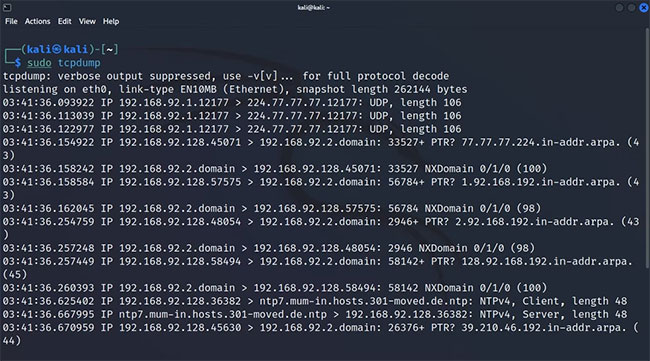
<p style="text-align: justify;">Bây giờ, tcpdump sẽ bắt đầu tự động nắm bắt các gói mạng cho đến khi tín hiệu ngắt được gửi bằng phím tắt&nbsp;<strong>Ctrl + Z</strong>, phá vỡ quá trình theo cách thủ công. Để giới hạn tổng số gói được nắm bắt, hãy sử dụng flag -c và nhập giới hạn gói mong muốn bên cạnh:</p>

<pre id="pre4">
<code>sudo tcpdump -c 5</code></pre>

<figure>
<div style="text-align: justify;"><img alt="Đánh giá lưu lượng mạng bằng tcpdump" data-i="0" data-src="https://st.quantrimang.com/photos/image/2022/07/04/su-dung-tcpdump-de-phan-tich-luu-luong-1.jpg" data-was-processed="true" height="361" src="https://st.quantrimang.com/photos/image/2022/07/04/su-dung-tcpdump-de-phan-tich-luu-luong-1.jpg" width="650" /></div>

<figcaption>
<div style="text-align: justify;">Đánh giá lưu lượng mạng bằng tcpdump</div>
</figcaption>
</figure>

<p style="text-align: justify;">Nếu không thể hiểu đầu ra ngay bây giờ, trước tiên, bạn cần phải làm quen với định dạng đầu ra tcpdump.</p>

<h2 style="text-align: justify;">Kiểm tra interface mạng khả dụng với tcpdump</h2>

<p style="text-align: justify;">Theo mặc định, tcpdump nắm bắt lưu lượng truy cập từ bất kỳ interface mạng nào có sẵn. Nếu có nhiều interface mạng đang hoạt động, bạn có thể muốn xác định interface mạng mà từ đó tcpdump sẽ nắm bắt các gói tin. Để bắt đầu tcpdump trên một interface cụ thể, trước tiên bạn sẽ phải tìm hiểu về tên interface</p>

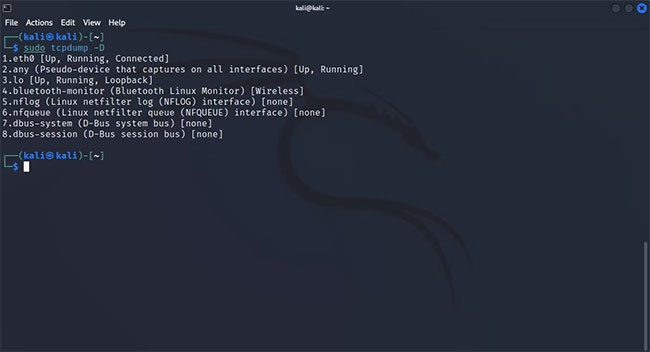
<p style="text-align: justify;">Dưới đây là cách liệt kê tất cả các interface mạng có sẵn với tcpdump:</p>

<pre id="pre5">
<code>sudo tcpdump -D</code></pre>

<p style="text-align: justify;">Hoặc, bạn có thể thêm flag&nbsp;<strong>--list-interface</strong>&nbsp;vào lệnh:</p>

<pre id="pre6">
<code>sudo tcpdump --list-interfaces</code></pre>

<figure>
<div style="text-align: justify;"><img alt="Kiểm tra các interface mạng có sẵn bằng tcpdump" data-i="1" data-src="https://st.quantrimang.com/photos/image/2022/07/04/su-dung-tcpdump-de-phan-tich-luu-luong-2.jpg" data-was-processed="true" height="352" src="https://st.quantrimang.com/photos/image/2022/07/04/su-dung-tcpdump-de-phan-tich-luu-luong-2.jpg" width="650" /></div>

<figcaption>
<div style="text-align: justify;">Kiểm tra các interface mạng có sẵn bằng tcpdump</div>
</figcaption>
</figure>

<p style="text-align: justify;">Kết quả trả về chứa danh sách tất cả các interface mạng đang hoạt động mà tcpdump có thể lắng nghe. Để cấu hình tcpdump nắm bắt các quá trình truyền từ một interface mạng cụ thể, hãy nhập lệnh sau:</p>

<pre id="pre7">
<code>sudo tcpdump -i interface_id</code></pre>

<p style="text-align: justify;">Hoặc, bạn có thể thêm flag&nbsp;<strong>--interface</strong>&nbsp;vào lệnh:</p>

<pre id="pre8">
<code>sudo tcpdump --interface interface_id</code></pre>

<p style="text-align: justify;">Bây giờ, bạn đã nắm bắt được một vài gói tin, hãy nghiên cứu kỹ chúng và tìm hiểu cách bạn có thể điều chỉnh đầu ra để dễ đọc hơn.</p>

<h2 style="text-align: justify;">Khám phá các bộ lọc tcpdump</h2>

<p style="text-align: justify;">Tcpdump có khả năng thu hút một lượng lớn lưu lượng truy cập trong một lần chạy. Tình trạng quá tải thông tin như vậy có thể khiến bạn chệch hướng khi điều tra hoặc khắc phục sự cố với host hoặc giao thức mạng cụ thể.</p>

<p style="text-align: justify;">Đây là nơi mà các bộ lọc tcpdump phát huy tác dụng. Bạn có thể nối lệnh tcpdump với một số flag nhất định để lọc ra lưu lượng mạng và nắm bắt các gói tin cụ thể. Sau đó, bạn có thể lưu trữ các gói tin này, sau đó phân tích chúng để tìm ra gốc rễ của bất kỳ vấn đề nào liên quan đến mạng. Hãy cùng tìm hiểu cách sử dụng bộ lọc trong tcpdump.</p>

<h3 style="text-align: justify;">Lọc gói dựa trên giao thức mạng đang được sử dụng</h3>

<p style="text-align: justify;">Để lọc các gói được truyền qua một giao thức cụ thể, hãy nhập tên giao thức bằng lệnh tcpdump và nó sẽ chỉ nắm bắt các gói truyền qua giao thức mạng đã xác định.</p>

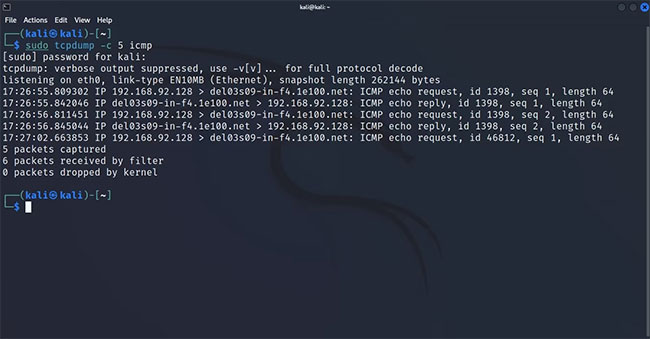
<p style="text-align: justify;">Ví dụ, để nắm bắt các gói dựa trên ICMP, bạn chỉ cần đính kèm icmp vào cuối lệnh tcpdump. Quá trình này cũng giống như vậy nếu bạn chỉ muốn nắm bắt các gói UDP hoặc TCP.</p>

<pre id="pre9">
<code>sudo tcpdump -c 5 icmp</code></pre>

<p style="text-align: justify;">Lệnh này sẽ chỉ trả về đầu ra nếu có sự trao đổi dữ liệu thông qua giao thức ICMP.</p>

<figure>
<div style="text-align: justify;"><img alt="Lọc lưu lượng trên cơ sở giao thức mạng" data-i="2" data-src="https://st.quantrimang.com/photos/image/2022/07/04/su-dung-tcpdump-de-phan-tich-luu-luong-3.jpg" data-was-processed="true" height="339" src="https://st.quantrimang.com/photos/image/2022/07/04/su-dung-tcpdump-de-phan-tich-luu-luong-3.jpg" width="650" /></div>

<figcaption>
<div style="text-align: justify;">Lọc lưu lượng trên cơ sở giao thức mạng</div>
</figcaption>
</figure>

<h3 style="text-align: justify;">Lọc gói dựa trên host</h3>

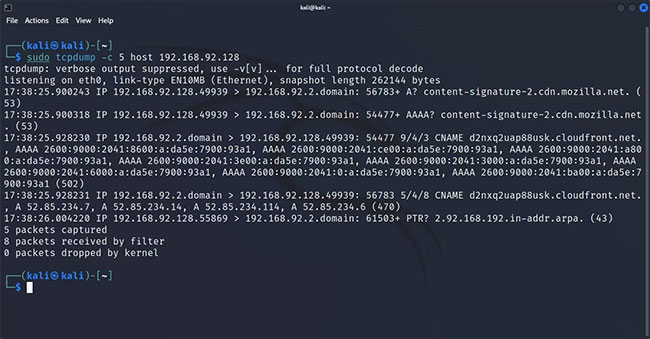
<p style="text-align: justify;">Bạn có thể cấu hình tcpdump để nắm bắt các gói liên quan đến một host duy nhất với tham số host. Điều này đặc biệt hữu ích khi tất cả các hệ thống trong mạng của bạn đang hoạt động ngoại trừ một hệ thống. Bộ lọc này cho phép bạn thực hiện điều tra được nhắm mục tiêu và tăng tốc quy trình xử lý sự cố tổng thể vì bạn không bị phân tâm bởi dữ liệu không cần thiết.</p>

<p style="text-align: justify;">Để nắm bắt các gói liên quan đến một host cụ thể, hãy xác định địa chỉ mạng của host với tham số host:</p>

<pre id="pre10">
<code>sudo tcpdump -c 5 host 192.168.2.1</code></pre>

<p style="text-align: justify;">Tương tự như bộ lọc giao thức mạng, lệnh này sẽ chỉ trả về đầu ra nếu bất kỳ quá trình truyền đang diễn ra nào có liên quan đến host đã xác định.</p>

<figure>
<div style="text-align: justify;"><img alt="Lọc gói dựa trên host" data-i="3" data-src="https://st.quantrimang.com/photos/image/2022/07/04/su-dung-tcpdump-de-phan-tich-luu-luong-4.jpg" data-was-processed="true" height="339" src="https://st.quantrimang.com/photos/image/2022/07/04/su-dung-tcpdump-de-phan-tich-luu-luong-4.jpg" width="650" /></div>

<figcaption>
<div style="text-align: justify;">Lọc gói dựa trên host</div>
</figcaption>
</figure>

<h3 style="text-align: justify;">Lọc gói dựa trên cổng hoạt động</h3>

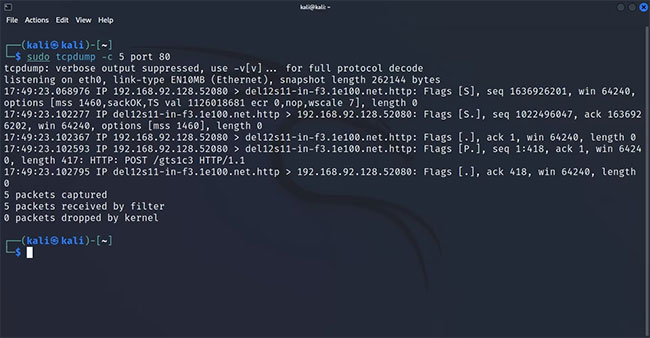
<p style="text-align: justify;">Tcpdump được trang bị một tham số cho phép bạn lọc lưu lượng mạng và chỉ nắm bắt các gói được truyền đến hoặc từ một cổng cụ thể.</p>

<p style="text-align: justify;">Để nắm bắt các gói đến từ một cổng cụ thể, hãy gắn flag cổng vào lệnh tcpdump và xác định số cổng bên cạnh nó. Ví dụ, để nắm bắt mọi lưu lượng HTTP đến hoặc đi, hãy xác định cổng 80:</p>

<pre id="pre11">
<code>sudo tcpdump -c 5 port 80</code></pre>

<p style="text-align: justify;">Tcpdump sẽ lắng nghe trên cổng 80, chờ truyền HTTP. Khi phát hiện các gói HTTP trong mạng, nó sẽ nắm bắt chúng.</p>

<figure>
<div style="text-align: justify;"><img alt="Lọc gói dựa trên cổng hoạt động" data-i="4" data-src="https://st.quantrimang.com/photos/image/2022/07/04/su-dung-tcpdump-de-phan-tich-luu-luong-5.jpg" data-was-processed="true" height="338" src="https://st.quantrimang.com/photos/image/2022/07/04/su-dung-tcpdump-de-phan-tich-luu-luong-5.jpg" width="650" /></div>

<figcaption>
<div style="text-align: justify;">Lọc gói dựa trên cổng hoạt động</div>
</figcaption>
</figure>

<h3 style="text-align: justify;">Kết hợp các bộ lọc với nhau để phân loại nâng cao</h3>

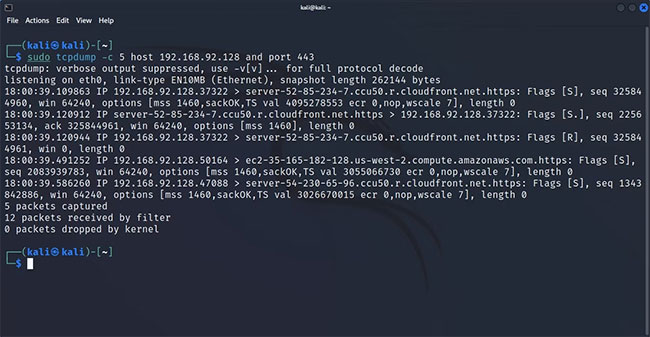
<p style="text-align: justify;">Các phần trước đã thảo luận về cách bạn có thể lọc lưu lượng dựa trên cổng, giao thức hoặc host, nhưng nếu bạn muốn nắm bắt lưu lượng truy cập từ một cổng của một host cụ thể bằng một giao thức mạng cụ thể thì sao? Chà, bạn thật may mắn vì điều này là có thể, do khả năng sử dụng các toán tử logic với lệnh tcpdump.</p>

<p style="text-align: justify;">Để nắm bắt các gói từ một host riêng lẻ bằng cách sử dụng cổng 443, hãy sử dụng lệnh sau:</p>

<pre id="pre12">
<code>sudo tcpdump -c 5 host 192.168.2.1 and port 443</code></pre>

<figure>
<div style="text-align: justify;"><img alt="Kết hợp các bộ lọc với nhau để phân loại nâng cao" data-i="5" data-src="https://st.quantrimang.com/photos/image/2022/07/04/su-dung-tcpdump-de-phan-tich-luu-luong-6.jpg" data-was-processed="true" height="337" src="https://st.quantrimang.com/photos/image/2022/07/04/su-dung-tcpdump-de-phan-tich-luu-luong-6.jpg" width="650" /></div>

<figcaption>
<div style="text-align: justify;">Kết hợp các bộ lọc với nhau để phân loại nâng cao</div>
</figcaption>
</figure>

<h2 style="text-align: justify;">Kiểm tra nội dung của các gói đã nắm bắt</h2>

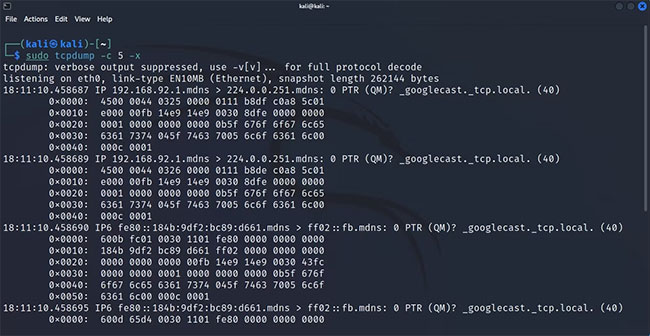
<p style="text-align: justify;">Theo mặc định, tcpdump hiển thị các tiêu đề của một gói trong đầu ra. Mặc dù trong hầu hết các trường hợp như vậy là quá đủ, nhưng đôi khi, bạn có thể muốn hoặc cần xem xét sâu hơn dữ liệu đã thu thập. Bạn có thể chuyển một số tham số nhất định bằng lệnh tcpdump để kiểm tra nội dung của gói đã nắm bắt.</p>

<p style="text-align: justify;">Đây là cách xem nội dung của các gói:</p>

<pre id="pre13">
<code>sudo tcpdump -c 5 -x</code></pre>

<figure>
<div style="text-align: justify;"><img alt="Xem nội dung của các gói" data-i="6" data-src="https://st.quantrimang.com/photos/image/2022/07/04/su-dung-tcpdump-de-phan-tich-luu-luong-7.jpg" data-was-processed="true" height="336" src="https://st.quantrimang.com/photos/image/2022/07/04/su-dung-tcpdump-de-phan-tich-luu-luong-7.jpg" width="650" /></div>

<figcaption>
<div style="text-align: justify;">Xem nội dung của các gói</div>
</figcaption>
</figure>

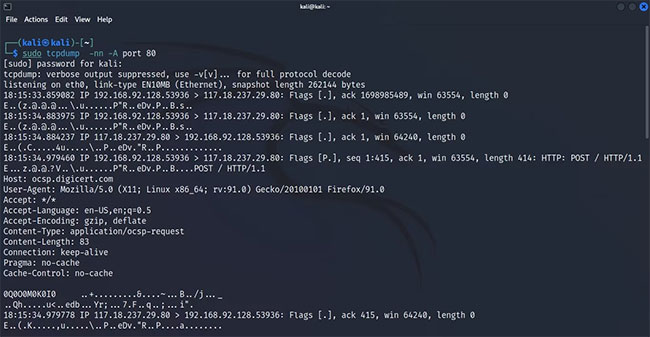
<p style="text-align: justify;">Lệnh này trả về phiên bản hex của nội dung trong một gói được nắm bắt. Nếu bạn muốn xem dạng ASCII của dữ liệu, bạn có thể chuyển tham số&nbsp;<strong>-A</strong>&nbsp;với:</p>

<pre id="pre14">
<code>sudo tcpdump -A</code></pre>

<figure>
<div style="text-align: justify;"><img alt="Xem dạng ASCII của dữ liệu" data-i="7" data-src="https://st.quantrimang.com/photos/image/2022/07/04/su-dung-tcpdump-de-phan-tich-luu-luong-8.jpg" data-was-processed="true" height="337" src="https://st.quantrimang.com/photos/image/2022/07/04/su-dung-tcpdump-de-phan-tich-luu-luong-8.jpg" width="650" /></div>

<figcaption>
<div style="text-align: justify;">Xem dạng ASCII của dữ liệu</div>
</figcaption>
</figure>

<h2 style="text-align: justify;">Lưu đầu ra tcpdump vào một file</h2>

<p style="text-align: justify;">Giống như hầu hết các công cụ dòng lệnh Linux khác, bạn có thể lưu trữ kết quả đầu ra do tcpdump tạo ra thành một file để tham chiếu sau này.</p>

<p style="text-align: justify;">Điều này có thể được thực hiện bằng cách thêm flag&nbsp;<strong>-w</strong>&nbsp;vào lệnh. Sau khi thực thi, tcpdump sẽ lưu trữ dữ liệu đã nắm bắt vào một file .pcap để sau này có thể phân tích bằng tcpdump hoặc các công cụ giám sát mạng khác như&nbsp;Wireshark.</p>

<p style="text-align: justify;">Nhập lệnh này để lưu đầu ra lệnh tcpdump của bạn thành một file:</p>

<pre id="pre15">
<code>sudo tcpdump -w capture.pcap</code></pre>

<p style="text-align: justify;">Để đọc file .pcap, bạn có thể sử dụng tcpdump với tham số&nbsp;<strong>-r</strong>:</p>

<pre id="pre16">
<code>sudo tcpdump -r capture.pcap</code></pre>

<p style="text-align: justify;">Linux cung cấp rất nhiều công cụ mạng có thể giải quyết mọi vấn đề mạng miễn là nó thuộc về mặt phần mềm. Biết cách sử dụng một số công cụ mạng tốt nhất trong Linux chắc chắn sẽ rất hữu ích, cho dù bạn là một sysadmin quản lý mạng để kiếm sống hay chỉ là một người dùng Linux hàng ngày.</p>

<p style="text-align: justify;">Vì danh sách thực tế các lệnh mạng có sẵn có thể quá khó hiểu, đây là&nbsp;danh sách một số công cụ mạng Linux quan trọng nhất&nbsp;mà bạn nên biết.</p>
		</div>
				<div id="author">
						<p>
				<strong>Nguồn tin:</strong>
				Quantrimang.com
			</p>
		</div>
	</div>
	<div id="footer" class="clearfix">
		<div id="url">
			<strong>URL của bản tin này: </strong><a href="https://www.nguoicodonvn2008.info/vi/news/savefile/kien-thuc-may-tinh/su-dung-tcpdump-de-phan-tich-luu-luong-5811.html" title="Sử dụng tcpdump để phân tích lưu lượng">https://www.nguoicodonvn2008.info/vi/news/savefile/kien-thuc-may-tinh/su-dung-tcpdump-de-phan-tich-luu-luong-5811.html</a>

		</div>
		<div class="clear"></div>
		<div class="copyright">
			&copy; .&#x3A; Nguoicodonvn2008.info - Cõi lòng người cô đơn &#x3A;.
		</div>
		<div id="contact">
			<a href="mailto:admin@nguoicodonvn2008.info">admin@nguoicodonvn2008.info</a>
		</div>
	</div>
</div>
        <div id="timeoutsess" class="chromeframe">
            Bạn đã không sử dụng Site, <a onclick="timeoutsesscancel();" href="https://nguoicodonvn2008.info/#">Bấm vào đây để duy trì trạng thái đăng nhập</a>. Thời gian chờ: <span id="secField"> 60 </span> giây
        </div>
        <div id="openidResult" class="nv-alert" style="display:none"></div>
        <div id="openidBt" data-result="" data-redirect=""></div>
		</script>
		<div class="car-top">
  <span><img src="https://nguoicodonvn2008.info/themes/default/images/car.png" alt=""></span>
</div>
<div id="run_cronjobs" style="visibility:hidden;display:none;"><img alt="cron" src="/index.php?second=cronjobs&amp;p=u56qjPTy" width="1" height="1" /></div>
<script src="https://nguoicodonvn2008.info/assets/js/jquery/jquery.min.js"></script>
<script>var nv_base_siteurl="/",nv_lang_data="vi",nv_lang_interface="vi",nv_name_variable="nv",nv_fc_variable="op",nv_lang_variable="language",nv_module_name="news",nv_func_name="savefile",nv_is_user=0, nv_my_ofs=-4,nv_my_abbr="EDT",nv_cookie_prefix="nv4c_e856T",nv_check_pass_mstime=1738000,nv_area_admin=0,nv_safemode=0,theme_responsive=0,nv_recaptcha_ver=2,nv_recaptcha_sitekey="",nv_recaptcha_type="image",XSSsanitize=1;</script>
<script src="https://nguoicodonvn2008.info/assets/js/language/vi.js"></script>
<script src="https://nguoicodonvn2008.info/assets/js/DOMPurify/purify3.js"></script>
<script src="https://nguoicodonvn2008.info/assets/js/global.js"></script>
<script src="https://nguoicodonvn2008.info/assets/js/site.js"></script>
<script src="https://nguoicodonvn2008.info/themes/default/js/news.js"></script>
<script src="https://nguoicodonvn2008.info/themes/default/js/main.js"></script>
<script src="https://nguoicodonvn2008.info/themes/default/js/custom.js"></script>
<script type="application/ld+json">
        {
            "@context": "https://schema.org",
            "@type": "Organization",
            "url": "https://nguoicodonvn2008.info",
            "logo": "https://nguoicodonvn2008.info/uploads/angel.gif"
        }
        </script>
<script src="https://nguoicodonvn2008.info/themes/default/js/bootstrap.min.js"></script>
<script type="text/javascript">
var $scrolltop = $('.car-top');
$scrolltop.on('click', function () {
    $('html,body').animate({
        scrollTop: 0
    }, 800);
    $(this).addClass("car-run");
    setTimeout(function(){ $scrolltop.removeClass('car-run');}, 1000);
    return false;
});
$(window).on('scroll', function ()
{ 
    if($(window).scrollTop() >= 200)
    {
        $scrolltop.addClass("show");
        $scrolltop.addClass("car-down");
    }
    else
    {
       $scrolltop.removeClass("show");
       setTimeout(function(){ $scrolltop.removeClass('car-down');}, 300);
    }
});
</script>
</body>
</html>