<!DOCTYPE html>
    <html lang="vi" xmlns="http://www.w3.org/1999/xhtml" prefix="og: http://ogp.me/ns#">
    <head>
<title>SMB là gì? Cách vô hiệu hóa SMB3 trong Windows 10</title>
<meta name="description" content="SMB là gì? Cách vô hiệu hóa SMB3 trong Windows 10 - Savefile - Tin Tức -...">
<meta name="author" content=".: Nguoicodonvn2008.info - Cõi lòng người cô đơn :.">
<meta name="copyright" content=".: Nguoicodonvn2008.info - Cõi lòng người cô đơn :. [admin@nguoicodonvn2008.info]">
<meta name="robots" content="index, archive, follow, noodp">
<meta name="googlebot" content="index,archive,follow,noodp">
<meta name="msnbot" content="all,index,follow">
<meta name="generator" content="NukeViet v4.5">
<meta http-equiv="Content-Type" content="text/html; charset=utf-8">
<meta property="og:title" content="SMB là gì? Cách vô hiệu hóa SMB3 trong Windows 10">
<meta property="og:type" content="website">
<meta property="og:description" content="Savefile - Tin Tức - https&#x3A;&#x002F;&#x002F;www.nguoicodonvn2008.info&#x002F;vi&#x002F;news&#x002F;savefile&#x002F;kien-thuc-may-tinh&#x002F;smb-la-gi-cach-vo-hieu-hoa-smb3-trong-windows-10-1855.html">
<meta property="og:site_name" content=".&#x3A; Nguoicodonvn2008.info - Cõi lòng người cô đơn &#x3A;.">
<meta property="og:url" content="https://www.nguoicodonvn2008.info/vi/news/savefile/kien-thuc-may-tinh/smb-la-gi-cach-vo-hieu-hoa-smb3-trong-windows-10-1855.html">
<link rel="shortcut icon" href="https://nguoicodonvn2008.info/favicon.ico">
<link rel="canonical" href="https://www.nguoicodonvn2008.info/vi/news/savefile/kien-thuc-may-tinh/smb-la-gi-cach-vo-hieu-hoa-smb3-trong-windows-10-1855.html">
<link rel="alternate" href="https://nguoicodonvn2008.info/vi/news/rss/" title="Tin Tức" type="application/rss+xml">
<link rel="alternate" href="https://nguoicodonvn2008.info/vi/news/rss/karaoke-dual/" title="Tin Tức - Karaoke Dual" type="application/rss+xml">
<link rel="alternate" href="https://nguoicodonvn2008.info/vi/news/rss/nhac-tre/" title="Tin Tức - Nhạc trẻ" type="application/rss+xml">
<link rel="alternate" href="https://nguoicodonvn2008.info/vi/news/rss/tru-tinh/" title="Tin Tức - Trữ tình" type="application/rss+xml">
<link rel="alternate" href="https://nguoicodonvn2008.info/vi/news/rss/nuoc-ngoai/" title="Tin Tức - Nước ngoài" type="application/rss+xml">
<link rel="alternate" href="https://nguoicodonvn2008.info/vi/news/rss/remix/" title="Tin Tức - Remix" type="application/rss+xml">
<link rel="alternate" href="https://nguoicodonvn2008.info/vi/news/rss/tam-su-tinh-yeu/" title="Tin Tức - Tâm sự tình yêu" type="application/rss+xml">
<link rel="alternate" href="https://nguoicodonvn2008.info/vi/news/rss/tho-suu-tam/" title="Tin Tức - Thơ sưu tầm" type="application/rss+xml">
<link rel="alternate" href="https://nguoicodonvn2008.info/vi/news/rss/cuoc-song/" title="Tin Tức - Cuộc sống" type="application/rss+xml">
<link rel="alternate" href="https://nguoicodonvn2008.info/vi/news/rss/phan-mem/" title="Tin Tức - Phần mềm" type="application/rss+xml">
<link rel="alternate" href="https://nguoicodonvn2008.info/vi/news/rss/kien-thuc-may-tinh/" title="Tin Tức - Kiến thức máy tính" type="application/rss+xml">
<link rel="alternate" href="https://nguoicodonvn2008.info/vi/news/rss/hoc-tap/" title="Tin Tức - Học tập" type="application/rss+xml">
<link rel="alternate" href="https://nguoicodonvn2008.info/vi/news/rss/tai-lieu/" title="Tin Tức - Tài liệu" type="application/rss+xml">
<link rel="alternate" href="https://nguoicodonvn2008.info/vi/news/rss/de-thi/" title="Tin Tức - Đề thi" type="application/rss+xml">
<link rel="preload" as="style" href="https://nguoicodonvn2008.info/assets/css/font-awesome.min.css" type="text/css">
<link rel="preload" as="style" href="https://nguoicodonvn2008.info/themes/default/css/bootstrap.non-responsive.css" type="text/css">
<link rel="preload" as="style" href="https://nguoicodonvn2008.info/themes/default/css/style.css" type="text/css">
<link rel="preload" as="style" href="https://nguoicodonvn2008.info/themes/default/css/style.non-responsive.css" type="text/css">
<link rel="preload" as="style" href="https://nguoicodonvn2008.info/themes/default/css/news.css" type="text/css">
<link rel="preload" as="style" href="https://nguoicodonvn2008.info/themes/default/css/custom.css" type="text/css">
<link rel="preload" as="script" href="https://nguoicodonvn2008.info/assets/js/jquery/jquery.min.js" type="text/javascript">
<link rel="preload" as="script" href="https://nguoicodonvn2008.info/assets/js/language/vi.js" type="text/javascript">
<link rel="preload" as="script" href="https://nguoicodonvn2008.info/assets/js/DOMPurify/purify3.js" type="text/javascript">
<link rel="preload" as="script" href="https://nguoicodonvn2008.info/assets/js/global.js" type="text/javascript">
<link rel="preload" as="script" href="https://nguoicodonvn2008.info/assets/js/site.js" type="text/javascript">
<link rel="preload" as="script" href="https://nguoicodonvn2008.info/themes/default/js/news.js" type="text/javascript">
<link rel="preload" as="script" href="https://nguoicodonvn2008.info/themes/default/js/main.js" type="text/javascript">
<link rel="preload" as="script" href="https://nguoicodonvn2008.info/themes/default/js/custom.js" type="text/javascript">
<link rel="preload" as="script" href="https://nguoicodonvn2008.info/themes/default/js/bootstrap.min.js" type="text/javascript">
<link rel="stylesheet" href="https://nguoicodonvn2008.info/assets/css/font-awesome.min.css">
<link rel="stylesheet" href="https://nguoicodonvn2008.info/themes/default/css/bootstrap.non-responsive.css">
<link rel="stylesheet" href="https://nguoicodonvn2008.info/themes/default/css/style.css">
<link rel="stylesheet" href="https://nguoicodonvn2008.info/themes/default/css/style.non-responsive.css">
<link rel="StyleSheet" href="https://nguoicodonvn2008.info/themes/default/css/news.css">
<link rel="stylesheet" href="https://nguoicodonvn2008.info/themes/default/css/custom.css">
<style type="text/css">
	body{background: #fff;}
</style>
    </head>
    <body>
<div id="print">
	<div id="hd_print">
		<h2 class="pull-left">.&#x3A; Nguoicodonvn2008.info - Cõi lòng người cô đơn &#x3A;.</h2>
		<p class="pull-right"><a title=".&#x3A; Nguoicodonvn2008.info - Cõi lòng người cô đơn &#x3A;." href="https://nguoicodonvn2008.info/">https://nguoicodonvn2008.info</a></p>
	</div>
	<div class="clear"></div>
	<hr />
	<div id="content">
		<h1>SMB là gì? Cách vô hiệu hóa SMB3 trong Windows 10</h1>
		<ul class="list-inline">
			<li>Thứ tư - 18/03/2020 02:03</li>
			<li class="hidden-print txtrequired"><em class="fa fa-print">&nbsp;</em><a title="In ra" href="javascript:;" onclick="window.print()">In ra</a></li>
			<li class="hidden-print txtrequired"><em class="fa fa-power-off">&nbsp;</em><a title="Đóng cửa sổ này" href="javascript:;" onclick="window.close()">Đóng cửa sổ này</a></li>
		</ul>
		<div class="clear"></div>
		<div id="hometext">
		</div>
				<div class="imghome">
			<img alt="SMB là gì? Cách vô hiệu hóa SMB3 trong Windows 10" src="https://st.quantrimang.com/photos/image/2020/03/17/vo-hieu-hoa-smb3-1.jpg" width="460" class="img-thumbnail" />
		</div>
		<div class="clear"></div>
		<div id="bodytext" class="clearfix">
			<p style="text-align: justify;">Giao thức SMB2 và/hoặc SMB3 được bật theo mặc định trong Windows. Nếu bạn cần, đây là các bước để vô hiệu hóa SMB2 và SMB3 trong Windows. Nếu bạn không biết SMB là gì, hãy kéo xuống cuối bài viết để tìm hiểu thêm về giao thức này nhé.</p>

<p style="text-align: justify;"><strong>Lưu ý</strong>: SMB2 và SMB3 được liên kết với nhau. Vì vậy, kích hoạt hoặc vô hiệu hóa SMB2 sẽ dẫn đến điều tương tự cho SMB3.</p>

<p style="text-align: justify;">Để vô hiệu hóa SMB3, bạn có thể sử dụng&nbsp;PowerShell&nbsp;hoặc&nbsp;Command Prompt. Hãy thực hiện theo cách bạn cảm thấy quen thuộc.</p>

<h2 style="text-align: justify;">Vô hiệu hóa SMB3 bằng PowerShell (nên dùng)</h2>

<p style="text-align: justify;">1.&nbsp;Mở PowerShell với quyền admin.</p>

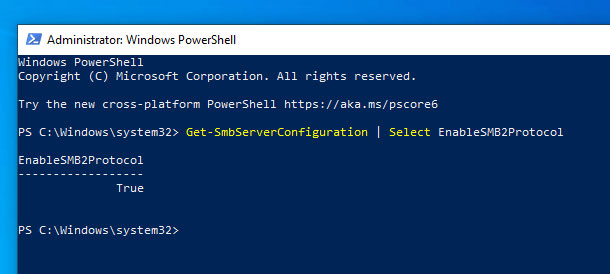
<p style="text-align: justify;">2. Tiếp theo, xác minh rằng SMB3 được kích hoạt bằng cách thực thi lệnh bên dưới. Nếu giao thức được kích hoạt, bạn sẽ thấy&nbsp;<strong>&quot;true&quot;</strong>&nbsp;trong phản hồi.</p>

<pre id="pre0">
<code>Get-SmbServerConfiguration | Select EnableSMB2Protocol</code></pre>

<figure>
<div style="text-align: justify;"><img alt="Nếu giao thức được kích hoạt, bạn sẽ thấy &#039;true&#039; trong phản hồi" data-i="0" data-src="https://st.quantrimang.com/photos/image/2020/03/17/vo-hieu-hoa-smb3-1.jpg" data-was-processed="true" height="274" src="https://st.quantrimang.com/photos/image/2020/03/17/vo-hieu-hoa-smb3-1.jpg" width="610" /></div>

<figcaption>
<div style="text-align: justify;">Nếu giao thức được kích hoạt, bạn sẽ thấy &quot;true&quot; trong phản hồi</div>
</figcaption>
</figure>

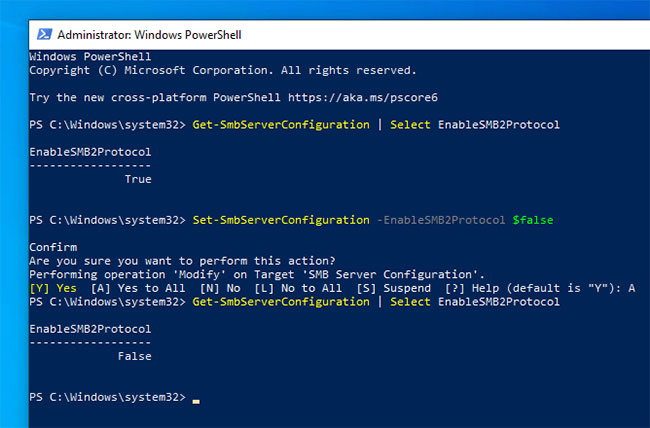
<p style="text-align: justify;">3. Để tắt SMB3, hãy thực thi lệnh này.</p>

<pre id="pre1">
<code>Set-SmbServerConfiguration -EnableSMB2Protocol $false</code></pre>

<p style="text-align: justify;">4. PowerShell sẽ yêu cầu xác nhận của bạn, nhập&nbsp;<code>Y</code>&nbsp;hoặc&nbsp;<code>A</code>&nbsp;và nhấn&nbsp;<code>Enter</code>&nbsp;để xác nhận.</p>

<p style="text-align: justify;">5. Khi bị vô hiệu hóa, bạn có thể xác minh nó bằng cách thực thi lệnh đầu tiên. Nếu giao thức bị vô hiệu hóa, bạn sẽ thấy&nbsp;<strong>&quot;false&quot;.</strong></p>

<figure>
<div style="text-align: justify;"><img alt="Nếu giao thức bị vô hiệu hóa, bạn sẽ thấy &#039;false&#039;" data-i="1" data-src="https://st.quantrimang.com/photos/image/2020/03/17/vo-hieu-hoa-smb3-2.jpg" data-was-processed="true" height="428" src="https://st.quantrimang.com/photos/image/2020/03/17/vo-hieu-hoa-smb3-2.jpg" width="650" /></div>

<figcaption>
<div style="text-align: justify;">Nếu giao thức bị vô hiệu hóa, bạn sẽ thấy &quot;false&quot;</div>
</figcaption>
</figure>

<p style="text-align: justify;">6. Cuối cùng, khởi động lại Windows để áp dụng các thay đổi.</p>

<p style="text-align: justify;">Để kích hoạt lại SMB3, bạn có thể sử dụng lệnh bên dưới.</p>

<pre id="pre2">
<code>Set-SmbServerConfiguration -EnableSMB2Protocol $true</code></pre>

<div style="text-align: justify;">&nbsp;</div>

<h2 style="text-align: justify;">Vô hiệu hóa SMB3 bằng Command Prompt</h2>

<p style="text-align: justify;">Bạn cũng có thể sử dụng Command Prompt để vô hiệu hóa SMB3. Vấn đề duy nhất là nó không trực quan như phương thức PowerShell, nhưng dù sao cũng có tác dụng.</p>

<p style="text-align: justify;">1.&nbsp;Chạy Command Prompt với quyền admin.</p>

<p style="text-align: justify;">2. Trong cửa sổ Command Prompt, thực thi lần lượt các lệnh bên dưới.</p>

<pre id="pre3">
<code>sc.exe config lanmanworkstation depend= bowser/mrxsmb10/nsi</code></pre>

<pre id="pre4">
<code>sc.exe config mrxsmb20 start= disabled</code></pre>

<p style="text-align: justify;">3. Khi đã xong, khởi động lại Windows để áp dụng các thay đổi. Sau khi khởi động lại, giao thức SMB3 sẽ bị vô hiệu hóa.</p>

<p style="text-align: justify;">Để kích hoạt lại giao thức SMB3, hãy mở Command Prompt với quyền admin và thực thi lần lượt các lệnh bên dưới.</p>

<pre id="pre5">
<code>sc.exe config lanmanworkstation depend= bowser/mrxsmb10/mrxsmb20/nsi</code></pre>

<pre id="pre6">
<code>sc.exe config mrxsmb20 start= auto</code></pre>

<h2 style="text-align: justify;">SMB là gì?</h2>

<p style="text-align: justify;">Server Message Block hay SMB là giao thức mạng thuộc lớp ứng dụng, được Microsoft phát triển chủ yếu để truy cập chung vào các tệp, cổng nối tiếp và các giao tiếp khác nhau giữa các nút mạng. Nó cho phép các ứng dụng trên máy tính đọc và ghi vào file cũng như yêu cầu dịch vụ từ các chương trình trên máy chủ trong mạng máy tính.</p>

<p style="text-align: justify;">Với SMB, ứng dụng (hoặc người dùng ứng dụng) có thể truy cập vào file hoặc tài nguyên khác trên máy chủ từ xa, sau đó đọc, tạo và cập nhật file trên máy chủ. SMB cũng có thể giao tiếp với bất kỳ chương trình máy chủ nào được thiết lập để nhận yêu cầu từ máy khách SMB. SMB là một giao thức kết cấu được sử dụng bởi các công nghệ điện toán Trung tâm dữ liệu được định nghĩa bằng phần mềm (Software-defined Data Center - SDDC), chẳng hạn như Storage Spaces Direct, Storage Replica.</p>

<p style="text-align: justify;">Ban đầu, SMB được thiết kế trong IBM để tạo ra một hệ thống tệp được nối mạng cho DOS, nhưng sau đó Microsoft đã đổi tên SMB thành CIFS (Common Internet File System) và phát triển thêm. Phiên bản thứ hai - SMB 2.0, được giới thiệu trong Windows Vista với một loạt các tính năng mới, cải thiện hiệu suất và khả năng tương thích.</p>

<p style="text-align: justify;">Microsoft đã giới thiệu SMB 3.0 trên Windows Server 2012, bổ sung tính năng quan trọng, như SMB Direct (SMB qua RDMA) và SMB Multichannel (nhiều kết nối cho mỗi phiên SMB). Chúng được dự định để tăng cường chức năng và hiệu suất, đặc biệt là cho các trung tâm dữ liệu ảo hóa. Cùng với NFS, SMB hiện là một trong những giao thức mạng phổ biến nhất. Microsoft cũng đã thêm trình quản lý máy ảo (Virtual Machine Manager) của riêng mình vào giao thức, giúp các quản trị viên Windows thông thường dễ dàng thiết lập hơn.</p>

<p style="text-align: justify;">Những phát triển mới nhất trong công nghệ SMB là SMB 3.0.2 (trong Windows Server 2012 R2) và 3.1.1 (Windows Server 2016), được dành riêng cho các cải tiến bảo mật.</p>
		</div>
				<div id="author">
						<p>
				<strong>Nguồn tin:</strong>
				Quantrimang.com
			</p>
		</div>
	</div>
	<div id="footer" class="clearfix">
		<div id="url">
			<strong>URL của bản tin này: </strong><a href="https://www.nguoicodonvn2008.info/vi/news/savefile/kien-thuc-may-tinh/smb-la-gi-cach-vo-hieu-hoa-smb3-trong-windows-10-1855.html" title="SMB là gì? Cách vô hiệu hóa SMB3 trong Windows 10">https://www.nguoicodonvn2008.info/vi/news/savefile/kien-thuc-may-tinh/smb-la-gi-cach-vo-hieu-hoa-smb3-trong-windows-10-1855.html</a>

		</div>
		<div class="clear"></div>
		<div class="copyright">
			&copy; .&#x3A; Nguoicodonvn2008.info - Cõi lòng người cô đơn &#x3A;.
		</div>
		<div id="contact">
			<a href="mailto:admin@nguoicodonvn2008.info">admin@nguoicodonvn2008.info</a>
		</div>
	</div>
</div>
        <div id="timeoutsess" class="chromeframe">
            Bạn đã không sử dụng Site, <a onclick="timeoutsesscancel();" href="https://nguoicodonvn2008.info/#">Bấm vào đây để duy trì trạng thái đăng nhập</a>. Thời gian chờ: <span id="secField"> 60 </span> giây
        </div>
        <div id="openidResult" class="nv-alert" style="display:none"></div>
        <div id="openidBt" data-result="" data-redirect=""></div>
		</script>
		<div class="car-top">
  <span><img src="https://nguoicodonvn2008.info/themes/default/images/car.png" alt=""></span>
</div>
<div id="run_cronjobs" style="visibility:hidden;display:none;"><img alt="cron" src="/index.php?second=cronjobs&amp;p=i4515O4R" width="1" height="1" /></div>
<script src="https://nguoicodonvn2008.info/assets/js/jquery/jquery.min.js"></script>
<script>var nv_base_siteurl="/",nv_lang_data="vi",nv_lang_interface="vi",nv_name_variable="nv",nv_fc_variable="op",nv_lang_variable="language",nv_module_name="news",nv_func_name="savefile",nv_is_user=0, nv_my_ofs=-4,nv_my_abbr="EDT",nv_cookie_prefix="nv4c_e856T",nv_check_pass_mstime=1738000,nv_area_admin=0,nv_safemode=0,theme_responsive=0,nv_recaptcha_ver=2,nv_recaptcha_sitekey="",nv_recaptcha_type="image",XSSsanitize=1;</script>
<script src="https://nguoicodonvn2008.info/assets/js/language/vi.js"></script>
<script src="https://nguoicodonvn2008.info/assets/js/DOMPurify/purify3.js"></script>
<script src="https://nguoicodonvn2008.info/assets/js/global.js"></script>
<script src="https://nguoicodonvn2008.info/assets/js/site.js"></script>
<script src="https://nguoicodonvn2008.info/themes/default/js/news.js"></script>
<script src="https://nguoicodonvn2008.info/themes/default/js/main.js"></script>
<script src="https://nguoicodonvn2008.info/themes/default/js/custom.js"></script>
<script type="application/ld+json">
        {
            "@context": "https://schema.org",
            "@type": "Organization",
            "url": "https://nguoicodonvn2008.info",
            "logo": "https://nguoicodonvn2008.info/uploads/angel.gif"
        }
        </script>
<script src="https://nguoicodonvn2008.info/themes/default/js/bootstrap.min.js"></script>
<script type="text/javascript">
var $scrolltop = $('.car-top');
$scrolltop.on('click', function () {
    $('html,body').animate({
        scrollTop: 0
    }, 800);
    $(this).addClass("car-run");
    setTimeout(function(){ $scrolltop.removeClass('car-run');}, 1000);
    return false;
});
$(window).on('scroll', function ()
{ 
    if($(window).scrollTop() >= 200)
    {
        $scrolltop.addClass("show");
        $scrolltop.addClass("car-down");
    }
    else
    {
       $scrolltop.removeClass("show");
       setTimeout(function(){ $scrolltop.removeClass('car-down');}, 300);
    }
});
</script>
</body>
</html>