<!DOCTYPE html>
    <html lang="vi" xmlns="http://www.w3.org/1999/xhtml" prefix="og: http://ogp.me/ns#">
    <head>
<title>Những hàm DATE trong Excel bạn cần biết</title>
<meta name="description" content="Những hàm DATE trong Excel bạn cần biết - Savefile - Tin Tức -...">
<meta name="author" content=".: Nguoicodonvn2008.info - Cõi lòng người cô đơn :.">
<meta name="copyright" content=".: Nguoicodonvn2008.info - Cõi lòng người cô đơn :. [admin@nguoicodonvn2008.info]">
<meta name="robots" content="index, archive, follow, noodp">
<meta name="googlebot" content="index,archive,follow,noodp">
<meta name="msnbot" content="all,index,follow">
<meta name="generator" content="NukeViet v4.5">
<meta http-equiv="Content-Type" content="text/html; charset=utf-8">
<meta property="og:title" content="Những hàm DATE trong Excel bạn cần biết">
<meta property="og:type" content="website">
<meta property="og:description" content="Savefile - Tin Tức - https&#x3A;&#x002F;&#x002F;www.nguoicodonvn2008.info&#x002F;vi&#x002F;news&#x002F;savefile&#x002F;kien-thuc-may-tinh&#x002F;nhung-ham-date-trong-excel-ban-can-biet-7436.html">
<meta property="og:site_name" content=".&#x3A; Nguoicodonvn2008.info - Cõi lòng người cô đơn &#x3A;.">
<meta property="og:url" content="https://www.nguoicodonvn2008.info/vi/news/savefile/kien-thuc-may-tinh/nhung-ham-date-trong-excel-ban-can-biet-7436.html">
<link rel="shortcut icon" href="https://nguoicodonvn2008.info/favicon.ico">
<link rel="canonical" href="https://www.nguoicodonvn2008.info/vi/news/savefile/kien-thuc-may-tinh/nhung-ham-date-trong-excel-ban-can-biet-7436.html">
<link rel="alternate" href="https://nguoicodonvn2008.info/vi/news/rss/" title="Tin Tức" type="application/rss+xml">
<link rel="alternate" href="https://nguoicodonvn2008.info/vi/news/rss/karaoke-dual/" title="Tin Tức - Karaoke Dual" type="application/rss+xml">
<link rel="alternate" href="https://nguoicodonvn2008.info/vi/news/rss/nhac-tre/" title="Tin Tức - Nhạc trẻ" type="application/rss+xml">
<link rel="alternate" href="https://nguoicodonvn2008.info/vi/news/rss/tru-tinh/" title="Tin Tức - Trữ tình" type="application/rss+xml">
<link rel="alternate" href="https://nguoicodonvn2008.info/vi/news/rss/nuoc-ngoai/" title="Tin Tức - Nước ngoài" type="application/rss+xml">
<link rel="alternate" href="https://nguoicodonvn2008.info/vi/news/rss/remix/" title="Tin Tức - Remix" type="application/rss+xml">
<link rel="alternate" href="https://nguoicodonvn2008.info/vi/news/rss/tam-su-tinh-yeu/" title="Tin Tức - Tâm sự tình yêu" type="application/rss+xml">
<link rel="alternate" href="https://nguoicodonvn2008.info/vi/news/rss/tho-suu-tam/" title="Tin Tức - Thơ sưu tầm" type="application/rss+xml">
<link rel="alternate" href="https://nguoicodonvn2008.info/vi/news/rss/cuoc-song/" title="Tin Tức - Cuộc sống" type="application/rss+xml">
<link rel="alternate" href="https://nguoicodonvn2008.info/vi/news/rss/phan-mem/" title="Tin Tức - Phần mềm" type="application/rss+xml">
<link rel="alternate" href="https://nguoicodonvn2008.info/vi/news/rss/kien-thuc-may-tinh/" title="Tin Tức - Kiến thức máy tính" type="application/rss+xml">
<link rel="alternate" href="https://nguoicodonvn2008.info/vi/news/rss/hoc-tap/" title="Tin Tức - Học tập" type="application/rss+xml">
<link rel="alternate" href="https://nguoicodonvn2008.info/vi/news/rss/tai-lieu/" title="Tin Tức - Tài liệu" type="application/rss+xml">
<link rel="alternate" href="https://nguoicodonvn2008.info/vi/news/rss/de-thi/" title="Tin Tức - Đề thi" type="application/rss+xml">
<link rel="preload" as="style" href="https://nguoicodonvn2008.info/assets/css/font-awesome.min.css" type="text/css">
<link rel="preload" as="style" href="https://nguoicodonvn2008.info/themes/default/css/bootstrap.non-responsive.css" type="text/css">
<link rel="preload" as="style" href="https://nguoicodonvn2008.info/themes/default/css/style.css" type="text/css">
<link rel="preload" as="style" href="https://nguoicodonvn2008.info/themes/default/css/style.non-responsive.css" type="text/css">
<link rel="preload" as="style" href="https://nguoicodonvn2008.info/themes/default/css/news.css" type="text/css">
<link rel="preload" as="style" href="https://nguoicodonvn2008.info/themes/default/css/custom.css" type="text/css">
<link rel="preload" as="script" href="https://nguoicodonvn2008.info/assets/js/jquery/jquery.min.js" type="text/javascript">
<link rel="preload" as="script" href="https://nguoicodonvn2008.info/assets/js/language/vi.js" type="text/javascript">
<link rel="preload" as="script" href="https://nguoicodonvn2008.info/assets/js/DOMPurify/purify3.js" type="text/javascript">
<link rel="preload" as="script" href="https://nguoicodonvn2008.info/assets/js/global.js" type="text/javascript">
<link rel="preload" as="script" href="https://nguoicodonvn2008.info/assets/js/site.js" type="text/javascript">
<link rel="preload" as="script" href="https://nguoicodonvn2008.info/themes/default/js/news.js" type="text/javascript">
<link rel="preload" as="script" href="https://nguoicodonvn2008.info/themes/default/js/main.js" type="text/javascript">
<link rel="preload" as="script" href="https://nguoicodonvn2008.info/themes/default/js/custom.js" type="text/javascript">
<link rel="preload" as="script" href="https://nguoicodonvn2008.info/themes/default/js/bootstrap.min.js" type="text/javascript">
<link rel="stylesheet" href="https://nguoicodonvn2008.info/assets/css/font-awesome.min.css">
<link rel="stylesheet" href="https://nguoicodonvn2008.info/themes/default/css/bootstrap.non-responsive.css">
<link rel="stylesheet" href="https://nguoicodonvn2008.info/themes/default/css/style.css">
<link rel="stylesheet" href="https://nguoicodonvn2008.info/themes/default/css/style.non-responsive.css">
<link rel="StyleSheet" href="https://nguoicodonvn2008.info/themes/default/css/news.css">
<link rel="stylesheet" href="https://nguoicodonvn2008.info/themes/default/css/custom.css">
<style type="text/css">
	body{background: #fff;}
</style>
    </head>
    <body>
<div id="print">
	<div id="hd_print">
		<h2 class="pull-left">.&#x3A; Nguoicodonvn2008.info - Cõi lòng người cô đơn &#x3A;.</h2>
		<p class="pull-right"><a title=".&#x3A; Nguoicodonvn2008.info - Cõi lòng người cô đơn &#x3A;." href="https://nguoicodonvn2008.info/">https://nguoicodonvn2008.info</a></p>
	</div>
	<div class="clear"></div>
	<hr />
	<div id="content">
		<h1>Những hàm DATE trong Excel bạn cần biết</h1>
		<ul class="list-inline">
			<li>Thứ hai - 21/08/2023 09:53</li>
			<li class="hidden-print txtrequired"><em class="fa fa-print">&nbsp;</em><a title="In ra" href="javascript:;" onclick="window.print()">In ra</a></li>
			<li class="hidden-print txtrequired"><em class="fa fa-power-off">&nbsp;</em><a title="Đóng cửa sổ này" href="javascript:;" onclick="window.close()">Đóng cửa sổ này</a></li>
		</ul>
		<div class="clear"></div>
		<div id="hometext">
		</div>
				<div class="imghome">
			<img alt="Những hàm DATE trong Excel bạn cần biết" src="https://st.quantrimang.com/photos/image/2023/08/21/Ham-DAYS360.jpg" width="460" class="img-thumbnail" />
		</div>
		<div class="clear"></div>
		<div id="bodytext" class="clearfix">
			<p style="text-align: justify;">Bạn muốn làm chủ những&nbsp;<strong>hàm ngày tháng trong Excel</strong>? Dưới đây là&nbsp;<strong>một số hàm DATE cơ bản&nbsp;</strong>mà nhất định bạn cần biết.</p>

<p style="text-align: justify;"><img alt="Hàm ngày tháng trong Excel" data-i="0" data-src="https://st.quantrimang.com/photos/image/2023/08/21/ham-excel-date-7.jpg" data-was-processed="true" height="340" src="https://st.quantrimang.com/photos/image/2023/08/21/ham-excel-date-7.jpg" width="650" /></p>

<p style="text-align: justify;"><strong>Excel</strong>&nbsp;không chỉ là một công cụ tính toán và sắp xếp dữ liệu cơ bản mà nó còn là một công cụ hiệu quả để xử lý, phân tích những phép tính liên quan tới ngày tháng. Bạn có thể dùng các hàm ngày tháng của Excel để tính khoảng thời gian, tìm sự khác biệt giữa ngày tháng, xác định ngày công, thậm chí cả dự đoán ngày tương lai.</p>

<p style="text-align: justify;">Ở bài viết này, hãy cùng Quantrimang.com tổng hợp lại những hàm ngày tháng mà bạn nên biết để sử dụng chúng hiệu quả trong Excel.</p>

<h2 style="text-align: justify;">DATE</h2>

<p style="text-align: justify;">Hàm DATE trong Excel được dùng để tạo ngày tháng dựa trên từng năm, tháng và ngày mà bạn đã chỉ định. Nó tính 3 đối số: year, month và day.</p>

<p style="text-align: justify;"><code>=DATE(year, month, day)</code></p>

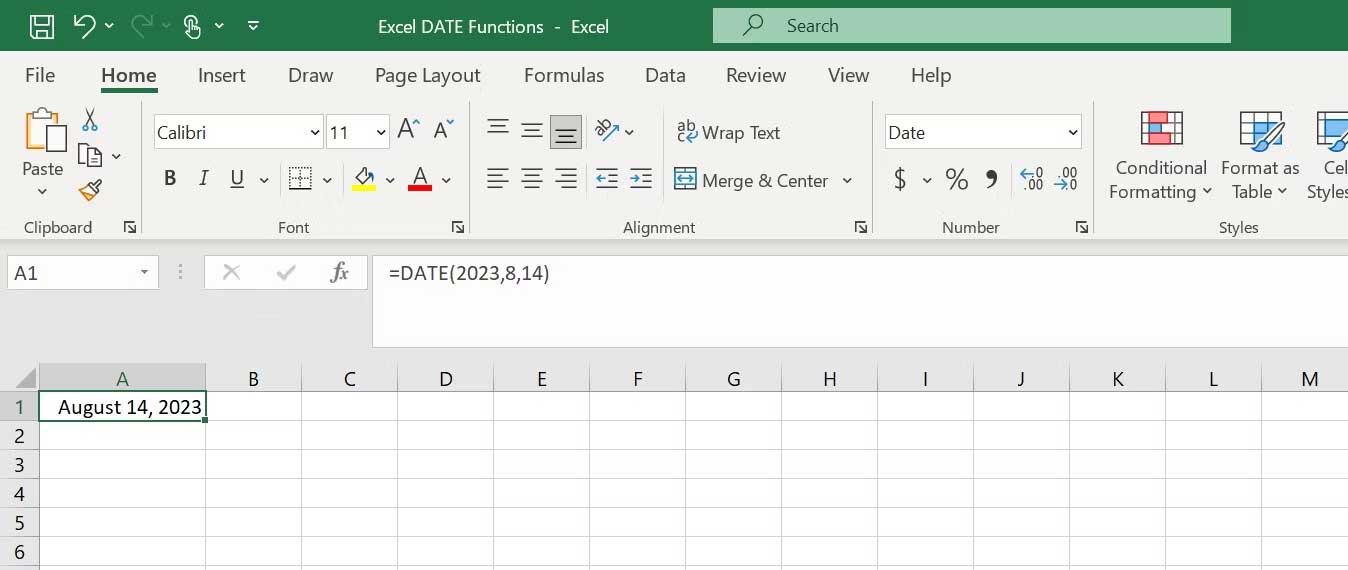
<p style="text-align: justify;">Ví dụ, công thức sau sẽ trả về ngày August 14, 2023.</p>

<p style="text-align: justify;"><code>=DATE(2023, 8, 14)</code></p>

<p style="text-align: justify;"><img alt="Cách dùng hàm DATE trong Excel" data-i="1" data-src="https://st.quantrimang.com/photos/image/2023/08/21/ham-date-excel-1.jpg" data-was-processed="true" height="275" src="https://st.quantrimang.com/photos/image/2023/08/21/ham-date-excel-1.jpg" width="650" /></p>

<h2 style="text-align: justify;">EDATE</h2>

<p style="text-align: justify;">Hàm EDATE tính ngày tháng là một số tháng cụ thể trước hoặc sau ngày tháng bắt đầu cụ thể. Nó thường được dùng để tính toán tài chính, như dự đoán ngày tương lai dựa trên khung thời gian được cung cấp. Cú pháp cho hàm EDATE như sau:</p>

<p style="text-align: justify;"><code>=EDATE(start_date, months)</code></p>

<p style="text-align: justify;">Trong đó:</p>

<ul>
	<li style="text-align: justify;"><strong>Start_date</strong>&nbsp;là ngày bắt đầu từ nơi bạn muốn tính ngày tháng mới.</li>
	<li style="text-align: justify;"><strong>Months</strong>&nbsp;là số tháng bạn muốn thêm hoặc trừ đi từ ngày bắt dầu.</li>
</ul>

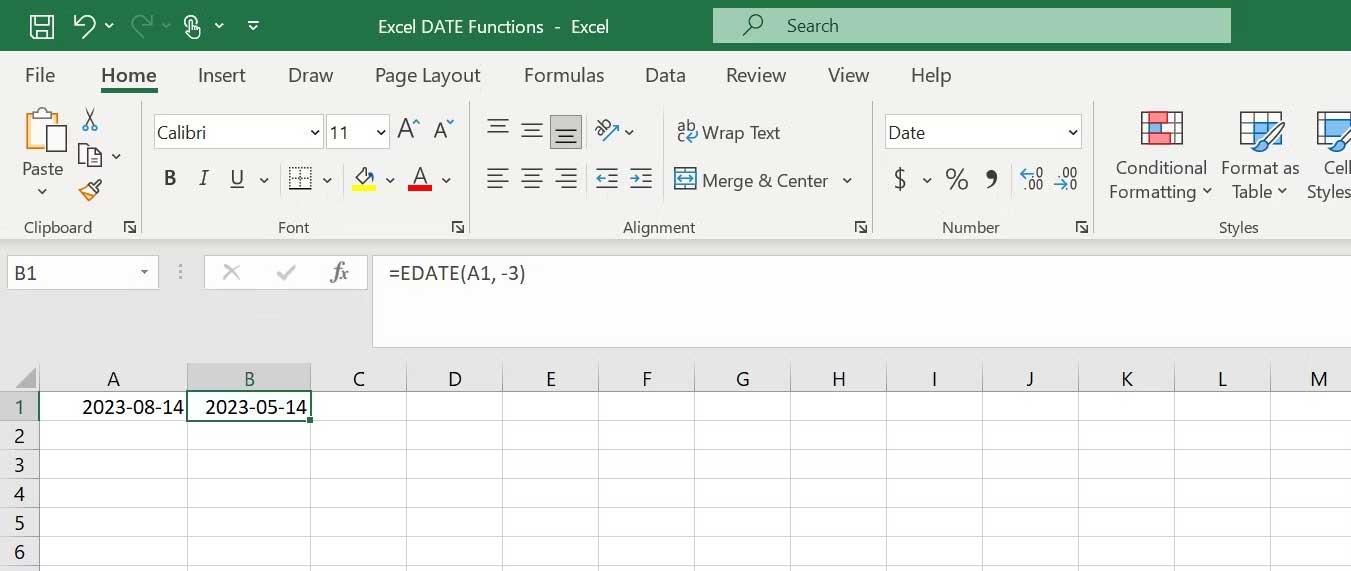
<p style="text-align: justify;">Ví dụ, để tìm ngày tháng là 3 tháng sau ngày tháng ở ô A1, bạn sẽ dùng công thức sau:</p>

<p style="text-align: justify;"><code>=EDATE(A1, -3)</code></p>

<p style="text-align: justify;"><img alt="Hàm EDATE trong Excel" data-i="2" data-src="https://st.quantrimang.com/photos/image/2023/08/21/ham-edate-excel-2.jpg" data-was-processed="true" height="275" src="https://st.quantrimang.com/photos/image/2023/08/21/ham-edate-excel-2.jpg" width="650" /></p>

<p style="text-align: justify;">Công thức này sẽ trả về ngày tháng: 14/05/2023.</p>

<h2 style="text-align: justify;">DAY</h2>

<p style="text-align: justify;">Hàm DAY trích xuất ngày trong tháng từ một ngày tháng cụ thể. Nó trả về ngày dưới dạng số giữa 1 và 31. Cú pháp của hàm DAY là:</p>

<p style="text-align: justify;"><code>=DAY(serial_number)</code></p>

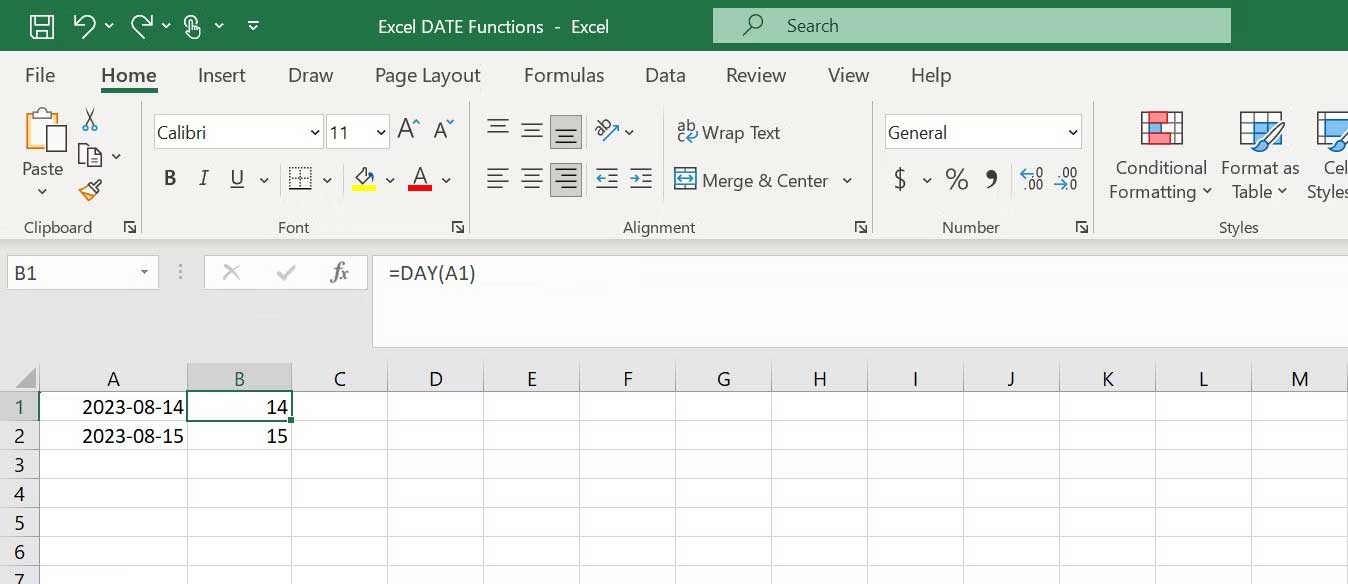
<p style="text-align: justify;">Tại serial_number là ngày tháng mà bạn muốn trích xuất. Ví dụ, nếu có ngày tháng trong ô A1 và muốn trích xuất ngày từ nó, bạn có thể dùng công thức:</p>

<p style="text-align: justify;"><code>=DAY(A1)</code></p>

<p style="text-align: justify;"><img alt="Hàm DAY trong Excel" data-i="3" data-src="https://st.quantrimang.com/photos/image/2023/08/21/ham-day-excel-3.jpg" data-was-processed="true" height="282" src="https://st.quantrimang.com/photos/image/2023/08/21/ham-day-excel-3.jpg" width="650" /></p>

<p style="text-align: justify;">Công thức này sẽ trả về giá trị 14, đại diện cho ngày trong tháng.</p>

<h2 style="text-align: justify;">TODAY</h2>

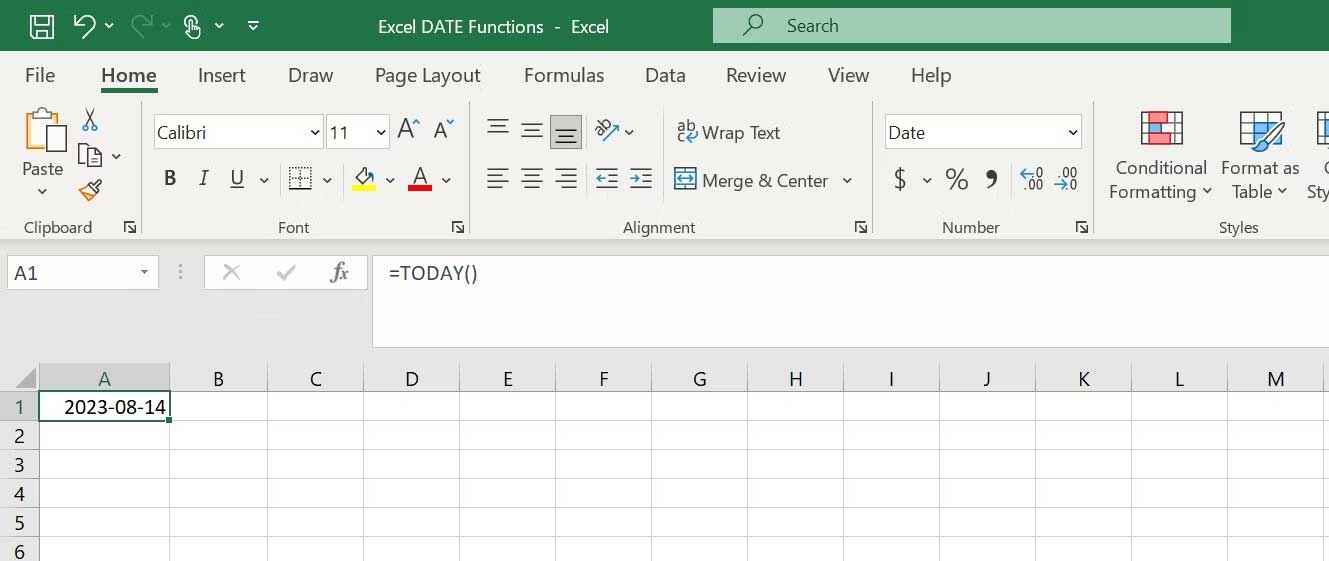
<p style="text-align: justify;">Hàm TODAY trong Excel được dùng để hiện ngày tháng hiện tại. Nó không nhận bất kỳ đối số nào. Nó update tự động từng ngày. Cú pháp của hàm TODAY thật sự đơn giản:</p>

<p style="text-align: justify;"><code>=TODAY()</code></p>

<p style="text-align: justify;"><img alt="Hàm TODAY trong Excel" data-i="4" data-src="https://st.quantrimang.com/photos/image/2023/08/21/ham-today-excel.jpg" data-was-processed="true" height="274" src="https://st.quantrimang.com/photos/image/2023/08/21/ham-today-excel.jpg" width="650" /></p>

<h2 style="text-align: justify;">DAYS360</h2>

<p style="text-align: justify;">Hàm DAYS360 cho phép bạn tính toán giữa hai ngày tháng trong Excel. Nó trả về số ngày giữa hai ngày tháng bằng phương pháp 360 ngày/năm. Cú pháp của hàm DAYS360 như sau:</p>

<p style="text-align: justify;"><code>=DAYS360(start_date, end_date, &#91;method&#93;)</code></p>

<p style="text-align: justify;">Trong đó:</p>

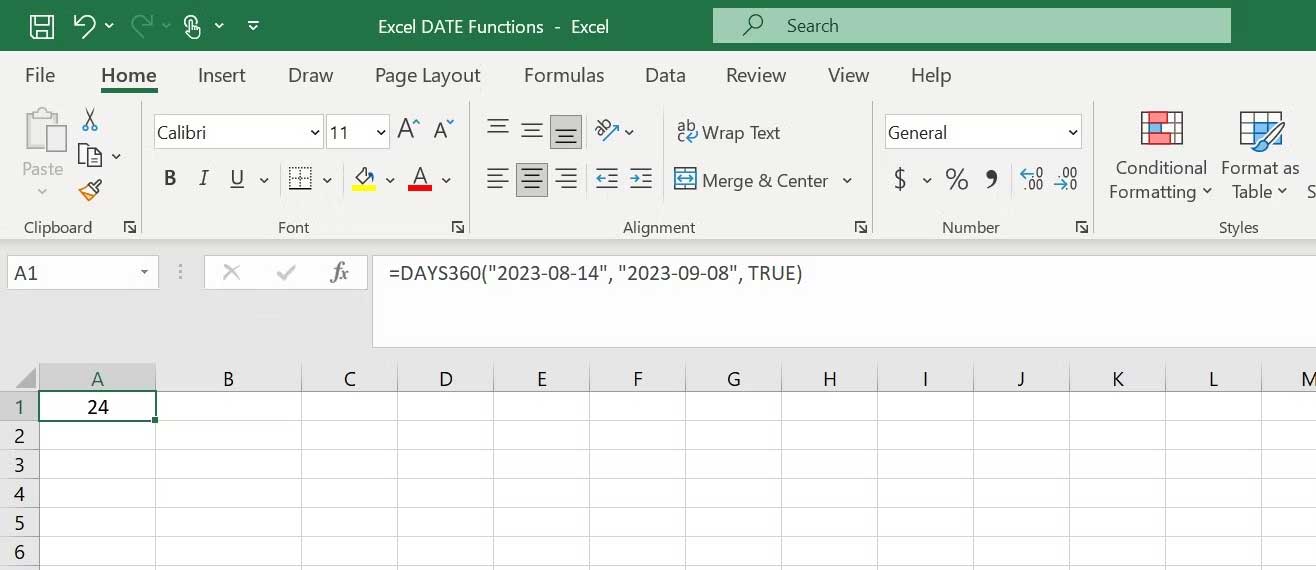
<p style="text-align: justify;"><strong>&#91;method&#93;&nbsp;</strong>là đối số tùy chọn, xác định phương thức dùng để tính sự khác biệt. Nếu bỏ qua, Excel sẽ dùng phương thức U.S (NASD).</p>

<p style="text-align: justify;">Ví dụ, nếu dùng công thức sau:</p>

<p style="text-align: justify;"><code>=DAYS360(&quot;2023-08-14&quot;, &quot;2023-09-08&quot;, TRUE)</code></p>

<p style="text-align: justify;"><img alt="Hàm DAYS360 trong Excel" data-i="5" data-src="https://st.quantrimang.com/photos/image/2023/08/21/Ham-DAYS360.jpg" data-was-processed="true" height="282" src="https://st.quantrimang.com/photos/image/2023/08/21/Ham-DAYS360.jpg" width="650" /></p>

<p style="text-align: justify;">Nó sẽ trả về số ngày giữa 14/8/2023 và 8/9/2023.</p>

<p style="text-align: justify;">Trên đây là&nbsp;<strong>những hàm DATE trong Microsoft Excel&nbsp;</strong>vô cùng hữu ích. Bạn nên biết cách dùng chúng để xử lý dữ liệu ngày tháng hiệu quả và nhanh chóng nhé!</p>
		</div>
				<div id="author">
						<p>
				<strong>Nguồn tin:</strong>
				Quantrimang.com
			</p>
		</div>
	</div>
	<div id="footer" class="clearfix">
		<div id="url">
			<strong>URL của bản tin này: </strong><a href="https://www.nguoicodonvn2008.info/vi/news/savefile/kien-thuc-may-tinh/nhung-ham-date-trong-excel-ban-can-biet-7436.html" title="Những hàm DATE trong Excel bạn cần biết">https://www.nguoicodonvn2008.info/vi/news/savefile/kien-thuc-may-tinh/nhung-ham-date-trong-excel-ban-can-biet-7436.html</a>

		</div>
		<div class="clear"></div>
		<div class="copyright">
			&copy; .&#x3A; Nguoicodonvn2008.info - Cõi lòng người cô đơn &#x3A;.
		</div>
		<div id="contact">
			<a href="mailto:admin@nguoicodonvn2008.info">admin@nguoicodonvn2008.info</a>
		</div>
	</div>
</div>
        <div id="timeoutsess" class="chromeframe">
            Bạn đã không sử dụng Site, <a onclick="timeoutsesscancel();" href="https://nguoicodonvn2008.info/#">Bấm vào đây để duy trì trạng thái đăng nhập</a>. Thời gian chờ: <span id="secField"> 60 </span> giây
        </div>
        <div id="openidResult" class="nv-alert" style="display:none"></div>
        <div id="openidBt" data-result="" data-redirect=""></div>
		</script>
		<div class="car-top">
  <span><img src="https://nguoicodonvn2008.info/themes/default/images/car.png" alt=""></span>
</div>
<script src="https://nguoicodonvn2008.info/assets/js/jquery/jquery.min.js"></script>
<script>var nv_base_siteurl="/",nv_lang_data="vi",nv_lang_interface="vi",nv_name_variable="nv",nv_fc_variable="op",nv_lang_variable="language",nv_module_name="news",nv_func_name="savefile",nv_is_user=0, nv_my_ofs=-4,nv_my_abbr="EDT",nv_cookie_prefix="nv4c_e856T",nv_check_pass_mstime=1738000,nv_area_admin=0,nv_safemode=0,theme_responsive=0,nv_recaptcha_ver=2,nv_recaptcha_sitekey="",nv_recaptcha_type="image",XSSsanitize=1;</script>
<script src="https://nguoicodonvn2008.info/assets/js/language/vi.js"></script>
<script src="https://nguoicodonvn2008.info/assets/js/DOMPurify/purify3.js"></script>
<script src="https://nguoicodonvn2008.info/assets/js/global.js"></script>
<script src="https://nguoicodonvn2008.info/assets/js/site.js"></script>
<script src="https://nguoicodonvn2008.info/themes/default/js/news.js"></script>
<script src="https://nguoicodonvn2008.info/themes/default/js/main.js"></script>
<script src="https://nguoicodonvn2008.info/themes/default/js/custom.js"></script>
<script type="application/ld+json">
        {
            "@context": "https://schema.org",
            "@type": "Organization",
            "url": "https://nguoicodonvn2008.info",
            "logo": "https://nguoicodonvn2008.info/uploads/angel.gif"
        }
        </script>
<script src="https://nguoicodonvn2008.info/themes/default/js/bootstrap.min.js"></script>
<script type="text/javascript">
var $scrolltop = $('.car-top');
$scrolltop.on('click', function () {
    $('html,body').animate({
        scrollTop: 0
    }, 800);
    $(this).addClass("car-run");
    setTimeout(function(){ $scrolltop.removeClass('car-run');}, 1000);
    return false;
});
$(window).on('scroll', function ()
{ 
    if($(window).scrollTop() >= 200)
    {
        $scrolltop.addClass("show");
        $scrolltop.addClass("car-down");
    }
    else
    {
       $scrolltop.removeClass("show");
       setTimeout(function(){ $scrolltop.removeClass('car-down');}, 300);
    }
});
</script>
</body>
</html>