<!DOCTYPE html>
    <html lang="vi" xmlns="http://www.w3.org/1999/xhtml" prefix="og: http://ogp.me/ns#">
    <head>
<title>Những điều cần biết về bộ chọn &#x3A;nth-child&#40;&#41; trong CSS</title>
<meta name="description" content="Những điều cần biết về bộ chọn &#x3A;nth-child&#40;&#41; trong CSS - Savefile - Tin Tức -...">
<meta name="author" content=".: Nguoicodonvn2008.info - Cõi lòng người cô đơn :.">
<meta name="copyright" content=".: Nguoicodonvn2008.info - Cõi lòng người cô đơn :. [admin@nguoicodonvn2008.info]">
<meta name="robots" content="index, archive, follow, noodp">
<meta name="googlebot" content="index,archive,follow,noodp">
<meta name="msnbot" content="all,index,follow">
<meta name="generator" content="NukeViet v4.5">
<meta http-equiv="Content-Type" content="text/html; charset=utf-8">
<meta property="og:title" content="Những điều cần biết về bộ chọn &#x3A;nth-child&#40;&#41; trong CSS">
<meta property="og:type" content="website">
<meta property="og:description" content="Savefile - Tin Tức - https&#x3A;&#x002F;&#x002F;www.nguoicodonvn2008.info&#x002F;vi&#x002F;news&#x002F;savefile&#x002F;kien-thuc-may-tinh&#x002F;nhung-dieu-can-biet-ve-bo-chon-nth-child-trong-css-7629.html">
<meta property="og:site_name" content=".&#x3A; Nguoicodonvn2008.info - Cõi lòng người cô đơn &#x3A;.">
<meta property="og:url" content="https://www.nguoicodonvn2008.info/vi/news/savefile/kien-thuc-may-tinh/nhung-dieu-can-biet-ve-bo-chon-nth-child-trong-css-7629.html">
<link rel="shortcut icon" href="https://nguoicodonvn2008.info/favicon.ico">
<link rel="canonical" href="https://www.nguoicodonvn2008.info/vi/news/savefile/kien-thuc-may-tinh/nhung-dieu-can-biet-ve-bo-chon-nth-child-trong-css-7629.html">
<link rel="alternate" href="https://nguoicodonvn2008.info/vi/news/rss/" title="Tin Tức" type="application/rss+xml">
<link rel="alternate" href="https://nguoicodonvn2008.info/vi/news/rss/karaoke-dual/" title="Tin Tức - Karaoke Dual" type="application/rss+xml">
<link rel="alternate" href="https://nguoicodonvn2008.info/vi/news/rss/nhac-tre/" title="Tin Tức - Nhạc trẻ" type="application/rss+xml">
<link rel="alternate" href="https://nguoicodonvn2008.info/vi/news/rss/tru-tinh/" title="Tin Tức - Trữ tình" type="application/rss+xml">
<link rel="alternate" href="https://nguoicodonvn2008.info/vi/news/rss/nuoc-ngoai/" title="Tin Tức - Nước ngoài" type="application/rss+xml">
<link rel="alternate" href="https://nguoicodonvn2008.info/vi/news/rss/remix/" title="Tin Tức - Remix" type="application/rss+xml">
<link rel="alternate" href="https://nguoicodonvn2008.info/vi/news/rss/tam-su-tinh-yeu/" title="Tin Tức - Tâm sự tình yêu" type="application/rss+xml">
<link rel="alternate" href="https://nguoicodonvn2008.info/vi/news/rss/tho-suu-tam/" title="Tin Tức - Thơ sưu tầm" type="application/rss+xml">
<link rel="alternate" href="https://nguoicodonvn2008.info/vi/news/rss/cuoc-song/" title="Tin Tức - Cuộc sống" type="application/rss+xml">
<link rel="alternate" href="https://nguoicodonvn2008.info/vi/news/rss/phan-mem/" title="Tin Tức - Phần mềm" type="application/rss+xml">
<link rel="alternate" href="https://nguoicodonvn2008.info/vi/news/rss/kien-thuc-may-tinh/" title="Tin Tức - Kiến thức máy tính" type="application/rss+xml">
<link rel="alternate" href="https://nguoicodonvn2008.info/vi/news/rss/hoc-tap/" title="Tin Tức - Học tập" type="application/rss+xml">
<link rel="alternate" href="https://nguoicodonvn2008.info/vi/news/rss/tai-lieu/" title="Tin Tức - Tài liệu" type="application/rss+xml">
<link rel="alternate" href="https://nguoicodonvn2008.info/vi/news/rss/de-thi/" title="Tin Tức - Đề thi" type="application/rss+xml">
<link rel="preload" as="style" href="https://nguoicodonvn2008.info/assets/css/font-awesome.min.css" type="text/css">
<link rel="preload" as="style" href="https://nguoicodonvn2008.info/themes/default/css/bootstrap.non-responsive.css" type="text/css">
<link rel="preload" as="style" href="https://nguoicodonvn2008.info/themes/default/css/style.css" type="text/css">
<link rel="preload" as="style" href="https://nguoicodonvn2008.info/themes/default/css/style.non-responsive.css" type="text/css">
<link rel="preload" as="style" href="https://nguoicodonvn2008.info/themes/default/css/news.css" type="text/css">
<link rel="preload" as="style" href="https://nguoicodonvn2008.info/themes/default/css/custom.css" type="text/css">
<link rel="preload" as="script" href="https://nguoicodonvn2008.info/assets/js/jquery/jquery.min.js" type="text/javascript">
<link rel="preload" as="script" href="https://nguoicodonvn2008.info/assets/js/language/vi.js" type="text/javascript">
<link rel="preload" as="script" href="https://nguoicodonvn2008.info/assets/js/DOMPurify/purify3.js" type="text/javascript">
<link rel="preload" as="script" href="https://nguoicodonvn2008.info/assets/js/global.js" type="text/javascript">
<link rel="preload" as="script" href="https://nguoicodonvn2008.info/assets/js/site.js" type="text/javascript">
<link rel="preload" as="script" href="https://nguoicodonvn2008.info/themes/default/js/news.js" type="text/javascript">
<link rel="preload" as="script" href="https://nguoicodonvn2008.info/themes/default/js/main.js" type="text/javascript">
<link rel="preload" as="script" href="https://nguoicodonvn2008.info/themes/default/js/custom.js" type="text/javascript">
<link rel="preload" as="script" href="https://nguoicodonvn2008.info/themes/default/js/bootstrap.min.js" type="text/javascript">
<link rel="stylesheet" href="https://nguoicodonvn2008.info/assets/css/font-awesome.min.css">
<link rel="stylesheet" href="https://nguoicodonvn2008.info/themes/default/css/bootstrap.non-responsive.css">
<link rel="stylesheet" href="https://nguoicodonvn2008.info/themes/default/css/style.css">
<link rel="stylesheet" href="https://nguoicodonvn2008.info/themes/default/css/style.non-responsive.css">
<link rel="StyleSheet" href="https://nguoicodonvn2008.info/themes/default/css/news.css">
<link rel="stylesheet" href="https://nguoicodonvn2008.info/themes/default/css/custom.css">
<style type="text/css">
	body{background: #fff;}
</style>
    </head>
    <body>
<div id="print">
	<div id="hd_print">
		<h2 class="pull-left">.&#x3A; Nguoicodonvn2008.info - Cõi lòng người cô đơn &#x3A;.</h2>
		<p class="pull-right"><a title=".&#x3A; Nguoicodonvn2008.info - Cõi lòng người cô đơn &#x3A;." href="https://nguoicodonvn2008.info/">https://nguoicodonvn2008.info</a></p>
	</div>
	<div class="clear"></div>
	<hr />
	<div id="content">
		<h1>Những điều cần biết về bộ chọn &#x3A;nth-child&#40;&#41; trong CSS</h1>
		<ul class="list-inline">
			<li>Thứ ba - 10/10/2023 10:40</li>
			<li class="hidden-print txtrequired"><em class="fa fa-print">&nbsp;</em><a title="In ra" href="javascript:;" onclick="window.print()">In ra</a></li>
			<li class="hidden-print txtrequired"><em class="fa fa-power-off">&nbsp;</em><a title="Đóng cửa sổ này" href="javascript:;" onclick="window.close()">Đóng cửa sổ này</a></li>
		</ul>
		<div class="clear"></div>
		<div id="hometext">
		</div>
				<div class="imghome">
			<img alt="Những điều cần biết về bộ chọn &#x3A;nth-child&#40;&#41; trong CSS" src="https://st.quantrimang.com/photos/image/2023/10/09/CSS-nth-child-use7.jpg" width="460" class="img-thumbnail" />
		</div>
		<div class="clear"></div>
		<div id="bodytext" class="clearfix">
			<p style="text-align: justify;"><strong>:nth-child() trong CSS</strong>&nbsp;đặc biệt hữu ích trong việc tạo kiểu bảng và danh sách phức tạp. Dưới đây là những điều bạn cần biết về<strong>&nbsp;:nth-child() trong CSS</strong>.</p>

<p style="text-align: justify;"><img alt="Lập trình CSS" data-i="0" data-src="https://st.quantrimang.com/photos/image/2023/10/09/CSS-nth-child-7.jpg" data-was-processed="true" height="340" src="https://st.quantrimang.com/photos/image/2023/10/09/CSS-nth-child-7.jpg" width="650" /></p>

<p style="text-align: justify;">Giống như tất cả bộ chọn CSS, bạn có thể dùng :nth-child() để xác định các thành phần trong một trang web và áp dụng các kiểu khác nhau cho chúng. Thế nhưng bộ chọn này cho phép bạn thu hẹp một nhóm nhân tố dựa trên vị trí quan hệ của chúng.</p>

<p style="text-align: justify;">Bộ chọn này hỗ trợ một số từ khóa cơ bản cho những trường hợp thường gặp. Ngoài ra, nó cũng cung cấp cú pháp kết hợp mẫu mạnh mẽ. Dùng nó, bạn có thể chọn các thành phần dựa trên mẫu thông thường, lặp lại hoặc định nghĩa phức tạp theo nhu cầu.</p>

<h2 style="text-align: justify;">Cú pháp bộ chọn :nth-child()</h2>

<p style="text-align: justify;">Dù là một bộ chọn CSS pseudo-class, cú pháp :nth-child() khác những bộ chọn khác. Nó lấy một đối số làm mẫu để kết hợp các phần tử trong một nhóm thành phần con:</p>

<pre id="pre0" style="text-align: justify;">
:nth-child(args) {
    /*...*/
}</pre>

<p style="text-align: justify;">Trọng tâm chính là các đối số trong ngoặc đơn. Các đối số này xác định tập hợp con của các phần tử cần chọn.</p>

<h2 style="text-align: justify;">Dùng giá trị từ khóa cho các trường hợp phổ biến</h2>

<p style="text-align: justify;">Bộ chọn này có thể chứa hai giá trị từ khóa:&nbsp;<strong>odd</strong>&nbsp;và&nbsp;<strong>even</strong>. Chúng đặc biệt hữu ích cho việc tạo kiểu cho các hàng thay thế trong bảng.</p>

<p style="text-align: justify;">Một danh sách theo thứ tự đơn giản là ví dụ hay khác về thời điểm bạn có thể dùng những giá trị từ khóa này:</p>

<pre id="pre1" style="text-align: justify;">
&lt;ol&gt;
    &lt;li&gt;Item 1&lt;/li&gt;
    &lt;li&gt;Item 2&lt;/li&gt;
    &lt;li&gt;Item 3&lt;/li&gt;
    &lt;li&gt;Item 4&lt;/li&gt;
    &lt;li&gt;Item 5&lt;/li&gt;
    &lt;li&gt;Item 6&lt;/li&gt;
    &lt;li&gt;Item 7&lt;/li&gt;
&lt;/ol&gt;</pre>

<p style="text-align: justify;">Dùng bộ chọn&nbsp;<strong>:nth-child(odd)</strong>, bạn có thể thay đổi màu sắc của từng mục thay thế:</p>

<pre id="pre2" style="text-align: justify;">
:nth-child(odd) {
    color: red;
}</pre>

<p style="text-align: justify;">Các mục bắt đầu ở index 1, vì thế, mục đầu tiên sẽ hiện màu đỏ, sau đó tới thứ 3… cứ liên tục như vậy:</p>

<p style="text-align: justify;"><img alt="Lập trình cùng CSS" data-i="1" data-src="https://st.quantrimang.com/photos/image/2023/10/09/CSS-nth-child-use.jpg" data-was-processed="true" height="325" src="https://st.quantrimang.com/photos/image/2023/10/09/CSS-nth-child-use.jpg" width="650" /></p>

<h2 style="text-align: justify;">Linh hoạt hơn bằng ký hiệu chức năng</h2>

<p style="text-align: justify;">Bạn có thể dùng một số nguyên duy nhất để chọn một thành phần đơn lẻ, như thế này:</p>

<pre id="pre3" style="text-align: justify;">
li:nth-child(4) {
    color: red;
}</pre>

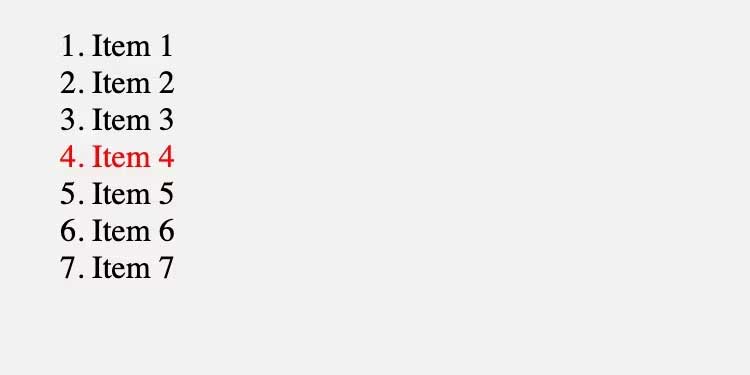
<p style="text-align: justify;">Trong trường hợp này, bộ chọn chỉ kết hợp mục thứ 4 trong danh sách:</p>

<p style="text-align: justify;"><img alt="Hướng dẫn dùng :nth-child" data-i="2" data-src="https://st.quantrimang.com/photos/image/2023/10/09/CSS-nth-child-use2.jpg" data-was-processed="true" height="325" src="https://st.quantrimang.com/photos/image/2023/10/09/CSS-nth-child-use2.jpg" width="650" /></p>

<p style="text-align: justify;">Cú pháp này là một trường hợp đặc biệt của cú pháp chức năng tổng quát hơn nhằm chọn các mục khớp với một mẫu nhất định. Cú pháp này là:</p>

<pre id="pre4" style="text-align: justify;">
:nth-child(An+B) {
    /*...*/
}</pre>

<p style="text-align: justify;">Trong ký hiệu này,<strong>&nbsp;A&nbsp;</strong>là kích thước bước. Điều này có nghĩa là số lần bộ chọn di chuyển để chọn mục tiếp theo. Nó cho phép bạn chọn mọi mục khác, mọi mục thứ ba, v.v.<strong>&nbsp;B&nbsp;</strong>là điểm bắt đầu lựa chọn.</p>

<p style="text-align: justify;">Ví dụ, lấy đối số&nbsp;<strong>3n+1</strong>:</p>

<pre id="pre5" style="text-align: justify;">
li:nth-child(3n+1) {
color: red;
}</pre>

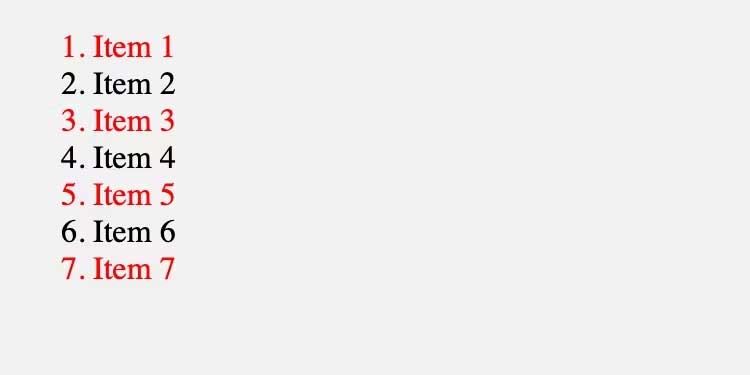
<p style="text-align: justify;">Điều này sẽ bắt đầu lựa chọn ở mục đầu tiên và tiếp tục với từng mục thứ ba sau đó:</p>

<p style="text-align: justify;"><img alt="Chú thích chức năg" data-i="3" data-src="https://st.quantrimang.com/photos/image/2023/10/09/CSS-nth-child-use3.jpg" data-was-processed="true" height="325" src="https://st.quantrimang.com/photos/image/2023/10/09/CSS-nth-child-use3.jpg" width="650" /></p>

<p style="text-align: justify;">So sánh nó với biểu thức 3n+2:</p>

<pre id="pre6" style="text-align: justify;">
li:nth-child(3n+2) {
    color:red;
}</pre>

<p style="text-align: justify;">Hành động này vẫn chọn từng mục thứ ba, nhưng giờ nó bắt đầu từ mục thứ hai trong danh sách:</p>

<p style="text-align: justify;"><img alt="Kết quả ví dụ từ bộ chọn trong CSS" data-i="4" data-src="https://st.quantrimang.com/photos/image/2023/10/09/CSS-nth-child-use4.jpg" data-was-processed="true" height="325" src="https://st.quantrimang.com/photos/image/2023/10/09/CSS-nth-child-use4.jpg" width="650" /></p>

<p style="text-align: justify;">Ví dụ thú vị khác là :nth-child(n+3):</p>

<pre id="pre7" style="text-align: justify;">
li:nth-child(n+3) {
    color: red;
}</pre>

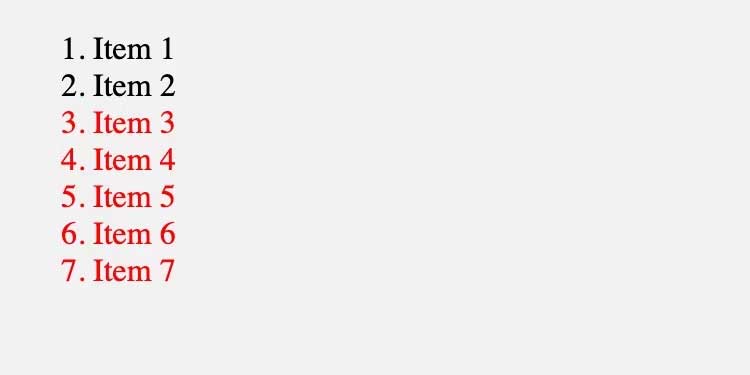
<p style="text-align: justify;">Code này sẽ chọn từng mục (n), bắt đầu từ thứ ba (+3). Nó sẽ trông như thế này.</p>

<p style="text-align: justify;"><img alt="Kết quả ví dụ dùng bộ chọn CSS" data-i="5" data-src="https://st.quantrimang.com/photos/image/2023/10/09/CSS-nth-child-use5.jpg" data-was-processed="true" height="325" src="https://st.quantrimang.com/photos/image/2023/10/09/CSS-nth-child-use5.jpg" width="650" /></p>

<p style="text-align: justify;">Bạn cũng có thể sử dụng phép trừ để đạt được kết quả nhất định:</p>

<pre id="pre8" style="text-align: justify;">
li:nth-child(3n-1) {
    color: red;
}</pre>

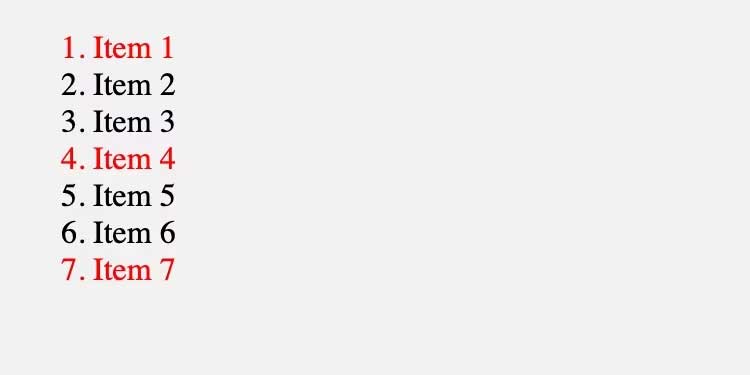
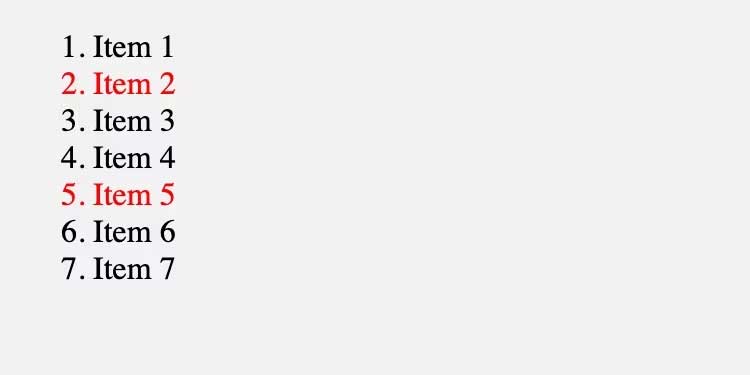
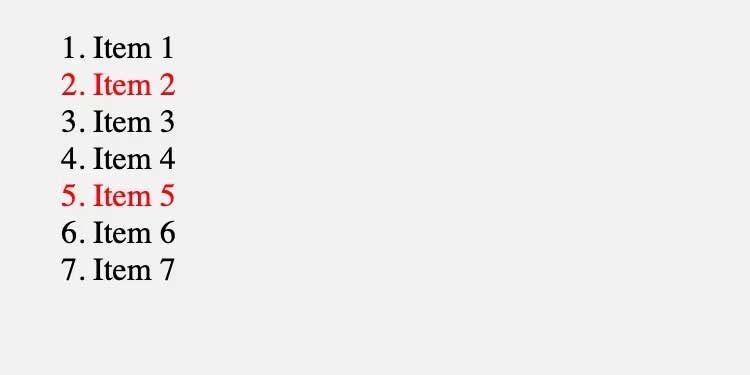
<p style="text-align: justify;">Ví dụ này vẫn chọn từng mục thứ ba, nhưng nó bắt đầu từ “dấu trừ đầu tiên”. Trên thực tế, điều này có nghĩa là nó sẽ chọn mục thứ hai trong danh sách, sau đó là mục thứ năm, v.v.:</p>

<p style="text-align: justify;"><img alt="Chọn mục thứ 5" data-i="6" data-src="https://st.quantrimang.com/photos/image/2023/10/09/CSS-nth-child-use6.jpg" data-was-processed="true" height="325" src="https://st.quantrimang.com/photos/image/2023/10/09/CSS-nth-child-use6.jpg" width="650" /></p>

<h2 style="text-align: justify;">Cú pháp of &lt;selector&gt;</h2>

<p style="text-align: justify;">Bạn cũng có thể sử dụng từ khóa&nbsp;<strong>of&nbsp;</strong>được theo sau bởi một&nbsp;<strong>selector</strong>&nbsp;làm đối số trong bộ chọn :nth-child(). Cú pháp này cho phép bạn thu hẹp các mục có thể mà mẫu thông thường chọn từ đó.</p>

<p style="text-align: justify;">Ví dụ, hãy tưởng tượng đánh dấu của bạn phức tạp hơn bản gốc:</p>

<pre id="pre9" style="text-align: justify;">
&lt;ol&gt;
    &lt;li class=&quot;old&quot;&gt;Item 1&lt;/li&gt;
    &lt;li class=&quot;new&quot;&gt;Item 2&lt;/li&gt;
    &lt;li class=&quot;new&quot;&gt;Item 3&lt;/li&gt;
    &lt;li class=&quot;old&quot;&gt;Item 4&lt;/li&gt;
    &lt;li class=&quot;new&quot;&gt;Item 5&lt;/li&gt;
    &lt;li class=&quot;new&quot;&gt;Item 6&lt;/li&gt;
    &lt;li class=&quot;new&quot;&gt;Item 7&lt;/li&gt;
&lt;/ol&gt;
Now, use :nth-chil</pre>

<p style="text-align: justify;">Bây giờ, hãy sử dụng :nth-child để chọn các mục chẵn từ tập hợp các mục có class cụ thể:</p>

<pre id="pre10" style="text-align: justify;">
.new {
    font-weight: bold;
}

li:nth-child(even of.new) {
    color: red;
}</pre>

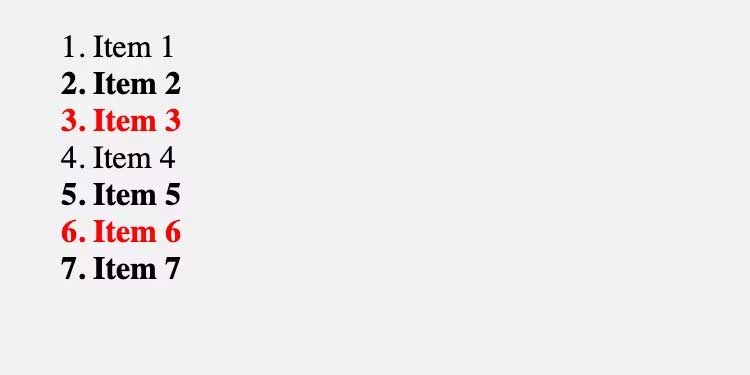
<p style="text-align: justify;">Lưu ý rằng chỉ những mục in đậm có số chẵn mới có màu đỏ:</p>

<p style="text-align: justify;"><img alt="In đậm và to đỏ số chẵn" data-i="7" data-src="https://st.quantrimang.com/photos/image/2023/10/09/CSS-nth-child-use7.jpg" data-was-processed="true" height="325" src="https://st.quantrimang.com/photos/image/2023/10/09/CSS-nth-child-use7.jpg" width="650" /></p>

<p style="text-align: justify;">Ngoài ra, hãy xem xét điểm khác biệt với li.new:nth-child(even) nhắm mục tiêu các phần tử .new, nhưng chỉ khi chúng là số chẵn. Đây sẽ là mục 2 và 6 trong ví dụ trên.</p>

<p style="text-align: justify;">Trên đây là những điều bạn cần biết về cách dùng bộ chọn :nth-child() trong&nbsp;CSS&nbsp;. Hi vọng bài viết hữu ích với các bạn.</p>

<div style="text-align: justify;">&nbsp;</div>
		</div>
				<div id="author">
						<p>
				<strong>Nguồn tin:</strong>
				Quantrimang.com
			</p>
		</div>
	</div>
	<div id="footer" class="clearfix">
		<div id="url">
			<strong>URL của bản tin này: </strong><a href="https://www.nguoicodonvn2008.info/vi/news/savefile/kien-thuc-may-tinh/nhung-dieu-can-biet-ve-bo-chon-nth-child-trong-css-7629.html" title="Những điều cần biết về bộ chọn &#x3A;nth-child&#40;&#41; trong CSS">https://www.nguoicodonvn2008.info/vi/news/savefile/kien-thuc-may-tinh/nhung-dieu-can-biet-ve-bo-chon-nth-child-trong-css-7629.html</a>

		</div>
		<div class="clear"></div>
		<div class="copyright">
			&copy; .&#x3A; Nguoicodonvn2008.info - Cõi lòng người cô đơn &#x3A;.
		</div>
		<div id="contact">
			<a href="mailto:admin@nguoicodonvn2008.info">admin@nguoicodonvn2008.info</a>
		</div>
	</div>
</div>
        <div id="timeoutsess" class="chromeframe">
            Bạn đã không sử dụng Site, <a onclick="timeoutsesscancel();" href="https://nguoicodonvn2008.info/#">Bấm vào đây để duy trì trạng thái đăng nhập</a>. Thời gian chờ: <span id="secField"> 60 </span> giây
        </div>
        <div id="openidResult" class="nv-alert" style="display:none"></div>
        <div id="openidBt" data-result="" data-redirect=""></div>
		</script>
		<div class="car-top">
  <span><img src="https://nguoicodonvn2008.info/themes/default/images/car.png" alt=""></span>
</div>
<div id="run_cronjobs" style="visibility:hidden;display:none;"><img alt="cron" src="/index.php?second=cronjobs&amp;p=g6WvI12K" width="1" height="1" /></div>
<script src="https://nguoicodonvn2008.info/assets/js/jquery/jquery.min.js"></script>
<script>var nv_base_siteurl="/",nv_lang_data="vi",nv_lang_interface="vi",nv_name_variable="nv",nv_fc_variable="op",nv_lang_variable="language",nv_module_name="news",nv_func_name="savefile",nv_is_user=0, nv_my_ofs=-4,nv_my_abbr="EDT",nv_cookie_prefix="nv4c_e856T",nv_check_pass_mstime=1738000,nv_area_admin=0,nv_safemode=0,theme_responsive=0,nv_recaptcha_ver=2,nv_recaptcha_sitekey="",nv_recaptcha_type="image",XSSsanitize=1;</script>
<script src="https://nguoicodonvn2008.info/assets/js/language/vi.js"></script>
<script src="https://nguoicodonvn2008.info/assets/js/DOMPurify/purify3.js"></script>
<script src="https://nguoicodonvn2008.info/assets/js/global.js"></script>
<script src="https://nguoicodonvn2008.info/assets/js/site.js"></script>
<script src="https://nguoicodonvn2008.info/themes/default/js/news.js"></script>
<script src="https://nguoicodonvn2008.info/themes/default/js/main.js"></script>
<script src="https://nguoicodonvn2008.info/themes/default/js/custom.js"></script>
<script type="application/ld+json">
        {
            "@context": "https://schema.org",
            "@type": "Organization",
            "url": "https://nguoicodonvn2008.info",
            "logo": "https://nguoicodonvn2008.info/uploads/angel.gif"
        }
        </script>
<script src="https://nguoicodonvn2008.info/themes/default/js/bootstrap.min.js"></script>
<script type="text/javascript">
var $scrolltop = $('.car-top');
$scrolltop.on('click', function () {
    $('html,body').animate({
        scrollTop: 0
    }, 800);
    $(this).addClass("car-run");
    setTimeout(function(){ $scrolltop.removeClass('car-run');}, 1000);
    return false;
});
$(window).on('scroll', function ()
{ 
    if($(window).scrollTop() >= 200)
    {
        $scrolltop.addClass("show");
        $scrolltop.addClass("car-down");
    }
    else
    {
       $scrolltop.removeClass("show");
       setTimeout(function(){ $scrolltop.removeClass('car-down');}, 300);
    }
});
</script>
</body>
</html>