<!DOCTYPE html>
    <html lang="vi" xmlns="http://www.w3.org/1999/xhtml" prefix="og: http://ogp.me/ns#">
    <head>
<title>Những điều cần biết khi sử dụng driver Windows trên Steam Deck</title>
<meta name="description" content="Những điều cần biết khi sử dụng driver Windows trên Steam Deck - Savefile - Tin Tức -...">
<meta name="author" content=".: Nguoicodonvn2008.info - Cõi lòng người cô đơn :.">
<meta name="copyright" content=".: Nguoicodonvn2008.info - Cõi lòng người cô đơn :. [admin@nguoicodonvn2008.info]">
<meta name="robots" content="index, archive, follow, noodp">
<meta name="googlebot" content="index,archive,follow,noodp">
<meta name="msnbot" content="all,index,follow">
<meta name="generator" content="NukeViet v4.5">
<meta http-equiv="Content-Type" content="text/html; charset=utf-8">
<meta property="og:title" content="Những điều cần biết khi sử dụng driver Windows trên Steam Deck">
<meta property="og:type" content="website">
<meta property="og:description" content="Savefile - Tin Tức - https&#x3A;&#x002F;&#x002F;www.nguoicodonvn2008.info&#x002F;vi&#x002F;news&#x002F;savefile&#x002F;kien-thuc-may-tinh&#x002F;nhung-dieu-can-biet-khi-su-dung-driver-windows-tren-steam-deck-6604.html">
<meta property="og:site_name" content=".&#x3A; Nguoicodonvn2008.info - Cõi lòng người cô đơn &#x3A;.">
<meta property="og:url" content="https://www.nguoicodonvn2008.info/vi/news/savefile/kien-thuc-may-tinh/nhung-dieu-can-biet-khi-su-dung-driver-windows-tren-steam-deck-6604.html">
<link rel="shortcut icon" href="https://nguoicodonvn2008.info/favicon.ico">
<link rel="canonical" href="https://www.nguoicodonvn2008.info/vi/news/savefile/kien-thuc-may-tinh/nhung-dieu-can-biet-khi-su-dung-driver-windows-tren-steam-deck-6604.html">
<link rel="alternate" href="https://nguoicodonvn2008.info/vi/news/rss/" title="Tin Tức" type="application/rss+xml">
<link rel="alternate" href="https://nguoicodonvn2008.info/vi/news/rss/karaoke-dual/" title="Tin Tức - Karaoke Dual" type="application/rss+xml">
<link rel="alternate" href="https://nguoicodonvn2008.info/vi/news/rss/nhac-tre/" title="Tin Tức - Nhạc trẻ" type="application/rss+xml">
<link rel="alternate" href="https://nguoicodonvn2008.info/vi/news/rss/tru-tinh/" title="Tin Tức - Trữ tình" type="application/rss+xml">
<link rel="alternate" href="https://nguoicodonvn2008.info/vi/news/rss/nuoc-ngoai/" title="Tin Tức - Nước ngoài" type="application/rss+xml">
<link rel="alternate" href="https://nguoicodonvn2008.info/vi/news/rss/remix/" title="Tin Tức - Remix" type="application/rss+xml">
<link rel="alternate" href="https://nguoicodonvn2008.info/vi/news/rss/tam-su-tinh-yeu/" title="Tin Tức - Tâm sự tình yêu" type="application/rss+xml">
<link rel="alternate" href="https://nguoicodonvn2008.info/vi/news/rss/tho-suu-tam/" title="Tin Tức - Thơ sưu tầm" type="application/rss+xml">
<link rel="alternate" href="https://nguoicodonvn2008.info/vi/news/rss/cuoc-song/" title="Tin Tức - Cuộc sống" type="application/rss+xml">
<link rel="alternate" href="https://nguoicodonvn2008.info/vi/news/rss/phan-mem/" title="Tin Tức - Phần mềm" type="application/rss+xml">
<link rel="alternate" href="https://nguoicodonvn2008.info/vi/news/rss/kien-thuc-may-tinh/" title="Tin Tức - Kiến thức máy tính" type="application/rss+xml">
<link rel="alternate" href="https://nguoicodonvn2008.info/vi/news/rss/hoc-tap/" title="Tin Tức - Học tập" type="application/rss+xml">
<link rel="alternate" href="https://nguoicodonvn2008.info/vi/news/rss/tai-lieu/" title="Tin Tức - Tài liệu" type="application/rss+xml">
<link rel="alternate" href="https://nguoicodonvn2008.info/vi/news/rss/de-thi/" title="Tin Tức - Đề thi" type="application/rss+xml">
<link rel="preload" as="style" href="https://nguoicodonvn2008.info/assets/css/font-awesome.min.css" type="text/css">
<link rel="preload" as="style" href="https://nguoicodonvn2008.info/themes/default/css/bootstrap.non-responsive.css" type="text/css">
<link rel="preload" as="style" href="https://nguoicodonvn2008.info/themes/default/css/style.css" type="text/css">
<link rel="preload" as="style" href="https://nguoicodonvn2008.info/themes/default/css/style.non-responsive.css" type="text/css">
<link rel="preload" as="style" href="https://nguoicodonvn2008.info/themes/default/css/news.css" type="text/css">
<link rel="preload" as="style" href="https://nguoicodonvn2008.info/themes/default/css/custom.css" type="text/css">
<link rel="preload" as="script" href="https://nguoicodonvn2008.info/assets/js/jquery/jquery.min.js" type="text/javascript">
<link rel="preload" as="script" href="https://nguoicodonvn2008.info/assets/js/language/vi.js" type="text/javascript">
<link rel="preload" as="script" href="https://nguoicodonvn2008.info/assets/js/DOMPurify/purify3.js" type="text/javascript">
<link rel="preload" as="script" href="https://nguoicodonvn2008.info/assets/js/global.js" type="text/javascript">
<link rel="preload" as="script" href="https://nguoicodonvn2008.info/assets/js/site.js" type="text/javascript">
<link rel="preload" as="script" href="https://nguoicodonvn2008.info/themes/default/js/news.js" type="text/javascript">
<link rel="preload" as="script" href="https://nguoicodonvn2008.info/themes/default/js/main.js" type="text/javascript">
<link rel="preload" as="script" href="https://nguoicodonvn2008.info/themes/default/js/custom.js" type="text/javascript">
<link rel="preload" as="script" href="https://nguoicodonvn2008.info/themes/default/js/bootstrap.min.js" type="text/javascript">
<link rel="stylesheet" href="https://nguoicodonvn2008.info/assets/css/font-awesome.min.css">
<link rel="stylesheet" href="https://nguoicodonvn2008.info/themes/default/css/bootstrap.non-responsive.css">
<link rel="stylesheet" href="https://nguoicodonvn2008.info/themes/default/css/style.css">
<link rel="stylesheet" href="https://nguoicodonvn2008.info/themes/default/css/style.non-responsive.css">
<link rel="StyleSheet" href="https://nguoicodonvn2008.info/themes/default/css/news.css">
<link rel="stylesheet" href="https://nguoicodonvn2008.info/themes/default/css/custom.css">
<style type="text/css">
	body{background: #fff;}
</style>
    </head>
    <body>
<div id="print">
	<div id="hd_print">
		<h2 class="pull-left">.&#x3A; Nguoicodonvn2008.info - Cõi lòng người cô đơn &#x3A;.</h2>
		<p class="pull-right"><a title=".&#x3A; Nguoicodonvn2008.info - Cõi lòng người cô đơn &#x3A;." href="https://nguoicodonvn2008.info/">https://nguoicodonvn2008.info</a></p>
	</div>
	<div class="clear"></div>
	<hr />
	<div id="content">
		<h1>Những điều cần biết khi sử dụng driver Windows trên Steam Deck</h1>
		<ul class="list-inline">
			<li>Thứ sáu - 13/01/2023 23:50</li>
			<li class="hidden-print txtrequired"><em class="fa fa-print">&nbsp;</em><a title="In ra" href="javascript:;" onclick="window.print()">In ra</a></li>
			<li class="hidden-print txtrequired"><em class="fa fa-power-off">&nbsp;</em><a title="Đóng cửa sổ này" href="javascript:;" onclick="window.close()">Đóng cửa sổ này</a></li>
		</ul>
		<div class="clear"></div>
		<div id="hometext">
		</div>
				<div class="imghome">
			<img alt="Những điều cần biết khi sử dụng driver Windows trên Steam Deck" src="https://st.quantrimang.com/photos/image/2023/01/13/luu-y-khi-su-dung-driver-windows-tren-steam-deck-1.jpg" width="460" class="img-thumbnail" />
		</div>
		<div class="clear"></div>
		<div id="bodytext" class="clearfix">
			<p style="text-align: justify;">Steam Deck của Valve là một máy chơi game cầm tay mạnh mẽ. Nó có bộ xử lý có thể chạy tới 3,5GHz và&nbsp;GPU&nbsp;có thể quay tới 1,6 TFlops. Valve đã chính thức phát hành driver Windows 10 cho Steam Deck để phục vụ nhu cầu của những người hâm mộ muốn chạy Windows trên đó.</p>

<h2 style="text-align: justify;">Bạn có thể làm gì với driver Windows trên Steam Deck?</h2>

<p style="text-align: justify;">Khi Valve ra mắt driver Windows cho Steam Deck, đã có sẵn 4 driver để&nbsp;cho phép những chủ sở hữu Deck dũng cảm mày mò trên thiết bị của họ. Đây là những driver Windows dành cho GPU, WiFi, Bluetooth và đầu đọc thẻ SD. Kể từ đó, Valve đã phát hành thêm một số driver để giúp trải nghiệm Windows của bạn trên Steam Deck mượt mà hơn một chút.</p>

<h3 style="text-align: justify;">Chủ sở hữu Steam Deck hiện có thể cài đặt Windows 11</h3>

<p style="text-align: justify;">Khi driver Windows được tung ra cho Steam Deck, Windows 10 đã có sẵn. Giờ đây, những ai muốn khởi động Steam Deck console của họ vào nền tảng Windows mới nhất - Windows 11 - cũng đã có thể thực hiện việc này.</p>

<h3 style="text-align: justify;">Steam Deck với Windows hiện có âm thanh</h3>

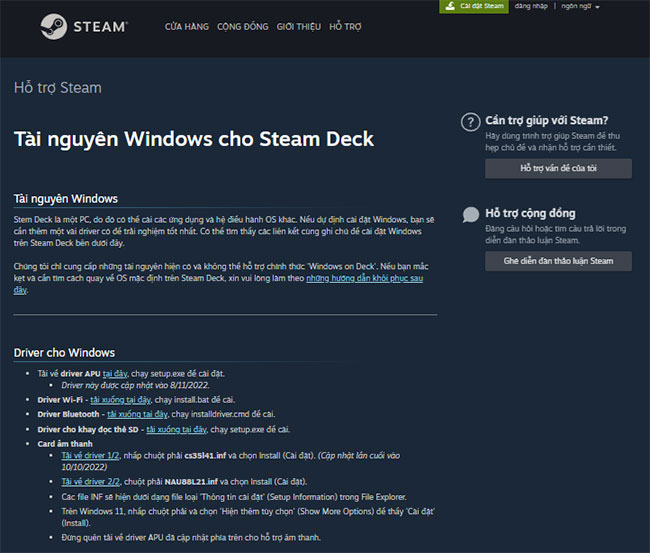
<p style="text-align: justify;">Tuy nhiên, đứng đầu trong số các driver Windows mới là những driver dành cho âm thanh. Những người dùng đầu tiên buộc phải sử dụng USB-C hoặc&nbsp;Bluetooth&nbsp;cho âm thanh với Windows trên Steam Deck. Driver âm thanh cho Steam Deck có hai file riêng biệt và thông tin về cách thiết lập file đó có sẵn trên&nbsp;trang Tài nguyên Windows cho Steam Deck.</p>

<figure>
<div style="text-align: justify;"><img alt="Trang Tài nguyên Windows cho Steam Deck" data-i="0" data-src="https://st.quantrimang.com/photos/image/2023/01/13/luu-y-khi-su-dung-driver-windows-tren-steam-deck-1.jpg" data-was-processed="true" height="553" src="https://st.quantrimang.com/photos/image/2023/01/13/luu-y-khi-su-dung-driver-windows-tren-steam-deck-1.jpg" width="650" /></div>

<figcaption>
<div style="text-align: justify;">Trang Tài nguyên Windows cho Steam Deck</div>
</figcaption>
</figure>

<h2 style="text-align: justify;">Người dùng còn mong chờ điều gì?</h2>

<p style="text-align: justify;">Người dùng đã sẵn sàng với việc Valve phát hành thêm driver Windows cho Steam Deck. Điều duy nhất còn lại mà Valve chưa thêm vào thiết bị cầm tay mạnh mẽ này là khả năng có hai hệ điều hành.</p>

<h3 style="text-align: justify;">Khởi động kép&nbsp;chưa khả dụng</h3>

<p style="text-align: justify;">Valve chưa có phương pháp chính thức để khởi động kép Windows và SteamOS trên Deck - tuy nhiên, có một số cách không chính thức để thực hiện điều này. Các game thủ muốn khởi động kép Windows và SteamOS sẽ phải chờ thêm một thời gian nữa.</p>

<h2 style="text-align: justify;">Có nên cài đặt Windows trên Steam Deck không?</h2>

<p style="text-align: justify;">Mặc dù không có gì ngăn cản bạn cài đặt Windows trên Steam Deck, nhưng có lý do để thận trọng khi làm như vậy. Không phải tất cả các game trên thiết bị cầm tay của Valve đều phù hợp với Windows.</p>

<p style="text-align: justify;">Tuy nhiên, bạn có thể tải xuống driver Windows cho Steam Deck trực tiếp từ Valve nếu muốn. Siêu liên kết được cung cấp sẽ đưa bạn đến trang hỗ trợ Steam của Valve, trang này liên kết các driver hiện được cung cấp cho Windows 10 trên Steam Deck.</p>

<h2 style="text-align: justify;">Những lưu ý khi cài đặt Windows 10 trên Steam Deck</h2>

<p style="text-align: justify;">Mặc dù Valve có các công cụ để cài đặt Windows trên Steam Deck, nhưng không có hỗ trợ &quot;Windows on Deck&quot; cho các hướng dẫn cài đặt từng bước. Tuy nhiên, nếu bạn bị mắc kẹt trong quá trình này và muốn đưa Deck trở lại như cũ, Valve có các hướng dẫn khôi phục để giúp bạn khắc phục sự cố.</p>

<p style="text-align: justify;">Deck có thể là một console đắt tiền, giá dao động từ $399 tới $649, nhưng Steam Deck có rất nhiều ưu điểm.</p>

<p style="text-align: justify;">Nếu bạn đang muốn biến Steam Deck của mình thành một cỗ máy Windows, thì bạn có thể bắt đầu ngay với sự hỗ trợ của nó cho GPU, WiFi, Bluetooth và đầu đọc thẻ SD hiện có. Bạn sẽ phải chờ thêm một thời gian nữa để có driver âm thanh và chức năng khởi động kép.</p>
		</div>
				<div id="author">
						<p>
				<strong>Nguồn tin:</strong>
				Quantrimang.com
			</p>
		</div>
	</div>
	<div id="footer" class="clearfix">
		<div id="url">
			<strong>URL của bản tin này: </strong><a href="https://www.nguoicodonvn2008.info/vi/news/savefile/kien-thuc-may-tinh/nhung-dieu-can-biet-khi-su-dung-driver-windows-tren-steam-deck-6604.html" title="Những điều cần biết khi sử dụng driver Windows trên Steam Deck">https://www.nguoicodonvn2008.info/vi/news/savefile/kien-thuc-may-tinh/nhung-dieu-can-biet-khi-su-dung-driver-windows-tren-steam-deck-6604.html</a>

		</div>
		<div class="clear"></div>
		<div class="copyright">
			&copy; .&#x3A; Nguoicodonvn2008.info - Cõi lòng người cô đơn &#x3A;.
		</div>
		<div id="contact">
			<a href="mailto:admin@nguoicodonvn2008.info">admin@nguoicodonvn2008.info</a>
		</div>
	</div>
</div>
        <div id="timeoutsess" class="chromeframe">
            Bạn đã không sử dụng Site, <a onclick="timeoutsesscancel();" href="https://nguoicodonvn2008.info/#">Bấm vào đây để duy trì trạng thái đăng nhập</a>. Thời gian chờ: <span id="secField"> 60 </span> giây
        </div>
        <div id="openidResult" class="nv-alert" style="display:none"></div>
        <div id="openidBt" data-result="" data-redirect=""></div>
		</script>
		<div class="car-top">
  <span><img src="https://nguoicodonvn2008.info/themes/default/images/car.png" alt=""></span>
</div>
<script src="https://nguoicodonvn2008.info/assets/js/jquery/jquery.min.js"></script>
<script>var nv_base_siteurl="/",nv_lang_data="vi",nv_lang_interface="vi",nv_name_variable="nv",nv_fc_variable="op",nv_lang_variable="language",nv_module_name="news",nv_func_name="savefile",nv_is_user=0, nv_my_ofs=-4,nv_my_abbr="EDT",nv_cookie_prefix="nv4c_e856T",nv_check_pass_mstime=1738000,nv_area_admin=0,nv_safemode=0,theme_responsive=0,nv_recaptcha_ver=2,nv_recaptcha_sitekey="",nv_recaptcha_type="image",XSSsanitize=1;</script>
<script src="https://nguoicodonvn2008.info/assets/js/language/vi.js"></script>
<script src="https://nguoicodonvn2008.info/assets/js/DOMPurify/purify3.js"></script>
<script src="https://nguoicodonvn2008.info/assets/js/global.js"></script>
<script src="https://nguoicodonvn2008.info/assets/js/site.js"></script>
<script src="https://nguoicodonvn2008.info/themes/default/js/news.js"></script>
<script src="https://nguoicodonvn2008.info/themes/default/js/main.js"></script>
<script src="https://nguoicodonvn2008.info/themes/default/js/custom.js"></script>
<script type="application/ld+json">
        {
            "@context": "https://schema.org",
            "@type": "Organization",
            "url": "https://nguoicodonvn2008.info",
            "logo": "https://nguoicodonvn2008.info/uploads/angel.gif"
        }
        </script>
<script src="https://nguoicodonvn2008.info/themes/default/js/bootstrap.min.js"></script>
<script type="text/javascript">
var $scrolltop = $('.car-top');
$scrolltop.on('click', function () {
    $('html,body').animate({
        scrollTop: 0
    }, 800);
    $(this).addClass("car-run");
    setTimeout(function(){ $scrolltop.removeClass('car-run');}, 1000);
    return false;
});
$(window).on('scroll', function ()
{ 
    if($(window).scrollTop() >= 200)
    {
        $scrolltop.addClass("show");
        $scrolltop.addClass("car-down");
    }
    else
    {
       $scrolltop.removeClass("show");
       setTimeout(function(){ $scrolltop.removeClass('car-down');}, 300);
    }
});
</script>
</body>
</html>