<!DOCTYPE html>
    <html lang="vi" xmlns="http://www.w3.org/1999/xhtml" prefix="og: http://ogp.me/ns#">
    <head>
<title>Những câu lệnh cần biết để thao tác với mạng cho người dùng Linux</title>
<meta name="description" content="Những câu lệnh cần biết để thao tác với mạng cho người dùng Linux - Savefile - Tin Tức -...">
<meta name="author" content=".: Nguoicodonvn2008.info - Cõi lòng người cô đơn :.">
<meta name="copyright" content=".: Nguoicodonvn2008.info - Cõi lòng người cô đơn :. [admin@nguoicodonvn2008.info]">
<meta name="robots" content="index, archive, follow, noodp">
<meta name="googlebot" content="index,archive,follow,noodp">
<meta name="msnbot" content="all,index,follow">
<meta name="generator" content="NukeViet v4.5">
<meta http-equiv="Content-Type" content="text/html; charset=utf-8">
<meta property="og:title" content="Những câu lệnh cần biết để thao tác với mạng cho người dùng Linux">
<meta property="og:type" content="website">
<meta property="og:description" content="Savefile - Tin Tức - https&#x3A;&#x002F;&#x002F;www.nguoicodonvn2008.info&#x002F;vi&#x002F;news&#x002F;savefile&#x002F;kien-thuc-may-tinh&#x002F;nhung-cau-lenh-can-biet-de-thao-tac-voi-mang-cho-nguoi-dung-linux-9086.html">
<meta property="og:site_name" content=".&#x3A; Nguoicodonvn2008.info - Cõi lòng người cô đơn &#x3A;.">
<meta property="og:url" content="https://www.nguoicodonvn2008.info/vi/news/savefile/kien-thuc-may-tinh/nhung-cau-lenh-can-biet-de-thao-tac-voi-mang-cho-nguoi-dung-linux-9086.html">
<link rel="shortcut icon" href="https://nguoicodonvn2008.info/favicon.ico">
<link rel="canonical" href="https://www.nguoicodonvn2008.info/vi/news/savefile/kien-thuc-may-tinh/nhung-cau-lenh-can-biet-de-thao-tac-voi-mang-cho-nguoi-dung-linux-9086.html">
<link rel="alternate" href="https://nguoicodonvn2008.info/vi/news/rss/" title="Tin Tức" type="application/rss+xml">
<link rel="alternate" href="https://nguoicodonvn2008.info/vi/news/rss/karaoke-dual/" title="Tin Tức - Karaoke Dual" type="application/rss+xml">
<link rel="alternate" href="https://nguoicodonvn2008.info/vi/news/rss/nhac-tre/" title="Tin Tức - Nhạc trẻ" type="application/rss+xml">
<link rel="alternate" href="https://nguoicodonvn2008.info/vi/news/rss/tru-tinh/" title="Tin Tức - Trữ tình" type="application/rss+xml">
<link rel="alternate" href="https://nguoicodonvn2008.info/vi/news/rss/nuoc-ngoai/" title="Tin Tức - Nước ngoài" type="application/rss+xml">
<link rel="alternate" href="https://nguoicodonvn2008.info/vi/news/rss/remix/" title="Tin Tức - Remix" type="application/rss+xml">
<link rel="alternate" href="https://nguoicodonvn2008.info/vi/news/rss/tam-su-tinh-yeu/" title="Tin Tức - Tâm sự tình yêu" type="application/rss+xml">
<link rel="alternate" href="https://nguoicodonvn2008.info/vi/news/rss/tho-suu-tam/" title="Tin Tức - Thơ sưu tầm" type="application/rss+xml">
<link rel="alternate" href="https://nguoicodonvn2008.info/vi/news/rss/cuoc-song/" title="Tin Tức - Cuộc sống" type="application/rss+xml">
<link rel="alternate" href="https://nguoicodonvn2008.info/vi/news/rss/phan-mem/" title="Tin Tức - Phần mềm" type="application/rss+xml">
<link rel="alternate" href="https://nguoicodonvn2008.info/vi/news/rss/kien-thuc-may-tinh/" title="Tin Tức - Kiến thức máy tính" type="application/rss+xml">
<link rel="alternate" href="https://nguoicodonvn2008.info/vi/news/rss/hoc-tap/" title="Tin Tức - Học tập" type="application/rss+xml">
<link rel="alternate" href="https://nguoicodonvn2008.info/vi/news/rss/tai-lieu/" title="Tin Tức - Tài liệu" type="application/rss+xml">
<link rel="alternate" href="https://nguoicodonvn2008.info/vi/news/rss/de-thi/" title="Tin Tức - Đề thi" type="application/rss+xml">
<link rel="preload" as="style" href="https://nguoicodonvn2008.info/assets/css/font-awesome.min.css" type="text/css">
<link rel="preload" as="style" href="https://nguoicodonvn2008.info/themes/default/css/bootstrap.non-responsive.css" type="text/css">
<link rel="preload" as="style" href="https://nguoicodonvn2008.info/themes/default/css/style.css" type="text/css">
<link rel="preload" as="style" href="https://nguoicodonvn2008.info/themes/default/css/style.non-responsive.css" type="text/css">
<link rel="preload" as="style" href="https://nguoicodonvn2008.info/themes/default/css/news.css" type="text/css">
<link rel="preload" as="style" href="https://nguoicodonvn2008.info/themes/default/css/custom.css" type="text/css">
<link rel="preload" as="script" href="https://nguoicodonvn2008.info/assets/js/jquery/jquery.min.js" type="text/javascript">
<link rel="preload" as="script" href="https://nguoicodonvn2008.info/assets/js/language/vi.js" type="text/javascript">
<link rel="preload" as="script" href="https://nguoicodonvn2008.info/assets/js/DOMPurify/purify3.js" type="text/javascript">
<link rel="preload" as="script" href="https://nguoicodonvn2008.info/assets/js/global.js" type="text/javascript">
<link rel="preload" as="script" href="https://nguoicodonvn2008.info/assets/js/site.js" type="text/javascript">
<link rel="preload" as="script" href="https://nguoicodonvn2008.info/themes/default/js/news.js" type="text/javascript">
<link rel="preload" as="script" href="https://nguoicodonvn2008.info/themes/default/js/main.js" type="text/javascript">
<link rel="preload" as="script" href="https://nguoicodonvn2008.info/themes/default/js/custom.js" type="text/javascript">
<link rel="preload" as="script" href="https://nguoicodonvn2008.info/themes/default/js/bootstrap.min.js" type="text/javascript">
<link rel="stylesheet" href="https://nguoicodonvn2008.info/assets/css/font-awesome.min.css">
<link rel="stylesheet" href="https://nguoicodonvn2008.info/themes/default/css/bootstrap.non-responsive.css">
<link rel="stylesheet" href="https://nguoicodonvn2008.info/themes/default/css/style.css">
<link rel="stylesheet" href="https://nguoicodonvn2008.info/themes/default/css/style.non-responsive.css">
<link rel="StyleSheet" href="https://nguoicodonvn2008.info/themes/default/css/news.css">
<link rel="stylesheet" href="https://nguoicodonvn2008.info/themes/default/css/custom.css">
<style type="text/css">
	body{background: #fff;}
</style>
    </head>
    <body>
<div id="print">
	<div id="hd_print">
		<h2 class="pull-left">.&#x3A; Nguoicodonvn2008.info - Cõi lòng người cô đơn &#x3A;.</h2>
		<p class="pull-right"><a title=".&#x3A; Nguoicodonvn2008.info - Cõi lòng người cô đơn &#x3A;." href="https://nguoicodonvn2008.info/">https://nguoicodonvn2008.info</a></p>
	</div>
	<div class="clear"></div>
	<hr />
	<div id="content">
		<h1>Những câu lệnh cần biết để thao tác với mạng cho người dùng Linux</h1>
		<ul class="list-inline">
			<li>Thứ sáu - 27/09/2024 23:50</li>
			<li class="hidden-print txtrequired"><em class="fa fa-print">&nbsp;</em><a title="In ra" href="javascript:;" onclick="window.print()">In ra</a></li>
			<li class="hidden-print txtrequired"><em class="fa fa-power-off">&nbsp;</em><a title="Đóng cửa sổ này" href="javascript:;" onclick="window.close()">Đóng cửa sổ này</a></li>
		</ul>
		<div class="clear"></div>
		<div id="hometext">
		</div>
				<div class="imghome">
			<img alt="Những câu lệnh cần biết để thao tác với mạng cho người dùng Linux" src="https://st.quantrimang.com/photos/image/2024/09/27/cau-lenh-thao-tac-voi-mang-cho-nguoi-dung-linux-2.jpg" width="460" class="img-thumbnail" />
		</div>
		<div class="clear"></div>
		<div id="bodytext" class="clearfix">
			<p style="text-align: justify;">Linux đã được sử dụng như một trong những công cụ phổ biến nhất cho việc triển khai máy chủ, máy chủ hệ điều hành và các ứng dụng khác, nhờ vào tính bảo mật, hiệu suất và tính ổn định của nó. Làm việc trên một hệ thống Linux duy nhất thì dễ, nhưng khi phải trao đổi thông tin giữa nhiều máy, bạn cần một mạng hiệu quả để có thể dễ dàng chia sẻ thông tin</p>

<p style="text-align: justify;">Sau đây là những câu lệnh cần biết để thao tác với mạng cho người dùng Linux!</p>

<h2 style="text-align: justify;">ifconfig</h2>

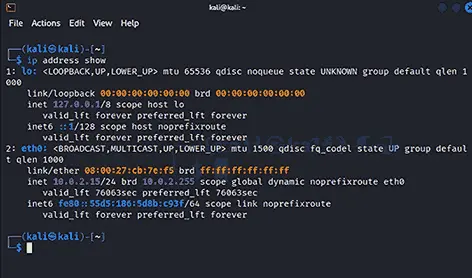
<p style="text-align: justify;">Lệnh ifconfig (interface configuration) cấu hình, hiển thị và quản lý các interface mạng. Lệnh này cung cấp thông tin về cấu hình mạng hiện tại của hệ thống, như địa chỉ IP, địa chỉ MAC, v.v... Do đó, lệnh này cho phép quản trị viên xem và sửa đổi cấu hình của các interface mạng, đặt địa chỉ IP, kích hoạt hoặc vô hiệu hóa interface, v.v... Việc triển khai lệnh này được hiển thị bên dưới.</p>

<figure>
<div style="text-align: justify;"><img alt="" data-i="0" data-src="https://st.quantrimang.com/photos/image/2024/09/27/cau-lenh-thao-tac-voi-mang-cho-nguoi-dung-linux-1.jpg" data-was-processed="true" height="257" src="https://st.quantrimang.com/photos/image/2024/09/27/cau-lenh-thao-tac-voi-mang-cho-nguoi-dung-linux-1.jpg" width="358" /></div>
</figure>

<h2 style="text-align: justify;">IP</h2>

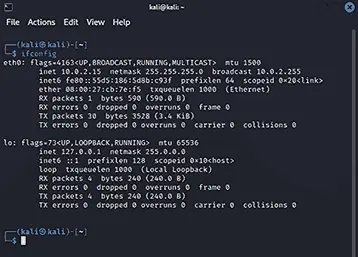
<p style="text-align: justify;">Các chuyên gia Linux sử dụng lệnh ip để cấu hình interface mạng, bảng định tuyến, tunnel và quản lý mạng trong Linux. Lệnh này tương tự như lệnh &#039;ifconfig&#039; nhưng cung cấp nhiều chức năng hơn. Với ip, quản trị viên có thể chỉ định địa chỉ IP, quản lý bảng định tuyến, cấu hình tunnel và thực hiện nhiều tác vụ liên quan đến mạng. Giả sử bạn muốn hiển thị địa chỉ IP của máy chủ, bạn có thể sử dụng lệnh này như minh họa bên dưới.</p>

<figure>
<div style="text-align: justify;"><img alt="" data-i="1" data-src="https://st.quantrimang.com/photos/image/2024/09/27/cau-lenh-thao-tac-voi-mang-cho-nguoi-dung-linux-2.jpg" data-was-processed="true" height="278" src="https://st.quantrimang.com/photos/image/2024/09/27/cau-lenh-thao-tac-voi-mang-cho-nguoi-dung-linux-2.jpg" width="472" /></div>
</figure>

<h2 style="text-align: justify;">traceroute</h2>

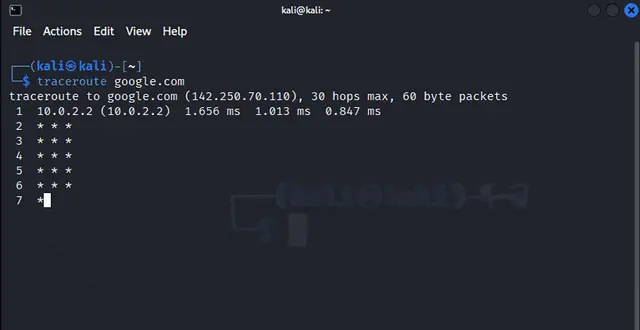
<p style="text-align: justify;">Bạn có thể sử dụng lệnh này nếu bạn muốn theo dõi tuyến đường của các gói tin từ hệ thống cục bộ đến&nbsp;địa chỉ IP&nbsp;đích hoặc tên máy chủ. Lệnh này cung cấp chế độ xem chi tiết về đường dẫn mạng và hiển thị từng bước nhảy cùng với thời gian khứ hồi tương ứng. Ví dụ, nếu muốn theo dõi đường dẫn tuyến đường cho google.com, bạn có thể sử dụng lệnh này như minh họa bên dưới.</p>

<figure>
<div style="text-align: justify;"><img alt="" data-i="2" data-src="https://st.quantrimang.com/photos/image/2024/09/27/cau-lenh-thao-tac-voi-mang-cho-nguoi-dung-linux-3.jpg" data-was-processed="true" height="330" src="https://st.quantrimang.com/photos/image/2024/09/27/cau-lenh-thao-tac-voi-mang-cho-nguoi-dung-linux-3.jpg" width="640" /></div>
</figure>

<h2 style="text-align: justify;">trace path</h2>

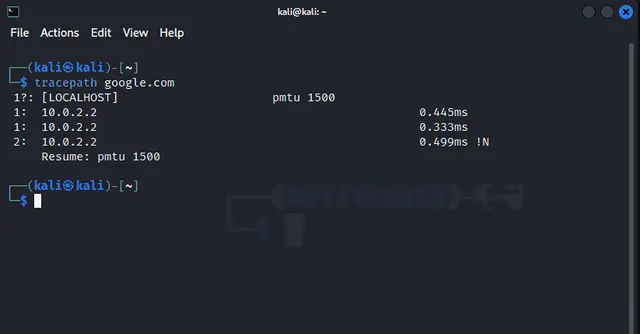
<p style="text-align: justify;">Lệnh mạng Linux này tương tự như traceroute vì lệnh này hiển thị đường dẫn mạng đến đích. Nhưng lệnh này cung cấp đầu ra được đơn giản hóa so với traceroute. Do đó, lệnh này hiệu quả hơn. Lệnh này giúp xác định các nút thắt cổ chai mạng, cũng như độ trễ giữa nguồn và đích. Một triển khai đơn giản của lệnh này được hiển thị bên dưới:</p>

<figure>
<div style="text-align: justify;"><img alt="" data-adbro-processed="true" data-i="3" data-src="https://st.quantrimang.com/photos/image/2024/09/27/cau-lenh-thao-tac-voi-mang-cho-nguoi-dung-linux-4.jpg" data-was-processed="true" height="334" src="https://st.quantrimang.com/photos/image/2024/09/27/cau-lenh-thao-tac-voi-mang-cho-nguoi-dung-linux-4.jpg" width="640" /></div>
</figure>

<div style="text-align: justify;">&nbsp;</div>

<h2 style="text-align: justify;">netstat</h2>

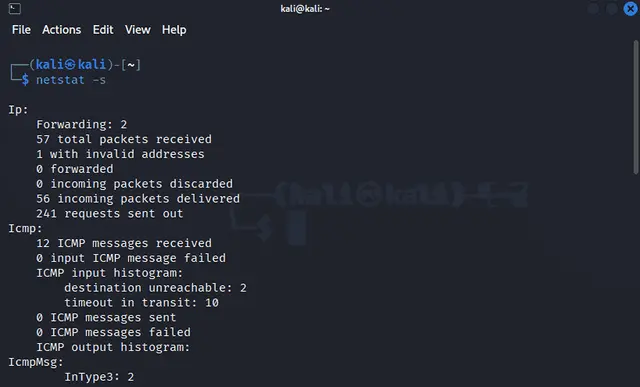
<p style="text-align: justify;">&#039;netstat&#039; là một công cụ dòng lệnh hiển thị thông tin về các kết nối mạng, bảng định tuyến, số liệu thống kê interface, kết nối ngụy trang, v.v... Lệnh này cung cấp chế độ xem toàn diện về các hoạt động liên quan đến mạng, cho phép bạn khắc phục sự cố và giám sát hiệu suất mạng.</p>

<p style="text-align: justify;">Nói cách khác, nó hiển thị dữ liệu thống kê về các socket mở, bảng định tuyến và thông tin kết nối. Trong ví dụ sau, chúng ta đang lấy thông tin về các cổng trong môi trường Linux của mình.</p>

<figure>
<div style="text-align: justify;"><img alt="" data-i="4" data-src="https://st.quantrimang.com/photos/image/2024/09/27/cau-lenh-thao-tac-voi-mang-cho-nguoi-dung-linux-5.jpg" data-was-processed="true" height="387" src="https://st.quantrimang.com/photos/image/2024/09/27/cau-lenh-thao-tac-voi-mang-cho-nguoi-dung-linux-5.jpg" width="640" /></div>
</figure>

<h2 style="text-align: justify;">ss (Socket Statistics)</h2>

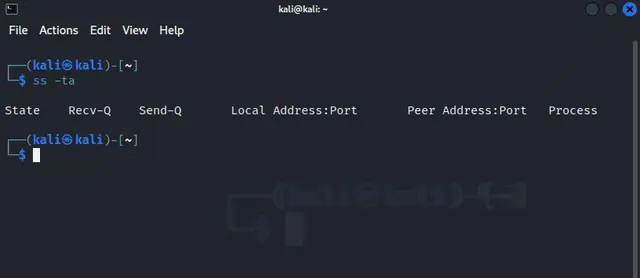
<p style="text-align: justify;">Socket giống như điểm cuối mà các chương trình giao tiếp với nhau. Nó hiển thị thông tin về các socket, giống như lệnh ‘netstat’ hiển thị về mạng. Ví dụ, nếu muốn lấy thông tin của tất cả các socket có sẵn trên máy chủ, bạn có thể sử dụng lệnh này như được hiển thị bên dưới.</p>

<figure>
<div style="text-align: justify;"><img alt="" data-i="5" data-src="https://st.quantrimang.com/photos/image/2024/09/27/cau-lenh-thao-tac-voi-mang-cho-nguoi-dung-linux-6.jpg" data-was-processed="true" height="278" src="https://st.quantrimang.com/photos/image/2024/09/27/cau-lenh-thao-tac-voi-mang-cho-nguoi-dung-linux-6.jpg" width="640" /></div>
</figure>

<h2 style="text-align: justify;">dig</h2>

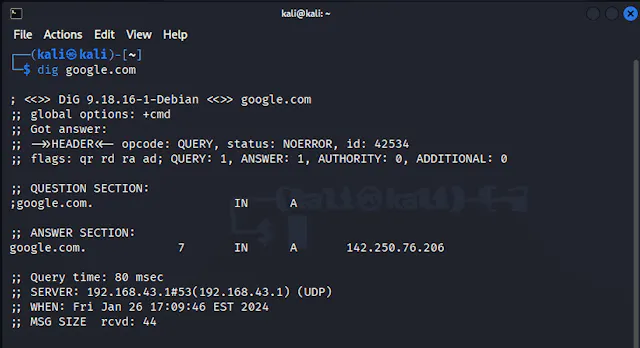
<p style="text-align: justify;">DIG có nghĩa là ‘Domain Information Grouper’. Do đó, lệnh này sẽ lấy thông tin về DNS Name Servers. Đơn giản, người dùng Linux sử dụng lệnh này để lấy thông tin về trang web như vị trí của trang, mail server, địa chỉ IP, v.v... Cách sử dụng Lệnh mạng Linux này được hiển thị bên dưới:</p>

<figure>
<div style="text-align: justify;"><img alt="" data-i="6" data-src="https://st.quantrimang.com/photos/image/2024/09/27/cau-lenh-thao-tac-voi-mang-cho-nguoi-dung-linux-7.jpg" data-was-processed="true" height="348" src="https://st.quantrimang.com/photos/image/2024/09/27/cau-lenh-thao-tac-voi-mang-cho-nguoi-dung-linux-7.jpg" width="640" /></div>
</figure>

<div style="text-align: justify;">&nbsp;</div>

<h2 style="text-align: justify;">nslookup</h2>

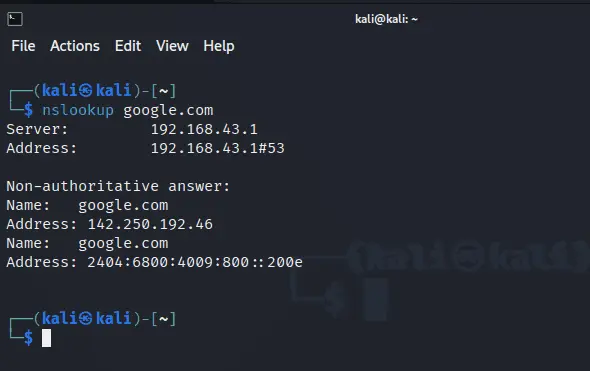
<p style="text-align: justify;">Nó tương tự như lệnh &#039;dig&#039; và hiển thị thông tin liên quan đến DNS cho người dùng Linux. Điểm khác biệt là nó ít tùy chỉnh hơn lệnh &#039;dig&#039;. Ngoài ra, nó hiển thị ít thông tin hơn về hệ thống tên miền. Ví dụ sau đây hiển thị lệnh &#039;nslookup&#039; trong hệ thống Linux.</p>

<figure>
<div style="text-align: justify;"><img alt="" data-i="7" data-src="https://st.quantrimang.com/photos/image/2024/09/27/cau-lenh-thao-tac-voi-mang-cho-nguoi-dung-linux-8.jpg" data-was-processed="true" height="371" src="https://st.quantrimang.com/photos/image/2024/09/27/cau-lenh-thao-tac-voi-mang-cho-nguoi-dung-linux-8.jpg" width="590" /></div>
</figure>

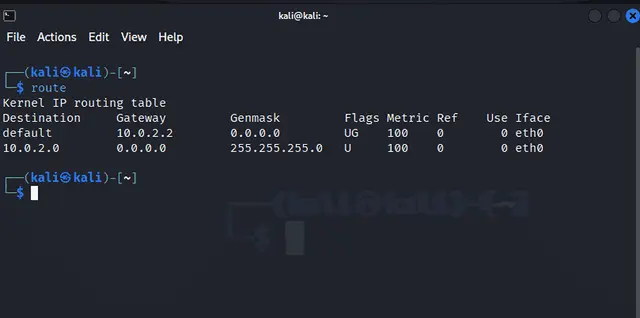
<h2 style="text-align: justify;">route</h2>

<p style="text-align: justify;">Định tuyến là phương pháp chọn đường dẫn tốt nhất để phân phối gói dữ liệu từ nguồn đến đích. Vì vậy, lệnh này cho phép bạn xem hoặc sửa đổi bảng định tuyến. Ví dụ, quản trị viên có thể thêm hoặc xóa các tuyến bằng lệnh này. Bạn có thể sử dụng lệnh này như được hiển thị bên dưới.</p>

<figure>
<div style="text-align: justify;"><img alt="" data-i="8" data-src="https://st.quantrimang.com/photos/image/2024/09/27/cau-lenh-thao-tac-voi-mang-cho-nguoi-dung-linux-9.jpg" data-was-processed="true" height="318" src="https://st.quantrimang.com/photos/image/2024/09/27/cau-lenh-thao-tac-voi-mang-cho-nguoi-dung-linux-9.jpg" width="640" /></div>
</figure>

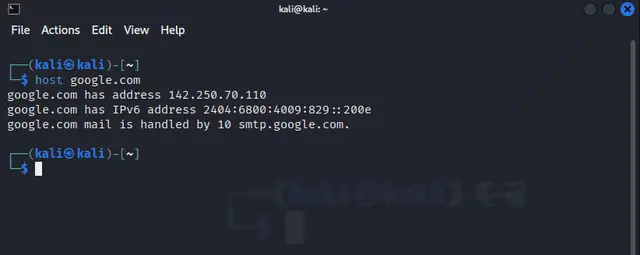
<h2 style="text-align: justify;">host</h2>

<p style="text-align: justify;">Nếu bạn muốn lấy thông tin DNS về máy chủ, hãy sử dụng lệnh này. Bạn có thể lấy tên máy chủ bằng địa chỉ IP hoặc lấy địa chỉ IP bằng tên miền. Ví dụ, để lấy thông tin DNS về google.com, chúng ta có thể sử dụng lệnh này như bên dưới.</p>

<figure>
<div style="text-align: justify;"><img alt="" data-i="9" data-src="https://st.quantrimang.com/photos/image/2024/09/27/cau-lenh-thao-tac-voi-mang-cho-nguoi-dung-linux-10.jpg" data-was-processed="true" height="255" src="https://st.quantrimang.com/photos/image/2024/09/27/cau-lenh-thao-tac-voi-mang-cho-nguoi-dung-linux-10.jpg" width="640" /></div>
</figure>

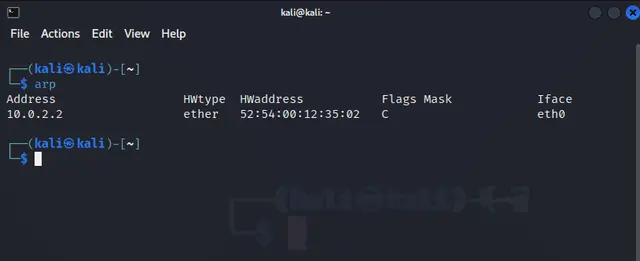
<h2 style="text-align: justify;">arp</h2>

<p style="text-align: justify;">ARP có nghĩa là Address Resolution Protocol, được sử dụng để ánh xạ địa chỉ MAC của thiết bị thành địa chỉ IP. Do đó, lệnh này cho phép chúng ta sửa đổi các địa chỉ trên mạng cục bộ. Việc sử dụng lệnh này được trình bày bên dưới.</p>

<figure>
<div style="text-align: justify;"><img alt="" data-i="10" data-src="https://st.quantrimang.com/photos/image/2024/09/27/cau-lenh-thao-tac-voi-mang-cho-nguoi-dung-linux-11.jpg" data-was-processed="true" height="261" src="https://st.quantrimang.com/photos/image/2024/09/27/cau-lenh-thao-tac-voi-mang-cho-nguoi-dung-linux-11.jpg" width="640" /></div>
</figure>

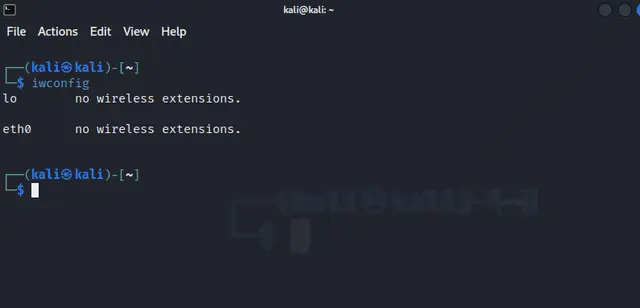
<h2 style="text-align: justify;">iwconfig</h2>

<p style="text-align: justify;">iwconfig được sử dụng để cấu hình interface mạng không dây trong Linux. Lệnh này hiển thị thông tin về interface không dây, bao gồm thông tin chi tiết về kết nối hiện tại, cường độ tín hiệu, mã hóa, v.v... như được hiển thị bên dưới.</p>

<figure>
<div style="text-align: justify;"><img alt="" data-i="11" data-src="https://st.quantrimang.com/photos/image/2024/09/27/cau-lenh-thao-tac-voi-mang-cho-nguoi-dung-linux-12.jpg" data-was-processed="true" height="308" src="https://st.quantrimang.com/photos/image/2024/09/27/cau-lenh-thao-tac-voi-mang-cho-nguoi-dung-linux-12.jpg" width="640" /></div>
</figure>

<div style="text-align: justify;"><iframe allow="autoplay" allowtransparency="true" aria-label="Advertisement" data-google-container-id="a!5" data-google-query-id="CMnl6ore5IgDFR5EwgUdbkAx4w" data-load-complete="true" frameborder="0" height="0" hspace="0" id="aswift_4" marginheight="0" marginwidth="0" name="aswift_4" sandbox="allow-scripts allow-same-origin allow-forms allow-presentation allow-popups" scrolling="no" tabindex="0" title="Advertisement" vspace="0" width="694"></iframe></div>

<h2 style="text-align: justify;">hostname</h2>

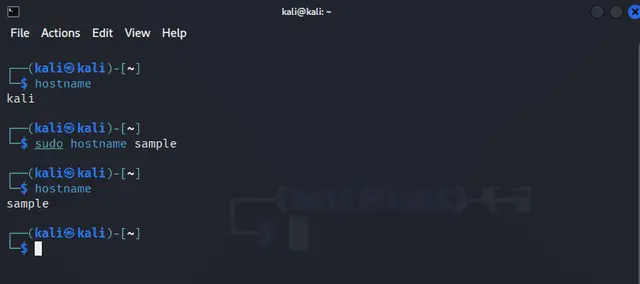
<p style="text-align: justify;">Lệnh này cho phép hiển thị tên máy chủ của một hệ thống để xác định hệ thống trên mạng. Ngoài ra, chúng ta có thể thay đổi tên máy chủ bằng lệnh này, như được trình bày bên dưới.</p>

<p style="text-align: justify;">Điểm quan trọng là nó không đặt tên máy chủ vĩnh viễn. Tên máy chủ được khôi phục về tên gốc khi hệ thống tắt</p>

<figure>
<div style="text-align: justify;"><img alt="" data-i="12" data-src="https://st.quantrimang.com/photos/image/2024/09/27/cau-lenh-thao-tac-voi-mang-cho-nguoi-dung-linux-13.jpg" data-was-processed="true" height="284" src="https://st.quantrimang.com/photos/image/2024/09/27/cau-lenh-thao-tac-voi-mang-cho-nguoi-dung-linux-13.jpg" width="640" /></div>
</figure>

<h2 style="text-align: justify;">curl</h2>

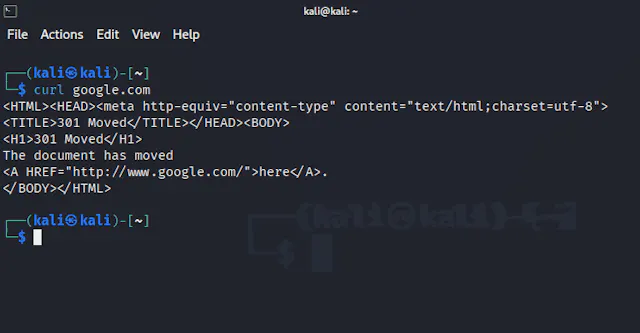
<p style="text-align: justify;">Trong trường hợp bạn muốn thực hiện các yêu cầu HTTP, lệnh này sẽ giúp ích. Bạn có thể sử dụng lệnh này để truy xuất hoặc gửi dữ liệu đến máy chủ để bạn có thể dễ dàng tương tác với các dịch vụ web. Giả sử bạn muốn tương tác với google.com, bạn có thể sử dụng lệnh này như sau.</p>

<figure>
<div style="text-align: justify;"><img alt="" data-i="13" data-src="https://st.quantrimang.com/photos/image/2024/09/27/cau-lenh-thao-tac-voi-mang-cho-nguoi-dung-linux-14.jpg" data-was-processed="true" height="333" src="https://st.quantrimang.com/photos/image/2024/09/27/cau-lenh-thao-tac-voi-mang-cho-nguoi-dung-linux-14.jpg" width="640" /></div>
</figure>

<h2 style="text-align: justify;">ping</h2>

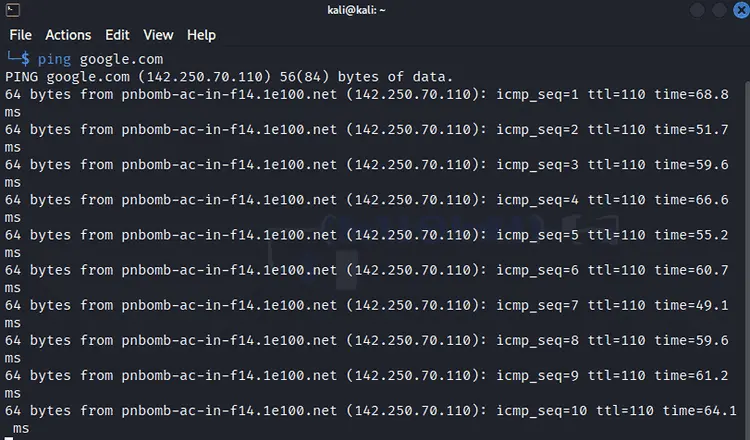
<p style="text-align: justify;">Đây là một trong những lệnh cơ bản nhất giúp bạn kiểm tra kết nối mạng. Lệnh này viết tắt của ‘Packet InterNet Groper’ và đảm bảo kết nối giữa server và host. Một ví dụ về lệnh này được đưa ra bên dưới.</p>

<figure>
<div style="text-align: justify;"><img alt="" data-i="14" data-src="https://st.quantrimang.com/photos/image/2024/09/27/cau-lenh-thao-tac-voi-mang-cho-nguoi-dung-linux-15.jpg" data-was-processed="true" height="440" src="https://st.quantrimang.com/photos/image/2024/09/27/cau-lenh-thao-tac-voi-mang-cho-nguoi-dung-linux-15.jpg" width="750" /></div>
</figure>

<h2 style="text-align: justify;">mtr</h2>

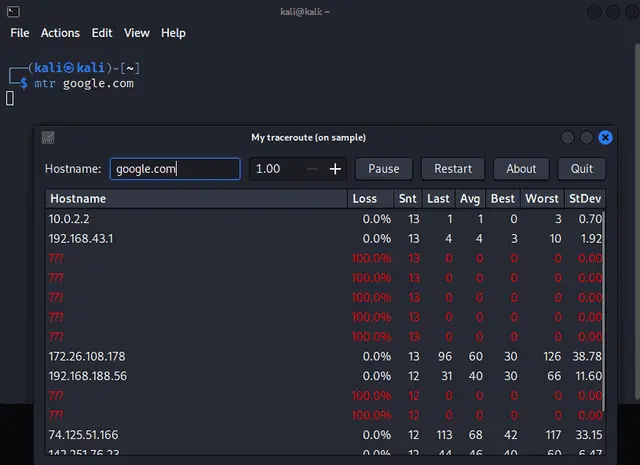
<p style="text-align: justify;">mtr (My TraceRoute) là một công cụ chẩn đoán mạng kết hợp chức năng của ping và traceroute. Lệnh này liên tục theo dõi tuyến đường đến đích và cung cấp số liệu thống kê thời gian thực về tình trạng mất gói tin và độ trễ cho mỗi lần chuyển (hop).</p>

<figure>
<div style="text-align: justify;"><img alt="" data-i="15" data-src="https://st.quantrimang.com/photos/image/2024/09/27/cau-lenh-thao-tac-voi-mang-cho-nguoi-dung-linux-16.jpg" data-was-processed="true" height="465" src="https://st.quantrimang.com/photos/image/2024/09/27/cau-lenh-thao-tac-voi-mang-cho-nguoi-dung-linux-16.jpg" width="640" /></div>
</figure>

<h2 style="text-align: justify;">whois</h2>

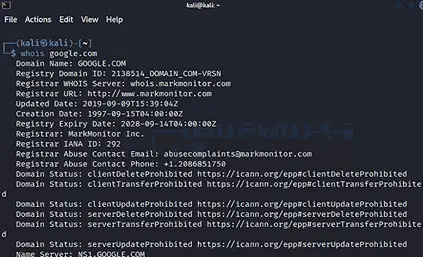
<p style="text-align: justify;">Lệnh whois cung cấp thông tin về đăng ký domain, bao gồm thông tin chi tiết về đơn vị đăng ký domain, ngày đăng ký và thông tin liên hệ. Lệnh này hữu ích để lấy thông tin về chủ sở hữu domain.</p>

<figure>
<div style="text-align: justify;"><img alt="" data-i="16" data-src="https://st.quantrimang.com/photos/image/2024/09/27/cau-lenh-thao-tac-voi-mang-cho-nguoi-dung-linux-17.jpg" data-was-processed="true" height="257" src="https://st.quantrimang.com/photos/image/2024/09/27/cau-lenh-thao-tac-voi-mang-cho-nguoi-dung-linux-17.jpg" width="423" /></div>
</figure>

<h2 style="text-align: justify;">ifplugstatus</h2>

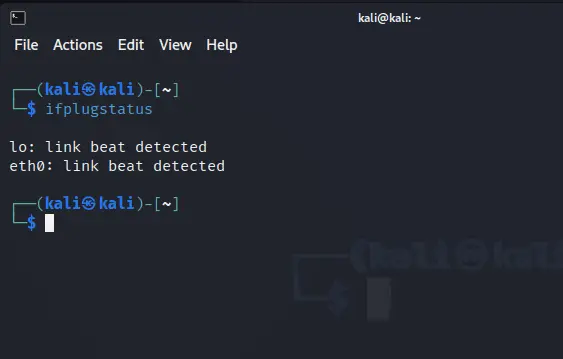
<p style="text-align: justify;">Đây là lệnh kiểm tra xem interface Ethernet có được kết nối hoặc cắm vào hệ thống hay không. Do đó, đây là công cụ để xác minh kết nối vật lý của mạng. Cú pháp của lệnh này được hiển thị bên dưới.</p>

<figure>
<div style="text-align: justify;"><img alt="" data-i="17" data-src="https://st.quantrimang.com/photos/image/2024/09/27/cau-lenh-thao-tac-voi-mang-cho-nguoi-dung-linux-18.jpg" data-was-processed="true" height="359" src="https://st.quantrimang.com/photos/image/2024/09/27/cau-lenh-thao-tac-voi-mang-cho-nguoi-dung-linux-18.jpg" width="563" /></div>
</figure>

<div style="text-align: justify;"><iframe allow="autoplay" allowtransparency="true" aria-label="Advertisement" data-google-container-id="a!6" data-google-query-id="CPXS6Ive5IgDFQRHwgUd6RILhA" data-load-complete="true" frameborder="0" height="0" hspace="0" id="aswift_5" marginheight="0" marginwidth="0" name="aswift_5" sandbox="allow-scripts allow-same-origin allow-forms allow-presentation allow-popups" scrolling="no" tabindex="0" title="Advertisement" vspace="0" width="694"></iframe></div>

<h2 style="text-align: justify;">iftop</h2>

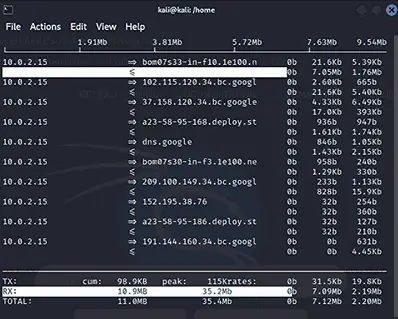
<p style="text-align: justify;">Băng thông của mạng đóng vai trò quan trọng trong việc truyền dữ liệu trên toàn hệ thống. Vì vậy, lệnh iftop (Interface TOP) được sử dụng để lấy thông tin về số liệu thống kê băng thông. Khi bạn nhập lệnh &#039;sudo iftop&#039;, đầu ra sẽ được hiển thị bên dưới.</p>

<figure>
<div style="text-align: justify;"><img alt="" data-i="18" data-src="https://st.quantrimang.com/photos/image/2024/09/27/cau-lenh-thao-tac-voi-mang-cho-nguoi-dung-linux-19.jpg" data-was-processed="true" height="319" src="https://st.quantrimang.com/photos/image/2024/09/27/cau-lenh-thao-tac-voi-mang-cho-nguoi-dung-linux-19.jpg" width="398" /></div>
</figure>

<h2 style="text-align: justify;">nmcli</h2>

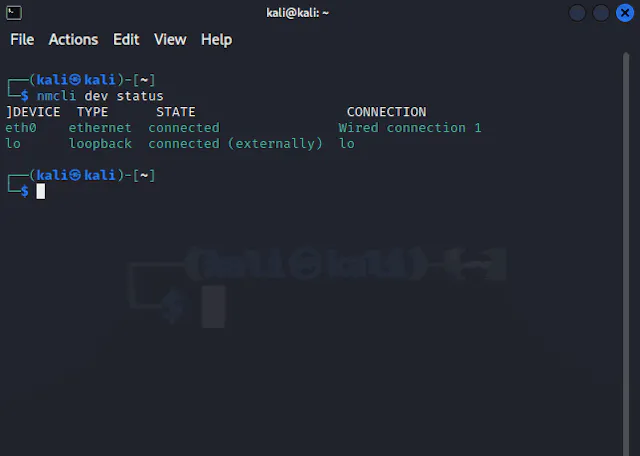
<p style="text-align: justify;">Đây là lệnh tạo script hiển thị trạng thái của mạng và điều khiển trình quản lý mạng. Bạn có thể sử dụng lệnh này để xem các thiết bị mạng như đã đề cập bên dưới.</p>

<figure>
<div style="text-align: justify;"><img alt="" data-i="19" data-src="https://st.quantrimang.com/photos/image/2024/09/27/cau-lenh-thao-tac-voi-mang-cho-nguoi-dung-linux-20.jpg" data-was-processed="true" height="456" src="https://st.quantrimang.com/photos/image/2024/09/27/cau-lenh-thao-tac-voi-mang-cho-nguoi-dung-linux-20.jpg" width="640" /></div>
</figure>

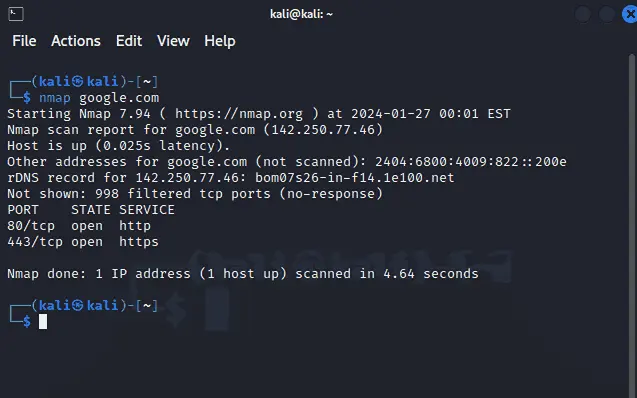
<h2 style="text-align: justify;">nmap</h2>

<p style="text-align: justify;">Lệnh này quét các host và service khác nhau trên mạng máy tính. Nó cũng cung cấp thông tin về các cổng mở, service và lỗ hổng như minh họa bên dưới.</p>

<figure>
<div style="text-align: justify;"><img alt="" data-i="20" data-src="https://st.quantrimang.com/photos/image/2024/09/27/cau-lenh-thao-tac-voi-mang-cho-nguoi-dung-linux-21.jpg" data-was-processed="true" height="398" src="https://st.quantrimang.com/photos/image/2024/09/27/cau-lenh-thao-tac-voi-mang-cho-nguoi-dung-linux-21.jpg" width="637" /></div>
</figure>

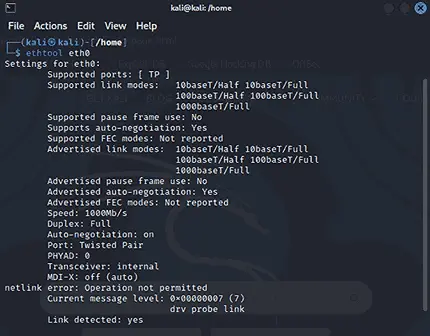
<h2 style="text-align: justify;">ethtool</h2>

<p style="text-align: justify;">Lệnh này thay đổi hoặc truy xuất thông tin về cài đặt thiết bị Ethernet. Bạn cũng có thể xem cài đặt cấu hình cho thiết bị Ethernet trong mạng. Nó được minh họa như minh họa bên dưới.</p>

<figure>
<div style="text-align: justify;"><img alt="" data-i="21" data-src="https://st.quantrimang.com/photos/image/2024/09/27/cau-lenh-thao-tac-voi-mang-cho-nguoi-dung-linux-22.jpg" data-was-processed="true" height="336" src="https://st.quantrimang.com/photos/image/2024/09/27/cau-lenh-thao-tac-voi-mang-cho-nguoi-dung-linux-22.jpg" width="430" /></div>
</figure>

<div style="text-align: justify;">&nbsp;</div>
		</div>
				<div id="author">
						<p>
				<strong>Nguồn tin:</strong>
				Quantrimang.com:
			</p>
		</div>
	</div>
	<div id="footer" class="clearfix">
		<div id="url">
			<strong>URL của bản tin này: </strong><a href="https://www.nguoicodonvn2008.info/vi/news/savefile/kien-thuc-may-tinh/nhung-cau-lenh-can-biet-de-thao-tac-voi-mang-cho-nguoi-dung-linux-9086.html" title="Những câu lệnh cần biết để thao tác với mạng cho người dùng Linux">https://www.nguoicodonvn2008.info/vi/news/savefile/kien-thuc-may-tinh/nhung-cau-lenh-can-biet-de-thao-tac-voi-mang-cho-nguoi-dung-linux-9086.html</a>

		</div>
		<div class="clear"></div>
		<div class="copyright">
			&copy; .&#x3A; Nguoicodonvn2008.info - Cõi lòng người cô đơn &#x3A;.
		</div>
		<div id="contact">
			<a href="mailto:admin@nguoicodonvn2008.info">admin@nguoicodonvn2008.info</a>
		</div>
	</div>
</div>
        <div id="timeoutsess" class="chromeframe">
            Bạn đã không sử dụng Site, <a onclick="timeoutsesscancel();" href="https://nguoicodonvn2008.info/#">Bấm vào đây để duy trì trạng thái đăng nhập</a>. Thời gian chờ: <span id="secField"> 60 </span> giây
        </div>
        <div id="openidResult" class="nv-alert" style="display:none"></div>
        <div id="openidBt" data-result="" data-redirect=""></div>
		</script>
		<div class="car-top">
  <span><img src="https://nguoicodonvn2008.info/themes/default/images/car.png" alt=""></span>
</div>
<div id="run_cronjobs" style="visibility:hidden;display:none;"><img alt="cron" src="/index.php?second=cronjobs&amp;p=l4hwJ2kV" width="1" height="1" /></div>
<script src="https://nguoicodonvn2008.info/assets/js/jquery/jquery.min.js"></script>
<script>var nv_base_siteurl="/",nv_lang_data="vi",nv_lang_interface="vi",nv_name_variable="nv",nv_fc_variable="op",nv_lang_variable="language",nv_module_name="news",nv_func_name="savefile",nv_is_user=0, nv_my_ofs=-4,nv_my_abbr="EDT",nv_cookie_prefix="nv4c_e856T",nv_check_pass_mstime=1738000,nv_area_admin=0,nv_safemode=0,theme_responsive=0,nv_recaptcha_ver=2,nv_recaptcha_sitekey="",nv_recaptcha_type="image",XSSsanitize=1;</script>
<script src="https://nguoicodonvn2008.info/assets/js/language/vi.js"></script>
<script src="https://nguoicodonvn2008.info/assets/js/DOMPurify/purify3.js"></script>
<script src="https://nguoicodonvn2008.info/assets/js/global.js"></script>
<script src="https://nguoicodonvn2008.info/assets/js/site.js"></script>
<script src="https://nguoicodonvn2008.info/themes/default/js/news.js"></script>
<script src="https://nguoicodonvn2008.info/themes/default/js/main.js"></script>
<script src="https://nguoicodonvn2008.info/themes/default/js/custom.js"></script>
<script type="application/ld+json">
        {
            "@context": "https://schema.org",
            "@type": "Organization",
            "url": "https://nguoicodonvn2008.info",
            "logo": "https://nguoicodonvn2008.info/uploads/angel.gif"
        }
        </script>
<script src="https://nguoicodonvn2008.info/themes/default/js/bootstrap.min.js"></script>
<script type="text/javascript">
var $scrolltop = $('.car-top');
$scrolltop.on('click', function () {
    $('html,body').animate({
        scrollTop: 0
    }, 800);
    $(this).addClass("car-run");
    setTimeout(function(){ $scrolltop.removeClass('car-run');}, 1000);
    return false;
});
$(window).on('scroll', function ()
{ 
    if($(window).scrollTop() >= 200)
    {
        $scrolltop.addClass("show");
        $scrolltop.addClass("car-down");
    }
    else
    {
       $scrolltop.removeClass("show");
       setTimeout(function(){ $scrolltop.removeClass('car-down');}, 300);
    }
});
</script>
</body>
</html>