<!DOCTYPE html>
    <html lang="vi" xmlns="http://www.w3.org/1999/xhtml" prefix="og: http://ogp.me/ns#">
    <head>
<title>Microsoft loại bỏ thư mục “vô dụng” nhất trên Windows 10 khỏi File Explorer</title>
<meta name="description" content="Microsoft loại bỏ thư mục “vô dụng” nhất trên Windows 10 khỏi File Explorer - Savefile - Tin Tức -...">
<meta name="author" content=".: Nguoicodonvn2008.info - Cõi lòng người cô đơn :.">
<meta name="copyright" content=".: Nguoicodonvn2008.info - Cõi lòng người cô đơn :. [admin@nguoicodonvn2008.info]">
<meta name="robots" content="index, archive, follow, noodp">
<meta name="googlebot" content="index,archive,follow,noodp">
<meta name="msnbot" content="all,index,follow">
<meta name="generator" content="NukeViet v4.5">
<meta http-equiv="Content-Type" content="text/html; charset=utf-8">
<meta property="og:title" content="Microsoft loại bỏ thư mục “vô dụng” nhất trên Windows 10 khỏi File Explorer">
<meta property="og:type" content="website">
<meta property="og:description" content="Savefile - Tin Tức -...">
<meta property="og:site_name" content=".&#x3A; Nguoicodonvn2008.info - Cõi lòng người cô đơn &#x3A;.">
<meta property="og:url" content="https://www.nguoicodonvn2008.info/vi/news/savefile/kien-thuc-may-tinh/microsoft-loai-bo-thu-muc-vo-dung-nhat-tren-windows-10-khoi-file-explorer-3668.html">
<link rel="shortcut icon" href="https://nguoicodonvn2008.info/favicon.ico">
<link rel="canonical" href="https://www.nguoicodonvn2008.info/vi/news/savefile/kien-thuc-may-tinh/microsoft-loai-bo-thu-muc-vo-dung-nhat-tren-windows-10-khoi-file-explorer-3668.html">
<link rel="alternate" href="https://nguoicodonvn2008.info/vi/news/rss/" title="Tin Tức" type="application/rss+xml">
<link rel="alternate" href="https://nguoicodonvn2008.info/vi/news/rss/karaoke-dual/" title="Tin Tức - Karaoke Dual" type="application/rss+xml">
<link rel="alternate" href="https://nguoicodonvn2008.info/vi/news/rss/nhac-tre/" title="Tin Tức - Nhạc trẻ" type="application/rss+xml">
<link rel="alternate" href="https://nguoicodonvn2008.info/vi/news/rss/tru-tinh/" title="Tin Tức - Trữ tình" type="application/rss+xml">
<link rel="alternate" href="https://nguoicodonvn2008.info/vi/news/rss/nuoc-ngoai/" title="Tin Tức - Nước ngoài" type="application/rss+xml">
<link rel="alternate" href="https://nguoicodonvn2008.info/vi/news/rss/remix/" title="Tin Tức - Remix" type="application/rss+xml">
<link rel="alternate" href="https://nguoicodonvn2008.info/vi/news/rss/tam-su-tinh-yeu/" title="Tin Tức - Tâm sự tình yêu" type="application/rss+xml">
<link rel="alternate" href="https://nguoicodonvn2008.info/vi/news/rss/tho-suu-tam/" title="Tin Tức - Thơ sưu tầm" type="application/rss+xml">
<link rel="alternate" href="https://nguoicodonvn2008.info/vi/news/rss/cuoc-song/" title="Tin Tức - Cuộc sống" type="application/rss+xml">
<link rel="alternate" href="https://nguoicodonvn2008.info/vi/news/rss/phan-mem/" title="Tin Tức - Phần mềm" type="application/rss+xml">
<link rel="alternate" href="https://nguoicodonvn2008.info/vi/news/rss/kien-thuc-may-tinh/" title="Tin Tức - Kiến thức máy tính" type="application/rss+xml">
<link rel="alternate" href="https://nguoicodonvn2008.info/vi/news/rss/hoc-tap/" title="Tin Tức - Học tập" type="application/rss+xml">
<link rel="alternate" href="https://nguoicodonvn2008.info/vi/news/rss/tai-lieu/" title="Tin Tức - Tài liệu" type="application/rss+xml">
<link rel="alternate" href="https://nguoicodonvn2008.info/vi/news/rss/de-thi/" title="Tin Tức - Đề thi" type="application/rss+xml">
<link rel="preload" as="style" href="https://nguoicodonvn2008.info/assets/css/font-awesome.min.css" type="text/css">
<link rel="preload" as="style" href="https://nguoicodonvn2008.info/themes/default/css/bootstrap.non-responsive.css" type="text/css">
<link rel="preload" as="style" href="https://nguoicodonvn2008.info/themes/default/css/style.css" type="text/css">
<link rel="preload" as="style" href="https://nguoicodonvn2008.info/themes/default/css/style.non-responsive.css" type="text/css">
<link rel="preload" as="style" href="https://nguoicodonvn2008.info/themes/default/css/news.css" type="text/css">
<link rel="preload" as="style" href="https://nguoicodonvn2008.info/themes/default/css/custom.css" type="text/css">
<link rel="preload" as="script" href="https://nguoicodonvn2008.info/assets/js/jquery/jquery.min.js" type="text/javascript">
<link rel="preload" as="script" href="https://nguoicodonvn2008.info/assets/js/language/vi.js" type="text/javascript">
<link rel="preload" as="script" href="https://nguoicodonvn2008.info/assets/js/DOMPurify/purify3.js" type="text/javascript">
<link rel="preload" as="script" href="https://nguoicodonvn2008.info/assets/js/global.js" type="text/javascript">
<link rel="preload" as="script" href="https://nguoicodonvn2008.info/assets/js/site.js" type="text/javascript">
<link rel="preload" as="script" href="https://nguoicodonvn2008.info/themes/default/js/news.js" type="text/javascript">
<link rel="preload" as="script" href="https://nguoicodonvn2008.info/themes/default/js/main.js" type="text/javascript">
<link rel="preload" as="script" href="https://nguoicodonvn2008.info/themes/default/js/custom.js" type="text/javascript">
<link rel="preload" as="script" href="https://nguoicodonvn2008.info/themes/default/js/bootstrap.min.js" type="text/javascript">
<link rel="stylesheet" href="https://nguoicodonvn2008.info/assets/css/font-awesome.min.css">
<link rel="stylesheet" href="https://nguoicodonvn2008.info/themes/default/css/bootstrap.non-responsive.css">
<link rel="stylesheet" href="https://nguoicodonvn2008.info/themes/default/css/style.css">
<link rel="stylesheet" href="https://nguoicodonvn2008.info/themes/default/css/style.non-responsive.css">
<link rel="StyleSheet" href="https://nguoicodonvn2008.info/themes/default/css/news.css">
<link rel="stylesheet" href="https://nguoicodonvn2008.info/themes/default/css/custom.css">
<style type="text/css">
	body{background: #fff;}
</style>
    </head>
    <body>
<div id="print">
	<div id="hd_print">
		<h2 class="pull-left">.&#x3A; Nguoicodonvn2008.info - Cõi lòng người cô đơn &#x3A;.</h2>
		<p class="pull-right"><a title=".&#x3A; Nguoicodonvn2008.info - Cõi lòng người cô đơn &#x3A;." href="https://nguoicodonvn2008.info/">https://nguoicodonvn2008.info</a></p>
	</div>
	<div class="clear"></div>
	<hr />
	<div id="content">
		<h1>Microsoft loại bỏ thư mục “vô dụng” nhất trên Windows 10 khỏi File Explorer</h1>
		<ul class="list-inline">
			<li>Thứ sáu - 26/02/2021 21:24</li>
			<li class="hidden-print txtrequired"><em class="fa fa-print">&nbsp;</em><a title="In ra" href="javascript:;" onclick="window.print()">In ra</a></li>
			<li class="hidden-print txtrequired"><em class="fa fa-power-off">&nbsp;</em><a title="Đóng cửa sổ này" href="javascript:;" onclick="window.close()">Đóng cửa sổ này</a></li>
		</ul>
		<div class="clear"></div>
		<div id="hometext">
		</div>
				<div class="imghome">
			<img alt="Microsoft loại bỏ thư mục “vô dụng” nhất trên Windows 10 khỏi File Explorer" src="https://st.quantrimang.com/photos/image/2021/02/26/microsoft-loai-bo-3d-object1.jpg" width="460" class="img-thumbnail" />
		</div>
		<div class="clear"></div>
		<div id="bodytext" class="clearfix">
			<p style="text-align: justify;">Như vậy sau bao năm “bỏ thì thương vương thì tội”, Microsoft cuối cùng đã chính thức không còn coi 3D Objects - một trong nhưng thư mục ít được sử dụng nhất - là một thư mục đặc biệt trong File Explorer.</p>

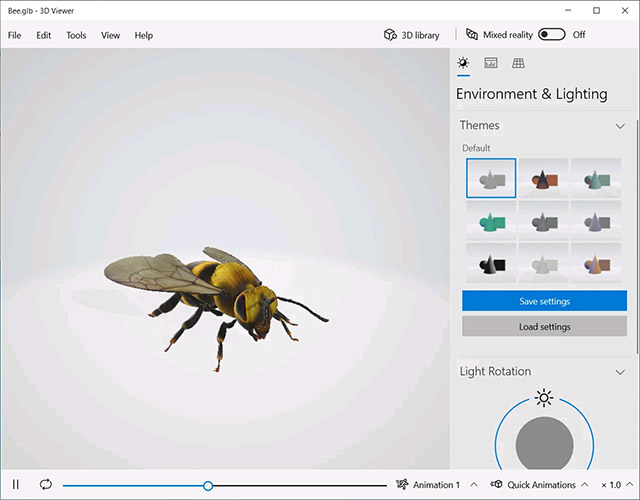
<p style="text-align: justify;">Trước đó, với việc phát hành phiên bản Windows 10 1703, còn được gọi là “Bản cập nhật dành cho những Người sáng tạo (Creators Update), Microsoft đã gây bất ngờ khi đưa vào Windows một ứng dụng mới có tên là “3D Viewer” - cho phép bạn xem và thao tác với các mô hình 3D.</p>

<figure>
<div style="text-align: justify;"><img alt="Windows 10 3D Viewer" data-i="0" data-src="https://st.quantrimang.com/photos/image/2021/02/26/microsoft-loai-bo-3d-object1.jpg" data-was-processed="true" height="500" src="https://st.quantrimang.com/photos/image/2021/02/26/microsoft-loai-bo-3d-object1.jpg" width="640" /></div>

<figcaption>
<div style="text-align: justify;">Windows 10 3D Viewer</div>
</figcaption>
</figure>

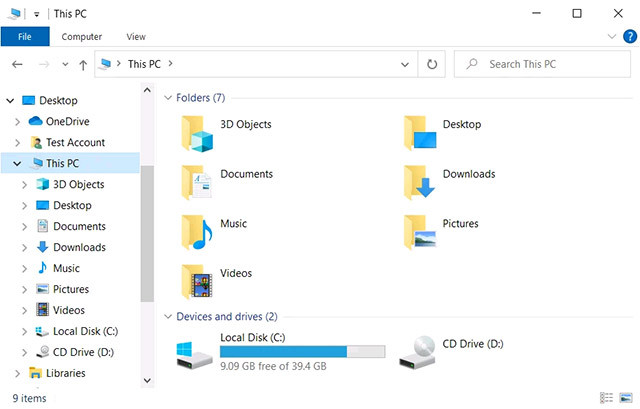
<p style="text-align: justify;">Cùng với sự xuất hiện của 3D Viewer, Microsoft muốn tạo một thư mục đặc biệt làm nơi lưu trữ tất cả các tệp 3D mà người dùng download về máy. Và thế là một thư mục có tên “3D Objects” xuất hiện trên tất cả các hệ thống Windows 10. Thư mục này có biểu tượng đặc trưng là một hình lập phương trong suốt, và được chỉ định là một thư mục đặc biệt trong File Explorer, đứng đầu mục This PC và chễm trệ ở đó dù bạn có muốn hay không.</p>

<figure>
<div style="text-align: justify;"><img alt="Thư mục đặc biệt 3D Objects" data-i="1" data-src="https://st.quantrimang.com/photos/image/2021/02/26/microsoft-loai-bo-3d-object2.jpg" data-was-processed="true" height="409" src="https://st.quantrimang.com/photos/image/2021/02/26/microsoft-loai-bo-3d-object2.jpg" width="640" /></div>

<figcaption>
<div style="text-align: justify;">Thư mục đặc biệt 3D Objects</div>
</figcaption>
</figure>

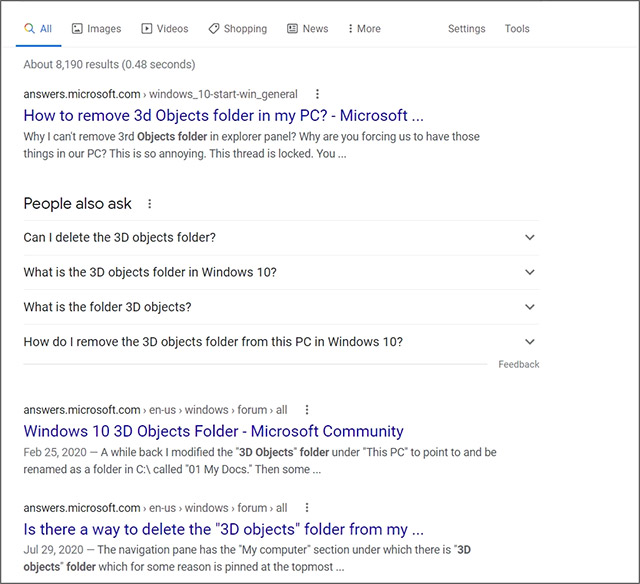
<p style="text-align: justify;">Tuy nhiên, thực thế đã chỉ ra rằng hầu hết người dùng Windows 10 đều không thấy 3D Viewer hữu ích như Microsoft vẫn hằng mong đợi. Đáng buồn hơn, các truy vấn tìm kiếm phổ biến nhất trên Google liên quan đến “3D Objects” lại hầu như chỉ xoay quanh việc làm thế nào để xóa thư mục này khỏi hệ thống.</p>

<figure>
<div style="text-align: justify;"><img alt="Kết quả tìm kiếm hỏi cách xóa thư mục 3D Objects" data-i="2" data-src="https://st.quantrimang.com/photos/image/2021/02/26/microsoft-loai-bo-3d-object3.jpg" data-was-processed="true" height="584" src="https://st.quantrimang.com/photos/image/2021/02/26/microsoft-loai-bo-3d-object3.jpg" width="640" /></div>

<figcaption>
<div style="text-align: justify;">Kết quả tìm kiếm hỏi cách xóa thư mục 3D Objects</div>
</figcaption>
</figure>

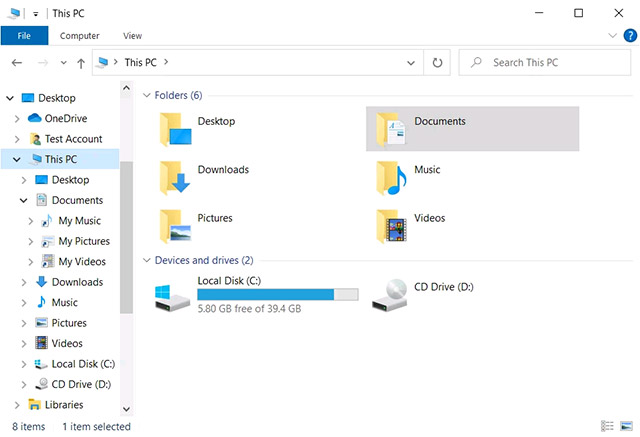
<p style="text-align: justify;">Microsoft đương nhiên biết rõ điều này và sau thời gian dài chần chừ, cuối cùng công ty Redmond cũng đã có phương án giải quyết “đi vào lòng người”. Với bản phát hành Windows 10 Insider build 21322 được thử nghiệm trong kênh Dev vào ngày 25/2 vừa qua, thư mục 3D Objects đã không còn được hiển thị như một thư mục đặc biệt trong File Explorer. Tuy nhiên, người dùng Windows 10 vẫn có thể truy cập trực tiếp vào nó từ thư mục %UserProfile%.</p>

<p style="text-align: justify;">Thông báo cụ thể của Microsoft như sau:</p>

<blockquote>
<p style="text-align: justify;"><em>&quot;Thư mục 3D Objects sẽ không còn được hiển thị dưới dạng thư mục đặc biệt trong File Explorer sau khi người dùng cập nhật lên Insider Build 21322. Nếu bạn cần truy cập thư mục này, có thể thực hiện bằng cách gõ %userprofile% trong File Explorer, hoặc thông qua tùy chọn ngăn điều hướng Show all folders&quot;</em>.</p>
</blockquote>

<figure>
<div style="text-align: justify;"><img alt="Thư mục 3D Objects đã bị xóa khỏi File Explorer" data-i="3" data-src="https://st.quantrimang.com/photos/image/2021/02/26/microsoft-loai-bo-3d-object4.jpg" data-was-processed="true" height="437" src="https://st.quantrimang.com/photos/image/2021/02/26/microsoft-loai-bo-3d-object4.jpg" width="640" /></div>

<figcaption>
<div style="text-align: justify;">Thư mục 3D Objects đã bị xóa khỏi File Explorer</div>
</figcaption>
</figure>

<p style="text-align: justify;">Mặc dù đây không phải là một thay đổi đặc biệt lớn đối với người dùng Windows, nhưng với những người luôn hướng đến sự tối giản, gọn gàng trong File Explorer, hay chỉ đơn giản là không thích sự xuất hiện của thư mục 3D Objects này, đây rõ ràng là điều đã được chờ đợi từ lâu.</p>
		</div>
				<div id="author">
						<p>
				<strong>Nguồn tin:</strong>
				Quantrimang.com
			</p>
		</div>
	</div>
	<div id="footer" class="clearfix">
		<div id="url">
			<strong>URL của bản tin này: </strong><a href="https://www.nguoicodonvn2008.info/vi/news/savefile/kien-thuc-may-tinh/microsoft-loai-bo-thu-muc-vo-dung-nhat-tren-windows-10-khoi-file-explorer-3668.html" title="Microsoft loại bỏ thư mục “vô dụng” nhất trên Windows 10 khỏi File Explorer">https://www.nguoicodonvn2008.info/vi/news/savefile/kien-thuc-may-tinh/microsoft-loai-bo-thu-muc-vo-dung-nhat-tren-windows-10-khoi-file-explorer-3668.html</a>

		</div>
		<div class="clear"></div>
		<div class="copyright">
			&copy; .&#x3A; Nguoicodonvn2008.info - Cõi lòng người cô đơn &#x3A;.
		</div>
		<div id="contact">
			<a href="mailto:admin@nguoicodonvn2008.info">admin@nguoicodonvn2008.info</a>
		</div>
	</div>
</div>
        <div id="timeoutsess" class="chromeframe">
            Bạn đã không sử dụng Site, <a onclick="timeoutsesscancel();" href="https://nguoicodonvn2008.info/#">Bấm vào đây để duy trì trạng thái đăng nhập</a>. Thời gian chờ: <span id="secField"> 60 </span> giây
        </div>
        <div id="openidResult" class="nv-alert" style="display:none"></div>
        <div id="openidBt" data-result="" data-redirect=""></div>
		</script>
		<div class="car-top">
  <span><img src="https://nguoicodonvn2008.info/themes/default/images/car.png" alt=""></span>
</div>
<script src="https://nguoicodonvn2008.info/assets/js/jquery/jquery.min.js"></script>
<script>var nv_base_siteurl="/",nv_lang_data="vi",nv_lang_interface="vi",nv_name_variable="nv",nv_fc_variable="op",nv_lang_variable="language",nv_module_name="news",nv_func_name="savefile",nv_is_user=0, nv_my_ofs=-4,nv_my_abbr="EDT",nv_cookie_prefix="nv4c_e856T",nv_check_pass_mstime=1738000,nv_area_admin=0,nv_safemode=0,theme_responsive=0,nv_recaptcha_ver=2,nv_recaptcha_sitekey="",nv_recaptcha_type="image",XSSsanitize=1;</script>
<script src="https://nguoicodonvn2008.info/assets/js/language/vi.js"></script>
<script src="https://nguoicodonvn2008.info/assets/js/DOMPurify/purify3.js"></script>
<script src="https://nguoicodonvn2008.info/assets/js/global.js"></script>
<script src="https://nguoicodonvn2008.info/assets/js/site.js"></script>
<script src="https://nguoicodonvn2008.info/themes/default/js/news.js"></script>
<script src="https://nguoicodonvn2008.info/themes/default/js/main.js"></script>
<script src="https://nguoicodonvn2008.info/themes/default/js/custom.js"></script>
<script type="application/ld+json">
        {
            "@context": "https://schema.org",
            "@type": "Organization",
            "url": "https://nguoicodonvn2008.info",
            "logo": "https://nguoicodonvn2008.info/uploads/angel.gif"
        }
        </script>
<script src="https://nguoicodonvn2008.info/themes/default/js/bootstrap.min.js"></script>
<script type="text/javascript">
var $scrolltop = $('.car-top');
$scrolltop.on('click', function () {
    $('html,body').animate({
        scrollTop: 0
    }, 800);
    $(this).addClass("car-run");
    setTimeout(function(){ $scrolltop.removeClass('car-run');}, 1000);
    return false;
});
$(window).on('scroll', function ()
{ 
    if($(window).scrollTop() >= 200)
    {
        $scrolltop.addClass("show");
        $scrolltop.addClass("car-down");
    }
    else
    {
       $scrolltop.removeClass("show");
       setTimeout(function(){ $scrolltop.removeClass('car-down');}, 300);
    }
});
</script>
</body>
</html>