<!DOCTYPE html>
    <html lang="vi" xmlns="http://www.w3.org/1999/xhtml" prefix="og: http://ogp.me/ns#">
    <head>
<title>Microsoft giải thích cách cài đặt WMIC trên Windows 11 trước khi gỡ bỏ</title>
<meta name="description" content="Microsoft giải thích cách cài đặt WMIC trên Windows 11 trước khi gỡ bỏ - Savefile - Tin Tức -...">
<meta name="author" content=".: Nguoicodonvn2008.info - Cõi lòng người cô đơn :.">
<meta name="copyright" content=".: Nguoicodonvn2008.info - Cõi lòng người cô đơn :. [admin@nguoicodonvn2008.info]">
<meta name="robots" content="index, archive, follow, noodp">
<meta name="googlebot" content="index,archive,follow,noodp">
<meta name="msnbot" content="all,index,follow">
<meta name="generator" content="NukeViet v4.5">
<meta http-equiv="Content-Type" content="text/html; charset=utf-8">
<meta property="og:title" content="Microsoft giải thích cách cài đặt WMIC trên Windows 11 trước khi gỡ bỏ">
<meta property="og:type" content="website">
<meta property="og:description" content="Savefile - Tin Tức -...">
<meta property="og:site_name" content=".&#x3A; Nguoicodonvn2008.info - Cõi lòng người cô đơn &#x3A;.">
<meta property="og:url" content="https://www.nguoicodonvn2008.info/vi/news/savefile/kien-thuc-may-tinh/microsoft-giai-thich-cach-cai-dat-wmic-tren-windows-11-truoc-khi-go-bo-8653.html">
<link rel="shortcut icon" href="https://nguoicodonvn2008.info/favicon.ico">
<link rel="canonical" href="https://www.nguoicodonvn2008.info/vi/news/savefile/kien-thuc-may-tinh/microsoft-giai-thich-cach-cai-dat-wmic-tren-windows-11-truoc-khi-go-bo-8653.html">
<link rel="alternate" href="https://nguoicodonvn2008.info/vi/news/rss/" title="Tin Tức" type="application/rss+xml">
<link rel="alternate" href="https://nguoicodonvn2008.info/vi/news/rss/karaoke-dual/" title="Tin Tức - Karaoke Dual" type="application/rss+xml">
<link rel="alternate" href="https://nguoicodonvn2008.info/vi/news/rss/nhac-tre/" title="Tin Tức - Nhạc trẻ" type="application/rss+xml">
<link rel="alternate" href="https://nguoicodonvn2008.info/vi/news/rss/tru-tinh/" title="Tin Tức - Trữ tình" type="application/rss+xml">
<link rel="alternate" href="https://nguoicodonvn2008.info/vi/news/rss/nuoc-ngoai/" title="Tin Tức - Nước ngoài" type="application/rss+xml">
<link rel="alternate" href="https://nguoicodonvn2008.info/vi/news/rss/remix/" title="Tin Tức - Remix" type="application/rss+xml">
<link rel="alternate" href="https://nguoicodonvn2008.info/vi/news/rss/tam-su-tinh-yeu/" title="Tin Tức - Tâm sự tình yêu" type="application/rss+xml">
<link rel="alternate" href="https://nguoicodonvn2008.info/vi/news/rss/tho-suu-tam/" title="Tin Tức - Thơ sưu tầm" type="application/rss+xml">
<link rel="alternate" href="https://nguoicodonvn2008.info/vi/news/rss/cuoc-song/" title="Tin Tức - Cuộc sống" type="application/rss+xml">
<link rel="alternate" href="https://nguoicodonvn2008.info/vi/news/rss/phan-mem/" title="Tin Tức - Phần mềm" type="application/rss+xml">
<link rel="alternate" href="https://nguoicodonvn2008.info/vi/news/rss/kien-thuc-may-tinh/" title="Tin Tức - Kiến thức máy tính" type="application/rss+xml">
<link rel="alternate" href="https://nguoicodonvn2008.info/vi/news/rss/hoc-tap/" title="Tin Tức - Học tập" type="application/rss+xml">
<link rel="alternate" href="https://nguoicodonvn2008.info/vi/news/rss/tai-lieu/" title="Tin Tức - Tài liệu" type="application/rss+xml">
<link rel="alternate" href="https://nguoicodonvn2008.info/vi/news/rss/de-thi/" title="Tin Tức - Đề thi" type="application/rss+xml">
<link rel="preload" as="style" href="https://nguoicodonvn2008.info/assets/css/font-awesome.min.css" type="text/css">
<link rel="preload" as="style" href="https://nguoicodonvn2008.info/themes/default/css/bootstrap.non-responsive.css" type="text/css">
<link rel="preload" as="style" href="https://nguoicodonvn2008.info/themes/default/css/style.css" type="text/css">
<link rel="preload" as="style" href="https://nguoicodonvn2008.info/themes/default/css/style.non-responsive.css" type="text/css">
<link rel="preload" as="style" href="https://nguoicodonvn2008.info/themes/default/css/news.css" type="text/css">
<link rel="preload" as="style" href="https://nguoicodonvn2008.info/themes/default/css/custom.css" type="text/css">
<link rel="preload" as="script" href="https://nguoicodonvn2008.info/assets/js/jquery/jquery.min.js" type="text/javascript">
<link rel="preload" as="script" href="https://nguoicodonvn2008.info/assets/js/language/vi.js" type="text/javascript">
<link rel="preload" as="script" href="https://nguoicodonvn2008.info/assets/js/DOMPurify/purify3.js" type="text/javascript">
<link rel="preload" as="script" href="https://nguoicodonvn2008.info/assets/js/global.js" type="text/javascript">
<link rel="preload" as="script" href="https://nguoicodonvn2008.info/assets/js/site.js" type="text/javascript">
<link rel="preload" as="script" href="https://nguoicodonvn2008.info/themes/default/js/news.js" type="text/javascript">
<link rel="preload" as="script" href="https://nguoicodonvn2008.info/themes/default/js/main.js" type="text/javascript">
<link rel="preload" as="script" href="https://nguoicodonvn2008.info/themes/default/js/custom.js" type="text/javascript">
<link rel="preload" as="script" href="https://nguoicodonvn2008.info/themes/default/js/bootstrap.min.js" type="text/javascript">
<link rel="stylesheet" href="https://nguoicodonvn2008.info/assets/css/font-awesome.min.css">
<link rel="stylesheet" href="https://nguoicodonvn2008.info/themes/default/css/bootstrap.non-responsive.css">
<link rel="stylesheet" href="https://nguoicodonvn2008.info/themes/default/css/style.css">
<link rel="stylesheet" href="https://nguoicodonvn2008.info/themes/default/css/style.non-responsive.css">
<link rel="StyleSheet" href="https://nguoicodonvn2008.info/themes/default/css/news.css">
<link rel="stylesheet" href="https://nguoicodonvn2008.info/themes/default/css/custom.css">
<style type="text/css">
	body{background: #fff;}
</style>
    </head>
    <body>
<div id="print">
	<div id="hd_print">
		<h2 class="pull-left">.&#x3A; Nguoicodonvn2008.info - Cõi lòng người cô đơn &#x3A;.</h2>
		<p class="pull-right"><a title=".&#x3A; Nguoicodonvn2008.info - Cõi lòng người cô đơn &#x3A;." href="https://nguoicodonvn2008.info/">https://nguoicodonvn2008.info</a></p>
	</div>
	<div class="clear"></div>
	<hr />
	<div id="content">
		<h1>Microsoft giải thích cách cài đặt WMIC trên Windows 11 trước khi gỡ bỏ</h1>
		<ul class="list-inline">
			<li>Thứ bảy - 13/07/2024 02:57</li>
			<li class="hidden-print txtrequired"><em class="fa fa-print">&nbsp;</em><a title="In ra" href="javascript:;" onclick="window.print()">In ra</a></li>
			<li class="hidden-print txtrequired"><em class="fa fa-power-off">&nbsp;</em><a title="Đóng cửa sổ này" href="javascript:;" onclick="window.close()">Đóng cửa sổ này</a></li>
		</ul>
		<div class="clear"></div>
		<div id="hometext">
		</div>
				<div class="imghome">
			<img alt="Microsoft giải thích cách cài đặt WMIC trên Windows 11 trước khi gỡ bỏ" src="https://st.quantrimang.com/photos/image/2024/07/13/microsoft-vo-hieu-hoa-lenh-wmic-trong-windows111.jpg" width="460" class="img-thumbnail" />
		</div>
		<div class="clear"></div>
		<div id="bodytext" class="clearfix">
			<div class="ckeditor-html5-audio" style="text-align: center;">
<audio controls="controls" controlslist="nodownload" src="https://st.quantrimang.com/photos/media/2024/01/28/638420358787974244.mp3">&nbsp;</audio>
</div>

<h1 style="text-align: justify;"><span style="font-size: 13px;">Đầu năm nay, Microsoft đã công bố kế hoạch ngừng sử dụng công cụ Windows Management Instrumentation Command Line (WMIC) trong phiên bản Windows 11 thế hệ tiếp theo. Tuy nhiên cho đến thời điểm hiện tại, WMIC vẫn chưa biến mất hoàn toàn. Mặc dù bị tuyên bố là dừng triển khai, nhưng người dùng và quản trị viên hệ thống vẫn có thể tiếp tục sử dụng lệnh WMIC. Thậm chí Microsoft mới đây cũng đã đăng tải một hướng dẫn ngắn gọn về cách làm cho lệnh này hoạt động trở lại.</span></h1>

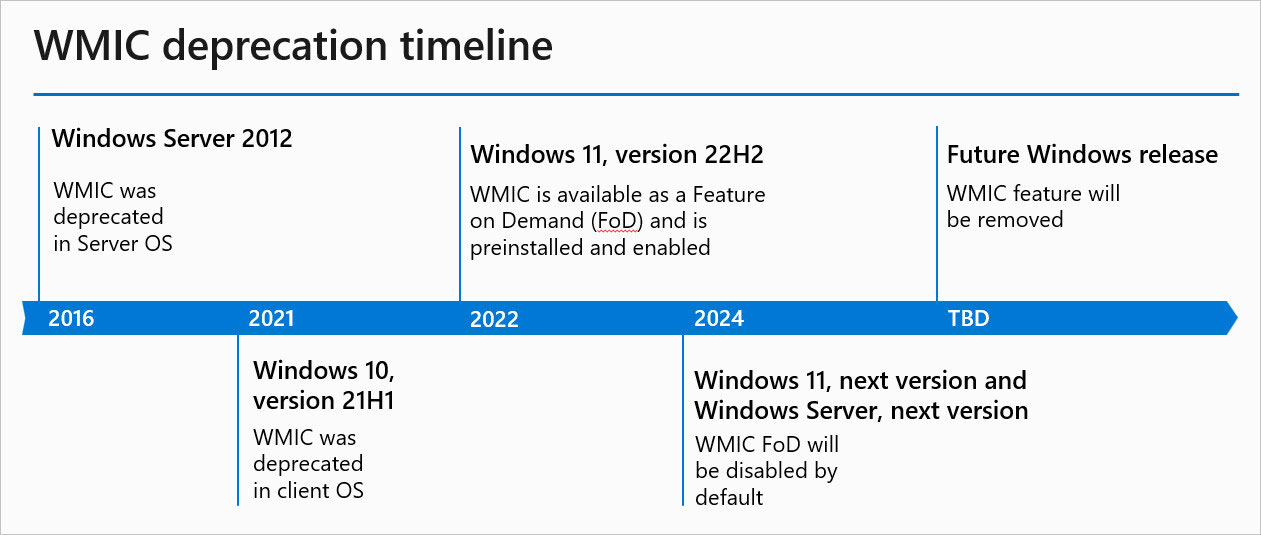
<p style="text-align: justify;">Để giúp các tổ chức dần chuyển từ WMIC sang PowerShell, Microsoft đã đưa WMIC thành tính năng theo yêu cầu (FOD) theo mặc định. Phiên bản Windows 11 24H2, sắp ra mắt vào cuối năm nay, sẽ mặc định tắt WMIC. Đây là những gì bạn cần biết về thay đổi này:</p>

<p style="text-align: justify;">Trước tiên, Microsoft đã giải thích cách nhận biết WMIC bị thiếu. Việc thực thi lệnh WMIC trên hệ thống bị thiếu, tắt hoặc gỡ cài đặt WMIC sẽ dẫn đến thông báo CLI sau:</p>

<blockquote>
<p style="text-align: justify;">wmic’ is not recognized as an internal or external command, operable program, or batch file.</p>
</blockquote>

<p style="text-align: justify;">Bạn có thể khắc phục lỗi này trên Windows 11 bằng cách thực hiện như sau:</p>

<ol>
	<li style="text-align: justify;">Đi tới&nbsp;<strong>Settings &gt; System Optional features</strong>.</li>
	<li style="text-align: justify;">Nhấp vào &quot;<strong>View features</strong>&quot; bên cạnh tùy chọn &quot;<strong>Add an optional feature</strong>&quot;.</li>
	<li style="text-align: justify;">Nhập WMIC vào hộp tìm kiếm và đánh dấu trong danh sách kết quả hiện ra tương ứng.</li>
	<li style="text-align: justify;">Nhấp vào &quot;<strong>Next</strong>&quot; để cài đặt WMIC trong Windows 11.</li>
</ol>

<p style="text-align: justify;">Sau khi mọi thứ hoàn tất, bạn sẽ thấy WMIC trong danh sách các tính năng tùy chọn đã cài đặt. Từ đó, bạn có thể gỡ cài đặt nó bất cứ khi nào bạn muốn.</p>

<figure>
<div style="text-align: justify;"><img alt="" data-i="0" data-src="https://st.quantrimang.com/photos/image/2024/07/13/microsoft-vo-hieu-hoa-lenh-wmic-trong-windows111.jpg" data-was-processed="true" height="535" src="https://st.quantrimang.com/photos/image/2024/07/13/microsoft-vo-hieu-hoa-lenh-wmic-trong-windows111.jpg" width="1261" /></div>
</figure>

<p style="text-align: justify;">WMIC là giao diện dòng lệnh dành cho Công cụ quản lý Windows (Windows Management Instrumentatio), một phương pháp để Quản trị viên CNTT quản lý hệ thống của họ và truy xuất thông tin về phần cứng, phần mềm, dịch vụ, v.v.</p>

<p style="text-align: justify;">Microsoft đã thay thế WMIC bằng Windows PowerShell cho WMI (WMIC và WMI là lại tiện ích khác nhau), cung cấp cho quản trị viên một phương thức hiệu quả hơn để truy vấn Windows Management Instrumentation. Microsoft cho biết việc loại bỏ các tính năng không được sử dụng phổ biến nữa sẽ giúp giảm độ phức tạp của mã, cũng như mang đến cho người dùng một trải nghiệm &quot;an toàn và hiệu quả&quot;.</p>

<p style="text-align: justify;">Tắt WMIC trong phiên bản Windows thế hệ tiếp theo là một trong những bước cuối cùng trong quá trình ngừng sử dụng tính năng này. Bước tiếp theo và cuối cùng là loại bỏ hoàn toàn WMIC khỏi các phiên bản máy khách và máy chủ Windows trong tương lai. Hiện tại, Microsoft vẫn chốt chính xác thời điểm WMIC sẽ biến mất vĩnh viễn và lộ trình mới nhất WMIC vẫn cho biết bước cuối cùng là &quot;sắp được xác định&quot;.</p>
		</div>
				<div id="author">
						<p>
				<strong>Nguồn tin:</strong>
				Quantrimang.com:
			</p>
		</div>
	</div>
	<div id="footer" class="clearfix">
		<div id="url">
			<strong>URL của bản tin này: </strong><a href="https://www.nguoicodonvn2008.info/vi/news/savefile/kien-thuc-may-tinh/microsoft-giai-thich-cach-cai-dat-wmic-tren-windows-11-truoc-khi-go-bo-8653.html" title="Microsoft giải thích cách cài đặt WMIC trên Windows 11 trước khi gỡ bỏ">https://www.nguoicodonvn2008.info/vi/news/savefile/kien-thuc-may-tinh/microsoft-giai-thich-cach-cai-dat-wmic-tren-windows-11-truoc-khi-go-bo-8653.html</a>

		</div>
		<div class="clear"></div>
		<div class="copyright">
			&copy; .&#x3A; Nguoicodonvn2008.info - Cõi lòng người cô đơn &#x3A;.
		</div>
		<div id="contact">
			<a href="mailto:admin@nguoicodonvn2008.info">admin@nguoicodonvn2008.info</a>
		</div>
	</div>
</div>
        <div id="timeoutsess" class="chromeframe">
            Bạn đã không sử dụng Site, <a onclick="timeoutsesscancel();" href="https://nguoicodonvn2008.info/#">Bấm vào đây để duy trì trạng thái đăng nhập</a>. Thời gian chờ: <span id="secField"> 60 </span> giây
        </div>
        <div id="openidResult" class="nv-alert" style="display:none"></div>
        <div id="openidBt" data-result="" data-redirect=""></div>
		</script>
		<div class="car-top">
  <span><img src="https://nguoicodonvn2008.info/themes/default/images/car.png" alt=""></span>
</div>
<script src="https://nguoicodonvn2008.info/assets/js/jquery/jquery.min.js"></script>
<script>var nv_base_siteurl="/",nv_lang_data="vi",nv_lang_interface="vi",nv_name_variable="nv",nv_fc_variable="op",nv_lang_variable="language",nv_module_name="news",nv_func_name="savefile",nv_is_user=0, nv_my_ofs=-4,nv_my_abbr="EDT",nv_cookie_prefix="nv4c_e856T",nv_check_pass_mstime=1738000,nv_area_admin=0,nv_safemode=0,theme_responsive=0,nv_recaptcha_ver=2,nv_recaptcha_sitekey="",nv_recaptcha_type="image",XSSsanitize=1;</script>
<script src="https://nguoicodonvn2008.info/assets/js/language/vi.js"></script>
<script src="https://nguoicodonvn2008.info/assets/js/DOMPurify/purify3.js"></script>
<script src="https://nguoicodonvn2008.info/assets/js/global.js"></script>
<script src="https://nguoicodonvn2008.info/assets/js/site.js"></script>
<script src="https://nguoicodonvn2008.info/themes/default/js/news.js"></script>
<script src="https://nguoicodonvn2008.info/themes/default/js/main.js"></script>
<script src="https://nguoicodonvn2008.info/themes/default/js/custom.js"></script>
<script type="application/ld+json">
        {
            "@context": "https://schema.org",
            "@type": "Organization",
            "url": "https://nguoicodonvn2008.info",
            "logo": "https://nguoicodonvn2008.info/uploads/angel.gif"
        }
        </script>
<script src="https://nguoicodonvn2008.info/themes/default/js/bootstrap.min.js"></script>
<script type="text/javascript">
var $scrolltop = $('.car-top');
$scrolltop.on('click', function () {
    $('html,body').animate({
        scrollTop: 0
    }, 800);
    $(this).addClass("car-run");
    setTimeout(function(){ $scrolltop.removeClass('car-run');}, 1000);
    return false;
});
$(window).on('scroll', function ()
{ 
    if($(window).scrollTop() >= 200)
    {
        $scrolltop.addClass("show");
        $scrolltop.addClass("car-down");
    }
    else
    {
       $scrolltop.removeClass("show");
       setTimeout(function(){ $scrolltop.removeClass('car-down');}, 300);
    }
});
</script>
</body>
</html>