<!DOCTYPE html>
    <html lang="vi" xmlns="http://www.w3.org/1999/xhtml" prefix="og: http://ogp.me/ns#">
    <head>
<title>Microsoft cảnh báo lỗ hổng RCE trong công cụ chẩn đoán Windows</title>
<meta name="description" content="Microsoft cảnh báo lỗ hổng RCE trong công cụ chẩn đoán Windows - Savefile - Tin Tức -...">
<meta name="author" content=".: Nguoicodonvn2008.info - Cõi lòng người cô đơn :.">
<meta name="copyright" content=".: Nguoicodonvn2008.info - Cõi lòng người cô đơn :. [admin@nguoicodonvn2008.info]">
<meta name="robots" content="index, archive, follow, noodp">
<meta name="googlebot" content="index,archive,follow,noodp">
<meta name="msnbot" content="all,index,follow">
<meta name="generator" content="NukeViet v4.5">
<meta http-equiv="Content-Type" content="text/html; charset=utf-8">
<meta property="og:title" content="Microsoft cảnh báo lỗ hổng RCE trong công cụ chẩn đoán Windows">
<meta property="og:type" content="website">
<meta property="og:description" content="Savefile - Tin Tức - https&#x3A;&#x002F;&#x002F;www.nguoicodonvn2008.info&#x002F;vi&#x002F;news&#x002F;savefile&#x002F;kien-thuc-may-tinh&#x002F;microsoft-canh-bao-lo-hong-rce-trong-cong-cu-chan-doan-windows-5691.html">
<meta property="og:site_name" content=".&#x3A; Nguoicodonvn2008.info - Cõi lòng người cô đơn &#x3A;.">
<meta property="og:url" content="https://www.nguoicodonvn2008.info/vi/news/savefile/kien-thuc-may-tinh/microsoft-canh-bao-lo-hong-rce-trong-cong-cu-chan-doan-windows-5691.html">
<link rel="shortcut icon" href="https://nguoicodonvn2008.info/favicon.ico">
<link rel="canonical" href="https://www.nguoicodonvn2008.info/vi/news/savefile/kien-thuc-may-tinh/microsoft-canh-bao-lo-hong-rce-trong-cong-cu-chan-doan-windows-5691.html">
<link rel="alternate" href="https://nguoicodonvn2008.info/vi/news/rss/" title="Tin Tức" type="application/rss+xml">
<link rel="alternate" href="https://nguoicodonvn2008.info/vi/news/rss/karaoke-dual/" title="Tin Tức - Karaoke Dual" type="application/rss+xml">
<link rel="alternate" href="https://nguoicodonvn2008.info/vi/news/rss/nhac-tre/" title="Tin Tức - Nhạc trẻ" type="application/rss+xml">
<link rel="alternate" href="https://nguoicodonvn2008.info/vi/news/rss/tru-tinh/" title="Tin Tức - Trữ tình" type="application/rss+xml">
<link rel="alternate" href="https://nguoicodonvn2008.info/vi/news/rss/nuoc-ngoai/" title="Tin Tức - Nước ngoài" type="application/rss+xml">
<link rel="alternate" href="https://nguoicodonvn2008.info/vi/news/rss/remix/" title="Tin Tức - Remix" type="application/rss+xml">
<link rel="alternate" href="https://nguoicodonvn2008.info/vi/news/rss/tam-su-tinh-yeu/" title="Tin Tức - Tâm sự tình yêu" type="application/rss+xml">
<link rel="alternate" href="https://nguoicodonvn2008.info/vi/news/rss/tho-suu-tam/" title="Tin Tức - Thơ sưu tầm" type="application/rss+xml">
<link rel="alternate" href="https://nguoicodonvn2008.info/vi/news/rss/cuoc-song/" title="Tin Tức - Cuộc sống" type="application/rss+xml">
<link rel="alternate" href="https://nguoicodonvn2008.info/vi/news/rss/phan-mem/" title="Tin Tức - Phần mềm" type="application/rss+xml">
<link rel="alternate" href="https://nguoicodonvn2008.info/vi/news/rss/kien-thuc-may-tinh/" title="Tin Tức - Kiến thức máy tính" type="application/rss+xml">
<link rel="alternate" href="https://nguoicodonvn2008.info/vi/news/rss/hoc-tap/" title="Tin Tức - Học tập" type="application/rss+xml">
<link rel="alternate" href="https://nguoicodonvn2008.info/vi/news/rss/tai-lieu/" title="Tin Tức - Tài liệu" type="application/rss+xml">
<link rel="alternate" href="https://nguoicodonvn2008.info/vi/news/rss/de-thi/" title="Tin Tức - Đề thi" type="application/rss+xml">
<link rel="preload" as="style" href="https://nguoicodonvn2008.info/assets/css/font-awesome.min.css" type="text/css">
<link rel="preload" as="style" href="https://nguoicodonvn2008.info/themes/default/css/bootstrap.non-responsive.css" type="text/css">
<link rel="preload" as="style" href="https://nguoicodonvn2008.info/themes/default/css/style.css" type="text/css">
<link rel="preload" as="style" href="https://nguoicodonvn2008.info/themes/default/css/style.non-responsive.css" type="text/css">
<link rel="preload" as="style" href="https://nguoicodonvn2008.info/themes/default/css/news.css" type="text/css">
<link rel="preload" as="style" href="https://nguoicodonvn2008.info/themes/default/css/custom.css" type="text/css">
<link rel="preload" as="script" href="https://nguoicodonvn2008.info/assets/js/jquery/jquery.min.js" type="text/javascript">
<link rel="preload" as="script" href="https://nguoicodonvn2008.info/assets/js/language/vi.js" type="text/javascript">
<link rel="preload" as="script" href="https://nguoicodonvn2008.info/assets/js/DOMPurify/purify3.js" type="text/javascript">
<link rel="preload" as="script" href="https://nguoicodonvn2008.info/assets/js/global.js" type="text/javascript">
<link rel="preload" as="script" href="https://nguoicodonvn2008.info/assets/js/site.js" type="text/javascript">
<link rel="preload" as="script" href="https://nguoicodonvn2008.info/themes/default/js/news.js" type="text/javascript">
<link rel="preload" as="script" href="https://nguoicodonvn2008.info/themes/default/js/main.js" type="text/javascript">
<link rel="preload" as="script" href="https://nguoicodonvn2008.info/themes/default/js/custom.js" type="text/javascript">
<link rel="preload" as="script" href="https://nguoicodonvn2008.info/themes/default/js/bootstrap.min.js" type="text/javascript">
<link rel="stylesheet" href="https://nguoicodonvn2008.info/assets/css/font-awesome.min.css">
<link rel="stylesheet" href="https://nguoicodonvn2008.info/themes/default/css/bootstrap.non-responsive.css">
<link rel="stylesheet" href="https://nguoicodonvn2008.info/themes/default/css/style.css">
<link rel="stylesheet" href="https://nguoicodonvn2008.info/themes/default/css/style.non-responsive.css">
<link rel="StyleSheet" href="https://nguoicodonvn2008.info/themes/default/css/news.css">
<link rel="stylesheet" href="https://nguoicodonvn2008.info/themes/default/css/custom.css">
<style type="text/css">
	body{background: #fff;}
</style>
    </head>
    <body>
<div id="print">
	<div id="hd_print">
		<h2 class="pull-left">.&#x3A; Nguoicodonvn2008.info - Cõi lòng người cô đơn &#x3A;.</h2>
		<p class="pull-right"><a title=".&#x3A; Nguoicodonvn2008.info - Cõi lòng người cô đơn &#x3A;." href="https://nguoicodonvn2008.info/">https://nguoicodonvn2008.info</a></p>
	</div>
	<div class="clear"></div>
	<hr />
	<div id="content">
		<h1>Microsoft cảnh báo lỗ hổng RCE trong công cụ chẩn đoán Windows</h1>
		<ul class="list-inline">
			<li>Thứ tư - 01/06/2022 00:48</li>
			<li class="hidden-print txtrequired"><em class="fa fa-print">&nbsp;</em><a title="In ra" href="javascript:;" onclick="window.print()">In ra</a></li>
			<li class="hidden-print txtrequired"><em class="fa fa-power-off">&nbsp;</em><a title="Đóng cửa sổ này" href="javascript:;" onclick="window.close()">Đóng cửa sổ này</a></li>
		</ul>
		<div class="clear"></div>
		<div id="hometext">
		</div>
				<div class="imghome">
			<img alt="Microsoft cảnh báo lỗ hổng RCE trong công cụ chẩn đoán Windows" src="https://st.quantrimang.com/photos/image/2022/05/31/microsoft-canh-bao-lo-hong-rce-trong-cong-cu-chan-doan-windows.jpg" width="460" class="img-thumbnail" />
		</div>
		<div class="clear"></div>
		<div id="bodytext" class="clearfix">
			<div class="ckeditor-html5-audio" style="text-align: center;">
<audio controls="controls" controlslist="nodownload" src="https://st.quantrimang.com/photos/media/2022/05/31/190325.20225311645.mp3">&nbsp;</audio>
</div>

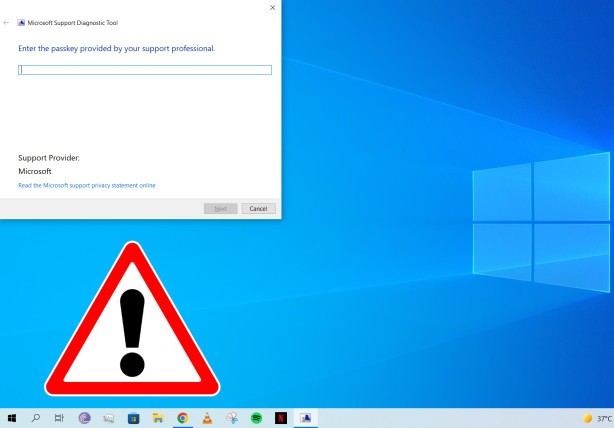
<p style="text-align: justify;">Nếu đã từng liên hệ với nhân viên hỗ trợ của Microsoft để nhờ giải quyết các vấn đề trong&nbsp;Windows&nbsp;hoặc&nbsp;Windows Server&nbsp;thì chắc hẳn bạn đã từng được hướng dẫn sử dụng Công cụ Chẩn đoán Hỗ trợ của Microsoft (Microsoft Support Diagnostic Tool - MSDT).</p>

<p style="text-align: justify;">Bạn có thể mở nó bằng cách nhập msdt vào Windows Run (Win + R) sau đó phải nhập mã khóa do nhân viên hỗ trợ cung cấp. Sau khi mã khóa được nhập, bạn có thể chạy một số chẩn đoán và gửi kết quả trực tiếp tới Microsoft để phân tích thêm.</p>

<p style="text-align: justify;">Tuy nhiên, mới đây Microsoft đã đưa ra cảnh báo về một lỗ hổng thực thi code từ xa (RCE) có trong MSDT. Lỗ hổng bảo mật này ảnh hưởng tới hầu như tất cả các phiên bản Windows và Windows Server bao gồm Windows 7, 8.1, 10, 11, Windows Server 2008, 2012, 2016, 2019 và 2022.</p>

<p style="text-align: justify;"><img alt="Microsoft cảnh báo lỗ hổng RCE trong công cụ chẩn đoán Windows" data-i="0" data-src="https://st.quantrimang.com/photos/image/2022/05/31/microsoft-canh-bao-lo-hong-rce-trong-cong-cu-chan-doan-windows.jpg" data-was-processed="true" height="428" src="https://st.quantrimang.com/photos/image/2022/05/31/microsoft-canh-bao-lo-hong-rce-trong-cong-cu-chan-doan-windows.jpg" width="614" /></p>

<p style="text-align: justify;">Lỗ hổng này cũng đã được gắn mã theo dõi là CVE-2022-30190 và có mức độ nguy hiểm cao. Do lỗ hổng chưa được vá nên Microsoft không công bố chi tiết mà chỉ giải thích rằng RCE có thể xảy ra khi MSDT được gọi bằng giao thức URL từ một ứng dụng gọi lệnh, chẳng hạn như Microsoft Word.</p>

<p style="text-align: justify;">Kẻ tấn công có thể chạy code tùy ý thứ có thể xem, xóa hoặc thay đổi file của bạn thông qua các đặc quyền cảu ứng dụng gọi lệnh. Ví dụ, nếu MSDT được gọi thông qua Microsoft Word và chạy với đặc quyền quản trị, kẻ tấn công sẽ có đặc quyền quản trị tương ứng, một điều không hề tốt cho bất cứ ai.</p>

<p style="text-align: justify;">Hiện tại, Microsoft khuyến nghị người dùng nên tắt MSDT thông qua các lệnh Command Promt. Các bước thực hiện như sau:</p>

<ul>
	<li style="text-align: justify;">Chạy&nbsp;<strong>Command Prompt</strong>&nbsp;dưới quyền Admin.</li>
	<li style="text-align: justify;">Sao lưu khóa registry bằng lệnh: &quot;<strong>reg export HKEY_CLASSES_ROOT\ms-msdt filename</strong>&quot;.</li>
	<li style="text-align: justify;">Thực hiện lệnh: &quot;<strong>reg delete HKEY_CLASSES_ROOT\ms-msdt /f</strong>&quot;</li>
</ul>

<p style="text-align: justify;">Nếu sau này bạn cảm thấy MSDT rất quan trọng với công việc của bạn và bạn chấp nhận rùi ro thì bạn có thể khôi phục MSDT theo các bước sau:</p>

<ul>
	<li style="text-align: justify;">Chạy&nbsp;<strong>Command Prompt</strong>&nbsp;dưới quyền Admin.</li>
	<li style="text-align: justify;">Khôi phục lại khóa registry bằng file sao lưu trước đó: &quot;<strong>reg import filename</strong>&quot;</li>
</ul>

<p style="text-align: justify;"><strong>Lưu ý</strong>: Trong cả hai phần, filename là thứ mà bạn tự đặt cho riêng mình và đặt tên ở phần sao lưu như thế nào thì nhập tương tự ở phần khôi phục.</p>

<p style="text-align: justify;">Hiện tại, Microsoft vẫn đang tìm cách vá lỗ hổng này. Gã khổng lồ phần mềm nhấn mạnh rằng lỗ hổng đang bị hacker tích cực khai thác vì vậy người dùng nên hết sức cẩn thận.</p>

<p style="text-align: justify;">Để đảm bảo an toàn, người dùng nên bật tính năng bảo vệ phân phối qua điện toán đám mây và gửi mẫu tự động trên Microsoft Defender. Trong khi đó, khách hàng sử dụng Microsoft Defender for Endpoint có thể cấu hình các chính sách để giảm bề mặt tấn công từ các quy trình con của ứng dụng Office.</p>
		</div>
				<div id="author">
						<p>
				<strong>Nguồn tin:</strong>
				Quantrimang.com
			</p>
		</div>
	</div>
	<div id="footer" class="clearfix">
		<div id="url">
			<strong>URL của bản tin này: </strong><a href="https://www.nguoicodonvn2008.info/vi/news/savefile/kien-thuc-may-tinh/microsoft-canh-bao-lo-hong-rce-trong-cong-cu-chan-doan-windows-5691.html" title="Microsoft cảnh báo lỗ hổng RCE trong công cụ chẩn đoán Windows">https://www.nguoicodonvn2008.info/vi/news/savefile/kien-thuc-may-tinh/microsoft-canh-bao-lo-hong-rce-trong-cong-cu-chan-doan-windows-5691.html</a>

		</div>
		<div class="clear"></div>
		<div class="copyright">
			&copy; .&#x3A; Nguoicodonvn2008.info - Cõi lòng người cô đơn &#x3A;.
		</div>
		<div id="contact">
			<a href="mailto:admin@nguoicodonvn2008.info">admin@nguoicodonvn2008.info</a>
		</div>
	</div>
</div>
        <div id="timeoutsess" class="chromeframe">
            Bạn đã không sử dụng Site, <a onclick="timeoutsesscancel();" href="https://nguoicodonvn2008.info/#">Bấm vào đây để duy trì trạng thái đăng nhập</a>. Thời gian chờ: <span id="secField"> 60 </span> giây
        </div>
        <div id="openidResult" class="nv-alert" style="display:none"></div>
        <div id="openidBt" data-result="" data-redirect=""></div>
		</script>
		<div class="car-top">
  <span><img src="https://nguoicodonvn2008.info/themes/default/images/car.png" alt=""></span>
</div>
<script src="https://nguoicodonvn2008.info/assets/js/jquery/jquery.min.js"></script>
<script>var nv_base_siteurl="/",nv_lang_data="vi",nv_lang_interface="vi",nv_name_variable="nv",nv_fc_variable="op",nv_lang_variable="language",nv_module_name="news",nv_func_name="savefile",nv_is_user=0, nv_my_ofs=-4,nv_my_abbr="EDT",nv_cookie_prefix="nv4c_e856T",nv_check_pass_mstime=1738000,nv_area_admin=0,nv_safemode=0,theme_responsive=0,nv_recaptcha_ver=2,nv_recaptcha_sitekey="",nv_recaptcha_type="image",XSSsanitize=1;</script>
<script src="https://nguoicodonvn2008.info/assets/js/language/vi.js"></script>
<script src="https://nguoicodonvn2008.info/assets/js/DOMPurify/purify3.js"></script>
<script src="https://nguoicodonvn2008.info/assets/js/global.js"></script>
<script src="https://nguoicodonvn2008.info/assets/js/site.js"></script>
<script src="https://nguoicodonvn2008.info/themes/default/js/news.js"></script>
<script src="https://nguoicodonvn2008.info/themes/default/js/main.js"></script>
<script src="https://nguoicodonvn2008.info/themes/default/js/custom.js"></script>
<script type="application/ld+json">
        {
            "@context": "https://schema.org",
            "@type": "Organization",
            "url": "https://nguoicodonvn2008.info",
            "logo": "https://nguoicodonvn2008.info/uploads/angel.gif"
        }
        </script>
<script src="https://nguoicodonvn2008.info/themes/default/js/bootstrap.min.js"></script>
<script type="text/javascript">
var $scrolltop = $('.car-top');
$scrolltop.on('click', function () {
    $('html,body').animate({
        scrollTop: 0
    }, 800);
    $(this).addClass("car-run");
    setTimeout(function(){ $scrolltop.removeClass('car-run');}, 1000);
    return false;
});
$(window).on('scroll', function ()
{ 
    if($(window).scrollTop() >= 200)
    {
        $scrolltop.addClass("show");
        $scrolltop.addClass("car-down");
    }
    else
    {
       $scrolltop.removeClass("show");
       setTimeout(function(){ $scrolltop.removeClass('car-down');}, 300);
    }
});
</script>
</body>
</html>