<!DOCTYPE html>
    <html lang="vi" xmlns="http://www.w3.org/1999/xhtml" prefix="og: http://ogp.me/ns#">
    <head>
<title>Mảng trong Golang</title>
<meta name="description" content="Mảng trong Golang - Savefile - Tin Tức - https&#x3A;&#x002F;&#x002F;www.nguoicodonvn2008.info&#x002F;vi&#x002F;news&#x002F;savefile&#x002F;kien-thuc-may-tinh&#x002F;mang-trong-golang-10334.html">
<meta name="author" content=".: Nguoicodonvn2008.info - Cõi lòng người cô đơn :.">
<meta name="copyright" content=".: Nguoicodonvn2008.info - Cõi lòng người cô đơn :. [admin@nguoicodonvn2008.info]">
<meta name="robots" content="index, archive, follow, noodp">
<meta name="googlebot" content="index,archive,follow,noodp">
<meta name="msnbot" content="all,index,follow">
<meta name="generator" content="NukeViet v4.5">
<meta http-equiv="Content-Type" content="text/html; charset=utf-8">
<meta property="og:title" content="Mảng trong Golang">
<meta property="og:type" content="website">
<meta property="og:description" content="Savefile - Tin Tức - https&#x3A;&#x002F;&#x002F;www.nguoicodonvn2008.info&#x002F;vi&#x002F;news&#x002F;savefile&#x002F;kien-thuc-may-tinh&#x002F;mang-trong-golang-10334.html">
<meta property="og:site_name" content=".&#x3A; Nguoicodonvn2008.info - Cõi lòng người cô đơn &#x3A;.">
<meta property="og:url" content="https://www.nguoicodonvn2008.info/vi/news/savefile/kien-thuc-may-tinh/mang-trong-golang-10334.html">
<link rel="shortcut icon" href="https://nguoicodonvn2008.info/favicon.ico">
<link rel="canonical" href="https://www.nguoicodonvn2008.info/vi/news/savefile/kien-thuc-may-tinh/mang-trong-golang-10334.html">
<link rel="alternate" href="https://nguoicodonvn2008.info/vi/news/rss/" title="Tin Tức" type="application/rss+xml">
<link rel="alternate" href="https://nguoicodonvn2008.info/vi/news/rss/karaoke-dual/" title="Tin Tức - Karaoke Dual" type="application/rss+xml">
<link rel="alternate" href="https://nguoicodonvn2008.info/vi/news/rss/nhac-tre/" title="Tin Tức - Nhạc trẻ" type="application/rss+xml">
<link rel="alternate" href="https://nguoicodonvn2008.info/vi/news/rss/tru-tinh/" title="Tin Tức - Trữ tình" type="application/rss+xml">
<link rel="alternate" href="https://nguoicodonvn2008.info/vi/news/rss/nuoc-ngoai/" title="Tin Tức - Nước ngoài" type="application/rss+xml">
<link rel="alternate" href="https://nguoicodonvn2008.info/vi/news/rss/remix/" title="Tin Tức - Remix" type="application/rss+xml">
<link rel="alternate" href="https://nguoicodonvn2008.info/vi/news/rss/tam-su-tinh-yeu/" title="Tin Tức - Tâm sự tình yêu" type="application/rss+xml">
<link rel="alternate" href="https://nguoicodonvn2008.info/vi/news/rss/tho-suu-tam/" title="Tin Tức - Thơ sưu tầm" type="application/rss+xml">
<link rel="alternate" href="https://nguoicodonvn2008.info/vi/news/rss/cuoc-song/" title="Tin Tức - Cuộc sống" type="application/rss+xml">
<link rel="alternate" href="https://nguoicodonvn2008.info/vi/news/rss/phan-mem/" title="Tin Tức - Phần mềm" type="application/rss+xml">
<link rel="alternate" href="https://nguoicodonvn2008.info/vi/news/rss/kien-thuc-may-tinh/" title="Tin Tức - Kiến thức máy tính" type="application/rss+xml">
<link rel="alternate" href="https://nguoicodonvn2008.info/vi/news/rss/hoc-tap/" title="Tin Tức - Học tập" type="application/rss+xml">
<link rel="alternate" href="https://nguoicodonvn2008.info/vi/news/rss/tai-lieu/" title="Tin Tức - Tài liệu" type="application/rss+xml">
<link rel="alternate" href="https://nguoicodonvn2008.info/vi/news/rss/de-thi/" title="Tin Tức - Đề thi" type="application/rss+xml">
<link rel="preload" as="style" href="https://nguoicodonvn2008.info/assets/css/font-awesome.min.css" type="text/css">
<link rel="preload" as="style" href="https://nguoicodonvn2008.info/themes/default/css/bootstrap.non-responsive.css" type="text/css">
<link rel="preload" as="style" href="https://nguoicodonvn2008.info/themes/default/css/style.css" type="text/css">
<link rel="preload" as="style" href="https://nguoicodonvn2008.info/themes/default/css/style.non-responsive.css" type="text/css">
<link rel="preload" as="style" href="https://nguoicodonvn2008.info/themes/default/css/news.css" type="text/css">
<link rel="preload" as="style" href="https://nguoicodonvn2008.info/themes/default/css/custom.css" type="text/css">
<link rel="preload" as="script" href="https://nguoicodonvn2008.info/assets/js/jquery/jquery.min.js" type="text/javascript">
<link rel="preload" as="script" href="https://nguoicodonvn2008.info/assets/js/language/vi.js" type="text/javascript">
<link rel="preload" as="script" href="https://nguoicodonvn2008.info/assets/js/DOMPurify/purify3.js" type="text/javascript">
<link rel="preload" as="script" href="https://nguoicodonvn2008.info/assets/js/global.js" type="text/javascript">
<link rel="preload" as="script" href="https://nguoicodonvn2008.info/assets/js/site.js" type="text/javascript">
<link rel="preload" as="script" href="https://nguoicodonvn2008.info/themes/default/js/news.js" type="text/javascript">
<link rel="preload" as="script" href="https://nguoicodonvn2008.info/themes/default/js/main.js" type="text/javascript">
<link rel="preload" as="script" href="https://nguoicodonvn2008.info/themes/default/js/custom.js" type="text/javascript">
<link rel="preload" as="script" href="https://nguoicodonvn2008.info/themes/default/js/bootstrap.min.js" type="text/javascript">
<link rel="stylesheet" href="https://nguoicodonvn2008.info/assets/css/font-awesome.min.css">
<link rel="stylesheet" href="https://nguoicodonvn2008.info/themes/default/css/bootstrap.non-responsive.css">
<link rel="stylesheet" href="https://nguoicodonvn2008.info/themes/default/css/style.css">
<link rel="stylesheet" href="https://nguoicodonvn2008.info/themes/default/css/style.non-responsive.css">
<link rel="StyleSheet" href="https://nguoicodonvn2008.info/themes/default/css/news.css">
<link rel="stylesheet" href="https://nguoicodonvn2008.info/themes/default/css/custom.css">
<style type="text/css">
	body{background: #fff;}
</style>
    </head>
    <body>
<div id="print">
	<div id="hd_print">
		<h2 class="pull-left">.&#x3A; Nguoicodonvn2008.info - Cõi lòng người cô đơn &#x3A;.</h2>
		<p class="pull-right"><a title=".&#x3A; Nguoicodonvn2008.info - Cõi lòng người cô đơn &#x3A;." href="https://nguoicodonvn2008.info/">https://nguoicodonvn2008.info</a></p>
	</div>
	<div class="clear"></div>
	<hr />
	<div id="content">
		<h1>Mảng trong Golang</h1>
		<ul class="list-inline">
			<li>Thứ sáu - 09/05/2025 00:37</li>
			<li class="hidden-print txtrequired"><em class="fa fa-print">&nbsp;</em><a title="In ra" href="javascript:;" onclick="window.print()">In ra</a></li>
			<li class="hidden-print txtrequired"><em class="fa fa-power-off">&nbsp;</em><a title="Đóng cửa sổ này" href="javascript:;" onclick="window.close()">Đóng cửa sổ này</a></li>
		</ul>
		<div class="clear"></div>
		<div id="hometext">
		</div>
				<div class="imghome">
			<img alt="Mảng trong Golang" src="https://st.quantrimang.com/photos/image/2025/05/09/mang-trong-golang3.jpg" width="460" class="img-thumbnail" />
		</div>
		<div class="clear"></div>
		<div id="bodytext" class="clearfix">
			<p style="text-align: justify;"><strong>Mảng - Array trong ngôn ngữ lập trình Golang hay Go&nbsp;</strong>khá giống với các ngôn ngữ lập trình khác. Dưới đây là những điều bạn cần biết về<strong>&nbsp;mảng trong Golang</strong>.</p>

<div style="text-align: justify;">&nbsp;</div>

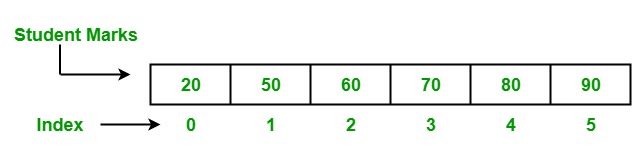
<p style="text-align: justify;">Trong chương trình, đôi khi chúng ta cần lưu trữ một tập hợp dữ liệu cùng loại, như danh sách điểm của học sinh. Kiểu tập hợp như vậy được lưu trữ trong chương trình bằng cách sử dụng Mảng. Mảng là một chuỗi có độ dài cố định được sử dụng để lưu trữ các phần tử đồng nhất trong bộ nhớ. Do có độ dài cố định nên mảng không phổ biến như Slice trong ngôn ngữ Go. Trong một mảng, bạn được phép lưu trữ&nbsp;<strong>0&nbsp;</strong>hoặc nhiều hơn&nbsp;<strong>0&nbsp;</strong>phần tử trong đó. Các phần tử của mảng được lập chỉ mục bằng cách sử dụng toán tử chỉ mục&nbsp;<strong>&#91;&#93;</strong>&nbsp;với vị trí bắt đầu từ&nbsp;<strong>0</strong>&nbsp;của chúng, nghĩa là chỉ mục của phần tử đầu tiên là mảng<strong>&nbsp;&#91;0&#93;</strong>&nbsp;và chỉ mục của phần tử cuối cùng là mảng&nbsp;<strong>&#91;len</strong>&nbsp;(mảng)&nbsp;<strong>- 1&#93;</strong>.</p>

<p style="text-align: justify;"><img alt="Mảng trong Golang" data-i="0" data-src="https://st.quantrimang.com/photos/image/2025/05/09/mang-trong-golang.jpg" data-was-processed="true" height="159" src="https://st.quantrimang.com/photos/image/2025/05/09/mang-trong-golang.jpg" width="642" /></p>

<h3 style="text-align: justify;">Tạo và truy cập một Mảng</h3>

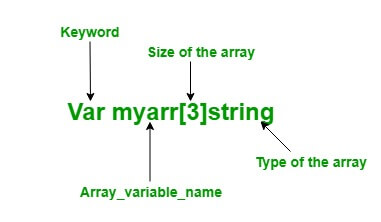
<p style="text-align: justify;">Trong ngôn ngữ Go, mảng được tạo theo hai cách khác nhau:</p>

<p style="text-align: justify;">Sử dụng từ khóa&nbsp;<strong>var</strong>: Trong ngôn ngữ&nbsp;<strong>Go</strong>, mảng được tạo bằng từ khóa&nbsp;<strong>var</strong>&nbsp;của một kiểu cụ thể với tên, kích thước và phần tử.&nbsp;<strong>Cú pháp</strong>:</p>

<pre id="pre0" style="text-align: justify;">
Var array_name&#91;length&#93;Type</pre>

<p style="text-align: justify;"><strong>Lưu ý quan trọng:</strong></p>

<p style="text-align: justify;">Trong ngôn ngữ Go, mảng có thể thay đổi, do đó bạn có thể sử dụng cú pháp&nbsp;<strong>array&#91;index&#93;</strong>&nbsp;ở phía bên trái của phép gán để đặt các phần tử của mảng tại chỉ mục đã cho.</p>

<pre id="pre1" style="text-align: justify;">
Var array_name&#91;index&#93; = element</pre>

<p style="text-align: justify;"><img alt="Ví dụ về mảng trong Golang" data-i="1" data-src="https://st.quantrimang.com/photos/image/2025/05/09/mang-trong-golang2-1.jpg" data-was-processed="true" height="222" src="https://st.quantrimang.com/photos/image/2025/05/09/mang-trong-golang2-1.jpg" width="381" /></p>

<div style="text-align: justify;">&nbsp;</div>

<ul>
	<li style="text-align: justify;">Bạn có thể truy cập các phần tử của mảng bằng cách sử dụng giá trị chỉ mục hoặc bằng cách sử dụng vòng lặp&nbsp;<strong>for</strong>.</li>
	<li style="text-align: justify;">Trong ngôn ngữ Go, kiểu mảng là một chiều.</li>
	<li style="text-align: justify;">Độ dài của mảng là cố định và không thể thay đổi.</li>
	<li style="text-align: justify;">Bạn được phép lưu trữ các phần tử trùng lặp trong một mảng.</li>
</ul>

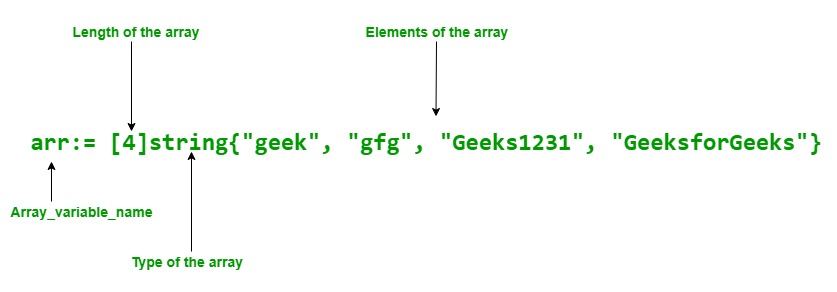
<p style="text-align: justify;"><strong>Cách tiếp cận 1:&nbsp;</strong>Sử dụng khai báo viết tắt:</p>

<p style="text-align: justify;">Trong ngôn ngữ Go, mảng cũng có thể khai báo bằng cách sử dụng khai báo viết tắt. Nó linh hoạt hơn so với khai báo ở trên.</p>

<p style="text-align: justify;">Cú pháp:</p>

<pre id="pre2" style="text-align: justify;">
array_name:= &#91;length&#93;Type{item1, item2, item3,...itemN}</pre>

<p style="text-align: justify;"><img alt="Chiều dài của mảng trong Golang" data-i="2" data-src="https://st.quantrimang.com/photos/image/2025/05/09/mang-trong-golang3.jpg" data-was-processed="true" height="227" src="https://st.quantrimang.com/photos/image/2025/05/09/mang-trong-golang3.jpg" width="650" /></p>

<p style="text-align: justify;">Ví dụ:</p>

<pre id="pre3" style="text-align: justify;">
// Chương trình Go minh họa cách tạo
//một mảng sử dụng khai báo viết tắt
// và truy cập vào các yếu tố của
// mảng bằng vòng lặp for
package main

import &quot;fmt&quot;

func main() {

// Khai báo viết tắt của mảng
arr:= &#91;4&#93;string{&quot;geek&quot;, &quot;gfg&quot;, &quot;Geeks1231&quot;, &quot;GeeksforGeeks&quot;}

// Truy cập các phần tử của
//mảng dùng vòng lặp for
fmt.Println(&quot;Elements of the array:&quot;)

for i:= 0; i &lt; 3; i++{
fmt.Println(arr&#91;i&#93;)
}

}</pre>

<p style="text-align: justify;">Kết quả:</p>

<pre id="pre4" style="text-align: justify;">
Elements of the array:
geek
gfg
Geeks1231</pre>

<h3 style="text-align: justify;">Mảng đa chiều</h3>

<p style="text-align: justify;">Như chúng ta đã biết, mảng là 1 chiều nhưng bạn được phép tạo mảng đa chiều trong&nbsp;<a data-type="internal" href="https://quantrimang.com/hoc/cau-truc-trong-golang-208543" rel="noopener" target="_blank" title="Cấu trúc trong Golang">Golang</a>. Mảng đa chiều là mảng của các mảng cùng loại. Trong ngôn ngữ Go, bạn có thể tạo mảng đa chiều bằng cú pháp sau:</p>

<pre id="pre5" style="text-align: justify;">
Array_name&#91;Length1&#93;&#91;Length2&#93;..&#91;LengthN&#93;Type</pre>

<p style="text-align: justify;">Bạn có thể tạo một mảng đa chiều bằng cách sử dụng từ khóa&nbsp;<strong>Var</strong>&nbsp;hoặc sử dụng khai báo viết tắt như trong ví dụ dưới đây.</p>

<p style="text-align: justify;"><strong>Lưu ý:&nbsp;</strong>Trong mảng đa chiều, nếu một ô không được người dùng khởi tạo bằng một giá trị nào đó, thì nó sẽ tự động được trình biên dịch khởi tạo bằng số không. Không có khái niệm nào chưa được khởi tạo trong Golang.</p>

<p style="text-align: justify;">Ví dụ:</p>

<pre id="pre6" style="text-align: justify;">
// Go program to illustrate the
// concept of multi-dimension array
package main

import &quot;fmt&quot;

func main() {

    // Creating and initializing
    // 2-dimensional array
    // Using shorthand declaration
    // Here the (,) Comma is necessary
    arr := &#91;3&#93;&#91;3&#93;string{{&quot;C #&quot;, &quot;C&quot;, &quot;Python&quot;}, {&quot;Java&quot;, &quot;Scala&quot;, &quot;Perl&quot;},
        {&quot;C++&quot;, &quot;Go&quot;, &quot;HTML&quot;}}

    // Accessing the values of the
    // array Using for loop
    fmt.Println(&quot;Elements of Array 1&quot;)
    for x := 0; x &lt; 3; x++ {
        for y := 0; y &lt; 3; y++ {

            fmt.Println(arr&#91;x&#93;&#91;y&#93;)
        }
    }

    // Tạo mảng 2 chiều
    // bằng từ khóa var
    // và khởi tạo 
    // -một mảng đa chiều bằng index
    var arr1 &#91;2&#93;&#91;2&#93;int
    arr1&#91;0&#93;&#91;0&#93; = 100
    arr1&#91;0&#93;&#91;1&#93; = 200
    arr1&#91;1&#93;&#91;0&#93; = 300
    arr1&#91;1&#93;&#91;1&#93; = 400

    // Truy cập các giá trị của mảng
    fmt.Println(&quot;Elements of array 2&quot;)
    for p := 0; p &lt; 2; p++ {
        for q := 0; q &lt; 2; q++ {
            fmt.Println(arr1&#91;p&#93;&#91;q&#93;)
        }
    }
}</pre>

<div style="text-align: justify;">&nbsp;</div>

<p style="text-align: justify;">Kết quả:</p>

<pre id="pre7" style="text-align: justify;">
Elements of Array 1
C#
C
Python
Java
Scala
Perl
C++
Go
HTML
Elements of array 2
100
200
300
400</pre>

<p style="text-align: justify;"><strong>Lưu ý quan trọng về mảng trong Golang:</strong></p>

<p style="text-align: justify;">Trong một mảng, nếu một mảng không được khởi tạo rõ ràng, thì giá trị mặc định của nó bằng 0.</p>

<p style="text-align: justify;">Ví dụ:</p>

<pre id="pre8" style="text-align: justify;">
// Chương trình Go minh họa một mảng
package main

import &quot;fmt&quot;

func main() {
	// Tạo một mảng kiểu int
	// chứa 2 thành phần
	// Tại đây chúng ta không khởi tạo 
	//mảng, vì thế giá trị của mảng
	// bằng 0
	var myarr &#91;2&#93;int

	// In mảng
	fmt.Println(&quot;Elements of the Array: &quot;, myarr)
}</pre>

<p style="text-align: justify;"><strong>Kết quả:</strong></p>

<pre id="pre9" style="text-align: justify;">
Elements of the Array : &#91;0 0&#93;</pre>

<p style="text-align: justify;">Trong một mảng, bạn có thể tìm độ dài của mảng bằng phương thức&nbsp;<strong>len()</strong>&nbsp;như được hiển thị bên dưới:</p>

<p style="text-align: justify;">Ví dụ:</p>

<pre id="pre10" style="text-align: justify;">
// Chương trình Go minh họa cách tìm
// chiều dài của mảng
package main

import &quot;fmt&quot;

func main() {

// Tạo mảng
// bằng khai báo viết tắt
arr1:= &#91;3&#93;int{9,7,6}
arr2:= &#91;...&#93;int{9,7,6,4,5,3,2,4}
arr3:= &#91;3&#93;int{9,3,5}

// Tìm chiều dài của 
// mảng bằng phương thức len
fmt.Println(&quot;Length of the array 1 is:&quot;, len(arr1))
fmt.Println(&quot;Length of the array 2 is:&quot;, len(arr2))
fmt.Println(&quot;Length of the array 3 is:&quot;, len(arr3))
}</pre>

<p style="text-align: justify;"><strong>Kết quả</strong></p>

<pre id="pre11" style="text-align: justify;">
Length of the array 1 is: 3
Length of the array 2 is: 8
Length of the array 3 is: 3</pre>

<p style="text-align: justify;">Trong một mảng, nếu dấu ba chấm ‘‘…’’ xuất hiện ở vị trí<strong>&nbsp;length</strong>, thì độ dài của mảng được xác định bởi các phần tử được khởi tạo. Như thể hiện trong ví dụ bên dưới:</p>

<p style="text-align: justify;"><strong>Ví dụ:</strong></p>

<pre id="pre12" style="text-align: justify;">
// Chương trình Go minh họa
// khái niệm ba chấm trong một mảng
package main

import &quot;fmt&quot;

func main() {
// Tạo mảng có kích thước đã được xác định
// bởi số phần tử nằm ở bên trong
// Dùng ellipsis
myarray:= &#91;...&#93;string{&quot;GFG&quot;, &quot;gfg&quot;, &quot;geeks&quot;,
                    &quot;GeeksforGeeks&quot;, &quot;GEEK&quot;}

fmt.Println(&quot;Elements of the array: &quot;, myarray)

// Chiều dài của mảng
// được quyết định bởi
// Dùng phương thức len() method
fmt.Println(&quot;Length of the array is:&quot;, len(myarray))
}</pre>

<p style="text-align: justify;"><strong>Kết quả:&nbsp;</strong></p>

<pre id="pre13" style="text-align: justify;">
Elements of the array:  &#91;GFG gfg geeks GeeksforGeeks GEEK&#93;
Length of the array is: 5</pre>

<div style="text-align: justify;">&nbsp;</div>
		</div>
				<div id="author">
						<p>
				<strong>Nguồn tin:</strong>
				Quantrimang.com:
			</p>
		</div>
	</div>
	<div id="footer" class="clearfix">
		<div id="url">
			<strong>URL của bản tin này: </strong><a href="https://www.nguoicodonvn2008.info/vi/news/savefile/kien-thuc-may-tinh/mang-trong-golang-10334.html" title="Mảng trong Golang">https://www.nguoicodonvn2008.info/vi/news/savefile/kien-thuc-may-tinh/mang-trong-golang-10334.html</a>

		</div>
		<div class="clear"></div>
		<div class="copyright">
			&copy; .&#x3A; Nguoicodonvn2008.info - Cõi lòng người cô đơn &#x3A;.
		</div>
		<div id="contact">
			<a href="mailto:admin@nguoicodonvn2008.info">admin@nguoicodonvn2008.info</a>
		</div>
	</div>
</div>
        <div id="timeoutsess" class="chromeframe">
            Bạn đã không sử dụng Site, <a onclick="timeoutsesscancel();" href="https://nguoicodonvn2008.info/#">Bấm vào đây để duy trì trạng thái đăng nhập</a>. Thời gian chờ: <span id="secField"> 60 </span> giây
        </div>
        <div id="openidResult" class="nv-alert" style="display:none"></div>
        <div id="openidBt" data-result="" data-redirect=""></div>
		</script>
		<div class="car-top">
  <span><img src="https://nguoicodonvn2008.info/themes/default/images/car.png" alt=""></span>
</div>
<script src="https://nguoicodonvn2008.info/assets/js/jquery/jquery.min.js"></script>
<script>var nv_base_siteurl="/",nv_lang_data="vi",nv_lang_interface="vi",nv_name_variable="nv",nv_fc_variable="op",nv_lang_variable="language",nv_module_name="news",nv_func_name="savefile",nv_is_user=0, nv_my_ofs=-4,nv_my_abbr="EDT",nv_cookie_prefix="nv4c_e856T",nv_check_pass_mstime=1738000,nv_area_admin=0,nv_safemode=0,theme_responsive=0,nv_recaptcha_ver=2,nv_recaptcha_sitekey="",nv_recaptcha_type="image",XSSsanitize=1;</script>
<script src="https://nguoicodonvn2008.info/assets/js/language/vi.js"></script>
<script src="https://nguoicodonvn2008.info/assets/js/DOMPurify/purify3.js"></script>
<script src="https://nguoicodonvn2008.info/assets/js/global.js"></script>
<script src="https://nguoicodonvn2008.info/assets/js/site.js"></script>
<script src="https://nguoicodonvn2008.info/themes/default/js/news.js"></script>
<script src="https://nguoicodonvn2008.info/themes/default/js/main.js"></script>
<script src="https://nguoicodonvn2008.info/themes/default/js/custom.js"></script>
<script type="application/ld+json">
        {
            "@context": "https://schema.org",
            "@type": "Organization",
            "url": "https://nguoicodonvn2008.info",
            "logo": "https://nguoicodonvn2008.info/uploads/angel.gif"
        }
        </script>
<script src="https://nguoicodonvn2008.info/themes/default/js/bootstrap.min.js"></script>
<script type="text/javascript">
var $scrolltop = $('.car-top');
$scrolltop.on('click', function () {
    $('html,body').animate({
        scrollTop: 0
    }, 800);
    $(this).addClass("car-run");
    setTimeout(function(){ $scrolltop.removeClass('car-run');}, 1000);
    return false;
});
$(window).on('scroll', function ()
{ 
    if($(window).scrollTop() >= 200)
    {
        $scrolltop.addClass("show");
        $scrolltop.addClass("car-down");
    }
    else
    {
       $scrolltop.removeClass("show");
       setTimeout(function(){ $scrolltop.removeClass('car-down');}, 300);
    }
});
</script>
</body>
</html>