<!DOCTYPE html>
    <html lang="vi" xmlns="http://www.w3.org/1999/xhtml" prefix="og: http://ogp.me/ns#">
    <head>
<title>Lý do nên dùng PivotCharts thay cho PivotTables trong Excel</title>
<meta name="description" content="Lý do nên dùng PivotCharts thay cho PivotTables trong Excel - Savefile - Tin Tức -...">
<meta name="author" content=".: Nguoicodonvn2008.info - Cõi lòng người cô đơn :.">
<meta name="copyright" content=".: Nguoicodonvn2008.info - Cõi lòng người cô đơn :. [admin@nguoicodonvn2008.info]">
<meta name="robots" content="index, archive, follow, noodp">
<meta name="googlebot" content="index,archive,follow,noodp">
<meta name="msnbot" content="all,index,follow">
<meta name="generator" content="NukeViet v4.5">
<meta http-equiv="Content-Type" content="text/html; charset=utf-8">
<meta property="og:title" content="Lý do nên dùng PivotCharts thay cho PivotTables trong Excel">
<meta property="og:type" content="website">
<meta property="og:description" content="Savefile - Tin Tức - https&#x3A;&#x002F;&#x002F;www.nguoicodonvn2008.info&#x002F;vi&#x002F;news&#x002F;savefile&#x002F;kien-thuc-may-tinh&#x002F;ly-do-nen-dung-pivotcharts-thay-cho-pivottables-trong-excel-11072.html">
<meta property="og:site_name" content=".&#x3A; Nguoicodonvn2008.info - Cõi lòng người cô đơn &#x3A;.">
<meta property="og:url" content="https://www.nguoicodonvn2008.info/vi/news/savefile/kien-thuc-may-tinh/ly-do-nen-dung-pivotcharts-thay-cho-pivottables-trong-excel-11072.html">
<link rel="shortcut icon" href="https://nguoicodonvn2008.info/favicon.ico">
<link rel="canonical" href="https://www.nguoicodonvn2008.info/vi/news/savefile/kien-thuc-may-tinh/ly-do-nen-dung-pivotcharts-thay-cho-pivottables-trong-excel-11072.html">
<link rel="alternate" href="https://nguoicodonvn2008.info/vi/news/rss/" title="Tin Tức" type="application/rss+xml">
<link rel="alternate" href="https://nguoicodonvn2008.info/vi/news/rss/karaoke-dual/" title="Tin Tức - Karaoke Dual" type="application/rss+xml">
<link rel="alternate" href="https://nguoicodonvn2008.info/vi/news/rss/nhac-tre/" title="Tin Tức - Nhạc trẻ" type="application/rss+xml">
<link rel="alternate" href="https://nguoicodonvn2008.info/vi/news/rss/tru-tinh/" title="Tin Tức - Trữ tình" type="application/rss+xml">
<link rel="alternate" href="https://nguoicodonvn2008.info/vi/news/rss/nuoc-ngoai/" title="Tin Tức - Nước ngoài" type="application/rss+xml">
<link rel="alternate" href="https://nguoicodonvn2008.info/vi/news/rss/remix/" title="Tin Tức - Remix" type="application/rss+xml">
<link rel="alternate" href="https://nguoicodonvn2008.info/vi/news/rss/tam-su-tinh-yeu/" title="Tin Tức - Tâm sự tình yêu" type="application/rss+xml">
<link rel="alternate" href="https://nguoicodonvn2008.info/vi/news/rss/tho-suu-tam/" title="Tin Tức - Thơ sưu tầm" type="application/rss+xml">
<link rel="alternate" href="https://nguoicodonvn2008.info/vi/news/rss/cuoc-song/" title="Tin Tức - Cuộc sống" type="application/rss+xml">
<link rel="alternate" href="https://nguoicodonvn2008.info/vi/news/rss/phan-mem/" title="Tin Tức - Phần mềm" type="application/rss+xml">
<link rel="alternate" href="https://nguoicodonvn2008.info/vi/news/rss/kien-thuc-may-tinh/" title="Tin Tức - Kiến thức máy tính" type="application/rss+xml">
<link rel="alternate" href="https://nguoicodonvn2008.info/vi/news/rss/hoc-tap/" title="Tin Tức - Học tập" type="application/rss+xml">
<link rel="alternate" href="https://nguoicodonvn2008.info/vi/news/rss/tai-lieu/" title="Tin Tức - Tài liệu" type="application/rss+xml">
<link rel="alternate" href="https://nguoicodonvn2008.info/vi/news/rss/de-thi/" title="Tin Tức - Đề thi" type="application/rss+xml">
<link rel="preload" as="style" href="https://nguoicodonvn2008.info/assets/css/font-awesome.min.css" type="text/css">
<link rel="preload" as="style" href="https://nguoicodonvn2008.info/themes/default/css/bootstrap.non-responsive.css" type="text/css">
<link rel="preload" as="style" href="https://nguoicodonvn2008.info/themes/default/css/style.css" type="text/css">
<link rel="preload" as="style" href="https://nguoicodonvn2008.info/themes/default/css/style.non-responsive.css" type="text/css">
<link rel="preload" as="style" href="https://nguoicodonvn2008.info/themes/default/css/news.css" type="text/css">
<link rel="preload" as="style" href="https://nguoicodonvn2008.info/themes/default/css/custom.css" type="text/css">
<link rel="preload" as="script" href="https://nguoicodonvn2008.info/assets/js/jquery/jquery.min.js" type="text/javascript">
<link rel="preload" as="script" href="https://nguoicodonvn2008.info/assets/js/language/vi.js" type="text/javascript">
<link rel="preload" as="script" href="https://nguoicodonvn2008.info/assets/js/DOMPurify/purify3.js" type="text/javascript">
<link rel="preload" as="script" href="https://nguoicodonvn2008.info/assets/js/global.js" type="text/javascript">
<link rel="preload" as="script" href="https://nguoicodonvn2008.info/assets/js/site.js" type="text/javascript">
<link rel="preload" as="script" href="https://nguoicodonvn2008.info/themes/default/js/news.js" type="text/javascript">
<link rel="preload" as="script" href="https://nguoicodonvn2008.info/themes/default/js/main.js" type="text/javascript">
<link rel="preload" as="script" href="https://nguoicodonvn2008.info/themes/default/js/custom.js" type="text/javascript">
<link rel="preload" as="script" href="https://nguoicodonvn2008.info/themes/default/js/bootstrap.min.js" type="text/javascript">
<link rel="stylesheet" href="https://nguoicodonvn2008.info/assets/css/font-awesome.min.css">
<link rel="stylesheet" href="https://nguoicodonvn2008.info/themes/default/css/bootstrap.non-responsive.css">
<link rel="stylesheet" href="https://nguoicodonvn2008.info/themes/default/css/style.css">
<link rel="stylesheet" href="https://nguoicodonvn2008.info/themes/default/css/style.non-responsive.css">
<link rel="StyleSheet" href="https://nguoicodonvn2008.info/themes/default/css/news.css">
<link rel="stylesheet" href="https://nguoicodonvn2008.info/themes/default/css/custom.css">
<style type="text/css">
	body{background: #fff;}
</style>
    </head>
    <body>
<div id="print">
	<div id="hd_print">
		<h2 class="pull-left">.&#x3A; Nguoicodonvn2008.info - Cõi lòng người cô đơn &#x3A;.</h2>
		<p class="pull-right"><a title=".&#x3A; Nguoicodonvn2008.info - Cõi lòng người cô đơn &#x3A;." href="https://nguoicodonvn2008.info/">https://nguoicodonvn2008.info</a></p>
	</div>
	<div class="clear"></div>
	<hr />
	<div id="content">
		<h1>Lý do nên dùng PivotCharts thay cho PivotTables trong Excel</h1>
		<ul class="list-inline">
			<li>Thứ sáu - 05/09/2025 00:19</li>
			<li class="hidden-print txtrequired"><em class="fa fa-print">&nbsp;</em><a title="In ra" href="javascript:;" onclick="window.print()">In ra</a></li>
			<li class="hidden-print txtrequired"><em class="fa fa-power-off">&nbsp;</em><a title="Đóng cửa sổ này" href="javascript:;" onclick="window.close()">Đóng cửa sổ này</a></li>
		</ul>
		<div class="clear"></div>
		<div id="hometext">
		</div>
				<div class="imghome">
			<img alt="Lý do nên dùng PivotCharts thay cho PivotTables trong Excel" src="https://st.quantrimang.com/photos/image/2025/09/04/dung-pivotcharts-thay-pivottables-trong-excel-8.jpg" width="460" class="img-thumbnail" />
		</div>
		<div class="clear"></div>
		<div id="bodytext" class="clearfix">
			<p style="text-align: justify;">PivotTables là công cụ phân tích dữ liệu quen thuộc, nhưng chúng thường khiến bạn phải nhìn chằm chằm vào các hàng số để tìm kiếm những mô hình. Giờ đây, nhiều người đã chuyển sang PivotCharts. Chúng chuyển đổi cùng một dữ liệu thành hình ảnh trực quan rõ ràng, cho thấy các xu hướng và thông tin chi tiết mà nếu không bạn có thể bỏ lỡ.</p>

<div style="text-align: justify;">&nbsp;</div>

<h2 style="text-align: justify;">Tìm hiểu PivotCharts của Excel</h2>

<h3 style="text-align: justify;">Mặt thông minh của PivotTables</h3>

<figure>
<div style="text-align: justify;"><img alt="PivotCharts trong Excel " data-adbro-processed="true" data-i="0" data-src="https://st.quantrimang.com/photos/image/2025/09/04/dung-pivotcharts-thay-pivottables-trong-excel-1.jpg" data-was-processed="true" height="464" src="https://st.quantrimang.com/photos/image/2025/09/04/dung-pivotcharts-thay-pivottables-trong-excel-1.jpg" width="825" /></div>

<figcaption>
<div style="text-align: justify;">PivotCharts trong Excel</div>
</figcaption>
</figure>

<p style="text-align: justify;">PivotCharts là các biểu diễn trực quan được liên kết với một PivotTable trong Excel, tóm tắt dữ liệu thô cơ bản. Khi bạn tạo một PivotCharts, Excel sẽ tự động tạo một PivotTables tương ứng và cả hai được liên kết động. Bất kỳ thay đổi nào được thực hiện trên một PivotTable - cho dù đó là lọc dữ liệu hay sắp xếp lại các trường - đều được phản ánh ngay lập tức trên PivotTable còn lại.</p>

<p style="text-align: justify;">Tuy nhiên, điểm khác biệt chính so với biểu đồ chuẩn là tính tương tác. Trong khi biểu đồ chuẩn hiển thị các phạm vi dữ liệu cố định, PivotCharts bao gồm các bộ lọc drop-down và những nút trường trực tiếp trên chính hình ảnh trực quan. Điều này cho phép bạn cắt và chia nhỏ dữ liệu mà không cần rời khỏi chế độ xem biểu đồ.</p>

<p style="text-align: justify;">PivotCharts&nbsp;nổi trội trong việc thể hiện các mối quan hệ, xu hướng và so sánh vốn có thể ẩn dưới dạng bảng. Trong khi PivotTables có thể hiển thị số liệu bán hàng theo quý dưới dạng các hàng số, PivotCharts lại chuyển đổi chính dữ liệu đó thành những đường xu hướng, cho thấy rõ ràng các mô hình tăng trưởng hoặc biến động theo mùa.</p>

<h2 style="text-align: justify;">Xây dựng PivotCharts đầu tiên</h2>

<h3 style="text-align: justify;">Không cần công thức, chỉ cần kéo thả</h3>

<figure>
<div style="text-align: justify;"><img alt="" data-i="1" data-src="https://st.quantrimang.com/photos/image/2025/09/04/dung-pivotcharts-thay-pivottables-trong-excel-2.jpg" data-was-processed="true" height="844" src="https://st.quantrimang.com/photos/image/2025/09/04/dung-pivotcharts-thay-pivottables-trong-excel-2.jpg" width="1126" /></div>
</figure>

<figure>
<div style="text-align: justify;"><img alt="" data-i="2" data-src="https://st.quantrimang.com/photos/image/2025/09/04/dung-pivotcharts-thay-pivottables-trong-excel-3.jpg" data-was-processed="true" height="422" src="https://st.quantrimang.com/photos/image/2025/09/04/dung-pivotcharts-thay-pivottables-trong-excel-3.jpg" width="562" /></div>
</figure>

<figure>
<div style="text-align: justify;"><img alt="" data-i="3" data-src="https://st.quantrimang.com/photos/image/2025/09/04/dung-pivotcharts-thay-pivottables-trong-excel-4.jpg" data-was-processed="true" height="844" src="https://st.quantrimang.com/photos/image/2025/09/04/dung-pivotcharts-thay-pivottables-trong-excel-4.jpg" width="1125" /></div>
</figure>

<div style="text-align: justify;">&nbsp;</div>

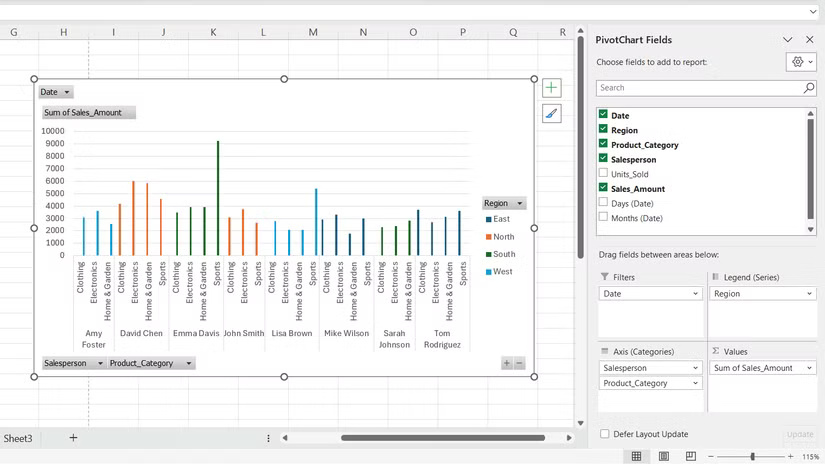
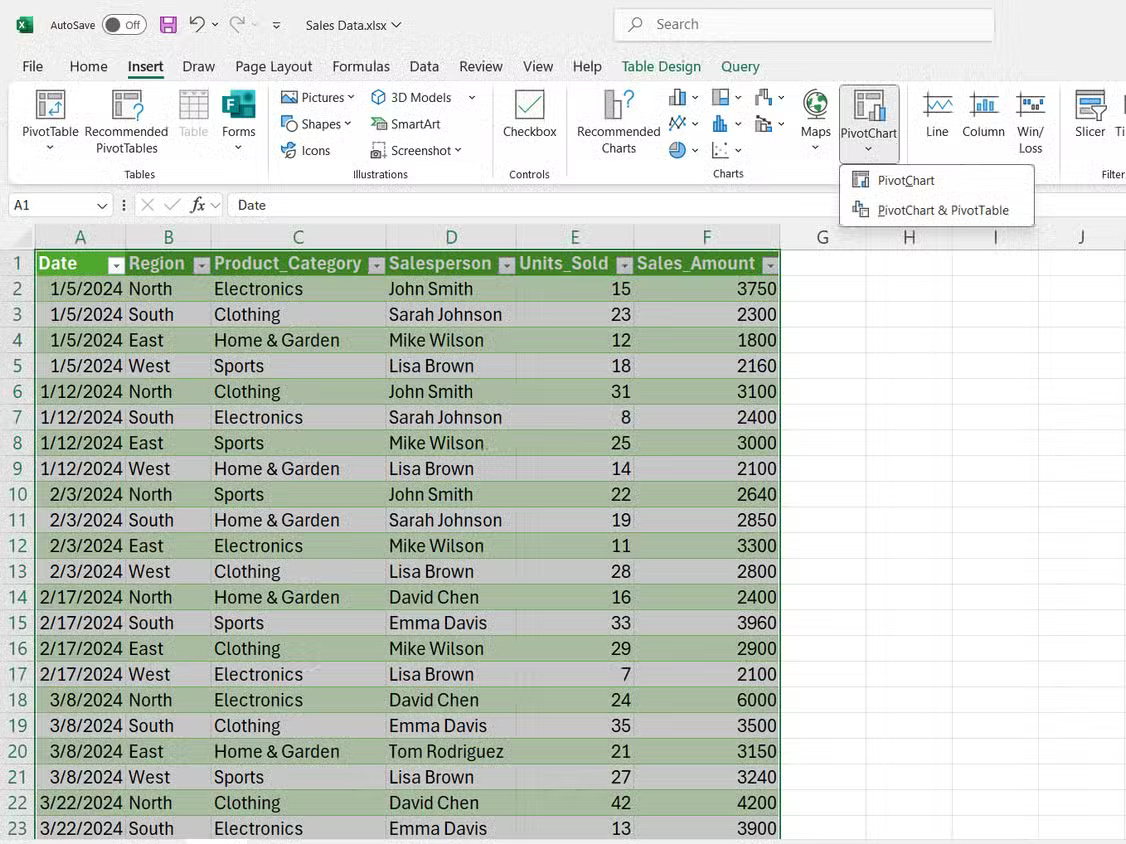
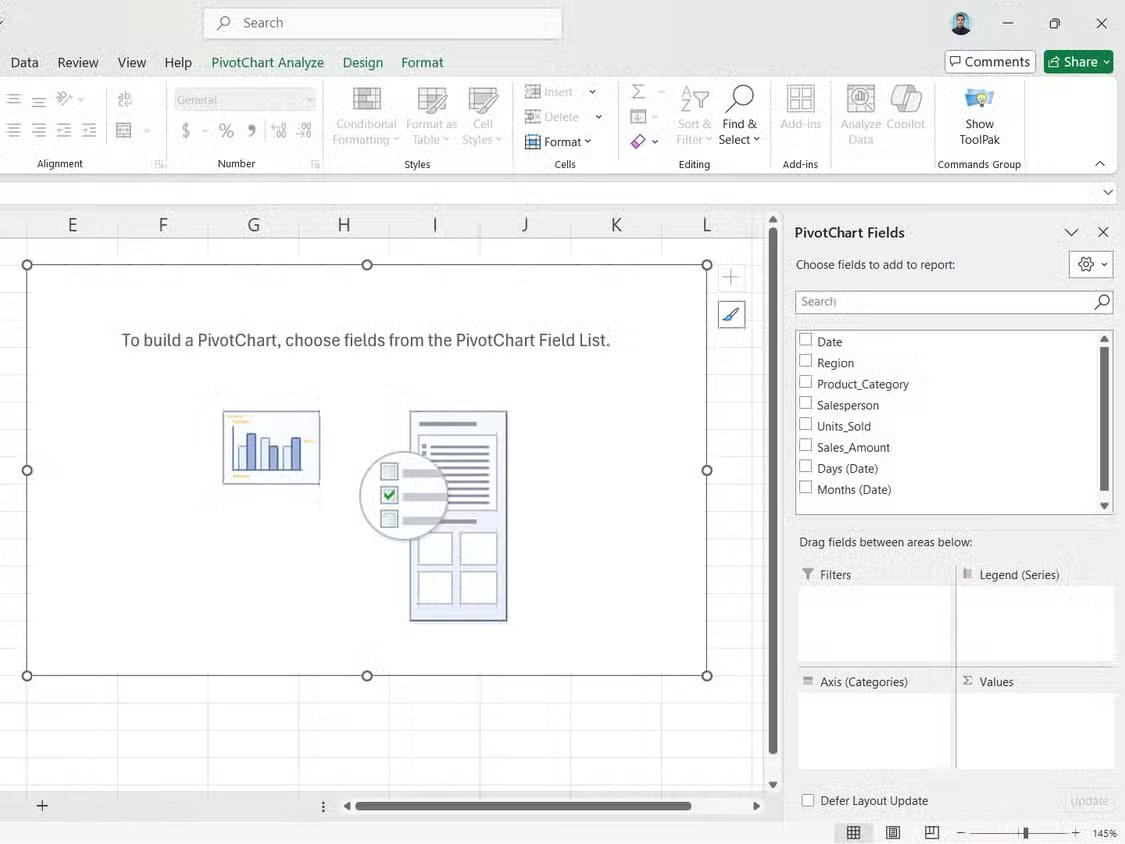
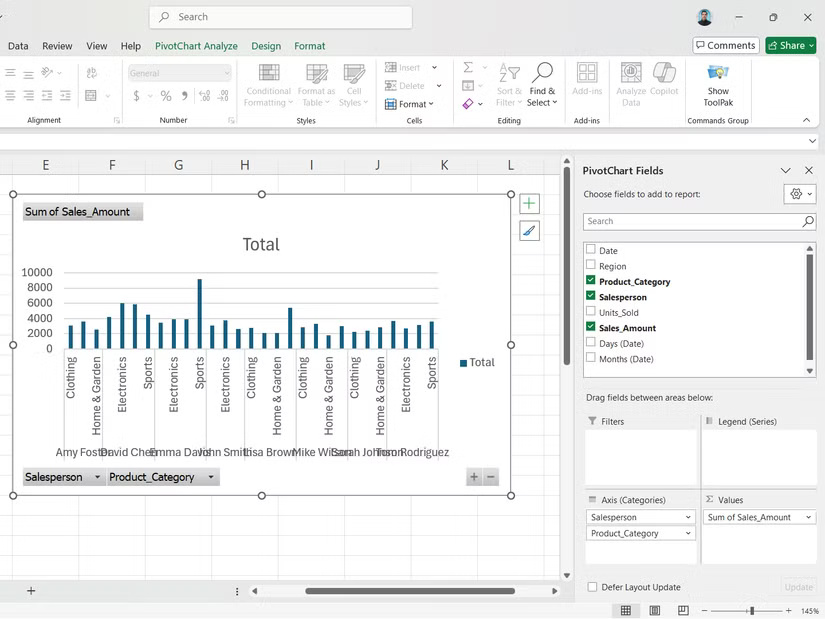
<p style="text-align: justify;">PivotCharts không yêu cầu bất kỳ công thức nào. Thay vào đó, bạn chỉ cần sắp xếp lại dữ liệu một cách trực quan. Việc tạo một PivotChart tuân theo cùng một logic như khi xây dựng PivotTable:</p>

<ol>
	<li style="text-align: justify;">Chọn vùng dữ liệu của bạn, rồi nhấp vào&nbsp;<strong>Insert</strong>.</li>
	<li style="text-align: justify;">Sau đó, chọn&nbsp;<strong>PivotChart</strong>&nbsp;từ nhóm&nbsp;<strong>Charts</strong>.</li>
	<li style="text-align: justify;">Trong hộp thoại xuất hiện, hãy xác nhận vùng dữ liệu của bạn và chọn đặt PivotChart&nbsp;vào một bảng tính mới hoặc hiện có.</li>
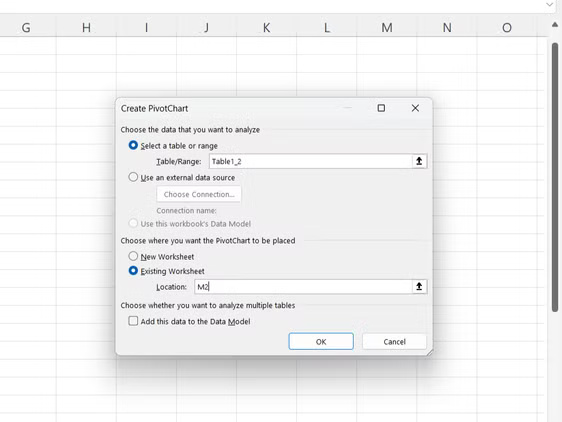
	<li style="text-align: justify;">Bảng&nbsp;<strong>PivotChart Fields</strong>&nbsp;sẽ xuất hiện ở bên phải. Kéo các trường bạn muốn phân tích vào những vùng đó.</li>
</ol>

<figure>
<div style="text-align: justify;"><img alt="" data-i="4" data-src="https://st.quantrimang.com/photos/image/2025/09/04/dung-pivotcharts-thay-pivottables-trong-excel-5.jpg" data-was-processed="true" height="619" src="https://st.quantrimang.com/photos/image/2025/09/04/dung-pivotcharts-thay-pivottables-trong-excel-5.jpg" width="825" /></div>
</figure>

<p style="text-align: justify;">Bạn sẽ tìm thấy các vùng trường sau trong những trường PivotCharts:</p>

<ul>
	<li style="text-align: justify;"><strong>Filters</strong>: Kiểm soát dữ liệu nào sẽ xuất hiện trong biểu đồ của bạn. Thêm các trường vào đây để tạo menu drop-down cho phép bạn hiển thị hoặc ẩn những danh mục cụ thể mà không cần xây dựng lại biểu đồ.</li>
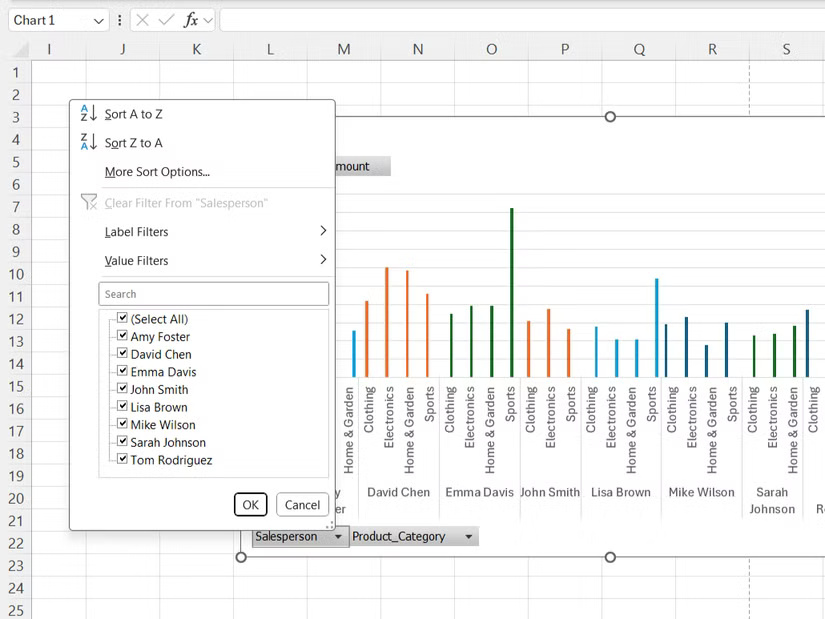
	<li style="text-align: justify;"><strong>Values</strong>: Dữ liệu số bạn đang đo lường, chẳng hạn như doanh số hoặc số lượng bán hàng. Excel tự động áp dụng&nbsp;hàm SUM, nhưng bạn có thể thay đổi thành&nbsp;hàm COUNT,&nbsp;AVERAGE&nbsp;hoặc các hàm Excel thiết yếu khác.</li>
	<li style="text-align: justify;"><strong>Legends</strong>: Các danh mục tạo ra những chuỗi dữ liệu có màu khác nhau trong biểu đồ của bạn. Kéo Salesperson vào đây sẽ hiển thị doanh số của mỗi người dưới dạng đường hoặc thanh màu khác nhau.</li>
	<li style="text-align: justify;"><strong>Axis</strong>: Tham chiếu ngang tổ chức dữ liệu của bạn. Thông thường, trục này chứa ngày tháng, tên sản phẩm hoặc thông tin danh mục khác tạo thành nền tảng của biểu đồ.</li>
</ul>

<p style="text-align: justify;">Khi bạn kéo và thả các trường này, PivotCharts của bạn và PivotTables được liên kết sẽ được xây dựng ngay lập tức.</p>

<h2 style="text-align: justify;">Tạo PivotCharts theo cách của riêng bạn</h2>

<h3 style="text-align: justify;">Màu sắc, kiểu dáng và loại biểu đồ</h3>

<figure>
<div style="text-align: justify;"><img alt="" data-i="5" data-src="https://st.quantrimang.com/photos/image/2025/09/04/dung-pivotcharts-thay-pivottables-trong-excel-6.jpg" data-was-processed="true" height="844" src="https://st.quantrimang.com/photos/image/2025/09/04/dung-pivotcharts-thay-pivottables-trong-excel-6.jpg" width="1126" /></div>
</figure>

<figure>
<div style="text-align: justify;"><img alt="" data-i="6" data-src="https://st.quantrimang.com/photos/image/2025/09/04/dung-pivotcharts-thay-pivottables-trong-excel-7.jpg" data-was-processed="true" height="844" src="https://st.quantrimang.com/photos/image/2025/09/04/dung-pivotcharts-thay-pivottables-trong-excel-7.jpg" width="1125" /></div>
</figure>

<div style="text-align: justify;">&nbsp;</div>

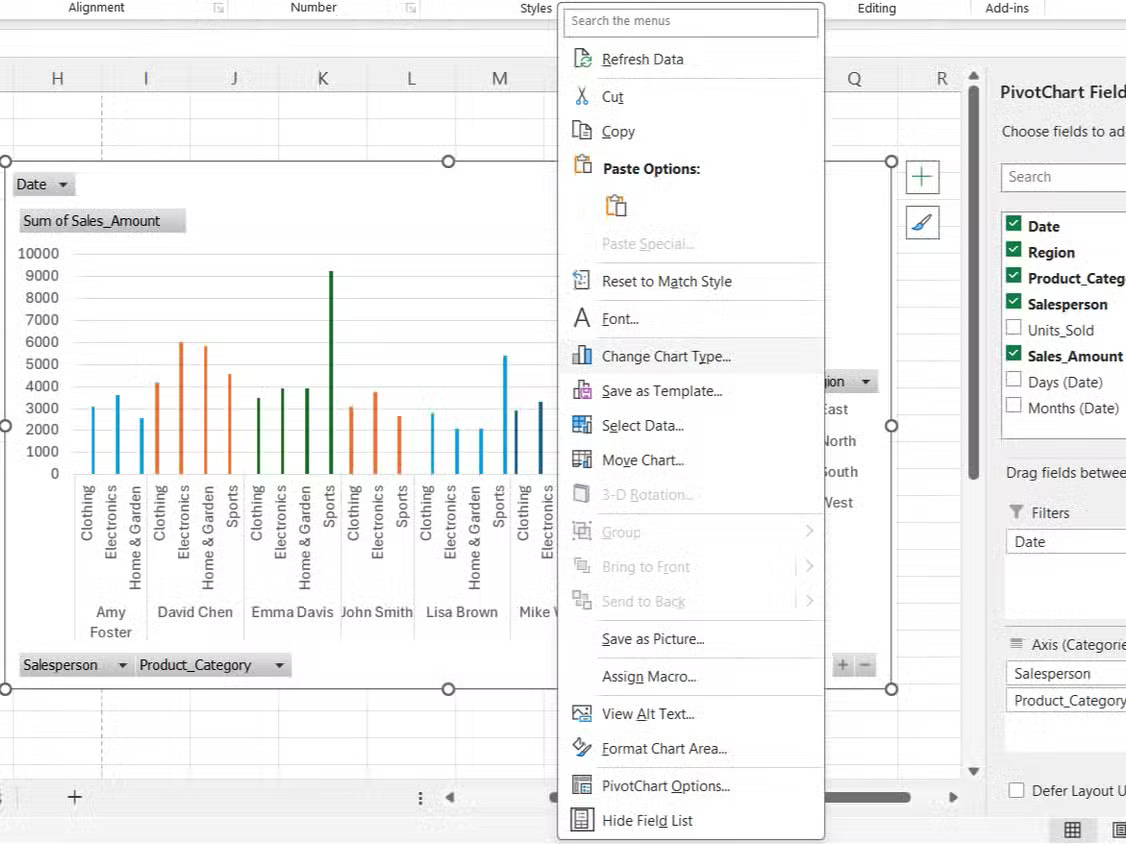
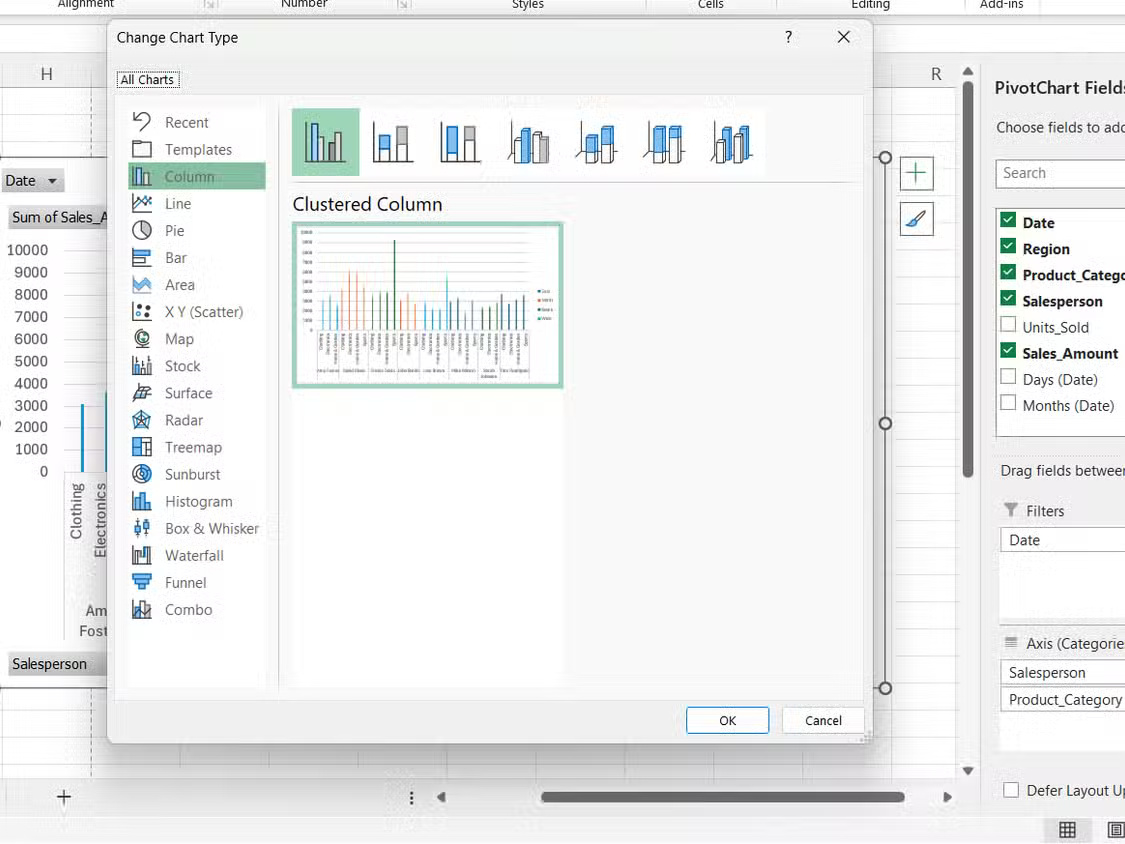
<p style="text-align: justify;">PivotCharts cho phép bạn điều chỉnh mọi thứ, từ màu sắc đến loại biểu đồ cho đến khi hình ảnh trực quan khớp chính xác với những gì bạn đang cố gắng truyền đạt.</p>

<p style="text-align: justify;">Ribbon Chart Tools xuất hiện khi bạn chọn một PivotChart. Bạn có thể chuyển đổi giữa biểu đồ cột, biểu đồ đường, biểu đồ tròn hoặc biểu đồ kết hợp tùy thuộc vào nội dung dữ liệu cần hiển thị. Hơn nữa, bạn có thể:</p>

<ul>
	<li style="text-align: justify;">Chọn&nbsp;<strong>Change Chart Type</strong>&nbsp;để khám phá các tùy chọn trực quan hóa khác nhau.</li>
	<li style="text-align: justify;">Sử dụng&nbsp;<strong>Format Selection</strong>&nbsp;để sửa đổi màu sắc, đường viền và kiểu điểm dữ liệu.</li>
	<li style="text-align: justify;">Thêm hoặc xóa các thành phần biểu đồ như chú giải, nhãn dữ liệu và đường lưới từ menu&nbsp;<strong>Chart Elements</strong>.</li>
	<li style="text-align: justify;">Điều chỉnh tỷ lệ trục và khoảng cách để nhấn mạnh các phạm vi dữ liệu cụ thể.</li>
</ul>

<p style="text-align: justify;"><strong>Lưu ý</strong>: Mặc dù PivotCharts hỗ trợ hầu hết các loại biểu đồ tiêu chuẩn, nhưng chúng không hỗ trợ những loại biểu đồ phân tán (XY), chứng khoán hoặc bong bóng.</p>

<p style="text-align: justify;">Mã màu tạo ra sự khác biệt lớn về khả năng đọc. Thay vì bảng màu mặc định của Excel, hãy chọn các màu phù hợp với thương hiệu công ty hoặc sử dụng những sắc thái tương phản để so sánh dễ dàng hơn - tương tự như cách bạn làm mới trực quan các trang tính Excel của mình.</p>

<p style="text-align: justify;">Bạn cũng có thể kết hợp các loại biểu đồ. Biểu đồ kết hợp có thể hiển thị cả khối lượng bán hàng dưới dạng cột và biên lợi nhuận dưới dạng đường, thể hiện các mối quan hệ khác nhau.</p>

<h2 style="text-align: justify;">Lọc tương tác với PivotCharts</h2>

<h3 style="text-align: justify;">Giúp việc khám phá dữ liệu dễ dàng hơn rất nhiều</h3>

<figure>
<div style="text-align: justify;"><img alt="Menu drop-down bộ lọc PivotCharts trong Excel" data-i="7" data-src="https://st.quantrimang.com/photos/image/2025/09/04/dung-pivotcharts-thay-pivottables-trong-excel-8.jpg" data-was-processed="true" height="619" src="https://st.quantrimang.com/photos/image/2025/09/04/dung-pivotcharts-thay-pivottables-trong-excel-8.jpg" width="825" /></div>

<figcaption>
<div style="text-align: justify;">Menu drop-down bộ lọc PivotCharts trong Excel</div>
</figcaption>
</figure>

<p style="text-align: justify;">Biểu đồ tĩnh hiển thị mọi thứ cùng một lúc, điều này có thể gây khó khăn khi bạn đang cố gắng tập trung vào các phân khúc cụ thể. PivotCharts bao gồm các bộ lọc tích hợp cho phép bạn phân tích sâu vào phần dữ liệu cần thiết.</p>

<p style="text-align: justify;">Ví dụ, hãy xem xét một tập dữ liệu bán hàng với sự kết hợp giữa các khu vực, danh mục sản phẩm và nhân viên bán hàng, bộ lọc theo ngành Điện tử sẽ hiển thị khu vực nào thúc đẩy doanh số bán hàng công nghệ. Sau đó, bạn có thể lọc thêm theo một nhân viên bán hàng cụ thể để xem hiệu suất của từng nhân viên trong khu vực và danh mục sản phẩm đó.</p>

<p style="text-align: justify;">Các nút lọc xuất hiện trực tiếp trên biểu đồ, thay vì bị ẩn trong những menu. Điều này có thể giúp phát hiện các xu hướng - chẳng hạn như một nhân viên bán hàng cụ thể đang kinh doanh tốt một dòng sản phẩm nhất định.</p>

<p style="text-align: justify;"><strong>Lưu ý</strong>: Không giống như các bộ lọc PivotTable ảnh hưởng đến toàn bộ trang tính, bộ lọc biểu đồ chỉ ảnh hưởng đến hình ảnh trực quan. Bằng cách này, bạn có thể có nhiều biểu đồ hiển thị các chế độ xem được lọc khác nhau của cùng một tập dữ liệu.</p>

<div style="text-align: justify;">&nbsp;</div>
		</div>
				<div id="author">
						<p>
				<strong>Nguồn tin:</strong>
				Quantrimang.com:
			</p>
		</div>
	</div>
	<div id="footer" class="clearfix">
		<div id="url">
			<strong>URL của bản tin này: </strong><a href="https://www.nguoicodonvn2008.info/vi/news/savefile/kien-thuc-may-tinh/ly-do-nen-dung-pivotcharts-thay-cho-pivottables-trong-excel-11072.html" title="Lý do nên dùng PivotCharts thay cho PivotTables trong Excel">https://www.nguoicodonvn2008.info/vi/news/savefile/kien-thuc-may-tinh/ly-do-nen-dung-pivotcharts-thay-cho-pivottables-trong-excel-11072.html</a>

		</div>
		<div class="clear"></div>
		<div class="copyright">
			&copy; .&#x3A; Nguoicodonvn2008.info - Cõi lòng người cô đơn &#x3A;.
		</div>
		<div id="contact">
			<a href="mailto:admin@nguoicodonvn2008.info">admin@nguoicodonvn2008.info</a>
		</div>
	</div>
</div>
        <div id="timeoutsess" class="chromeframe">
            Bạn đã không sử dụng Site, <a onclick="timeoutsesscancel();" href="https://nguoicodonvn2008.info/#">Bấm vào đây để duy trì trạng thái đăng nhập</a>. Thời gian chờ: <span id="secField"> 60 </span> giây
        </div>
        <div id="openidResult" class="nv-alert" style="display:none"></div>
        <div id="openidBt" data-result="" data-redirect=""></div>
		</script>
		<div class="car-top">
  <span><img src="https://nguoicodonvn2008.info/themes/default/images/car.png" alt=""></span>
</div>
<script src="https://nguoicodonvn2008.info/assets/js/jquery/jquery.min.js"></script>
<script>var nv_base_siteurl="/",nv_lang_data="vi",nv_lang_interface="vi",nv_name_variable="nv",nv_fc_variable="op",nv_lang_variable="language",nv_module_name="news",nv_func_name="savefile",nv_is_user=0, nv_my_ofs=-4,nv_my_abbr="EDT",nv_cookie_prefix="nv4c_e856T",nv_check_pass_mstime=1738000,nv_area_admin=0,nv_safemode=0,theme_responsive=0,nv_recaptcha_ver=2,nv_recaptcha_sitekey="",nv_recaptcha_type="image",XSSsanitize=1;</script>
<script src="https://nguoicodonvn2008.info/assets/js/language/vi.js"></script>
<script src="https://nguoicodonvn2008.info/assets/js/DOMPurify/purify3.js"></script>
<script src="https://nguoicodonvn2008.info/assets/js/global.js"></script>
<script src="https://nguoicodonvn2008.info/assets/js/site.js"></script>
<script src="https://nguoicodonvn2008.info/themes/default/js/news.js"></script>
<script src="https://nguoicodonvn2008.info/themes/default/js/main.js"></script>
<script src="https://nguoicodonvn2008.info/themes/default/js/custom.js"></script>
<script type="application/ld+json">
        {
            "@context": "https://schema.org",
            "@type": "Organization",
            "url": "https://nguoicodonvn2008.info",
            "logo": "https://nguoicodonvn2008.info/uploads/angel.gif"
        }
        </script>
<script src="https://nguoicodonvn2008.info/themes/default/js/bootstrap.min.js"></script>
<script type="text/javascript">
var $scrolltop = $('.car-top');
$scrolltop.on('click', function () {
    $('html,body').animate({
        scrollTop: 0
    }, 800);
    $(this).addClass("car-run");
    setTimeout(function(){ $scrolltop.removeClass('car-run');}, 1000);
    return false;
});
$(window).on('scroll', function ()
{ 
    if($(window).scrollTop() >= 200)
    {
        $scrolltop.addClass("show");
        $scrolltop.addClass("car-down");
    }
    else
    {
       $scrolltop.removeClass("show");
       setTimeout(function(){ $scrolltop.removeClass('car-down');}, 300);
    }
});
</script>
</body>
</html>